
Generative AI in software development can move quickly through a bounded task with clear requirements and accessible context.
It can also slow a developer down when the work depends on undocumented conventions, architectural judgment, or repeated corrections to output that looks plausible but does not fit the system.
In this guide, we follow generative AI through the software development lifecycle and show you where it can reduce effort, which tools teams use, and where a qualified person still needs to make the call.
AI in Software Development: Key Findings
- Generative AI delivers its clearest gains on bounded, testable tasks, with one study showing a 55% coding speed increase while another recorded a 19% slowdown on complex repository work.
- Across the software development lifecycle, AI can structure requirements, generate code and tests, filter deployment logs, and propose bug fixes while devs retain control over validation.
- In agency-reported projects, ELEKS reduced root cause analysis time by 20%, while Apriorit increased first-month user engagement by 11% with an AI language tutor.
What Is Generative AI in Software Development?
Generative AI in software development uses large language models to create, explain, transform, or review development work, including requirements, code, tests, documentation, configurations, and incident summaries.
Unlike traditional automation, which follows predefined rules, generative AI can interpret natural-language instructions and propose the code or supporting materials needed.
However, its outputs are probabilistic and may omit requirements or invent nonexistent APIs, so teams must verify generated work before using it in production.
Generative AI typically supports developers at three levels:
- Completion predicts the next line, code block, test, query, or comment.
- Conversation helps explain code, compare approaches, investigate bugs, and draft implementation plans.
- Agency allows the system to read and edit files, run commands and tests, and prepare pull requests within defined permissions.
Greater autonomy requires more context, access, and oversight. Teams can also explore tools for building AI agents without code or specialized AI web development tools, but neither replaces standard engineering controls.
Benefits of AI in Software Development
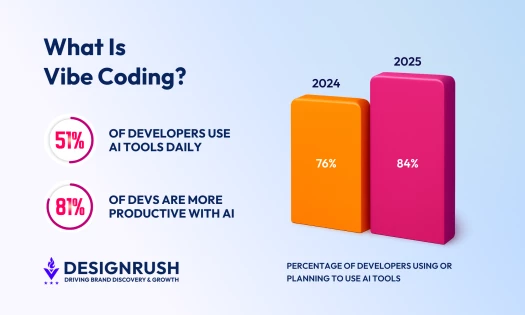
According to Stack Overflow’s 2025 Developer Survey, 84% of developers are already using or planning to use AI tools, up from 76% the year before, and 51% of professional developers now use them daily.
This level of adoption signals a shift in the development process itself, where AI is integrated into everyday workflows. The benefits below reflect where teams are seeing the most measurable impact across speed, efficiency, and output quality.
- Faster task execution: Documentation and repetitive coding tasks can be reduced by 30% to 50% with AI.
- Reduction in repetitive workload:Developers save 3.6 hours per week on average using AI tools.
- Increased productivity: Stack Overflow found that 52% of developers agree that AI tools and/or AI agents have had a positive effect on their productivity.
- Improved code quality signals: The same survey shows that 37.5% of developers agree that AI agents have improved the quality of their code.
How Generative AI Fits Into the Software Development Lifecycle
AI is no longer a separate layer added late in development as it now runs through every stage of the SDLC, shaping how teams plan, build, test, and deploy products, as outlined in our software development life cycle guide.
As Roman Rimsa, Managing Director of Sigli, explains:
“Teams are already using AI to generate boilerplate code, suggest logic based on context, and move toward automated testing, bug detection, and deployments that adjust based on real-time infrastructure signals.
This shifts the developer’s role toward reviewing, guiding, and validating AI outputs instead of writing every line from scratch.”
The impact of AI spans every phase of development:
- Planning: AI-Generated User Stories Met Quality Standards in 87.5% of Cases
- Design: 40% of GenAI Architecture Use Cases Focus on Turning Requirements Into Architecture
- AI-Assisted Coding: Developers Completed a Coding Task 55% Faster With GenAI
- Testing: AI-Generated Tests Matched or Exceeded Human Coverage Gains in Two of Three Projects
- Deployment: AI Analyzed CI Failures With 40% Fewer Log Tokens
- Maintenance: AI Fixed 133 Real Bugs and Outperformed the Best Baseline by 8%
1. Planning: AI-Generated User Stories Met Quality Standards in 87.5% of Cases
In the planning phase, AI is primarily used to turn unstructured inputs into structured work.
Teams feed it meeting transcripts, product briefs, or scattered notes, and it produces user stories, acceptance criteria, and backlog items in consistent formats.
A study on AI-assisted requirements generation found that 87.5% of AI-generated user story sets met predefined quality standards, which suggests that AI can handle structured planning tasks with a high degree of accuracy.
Useful planning tasks include:
- Converting meeting notes into user stories and acceptance criteria so the product manager starts with an organized draft.
- Grouping customer feedback by problem, workflow, or severity so the team can review themes without reading every comment again.
- Comparing a requirement against an existing backlog to surface likely duplicates, dependencies, and conflicts.
- Drafting open questions for stakeholders, so missing decisions appear before development begins.
- Creating traceability tables that connect requirements to planned tests and release criteria.
Tools driving this change include:
- IBM Engineering Requirements Management: Uses GPT-powered AI to review and refine requirements, especially useful in large-scale product development.
- OpenAI Whisper: Transcribes and analyzes stakeholder meetings to extract actionable input.
- Tara AI: Predicts technical tasks, timelines, and team assignments using historical project data.
- WriteMyPrd: Generates product requirement documents with AI, making documentation faster and more consistent.
2. Design: 40% of GenAI Architecture Use Cases Focus on Turning Requirements Into Architecture
During design, AI acts as a support tool for exploring options rather than making decisions. It can suggest architectures, outline system components, and identify dependencies based on common patterns.
This is useful when teams need to evaluate multiple approaches quickly or when developers are working in unfamiliar domains.
Current research shows that AI usage in design is already concentrated in specific areas.
A 2025 review of generative AI in software architecture found that 40% of use cases focus on translating requirements into architectural designs, which highlights where AI is most actively applied.
A sound design workflow has four steps:
- Give the model the functional and nonfunctional requirements, current architecture, prohibited technologies, and operating constraints.
- Ask for two or three viable options with assumptions, failure modes, and trade-offs stated explicitly.
- Have an architect test those assumptions against the actual system and organizational limits.
- Record the human decision and use the model to draft the supporting diagram or decision document.
Tools that allow this include:
- Amazon Q Developer: Suggests cloud-native architecture patterns and integrates with AWS services during design and development.
- Miro: Uses AI to turn ideas and requirements into visual system diagrams and architecture flows.
- Whimsical: Generates quick architecture diagrams and system maps from prompts or structured inputs.
3. AI-Assisted Coding: Developers Completed a Coding Task 55% Faster With GenAI
AI-assisted coding has become the most visible part of generative AI software development because it sits directly inside the editor or terminal.
Developers use it to generate boilerplate, explain unfamiliar code, draft API clients, translate between languages, refactor repetitive logic, write database queries, and implement small, well-scoped changes.
The strongest results come from tasks that have a clear specification and a fast feedback loop. The developer can run a compiler, linter, type checker, or test suite and immediately see whether the suggestion holds up.
In GitHub’s controlled productivity study, developers using Copilot completed a JavaScript HTTP server task 55% faster than the control group.
Tools making this possible include:
- GitHub Copilot: Suggests context-aware code and autocompletes logic inside popular IDEs.
- CodeRabbit: Reviews pull requests automatically and flags bugs, performance issues, or architecture risks.
- Windsurf: Uses its Cascade agent to analyze codebases, edit multiple files, and run terminal commands within the development environment.
- Tabnine: Provides private, organization-aware code completion, chat, and agentic support tailored to a company’s codebase and development standards.
A Review Rule That Prevents Most Problems
Every generated change should pass the same review, testing, security, and approval process as human-written code. The developer who submits it should understand the implementation well enough to explain what changed, why it works, and how it could fail.
That rule protects the codebase from a common failure mode in which generation becomes faster while review becomes the new bottleneck.
Stack Overflow found that 66% of developers encounter AI solutions that are almost right, and 45% say debugging generated code takes more time. Teams should measure accepted, validated work rather than lines generated or prompts submitted.
4. Testing: AI-Generated Tests Matched or Exceeded Human Coverage Gains in Two of Three Projects
AI can generate unit tests, suggest edge cases, and expand coverage based on existing code. This can reduce the manual effort required to create tests, although developers still need to validate the assertions and scenarios.
A 2026 study published at the ACM International Conference on Mining Software Repositories analyzed 2,232 test-related commits from real TypeScript projects. AI agents produced 16.4% of the commits that added tests, while their tests delivered coverage gains comparable to human-written tests.
The researchers could measure coverage across 531 commits in three projects.
AI-generated tests produced greater statement and branch coverage gains than human-written tests in two projects, while human-written tests performed better in the third.
The findings show that AI can support practical test creation, but its effectiveness still depends on the codebase and the quality of human review.
Tools supporting this include:
- Testim: Creates and maintains UI tests that evolve alongside the product.
- Qodana by JetBrains: Identifies bugs, security risks, and code smells during development.
- Snyk Code: Detects and helps fix security flaws in real time.
5. Deployment: AI Analyzed CI Failures With 40% Fewer Log Tokens
During deployment, AI can filter noisy CI logs, categorize failures, and surface the evidence engineers need for root cause analysis. This reduces the amount of data teams must process without automatically handing release control to the model.
A 2026 study from the University of Toronto and Trent University examined 9,166 GitHub Actions runs from 452 open-source Android projects.
Its diagnostic filtering method removed 42% of log lines and 40% of tokens while preserving the information needed to analyze failures.
When an LLM processed the reduced logs, it achieved 80% exact-match accuracy in failure categorization and 0.93 semantic alignment with the full diagnostic context. The researchers also found that embedding-based classifiers could identify relevant log lines with 97% accuracy.
Tools leading this space include:
- Datadog APM: Uses machine learning to detect performance bottlenecks and alert teams to issues.
- New Relic Applied Intelligence: Correlates signals from across your stack to detect anomalies and reduce alert noise.
- Dynatrace Davis AI: Delivers root-cause analysis and predictive alerts across infrastructure and applications.
6. Maintenance: AI Fixed 133 Real Bugs and Outperformed the Best Baseline by 8%
The maintenance phase is where AI often delivers the most practical value. Developers use it to understand unfamiliar code, analyze logs, and identify the root causes of issues.
This is especially useful in large or poorly documented systems, where navigating the codebase can take significant time.
The FLAMES program repair study showed that AI systems could correctly fix 133 real-world bugs and outperform previous baselines by 8%, with even higher gains on certain benchmarks.
Tools supporting this work include:
- Sentry Seer: Uses production errors, traces, and logs to investigate root causes and suggest code fixes.
- SonarQube: Identifies bugs, vulnerabilities, and maintainability issues through continuous code analysis.
- Claude Code: Can inspect repositories, edit files, run tests, and help developers debug complex issues.
What Generative AI Looks Like in Real Software Projects
Case Studies by Top Agencies
The following agency case studies show how AI can remove manual research from product workflows, accelerate knowledge retrieval during support, and build applications using existing models.
- ELEKS Reduced Root Cause Analysis Time by 20%
- Apriorit Increased First-Month Engagement by 11%
- Quixta Cut SunSniffer’s Manual Lead Research by 90%
1. ELEKS Reduced Root Cause Analysis Time by 20%

ELEKS implemented an AI-powered knowledge management system to help support engineers search historical bug reports and previous resolutions.
The Microsoft Copilot Agent connected with Microsoft Teams and Atlassian tools, which let engineers retrieve relevant knowledge without searching several disconnected systems.
Results:
- 20% reduction in root cause analysis time
- Improved support engineer productivity
- Faster and more accurate issue resolution
2. Apriorit Increased First-Month Engagement by 11%
Apriorit developed an AI language tutor by combining Whisper for speech recognition, a Cohere multilingual model and LangChain for conversation, Llama 2 for mistake detection, and GPT-3.5 for explanations.
Rather than engineering separate systems for speech processing, grammar analysis, and feedback logic, developers assembled these capabilities using existing models and frameworks, significantly reducing the need for custom-built NLP pipelines.
Results:
- Faster development by leveraging pre-trained models
- Reduced engineering complexity across multiple system layers
- +11% increase in user engagement in the first month
3. Quixta Cut SunSniffer’s Manual Lead Research by 90%
Quixta built a sales intelligence platform for SunSniffer that combined solar-potential data, business research, contact discovery, personalized outreach, and campaign management.
Instead of engineers building and maintaining complex rule-based systems for lead scoring, personalization, and outreach logic, AI models handle data enrichment, content generation, and communication workflows dynamically.
Results:
- 90% reduction in manual research time
- Scalable lead generation across cities and regions
- Fully automated, end-to-end sales workflow
Companies evaluating a more substantial build can compare established AI software development companies and review relevant software projects before choosing a partner.
Teams that need delivery support rather than AI specialization alone can also evaluate software development companies by expertise, budget, and verified client feedback.
How To Introduce AI-Assisted Software Development
A broad license rollout makes adoption easy to announce and difficult to evaluate. A controlled pilot gives the team a clearer answer about whether a tool improves the work that actually limits delivery.
- Start With a Measurable Bottleneck
- Decide What the Tool Can See and Do
- Put AI Inside the Workflow You Already Have
- Train on Real Tasks, Including When Not To Use It
- Measure the Real Cost of AI-Assisted Development
1. Start With a Measurable Bottleneck
Pick one repeated task you already have a baseline for. Drafting unit tests, documenting APIs, working out why a build failed, preparing release notes, digging through support incidents are all good candidates, because they happen often enough to measure, and the output is easy to check.
What to avoid is a target like developer productivity, which is broad enough to accommodate any result you want.
Tie the pilot to something concrete instead, for example a cycle time, review time, escaped defects, test coverage, incident-resolution time, or the share of generated changes accepted without major rework.
2. Decide What the Tool Can See and Do
Write down what developers may send to the tool and what stays out of it.
The policy needs to cover source code, customer data, credentials, internal tickets, personal information, security findings, and proprietary architecture, all belonging in the categories people paste in without thinking when they're mid-task and moving fast.
Then decide what the tool is permitted to do, because the risk profile varies enormously. Reading a repository is not the same as proposing a diff, which is not the same as running local tests, opening a pull request, or touching production.
Grant the least access the pilot actually needs and widen it later if the results justify it.
3. Put AI Inside the Workflow You Already Have
If developers have to copy context into a separate chat window for every task, the friction shows up as either abandonment or careless prompting.
Integrations with the IDE, repository, issue tracker, CI system, and observability platform give the model better context and spare the developer the manual transfer.
The integration should leave your existing gates intact. Generated code still goes through version control, review, automated checks, security scanning, and release approval.
4. Train on Real Tasks, Including When Not To Use It
What developers need here are worked examples grounded in the project itself, such as its architecture, conventions, test commands, security constraints, definition of done, and expected output format.
Christopher Duran, Operations Assistant at Tokyo Design Studio, emphasizes the importance of "learning new workflows and ensuring code accuracy and security."
He advises teams to focus on continuous learning, stay current on AI developments, and work closely with AI specialists by treating the tool as "a complementary tool that can help them succeed" rather than something to keep at arm's length.
Developers need to recognize when the tool lacks the context to be useful, when a task carries too much risk to delegate, and when writing the change directly will simply take less time than supervising its generation.
5. Measure the Real Cost of AI-Assisted Development
A July 2026 preprint from Carnegie Mellon and Stanford researchers analyzed 802 developers and 196,212 pull requests at a company aiming to double the number of merged pull requests per engineer.
The company reached 2.09 times its previous monthly output, representing one of the largest productivity gains documented in a real-world AI coding deployment.
However, the workload per reviewer also roughly doubled, and automated reviews became more common than human reviews. Merge and short-term revert rates remained stable, which means a standard engineering dashboard could have shown twice the output without revealing the increased pressure on reviewers.
The results also varied by time and project type. Productivity continued to increase as developers gained experience with AI, suggesting that a short pilot may capture the learning period rather than the full benefit.
Gains appeared across seniority levels but were concentrated in newer repositories and barely present in legacy code, while the researchers could not attribute the improvement to a specific model generation.
A pilot should measure the time required to produce an approved and tested change alongside reviewer workload, revision rounds, defects, accepted or discarded AI suggestions, testing and documentation output, operating costs, and developer satisfaction.
Risks and Limits of Generative AI Software Development
AI introduces real friction across accuracy, security, cost, and workflows. The difference between teams that struggle and teams that benefit from AI comes down to how these risks are managed operationally.
Below are the most common limitations according to Stack Overflow’s survey and what to do about each one.
- Plausible Output Can Still Be Wrong
- Sensitive Context Can Leave the Approved Boundary
- Faster Generation Can Overload Review
- Cost Becomes a Scaling Problem
Plausible Output Can Still Be Wrong
Stack Overflow found that more developers distrust AI accuracy than trust it. The danger comes from output that compiles, reads cleanly, and still mishandles an edge case, library contract, or business rule.
Require review and automated checks for every generated change. Keep full human ownership over authentication, authorization, payments, data deletion, cryptography, safety-critical behavior, and regulated decisions.
Sensitive Context Can Leave the Approved Boundary
Useful code generation requires context, and that context may include proprietary code, customer information, secrets, or security details. Consumer accounts and enterprise deployments can have different retention, training, isolation, and audit terms.
Approve tools and deployment modes centrally, block secrets at the source, use data-loss prevention where appropriate, and confirm the vendor’s current contractual terms.
Do not treat a privacy claim on a product page as a substitute for security and legal review.
Faster Generation Can Overload Review
AI tools often look easy in demos because they work well in isolated scenarios. The real challenge starts when a team tries to fit them into an existing development environment.
16.5% of respondents say integrating AI agents with existing tools and workflows is difficult.
The best way to solve this is to integrate AI gradually and only where the workflow is already stable.
A practical rollout usually follows this order:
- Start with IDE assistants, code explanation, test generation, commit message drafts, and documentation summaries. These uses are low risk and do not require major infrastructure changes.
- Once teams see value, expand into tasks connected to current tooling, like summarizing pull requests, classifying tickets, suggesting test cases from requirements, etc.
- Only after the first two stages of work should teams consider deeper integration into CI pipelines, internal portals, support systems, or product features.
Cost Becomes a Scaling Problem
The prototype cost may include a few licenses and modest model usage. Production adds API volume, larger context windows, retrieval infrastructure, evaluation, observability, security review, vendor management, and ongoing maintenance.
DesignRush’s breakdown of what AI implementation actually costs shows why budgets vary widely between off-the-shelf tools, pilots, custom systems, and enterprise deployments.
Manage AI spending like cloud spending. Tag usage by team and use case, set quotas and alerts, route simple tasks to less expensive models when quality holds, cache stable results, and compare the cost with validated time saved or business value created.
Final Thoughts on Generative AI in Software Development
Generative AI can reduce the time spent drafting requirements, writing routine code, creating tests, and investigating failures, but the results depend on task clarity, available context, and strong human review.
Teams should start with measurable use cases, keep existing quality and security controls in place, and expand only when the technology improves the full delivery process rather than simply increasing the amount of code produced.

Our team ranks agencies worldwide to help you find a qualified partner. Visit our Agency Directory for the top software development companies, as well as:
- Top Offshore Software Development Companies
- Top Nearshore Software Development Companies
- Top Software Outsourcing Companies
- Top Enterprise Software Development Companies
- Top Software Companies in Nashville
Our design experts also recognize the most innovative design projects across the globe. Given the recent uptick in app usage, you'll want to visit our Awards section for the best & latest in app designs.