


The best email automation software isn't the one with the longest feature list. It's the one that matches how you acquire customers, nurture leads, and generate revenue.
Email Automation Tools: Key Findings
- If you're running outbound sales, prioritize tools like Instantly or Saleshandy. For customer lifecycle marketing, consider ActiveCampaign or HubSpot. Ecommerce brands typically generate stronger ROI with platforms such as Klaviyo or Omnisend.
- Evaluate pricing at your future list size, not today's. Before committing, calculate costs at the contact volume or sending volume you expect within the next 12 to 18 months.
- Modern email platforms should connect campaigns to revenue, not just engagement metrics. Tools with attribution reporting help identify which automations drive purchases.
57% of Marketers Generate Half Their Revenue with Automation
According to DesignRush's 2026 survey of 99 verified email marketing professionals, automation is generating considerable revenue:
- 43% said automated flows account for 50% to 75% of total email revenue
- 14% reported that automation contributes more than 75%
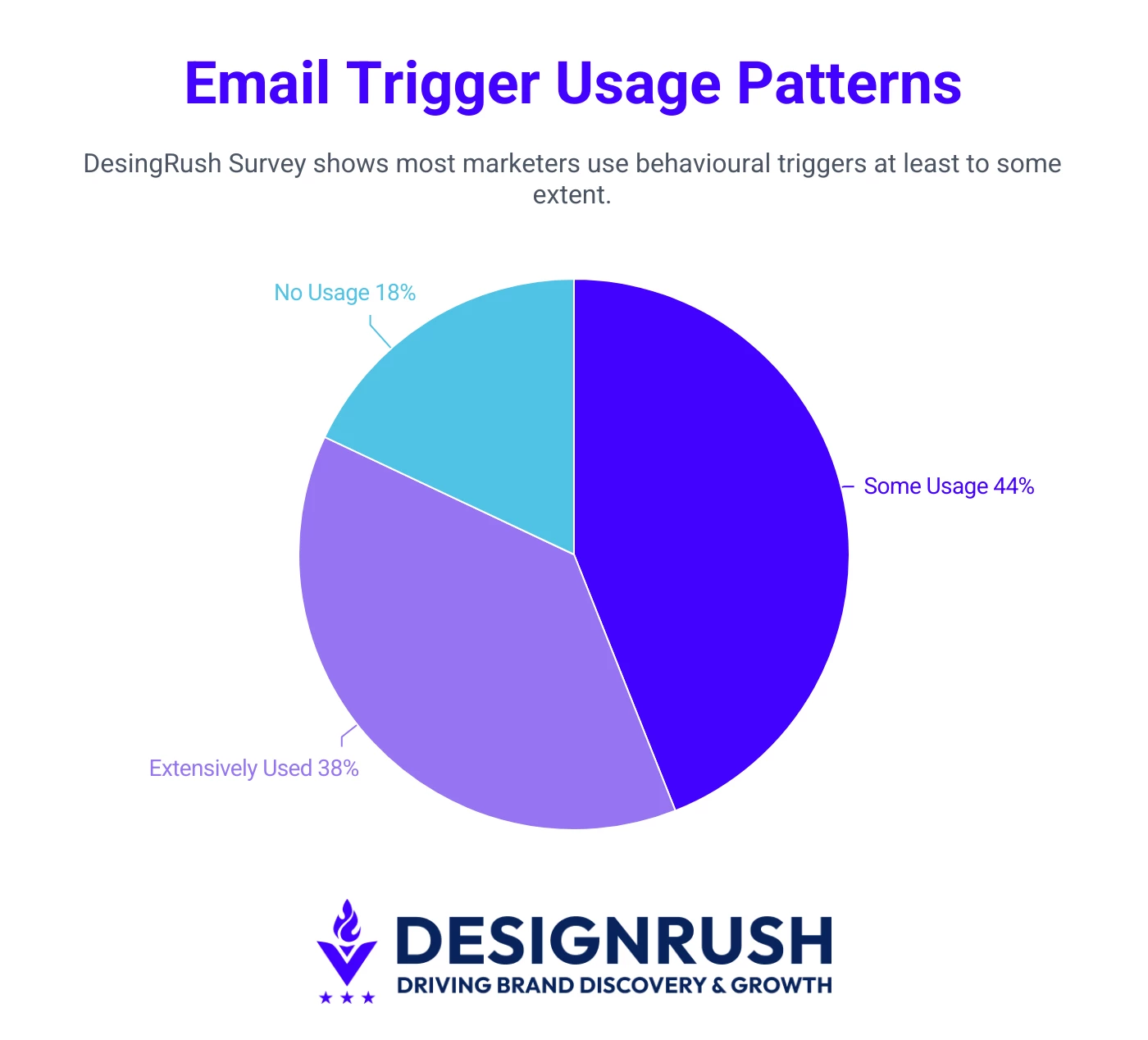
That helps explain why trigger-led automation is widely used. The same survey found 83% use behavioral triggers in some capacity, while 37% use them extensively. These commonly include welcome emails, cart recovery, browse abandonment, post-purchase follow-ups, and win-back sequences.
But here's the catch: the automated email software that runs those flows brilliantly for a Shopify store can be the wrong fit for a sales team sending cold outreach at scale.
Automation is not one category. Instead, it splits along what you're actually trying to do, and the platforms have specialized accordingly.


Sales & Cold Email Automation
Sales and cold email automation tools send personalized outreach to prospects who haven't opted in, at volume, without landing in spam.
They handle the mechanics that make cold email work: automated multi-step sequences, inbox rotation, email warmup, and reply detection that pauses follow-ups once someone responds.
For sales teams running outbound at scale, these features are the difference between booking meetings and getting flagged as a spammer.
Here are three of the strongest options:
- Instantly.ai: Best for high-volume sending with unlimited inboxes
- Saleshandy: Best for scaling cold outreach with deliverability control
- lemlist: Best for personalized multichannel sequences
1. Instantly.ai: Best for High-Volume Sending with Unlimited Inboxes
For teams looking to scale outbound aggressively while protecting deliverability
Instantly.ai is one of the best email automation tools when volume is the priority. Its defining feature is unlimited email account connections on every plan, which is what makes high-volume cold outreach economically viable.
Beyond sending, the platform bundles email warmup, campaign management, a lead database, and a built-in CRM, though these are sold as separate modules rather than one unified plan.
Pricing
- Growth: $47/month
- Hypergrowth: $97/month
- Light Speed: $358/month
- Enterprise: Custom pricing
Pros
- Aggressive scaling without burning a single domain
- Volume-based pricing keeps costs flat
- Strong fit for teams that prioritize send volume
Cons
- Modular structure makes pricing harder to predict
- Lighter CRM and intent-prospecting compared to dedicated tools
Who’s It For
Instantly is best suited for agencies, sales teams, founders, and freelancers running high-volume cold email campaigns where sending volume and inbox management matter more than deep CRM functionality.
Key Features
- Unlimited connected email accounts
- Built-in email warmup
- Lead database and CRM modules
- AI sales agent for autoreply and meeting booking
- Inbox placement and deliverability testing
2. Saleshandy: Best for Scaling Cold Outreach with Deliverability Control
For teams and agencies looking to run high-volume outbound without hurting sender reputation
Saleshandy is an all-in-one cold email platform that combines lead generation, sequence automation, and deliverability tools in a single workflow.
Like Instantly, it includes unlimited email account connections on every plan, but its standout advantage is team-based pricing. Agencies can manage unlimited client workspaces at no extra per-client cost, whereas competitors charge per additional client or per user.
The platform handles AI-powered sequences, a unified inbox, built-in email verification, and a B2B lead finder, making it a genuine alternative to stitching together separate prospecting and sending tools.
Pricing
- Outreach Starter: $25/month
- Outreach Pro: $69/month
- Outreach Scale: $13/month
Pros
- Flat-rate workspace model
- All-in-one workflow
- Low entry price
Cons
- Lead Finder is a separate subscription
- Email only, no multichannel outreach
Who’s It For
Saleshandy is built for agencies, recruiters, founders, and SDRs sending cold email who care about deliverability, performance, and results.
It’s particularly great for teams managing many clients who benefit from the flat-rate workspace model.
Key Features
- Unified inbox and deliverability tools
- Unlimited email accounts and unlimited client workspaces
- AI-powered email sequences
- Built-in email verification
- B2B Lead Finder (700M+ contacts)
3. lemlist: Best for Personalized Multichannel Sequences
For SDRs looking to stand out in crowded inboxes with customized outreach
lemlist takes a different angle from volume-first tools: it's built for personalization and multichannel outreach. It stands out for advanced personalization, with dynamic images, personalized videos, and landing pages.
It also has a built-in warmup system and the ability to combine email, LinkedIn, and calls within a single automated sequence. That sequence builder is the real draw, letting you orchestrate complex workflows that would otherwise require separate LinkedIn and email tools.
Pricing
- Email: $69/month
Pros
- One orchestrated sequence
- High-touch, relationship-driven outreach
- Many personalization options
Cons
- LinkedIn features locked to the higher tier
- Overkill for email-only teams
Who’s It For
lemlist primarily targets SDRs, recruiters, lead generation agencies, and B2B sales teams looking to automate and scale outreach while maintaining a high level of personalization.
It’s great for smaller teams running high-touch, multichannel campaigns.
Key Features
- Multichannel sequences (email + LinkedIn + calls)
- Dynamic image, video, and landing page personalization
- Lemwarm email warmup
- 600M+ lead database with enrichment
- CRM integrations (Salesforce, HubSpot, Pipedrive)
Email Marketing & Lifecycle Automation
Instead of cold outreach to strangers, these email automation tools are built for marketing to people who've opted in: subscribers, leads, and customers.
The core job is lifecycle automation, moving contacts through welcome series, nurture flows, behavioral triggers, and re-engagement campaigns based on what they do.
Some of these tools lean toward sophisticated automation logic and CRM depth, others toward ease of use and price. The right one depends on how complex your flows need to be, how big your list is, and whether email is a standalone channel or part of a wider sales and marketing stack.
- ActiveCampaign: Best for advanced automation and CRM depth
- GetResponse: Best for all-in-one marketing with built-in funnels
- Brevo: Best for affordable multichannel automation
- HubSpot Marketing: Best for unifying marketing, sales, and service
- MailerLite: Best for simple, clean automation on a budget
- Mailchimp: Best for brand-building with marketing smarts
- Benchmark: Best for straightforward email marketing
- Campaigner: Best for high-volume senders needing advanced control
- Constant Contact: Best for small businesses prioritizing simplicity
1. ActiveCampaign: Best for Advanced Automation and CRM Depth
For growing businesses looking to build sophisticated, behavior-driven customer journeys
View this post on Instagram
ActiveCampaign is the top email automation software marketers reach for when their needs outgrow simple newsletters.
Its visual workflow builder handles complex, behavior-driven journeys like branching logic, conditional content, site tracking, and event triggers. It’s paired with a built-in marketing CRM that ties email activity to deal pipelines.
The platform now layers AI on top through its Active Intelligence engine, adding predictive sending and content assistance.
Pricing
- Email Starter: $15/month
- Email Plus: $49/month
- Email Pro: $79/month
- Email Enterprise: $145/month
Pros
- Automation beyond simple newsletters
- Email activity connected to sales funnel
- AI features via Active Intelligence
Cons
- A/B testing and advanced segmentation are in higher tiers
- Steep learning curve
- Who’s It For
ActiveCampaign is ideal for growing businesses and marketers who need sophisticated, behavior-driven automation and want CRM functionality in the same platform.
It’s not the best for teams who only need to send the occasional broadcast.
Key Features
- Visual automation builder with conditional logic and branching
- Built-in marketing CRM and deal pipelines
- Site tracking and event-based triggers
- 900+ integrations including Shopify and WooCommerce
2. GetResponse: Best for All-in-One Marketing with Built-In Funnels
For marketers looking to combine email, landing pages, and webinars in one platform
GetResponse stands out by bundling tools that usually require separate subscriptions. It combines AI-assisted email marketing, autoresponders, visual automation workflows, landing pages, websites, webinars, funnels, and eCommerce tools in a single platform.
Its signature feature is the Conversion Funnel, where pre-built, end-to-end flows take a contact from a registration page through a webinar to a sales offer and follow-up sequence.
Pricing
- Starter: $19/month
- Marketer: $59/month
- Creator: $69/month
- Enterprise: Custom pricing
Pros
- All-in-one suite of tools
- Native webinar hosting
- Lower entry price
Cons
- Advanced features in higher tiers
- Automation lacks predictive sending and pipeline management
Who’s It For
GetResponse is one of the best email marketing automation tools for SMBs, solopreneurs, course creators, and coaches who want email, funnels, and webinars working together in one system. Its features are great for those running webinar-led or education-based marketing.
Key Features
- Conversion Funnel builder with 30+ templates
- Built-in webinar hosting
- Visual automation workflows and autoresponders
- Landing pages and website builder
- eCommerce tools including abandoned cart recovery
3. Brevo: Best for Affordable Multichannel Automation
For budget-conscious teams looking to combine email, SMS, and CRM without per-contact pricing
Brevo (formerly Sendinblue) earns its place through a pricing model that flips the industry norm: instead of charging per contact, it charges per email sent, meaning you can store unlimited contacts on every plan.
That makes it unusually cost-effective for businesses with large lists who email infrequently.
It's an all-in-one platform combining email marketing, SMS campaigns, automation, CRM, and transactional messaging, with native WhatsApp and chat rounding out the channels.
Pricing
- Starter: $9/month
- Standard: $18/month
- Professional: $499/month
- Enterprise: Custom pricing
Pros
- Cost effective for large lists
- Multi-touch platforms
- Strong fit for budget-conscious businesses
Cons
- Segmentation and analytics aren’t as sophisticated
- Unused email credits don’t roll over
Who’s It For
Brevo is ideal for small and mid-sized businesses that want multichannel messaging (email, SMS, WhatsApp) and CRM without paying per contact or stitching tools together.
Key Features
- Send-based pricing with unlimited contact storage
- Native email, SMS, WhatsApp, and chat
- Built-in CRM with pipeline and contact scoring
- Transactional email and SMTP
- Aura AI assistant across all plans
4. HubSpot Marketing: Best for Unifying Marketing, Sales, and Service
For scaling companies looking to run email automation inside a full CRM ecosystem
HubSpot's primary advantage is email automation living inside a unified platform where marketing, sales, and service all share one customer record.
Every email open, form fill, and page view feeds the same CRM your sales team works from, so automation can trigger on the full lifecycle rather than just email behavior.
For companies that want one system of record instead of a stack of disconnected tools, that integration is the whole point.
Pricing
- Free plan (up to 2 users)
- Starter: $10/month/seat
- Professional: $890/month (3 core seats)
- Enterprise: $3,600/month (5 core seats)
Pros
- Eliminates the integration headaches of separate tools
- Scales from a free CRM up to enterprise-grade attribution
- Strong choice when sales and marketing alignment is a priority
Cons
- Pricing can escalate quickly
- No automations on Free or Starter plans
Who’s It For
HubSpot Marketing is built for scaling companies and mid-market businesses that want email automation as one piece of a complete CRM ecosystem. It’s the most valuable for those that have the budget to invest in Professional or above to unlock it.
Key Features
- Unified CRM shared across marketing, sales, and service
- Workflows automation with branching logic
- Behavioral triggers based on full customer lifecycle, not just email
- Multi-touch revenue attribution and customer journey analytics
- Breeze AI features and 1,500+ integrations
5. MailerLite: Best for Simple, Clean Automation on a Budget
For creators and small businesses looking for powerful essentials without the bloat
View this post on Instagram
MailerLite has built its reputation on doing the essentials well without overwhelming users. The interface is clean and genuinely easy to learn, the automation builder covers the flows most small senders actually need.
Extras like landing pages and websites come bundled rather than gated behind premium tiers. It's the antidote to platforms that bury simple tasks under enterprise complexity.
The flip side is depth: segmentation and automation don't go as deep as ActiveCampaign or HubSpot, so teams running highly sophisticated journeys may eventually outgrow it.
Pricing
- Free (500 emails)
- Hobby: $7/month
- Starter: $35/month
- Professional: $110/month
Pros
- Low entry price
- Minimal learning curve to get campaigns running
- Bundles websites and landing pages
Cons
- Not built for teams running highly complex journeys
- Inactive contacts still count toward pricing
Who’s It For
MailerLite suits creators, solopreneurs, and small businesses that want a clean, affordable platform covering the essentials: email, automation, landing pages, and websites. You won’t pay for enterprise features you'll never use.
Key Features
- Drag-and-drop email and automation builder
- Bundled landing pages and website builder
- AI writing assistant
- Auto-resend and multiple automation triggers
- Custom HTML editor and signup popups
6. Mailchimp: Best for Brand-Building with Marketing Smarts
For small businesses looking for an established all-rounder with AI-assisted content tools
View this post on Instagram
Mailchimp is the email automation tool that most small businesses know first, and that familiarity comes with a genuinely broad, polished toolset. Beyond email, it spans landing pages, social ads, postcards, and customer journeys, with a heavy lean into AI-assisted content creation.
The catch is a pricing model that can climb faster than expected, since Mailchimp charges by both contacts and monthly email sends.
Pricing
- Free (250 contacts, 500 sends/month)
- Essentials: $6.50/month
- Standard: $10/month
- Premium: $175/month
Pros
- Trusted, established all-rounder
- Strong for brand-building across channels
- AI content tools for on-brand assets
Cons
- Best automation and AI features on higher tiers
- Pricing system gets expensive quickly
Who’s It For
Mailchimp fits small businesses and first-time marketers who want an established, easy-to-use platform with built-in AI content tools. It provides great brand-building across multiple channels over deep, low-cost automation.
Key Features
- Creative Assistant for AI-generated templates and ads
- Content Optimizer for AI copy and subject-line suggestions
- Customer Journeys visual automation builder with branching
- Predictive and behavioral segmentation
- Multichannel reach: social ads, postcards, landing pages
7. Benchmark: Best for Straightforward Email Marketing
For small teams looking for an easy, design-friendly platform without a steep learning curve
Benchmark is built around a simple promise: let marketing generalists design, send, and track professional email campaigns without wrestling with complexity.
It's made for marketing generalists at small to mid-sized businesses who need dependable tools that fit into their daily workflow rather than software that slows them down.
The drag-and-drop builder is genuinely intuitive, the templates are polished, and pricing stays refreshingly simple. There are no confusing feature tiers to decode.
Pricing
- Free (500 contacts, 5,000 sends/month)
- Pro: From $19/month (1,000 contacts)
- Enterprise: Custom pricing
Pros
- Minimal onboarding time for small teams
- Design-friendly templates
- Generous free plan
Cons
- Lacks advanced automation and segmentation
- Pricing increases per additional user
Who’s It For
Benchmark suits small teams, newsletter senders, and marketing generalists who want an easy, design-friendly email automation tool for straightforward campaigns. It’s not the best for businesses needing deep automation or behavioral segmentation.
Key Features
- Drag-and-drop email builder with responsive templates
- Assistive AI content tools
- Basic automation workflows and autoresponders
- Real-time performance dashboard and reporting
- Landing pages and A/B testing
8. Campaigner: Best for High-Volume Senders Needing Advanced Control
For experienced marketers looking for granular automation and multichannel reach at scale
Campaigner occupies the strategic middle ground between basic email tools and enterprise platforms. It positions itself as a robust, mid-market solution for businesses that have outgrown basic tools but aren't ready for the complexity and price of enterprise platforms.
It distinguishes itself through advanced automation workflows, reliable deliverability, and deeply integrated SMS. The visual builder handles multi-path sequences with conditional logic, and segmentation includes behavior, geography, A/B results, and custom fields.
Pricing
- Essentials: $14/month
- Advanced: $35/month
Pros
- Granular control over complex journeys
- Enterprise-grade automation depth
- Native email and SMS orchestration
Cons
- Thin integration marketplace
- SMS restricted to North America
Who’s It For
Campaigner is built for experienced marketers and high-volume senders who need in-depth automation, precise segmentation, and built-in SMS. If your team has outgrown entry-level tools, this is an excellent option to consider.
Key Features
- Visual automation builder with multi-path and conditional logic
- Native email and SMS orchestration
- Advanced rule-based segmentation and personalization
- REST API and SMTP relay for developers
- 60+ responsive templates with WYSIWYG and HTML editing
9. Constant Contact: Best for Small Businesses Prioritizing Simplicity
For small businesses and nonprofits looking for approachable email marketing backed by strong support
Constant Contact is one of the longest-running names in email marketing, and its appeal rests on approachability rather than cutting-edge features.
It makes the most sense when the buyer values simplicity, support, deliverability, and event-related workflows more than deep email automation or aggressive marketing optimization.
Built-in event registration with payment processing and social posting tools round out a package aimed squarely at small businesses and nonprofits that want to get marketing done without a steep learning curve.
Pricing
- Lite: $12/month
- Standard: $35/month
- Premium: $80/month
- Teams: Custom pricing
Pros
- Approachable enough for teams with no marketing specialists
- Long-standing reputation for customer support and deliverability
- Strong social and email combination
Cons
- Price scaling as contact list grows
- A/B testing and segmentation in higher tiers
Who’s It For
Constant Contact fits small businesses, nonprofits, and event-driven organizations that prize simplicity, support, and reliable sending over advanced automation. If you want approachable email marketing that just works without a learning curve, it's a dependable choice.
Key Features
- Drag-and-drop builder with BrandKit styling
- Event registration with payment processing
- Pre-built automations (welcome, resend to non-openers)
- Social media posting and reporting
- AI content recommendations
eCommerce Email Automation
What sets these tools apart from general email marketing tools is deep eCommerce integration: they plug into Shopify, WooCommerce, and BigCommerce to pull in product catalogs, track browsing and purchase behavior, and tie every email back to actual sales.
That connection powers the flows that drive store revenue: abandoned cart recovery, browse abandonment, post-purchase sequences, and win-back campaigns triggered by real shopping data.
- Klaviyo: Best for data-driven eCommerce at scale
- Omnisend: Best for email and SMS in one flow
- Drip: Best for behavioral personalization
1. Klaviyo: Best for Data-Driven eCommerce at Scale
For growing online stores looking to maximize revenue with deep segmentation and predictive analytics
Klaviyo is the platform serious eCommerce brands gravitate toward, and for good reason: it treats email as a revenue engine built on customer data.
As of 2026, Klaviyo describes itself as "The B2C CRM" rather than simply an email tool, reflecting how far it's expanded beyond email into SMS, WhatsApp, reviews, and advanced analytics.
Its real strength is depth: for Shopify brands, the native integration captures checkout data, product views, and collection visits without custom development, making the data available for segmentation richer than most alternatives.
Pricing
- Free (500 emails/month)
- Email: From $45/month (1,500 active profiles)
Pros
- Predictive analytics target high-value customers
- Charges only for active profiles
- Deepest Shopify integration available
Cons
- Steep learning curve
- One of the most expensive options for 50k+ contacts
Who’s It For
Klaviyo fits growing and established online stores, particularly Shopify brands that treat email and SMS as primary revenue channels. It’s best for businesses that want the deepest possible segmentation and predictive data to drive it.
Key Features
- Native Shopify, WooCommerce, and BigCommerce integrations
- Predictive analytics (CLV, churn risk, next order date)
- Pre-built eCommerce flows (cart, browse, post-purchase, winback)
- Real-time behavioral and predictive segmentation
- Built-in SMS, WhatsApp, and revenue attribution reporting
2. Omnisend: Best for Email and SMS in One Flow
For eCommerce brands looking to run omnichannel campaigns without juggling separate tools
Omnisend is built around a single idea: email, SMS, and push should live in one automated flow, not three disconnected tools.
Unlike general-purpose email tools, it focuses exclusively on eCommerce with product pickers, pre-built automation workflows, dynamic product recommendations, and revenue tracking that shows which campaigns drive sales.
The appeal is accessibility: it delivers a large share of enterprise capability at a lower cost than Klaviyo, with a gentler learning curve and a genuinely generous free plan.
Pricing
- Free (500 monthly emails)
- Standard: $16/month
- Pro: $59/month
Pros
- Unifies email, SMS, and push in one workflow
- Lower cost and easier learning curve
- One of the most generous free plans
Cons
- Costs rise quickly once you pass 250 contacts
- Less advanced predictive analytics
Who’s It For
Omnisend suits small to mid-sized eCommerce brands that want true omnichannel automation via email, SMS, and push together.
Key Features
- Unified email, SMS, and web push automation
- 27 pre-built ecommerce workflows
- Product picker and dynamic product recommendations
- Revenue attribution and campaign reporting
- AI segment builder and multi-store support
3. Drip: Best for Behavioral Personalization
For DTC brands looking to turn customer behavior into tailored, revenue-focused automation
Drip positions itself less as an email tool and more as an eCommerce CRM, the system of record for customer behavior that powers personalized, revenue-driven automation.
The visual workflow builder, paired with deep eCommerce integrations, lets DTC brands run sophisticated retention plays like win-back campaigns, VIP nurturing, and cross-sell flows triggered by real purchase and browsing data.
Pricing
- From $39/month (2,500 contacts)
Pros
- Built specifically for DTC retention
- All features unlocked at every price point
- Revenue attribution tracks which emails drive purchases
Cons
- Limited for teams needing full CRM tools
- Pricing rises as list grows
Who’s It For
Drip fits established DTC and eCommerce brands, typically those on Shopify, WooCommerce, or BigCommerce generating meaningful revenue. It’s great if you want behavior-driven personalization and dollar-level revenue attribution without enterprise complexity.
Key Features
- Visual workflow builder with behavioral triggers
- Native Shopify, WooCommerce, and BigCommerce integrations
- Dynamic segmentation based on purchase and browsing data
- Onsite forms, popups, and lead scoring
Choosing the Right Email Automation Software
With so many capable email automation tools, the right choice comes down to matching your actual use case rather than chasing the longest feature list.
| Tool | Best For | Primary Use Case | Starting Price |
| Instantly.ai | High-volume sending with unlimited inboxes | Cold outreach | $47/month |
| Saleshandy | Scaling cold outreach with deliverability control | Cold outreach | $25/month |
| lemlist | Personalized multichannel sequences | Cold outreach | $69/month |
| ActiveCampaign | Advanced automation and CRM depth | Lifecycle automation | $15/month |
| GetResponse | All-in-one marketing with built-in funnels | Lifecycle automation | $19/month |
| Brevo | Affordable multichannel automation | Lifecycle automation | $9/month |
| HubSpot Marketing | Unifying marketing, sales, and service | Lifecycle automation | $10/seat, free plan available |
| MailerLite | Simple, clean automation on a budget | Lifecycle automation | $7/month, free plan available |
| Mailchimp | Brand-building with marketing smarts | Lifecycle automation | $6.50/month, free plan available |
| Benchmark | Straightforward email marketing | Lifecycle automation | $19/month, free plan available |
| Campaigner | High-volume senders needing advanced control | Lifecycle automation | $14/month |
| Constant Contact | Small businesses prioritizing simplicity | Lifecycle automation | $12/month |
| Klaviyo | Data-driven eCommerce at scale | eCommerce automation | $45/month, free plan available |
| Omnisend | Email and SMS in one flow | eCommerce automation | $16/month, free plan available |
| Drip | Behavioral personalization | eCommerce automation | $39/month |
Ask these questions when evaluating your options:
- What's your primary use case? Cold outreach, lifecycle marketing, and eCommerce are different jobs with different tools. Start by placing yourself in one of the three buckets above.
- How does the pricing actually scale? Most platforms advertise a low entry price tied to a small contact count or send volume. Project your costs at the list size you expect in 12–18 months, not just today.
- Are you billed by contacts or by sends? Send-based pricing (like Brevo) favors large lists you email infrequently; contact-based pricing favors smaller lists you email often. Match the model to your sending pattern.
- Do you need multichannel, or just email? If SMS, WhatsApp, or LinkedIn matter, prioritize tools with those channels built in rather than bolting on separate services later.
- How deep does the automation need to go? Simple newsletters and welcome flows are table stakes; branching logic, behavioral triggers, and predictive analytics are not. Don't pay for depth you won't use, but don't outgrow your tool in six months either.
- Will it integrate with your existing stack? Check for native integrations with your store platform (Shopify, WooCommerce), CRM, or sales tools before committing.
- What's gated behind higher tiers? Features like A/B testing, advanced segmentation, and automation are often locked to mid- or top-tier plans. Confirm the capabilities you need are available within your budget.
- Are there hidden costs? Watch for separate SMS billing, mandatory onboarding fees, per-user charges, and auto-upgrade policies that bump you to the next tier mid-cycle.
Email Automation Tools: Final Thoughts
Email automation software has evolved far beyond scheduled newsletters. Today's leading platforms manage customer journeys, power outbound sales, and drive eCommerce revenue through behavior-based automation.
Match the platform to the job, and automation can become one of your highest-performing revenue channels.
Our team ranks agencies worldwide to help you find the right fit. Visit our Agency Directory for the top email marketing agencies, as well as:
- Top AI Email Marketing Agencies
- Top B2B Email Marketing Agencies
- Top eCommerce Email Marketing Agencies
- Top UI/UX Design Agencies
- Top Email Marketing Companies In Houston
Email Automation Tools FAQs
1. Can email automation improve customer retention?
Yes. Email automation helps retain customers by delivering relevant messages at critical moments, such as onboarding, post-purchase follow-ups, replenishment reminders, loyalty rewards, and win-back campaigns.
These automated touchpoints keep your brand top of mind, encourage repeat purchases, and strengthen long-term customer relationships without requiring constant manual effort.
2. What's the difference between contact-based and send-based pricing?
Contact-based pricing charges for the number of subscribers stored in your account, while send-based pricing charges for the volume of emails sent.
Businesses with large but less-active lists often save with send-based plans, whereas companies emailing smaller audiences frequently may benefit from contact-based pricing.
3. How long does it take to implement email automation?
Most businesses can launch basic automations, such as welcome emails and abandoned cart sequences, within a few days.
More advanced setups involving customer segmentation, CRM integrations, attribution tracking, and personalized workflows typically require several weeks of testing and optimization before reaching peak performance.
4. How many emails should an automation sequence include?
There's no universal number, but most high-performing automation sequences include three to seven emails. Welcome series often need three to five touchpoints, while lead nurturing and onboarding may require more.
Focus on guiding customers toward a specific outcome rather than hitting a target email count.
5. What features matter most when scaling past 10,000 contacts?
As your list grows, advanced segmentation, behavioral triggers, deliverability monitoring, dynamic content, and revenue attribution become essential. Pricing scalability also matters.
The best platforms help you personalize campaigns, maintain inbox placement, and measure revenue impact without dramatically increasing costs as your audience expands.
6. What's the difference between a drip campaign and a triggered email?
A drip campaign follows a predetermined schedule, sending emails at fixed intervals regardless of subscriber behavior.
Triggered emails respond to specific actions, such as signing up, abandoning a cart, or making a purchase. Because they're tied to real-time intent, triggered emails typically generate higher engagement and conversion rates.
