
AI sales tools use machine learning and generative AI to find leads, write outreach, analyze calls, update CRM records, and forecast revenue.
Work that once took hours of prospecting, data entry, and guesswork now takes minutes, freeing reps to spend more time selling.
Below, we compare the best AI sales tools of 2026 by use case, pricing, and team size, so you can find the right fit for how your team sells.
AI Tools for Sales: Key Findings
- CRM-native AI is the simplest place to start: Nutshell keeps pipeline management easy for SMBs, while HubSpotruns prospecting, deal progression, and forecasting inside one CRM for teams scaling up.
- AI SDRs like Regie.ai, Artisan, and AiSDR now run outbound end-to-end, from finding leads to booking meetings, so reps spend their time on qualified conversations.
- Pricing is shifting from seats to usage: Clay, Apollo.io, Artisan, Outreach, and HubSpot meter AI work in credits, so budget for volume, not just headcount.
Top AI Tools for Sales Compared
AI is now core to sales, helping reps find high-intent prospects, automate follow-ups, and forecast more accurately.
According to Salesforce, 87% of sales organizations use AI for tasks like prospecting, forecasting, lead scoring, and drafting emails. With AI built into every stage of the sales cycle, the real question is which platforms make a difference.
HubSpot, Nutshell, and Salesforce Sales Cloud build AI into the CRM; Apollo.io and ZoomInfo find leads; and Clay and Backstory enrich and capture data.
Outreach, Salesloft, Regie.ai, Artisan, and AiSDR run outreach; Gong, Avoma, and Hyperbound coach calls; and Freshsales and Aviso forecast revenue.
Here’s how all 17 compare on category, best use, and starting price:
Tool | Category | Best for | Pricing starts at |
| HubSpot | AI CRM and Sales Enablement | CRM-native AI across the full sales workflow | Free plan; Sales Hub from $20/seat/month |
| Nutshell | AI CRM and Sales Enablement | Simple, AI-assisted CRM for small teams | $13/user/month |
| Salesforce Sales Cloud | AI CRM and Sales Enablement | AI and agents for teams already on Salesforce | $25/user/month |
| Apollo.io | AI Prospecting | All-in-one prospecting and outreach | Free plan; paid from $49/seat/month (billed annually) |
| ZoomInfo | AI Prospecting | Deep enterprise account intelligence | Custom; free trial |
| Clay | AI Lead Enrichment and Sales Automation | Custom enrichment workflows | Free plan; paid from $167/month (billed annually) |
| Backstory (formerly People.ai) | AI Lead Enrichment and Sales Automation | Automatic activity capture | Custom |
| Outreach | AI Sales Engagement and Outreach | High-volume outbound sequencing | Custom |
| Salesloft | AI Sales Engagement and Outreach | Enterprise engagement with built-in Clari Forecast | Custom |
| Regie.ai | AI SDRs and AI Sales Agents | Self-serve AI prospecting with a built-in dialer | Free plan; Pro from $41/month (billed annually) |
| Artisan | AI SDRs and AI Sales Agents | Autonomous AI BDR for outbound | Free plan; paid from $250/month (billed annually) |
| AiSDR | AI SDRs and AI Sales Agents | Pay-as-you-go AI SDR | $1.50 per person prospected |
| Gong | AI Conversation Intelligence and Sales Coaching | Enterprise conversation and revenue intelligence | Custom |
| Avoma | AI Conversation Intelligence and Sales Coaching | Meeting notes and coaching for smaller teams | $19/seat/month (billed annually) |
| Hyperbound | AI Conversation Intelligence and Sales Coaching | AI roleplay training before live calls | Paid plans custom |
| Freshsales | AI Sales Forecasting and Pipeline Management | Simple SMB pipeline management | $9/user/month (billed annually) |
| Aviso | AI Sales Forecasting and Pipeline Management | Independent enterprise AI forecasting | Custom |
How We Chose These Tools
We narrowed our list to 17 AI sales tools, with two or three for each stage of the sales cycle. We evaluated each tool on four criteria:
- Verified capabilities: Features confirmed through product documentation, not marketing claims.
- Pricing transparency: Published rates, rechecked in November 2026.
- CRM integration: How deeply each tool connects and syncs data both ways with your CRM.
- Team fit: How well it suits small, mid-size, and enterprise teams.
Some links in this article are partner links, but partnerships don’t affect how tools are evaluated or ranked.
AI CRM and Sales Enablement Tools
Gartner predicts that by 2029, sales organizations using AI-driven enablement will move deals through each stage 40% faster than those using traditional methods.
Instead of making reps update records or hunt for materials, these tools automate data capture and surface the right insights and content at each stage of the sale.
- HubSpot: Best for CRM-native AI across the full sales workflow
- Nutshell: Best for simple, intelligent SMB CRM
- Salesforce Agentforce Sales: Best for enterprise salesforce automation and insights
1. HubSpot: Best for CRM-Native AI Across the Full Sales Workflow
For sales teams that want prospecting, deal management, and reporting powered by AI that runs inside their CRM rather than bolted on through integrations
HubSpot Sales Hub is the sales software inside HubSpot’s CRM platform, with AI agents built directly on your contact, deal, and conversation data.
Because prospecting, call notes, and deal updates all happen in one system, teams get AI help without connecting a stack of separate tools.
Key Capabilities:
- Prospecting Agent that researches contacts and builds personalized outreach without manual list-building
- Data Agent that answers questions about any contact or company using CRM data, calls, emails, and documents
- HubSpot Notetaker and conversation intelligence that capture every meeting, score calls against your sales methodology, and surface coaching moments
- Smart Deal Progression that reads call transcripts, emails, and deal history to suggest CRM updates, draft follow-ups, and recommend next steps, plus AI deal scoring that ranks deals by likelihood to close
- Sales reporting with AI-generated insights across pipeline, forecasting, and rep performance
Pricing:
- Free: $0 for up to 2 users
- Sales Hub Starter: $20/seat/month
- Sales Hub Professional: $100/seat/month
- Sales Hub Enterprise: $150/seat/month
Sales Team Use Case: A mid-market team runs prospecting, outreach, and deal tracking in one system, with the Prospecting Agent building contact lists, all working off live CRM data without external syncs.
Why It Stands Out: Most competitors connect to a CRM. HubSpot's AI runs inside one. Other tools require you to pipe in customer data through integrations, re-explain your business context, or maintain syncs that go stale. HubSpot's AI has native, real-time access to your deals, contacts, call recordings, emails, and behavioral data from day one.
Limitations to Know:
- Full AI capabilities require higher-tier Sales Hub plans
- Teams outside the HubSpot ecosystem see less value than those consolidated on the platform
Get started with HubSpot’s suite of AI tools for free.
2. Nutshell: Best for Simple, Intelligent SMB CRM
For small to mid-sized sales teams that want an easy-to-use CRM with built-in automation and sales enablement
Nutshell is an all-in-one CRM built for small and mid-sized sales teams that want to be up and running in days.
It adds AI call summaries, lead scoring, and email drafting, with marketing tools like email campaigns and landing pages included on every plan.
Key Capabilities:
- Contact timelines that log every call, email, text, and note, with AI-powered data enrichment and two-way Google and Microsoft email and calendar sync
- AI call and meeting summaries, predictive lead scoring, AI email drafting, and timeline summaries
- Automated sales sequences that stop when a lead replies, plus email marketing, webchat, an AI chatbot, forms, and landing pages on every plan
- Visual pipelines in kanban, list, map, and chart views, with sales forecasting, lead attribution, and team performance reports
- 5,000+ integrations, an open API, and SOC 2 and GDPR compliance
Pricing:
- Foundation: $13/month
- Growth: $25/month
- Pro: $42/month
- Business: $59/month
- Enterprise: $79/month
- 14-day trial, no credit card needed
Sales Team Use Case: A small sales team uses Nutshell to manage contacts, automate follow-ups, and track deal progress in one place without needing a dedicated RevOps function.
Limitations to Know:
- Limited customization compared to enterprise CRMs
- Fewer advanced analytics and forecasting capabilities
- Not ideal for highly complex sales organizations


3. Salesforce Agentforce Sales: Best for Enterprise Salesforce Automation and Insights
For enterprise teams already using Salesforce that want deeper automation, predictive insights, and embedded intelligence
Sales Cloud is Salesforce’s CRM for sales teams, with Agentforce AI agents and Einstein predictive AI built in. For companies already on Salesforce, it brings AI to leads, opportunities, and coaching without adding another platform.
Salesforce renamed Sales Cloud to Agentforce Sales in late 2025. Agentforce is the AI agent layer built into Sales Cloud, and Einstein remains the name for its built-in predictive AI.
Key Capabilities:
- AI-ranked prospect lists and lead scoring based on buying signals
- Agentforce SDR, which answers website visitors’ questions, handles objections, creates leads, and books meetings
- Automatic updates to deal stages and next steps from calls, emails, and meetings
- One-click account research for company overviews, KPIs, and competitor insights
- Agentforce Sales Coach for practicing pitches, plus quoting in plain language from Salesforce or Slack
Pricing:
- Starter Suite: $25/user/month, with a 30-day free trial and no credit card required
- Agentforce 1 Sales (full AI suite): $550/user/month
Sales Team Use Case: An enterprise team uses Salesforce Einstein to automatically score leads, prioritize opportunities, and guide reps on next steps, all within their existing CRM environment.
Limitations to Know:
- Requires Salesforce ecosystem to unlock full value
- Costs increase with add-ons and advanced features
AI Prospecting Tools for Sales Teams
These tools are the starting point of your sales pipeline. Instead of static contact lists, they surface accounts showing active buying signals, update contact data in real time, and help reps reach the right people before competitors do.
According to Outreach’s Sales 2025 report, sellers using AI can cut research and personalization time by up to 90%, turning a 20-minute task into a two-minute one.
- Apollo.io: Best for all-in-one prospecting and outreach at scale
- ZoomInfo: Best for enterprise teams needing deep account intelligence
4. Apollo.io: Best for All-in-One Prospecting and Outreach
For SDRs, sales managers, and growth-stage teams that need a single platform to find leads, build sequences, and launch outreach
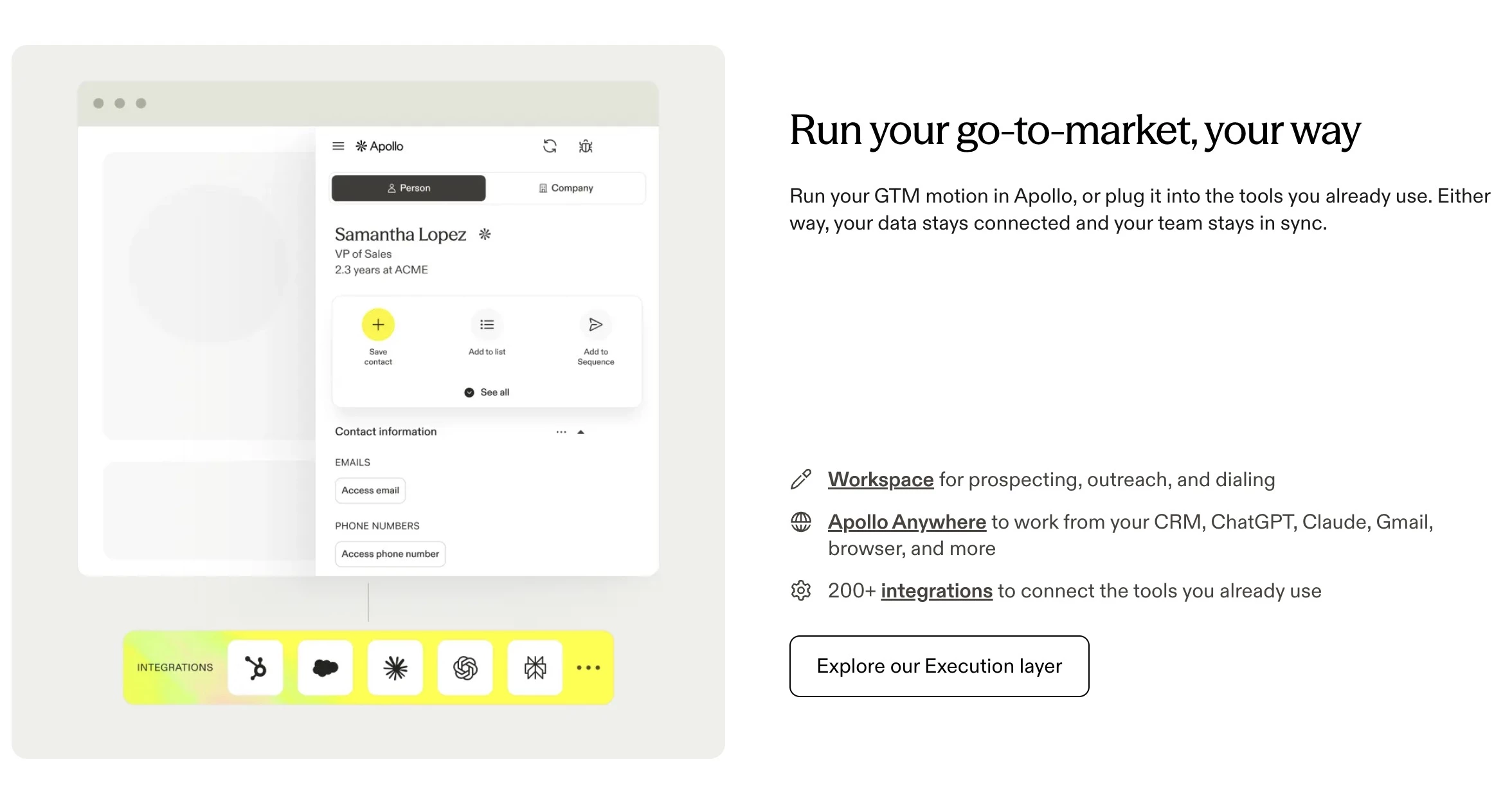
Apollo.io is a sales intelligence and engagement platform that combines a 240M+ contact database with sequencing, dialing, and AI agents.
Growing teams can find, contact, and book prospects in one tool, starting on a free plan.
Key Capabilities:
- 240M+ contacts and 30M+ accounts with 65+ filters and new lead alerts
- Unlimited sequences, a built-in dialer, and email warm-up
- AI agents that research accounts, write personalized outreach, and book meetings
- Buying intent and job change signals, plus AI lead scoring
- Automatic CRM enrichment and 200+ integrations
Pricing:
- Free plan available
- Basic: $49/seat/month billed annually
- Professional: $79/seat/month billed annually
- Organization: $119/seat/month billed annually
Sales Team Use Case: An SDR team uses Apollo to build a targeted list of VP-level contacts at mid-market SaaS companies, then auto-enrolls them into a 5-step sequence combining personalized emails and call tasks.
Limitations to Know:
- Credit-based pricing can create unpredictable costs
- Data accuracy may require additional verification
- Advanced features locked behind higher-tier plans
5. ZoomInfo: Best for Enterprise Teams Needing Deep Account Intelligence
For enterprise sales and marketing teams that need verified B2B data and intent signals
ZoomInfo is a B2B data and intelligence platform that large sales and marketing teams use to find and research target accounts.
Its main strength is data quality, with records verified across multiple sources and intent signals showing who’s actively buying.
Key Capabilities:
- Verified contact and company data, kept current even after acquisitions
- Buyer intent signals that show which accounts are actively researching solutions
- AI agents that research accounts and draft personalized openers, plus an AI sales coach
- Automated CRM enrichment, with records re-pulled free for a year
- 40 ready-made GTM plays, usable in ZoomInfo or your existing AI assistant
Pricing:
- Pricing is available upon request, with a free trial offered.
Sales Team Use Case: An enterprise AE identifies high-intent accounts, maps the buying committee, and runs multi-threaded outreach using AI-generated insights and account data.
Limitations to Know:
- High cost makes it inaccessible for SMBs
- Annual contracts with limited cancellation flexibility
- Key features often require additional paid add-ons
AI Lead Enrichment and Sales Automation
Lead enrichment and workflow automation tools fill the gaps prospecting platforms leave behind. They add missing contact details, verify data across multiple sources, and send enriched records to the right sequences or CRM fields automatically.
That matters because sellers spend only about 40% of their time selling, according to Salesforce’s 2026 State of Sales report. Handling admin work in the background gives reps more time to close deals.
6. Clay: Best for Building Custom Enrichment Workflows
For RevOps teams and GTM engineers who need flexible enrichment and routing across multiple data sources
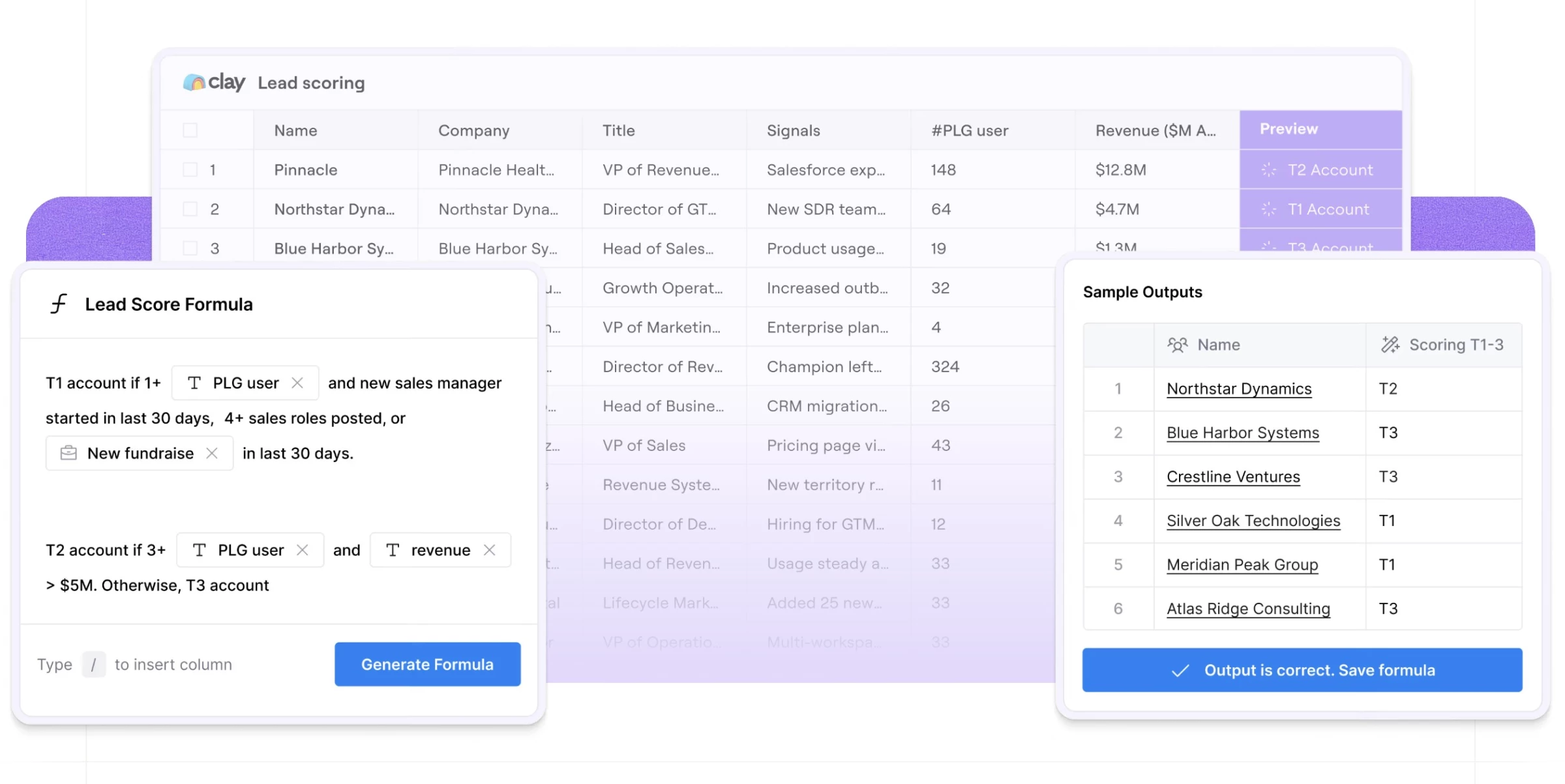
Clay is a data enrichment and workflow platform that pulls from 200+ data providers into one place.
RevOps teams and GTM engineers use it to build custom processes to research, score, and route leads.
Key Capabilities:
- 200+ data and AI providers on one contract, with layered data enrichment
- A visual canvas for building GTM plays with clicks, code, or chat
- Claygent and Account Agents for web research, account scoring, and personalized messaging
- Built-in email sequencing and ad audiences
- Integrations with outreach tools, CRMs, and APIs
- Bring-your-own-API support to reduce data costs
Pricing:
- Free
- Launch: $167/month billed annually
- Growth: $446/month billed annually
- Enterprise: Custom pricing
Sales Team Use Case: A RevOps team enriches inbound leads, scores them against ICP criteria, and automatically routes qualified contacts into CRM and outreach sequences.
Limitations to Know:
- Steep learning curve for first workflows
- CRM sync starts on the Growth plan, and the Free plan caps tables at 200 rows with no phone enrichment
- Usage is metered in actions and data credits, so costs scale with volume
7. Backstory (formerly People.ai): Best for Automatic Activity Capture
For enterprise sales teams that need complete, automated visibility into rep activity and pipeline health
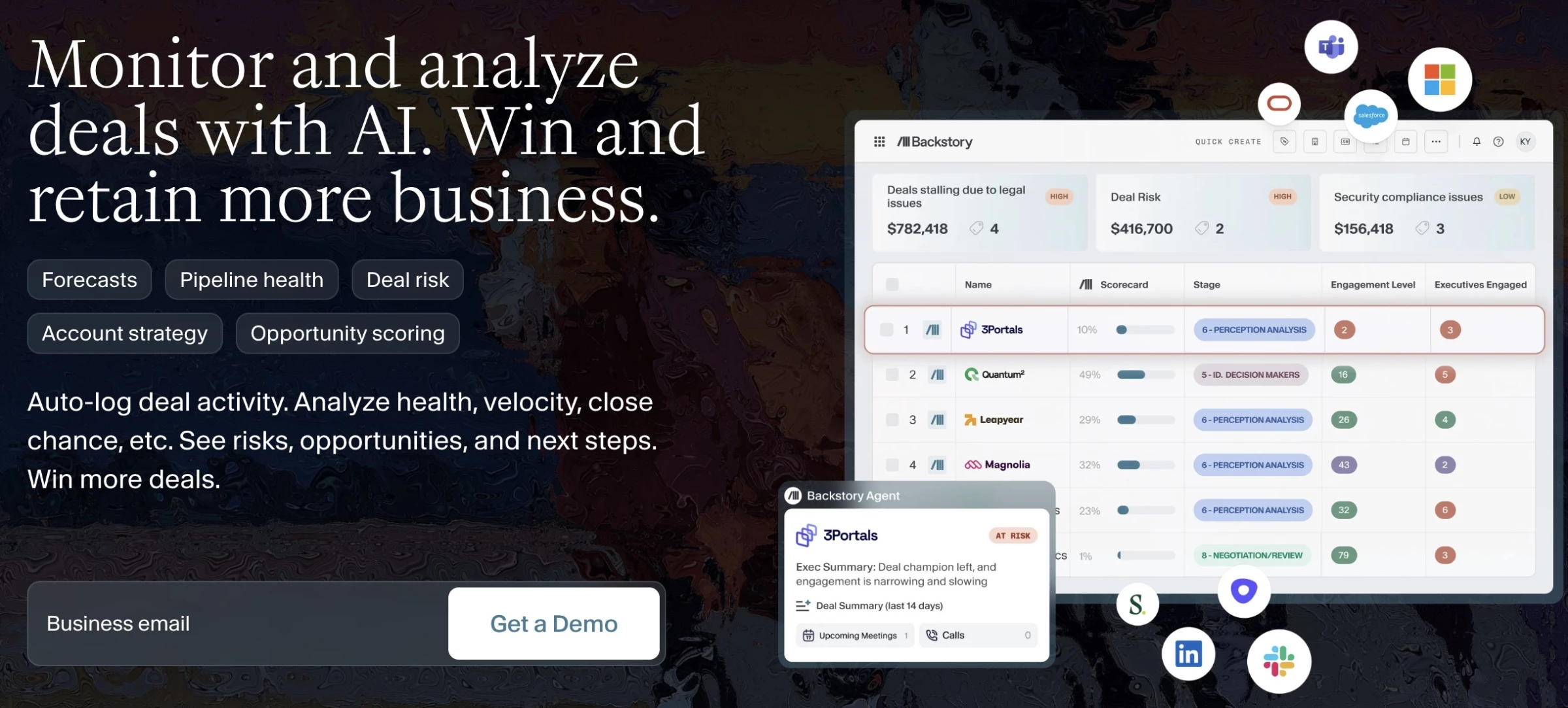
Backstory, formerly People.ai, is a revenue intelligence platform that automatically captures every email, call, and meeting tied to a deal.
Leaders get a view of real deal activity without relying on what reps log in the CRM.
Key Capabilities:
- Automatic logging of emails, calls, and meetings for every deal, reducing manual data entry
- Engagement and deal scoring, plus AI summaries of deal health, momentum, and odds of closing
- Risk alerts that flag deals likely to slip, with forecast views showing what changed
- Account views that show key contacts and gaps in coverage
- Backstory Assistant, which answers revenue questions in Claude, ChatGPT, Copilot, or Slack
Pricing:
- Pricing available by request.
Sales Team Use Case: A sales manager monitors pipeline health, identifies at-risk deals, and tracks engagement across accounts without relying on manual updates.
Limitations to Know:
- Limited customization for reporting and data views
- Best suited for mid-market and enterprise teams
AI Sales Engagement and Outreach Tools
Finding the right lead is only half the job. Getting a response is where most outbound efforts fall short.
The best sales engagement tools track prospect behavior, adjust timing and messaging, and suggest next steps so nothing slips through the cracks.
For help building cadences and workflows, many teams turn to marketing automation consultants.
- Outreach: Best for high-volume outbound sequencing
- Salesloft: Best for enterprise workflow orchestration
8. Outreach: Best for High-Volume Outbound Sequencing
For enterprise teams that need structured, scalable outbound execution on one platform that also covers deals, coaching, and forecasting
Outreach is a sales execution platform built for large teams running structured outbound at scale.
It brings sequencing, deal management, coaching, and forecasting together, with AI agents that support reps before, during, and after meetings.
Key Capabilities:
- Multichannel sequences with A/B testing, triggered by buyer signals and personalized with AI
- AI agents that brief reps before meetings, help with objections live, and update deals afterward
- Two-way CRM integration, including Salesforce
- Deal and pipeline management with risk alerts, plus forecasting on the Pro package
- Call analysis and ongoing rep coaching built in
Pricing:
- Pricing for Amplify Core, Plus, Essentials, and Pro plans is available by request.
Sales Team Use Case: A 50-person team runs coordinated outbound cadences while managers use AI insights and analytics to optimize messaging and coach reps in real time.
Limitations to Know:
- AI credits are usage-based, so costs grow with adoption, and forecasting is limited to the top package
- Steep learning curve for new SDRs and complex setups
9. Salesloft: Best for Enterprise Workflow Orchestration
For enterprise revenue teams that want a unified platform for outreach, pipeline management, and revenue operations
Salesloft is a revenue platform that now includes Clari, following their 2025 merger.
It combines sales engagement and conversation intelligence with Clari’s forecasting, so reps and leaders work from the same system.
Key Capabilities:
- Rhythm, which ranks each rep’s next best actions from buyer signals
- Conversation intelligence with call recording and coaching insights
- Signal capture across your stack, such as new stakeholders, competitor mentions, and pricing questions, that flags deal risk and triggers AI agents for risk plays and meeting prep
- Clari Forecast module for enterprise forecasting and pipeline inspection, connected to the engagement workflow
- Deep CRM integrations with Salesforce and HubSpot, plus MCP access for querying revenue data from AI assistants
Pricing:
- Pricing available by request.
Sales Team Use Case: Enterprise teams use Salesloft to prioritize daily actions, monitor deal risk, and coach reps using conversation intelligence in one system.
Limitations to Know:
- Key features often sold as add-ons, increasing total cost
- Best suited for large, enterprise-scale sales teams
AI SDRs and AI Sales Agents
Where engagement platforms help reps send sequences, AI SDRs take over the top of the funnel entirely. They find prospects, write outreach, respond to replies, and book meetings without a rep in the loop.
More than half of sellers (54%) have already used AI agents, according to Salesforce’s report. Here are the best AI SDR tools for automating your top-of-funnel outreach:
- Regie.ai: Best for signal-driven outreach
- Artisan: Best for an autonomous AI BDR
- AiSDR: Best for pay-as-you-go AI SDR outreach
10. Regie.ai: Best for Signal-Driven Outreach
For teams that want automated list building, sequencing, and personalized outreach at scale
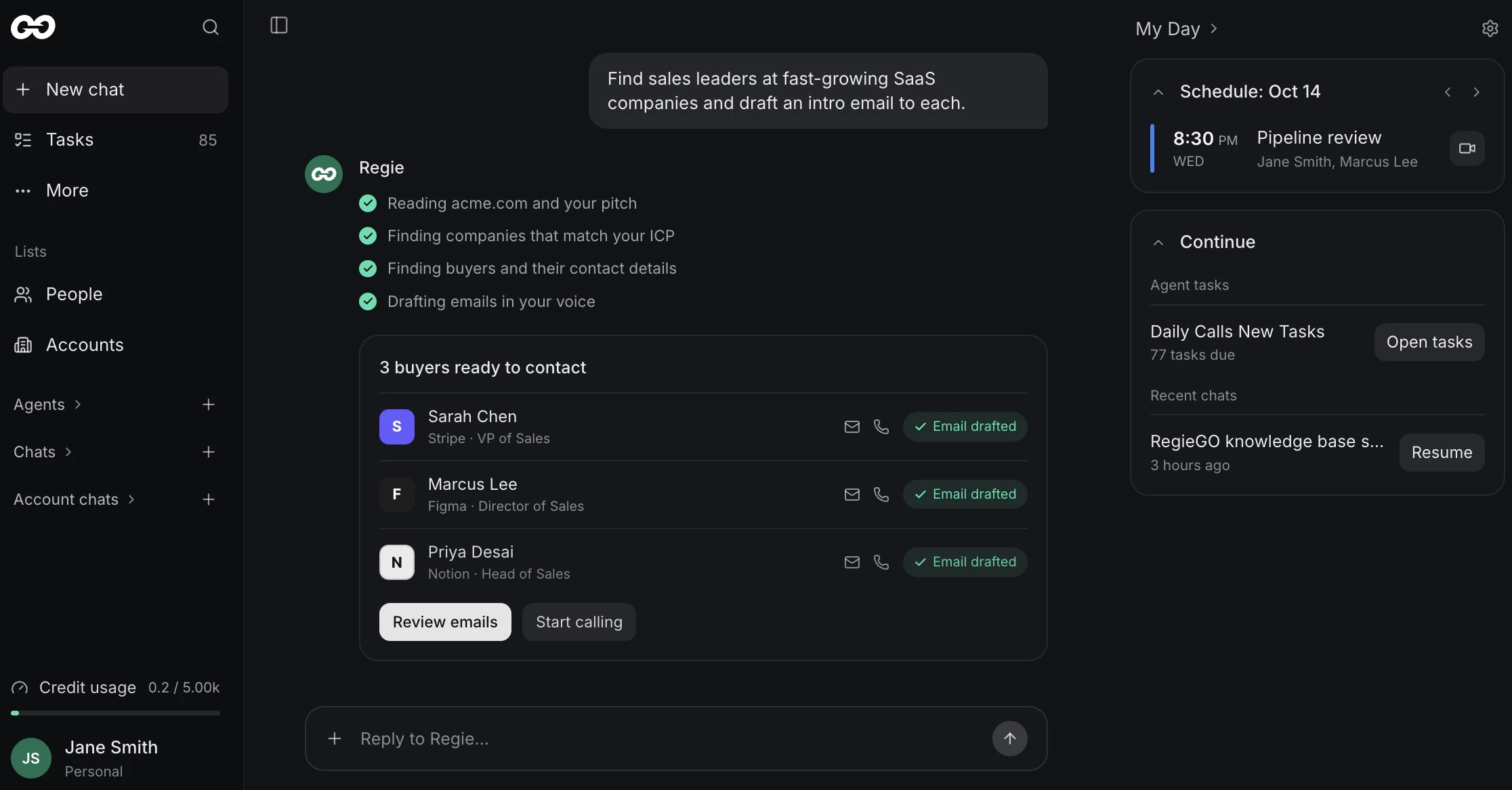
RegieGO, from Regie.ai, is an AI prospecting workspace for individual sellers and small teams.
It builds a prospect list from your website, researches each buyer, and drafts emails and call scripts for reps to review and send.
Key Capabilities:
- AI agents that source and enrich ICP contacts for multi-threaded outreach
- Multi-channel engagement with automated follow-ups
- AI-generated email sequences, call scripts, and cadences based on ICP inputs
- Access to 220M+ contacts with verified mobile numbers included
- 100+ intent signals across sources like LinkedIn, G2, Crunchbase, and more
Pricing:
- Free
- Pro: $41/month billed annually
- Team: $125/seat/month billed annually
- Enterprise: Custom pricing
Sales Team Use Case: An SDR team uses RegieGO to build ICP lists from its own website, review AI-drafted emails and call scripts, and work through the list with the parallel dialer each morning.
Limitations to Know:
- Reps review and send the AI-drafted messages, so it’s less autonomous than AI SDRs that send and reply on their own
- Credit-based usage means research, enrichment, and dialing costs rise with volume
11. Artisan: Best for an Autonomous AI BDR
For startups, SMBs, and enterprise teams that want an AI BDR, Ava, to run outbound end to end, from finding leads to booking meetings
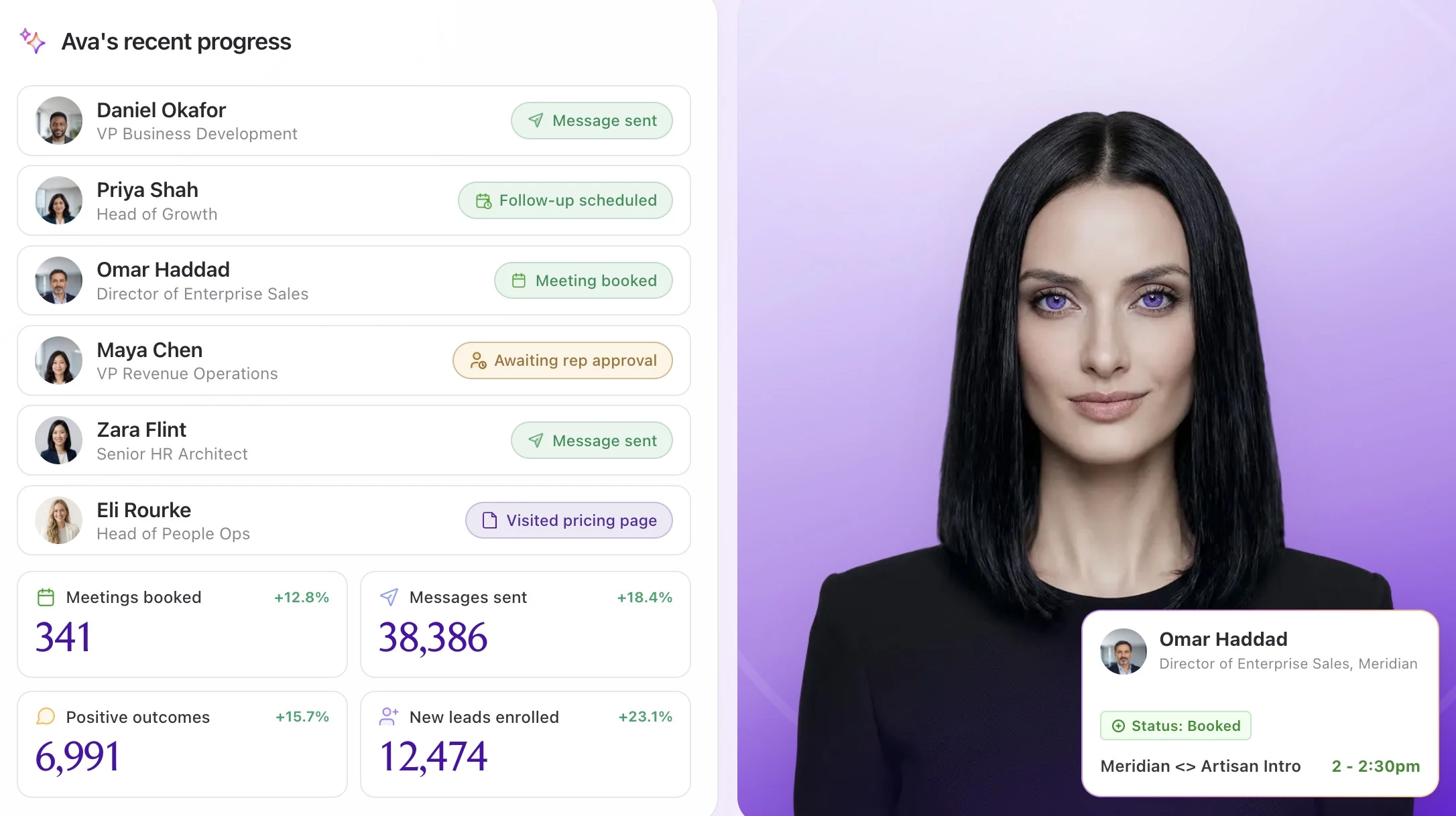
Artisan is an AI BDR platform built around Ava, an AI agent that runs outbound from finding leads to booking meetings.
Teams set the targeting and guardrails, and Ava handles the research, outreach, and replies.
Key Capabilities:
- Searches 250M+ verified B2B contacts and enriches prospects from 22+ data sources
- Prioritizes leads on intent signals such as funding rounds, leadership hires, and website visits
- Writes personalized email and social sequences, and A/B tests subject lines, structure, and calls to action automatically
- Handles replies and objections and books meetings on reps’ calendars, with approval mode and escalation rules
- Two-way CRM sync with Salesforce and HubSpot, plus outbound in 50+ languages
Pricing:
- Free: $0, with 300 credits/month
- Intern: $250/month billed annually
- Employee: $600/month billed annually
- Team, Scale, and Enterprise: Pricing by request
Sales Team Use Case: A Series B startup without a dedicated SDR team uses Ava to source ICP accounts, run multichannel sequences, and book first meetings directly onto AE calendars.
Limitations to Know:
- Credit-based usage, so volume drives cost
- Salesforce sync starts on the sales-led Team plan, and SSO and audit logs are Enterprise-only
- Autonomous outreach still needs guardrails and review to protect brand voice and domain reputation
12. AiSDR: Best for Pay-As-You-Go AI SDR Outreach
For founders and sales teams that want signal-led AI outreach without a subscription commitment
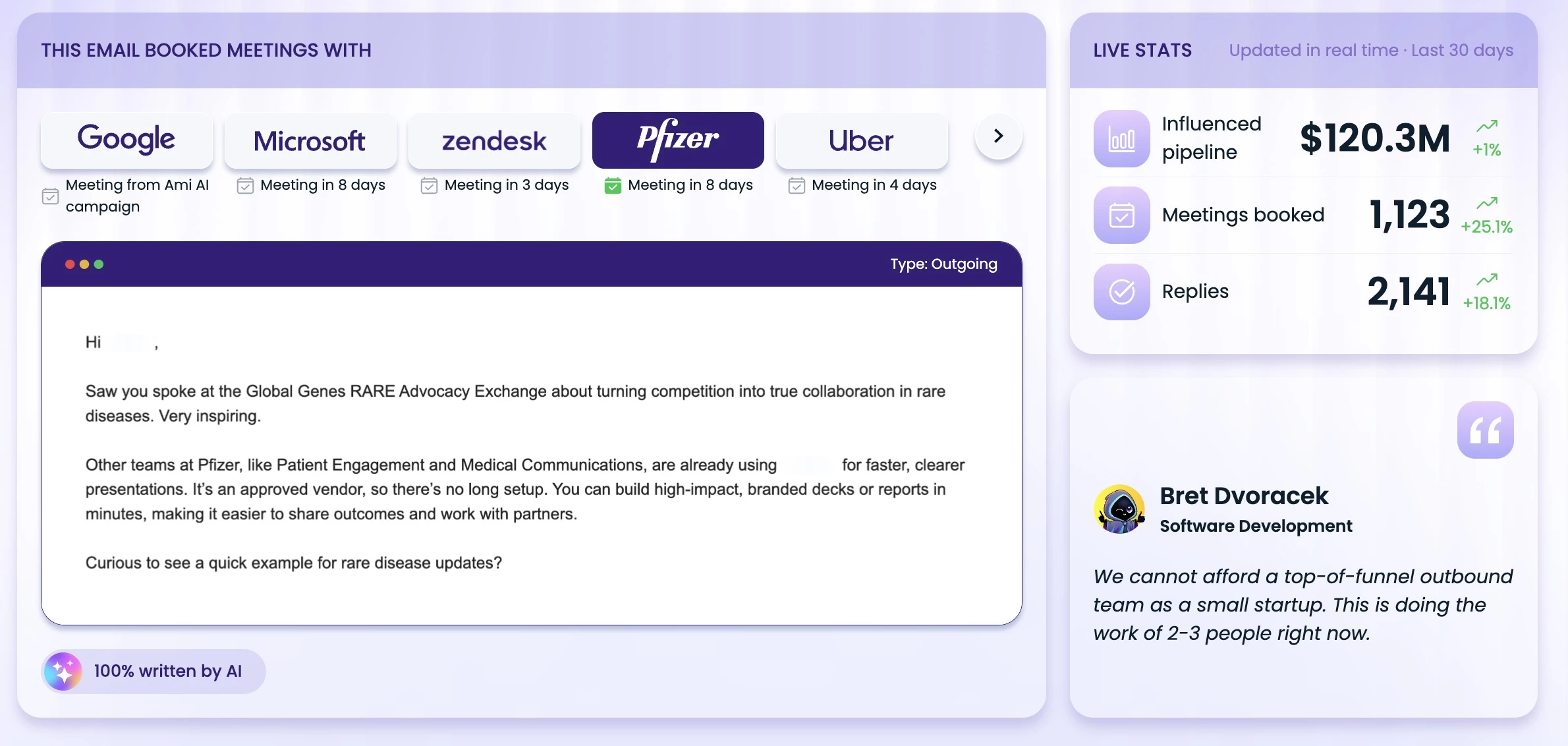
AiSDR is an AI SDR platform priced per prospect rather than per seat, so teams can test it without a subscription. Its AI agent, Ami, plans and runs campaigns across email, LinkedIn, and phone.
Key Capabilities:
- Ami, an AI GTM agent trained on 18,000 campaigns, reviews your website, suggests audiences and messaging, and runs campaigns
- Plain-English lead search across 300M+ contacts, with signals like job changes, hiring, funding, and LinkedIn activity
- Data enrichment from 20 providers, plus research on each prospect before outreach
- Multichannel sequences across email, LinkedIn, and phone, with replies, objections, and meeting booking handled quickly
- Two-way HubSpot sync, plus mailbox setup, warm-up, and deliverability monitoring
Pricing:
- Pay as you go: $1.50 per prospect, charged daily, with campaigns from $7.50
- Team plans: Volume-based pricing
- Add-ons: Warmed-up mailboxes ($33), managed campaigns ($149 each), or a fully managed service ($2,500/month)
Sales Team Use Case: A five-person startup connects HubSpot, describes its ideal customer to Ami, and runs a 500-prospect test campaign for $750 before upgrading to a Team plan.
Limitations to Know:
- Salesforce integration, website visitor tracking, and AI video require a Team plan
- Built for targeted outreach, not high-volume blasts or fully hands-off automation
- Pricing has changed several times since 2024, so confirm terms before signing
Conversation Intelligence and Sales Coaching Software
Conversation intelligence and sales coaching tools solve two distinct but connected problems. They surface what's working and what isn't, and they create a practice environment where sales can fix it.
- Gong: Best for enterprise conversation and revenue intelligence
- Avoma: Best for meeting intelligence and structured note taking
- Hyperbound: Best for AI-powered training and roleplay
13. Gong: Best for Enterprise Conversation and Revenue Intelligence
For mid-market and enterprise revenue teams that want call recording, deal intelligence, coaching, and forecasting built on real customer conversations
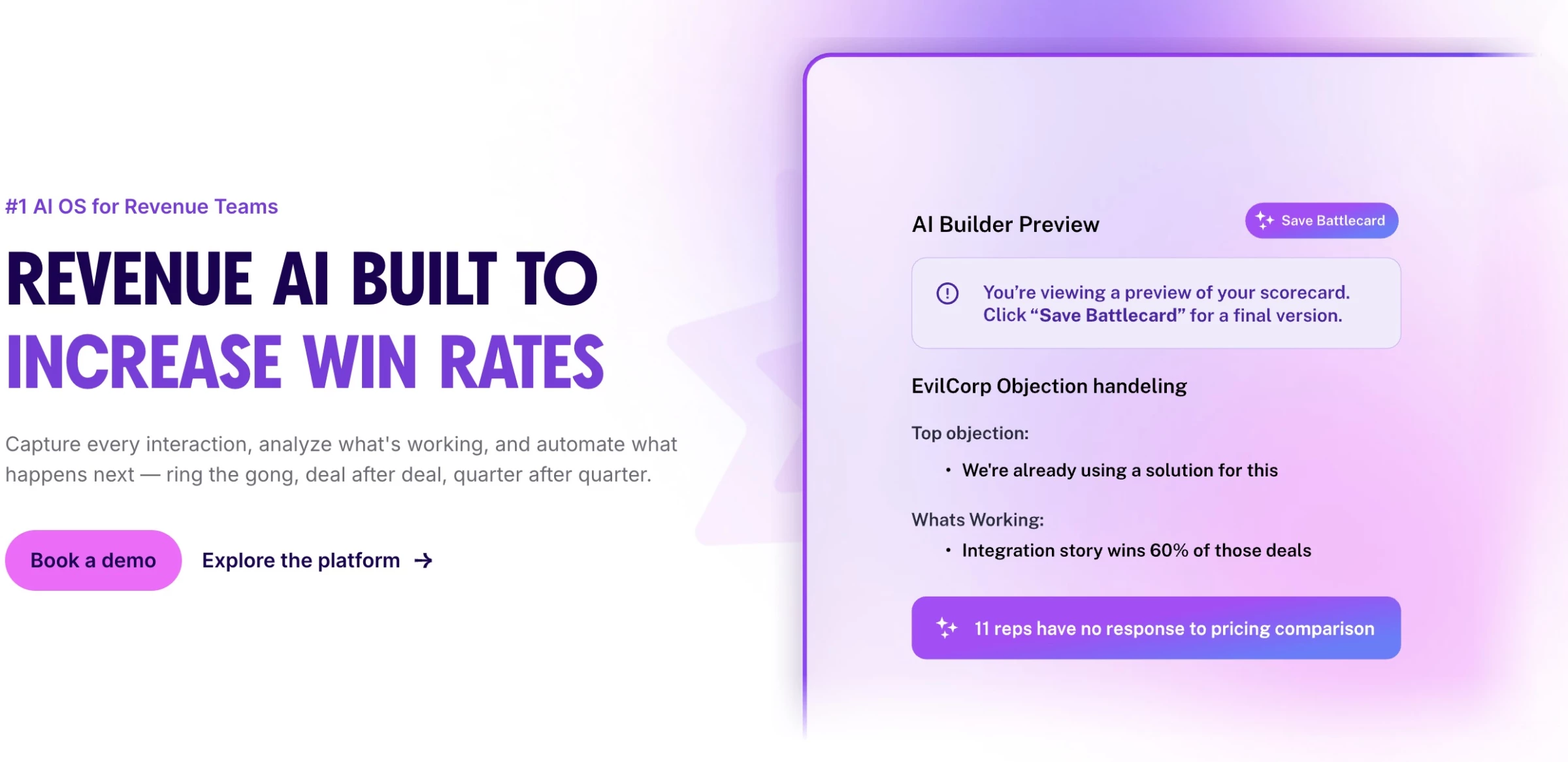
Gong is a revenue intelligence platform best known for conversation intelligence, turning calls, meetings, and emails into deal insights.
It has since added forecasting, enablement, and AI agents, so leaders can coach and forecast from the same data.
Key Capabilities:
- Automatically records, transcribes, and analyzes calls, meetings, and emails, then writes summaries and CRM updates
- Deal intelligence that flags risk based on engagement and buyer activity
- Gong Agents that automate follow-ups, pipeline edits, enablement triggers, and forecast corrections
- Coaching scorecards and shareable call reviews built from top-performer conversations, plus AI Trainer roleplays in Gong Enable
- Gong Forecast, which grounds pipeline predictions in buyer engagement rather than CRM fields alone
Pricing:
- Pricing available by request. Licenses are priced per user, plus a platform fee based on the number of users supported.
Sales Team Use Case: A VP of Sales spots deals that lack multi-threading before the forecast call, while frontline managers use flagged call moments to coach reps each week.
Limitations to Know:
- The platform fee on top of per-user licenses makes it expensive for small teams
- Third-party pricing guides report onboarding fees and usage-based AI credits on top of seats, so confirm both in your quote
14. Avoma: Best for Meeting Intelligence and Structured Note-Taking
For teams that want meeting recording, transcription, and coaching in one lightweight platform.
Avoma is an AI meeting assistant that grows into conversation and revenue intelligence through add-ons.
Teams can start with note-taking and scheduling, then add call scoring and forecasting when they need them.
Key Capabilities:
- Recording and transcription in 70+ languages, with AI notes and CRM syncing
- Ask Avoma, an AI assistant for questions about meetings and deals
- AI call scoring with custom scorecards and live objection help
- Deal risk alerts and forecasting through an add-on
- Scheduling, lead routing, and integrations with Zoom, Salesforce, and HubSpot
Pricing:
- Startup: $19/month
- Organization: $29/month
- Enterprise: $39/month
- 14-day free trial is available, with no credit card required.
Sales Team Use Case: An AE runs a discovery call, and Avoma automatically generates notes, updates CRM fields, and sends a follow-up draft while flagging deal risks for the manager.
Limitations to Know:
- Transcription accuracy can vary with accents or noise
- Advanced intelligence features require paid add-ons
- Better suited for startups and scaleups than large enterprise orgs
15. Hyperbound: Best for AI-Powered Training and Roleplay
For sales leaders who want reps to practice with AI buyers, then get coached on real calls.
Hyperbound is an AI sales coaching platform where reps practice with realistic AI buyers before speaking to real prospects. Its Perform plan applies the same scorecards to real calls, linking practice to performance.
Key Capabilities:
- Roleplays with realistic AI buyers based on your sales process, plus ready-made scenarios for cold calls and objections
- Custom AI scorecards and coaching on every roleplay, with analytics dashboards
- Real call scoring, deal coaching, and CRM sync on the Perform plan
- Kota, an AI agent that answers coaching and deal questions across calls, CRM, and Slack
- Support for 25+ languages, with SOC 2 Type II and ISO 27001 certification
Pricing:
- Pricing is available by request.
Sales Team Use Case: New SDRs complete dozens of simulated cold calls and objection scenarios in their first week, accelerating ramp time from months to days.
Limitations to Know:
- Paid plans are quote-only
- AI roleplays can feel overly aggressive for beginners
- Real call scoring and integrations require the Perform plan, and live call coaching costs extra
AI Sales Forecasting and Pipeline Management Software
Rep estimates and manual updates only go so far. These platforms look at deal activity, engagement, and past results to build more accurate forecasts and flag where teams should focus.
Since a bad forecast can throw off hiring, budgets, and strategy, that clearer view helps teams catch problems early and put their energy into the right deals.
- Freshsales: Best for simple SMB pipeline management
- Aviso: Best for independent enterprise AI forecasting
16. Freshsales: Best for Simple SMB Pipeline Management
For small to mid-sized teams that need pipeline tracking, lead scoring, and automation in one platform
Freshsales is Freshworks’ CRM for small and mid-sized sales teams, with pipeline tracking, contact scoring, and built-in phone and email. Its low entry price suits teams that want room to grow into forecasting on higher plans.
Key Capabilities:
- Visual pipelines with built-in chat, email, and phone
- AI contact scoring and deal insights to prioritize promising opportunities
- Workflow automation for follow-ups, assignments, and reminders
- Email tracking, sales sequences, and forecasting reports based on past deal data
Pricing:
- Growth: $9/month
- Pro: $39/month
- Enterprise: $59/month
Sales Team Use Case: A growing SaaS team uses Freshsales to track deals across stages, automatically score incoming leads, and trigger follow-ups based on engagement without needing multiple tools.
Limitations to Know:
- Forecasting is limited to the Enterprise plan and less advanced than dedicated tools
- Limited customization for complex sales processes
- Contact scoring and sequences start on Pro, and the AI agent costs extra
17. Aviso: Best for Independent Enterprise AI Forecasting
For enterprise revenue teams that need accurate forecasts across complex pipelines, multiple CRMs, or usage-based pricing.
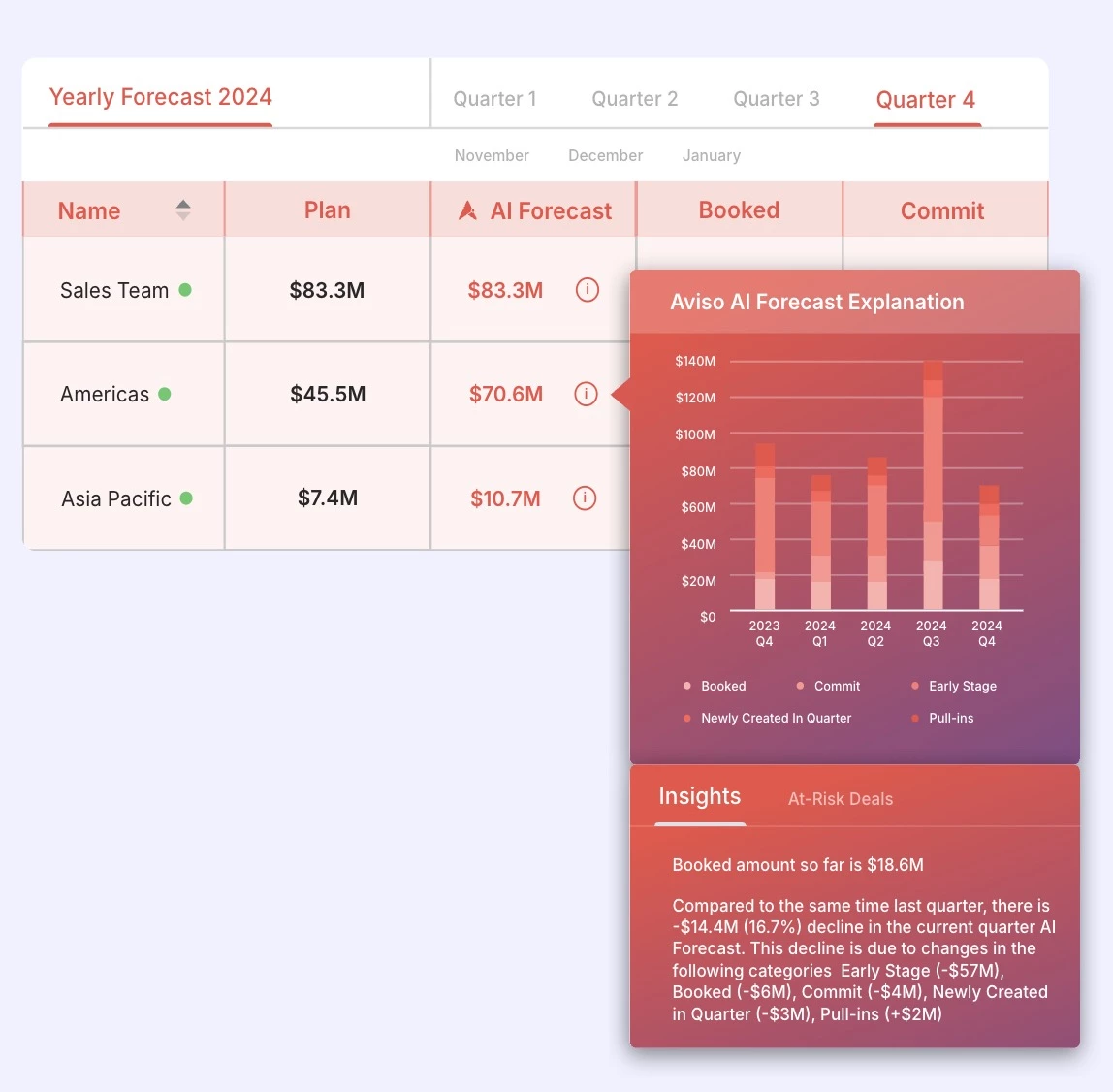
Aviso is an independent AI forecasting platform that sits on top of your existing CRM. It’s especially strong for companies that need to forecast usage-based revenue alongside traditional bookings.
Key Capabilities:
- Real-time forecast roll-ups with best-case, most-likely, and pacing views
- WinScores that rate deals to help managers decide what to commit
- Pipeline dashboards that flag slowdowns and plan coverage up to three quarters ahead
- MIKI, an AI assistant that answers questions about deals and accounts
- Consumption forecasting alongside traditional bookings forecasts
- Two-way Salesforce sync and automatic capture of emails and meetings
Pricing:
- Available on request
Sales Team Use Case: A RevOps leader at a usage-based software company runs one forecast for committed and consumption revenue, then uses WinScores to finalize commits before the quarterly call.
Limitations to Know:
- Enterprise-focused, with no public pricing
- More than teams need if they only want forecasting
- Complex setup, with accuracy dependent on clean CRM data
How to Choose: Decision Matrix by Team Size and Budget
| Team Size | Budget | Goal | Core Tools | Why It Works |
| SMB (1-20 reps) | Low | Simple setup, low admin | Nutshell, Apollo.io, Freshsales | Fast setup, minimal complexity |
| Mid-market (20-100 reps) | Growing | Scale outbound, improve execution | HubSpot, Regie.ai, Clay, Avoma | Boost productivity, standardize workflows |
| Enterprise (100+ reps) | High | Forecast accuracy, full visibility | Salesforce Agentforce Sales, Gong, ZoomInfo, Salesloft, Aviso, Backstory | Full visibility and accurate forecasting |
Which Tools Overlap (and What You Need Together)
Many of these platforms do overlapping work, and the smarter question isn't which ones to stack but where a single tool already covers a job you were about to buy separately.
HubSpot Sales Hub is the clearest example: with its Prospecting Agent, AI notetaker, AI deal scoring, and built-in forecasting, it handles pieces of prospecting, conversation intelligence, and pipeline management inside one CRM.
Here's how the categories relate:
- Prospecting data: Apollo.io and ZoomInfo both help you find and reach the right people, so choose one. Apollo suits budget-friendly, all-in-one outreach, while ZoomInfo fits enterprise account research.
AI SDRs like Artisan and AiSDR include their own contact data, so you may not need a separate database. - Enrichment: Clay fills gaps in your prospecting data using 200+ providers. Add it only when your existing data falls short.
- Outreach: Apollo already includes sequencing, so smaller teams can skip a dedicated platform. Outreach and Salesloft make sense for high-volume campaigns across many reps.
- AI SDRs: These send outreach themselves, so they overlap with sequencing tools. Point one AI SDR at accounts your reps aren’t working, and avoid running two on the same list.
- Conversation intelligence: Gong analyzes calls at enterprise scale, Avoma handles notes and coaching for smaller teams, and Hyperbound trains reps before real calls.
Pairing one recording tool with Hyperbound’s Practice plan works, but avoid running two recording tools. - Pipeline and forecasting: Freshsales and Nutshell are CRMs with built-in forecasting, while Aviso and Agentforce Sales add advanced forecasting to an existing CRM. Salesloft customers already get Clari Forecast, and Salesforce users should try the native option first.
The rule of thumb: start with what your CRM already does, and add specialist tools only when they fill a real gap.
How to Implement AI in Your Sales Process
Buying the right tool is only half the work. The teams that see real returns follow a deliberate rollout instead of switching on features and hoping revenue follows.
Here's a six-step sequence that keeps the focus on outcomes rather than software:
- Map your workflow and pain points. Walk through your sales cycle stage by stage and mark where reps lose time or deals stall. The bottleneck you find here decides which category of tool you actually need, and it's usually not the one with the flashiest demo.
- Baseline your metrics. Before you deploy anything, record where you stand today: research time per rep, reply rates, meetings booked, average cycle length, forecast accuracy. Without a starting number, you can't prove the tool worked.
- Clean your CRM and confirm two-way sync. Forecasting and lead scoring are only as accurate as the records feeding them. Stale contacts and inconsistent deal stages produce confident but wrong outputs, and returns collapse without automatic two-way write-back between the tool and your CRM.
- Start with one high-ROI use case. Resist the urge to roll out a full stack at once. Pick the single bottleneck where AI pays back fastest and prove the return there before expanding. One working use case builds the internal case for the next.
- Integrate with your CRM. AI is only as good as the data it reads, so connect the tool to your CRM and confirm the sync runs both ways. A tool that writes results back into your records keeps your source of truth current; one that only exports quietly recreates the admin work you were trying to remove.
- Measure and expand. Compare results against your baseline, then decide whether to widen adoption or add the next tool. Scale into new categories only once the current one is delivering.
This sequence reinforces the same principle that should guide every buying decision: start with the use case, not the brand.
The best-known platform won't fix a bottleneck it wasn't built for, and the right tool is the one that solves the specific problem your workflow map surfaced.
AI Tools for Sales: Final Thoughts
The modern sales stack is a system of specialized platforms, each solving a specific part of the revenue process.
It’s easy to default to well-known platforms, but the most effective teams choose tools based on their biggest bottlenecks. If your issue is pipeline visibility, a prospecting tool won’t fix it. If reps are wasting time on admin, adding more outreach software won’t help.
Start with the use case, not the brand.
Our team ranks agencies worldwide to help you find a qualified partner to implement the latest AI solutions. Visit our Agency Directory for the Top Call Center Companies, as well as: