
The right CMS depends on your content demands. Stay on WordPress if you run one brand, one language, a handful of content types, and no personalization or compliance pressure.
Go custom or headless once those needs force workarounds instead of features.
Most companies are in between, where the answer is usually WordPress extended properly or WordPress as the editing layer behind a custom front end.
Custom CMS vs. WordPress: Key Findings
- If your content is simple, static, and you need a quick, familiar setup, WordPress is ideal.
- If you require multi-brand, multi-locale experiences, personalization, or strict compliance, a custom CMS gives you more control over the architecture and workflows.
- If you're between the two, extend WordPress before replacing it. Custom development can address specific integrations, workflows, or performance issues without the cost of a full rebuild.
WordPress vs. Custom CMS at a Glance
The comparison below holds for most projects, but the right choice depends on your website's size and complexity.
| WordPress | Custom CMS |
Upfront cost | Lower. Themes and plugins cover many standard features. Ranges from $1,000- $30,000+. | Higher. Features need to be designed and developed. |
Time to launch | Weeks. A capable team can launch a marketing site in 4-8 weeks. | Months. A platform with major integrations often takes 3-6 months. |
Customization | Extensive within the theme and plugin ecosystem, but more expensive once you move outside it. | High. The content model and features can be built around the business. |
Performance | Varies by plugins, database, hosting, and caching. | More predictable because the architecture and delivery layer are designed around performance. |
Security | Core is well maintained, but third-party plugins and themes add risk. | You control the codebase, but you also have to manage security yourself. |
SEO | Strong out of the box with mature plugins and tools. | Full control over markup, schema, redirects, and technical SEO. |
Scalability | Can handle substantial traffic with proper caching. Content complexity can become the bigger issue. | Designed to scale around both traffic and data needs. |
Maintenance | Frequent core, plugin, and theme updates. | Less frequent but more technical maintenance. |
Talent availability | Large developer pool and competitive rates. | Smaller pool and more dependence on people who know your stack. |
In short, WordPress delivers more of the benefits upfront, while many of its costs show up later.
A custom build does the opposite, with more cost upfront in exchange for greater control over time. That's the real trade-off behind most of these rows.
Where WordPress Has the Edge: Speed to Launch and Editor Independence
WordPress is strongest when getting to market quickly and giving marketing teams independence matters more than having full control over the architecture.
That's true for most marketing sites for much of their life, where WordPress wins on four fronts:
- Fast to launch, with plugins covering most standard needs.
- Marketing can publish and restructure without a developer.
- Cheap to start, and the SEO tooling is good.
- Easy to staff. WordPress development rates run roughly $20-200 per hour across DesignRush's directory.
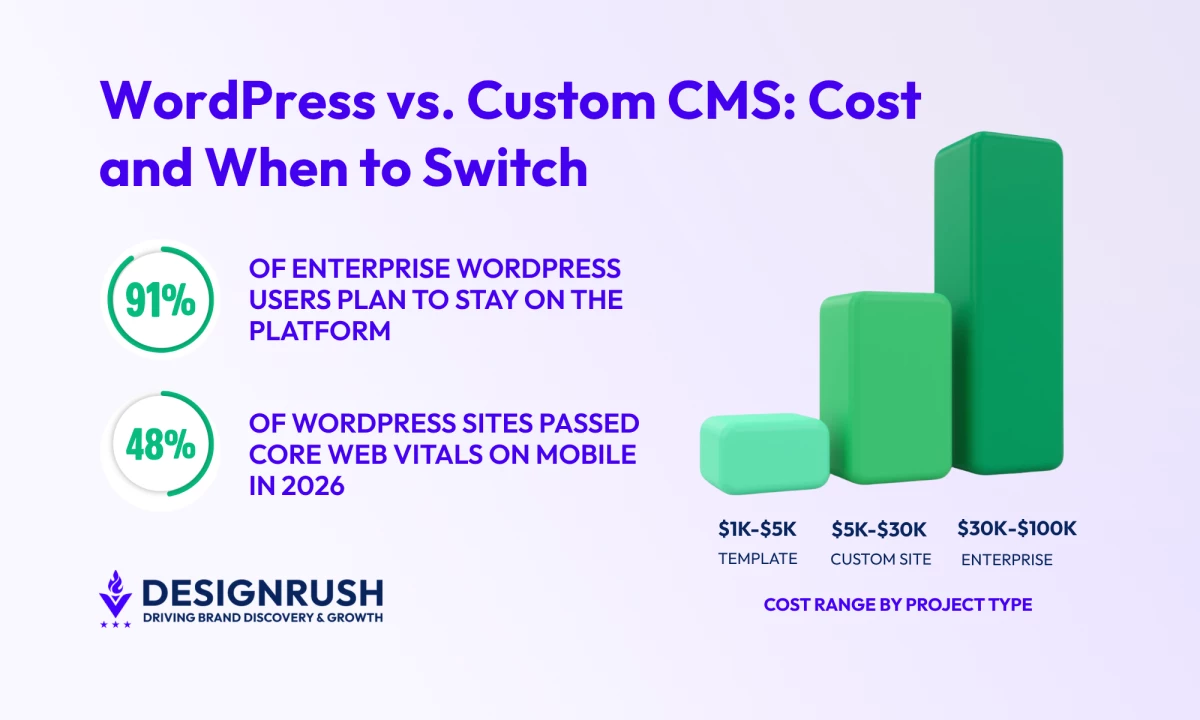
This also holds at scale for some enterprises. In the State of Enterprise WordPress survey, 91% of enterprise users said they intended to stay on the platform, 74% rated its ROI as good or excellent, and 72% said they would recommend it to other enterprises.
In fact, WordPress accounts for roughly 58% of CMS usage among the top 10,000 sites by traffic (Web Almanac).
However, the trade-off can build over time. Every plugin adds dependencies, queries, scripts, and update requirements you don't control. HTTP Archive found a median of 24 plugin resources per WordPress page.
Personalization and multi-brand governance end up requiring stacked plugins that were never built to work together.
Where Custom CMS Wins: Control Over Schema, Caching, and Release Timing
A custom build makes sense when these constraints start creating real operational problems.
Custom CMS is strongest when you need more control over your content, performance, and technical setup:
- The content model matches how the business works, so editors stop working around the schema.
- Performance and security are architectural, not inherited from plugins.
- Full control over markup, schema, redirects, and caching, which matters for SEO at scale.
- You set the upgrade schedule.
The costs are also front-loaded and ongoing. Expect higher upfront costs, a months-long launch, and continued developer dependency. Only 31% of IT projects fully meet their success criteria, according to the Standish Group’s CHAOS report.
Documentation is your responsibility, and there's no external security community looking at your code. These costs often become more noticeable after the original build team moves on.
5 Signs You've Outgrown WordPress
WordPress powers everything from local startups to global campaigns. It’s fast to deploy, affordable, and marketing teams love the autonomy. But it can eventually hit a ceiling.
These are the problems that usually signal it's time to reconsider your CMS. One may be a maintenance issue. Several together usually point to a larger platform problem.
If you’re starting to feel these friction points, it’s usually a sign you’re outgrowing WordPress:
- Your content is becoming more interconnected
- Personalization is putting pressure on performance
- Your brands and regions need different content rules
- Design or data integration is dictating product decisions
- You need stronger compliance controls
1. Your Content Is Becoming More Interconnected
Editors often need to connect products to stories, stories to regions, and regions to campaigns. 61% of teams now run content across more than one CMS and are looking to consolidate (Storyblok, 2025 State of CMS).
As those relationships grow, WordPress can take longer to handle complex searches and previews.
When one system can't handle the full content model, teams often add another tool to fill the gap.
2. Personalization Is Putting Pressure on Performance
Personalization means more dynamic page requests instead of one cached version for everyone. That increases server load and makes it harder to test different versions of a page reliably.
The pressure is worth taking seriously in both directions. Brands with mature personalization were 48% more likely to have exceeded their revenue goals and 71% more likely to report improved customer loyalty (Deloitte Digital).
While personalization can lift conversions, it also adds processing overhead.
Akamai's 2026 research found that a typical centralized personalization setup can add around 200 milliseconds of latency, while its research shows that a 100-millisecond delay can reduce conversions by 7%.
Personalization and caching can pull in opposite directions, and caching is a major part of WordPress performance.
3. Your Brands and Regions Need Different Content Rules
Shared content, multilingual SEO, regional variations, and approval workflows are manageable when a site has a small number of markets.
The problem starts when different brands or regions need different permissions, publishing rules, translations, or versions of the same content.
WordPress can support these workflows, but they often depend on a combination of plugins, custom fields, multisite configurations, and manual processes
For instance, Capgemini's 38-site WordPress network shows how quickly these requirements can become complex. The company runs 38 sites across more than 40 countries and 10+ languages.
Its teams needed global content to move across sites while allowing regional editors to accept, reject, translate, or detach content depending on local requirements. That required a bespoke content-syndication system on top of WordPress.
4. Design or Data Integration Is Dictating Product Decisions
If your design system has to be watered down to fit the theme, or a required integration gets shelved because no suitable plugin exists, WordPress is starting to dictate what you build.
Beverley Delay, Founder of Beverley Designs, explains this trade-off well:
"WordPress themes can be a more economical choice upfront because they're pre-made and often come with a lot of built-in functionality.
But here's where it gets tricky. While WordPress themes are convenient and budget-friendly, they can sometimes limit your flexibility and personalization options."
5. You Need Stronger Compliance Controls
Audit trails, enforced approval steps, and clear patch records often require additional plugins in WordPress.
That adds dependencies when third-party plugins already account for much of WordPress's security risk.
In one year, 1,614 plugins and themes were removed from the WordPress repository over unpatched security issues, and more than half of the developers Patchstack notified of a vulnerability did not ship a fix before public disclosure.



4 Workarounds a Custom CMS Removes
You need a custom CMS when your site has to do things standard plugins weren't built to handle. Instead of bolting on another plugin for every new requirement, you build the content structure, integrations, and workflows around the business.
So, ask what your current workarounds are costing you, and which ones a custom build can remove:
- Faster publishing without developer dependency
- Local teams can make changes without central approval on everything
- Makes experimentation less risky and costly
- More control over audit and approval records
1. Faster Publishing Without Developer Dependency
With a custom CMS, developers build reusable page types and content blocks, such as campaign pages, product sections, and regional versions, so marketing can create new pages without filing a ticket.
Forrester's study of Contentstack customers found a 90% reduction in time to publish; one interviewee said a routine information change dropped from five business days to roughly 30 minutes. The work doesn't disappear, but the handoff does.
2. Local Teams Can Make Changes Without Central Approval on Everything
In a global speed-to-market benchmark survey, more than half of go-to-market teams named approvals as their biggest bottleneck, and more than half run three or more rounds of revisions per piece.
When brand rules, approval chains, and publishing permissions are built into the system, regional teams can adapt pages within agreed limits instead of sending every change to the Head office. That becomes increasingly valuable as you add markets.
3. Makes Experimentation Less Risky and Costly
In a typical WordPress setup, a template or plugin change that breaks hundreds of pages can mean a long cleanup.
A more flexible CMS can make experimentation easier to undo because content structures and configuration can be versioned alongside the application.
The bigger benefit is what that does to experimentation: teams are more willing to test something when they know they can undo it quickly.
For instance, Bellhop chose a headless CMS partly so marketers could experiment independently, with content versioning allowing them to roll back mistakes to previous versions.
4. More Control Over Audit and Approval Records
WordPress can provide revision history and audit logs, but more detailed records, approval steps, or retention rules often require additional plugins.
A custom build can make those requirements part of the system from the start, rather than another layer to add and maintain.
For example, a recent custom-CMS case study from Master Publisher describes a publishing platform with full audit trails, version history, automatic archiving, role-based permissions, and approval gates built into the system.
It reports that a 14-person distributed editorial team cut its content approval cycle from three days to same-day after adopting structured workflow stages.
Performance and Speed: WordPress Optimizes the Stack, Custom Builds the Architecture
WordPress can be fast, especially when the site is well hosted, cached, and kept lean. But performance becomes harder to maintain as the stack grows.
As of June 2026, only 48% of WordPress sites passed all three Core Web Vitals on mobile, according to HTTP Archive.
Performance problems usually come from a combination of database bloat, plugin overhead, and theme bloat. Revisions and unused metadata can accumulate, plugins can add queries and scripts, and some themes load assets for features a page doesn't use.
Custom CMS take a different approach by generating pages ahead of time and serving them from a CDN. That can reduce the work required for each request and give you more control over performance at scale.
Security and Maintenance: The Hidden Cost of Plugins
WordPress core is well maintained. Patchstack's State of WordPress Security in 2026 found six vulnerabilities in core across all of 2025, all rated low risk.
The exposure is entirely in the ecosystem around it: of the 11,334 new vulnerabilities disclosed in 2025 – a 42% increase over 2024 – 91% were in plugins and 9% in themes.
Experts at IT Monks puts the issue down to governance:
"The objection is almost never about WordPress. It's about governance. Nine times out of ten, the person saying it has a scar – a plugin that owned their server, an agency that shipped 47 plugins and left, a site that fell over on launch day.
Ask 'what happened?' before you argue. You'll usually find the failure was in how it was run, not in what it was built on. WordPress core itself is secure and well monitored. In practice, it's usually the wrong team behind the wheel."
So, before treating security problems as a reason to rebuild, find out what failed: WordPress itself, the plugin stack, or the maintenance process.
Custom builds can give you tighter security controls, including service-level access controls, CI/CD security gates, and identity-based audit logs. But those controls don't maintain themselves.
A neglected custom CMS can be more dangerous than a well-maintained WordPress site because you have fewer people outside your team looking for its bugs.
SEO Capabilities: WordPress Covers Most Needs, But Not Every Use Case
SEO is often a deciding factor, but the trade-off isn't simply that WordPress is better for SEO.
WordPress makes common SEO tasks easy; a custom build gives you more control when those needs become more complex.
What WordPress Handles for Free: Permalinks, Canonicals, Sitemaps, and Schema
Clean permalink structures, canonical handling, and XML sitemaps work correctly with almost no configuration.
Yoast and Rank Math handle on-page SEO, redirects, and schema without requiring a developer. Between them, those two plugins have over 17 million active installations.
For a single-brand site publishing articles and landing pages, that's hard to beat. Going custom means rebuilding tooling you were getting free.
Where Custom Builds Go Further: Entity Schema, Programmatic Redirects, and Edge Cache Rules
You can control markup, heading structure, schema, redirects, and page templates directly instead of working through a theme or plugin.
Schema can be modeled on your actual entities, like as a product tied to a specific service area, for example.
Complex multilingual structures, large-scale programmatic redirects, and edge-level cache rules stop being plugin features and become part of the application.
Below a certain scale, none of this pays for itself. WordPress with a good SEO plugin handles a single-locale site with a few hundred pages perfectly well.
Cost and Time to Launch: WordPress Costs Less to Start, Custom Costs More Upfront
WordPress wins on both cost and speed to launch. You can get a full-featured website live in weeks.
But many teams underestimate the operational drag that follows: plugin upkeep, theme refactoring, and performance tuning. Ongoing plugin fees can reach $1,000, plus $100-200/hour for maintenance.
DesignRush's web development pricing guide breaks projects into four broad types. We mapped those cost ranges below:
Project type | Ideal for | Cost | Usual platform |
Template-based site | Small businesses, simple eCommerce | $1,000-$5,000 | WordPress with a marketplace theme |
Custom site | Medium businesses, service providers | $5,000-$30,000+ | WordPress with a custom theme and development |
Large business site | Multi-function, high-traffic sites | $30,000-$100,000 | Custom WordPress or headless front end |
Enterprise platform | Large corporations | $100,000-$200,000+ | Custom CMS, or WordPress as a governed component |
WordPress itself is free to about $70 a month, plus hosting, while ongoing agency retainers typically run $800 to $2,500 a month.
The platform cost, however, is only part of the budget. Marina Marsh, Founder and President of Web Loft Designs, sees clients make the mistake of assuming a cheaper platform means a cheaper website:
“They often believe that using a platform like WordPress will be inexpensive, but this is not the case. Creating a custom website requires a thorough understanding of the business, audience, and competition.
A successful website goes beyond just assembling elements with DIY tools; it demands a strategic blend of research, planning, design, and development.”
On timelines, a CMS-based marketing site typically takes 4-8 weeks, while a custom build with real integrations can take 3-6 months. Discovery matters more in the latter because late content-modeling decisions can push both cost and schedule.
Timeline | Focus | Action |
0-12 months | Launch fast | Use WordPress to get live and let marketing manage content without a developer bottleneck. |
12-24 months | Scale selectively | Add a custom API layer or move high-traffic or highly personalized templates to a headless front end. |
24+ months | Own the stack | Move to a custom CMS when control over the experience, data, and delivery justifies the engineering commitment. |
Ownership and Long-Term Control: Plugin Dependencies vs. Owning the Maintenance Burden
WordPress leaves parts of your roadmap in the hands of third-party vendors. If a plugin is abandoned, changes its pricing, or ships a breaking update, you have to deal with it, whether or not you had budgeted the time.
A custom CMS puts more of those decisions in your hands. Accessibility and privacy requirements live in the system itself. Integrations follow the tools you use, rather than whatever a connector happens to support
Marina Marsh, drawing on more than 2,000 projects, puts it simply:
“Custom sites are integrations galore. Clients often need their sites to play nice with their CRM, accounting software, ERP, etc. Custom sites are designed for that.”
And personalization or A/B testing can be built into how content is delivered rather than added on later.
The cost of that ownership is that you now own the roadmap. Custom platforms can decay when the original team moves on and nobody takes over maintenance.
Ownership is only an asset if you have the team to support it.
Middle-Ground Options Between WordPress and Custom CMS
Most teams that think they've outgrown WordPress don't need a full rebuild. There are two steps worth trying first: simplify the existing setup, then extend WordPress where it falls short.
If neither solves the problem, you have a stronger case for going custom.
Off-the-Shelf WordPress: Plugins and Light Configuration
This is the baseline, and often enough for many sites. A well-chosen theme, a small set of maintained plugins, and sensible configuration will carry a single-brand marketing site with straightforward content for years.
The key is keeping the stack small. Plugins solve feature gaps well, but they become a problem when you're using one plugin to work around another.
Six well-maintained plugins from established vendors is a stable site. Thirty is a liability, because each one is code you don't control running on every request, and the interactions between them are what break during updates.
If adding a plugin creates another plugin dependency, it's probably time to consider the next option. Bruno Zagorščak, Chief of Content at Neuralab, puts it bluntly:
“Let's be real for a second: if your WordPress site requires a developer to update a product description or publish a blog post, someone has royally screwed up the implementation.
WordPress was literally built to make content management accessible to non-technical users.”
Extend WordPress With Custom Development
A specialist agency or senior developer can replace overlapping plugins with purpose-built custom post types, custom queries, and code written for your specific model.
They can also build custom functionality on top of WordPress where an external system already owns the data. This can cost far less than a rebuild.
Experts at IT Monks, a WordPress-exclusive full-stack agency, explain what they look at first:
"We typically run through their concerns list: scalability, security, performance. All of those points are where WordPress core is the best – the way the website is built is another topic.
That's where our expertise helps them look at WordPress from a different perspective."
How IT Monks Extended WordPress for Combilift – A Manufacturing Website
IT Monks built a service job portal on WordPress for Combilift, an Irish forklift manufacturer.
Combilift ran service operations across disconnected tools. Job requests moved by email, so response times depended on who was checking an inbox, while customers, engineers, and coordinators had no shared view of job status.
Meanwhile, serial numbers, parts, and invoicing data sat in Syteline, the ERP, disconnected from the systems people used daily, so the data was entered twice and often disagreed.
A third-party service platform also covered part of the job at a recurring cost, with renewal approaching.
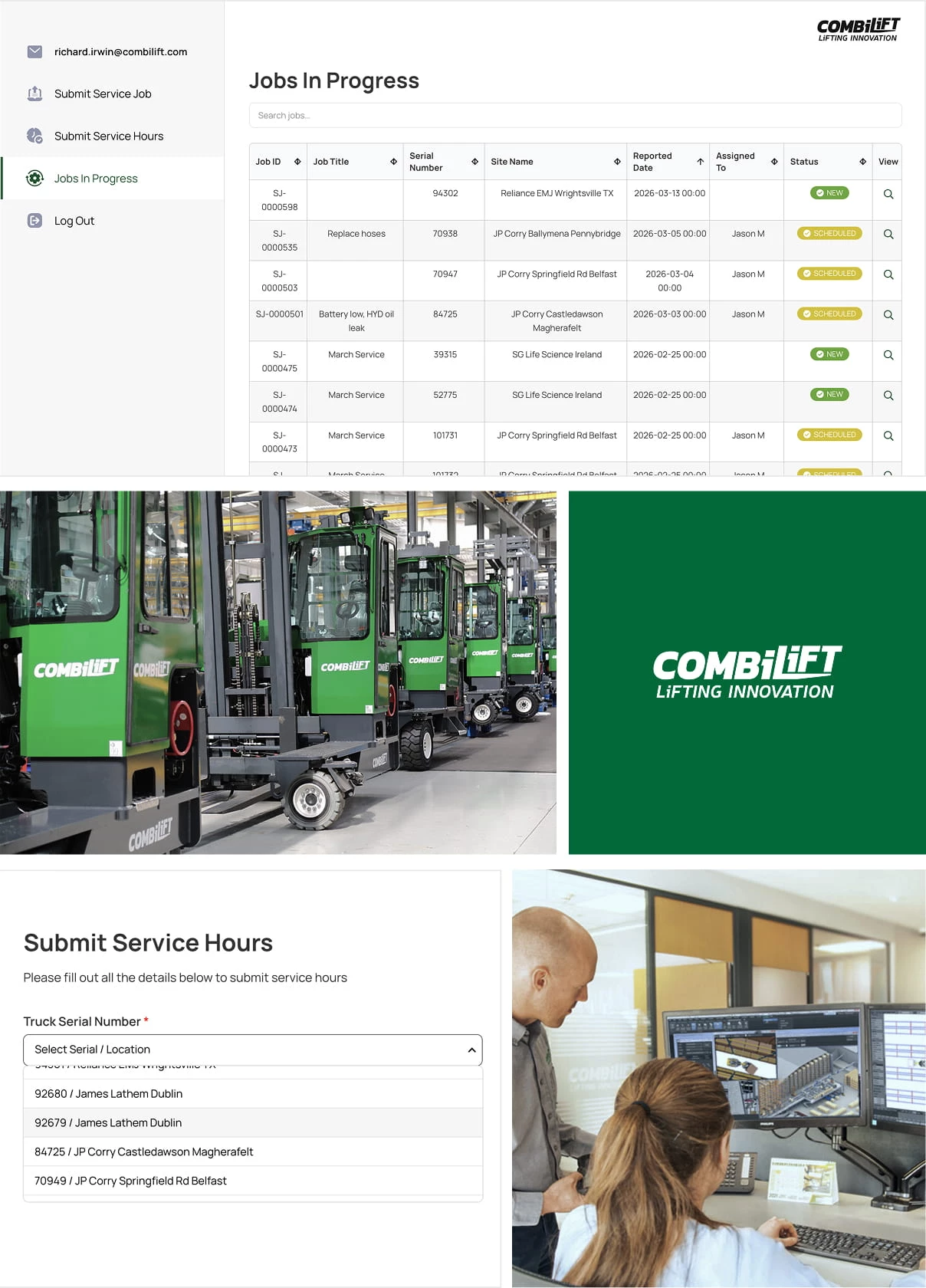
Rather than replace the existing systems, IT Monks built it on WordPress, integrated with Syteline over its API.
“We integrated the WordPress website with the internal ERP via API, which allowed users to use the website for communication, rather than relying on phone service.”
Now, requests route to engineers instead of starting an email thread, status flows both ways, and serial numbers, parts data, and invoicing appear in one place without duplicate entry.
WordPress handled authentication, role-based access, and the interface; Syteline stayed the system of record; the API carried everything between them. It shipped in two months, helped by reusing the existing portal design.
As a result, IT Monks reports:
- 80% reduction in response time
- 60% reduction in time spent per service job
- 150+ jobs handled monthly across 550+ active customers
WordPress or Custom CMS? 3 Questions That Decide It:
Run any platform decision through these three questions.
- Personalization and experimentation – What share of your traffic needs tailored content today, and what share will need it in twelve months? Limited personalization can usually be handled with plugins and edge rules. As it grows, caching gets harder, and architecture matters more.
- Localization and governance – How many brands, regions, and languages, and who approves what? Multiple teams and approval rules can add significant complexity.
- Non-functional requirements – What are your actual uptime, security, and performance targets, and are any of them contractual? Specific performance targets, uptime requirements, or audit requirements can change the platform decision.
Which One Are You? Four Profiles and What To Do
If your organization has fewer than five content types, minimal localization, and no personalization or regulatory constraints: Stay on WordPress and invest in a lean setup and proper maintenance.
If you're managing multiple brands or locales, data-driven personalization, or heavy compliance and security requirements: Invest in a custom or hybrid build with a specialist team, and decide it now rather than after another two years of workarounds.
If you're somewhere in between, which most companies are: Extend WordPress with specialist help, or move the front end to headless.
If you're not sure, measure the current workarounds first: developer hours, publishing delays, plugin maintenance, performance issues, and migration costs.
If those costs are still lower than building and maintaining a custom system, WordPress may still be the better choice.

Our team ranks agencies worldwide to help you find a qualified partner to implement the latest AI solutions. Visit our Agency Directory for the Top Web Development Companies, as well as:

-preview-webp.webp)