
As the next generation of web tools becomes more intelligent and autonomous, business leaders must rethink how their organizations structure design and development pipelines to stay ahead of the curve.
AI in Web Development: Key Findings
- Define what AI can and cannot auto-approve. Create a checklist that any AI-generated artifact must pass before deployment.
- Prioritize tool compatibility and ROI tracking from day one. Choose AI tools that integrate with your stack so you can quantify gains.
- Run small, measurable pilots before enterprise rollout. Start with a 6 to 8-week pilot on a single site or website feature, then scale only when clear KPIs improve.
Evolution of AI in Web Development
From 2015 to 2021, AI in web development mainly automated repetitive tasks.
From scaffolding frameworks, testing, auto-formatting, linting, and debugging, AI was an assistant rather than an autonomous coder.
In web design, drag-and-drop builders, template engines, and layout helpers lowered the barrier to entry for non-developers and set the stage for smarter, data-aware tools.
Between 2022 and 2026, AI moved into the workflow core: generating sizable code blocks, guiding UI/component decisions, and providing real-time IDE (Integrated Development Environment) suggestions.
In 2026, we are firmly in an era where AI in web development has become embedded in the entire lifecycle: code generation, testing, deployment, monitoring, personalization, and adaptive design.
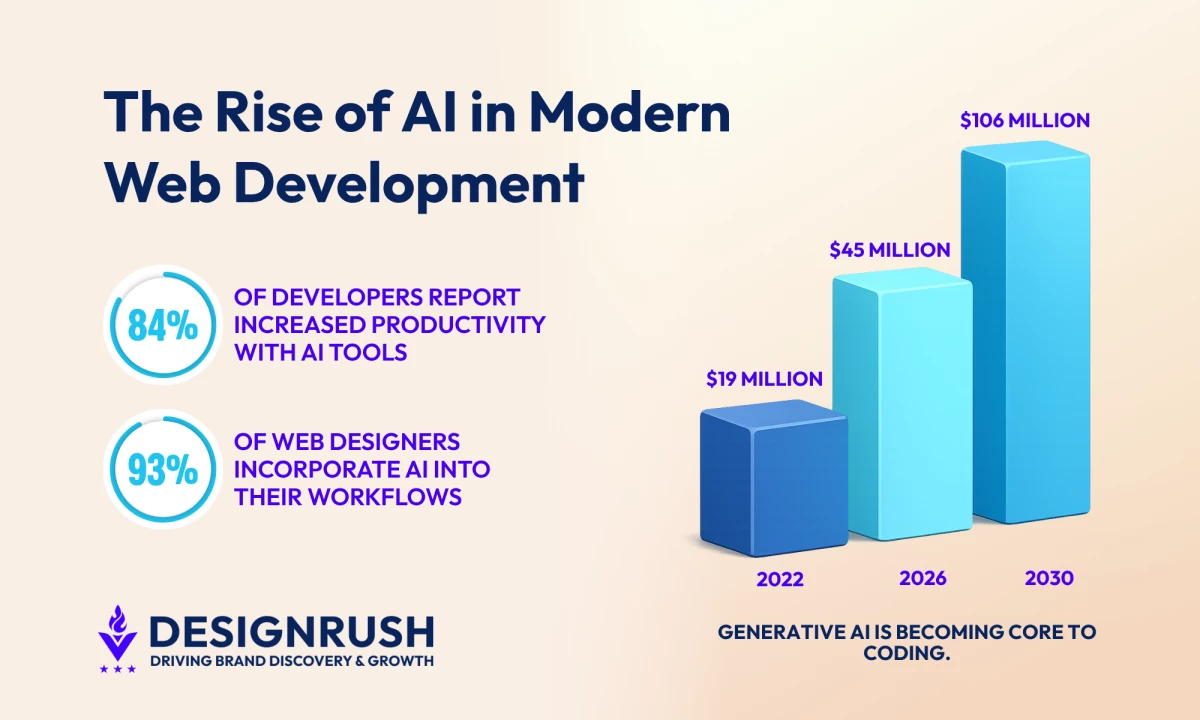
- More than 84% of developers report increased productivity when using AI tools in their workflows.
- AI-driven development tools are slashing development time and boosting productivity, contributing to a projected growth rate of 25.2% in AI adoption through 2030.
- Low-code and no-code website/app builders powered by AI are enabling non-technical stakeholders to participate directly in web development: rapid prototyping, generative layouts, AI-optimized UX.
- More than 90% of web designers report using AI tools.



Benefits of AI in Web Development
In 2026, embracing AI in web development delivers tangible business advantages across speed, scale, personalization, security, and cost-efficiency — and the data already confirms it.
| Dimension | Traditional Workflow | AI-Driven Workflow |
| Web development & testing | Manual coding | 32% faster review cycles |
| Production at scale | Throughput tied to team size | Higher output per developer at constant team size |
| Personalization | Static experiences with limited rule-based targeting | AI-driven growth 25% higher than automation without AI |
| Security | Reactive patching, inconsistent reviews | Lower error rates & better compliance |
| Spending | Longer cycles, more rework, higher overhead | Positive ROI typically within 2 to 4 years |
For business leaders, these benefits mean more than incremental improvement. They signal a shift in how web development strategies should be structured.
By leveraging AI smartly, organizations can deliver more, faster, and with higher precision, while making their development operations more agile, scalable, and cost-effective.
What to Expect in Year One (and Beyond)
According to McKinsey’s 2025 State of AI report, 57% of surveyed software engineering companies already reported revenue gains from AI adoption. Measurable business impact is becoming increasingly common as organizations scale beyond experimentation.
However, AI in web development is not an overnight transformation. Businesses that start structured pilots early are better positioned to benefit from long-term, compounding gains.
Months 1 to 3: Early Productivity Gains
- Faster code reviews and automated documentation
- Less time spent on repetitive boilerplate work
- Developers shift focus toward logic, architecture, and problem-solving
- ROI appears as recovered time rather than direct cost savings
Teams face an initial learning curve integrating AI into existing workflows. Best approach: Run controlled pilots with clear KPIs before scaling.
Months 6 to 12: Workflow-Level Improvements
- QA cycles shorten with AI-assisted testing
- Personalization features become faster and easier to develop
- Developer throughput increases without expanding headcount
- Teams begin seeing measurable operational ROI
- AI moves from task-level assistance to workflow optimization
 Years 1 to 2: Full-Pipeline ROI
According to Deloitte’s 2025 AI ROI survey, only 13% of successful AI projects generated meaningful financial returns within the first year. Most organizations achieve strong ROI within two to four years.
- AI impact becomes visible across delivery speed, development costs, and product quality
- PwC’s 2026 AI performance study found that the most AI-fit companies achieved AI-driven financial performance 7.2 times higher than other organizations
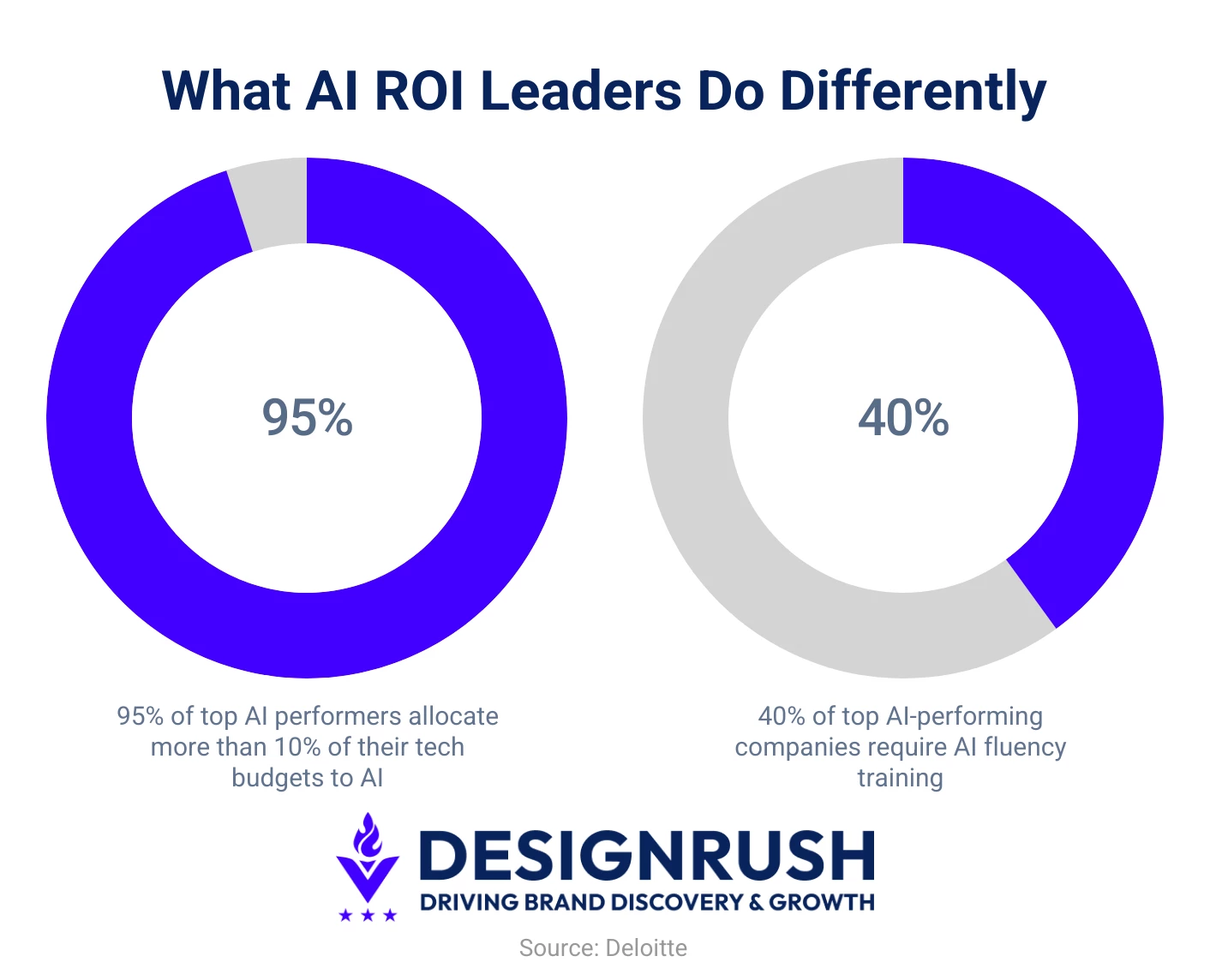
- Deloitte also found that 95% of AI ROI leaders dedicate more than 10% of their technology budgets to AI and continue increasing investment year over year
- Companies that invest early and scale strategically are more likely to see long-term compounding returns from AI adoption
How AI Is Changing Web Development: Key Use Cases and Tools
AI is now woven into every stage of the web development lifecycle. Below are the five areas where it delivers the most measurable business and technical impact:
- Code generation and automation
- Design and UI/UX
- Personalized experiences
- Performance and analytics
- No-code/low code democratization
1. Code Generation and Automation
Nearly 80% of developers reported productivity gains from AI tools, with 17% claiming a 10× increase in output.
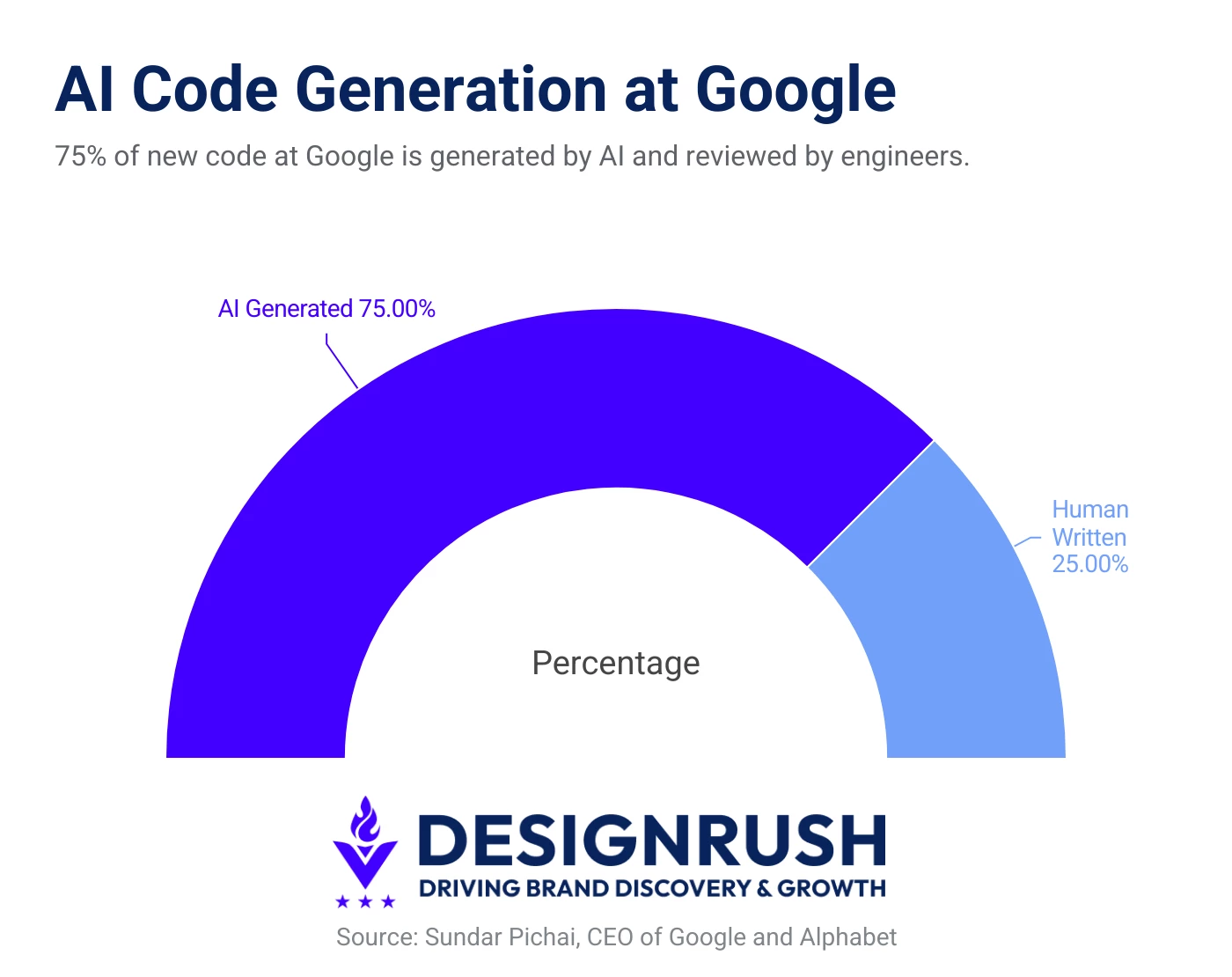
Furthermore, according to Sundar Pichai, CEO of Google and Alphabet, 75% of new code at Google is now generated by AI and reviewed by engineers.
This acceleration compresses time-to-market and reallocates talent from boilerplate to higher-value architecture and innovation, improving quality while lowering delivery costs.
How It Works:
- Smart suggestions: AI predicts the next lines or functions, so you code faster with fewer mistakes.
- Understands your project: It reads your files and docs to match your APIs, style, and patterns.
- Built-in safety nets: Automatic checks spot bugs and risks; feedback helps the AI improve over time.
Tools to Use:
- GitHub Copilot: best-in-class inline completions, tests/docs, repo-aware assistance.
- JetBrains AI: deep refactors and reviews across IntelliJ/WebStorm ecosystems.
2. Web Design and UI/UX
Research has shown how AI is improving personalization, decision-making, and automation across the web experience.
Crucially, better UX translates into higher conversion and retention, while AI-assisted accessibility reduces legal risk and broadens audience reach, directly impacting revenue and brand equity.
How It Works:
- Auto layouts: AI turns your brand's design rules into responsive pages, handling breakpoints, spacing, and components for you.
- Built-in accessibility: Flags low contrast, missing alt text, and keyboard traps, then suggests one-click fixes.
- Adapt & test: Adjusts UI in real time from behavior, auto-runs experiments, and surfaces next-best content.
Tools to Use:
- Webflow AI: AI prompts for layouts/components; auto-responsive structure with CMS-aware suggestions.
- Wix AI: Guided site generation; content, structure, and brand styling assembled from simple inputs.
- Uizard: Rapid prototyping from sketches/screenshots; generates editable UI and copy suggestions.
3. Personalized Experiences
As more businesses integrate AI in web development, personalization capabilities become central to differentiation. Dimi Baitanciuc, Co-Founder and CEO of Brizy, says:
“I’m particularly excited about AI trends like advanced personalization and predictive analytics. Imagine a website that adapts its layout or content in real-time based on who’s visiting — that’s where we’re headed.”
How It Works:
- Unified profiles: AI combines activity across devices to recognize each visitor and understand intent.
- Right content, right time: It picks the best layout, message, or offer per session to hit goals.
- Learns and adapts: Results feed back in; segments and personalized experiences update continuously for better outcomes.
Tools to Use:
- Dynamic Yield: Real-time segmentation, recommendation widgets, server- and client-side experiments.
- Insider: Unifies customer data, predicts intent, and delivers individualized web/app experiences.
4. Performance and Analytics
High-performing, resilient websites demand constant tuning through security patches, speed fixes, and reliability checks.
AI-driven monitoring and analytics automate that work, proactively preventing outages and performance dips while continuously optimizing UX without manual intervention.
How It Works:
- Stay fast automatically: AI predicts traffic spikes and bottlenecks, pre-scales servers, and streamlines assets for speedy loads.
- Spot issues instantly: It flags errors and slowdowns in real time, pinpoints causes, and suggests quick fixes.
- Turn data into wins: Connects user behavior to performance metrics, recommending UX tweaks that boost retention and conversions.
Tools to Use:
- Rewind AI: Captures your digital work session automatically. Transcribes, summarizes, and lets you search every moment effortlessly.
- Cloudflare AI: Uses predictive machine learning to monitor site traffic, block threats, optimize performance and protect web infrastructure.
5. No-Code/Low-Code Democratization
No-code/low-code platforms, along with emerging vibe coding workflows, enable non-developers to assemble functional, visually appealing websites with minimal manual coding. They just describe what they want and let AI translate intent into working interfaces.
This shift democratizes digital creation, allowing marketing, design, and product teams to prototype, test, and deploy experiences faster while reducing reliance on engineering resources.
How It Works:
- Visual logic builders: Drag-and-drop components convert user inputs into underlying code automatically.
- AI-assisted design: Platforms suggest layouts, color palettes, and structure based on content and brand preferences.
- Automation and integrations: Built-in connectors link apps, databases, and APIs without manual scripting.
Tools to Use:
- Bubble: Build web apps using workflows and database logic without writing a line of code.
- Framer AI: Converts natural language prompts into full responsive web layouts in seconds.
Questions to Ask Before Choosing an AI Web Development Tool
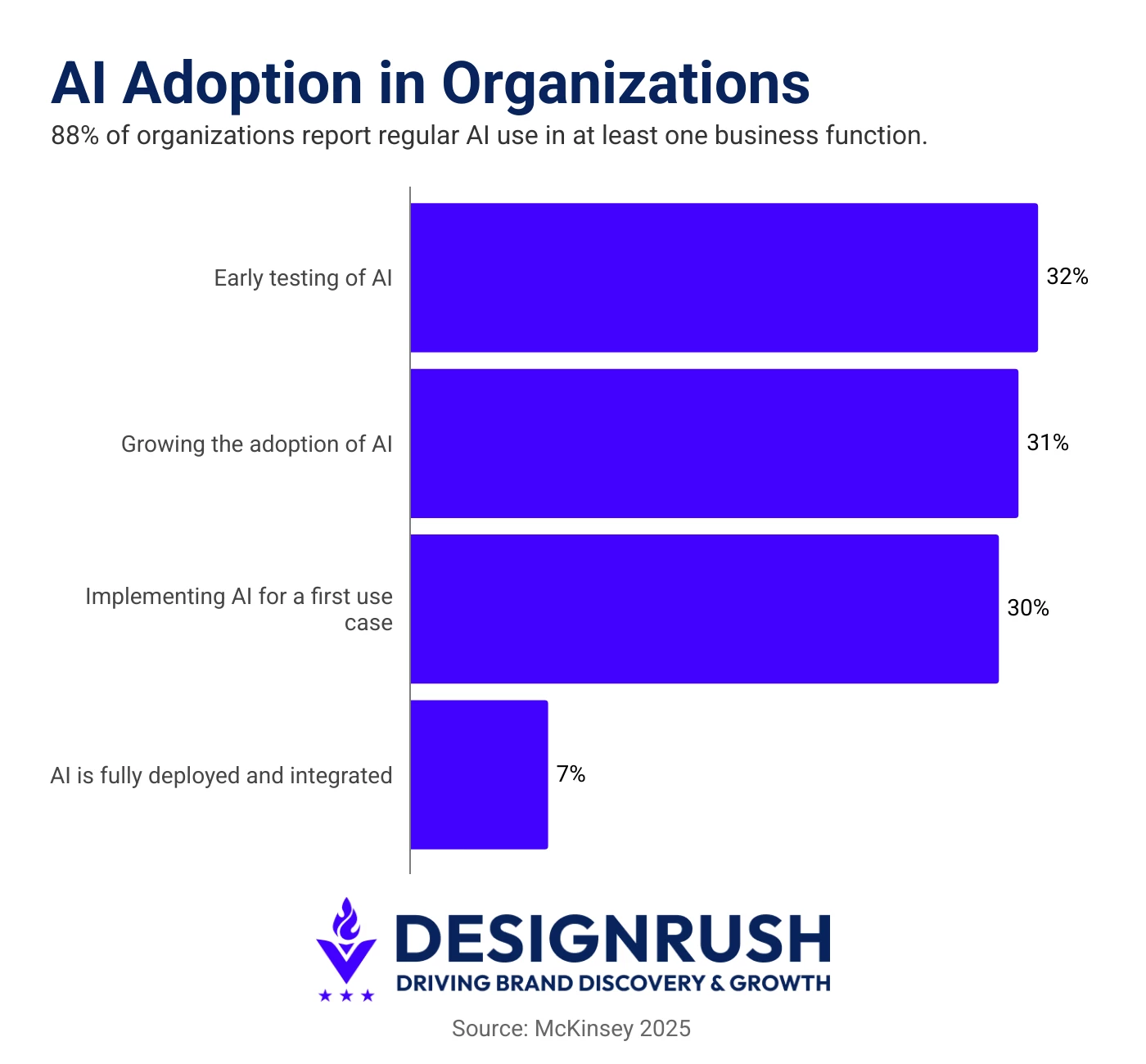
Nearly 90% of organizations now report regular AI use in at least one business function, up from 78% the previous year (McKinsey), making AI adoption widespread rather than experimental.
Yet most AI tool decisions still follow a flawed pattern: a developer demos something impressive, leadership approves the budget, and integration questions come later.
This checklist is designed to flip that sequence, so evaluation starts with real operational needs, not surface-level features.
- Does it integrate smoothly with our existing development environment? Check native support for IDEs and compatibility with CI/CD pipelines. Tools requiring major workflow changes or complex setup often face adoption friction.
- Does it support our existing tech stack and real-world use cases?AI coding performance varies significantly across languages, frameworks, and architectures. Always request stack-specific benchmarks and validate performance using your own codebase, not vendor demos.
- Where does our code and data go, and how is it used? Clarify whether code is processed locally or transmitted to external servers, whether it is stored, and if it contributes to model training. Also assess third-party subprocessors and access controls,.
- Is it compliant with our security, privacy, and IP requirements? Verify compliance with standards like GDPR, HIPAA, or SOC 2 before procurement. Ensure clear ownership terms for AI-generated code with unrestricted commercial usage rights.
- How does it perform on our real production work, not benchmarks? Run a structured pilot using actual production or legacy code over two to four weeks. Track time-to-usable output, error rates, and how often suggestions require significant rewriting.
- What will adoption actually look like across the team? Plan for a 4–8 week adjustment period as developers adapt workflows. Evaluate onboarding support, documentation quality, and team-level analytics for rollout management.
AI in Web Development: Risks, Failure Modes, and How to Mitigate Them
AI tools accelerate development, but they introduce a specific set of risks that don't exist in fully human-authored workflows.
The table below covers the most common failure modes, what they look like in practice, and the mitigation that addresses each one.
| Risk Category | What Can Go Wrong | How to Mitigate It |
| Code quality & hallucination | AI produces plausible, incorrect code that passes review | Mandate human review on all AI-generated logic |
| Security surface expansion | AI-generated auth and data access code widens attack vectors | Run automated security scans on every AI-written PR |
| Skill erosion | Junior developers skip fundamentals, outsource understanding | Require juniors to explain all AI-generated code they ship |
| IP & ownership ambiguity | Unclear who owns code AI wrote in commercial products | Review vendor ToS; document AI contribution per codebase |
| Bias in personalization | Recommendation engines disadvantage specific user demographics | Audit model outputs regularly across demographic segments |
| Complianceexposure | AI-driven personalization triggers GDPR/CCPA obligations | Map data flows before deployment; engage legal early |
The risks above are not reasons to avoid AI in web development; they are reasons to adopt it with a governance layer in place.
Teams that define review protocols, ownership policies, and compliance checkpoints before deployment consistently outperform those that address these issues reactively.
According to Rafael Levi, AI Architect Solution Expert at Bright Data, an AI model without live, specialized web access is forced to depend on outdated materials, limiting its ability to stay current and effective.
“They might have a strong foundational understanding, but their knowledge won't reflect the latest developments, trends, or immediate context. This can lead to inaccuracies, irrelevant suggestions, or an inability to handle novel situations effectively.
Real-time access bridges this gap. It allows the AI to continuously learn from the most current information available within its specific domain.”
Future Trends of AI in Web Development
As AI capabilities mature, expect a seamless blend of automation and creativity that redefines both process and product.
Aaron Janes, founder of Ignite Web Design & Development, expects big things for the future:
"In the next five years, I see AI revolutionizing web development by streamlining processes and enhancing creativity. Overall, using AI will make web development faster but it will also inspire new creativity in our projects.”
Some emerging trends to watch include:
- Deeper human–AI collaboration: Developers and designers will act more as strategists, using AI to handle execution and optimization.
- Autonomous site builders: End-to-end systems will design, code, test, and deploy fully functional websites with minimal human input.
- Agentic AI web development: AI agents will independently manage multi-step development tasks such as debugging, testing, deploying updates, monitoring performance, and coordinating across tools with limited supervision.
- AI-driven design feedback loops: Tools will analyze live user interactions and instantly suggest layout or UX improvements.
- Smarter accessibility features: AI will automatically detect accessibility gaps and generate inclusive design fixes in real time.
Together, these trends mark a shift from static development cycles to living, adaptive web ecosystems—where AI continuously learns, improves, and designs alongside us.
3 Forward-Thinking Agencies Embracing AI in Web Development
These firms are helping businesses launch smarter digital experiences while accelerating delivery, improving scalability, and reducing production bottlenecks.
1. Design in DC: Best for Conversion-Focused Web Development and Scalable Digital Experiences
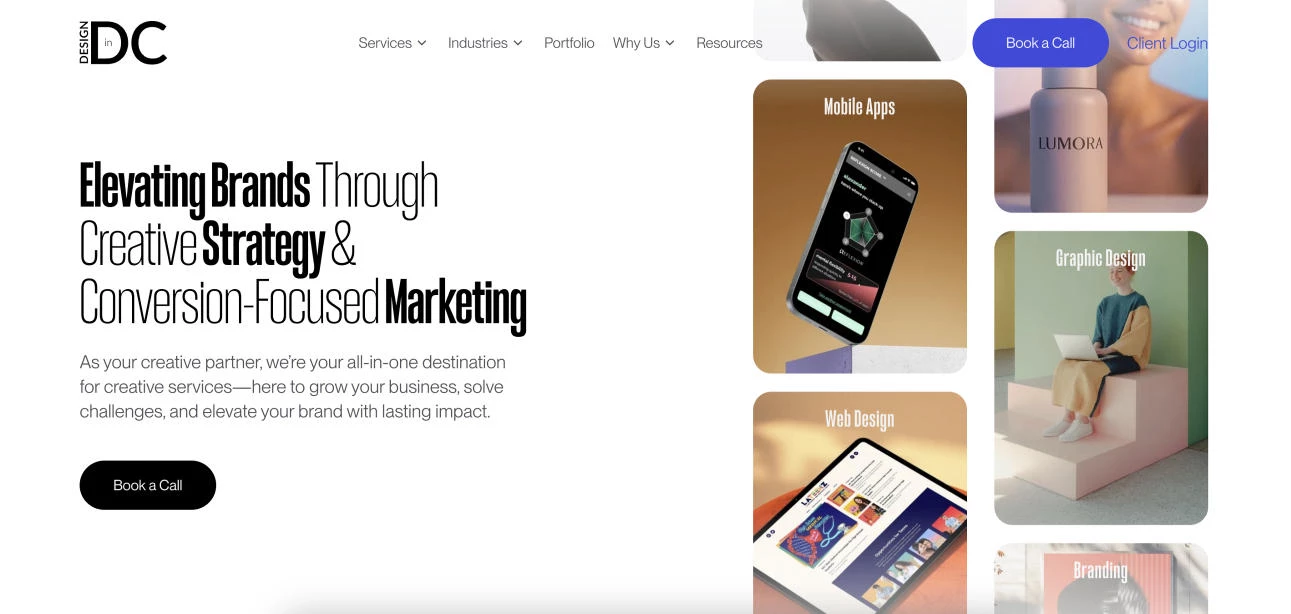
Design in DC builds AI-enhanced web development solutions focused on performance, scalability, and user experience.
The agency blends strategy, design, and engineering with emerging AI capabilities to streamline development workflows, improve site functionality, and accelerate delivery.
By integrating AI tools into modern web development processes, it helps organizations create adaptive, high-performing digital experiences that support long-term growth and continuous optimization across industries.
- Agency services:
- Web Design & Development
- Web App Development
- UI/UX Development
- Minimum budget: $10,000 - $25,000
- Notable clients: Accenture, The World Bank, Under Armour
What Clients Say
Clients consistently highlight Design In DC’s collaborative approach, technical expertise, and ability to translate business goals into polished, high-performing websites.
Across projects, they are praised for clear communication, flexibility, and delivering modern digital experiences that improve engagement, streamline operations, and strengthen brand presence.
What Sets the Agency Apart
Design In DC built RobustApp.io from the ground up: a full-stack agency management platform spanning web, iOS, and Android.
The scope covered information architecture, UI/UX design, and AI-driven feature development across multiple user workflows, delivered as a single, cohesive product.
The campaign delivered:
- Custom web app + native iOS and Android apps shipped
- AI-driven functionality integrated across core platform features
- Full delivery across discovery, IA, design, and development
- Built to support multiple concurrent user workflow types
2. Digital Silk: Best for Enterprise Web Development
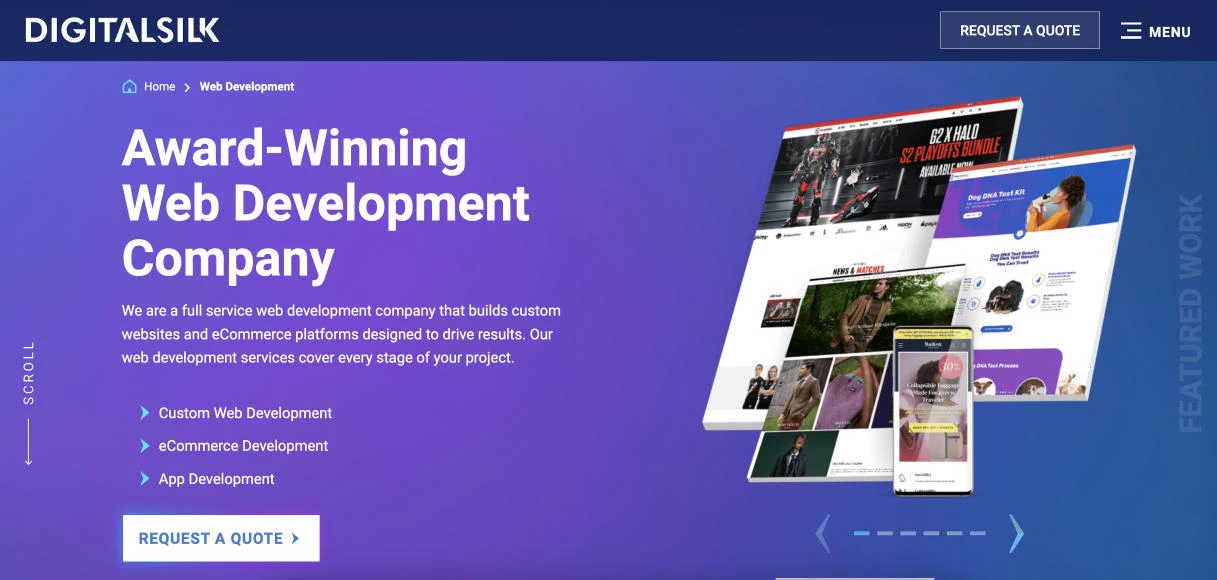
Digital Silk is a full-service web development agency that combines AI-enhanced workflows, custom development, and conversion-focused strategy to help brands build scalable digital experiences.
It specializes in custom websites, eCommerce platforms, and headless architectures across WordPress, Shopify, Magento, and React ecosystems.
Its approach blends AI-assisted efficiency with deep UX, SEO, and branding expertise to accelerate delivery, improve performance, and support long-term growth for enterprise and high-growth companies across industries.
- Agency services:
- Premium Web Design
- Branding
- Marketing
- Minimum budget: Inquire
- Notable clients: IBM, Sony, NASA
What Clients Say
Clients praise Digital Silk for combining strategic insight, responsive collaboration, and high-end execution to deliver polished, conversion-focused websites.
Reviews highlight the agency’s ability to align branding, UX, SEO, and development into seamless digital experiences that improve traffic, engagement, and long-term business growth.
What Sets the Agency Apart
Digital Silk helped Smart Academy modernize its HVACR customer portal by replacing manual data distribution with a streamlined, searchable digital platform.
The redesigned experience improved accessibility, automated resource delivery, and reduced workflow disruptions through enhanced UX, advanced search functionality, and centralized technical content management.
The campaign delivered:
- Automated technical data and resource distribution
- Improved workflow efficiency and productivity
- Enhanced UX with intuitive navigation and search
- Increased customer satisfaction and engagement
3. Unico Connect: Best for AI-Native Web Applications
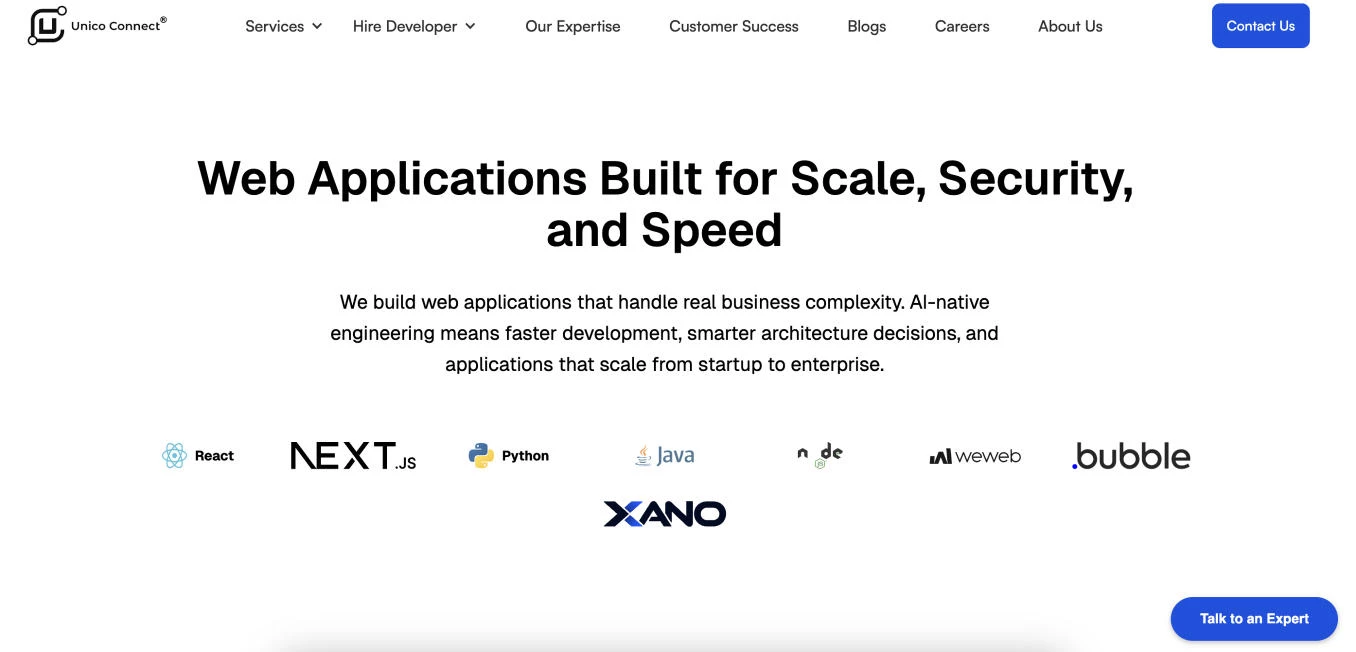
Unico Connect positions itself as an AI-native web development agency focused on scalable, high-performance applications for startups and enterprises.
Its team combines AI-assisted engineering, modular microservices architecture, and automated security workflows to accelerate development while reducing technical debt.
The agency builds custom web apps, enterprise dashboards, PWAs, eCommerce platforms, and API integrations using technologies like React, Next.js, Python, and Node.js.
- Agency services:
- Mobile App Development
- AI Agents
- Cloud & DevOps
- Minimum budget: $10,000 - $25,000
- Notable clients: Alt Codes, AO Foundation, StayVista
What Clients Say
Clients praise Unico Connect for its AI-native engineering mindset, scalable architecture expertise, and collaborative product development approach.
Reviews highlight the team’s strong technical execution, responsive communication, clean UI/UX design, and ability to deliver complex web platforms efficiently for fast-growing startups, MedTech companies, and scaling businesses.
What Sets the Agency Apart
Unico Connect helped EComm Pulse build an AI-driven SaaS platform that unified sales analytics, inventory management, and market intelligence for eCommerce sellers.
By consolidating fragmented tools into a centralized dashboard, the platform enabled faster decision-making, automated reporting, and smarter inventory forecasting for growing online brands operating across competitive marketplaces.
The campaign delivered:
- 50% improvement in product and inventory management efficiency
- 25% increase in sales through a more consistent shopping experience
- 30% growth in customer engagement through enhanced personalization
AI in Web Development: Final Thoughts
AI is redefining how websites are designed, built, and optimized from streamlining workflows to delivering deeply personalized user experiences. Yet its full potential emerges only when paired with human creativity.
By blending AI’s precision with human insight, teams can create digital experiences that are not only innovative and efficient but also inclusive and future-ready.

Our team ranks agencies worldwide to help you find a qualified partner to implement the latest AI solutions. Visit our Agency Directory for the Top Web Development Companies, as well as:
- Top AI Web Design Agencies
- Top Front End Web Development Companies
- Top WordPress Development Companies
- Top No Code Agencies
- Top Dallas Web Development Agencies
Our design experts also recognize the most innovative design projects across the globe. Visit our Awards section to see the best in web design.
AI in Web Development FAQs
1. Will AI replace web developers?
No. AI is augmenting web developers, not replacing them. AI tools can automate repetitive coding, testing, and debugging tasks, but human developers still make critical decisions around architecture, security, product strategy, and user experience.
As of 2026, no credible research predicts large-scale replacement of web developers within the next five years.
2. How much can AI reduce web development costs?
AI can reduce web development costs by accelerating coding, testing, documentation, and QA workflows. The biggest savings typically come from improved developer productivity, shorter release cycles, and reduced manual debugging rather than direct headcount reduction.
Actual savings vary depending on team size, implementation quality, and how deeply AI is integrated into workflows.
3. How should I measure ROI from AI in web development?
Use a mix of operational and business metrics: time-to-release, defects in production, developer hours saved, conversion lift, average revenue per visitor, and total cost of ownership. Compare pre- and post-adoption baselines over 3 to 6 months.
4. What is the biggest risk of using AI-generated code?
The biggest risk is deploying insecure or unreliable code that developers assume is correct because it was generated quickly and confidently. AI systems can introduce hidden vulnerabilities, outdated patterns, or inefficient logic that may not be immediately obvious during development.
Human code review and security testing are still mandatory safeguards.
5. Are no-code/low-code web development platforms secure and scalable for enterprise use?
Many platforms are mature enough for marketing and internal apps, but evaluate them against your security standards (SSO, encryption, audit logs), compliance needs, and scalability requirements before deploying customer-facing core systems.
6. How do I know if my team is ready to adopt AI development tools?
Your team is likely ready if repetitive development tasks, documentation bottlenecks, QA delays, or developer bandwidth constraints are slowing delivery.
Successful adoption usually requires clear workflows, measurable KPIs, and leadership support rather than advanced AI expertise. Most organizations start with small pilot projects before expanding usage across teams.

-preview-webp.webp)