
A farmer deciding how much nitrogen to put down is often doing it from a truck cab, one bar of signal, the agronomist three farms away. That seat is where agriculture app design has to work.
The screen fights glare, the app keeps running until the signal returns, and the answer on screen has to be clear enough that the farmer can repeat it to someone they trust.
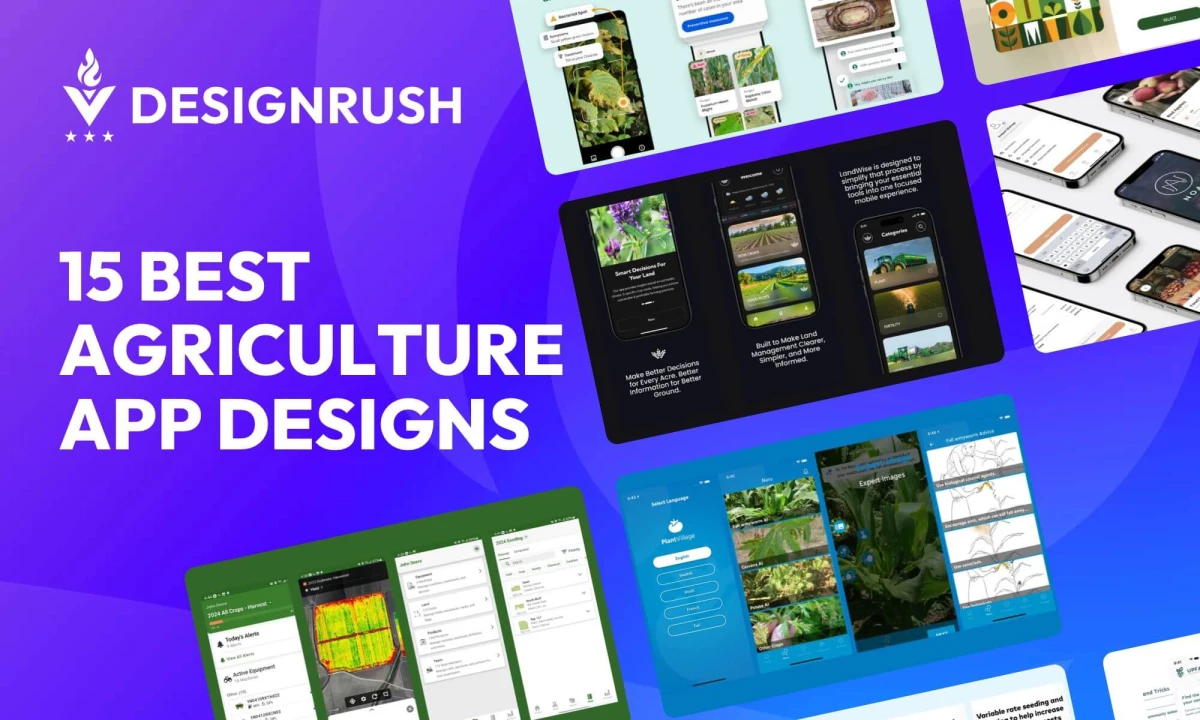
These 15 apps run in the order of a growing season: planning, managing the operation, diagnosing problems in the field, then selling the harvest.
Agriculture App Design: Key Findings
- The USDA National Agricultural Statistics Service’s August 2025 Technology Use report, based on a sample of about 28,000 operations, found 82% of US farms own or use a smartphone, while farms using precision agriculture practices fell from 27% in 2023 to 22% in 2025.
- McKinsey’s Global Farmer Insights 2026, a survey of 5,500 farmers across 10 countries, found 36% now use digital channels to evaluate and compare products, up 14 percentage points from 2024.
- The same survey found agronomists are a top influence for 56% of farmers, while only 6% name gen AI tools or AI search as a trusted source.
What Are Agriculture Apps?
Agriculture apps help farmers manage crops, land, equipment, and finances from a phone or tablet. They take over what notebooks and spreadsheets used to hold, and most run on iPhone, Android, or both.
The best farming apps fall into six jobs, and each one appears among the 15 entries:
- Planning and decision support: Crop, fertility, and food-plot plans, as in LandWise.
- Precision agriculture and crop monitoring: Satellite imagery, scouting, and variable-rate maps, as in Climate FieldView and xarvio FIELD MANAGER.
- Farm management and record keeping: Fields, costs, and profit in one place, as in Bushel.
- Machinery and field operations: Machine status and job tracking, as in Operations Center.
- Grain, market, and retailer tools: Harvest weights, contracts, and direct sales, as in Libra Harvest and Noah.
- Expert advice and collaboration: Diagnosis and shared recommendations, as in Plantix and Agworld.
What Makes a Good Agriculture App Design?
A good agriculture app design supports one farm decision at a time, keeps working when the phone loses signal, stays readable outdoors, and shows enough of its reasoning that a farmer can check the answer with an agronomist. Color and type come after those four tests.
Signal is the constraint designers most often underestimate. The USDA’s August 2025 Technology Use report found 74% of US farms reach the internet through a cellular data plan, and cellular coverage thins out across open ground.
An app built for that reality saves work on the phone first and syncs when it can.
| Field Condition | What the Design Has To Do | Who Does It on This List |
| Weak or no signal | Save work on the device, run models locally, sync later | PlantVillage Nuru diagnoses crop disease with no connection |
| Gloves, dust, one free hand | Large targets, few steps, navigation at the bottom edge | LandWise uses full-width photo cards and a three-icon bottom bar |
| Mixed languages and literacy | Voice input, local languages, photos in place of typed descriptions | Farmer's Solutions takes spoken questions; Plantix starts from a photo |
| An adviser in the decision | Shareable reports and visible reasoning | Xarvio turns a scouting visit into a report; Climate FieldView exports yield analysis |
Language and interface friction cost apps their users after the first download.
A 2026 study in the Asia-Pacific Journal of Regional Science of 151 farmers using ClimaFarm, a weather and agronomy advisory app in Vietnam and Thailand, found trust was the strongest of four factors predicting continued use, alongside usefulness, satisfaction, and attitude.
The farmers who dropped off named interface and language barriers, forecast accuracy, and patchy connectivity, and the authors read those as usability problems, since the farmers still rated the advice as relevant.
How These 15 Agriculture App Designs Were Chosen
Each app was grouped by season stage, three to a stage, with half drawn from outside DesignRush so the list covers tools farmers already use.
| Stage | The Decision It Supports | Entries |
| Plan | What to plant, at what rate, with what fertility | LandWise, Climate FieldView, Agrilo |
| Manage | Running machines, tasks, and records | John Deere Operations Center, Farmer's Solutions, Farm Management App |
| Diagnose | What is wrong with a crop and what to do about it | Plantix, PlantVillage Nuru, xarvio FIELD MANAGER |
| Sell and connect | Getting produce to buyers and farmers to each other | Farm.One, Noah, Upfarm |
Within each entry, four questions decided what got written about: whether the design fits the decision it serves, how it holds up in field conditions, whether it shows its reasoning, and what evidence exists that farmers actually use it.
Six of the entries come from the agriculture app design gallery. Submitted designs there are scored against four weighted criteria:
| Criterion | Weight | What It Measures |
| Design | 30% | How well the design commands attention and prompts action |
| Usability | 30% | Whether the design achieves its purpose and improves the user experience |
| Creativity | 30% | Whether the design is original in its techniques, tools, and concepts |
| Content | 10% | Whether the design is detail-oriented in execution and presentation |
Design Awards entries are submitted by agencies and designers through a paid DesignRush subscription, under the published evaluation process.
The 15 Best Agriculture App Design at a Glance
The table below compares 15 agriculture apps by the teams behind them, farming segment, and standout feature.
| App | Built By | Segment | Standout Feature |
| LandWise | Doodle N Dash | Land and crop planning | Full-width photo category cards |
| Climate FieldView | Bayer | Field data platform | Yield reports exported from the phone |
| Agrilo | Potential | Soil sensing | Pattern-coded soil readings |
| Operations Center | John Deere | Machine data platform | Machines log every pass |
| Farmer’s Solutions | Yudiz Solutions | Farm advisory | Spoken questions and answers |
| Farm Management App | Talha Cay | Farm records concept | Plainly laid-out record forms |
| Plantix | PEAT | Crop diagnosis | Photo-first diagnosis |
| PlantVillage Nuru | Penn State | Offline crop diagnosis | Diagnosis with no signal |
| xarvio FIELD MANAGER | BASF | Crop management for advisers | GPS-guided scouting trips |
| Farm.One | Spaceberry Studio | Vertical farm subscription | Pause, swap, or skip a week |
| Noah | Ronas IT | Local food marketplace | Separate shopper and farmer apps |
| Upfarm | Harshlotiya | Farmer community marketplace | Buy or rent equipment |
| Libra Harvest | Agrimatics | Grain and harvest tools | Automatic unload detection |
| The Bushel App | Bushel | Farm management and record keeping | Profit and loss by field |
| Agworld | Agworld | Expert advice and collaboration | Margins on the map |
1. LandWise by Doodle N Dash
Standout Features:
- Full-width photo category cards
- Weather and market strip
- Three-icon bottom bar
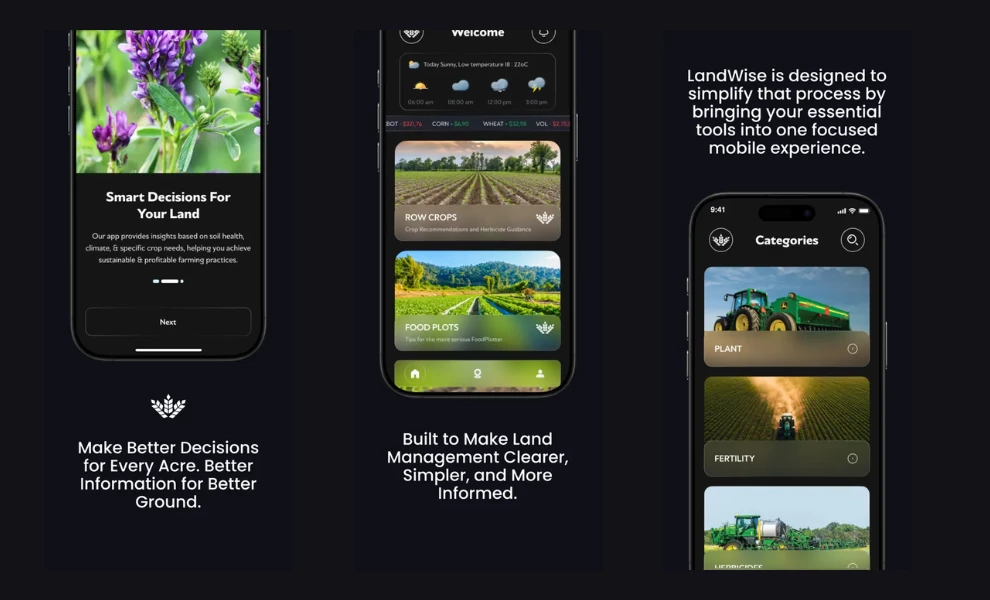
LandWise is an app for row-crop farmers, landowners, food plotters, and land managers deciding what to do with their ground.
You choose row crops or food plots, answer questions about the crop or species, the location, and what you want from the land, and the app turns those answers into planting, fertility, and herbicide recommendations. Plans save in the app, so you can reopen one later in the season.
The idea for LandWise came from Dustin Wiseman, an agricultural consultant with more than 21 years of experience, including work on wildlife land from Iowa and Kansas to Mississippi and the East Coast.
After a consultant leaves, the landowner keeps facing new questions for the rest of the year. Wiseman says in the launch release that he built the app “for the person standing in a field wondering what to do next.”
The app runs the answers you give it through decision rules drawn from Wiseman’s consulting work. A food plot plan, for example, works through what to plant, when to plant it, how much seed to put down, and how to handle fertility and weeds, with each answer shaped by the location and goal you entered.
The screen shows only the finished plan and keeps the database and rule logic out of view.
Doodle N Dash took LandWise from concept to a working app and built the recommendation engines with Wiseman. The agency says those engines pull from four sources: weather APIs, real-time location mapping, augmented reality, and US soil data.
See more of Doodle N Dash’s work on DesignRush.
The resulting layout follows a rule Doodle N Dash founder Ahmad Sohail learned from the agency’s 250-plus projects: design around “the customer you actually have, instead of the one you wish you had.”
Sohail wrote that visitors skim, scroll, and look for a button before they read any copy, so the first screen has to do all the work.
The home screen asks you for one decision, row crops or food plots, and gives each option a full-width photo card with its label on a frosted panel over the image.
Above the cards, an hourly weather strip and a commodity price ticker show conditions and prices before you tap anything.
Pick a land type, and the Categories screen splits the work into Plant, Fertility, and Herbicides, each a full-width field photograph with a chevron. A three-icon bar for home, location, and profile sits where your thumb rests in one-handed use.
The agency says the hardest part was live field input for planting decisions, since gathering that data "felt nearly impossible without physically being on the farm."
Its answer combines weather APIs, real-time location mapping, augmented reality, and US soil data in a proprietary algorithm that the agency reports predicts field conditions with unprecedented accuracy.
Why it works commercially: McKinsey’s Global Farmer Insights 2026, a survey of 5,500 farmers in ten countries, finds that agronomists remain a top influence for 56% of them.
LandWise’s App Store listing calls the app a complement to professional agricultural guidance. A farmer can bring a saved plan to the next agronomist visit and start the conversation from there.
2. Climate FieldView by Bayer
Standout Features:
- At-a-glance season summary
- Yield reports exported from iPhone
- Dealer-supported subscription tiers
Climate FieldView is Bayer’s digital farming platform, run by its Climate LLC subsidiary, and it gathers planting, application, and yield data from a farmer’s equipment into one record per field. Bayer built it for farmers and the advisers they share data with.
For the 2025 planning season, Bayer added Your Farm at a Glance, a summary view that surfaces trends and outliers a farmer used to dig for across seasons.
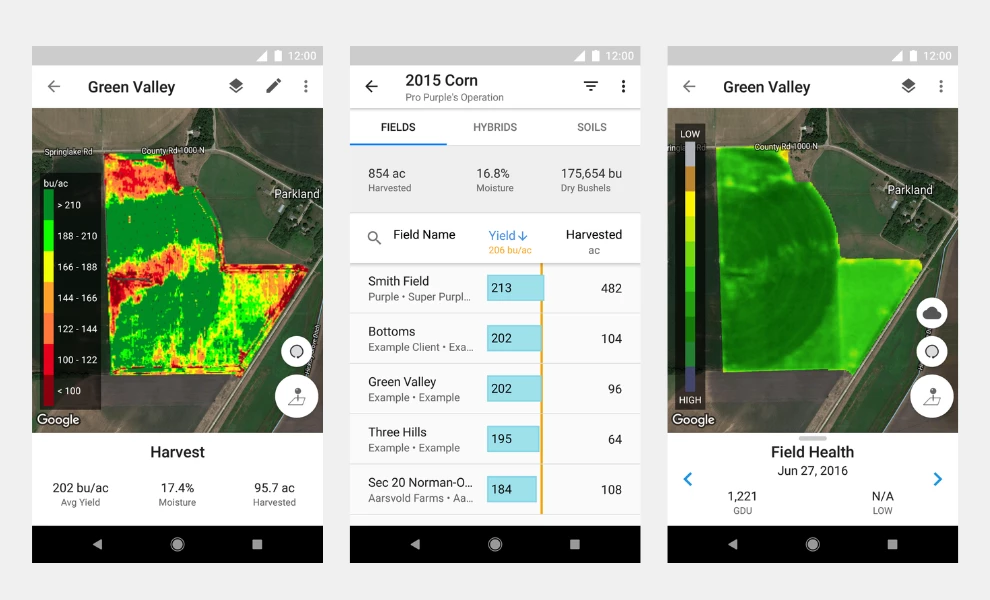
The iOS app runs on white cards over a four-tab bottom bar for Overview, Fields, Reports, and Settings, and its Field Health view shades each field by satellite biomass, dark green for high down to red for low, with the share of the field in each band listed beside the map.
A Yield Analysis by Field report ranks every field against the operation’s average, and reports export as PDF or CSV straight from the iOS app. That puts the farmer’s own numbers in front of an agronomist or landlord in a format they already use.
Reported outcome: More than 250 million subscribed acres across 23 countries, company-reported by Bayer. This measures subscription reach, not yield or revenue.
Why it works commercially: McKinsey’s 2026 survey found 36% of farmers now use digital channels to evaluate and compare products, up 14 percentage points from 2024. A yield report that exports in two taps is the evidence those comparisons run on.
3. Agrilo by Potential
Standout Features:
- Neon lime on near-black
- Pattern-coded soil readings
- Center scan button
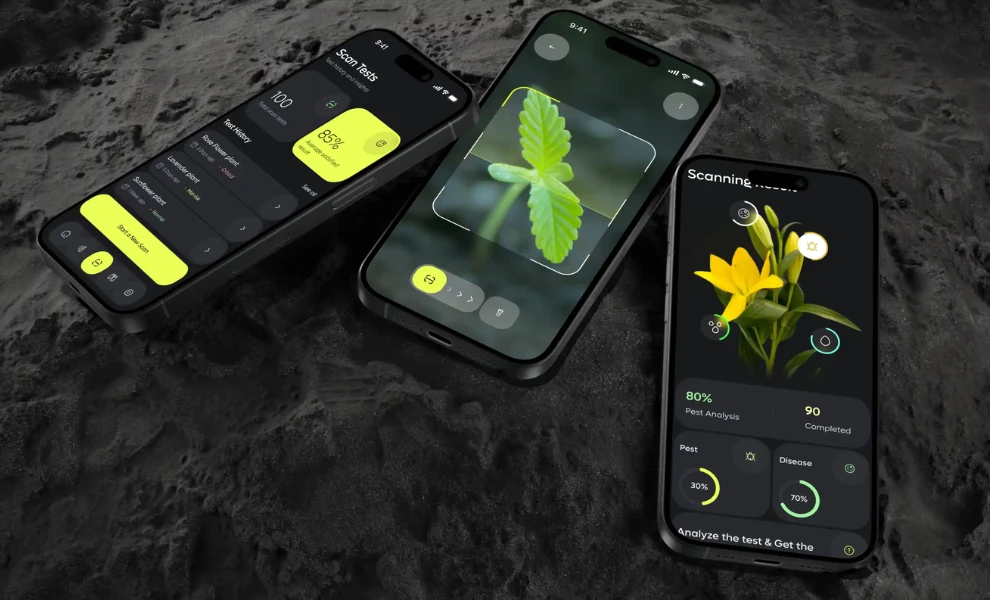
Agrilo pairs soil sensors with an app that tells the grower what to do about the readings. Potential, a San Francisco agency focused on AI-powered products, designed it, and its DesignRush entry describes an audience that includes home gardeners alongside working growers.
The interface pairs a neon lime (#E9FF4D) with near-black panels and a rounded geometric sans-serif.
The home screen opens on a Soil Overview card showing four readings at once, pH, moisture, fertility, and nutrients, and each bar uses its own fill pattern (solid, striped, dotted, or gradient), so the readings stay distinct without relying on color.
A segmented toggle switches between Soil Overview and Scan Overview, and a lime scan button sits at the center of the bottom bar.
Why it works commercially: In the 2026 ClimaFarm study of 151 farmers, perceived usefulness was one of the strongest predictors of continued use (β = 0.261). Four soil readings on one card, each readable without relying on color, make the app useful on first open.
We break down how the screens turn raw sensor numbers into a soil to-do list in our full Agrilo app design analysis.
4. Operations Center by John Deere
Standout Features:
- Machines log every pass
- Gen AI assistant layer
- One record per field
John Deere Operations Center is Deere’s online farm management system. Connected machines send each field pass into it with no typing from the operator, and farmers and their advisers plan work and review results from the same field record on web or mobile.
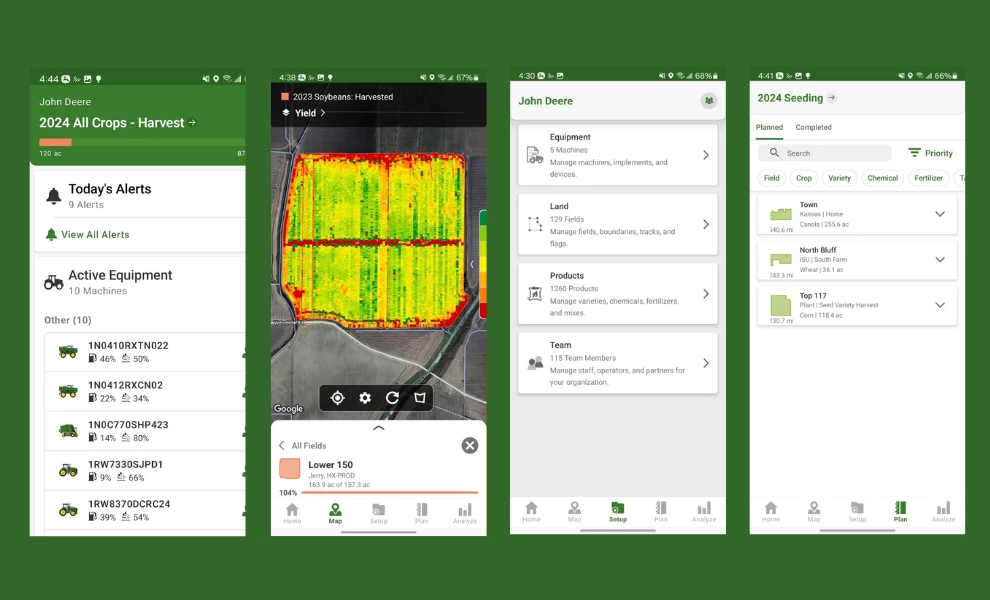
The mobile app opens under a John Deere green (#377C2B) header showing the operation in progress, a seeding pass, say, with a progress bar measured in acres.
Machine alerts and live equipment status sit below, and a five-tab bottom bar moves between Home, Map, Setup, Plan, and Analyze.
On September 1, 2026, Deere opened early access to JD, a gen AI assistant that answers plain-language questions from a farmer’s own field and machine data, free to Operations Center users, with wider rollout later in 2026.
Reported outcome: More than 520 million engaged acres across nearly 1.2 million connected machines, over 190 million highly engaged acres, and more than 450,000 monthly digital users, company-reported on Deere’s Q3 2026 earnings call on August 20, 2026.
Why it works commercially: McKinsey’s Global Farmer Insights 2026 found 17% of farmers already use gen AI for farm tasks, while only 4% pay for a solution. An assistant that answers from a farmer’s own machine records starts from data the farmer already trusts.
5. Farmer’s Solutions by Yudiz Solutions

Standout Features:
- Spoken questions and answers
- Language-adaptable type
- Daily weather and news view
Farmer’s Solutions is an agricultural management app designed by Yudiz Solutions. Its most distinctive tool lets a farmer record a spoken question and get an answer back, so the app works for users who would rather talk than type.
The home screen gives a daily overview of real-time weather and agricultural news, and the app saves responses for later use. Yudiz built the palette on green and orange, set type that adapts to local languages, and illustrated farm life in flat geometric shapes.
Why it works commercially: In the 2026 ClimaFarm study of 151 farmers, the users who stopped using the app named interface and language barriers among their reasons. Voice input and language-adaptable type take on both of those barriers in the first screen.
Our in-depth Farmer’s Solutions analysis walks through the voice tool and the daily dashboard screen by screen.
6. Farm Management App by Talha Cay
Standout Features:
- Green-themed form screens
- Soft illustrations
- Icon-led navigation
Farm Management App is a design concept by Talha Cay for organizing farm tasks and records, and it ranks among the most-viewed agriculture designs on DesignRush, with more than 4,000 views.
No client, launch, or app store listing turned up for it, so treat its screens as a reference for form design.
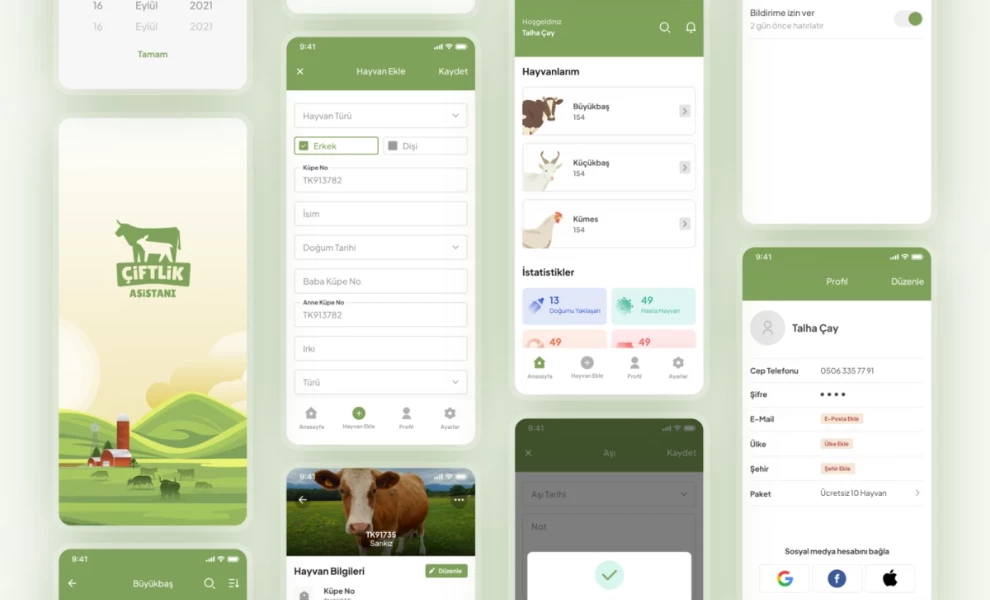
The screens use a green theme with plainly laid-out forms, gentle illustrations, and a consistent icon set, which keeps data entry from feeling like paperwork. Record-keeping apps lose people at the form, and this design spends its attention there.
Why it works commercially: The USDA’s 2025 Technology Use report found precision agriculture practices on 22% of US farms, down from 27% in 2023, even as smartphone ownership held at 82%. A record that takes a minute to log is a record that gets kept.
The form layouts and icon set get a closer look in our Farm Management App breakdown.
7. Plantix by PEAT
Standout Features:
- Photo-first diagnosis
- Nearby disease alerts
- Week-by-week crop calendar
Plantix is a crop diagnosis app from PEAT GmbH, a Berlin company owned by Helm AG since 2023. A farmer photographs a sick plant and gets a diagnosis with treatment options in seconds, and a community of agricultural experts takes the questions the model can’t settle.
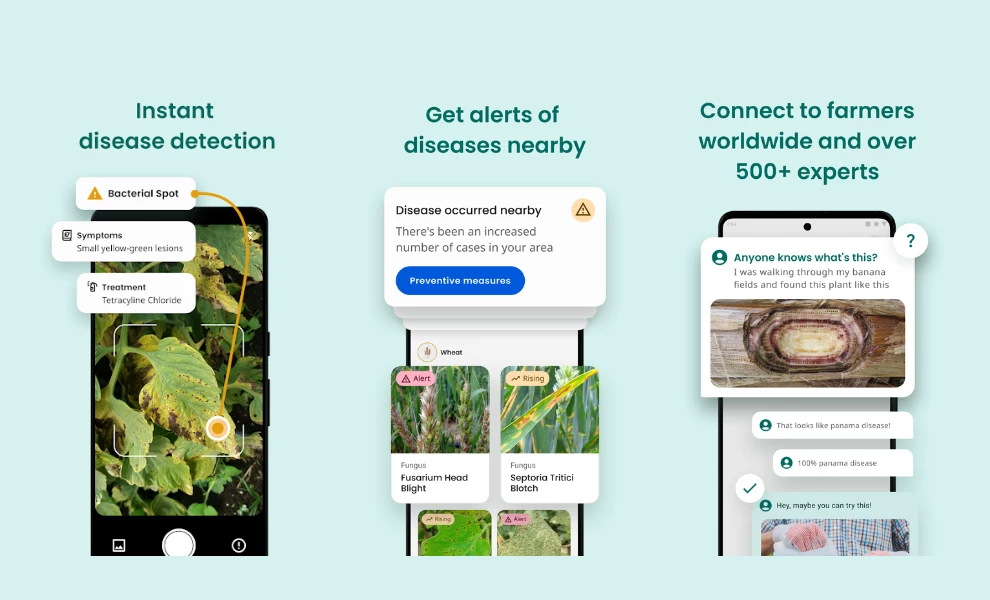
The camera viewfinder is the main input, and a diagnosis comes back as stacked cards for the problem, its symptoms, and a treatment, which suits users who would struggle with a typed symptom checklist.
A nearby-disease alert warns when cases rise in the area, and a cultivation timeline sets tasks week by week from two weeks before seeding. Plantix is built for Android, and a different developer’s app uses the Plantix name on the US App Store.
Reported outcome: More than 100 million crop-related questions answered, company-reported on plantix.net. This counts questions asked, not diagnoses confirmed in the field.
Why it works commercially: McKinsey’s Global Farmer Insights 2026 found only 6% of farmers treat gen AI tools or AI search as a trusted decision source. Routing hard cases to human experts gives an AI diagnosis the second opinion farmers are more willing to act on.
8. PlantVillage Nuru by Penn State
Standout Features:
- Diagnosis with no signal
- Point-the-camera scanning
- Local-language advice
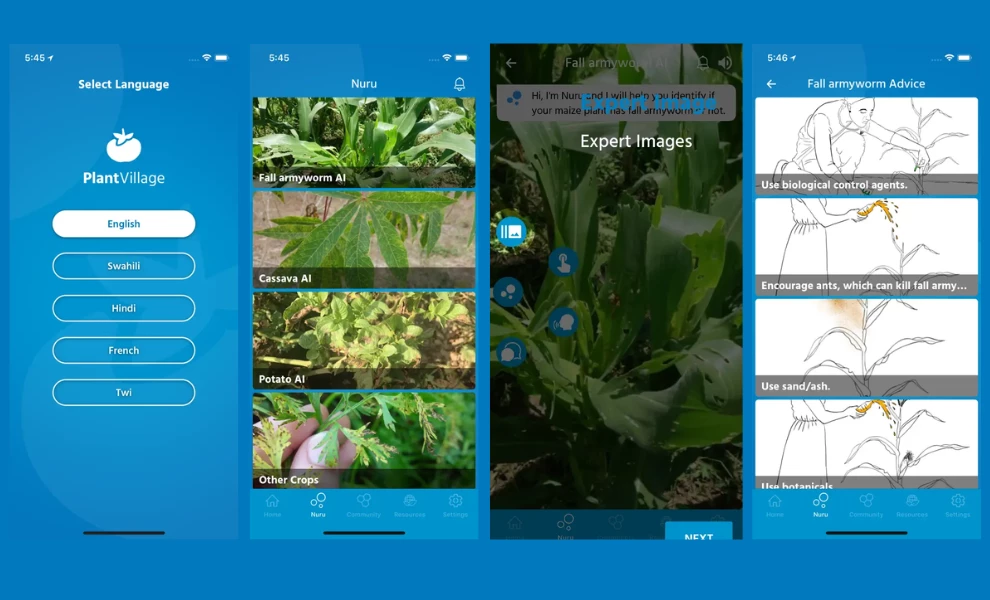
PlantVillage Nuru is a free crop diagnosis app developed at Penn State with the UN Food and Agriculture Organization and the International Institute of Tropical Agriculture. Its AI model runs on the phone itself, so it diagnoses crop disease in the field with no connection.
The farmer holds the camera over a leaf, and the app names the problem and suggests fixes. When signal returns, images can go to a cloud model that works alongside human experts, and advice comes in Swahili, Twi, Hindi, French, and English.
Researchers tested Nuru on cassava, whose mosaic and brown streak diseases outrun the extension agents sent to spot them.
In a study published in Frontiers in Plant Science in December 2020, Nuru identified symptoms with 65% accuracy, against 40 to 58% for extension agents and 18 to 31% for farmers on the same plants.
Accuracy rose to 74 to 88% when the app assessed six leaves per plant, and the figures predate later model updates. An app that runs on the device and asks for six leaves instead of one gets a better diagnosis from the same farmer.
Why it works commercially: the USDA’s 2025 Technology Use report found 74% of US farms reach the internet through cellular data plans. A diagnosis that needs no signal works on the acres those plans fail to cover.
9. xarvio FIELD MANAGER by BASF
Standout Features:
- GPS-guided scouting trips
- Field-specific crop models
- Reports shared with clients
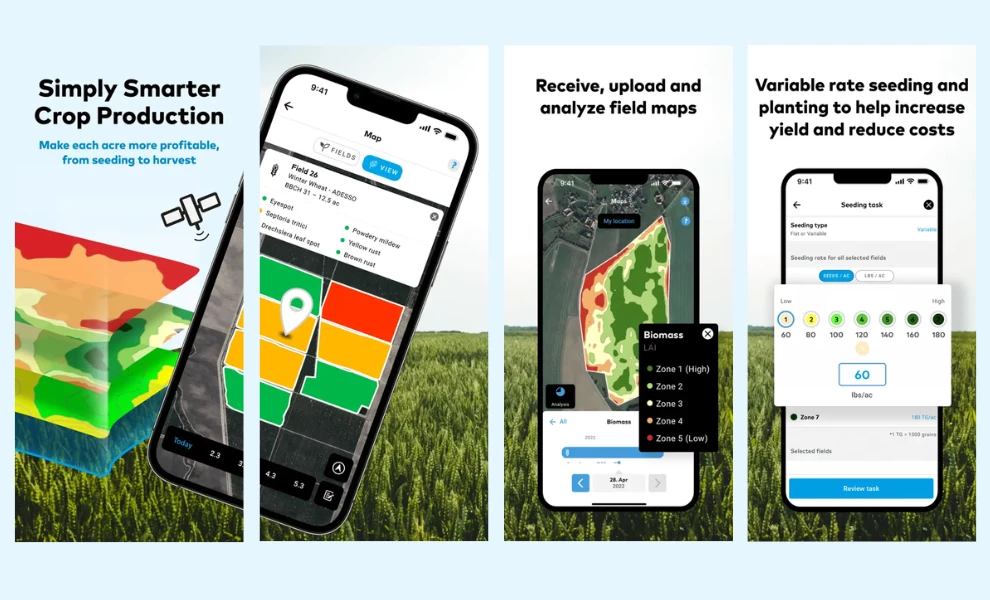
xarvio FIELD MANAGER is BASF Digital Farming’s crop management platform, and it gives field-specific recommendations from seeding to harvest using crop growth, pest, and disease models.
The AgBusiness version, launched in Canada and the US in 2025, is built for advisers who manage many farms.
Its Scouting Trips feature guides an adviser by GPS to a specific spot in a field, captures observations there, and turns them into a report to share with colleagues or the farmer. The map view shades each field by biomass zone, from Zone 1 (high) in green to Zone 5 (low) in red, with the legend on a dark overlay panel and a My Location button above the field.
Reported outcome: More than 130,000 farmers and consultants signed up, with more than 20 million hectares set up, company-reported by 25 BASF in September 20.
Why it works commercially: McKinsey’s Global Farmer Insights 2026 recorded the first significant drop in sales reps’ influence, down 11 percentage points globally, while agronomists held their place.
A tool that turns an adviser’s field visit into a shareable report backs the person farmers still rely on.
10. Farm.One by Spaceberry Studio
Standout Features:
- Produce supplies the color
- Pause, swap, or skip a week
- Recipes and events in one feed
Farm.One runs an indoor vertical farm in Brooklyn and sells its greens and herbs to members through weekly subscriptions.
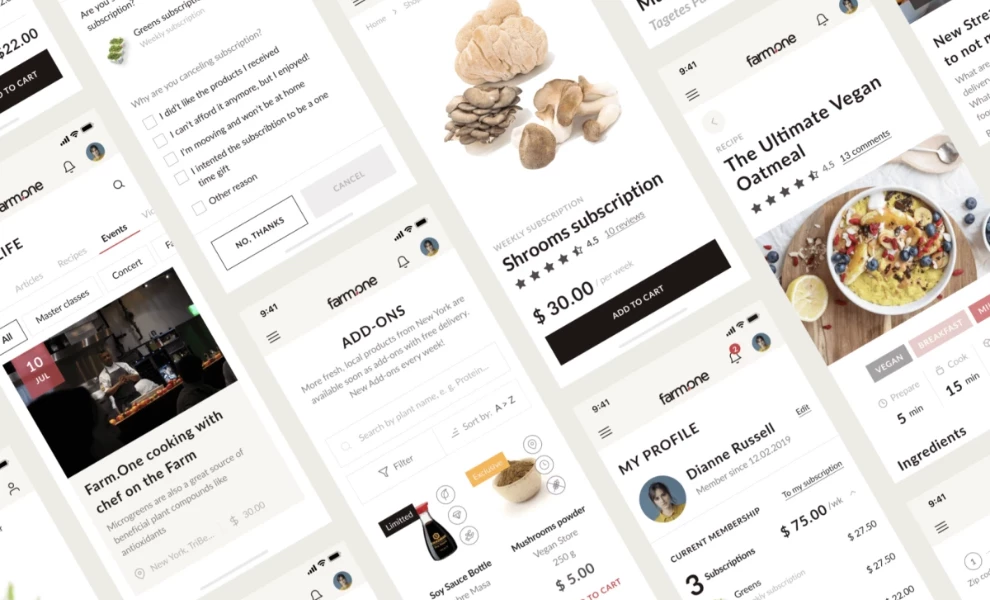
The interface sits on white and off-white so the produce photography supplies the color, with sans-serif type over the images. Members pause, swap, skip a week, or renew any item in a few taps, and a segmented home screen separates products, articles, recipes, and events.
Farm.One closed its Brooklyn farm in early 2022, reopened under a new investor later that year, then added a farm store called Field & Pantry in May 2026. Members now sign up through the farm’s website, and no current Farm.One app listing turned up as of October 2026.
Why it works commercially: Recurly’s 2026 State of Subscriptions report found three in four subscribers who pause eventually return, and a pause option turns 25% of would-be cancellations into pauses.
Putting pause, swap, and skip on the main screen gives a member a way to stay through a slow month.
For the subscription flow, from pause to swap to skip-a-week, read our full Farm.One app design analysis.
11. Noah by Ronas IT
Standout Features:
- Separate shopper and farmer apps
- Map search for nearby producers
- Expiry and storage on listings
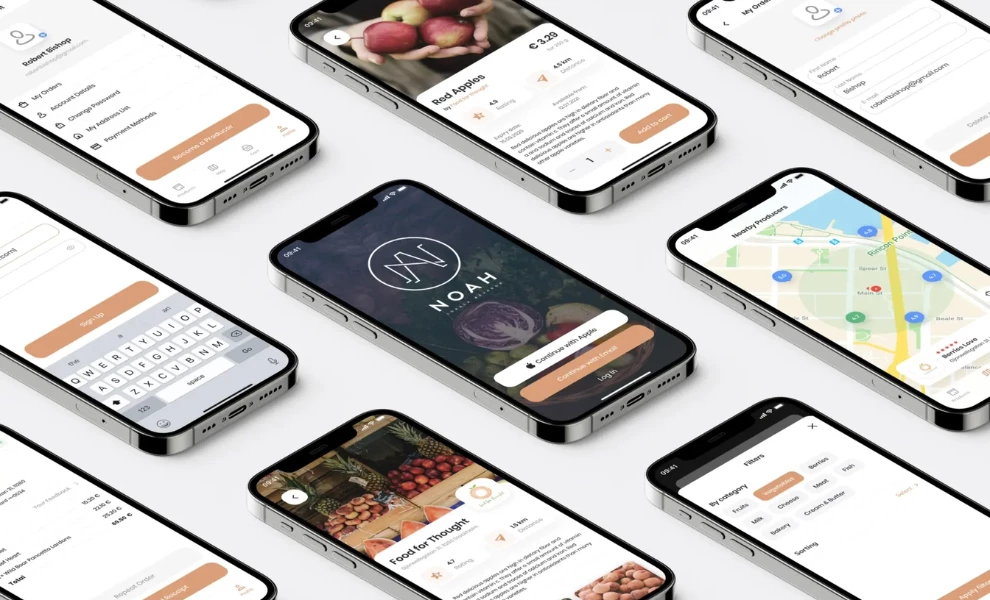
Noah is a Swedish marketplace that lets shoppers buy directly from local farmers, built by Ronas IT as two connected apps, one for consumers and one for producers. Shoppers find products and farms through a search bar or an interactive map that shows how close each producer is.
Producers manage their own profiles, listings, prices, discounts, and orders, and every listing carries expiration dates and storage instructions from the farmer.
Ronas IT built a minimal UI that holds both bright produce photography and quieter farm branding, and drew the app icon from Noah’s corporate color and its initials. The business, Noah Lokal Mat in Luleå, still sells food from about 30 Norrbotten producers through its app and webshop.
Noah’s founders came to Ronas IT in March with a fixed deadline: the apps had to be live before the Swedish harvest, which runs July to October.
Ronas IT reports shipping both native apps within four months, built in Swift and Kotlin with a shared UI kit, Stripe payments, and Firebase sign-in, on a project it dates to 2019.
That timeline is agency-reported, with no usage figures alongside it. The lesson for any farm marketplace is to set the launch date by the crop calendar and cut scope to meet it, since an app that misses harvest waits a year for its next season.
Why it works commercially: the USDA’s 2025 Technology Use report found 29% of US farms used the internet to market agricultural products, up from 23% in 2023. A producer app a farmer can run alone turns that intent into listings.
We look at how one design system serves both shoppers and farmers in ourin-depth Noah app analysis.
12. Upfarm by Harshlotiya
Standout Features:
- Skippable onboarding
- Language choice up front
- Buy or rent equipment
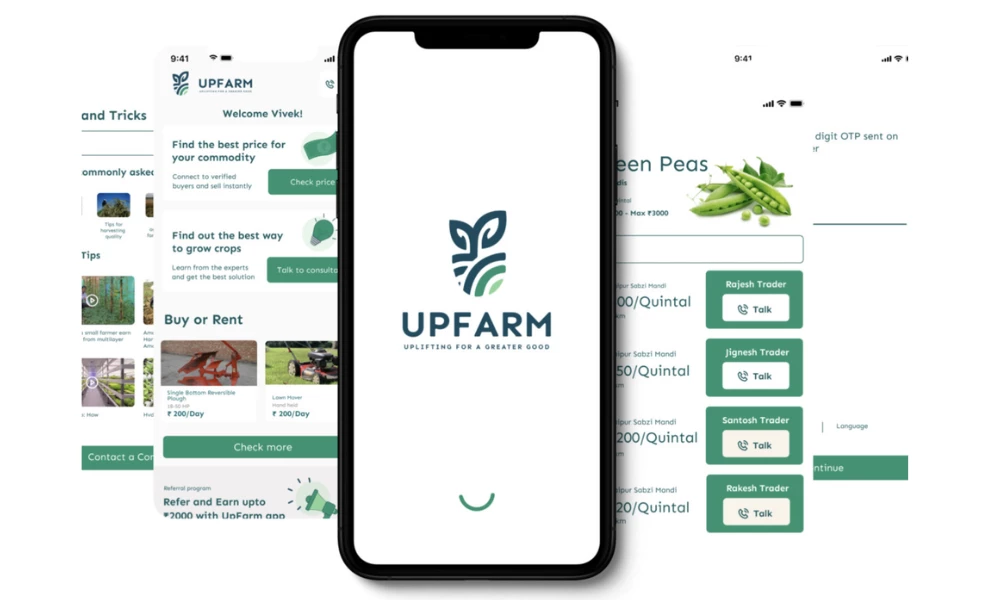
Upfarm is a community and marketplace app for farmers, designed by Harshlotiya, a Dublin-based UX designer. Farmers use it for growing guidance, to reach buyers and experts, and to buy or rent equipment from verified stores.
Onboarding walks a new user through the app but lets them skip it, and language selection comes first. The home screen routes to buyers, expert consultations, and the marketplace on a green-and-white palette with simple illustrations.
Harshlotiya reports a four-month project built on interviews with prospective users about their habits and frustrations. Sign-in through Google or Facebook keeps account setup off the first visit.
No public app store listing for Upfarm turned up, so this is a design concept with no launched product behind it yet.
Why it works commercially: McKinsey’s Global Farmer Insights 2026 found 31% of farmers now research products through digital channels. A marketplace that sits next to peer advice reaches that research where it already happens.
Our complete Upfarm app analysis shows how the onboarding prepares a first-time user before the home screen.
13. Libra Harvest by Agrimatics
Standout Features:
- Automatic unload detection
- Offline harvest records
- Live weights per cart
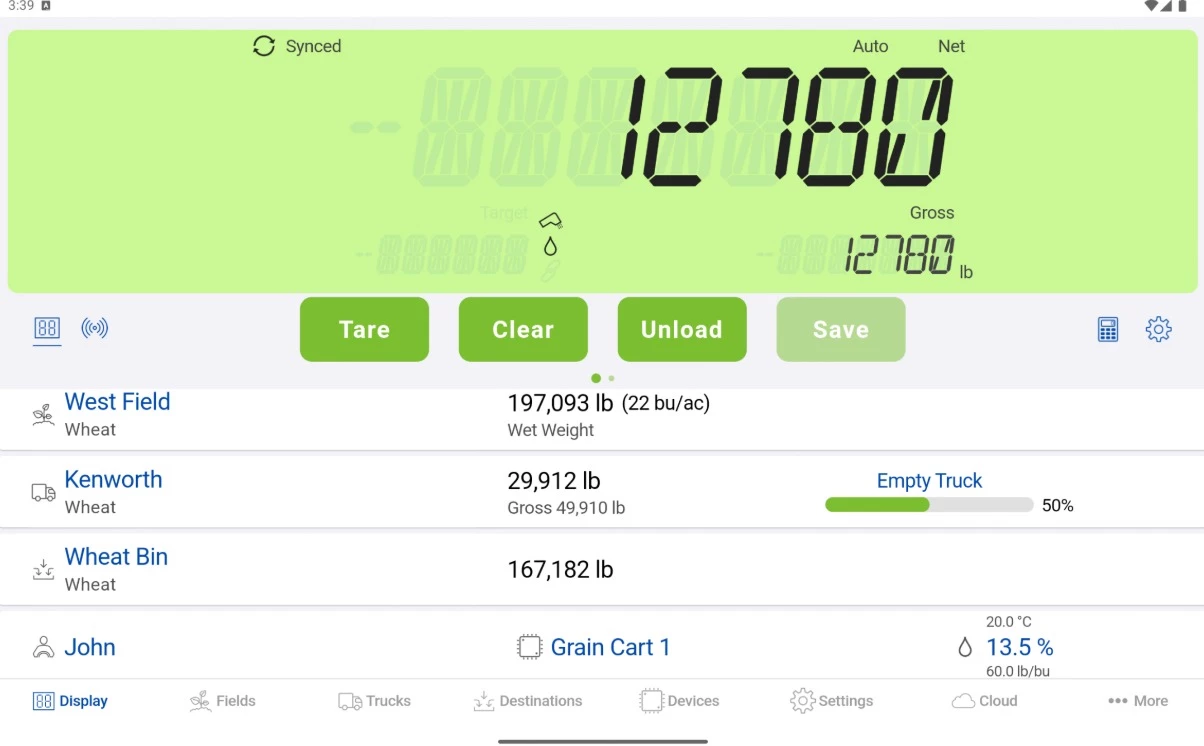
A grain cart operator has both hands busy and no time to log paperwork mid-harvest. Libra Harvest, the app for Agrimatics’ Libra Cart scale, solves that by reading the cart’s load cells over Bluetooth and catching every unload on its own, saving the date, time, GPS location, and weight without a button press.
The Display screen reads like a scale head: a seven-segment weight readout on a pale green panel (#D6F6B2), with Tare, Clear, Unload, and Save beneath it.
Tap into the cards below and each load ties to a field, truck, destination, operator, and moisture reading, and the bottom bar moves between Display, Fields, Trucks, Destinations, and More.
Records save offline and back up when the device reconnects, in pounds, kilograms, or bushels. A paid Harvest Pro tier adds multi-device syncing, team collaboration, and farm management integrations, and the App Store lists Bitstrata Systems as the publisher, with Agrimatics as its website.
Why it works commercially: The USDA’s 2025 Technology Use report found 74% of US farms reach the internet through a cellular data plan, the kind that drops out mid-field. A cart scale that logs every unload offline keeps the harvest ledger whole where the signal doesn’t.
14. The Bushel App by Bushel
Standout Features:
- Profit and loss by field
- Grain position tracking
- Built-in business banking
Most farm software tells a grower what happened in the field.
Bushel, once FarmLogs and then Bushel Farm, goes further and tells them whether it made money, pulling field maps, rainfall, satellite imagery, crop marketing, and land agreements into one app that syncs with John Deere Operations Center and Climate FieldView.
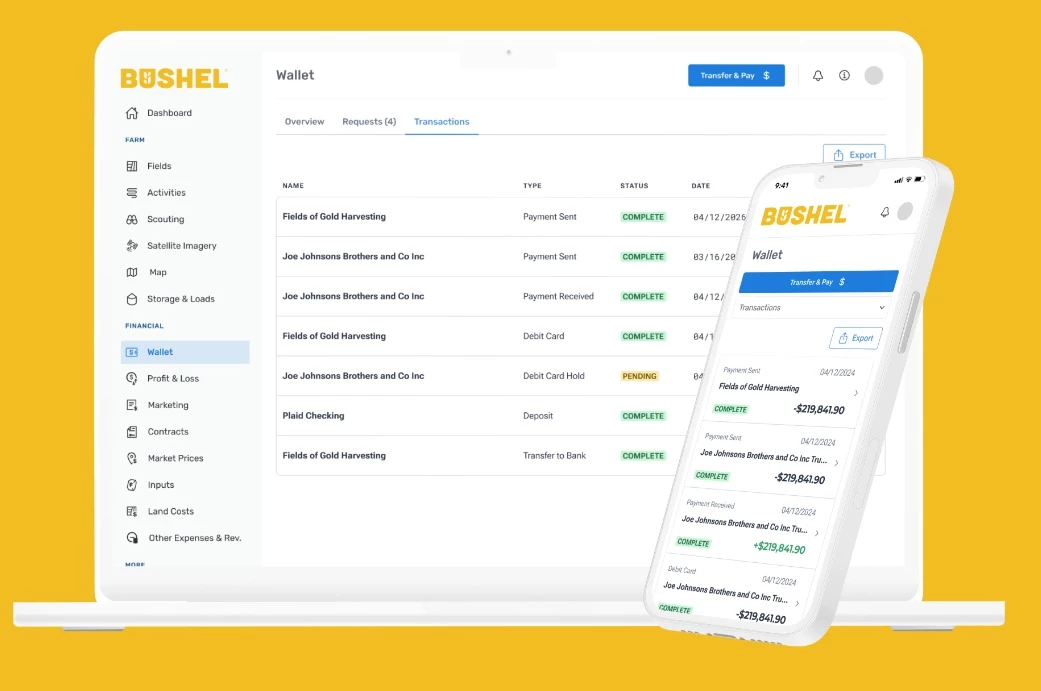
The Profit & Loss screen is where that pays off. It breaks each crop into revenue, cost, and profit per acre, then ranks cost by category, land, seed, fertilizer, and chemicals, as a share of the total.
A Marketing screen sets the farmer’s average sold price next to the current market price and shows how much of the crop is still unprotected. Store screenshots carry the Bushel Farm wordmark in yellow (#F2BC23), with blue action buttons on white.
The app also holds the money. A built-in wallet opens a Bushel Business Account, an interest-bearing account through The Bancorp Bank, and cash contracts from buyers in the Bushel Network can drop in automatically.
Why it works commercially: the USDA’s 2025 Technology Use report found 50% of US farms bought agricultural inputs online in 2025, up from 32% in 2023. An app that tracks cost and holds the account those purchases run through keeps the spending and the record in one place.
15. Agworld by Agworld
Standout Features:
- Offline mode with sync
- Margins on the map
- Reusable recommendation templates
A grower and a crop consultant working from different records end up managing two versions of the same farm. Agworld puts them on one, letting an adviser log observations and recommendations in the field while the grower sees those recommendations and work orders as they land.
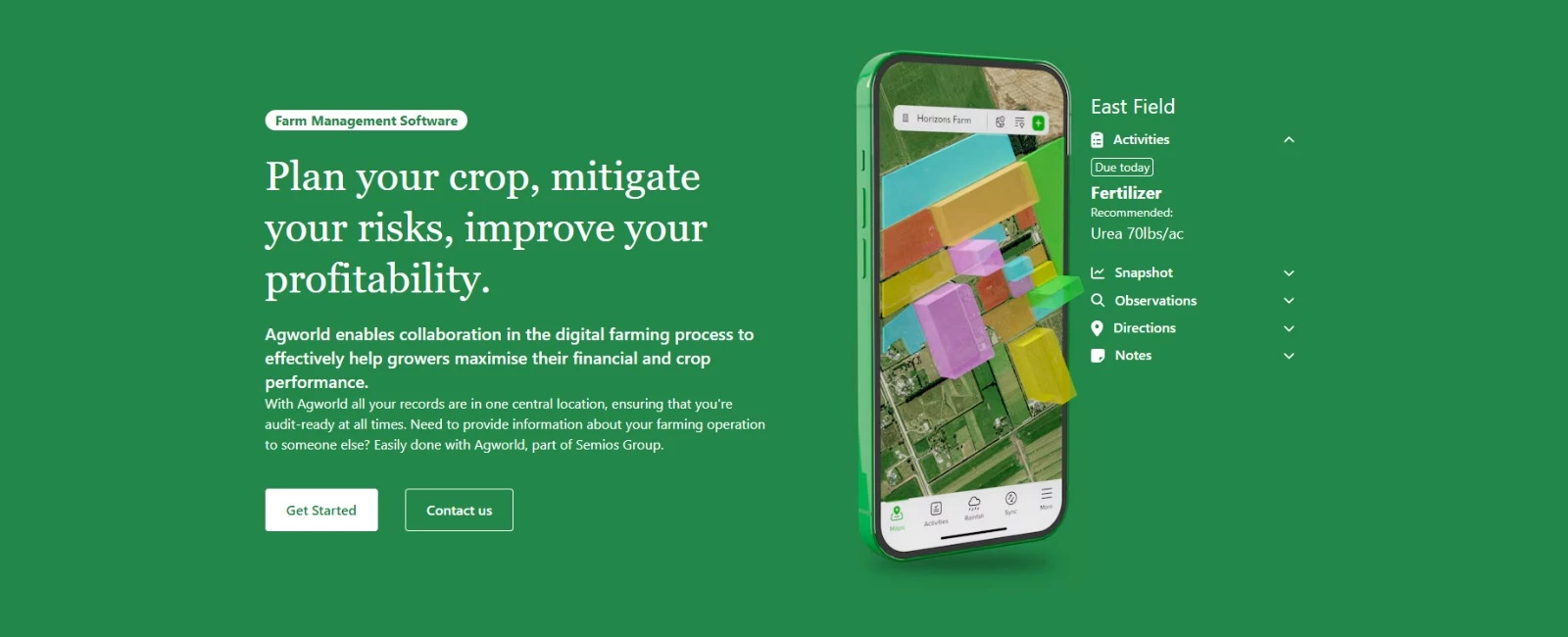
The Maps screen carries the weight of the app. Fields sit under imagery layers, labeled by name and marked with each one’s dollars per hectare, so a grower reads yield, cost to date, and gross margin across the whole operation from a single view.
The bottom bar covers Maps, Activities, Rainfall, Sync, and More.
Everything works offline and syncs once the phone is back in range. Product labels and safety data sheets stay readable with no signal, and a consultant can save a common recommendation as a template that new staff reuse.
Why it works commercially: In the 2026 ClimaFarm study of 151 farmers, trust was the strongest predictor of continued app use (β = 0.280). A record that grower and consultant both see, and both trust, is what keeps each of them in the app.
What an Agriculture App Costs and How Long It Takes
DesignRush's directory of mobile app development companies puts agency-built apps at $30,000 to $500,000+. A simple app runs $10,000 to $35,000, a medium-complexity app $35,000 to $150,000, and a complex app $150,000 to $300,000+.
| Tier | Typical Cost | What It Looks Like in Agriculture |
| Simple | $10,000-$35,000 | One flow, such as a single diagnosis or calculator |
| Medium | $35,000-$150,000 | Guided recommendation flows with saved plans and a weather feed |
| Complex | $150,000-$300,000+ | A two-sided marketplace like Noah, or machine-data integration like Operations Center |
Source: DesignRush mobile app development pricing data. Agriculture examples are DesignRush editorial mapping.
Five features move a farming app up a tier, and each one costs more in agriculture than in a typical consumer app. Budget for them at scoping, since adding any of them after the screens are designed means redesigning the screens.
| Feature | Why It Costs More on a Farm |
| Offline save and sync | Two phones can edit the same field record without signal, so the app needs a rule for which edit wins |
| On-device AI | The model has to fit and run on a mid-range Android phone, as Nuru's does |
| Equipment and sensor integrations | Each machine or sensor brand sends data in its own format |
| Multiple languages | Agronomy terms need translation and every layout needs retesting |
| Two-sided marketplace | Two apps, two onboarding flows, and payments between them, as Noah needed |
Timelines depend on the season as much as the scope. Ronas IT reports building Noah's two native apps in four months to launch before the Swedish harvest, and LandWise reached the App Store on September 8, 2026, with an update a month later.
6 Agriculture App Design Mistakes and How To Check for Them
Each mistake comes with a check you can run this week and a fix with an effort estimate. They run cheapest first, so work down the list until the budget runs out.
- Text and Targets Sized for an Office
Check: Use the app outdoors at midday wearing work gloves, and run every text color through a contrast checker. W3C’s WCAG contrast guidance sets 4.5:1 as the minimum for body text.
Fix: About a day. Raise contrast and target size in the design tokens so every new screen inherits them, then watch task completion on the main flow.
- Asking for Everything Before Giving Anything
Check: Count the required fields between opening the app and the first useful answer. Every field a farmer fills before seeing value is a chance to quit.
Fix: A few days. Ask only for the inputs the first recommendation needs and collect the rest later, the way LandWise splits Plant, Fertility, and Herbicides into separate flows. Measure time to first recommendation.
- Recommendations With No Visible Reasoning
Check: Pick one recommendation and try to find which inputs produced it within one tap. If you can’t, neither can the farmer’s agronomist.
Fix: One to two weeks. Add a panel that lists the inputs and assumptions behind each answer, plus an export or share button. Track how often recommendations get shared.
- Work That Disappears When the Signal Drops
Check: Switch the phone to airplane mode, complete the main task, then reconnect. Look at whether the entry survived and whether the app said what happened to it.
Fix: Two to four weeks of development. Save locally first, queue the sync, and show sync status on screen, as Nuru does by running its model on the phone. Watch the abandoned-entry rate.
- One Language and One Way to Ask
Check: Hand the app to a user whose first language isn’t the app’s, and time how long the main task takes. The ClimaFarm study found language barriers among the reasons farmers stopped using an app.
Fix: Two to six weeks. Localize agronomy terms with an agronomist as well as a translator, and add voice or photo input the way Farmer’s Solutions and Plantix do. Track drop-off among users outside the default language.
- Rebuilding Before the Cheap Fixes Run Out
Check: Name the specific problem a rebuild would solve, then check whether the five fixes above already handle it. A rebuild with no named problem just reproduces it on a new screen.
Fix: Months, at the medium or complex tier in the cost table above. Name the metric the rebuild has to move before anyone opens a design file.
Best Agriculture App Designs: The Takeaways
The 12 apps share no palette. Agrilo runs neon lime on black, Operations Center John Deere green on white, LandWise white type on near-black. What they share is one decision: each is built around a specific farm task and hands the farmer something to act on or pass to an adviser.
That focus matters because the phones are already in the field. The USDA’s August 2025 Technology Use report found 82% of US farms own or use a smartphone, unchanged from 2023, while precision agriculture use fell from 27% to 22%.
McKinsey’s Global Farmer Insights 2026 finds the tools still gaining ground solve one farm problem and fit work the farmer already does.
The planning and management apps meet that bar with records the farmer never types. Operations Center logs each machine pass, FieldView ranks every field against the operation’s average, and LandWise saves each plan, so the next decision starts from the last.
The diagnosis apps work in the field itself. Nuru runs with no signal, Plantix starts from a photo, and xarvio walks an adviser by GPS to the spot that needs checking.
The selling apps balance buyer flexibility against producer control. Farm.One members pause or skip a week, Noah’s producers set their own prices, and Upfarm rents out equipment a farmer can’t justify buying.
None of the 12 tries to replace the agronomist, and farmers wouldn’t want it to. McKinsey’s 2026 survey found agronomists are a top influence for 56% of farmers, while only 6% trust gen AI tools or AI search, even though 17% already use gen AI for farm tasks.
Charles Ellis, an agricultural engineering specialist at University of Missouri Extension, puts the app’s job plainly: “By entering information from your farm, you can get answers specific to your operation,” he says in a 2024 MU Extension release.
That answer earns trust when the farmer can see which inputs produced it and pass the result to an adviser, the way xarvio’s scouting reports and FieldView’s exports allow.
If you’re scoping an agriculture app, start from the farm decision and the field conditions, then choose the visual style last. The What to Fix First list runs in that order too, cheapest field-proofing ahead of any rebuild.
Our design experts recognize the most innovative and creative designs from across the globe. Visit Design Awards to see the:
- Best App Designs
- Best Website Designs
- Best Logo Designs
- Best Print Designs
- Best Packaging Designs
- Best Video Designs
Our team also ranks agencies worldwide to help you find a qualified agency partner. Visit our Agency Directory for the top Mobile App Development Companies, as well as:
- Top UI/UX Design Agencies
- Top Software Development Companies
- Top Product Design Companies
- Top Android App Development Companies
- Top iPhone App Development Companies
For more field-ready interfaces, browse the full agriculture app design gallery.
-preview-webp.webp)