
Every email platform now claims to have AI.
Far fewer can tell you what that AI actually does once you are past the marketing page, whether it writes a subject line and stops there, or whether it can build a flow, watch how it performs, and adjust on its own.
Here are the ten worth your attention in 2026, and exactly who each one is for.
Email Marketing AI Tools: Key Findings
- Platforms like Omnisend and Mailchimp combine email, SMS, and automation in one place, a strong fit for ecommerce and small teams using AI-assisted campaigns.
- Tools such as Klaviyo and ActiveCampaign use behavioral data and predictive sending to personalize at scale, with Klaviyo now running autonomous campaign agents.
- CRM-first platforms like Nutshell and HubSpot tie email sequences directly to pipeline activity, so outreach follows the deal instead of running separately.
Why 87% of Marketers Now Use AI in Email
AI-powered email marketing helps teams build campaigns faster, personalize messages at scale, and cut the manual work behind segmentation, testing, and automation.
Adoption reflects that value: in DesignRush's 2026 Email Marketing Benchmark Survey, 87% of marketers said they use at least one AI tool in their workflow.
Those capabilities matter more than ever in 2026. Roughly 392.5 billion emails are sent and received each day, and 71% of consumers now expect personalized interactions from the companies they buy from.
AI lets marketers meet that demand for relevance without manually building every campaign variation.
The right platform depends on which AI email automation use cases matter most to you, from content generation and predictive sending to product recommendations and lifecycle orchestration.
AI Email Marketing Tools Compared: Features, Pricing, and Who Each Is For
This breakdown shows which tools are best suited for ecommerce campaigns, CRM-driven sequences, budget-conscious teams, and the growing shift toward AI assistants that can query and build campaigns directly.
| Tool | Standout Feature | Behavioral Automation | AI Assistant/ MCP Integration | Free Tier | Starting Price |
| Omnisend | Official ChatGPT/Claude MCP connector | ✅ | ✅ | ✅ | $11.20/month |
| Mailchimp | Broad all-in-one marketing suite | ✅ | ✅ | ✅ | $13/month |
| Klaviyo | Composer autonomous campaign agent | ✅ | ✅ | ✅ | $45/month |
| Nutshell | AI email sequences tied to pipeline | ✅ | ✅ | ❌ | $19/user/month |
| ActiveCampaign | Predictive sending per contact | ✅ | ✅ | ❌ | $15/month |
| HubSpot | Breeze agents + CRM integration | ✅ | ✅ | ✅ | $7/month/seat |
| Brevo | Multi-channel on a free tier | ✅ | ✅ | ✅ | $9/month |
| Beehiiv | Newsletter growth + monetization | Limited | ❌ | ✅ | $43/month |
| Instantly | Cold outreach with inbox rotation | ✅ | ❌ | ❌ | $47/month |
| Copy.ai | Prompt-driven copy workflows | Limited | ❌ | ❌ | $24/month |
1. Omnisend: Best for eCommerce Email and SMS Campaigns
Try Omnisend if you’re a small to mid-sized eCommerce business looking to manage email, SMS, and automated customer journeys from one platform.
Omnisend is built for eCommerce, with tools for creating, personalizing, and automating campaigns around the customer journey.
Its product picker, discount code blocks, and drag-and-drop editor make it easy to build promotional emails without relying on a designer or developer.
Pros:
- Email, SMS, and push notifications in one platform
- Strong behavioral and purchase-based targeting
- Shopify, WooCommerce, and BigCommerce integrations
Cons:
- Limited appeal outside eCommerce
- Customization may not suit larger businesses
Omnisend keeps campaign creation simple with pre-built templates and an intuitive editor. Its AI tools can speed up copywriting and other repetitive tasks, although the output may need editing to fit a brand’s voice.
The platform’s integrations with Shopify, WooCommerce, and BigCommerce make it a natural fit for online stores, while 24/7 support is useful for smaller teams without dedicated technical resources.
Overall, Omnisend is a strong choice for growing eCommerce businesses that need email, SMS, and automation without the complexity of an enterprise platform.
Pricing (up to 500 contacts)
- Free
- Standard: $11.20/month
- Pro: $41.30/month
What Users Say
Users often praise Omnisend for its ease of use, automation, multichannel capabilities, and value for money. Reviews also highlight its Shopify integration and straightforward campaign setup.
The main complaints concern customization. Some users find the form builder restrictive, while larger businesses may want more flexibility as their marketing needs become more complex.
Other Notable Features
- Welcome, abandoned cart, post-purchase, and promotional workflows
- Up to eight personalized product recommendations per email
- A/B testing and campaign optimization
- Custom scheduling and email templates
2. Mailchimp: Best All-in-One Email Marketing Platform for SMBs
Try Mailchimp if you’re an SMB looking for email marketing, automation, audience management, and AI-powered tools in one platform.
Mailchimp combines email marketing with CRM and broader marketing tools, giving smaller teams a single place to manage campaigns, contacts, and customer communications.
Its drag-and-drop builder, templates, and automation tools make it approachable for teams without dedicated email marketing specialists.
Pros:
- Broad email, CRM, and marketing capabilities
- Beginner-friendly campaign creation
- Extensive integrations
Cons:
- Costs increase as contact lists grow
- More platform than simple email campaigns may require
Mailchimp’s strength is its breadth. Beyond email, it covers landing pages, forms, SMS, social media marketing, analytics, and customer management, making it easier for growing businesses to expand without adding several specialized tools.
Its AI features can help with copy, content recommendations, send-time optimization, and campaign improvements. Segmentation and behavioral targeting also give SMBs more control over who receives each message.
Overall, Mailchimp is best for SMBs that want an accessible email platform with room to expand into broader marketing. Businesses with large databases or more advanced requirements may find the pricing and plan restrictions harder to justify.
Pricing
- Free (up to 250 contacts)
- Essentials: Starts at $13/month
- Standard: Starts at $20/month
- Premium: Starts at $350/month
What Users Say
Users praise Mailchimp for its intuitive interface, templates, integrations, and straightforward campaign management. Its ease of use makes it particularly appealing to smaller teams managing email in-house.
Pricing is the most common drawback. Costs rise with contact volume, while some automation, reporting, and customization features are reserved for higher-tier plans.
Other Notable Features
- AI-assisted content and campaign optimization
- Automated customer journeys
- Campaign analytics and performance reporting
- Landing pages and signup forms
- Social marketing tools
3. Klaviyo: Best for Advanced eCommerce Personalization
Try Klaviyo if you’re an eCommerce brand looking to build highly personalized email and SMS campaigns around customer behavior, purchase history, and real-time data.
Klaviyo is built around customer data, giving eCommerce teams sophisticated tools for segmentation, automation, predictive analytics, and personalized messaging.
Its behavioral targeting and predictive features make it particularly useful for brands that have outgrown basic email automation and want more control over the customer journey.
Pros:
- Advanced behavioral and predictive segmentation
- Sophisticated email and SMS automation
- Strong eCommerce personalization
Cons:
- Pricing increases with contact volume
- Advanced workflows have a learning curve
Klaviyo can combine browsing behavior, purchase history, engagement, location, and predictive metrics such as lifetime value and churn risk when building audiences.
Its AI tools assist with content, segmentation, product recommendations, and send-time optimization. Automated flows can respond to actions such as product views, abandoned checkouts, and purchases, while conditional splits create different paths based on customer behavior.
With 60+ pre-built flow templates, Klaviyo gives eCommerce teams a strong starting point without limiting more complex customer journeys.
Overall, Klaviyo is best for eCommerce brands that need sophisticated personalization and automation. Its depth is valuable for businesses with substantial customer data, but smaller teams may find the cost and learning curve difficult to justify.
Pricing
- Free (up to 250 active profiles and 500 emails/month)
- Email (1,500 emails): Starts at $45/month
What Users Say
Users praise Klaviyo for its segmentation, automation, integrations, and eCommerce capabilities. Reviews often highlight how much control the platform gives marketers over customer targeting and personalized campaigns.
Pricing is the biggest concern, particularly as contact lists grow. Some users also find the interface and advanced workflows more difficult to navigate than simpler email platforms.
Other Notable Features
- Predictive analytics for lifetime value, churn risk, and next-order timing
- Dynamic product recommendations
- RFM analysis for customer segmentation
- 350+ integrations and APIs
- Attribution and customizable reporting
4. Nutshell: Best for CRM-Driven AI Email Sequences
Try Nutshell if you’re an SMB that wants to combine email marketing, sales automation, and customer relationship management in one platform.
Nutshell combines contact management, sales pipelines, email campaigns, and automation in one workspace, keeping marketing and sales activity connected.
Its email tools use CRM data to target campaigns and automate follow-ups, making it useful for businesses that want email to support the sales process rather than operate separately.
Pros:
- CRM, email, and sales automation in one platform
- Easy-to-use interface
- Automated email sequences and follow-ups
Cons:
- Less advanced email functionality than dedicated ESPs
- Limited customization
Nutshell lets teams build email sequences around contact records, pipeline stages, and sales activity. Automated drip campaigns and follow-ups can keep prospects moving without requiring separate tools.
AI features help draft emails and create content, reducing some of the manual work involved in outreach. The trade-off is depth: businesses looking for sophisticated email analytics or advanced campaign features may find dedicated platforms more capable.
Overall, Nutshell works best for SMBs that want email tied directly to sales and customer management, rather than a standalone email marketing system.
Pricing (billed annually)
- Foundation: $19/user/month
- Growth: $25/user/month
- Pro: $42/user/month
- Business: $52/user/month
- Enterprise: $79/user/month
What Users Say
Users appreciate Nutshell’s email sequences for making follow-ups easier to manage without relying on additional tools. The interface also gets positive feedback for being straightforward enough for non-technical users.
The main criticism is reporting depth. Businesses that need detailed email analytics may find Nutshell less comprehensive than dedicated email service providers.
Other Notable Features
- Lead scoring and activity tracking
- Sales pipeline management
- Follow-up reminders
- Email templates
- Sales performance reporting
- Business and productivity integrations
Sign up for a 14-day Nutshell trial here.
5. ActiveCampaign: Best for Advanced Email Automation
Try ActiveCampaign if you’re a growing business that needs sophisticated email automation, customer segmentation, and personalized journeys without moving to an enterprise marketing platform.
ActiveCampaign combines email marketing, marketing automation, CRM, and sales tools, with a strong focus on building detailed customer journeys.
Its automation builder lets teams create workflows based on customer actions, while segmentation and predictive sending help tailor when and how contacts are reached.
Pros:
- Sophisticated automation workflows
- Advanced behavioral targeting
- Strong CRM and sales integration
Cons:
- Steeper learning curve
- Pricing increases with contacts and features
ActiveCampaign is particularly useful for lead nurturing and lifecycle marketing. Workflows can branch based on engagement, customer data, and other triggers, giving teams more control than basic drip campaigns.
The platform also supports predictive sending and AI-assisted content creation. For businesses managing multiple touchpoints, these features can reduce manual work while keeping campaigns responsive to customer behavior.
As Jackie Palmer, VP Product Marketing at ActiveCampaign, explains:
“The highest-performing programs we see no longer treat email, SMS, and WhatsApp as separate channels—they treat them as a single, orchestrated conversation.
Email still carries the narrative and the depth, but real-time signals from SMS, transactional events, and messaging apps feed back into one autonomous system that decides where and how to follow up next.”
Pricing
- Starter: Starts at $15/month
- Plus: Starts at $49/month
- Pro: Starts at $79/month
What Users Say
Users frequently praise ActiveCampaign for its automation capabilities, segmentation, integrations, and flexibility. Reviews often highlight the visual workflow builder as a major advantage for creating complex customer journeys without coding.
The learning curve is the biggest drawback. New users can find the platform overwhelming, while costs can climb as contact lists and feature requirements expand.
Other Notable Features
- Predictive sending
- Lead scoring
- Sales automation
- Forms and landing pages
- CRM and pipeline management
- Campaign and automation reporting
6. HubSpot: Best for CRM-Integrated Email and Breeze Agents
Try HubSpot if you’re an SMB or growing team that wants email marketing connected to CRM data, sales activity, and AI tools.
HubSpot brings email marketing, CRM, sales, customer service, and marketing automation together, giving teams a shared view of customer activity.
Its email editor, workflows, and Breeze AI tools support campaign creation and customer engagement without requiring separate systems for marketing and sales.
Pros:
- Strong CRM and email integration
- Breeze AI agents and marketing tools
- Broad marketing and sales ecosystem
Cons:
- Costs can rise quickly as needs grow
- More complex than necessary for simple email campaigns
HubSpot connects campaigns to customer properties, lifecycle stages, website activity, and sales interactions, making it easier to build targeted campaigns around the full customer journey.
Breeze can assist with content creation, research, and customer engagement, while built-in tools cover personalization, A/B testing, and campaign reporting.
Overall, HubSpot is best for SMBs building a broader marketing and sales operation. It makes sense when email is just one part of the workflow; businesses focused primarily on email may find the platform more than they need.
Pricing
- Free
- Starter: Starts at $7/month/seat
- Professional: Starts at $800/month/seat
What Users Say
Users commonly praise HubSpot for its interface, CRM integration, automation, and breadth of marketing and sales tools. Keeping customer data, campaigns, and sales activity in one system is a frequent highlight.
Cost and complexity are the main drawbacks. Advanced features can require expensive tiers, and the pricing structure becomes harder to navigate as teams add more capabilities.
Other Notable Features
- Breeze AI agents
- A/B testing
- Landing pages and forms
- Lead scoring
- Sales pipelines
- Marketing and sales reporting
7. Brevo: Best Budget-Friendly Multi-Channel Platform
Try Brevo if you’re an SMB looking for an affordable way to manage email, SMS, WhatsApp, and other customer communications from one platform.
Brevo brings email campaigns, automation, transactional messaging, SMS, WhatsApp, and CRM tools together, making it a practical choice for businesses that want fewer separate marketing tools.
Its free plan and low starting price also make it accessible to smaller teams working with limited budgets.
Pros:
- Free plan available
- Multiple communication channels in one platform
- Affordable entry pricing
Cons:
- Email design can feel less polished than premium platforms
- CRM functionality is fairly basic
Brevo covers the essentials without requiring a large marketing budget. Its AI tools can assist with email content, while automation triggers campaigns based on customer actions and engagement.
CRM tools connect contacts, deals, and sales activity, giving smaller teams a simple way to tie marketing communications to customer relationships.
Overall, Brevo is best for budget-conscious SMBs that need several communication channels in one place. Businesses with complex automation or reporting requirements may eventually need a more advanced platform.
Pricing (billed monthly)
- Free
- Starter: $9/month
- Standard: $18/month
- Professional: $499/month
- Enterprise: Custom pricing
What Users Say
Users praise Brevo for its affordability, straightforward interface, and range of communication channels. The free plan and accessible pricing are particularly appealing to smaller businesses.
The main complaints involve limitations on lower-tier plans, particularly around automation and reporting. Some users also find the email design tools less flexible than those offered by more specialized platforms.
Other Notable Features
- Drag-and-drop email builder
- Visual marketing automation
- Contact and deal management
- Landing pages and signup forms
- Campaign reporting
8. Beehiiv: Best for Newsletter-First Creators
Try Beehiiv if you’re a creator, publisher, or media business looking to build, grow, and monetize an email newsletter from one platform.
Beehiiv is built around newsletters rather than traditional email marketing. It combines publishing, subscriber management, analytics, referrals, and monetization tools so creators can run a newsletter as a standalone business.
Its website builder and publishing tools also let creators manage their newsletter and web presence from the same platform.
Pros:
- Built specifically for newsletter publishing
- Strong audience-growth and monetization options
- Clean, straightforward publishing experience
Cons:
- Limited for complex marketing automation
- Basic CRM capabilities
Beehiiv puts audience growth and revenue at the center of the publishing experience. Analytics show how subscribers engage with newsletters, while recommendations and referrals can help bring in new readers.
Creators can also monetize through paid subscriptions and advertising, giving newsletters multiple potential revenue streams. AI writing tools can help speed up content production, although they’re secondary to the platform’s publishing and growth features.
Overall, Beehiiv is best for creators, publishers, and media businesses treating newsletters as a product or revenue channel. Companies looking for sophisticated CRM workflows or lifecycle marketing will find more capable options elsewhere.
Pricing (billed annually)
- Launch: Free (up to 2,500 subscribers)
- Scale: $43/month
- Max: $96/month
- Enterprise: Custom pricing
What Users Say
Users frequently praise Beehiiv for its clean interface, publishing tools, analytics, and audience-growth features. Monetization options are another common highlight among newsletter creators.
The main drawbacks involve customization and automation. Users looking for complex email workflows may find Beehiiv restrictive, while some advanced capabilities require a higher-tier plan.
Other Notable Features
- Newsletter website builder
- Paid subscription management
- Referral program
- Ad Network
- Custom domains and branding
9. Instantly.ai: Best for Cold Outreach at Scale
Try Instantly.ai if you’re a B2B sales or lead generation team looking to run high-volume cold email campaigns across multiple sending accounts.
Instantly.ai is designed for outbound sales, combining campaign management, automated follow-ups, deliverability tools, lead management, and prospecting features.
Its support for multiple email accounts makes it particularly useful for teams running large-scale outreach rather than traditional customer newsletters.
Pros:
- Built for high-volume outbound campaigns
- Multiple email account management
- Built-in B2B lead database
Cons:
- Focused on outbound rather than broader email marketing
- Deliverability requires ongoing attention
Instantly.ai lets sales teams manage multiple inboxes, automate follow-ups, and monitor campaign performance from one dashboard. Its AI tools can assist with prospect research, personalization, and email copy.
The built-in lead database also reduces the need for a separate prospecting tool, with filters for factors such as company, role, and industry.
Overall, Instantly.ai is best for B2B teams that depend on cold outreach to generate leads at scale. It’s more specialized than a conventional email marketing platform, so teams focused on newsletters, customer retention, or lifecycle campaigns will likely need another tool.
Pricing (billed monthly)
- Growth: $47/month
- Hypergrowth: $97/month
- Light Speed: $358/month
- Enterprise: Custom pricing
What Users Say
Users praise Instantly.ai for its ease of use, campaign automation, and ability to manage large outbound campaigns. The multiple-inbox setup is another frequently cited advantage.
Deliverability is the main concern. Maintaining strong inbox placement requires ongoing monitoring, while some users find the more advanced features less intuitive.
Other Notable Features
- Email warmup tools
- Deliverability monitoring
- Lead management
- Campaign performance tracking
- Automated outreach workflows
10. Copy.ai: Best for Quick AI Email Copy
Try Copy.ai if you’re a marketing or sales team that needs to produce email copy quickly and adapt messaging for different audiences.
Copy.ai focuses on AI-assisted sales and marketing content, helping teams create cold emails, follow-ups, newsletters, and other campaign copy.
Its workflow tools are particularly useful when teams need multiple versions of similar messages without writing each one from scratch.
Pros:
- Fast email and sales copy generation
- Workflow-based content production
- Useful for creating messaging variations
Cons:
- Output still needs human editing
- Not a replacement for full email marketing software
Copy.ai is most useful when the bottleneck is writing rather than campaign management. Teams can generate email drafts, subject lines, sales sequences, and personalized outreach, then refine the strongest versions before sending.
Workflows can also turn existing customer or prospect information into tailored messaging, making it easier to adapt campaigns for different audiences.
Overall, Copy.ai is best for teams that want to speed up email copywriting while keeping their existing CRM and email platforms. It’s less suitable for businesses looking for built-in campaign management, deliverability controls, or detailed email analytics.
Pricing
- Chat: $24/month (billed annually)
- Enterprise: Custom pricing
What Users Say
Users commonly praise Copy.ai for its speed, ease of use, and range of templates and workflows. It’s particularly useful for getting a first draft on the page quickly.
The main criticism is output consistency. Generated copy can require substantial editing, and some users find the growing feature set and pricing structure difficult to navigate.
Other Notable Features
- Brand voice customization
- Subject line variations
- Sales prospecting workflows
- Account research
- CRM and marketing integrations
The Rise of Agentic AI: Autonomous Email Campaigns
The biggest shift in 2026 is not that AI writes email copy faster, but that it now runs campaigns with less human input.
AI in email marketing is moving from assistive tools that suggest next steps to agentic systems that generate, launch, and optimize entire flows from a single prompt.
Two platforms in this roundup show where the category is heading:
- Klaviyo Composer generates, optimizes, and recommends full campaigns and flows from one prompt. It moved to public beta on June 30, 2026, and Klaviyo now describes itself as "the autonomous B2C CRM."
- HubSpot Breeze agents run multi-step marketing workflows, including drafting emails and landing pages, and can be triggered by CRM events such as a deal-stage change, with guardrails and approval steps built in.
The direction is clear, but so are the limits. These agents still run with human review, and their output is only as good as the customer data behind them.
Adoption of the more autonomous capabilities also trails simpler uses. In 2026, only 31% of email marketers applied AI to behavioral prediction, compared with 69% for subject lines and 63% for content generation (DesignRush).
That gap is the opportunity. The teams gaining the most are those pointing agentic AI at relevance and timing, not just faster production.
How AI Email Tools Affect Deliverability in 2026
AI makes it easier to send more email, which is exactly why deliverability matters more than ever.
When AI helps you produce and send faster without protecting sender reputation, all it does is get you to the spam folder quicker.
The rules tightened in 2026. Google and Yahoo now:
- Classify any domain sending 5,000 or more emails a day to personal accounts as a bulk sender
- Require SPF, DKIM, and DMARC authentication
- Enforce a spam complaint rate below 0.30%
Since November 2025, non-compliant mail has been rejected outright rather than routed to spam, so a weak setup no longer means reduced performance. It means your email never arrives.
The best AI email tools help on the parts of deliverability that respond to fixes:
| Deliverability Lever | What AI-enabled Tools Do | DesignRushSurvey Pain Point |
| Authentication (SPF, DKIM, DMARC) | Guided setup and monitoring | 36% cite authentication failures |
| List hygiene | Flag disengaged contacts and prompt sunsetting | 43% cite list decay |
| Engagement | Segment and time sends by behavior | 51% cite engagement decay |
| Reputation | Track complaint rates and inbox placement | 62% cite spam filtering |
How to Choose the Right Email Marketing AI Tool
The right tool should fit how your team already works and where you want email to go next. Weigh each platform against these factors:
- AI depth: Decide whether you need assistive AI that drafts and suggests, or agentic AI that builds and optimizes flows on its own. Match the capability to how hands-off you actually want to be.
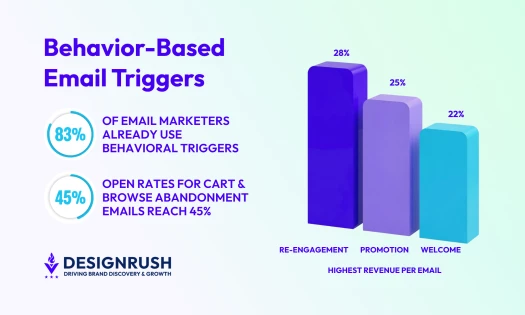
- Automation and personalization: Look for behavioral triggers and dynamic content, since relevance drives more revenue than send volume.
- Data integration: Confirm the tool connects cleanly to your CRM, eCommerce platform, and existing stack, because AI is only as good as the data feeding it.
- Deliverability support: Prioritize tools that monitor authentication, list health, and complaint rates, not just ones that generate copy.
- AI-assistant readiness: Check whether the platform offers an MCP connector or similar integration if you want to manage campaigns from ChatGPT or Claude.
- Cost at your list size: Compare pricing at the contact count you expect to reach, since costs can climb steeply as lists grow.
- Industry fit: Favor tools built for your model, whether that means eCommerce flows, B2B sequences, or newsletter growth.
How To Get Started with AI in Email Marketing
AI email tools can help teams move faster across content creation, automation, personalization, and deliverability monitoring.
The right next step depends on whether you want to test platforms yourself, get expert support, or keep researching before you commit.
- If you want to test tools first, start with platforms that offer free plans or trials, including Omnisend, Mailchimp, HubSpot, Brevo, and Beehiiv.
- If you're on a tight budget, Brevo (from $9/month) and Omnisend (from $11.20/month) cover email, SMS, and automation affordably, and both include free tiers you can build real flows on before upgrading. If you want to manage campaigns from an AI assistant, Omnisend's MCP connector lets you start from ChatGPT or Claude.
- If you want expert help choosing and implementing AI email tools, use our list of email marketing agencies to compare agencies by expertise, reviews, pricing, location, and service focus.
- If you want to learn more before committing, read related guides on how to improve email deliverability and email marketing compliance.