
Agentic workflows reduce the dependency on manual movement. AI agents monitor activity, organize context, and advance work automatically, allowing your team to spend less time managing tasks and more time making decisions.
Here’s how these workflows work, where companies are applying them, and what businesses should understand before adopting them.
Agentic Workflows in AI: Key Findings
- instinctools’ GENiE helps organizations move from concept to enterprise-ready agent workflows in roughly 6-8 weeks by focusing on context management, orchestration, and governance.
- Employees spend about 60% of their time on coordination tasks like status updates and information chasing, which agentic workflows aim to automate.
- Businesses standardizing processes with AI report roughly 30% operational efficiency improvements, alongside faster and more consistent execution.
What Are Agentic Workflows?
An agentic workflow is a business process where an AI agent can plan and execute multiple steps toward a goal autonomously, using tools like apps, APIs, databases, and adjusting its approach as it learns new information, with humans supervising where it matters.
That’s different from AI that writes text or a chatbot that answers questions.
In an agentic workflow, the AI is doing work across systems, for example, pulling customer data, drafting an outreach plan, launching a campaign, monitoring results, and escalating exceptions.
Core Components of AI Agentic Workflows
An AI agentic workflow can also be understood through the capabilities that allow an AI system to behave less like automation software and more like an operating teammate.
Each component plays a specific role in how the agent understands situations, makes decisions, and improves over time.
- Perception: Collects and interprets data from users, systems, and business environments to understand what is happening.
- Decision making: Evaluates context and chooses the best action based on goals, constraints, and predicted outcomes.
- Action execution: Performs tasks by interacting with tools, workflows, or business systems to produce real results.
- Feedback and learning: Analyzes outcomes and updates future behavior to continuously improve performance.
- Autonomous decision making: Handles routine decisions independently within defined rules and approval boundaries.
- Multi-agent collaboration: Coordinates multiple specialized agents that share context and work together across functions.
Together, these components enable AI systems to move from automation toward adaptive, self-improving execution.



Traditional vs. AI Agentic Workflows
The easiest way to understand agentic workflows is to compare how work happens today versus how it works when AI agents are introduced.
- Traditional workflows depend on people moving tasks from one step to another. Work waits in queues, information gets lost between teams, and decisions happen only after someone reviews the situation.
- Agentic workflows change this flow. The system gathers information, prepares actions, completes routine steps automatically, and involves people only when judgment or approval is needed.
Below are practical examples across three industries.
- Financial services: Fraud and disputes
- Retail and eCommerce: Merchandising and customer support
- Professional services: Sales to delivery handoff
Financial Services: Fraud and Disputes
Banks are moving fast on AI because fraud and dispute work is high-volume, time-sensitive, and expensive when handled manually.
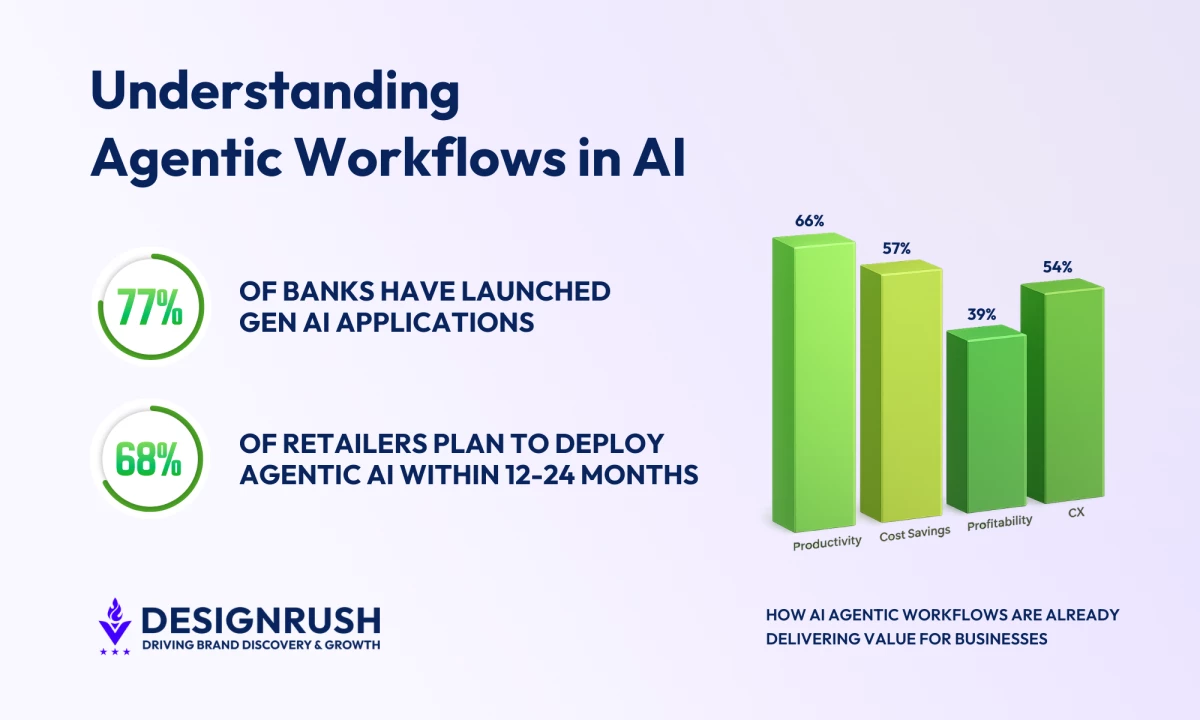
In EY-Parthenon’s 2025 Generative AI in Banking survey, 77% of banks said they have actively launched or soft-launched GenAI applications, up from 61% in 2023.
Traditional Workflow
A transaction is flagged by a rule-based system.
A case is created and added to an analyst’s queue. The analyst reviews the activity, requests documents from the customer, waits for responses, and then makes a decision.
Progress depends on availability, which often leads to delays and inconsistent investigations.
Agentic Workflow
An AI agent collects transaction history, customer behavior, and device data immediately after a flag appears.
It prepares a summary of the situation, gathers missing documents automatically, and suggests a decision supported by evidence.
Analysts review only complex or risky cases instead of every single one.
Retail and eCommerce: Merchandising and Customer Support
Retail is adopting AI quickly because customer demand changes daily, and small delays in pricing, inventory, or support show up fast in revenue and churn.
Deloitte’s 2026 retail outlook found that 68% of retail executives expect to deploy agentic AI for key operational and enterprise activities in the next 12 to 24 months.
Traditional Workflow
Merchandising teams analyze reports once a week, adjust pricing or promotions, and manually update campaigns. Customer support agents rely on scripts and escalate complicated problems to supervisors.
Agentic Workflow
An AI agent continuously monitors sales trends, inventory levels, and customer demand. It recommends pricing or promotion updates and sends them for approval when needed.
In customer support, the system resolves common issues automatically and passes unusual cases to human agents.
Professional Services: Sales to Delivery Handoff
Professional services companies are under pressure to deliver faster while protecting margin, and AI is increasingly being used to reduce admin work and prevent handoff mistakes.
A Thomson Reuters survey reported that 26% of legal organizations are actively using gen AI, up from 14% in 2024, and many expect it to become central to workflows over time.
Traditional Workflow
Sales teams collect client information during discovery and closing. When the project begins, delivery teams often repeat the same conversations because context was not fully transferred.
This slows project starts and creates scope misunderstandings.
Agentic Workflow
The AI agent captures discovery details in structured form, drafts project scope and timelines, and prepares kickoff plans automatically.
Project tools, documentation, and CRM records stay updated throughout the process.
5 Business Benefits of Agentic Workflows
The real value of agentic workflows shows up in the metrics executives already track, like faster execution, better decisions, improved customer experience, and clearer ROI.
Adoption is growing quickly, with 30% of organizations exploring AI agents and another 31% considering deployment, showing that many businesses are moving from testing AI to putting it into real workflows.
- Automation frees the 60% of time spent managing work
- Workflow automation improves operational efficiency by 30%
- 93% of businesses report faster and clearer decisions with AI
- Customer experience scales with 25% productivity gains
- AI beyond tools drives revenue for 30% of companies
1. Automation Frees the 60% of Time Spent Managing Work
Most organizations are slowed down by coordination work like chasing information, updating multiple systems, and repeating administrative steps across teams.
Agentic workflows remove this operational friction by allowing systems to gather data, prepare actions, and move tasks forward automatically.
The Asana Work Index shows employees spend 60% of their time on work about work such as meetings, status updates, duplicated tasks, and information chasing.
Reducing that overhead will allow you to move faster using existing teams instead of hiring more people.
2. Workflow Automation Improves Operational Efficiency by 30%
Traditional workflows rely heavily on individual judgment. Even well-designed processes produce inconsistent results when different people interpret rules differently or skip steps under pressure.
Agentic workflows standardize execution by embedding requirements directly into the workflow itself:
- Required fields can’t be skipped
- Compliance checks run automatically
- Documentation formats stay consistent
- Policies are applied the same way every time
As Shantanu Pandey, CEO of Tenet, explains:
“Traditional RPA handles the ‘what,’ but agentic workflows master the ‘what if.’ At Tenet, we’ve seen clients reduce operational bottlenecks by 60% because these workflows adapt in real time rather than breaking when conditions change.”
McKinsey research shows organizations automating workflows achieve around a 30% increase in operational efficiency when repetitive processes are standardized.
3. 93% of Businesses Report Faster and Clearer Decisions With AI
Many business decisions fail because the needed data arrives fragmented across systems and teams.
Agentic workflows follow a repeatable process that gathers, summarizes, and presents the right data before decisions are approved. With clear context instead of raw information, decisions rely less on intuition and accountability improves.
In PwC’s 2025 AI Agent Survey, 55% of companies said agentic AI helped them make faster decisions, with some reducing turnaround times by up to 70%.
Similarly, research on enterprise AI adoption shows 93% of organizations using AI for decision support report faster analysis and clearer managerial decisions because evidence is assembled automatically before judgment is applied.
4. Customer Experience Scales With 25% Productivity Gains
Customer expectations now demand speed, personalization, and continuity across channels. Scaling service manually increases costs faster than revenue.
Agentic workflows allow routine requests to be resolved automatically while preserving human attention for complex interactions.
Customer context travels with each request, reducing repeated conversations and improving continuity across channels.
Companies implementing workflow automation see 20-25% productivity increases.
5. AI Beyond Tools Drives Revenue for 30% of Companies
This is the most important benefit, and yet the most misunderstood.
AI itself does not create ROI without workflow redesign.
PwC’s 2026 Global CEO Survey shows the gap clearly:
- 30% of CEOs report revenue gains from AI
- 26% report cost reductions
- 56% report no measurable financial benefit yet
At the same time, Deloitte reports that only about 25% of organizations have moved a meaningful share of AI pilots into production, indicating that many companies remain stuck in experimentation rather than operational transformation.
The pattern is consistent across industries:
- Companies deploying AI as isolated tools struggle to see results
- Companies redesigning workflows around AI begin capturing measurable value
Agentic workflows succeed because they connect automation directly to business outcomes such as reduced cycle time, improved conversion rates, lower service costs, or faster delivery.
How Businesses Are Using Agentic AI Today
I evaluated some of the most advanced deployments, and three stand out:
- Walmart: AI super agents
- ServiceNow: Enterprise support at scale
- Salesforce: Agentforce in the field
- Tenet: Slashed processing time in healthcare
1. Walmart: AI Super Agents
Walmart is consolidating fragmented tools into AI “super agents.” I find this approach significant because integration, not intelligence, is what makes or breaks adoption.
These agents will replace fragmented AI tools and serve as the primary interface across functions, helping customers reorder items, plan events, or get product suggestions with minimal input.
One agent, Sparky, is already active in the Walmart app, handling product queries and suggestions autonomously.
Upon further research, upcoming agents are said to include:
- Associate Agent for employee tasks like leave requests and sales insights
- Marty for supplier onboarding, order management, and ad creation
- Developer Agent for building and testing future AI tools
Walmart says these agents are central to its goal of making eCommerce 50% of total sales within five years.
2. ServiceNow: Enterprise Support at Scale
In one real-world rollout I reviewed, ServiceNow used agentic AI to resolve 80% of support cases autonomously.
What’s compelling isn’t just the 52% resolution time reduction, but how seamlessly humans stay in the loop for edge cases.
This hybrid model — AI doing the heavy lifting while people handle the outliers — is the blueprint I recommend to most enterprises.
3. Salesforce: Agentforce in the Field
I’ve been following Salesforce’s rollout of Agentforce closely because it shows what happens when agentic AI is embedded directly into the tools people already use.
Here’s what stands out to me:
- Agentforce runs through Salesforce’s CRM, sales, and service tools, so adoption feels seamless. Teams don’t need extra training; they just become faster inside their existing workflows.
- These agents are autonomously resolving customer support cases, personalizing outreach, and managing marketing workflows.
- Over 340,000 queries have already been resolved autonomously, and Salesforce has set a goal of deploying 1 billion agents by year-end.
For me, that scale is the proof point: agentic AI has moved beyond experiments and is becoming a core business driver, delivering speed, personalization, and efficiency at once.
4. Tenet: Slashed Processing Time in Healthcare
Pandey shared a telling example from the healthcare sector.
He explained that one client was drowning in prior authorization requests, with an 18-day average processing time and a 40% error rate that left patients frustrated.
To solve this, Tenet built an agentic workflow that could read medical records, cross-reference insurance policies, and flag only the complex cases for human review.
“The results were dramatic,” Pandey noted. Processing time fell to just 2.8 days, errors dropped to 12%, and patient satisfaction rose by 35%.”
From my perspective, this is exactly what excites me about agentic workflows.
They’re not just shaving hours off existing processes — they’re redesigning how work happens at its core.
How To Build an AI Agentic Workflow?
Companies succeeding with AI agents focus less on the AI itself and more on workflow architecture, context engineering, and controlled deployment. These are the areas where experienced software engineering partners typically contribute the most value.
The process below walks through everything required to move from idea to a working agentic workflow.
- Step 1: Define the business outcome first
- Step 2: Map the workflow like an operations diagram
- Step 3. Decide what makes the workflow agentic
- Step 4: Prepare your data
- Step 5: Engineer context and memory
- Step 6. Define the agent’s tools
- Step 7: Design the workflow orchestration
- Step 8: Set behavior rules and guardrails
- Step 9: Tune the AI model for the job
- Step 10: Test like you’re launching a product
- Step 11: Deploy gradually and monitor continuously
- Step 12: Optimize cost and performance
Step 1: Define the Business Outcome First
The number one reason why an AI agent project fails is because companies start with picking the technology stack and evaluating vendors before figuring out their initial bottleneck.
You should start by answering these three questions:
- What work should the agent complete without human effort?
- What result must exist when the workflow finishes?
- What decisions can the agent safely make?
Good answer:
Automatically qualify inbound leads, enrich data, assign priority, and notify sales.
Bad answer:
We want an AI agent.
Agentic workflows succeed and have the most value when they replace a real operational bottleneck, not when they experiment with AI.
Step 2: Map the Workflow Like an Operations Diagram
Before writing prompts or choosing models, map how work currently happens in your environment.
Break the process into:
- Trigger: What starts the workflow?
- Inputs: Data the agent needs
- Decisions: Choices the agent must make
- Actions: Tools it uses
- Completion: How success is measured
For example:
| Stage | Example |
| Trigger | New support ticket arrives |
| Input | Customer history and SLA |
| Decision | Urgent or standard? |
| Action | Draft response or escalate |
| Completion | Ticket resolved or routed |
This becomes your agent blueprint.
Step 3. Decide What Makes the Workflow Agentic
Traditional automation follows rules.
Agentic workflows introduce decision loops.
Your agent must be able to:
- Analyze information
- Choose next actions
- Use tools
- Check results
- Continue working until the goal is reached
instinctools’ GENiE platform applies multi-agent orchestration so specialized AI agents can collaborate across workflows rather than forcing one model to manage everything.
You can use GENiE to accelerate agentic workflow delivery, especially when processes involve multiple systems and stakeholders.
Step 4: Prepare Your Data
Before building anything:
- Collect internal knowledge sources
- Clean and structure datasets
- Remove duplicates and outdated information
- Define which data the agent can access
Instinctools treats data preparation as the first engineering phase, running exploratory analysis, resolving quality issues, and aligning datasets with the agent’s real use case before deployment.
This reduces cost, hallucinations, and retraining later.
Step 5: Engineer Context and Memory
For an AI agent to work reliably, it needs the right information at the right moment, not all information at once.
The information typically is organized into layers:
| Context type | What it means | Purpose | Examples |
| Hot context | What matters right now | Directs the agent’s attention to the immediate task or action happening in real time | A customer ticket, a purchase request, a user action occurring right now |
| Warm context | Recent history | Helps the agent understand ongoing situations instead of treating each interaction as new | Recent conversations, prior decisions, recent transactions, ongoing workflows |
| Cold context | Long-term knowledge | Provides reference information the agent can access only when needed | Company policies, product documentation, contracts, internal guidelines |
This knowledge supports decisions without overwhelming the system.
Instinctools’ GENiE platform focuses heavily on goal-oriented context management, dynamically deciding what information the agent should see at each moment.
This approach helps enterprise agents stay accurate while controlling infrastructure costs, which is one of the major differences between experimental AI and systems that actually run business workflows.
Step 6. Define the Agent’s Tools
To act, the agent needs tools.
Clear tool design prevents common problems like agents updating the wrong record or triggering unnecessary actions.
These tools are simply the business systems your company already uses:
- CRM platforms
- Databases
- Internal APIs
- Analytics dashboards
- Messaging systems
- Document repositories
For every tool, define:
- What the tool does
- When the agent should use it
- What data it can access
- What result should come back
Platforms like GENiE use an OpenAPI-first integration approach so agents connect to existing software ecosystems instead of forcing companies to rebuild infrastructure, which is especially important for companies with complex tech stacks.
Step 7: Design the Workflow Orchestration
This is the stage where an AI workflow truly becomes agentic.
Orchestration simply means: Who does what, and in what order?
Common orchestration models include:
| Orchestration model | How it works | Example | Best use case |
| Sequential Workflow | One step follows another in a fixed order. | A lead enters the system, an agent qualifies the lead, assigns it, and sales is notified. | Predictable, structured processes. |
| Parallel Workflow | Multiple agents work simultaneously on different tasks. | One agent checks customer history while another gathers product data at the same time. | Faster decision-making and time-sensitive workflows. |
| Handoff Workflow | Work is transferred between agents or from AI to a human. | AI prepares a contract draft and the legal team reviews and approves it. | Processes requiring human validation or oversight. |
| Multi-Agent System | Multiple specialized agents collaborate toward a shared outcome. | A research agent collects data, an analysis agent evaluates it, and an execution agent carries out actions. | Complex workflows requiring specialization and coordination. |
In large organizations, orchestration often becomes the most important design decision.
Instinctools treats orchestration as the core success factor behind scalable agent systems, and GENiE provides a shared workspace where multiple agents, tools, and AI models operate together without locking companies into a single vendor.
Step 8: Set Behavior Rules and Guardrails
Agents must operate within boundaries because autonomy without limits creates risk, inefficiency, and loss of control.
Before deployment, define clear operating rules:
- Which actions require human approval?
- Which compliance rules must always be followed?
- What data can the agent access?
- How much can it spend or execute automatically?
- How confident must the agent be before acting?
Enterprise teams increasingly embed governance directly into workflows instead of adding controls later.
GENiE reflects this shift by including monitoring, compliance checks, bias detection, and visual dashboards that show how agents behave, what decisions they make, and how resources are used.
Step 9: Tune the AI Model for the Job
Tuning an agent means teaching it how your workflow works.
Teams typically:
- Provide real examples of successful outcomes so the agent understands what a successful result looks like in your real workflow.
- Test uncommon or difficult scenarios so the agent can handle edge cases and avoid breaking when situations become complex.
- Adjust how predictable responses should be so teams can control when the agent should act consistently or adapt more creatively.
- Refine instructions based on failures so performance improves over time as mistakes reveal missing context or unclear guidance.
instinctools engineers approach model tuning using real operational scenarios, so agents produce dependable business outcomes rather than impressive but unreliable responses.
Step 10: Test Like You’re Launching a Product
The safest approach before going live with an AI agent is to treat it like launching new software because agents make decisions and take actions that directly affect operations, customers, and data.
Run a controlled pilot:
- Simulate real user requests since people rarely follow perfect workflows, and the agent needs exposure to realistic inputs, ambiguity, and messy behavior.
- Intentionally break the workflow to uncover hidden weaknesses that only appear when something goes wrong.
- Test tool failures because integrations will eventually fail, and teams need to know whether the agent pauses safely, recovers, or creates bigger problems.
- Measure accuracy and completion rate to verify that tasks are finished correctly and consistently rather than simply executed.
- Observe when humans must intervene to identify where automation should hand control back to people instead of forcing the agent to handle situations beyond its limits.
Step 11: Deploy Gradually and Monitor Continuously
Production deployment should follow:
- Internal pilot
- Limited business rollout
- Performance monitoring
- Expansion to additional workflows
This reduces operational risk while teams build trust in the system.
instinctools follows a structured pilot-to-production approach, and its GENiE platform is designed to help organizations move from concept to functioning enterprise agent workflows within roughly six to eight weeks.
Step 12: Optimize Cost and Performance
After deployment, optimization becomes continuous because real-world usage constantly reveals new behaviors, edge cases, and inefficiencies that can’t be fully predicted during testing.
In this phase you can Improve the agentic workflow by:
- Removing unnecessary context the agent reads
- Reusing successful workflow components
- Routing tasks to the most efficient AI model
- Limiting tool access to essential actions
- Caching repeated requests
GENiE includes built-in token management, semantic prompt caching, behavior guardrails, and component reuse to prevent AI infrastructure costs from scaling uncontrollably.
Challenges of an AI Agentic Workflow and How To Fix Them
Across industries, the challenges emerging in 2026 look remarkably similar:
- The biggest surprise: Intelligence was never the problem
- Agents fail when they don’t understand business context
- Automation becomes harder once agents can actually act
- Coordination, not intelligence, is now the real challenge
- Costs and governance are emerging as strategic concerns
The Biggest Surprise: Intelligence Was Never the Problem
Businesses discover that building an AI agent is relatively straightforward. Modern models can reason, summarize, analyze, and generate decisions almost immediately.
The difficulty appears later.
When agents enter real workflows, they encounter messy realities: incomplete data, unclear ownership, legacy systems, and conflicting business rules. Suddenly, the issue is more tied to organizational clarity than the agent.
Businesses are learning that agentic AI exposes operational gaps that already existed. If processes were unclear for humans, they become impossible for AI.
That is why many companies now spend more time redesigning workflows than improving models.
Agents Fail When They Don’t Understand Business Context
Early deployments often assumed connecting an AI model to company data would be enough. In practice, agents struggled because they lacked situational awareness.
They could answer questions correctly but still make poor decisions because they didn’t know:
- Which information was current,
- Which policies mattered,
- or Which action was appropriate in a specific situation.
This explains the growing industry's focus on context engineering and memory management.
Automation Becomes Harder Once Agents Can Actually Act
Another turning point happens when companies move beyond chat interfaces and allow agents to execute real work.
At that moment, new questions appear:
- Should the agent update customer records automatically?
- Can it trigger payments or approvals?
- What happens if it makes the wrong call?
As a result, many 2026 deployments adopt a hybrid model where agents handle execution while humans retain strategic control. The most successful implementations treat agents less like software and more like junior employees gaining responsibility over time.
Coordination, Not Intelligence, Is Now the Real Challenge
As businesses add more agents, complexity increases quickly.
One agent gathers data, another analyzes it, another executes actions, but without coordination, workflows fragment. Companies report duplicated work, stalled processes, and unexpected costs caused by agents competing for the same tasks.
This is why modern enterprise platforms emphasize orchestration layers that define roles, responsibilities, and collaboration rules between agents, systems, and people.
Costs and Governance Are Emerging as Strategic Concerns
Another reality appearing in 2026 is that agentic AI scales differently from traditional software.
Agents continuously reason, retrieve information, and interact with tools. Without careful design, usage and cost grow invisibly.
At the same time, agents operating across multiple systems raise new governance questions around data access, compliance, and security.
About 52% of financial institutions are already actively adopting agentic AI, with 81% expecting meaningful deployment by 2030.
Yet accountability standards for autonomous AI errors remain unresolved, increasing pressure on businesses to build better oversight, approval, and audit processes as deployment scales.
Forward-thinking companies now treat governance and cost management as architectural decisions rather than operational cleanup. This aligns with the growing move toward platforms that embed monitoring, guardrails, and optimization directly into the agent lifecycle.

Companies that want to implement these systems often work with experienced AI development companies to build and manage them effectively.
Our team ranks agencies worldwide to help you find a qualified partner. Visit our Agency Directory for the top AI companies, as well as:
- Top IoT Companies
- Top Cybersecurity Companies
- Top Software Testing Companies
- Top VR & Augmented Reality Companies
- Top Blockchain Development Companies
Agentic Workflows in AI FAQs
1. What makes an AI workflow “agentic” instead of automated?
Traditional automation follows predefined rules and fixed sequences. An agentic workflow allows AI to evaluate situations, decide what action to take next, use tools, and adapt as conditions change. The key difference is decision-making autonomy rather than simple task execution.
2. Do businesses need multiple AI agents to see value?
Not necessarily. Many successful implementations start with a single agent handling one high-impact workflow, such as customer support triage or reporting automation. Multi-agent systems usually emerge later as organizations expand automation across departments.
3. How long does it take to implement an AI agentic workflow?
Initial pilots can often be built within weeks, but reaching production readiness typically takes longer because teams must integrate systems, define governance rules, and refine workflows. Most organizations adopt agentic AI gradually rather than through a single large rollout.
4. Will AI agents replace employees or change their roles?
Agentic workflows shift roles rather than eliminate them. Employees spend less time on repetitive coordination work and more time supervising outcomes, making strategic decisions, and handling complex exceptions that still require human judgment.
5. What should companies prepare before adopting agentic AI?
The most important preparation is operational clarity. Businesses benefit from documenting workflows, organizing internal knowledge, defining system ownership, and establishing data access rules before introducing AI agents. Clear processes make agent adoption significantly smoother.