
A small business needs to be able to show potential customers what they can expect, and handle matters when those expectations aren’t met.
A small business reputation management system manages a feedback loop: knowing what customers see, responding in a way that builds confidence, fixing recurring problems, and making accurate information easy to find wherever buyers are researching.
The 10 strategies below turn reputation management for small businesses into a practical system.
Small Business Reputation Management: Key Findings
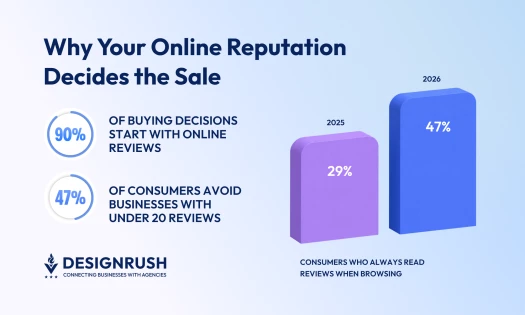
- 47% of consumers won't use a business with fewer than 20 reviews, and 74% only care about reviews from the last three months, so asking has to be routine.
- Wrong hours or a dead phone number earn one-star ratings that have nothing to do with your service.
- Decide in advance who handles what and plan out the moves that escalate a complaint.
What Online Business Reputation Management Involves
The process of monitoring, improving, and protecting how a company appears across reviews, search results, listings, social platforms, community discussions, news coverage, and AI-generated recommendations never ends.
Online reputation management for small businesses boils down to connecting what customers say about the business with appropriate responses and using that feedback to improve.
Reputation Management vs. Review and Crisis Management
Review management is one part of a broader reputation strategy, while crisis management is the escalation layer for unusually serious situations.
The odd one-star review is no crisis, but a pattern of complaints about the same issue, a factual allegation gaining reach, or a safety or legal claim could warrant a different response entirely.
| Discipline | Primary Purpose | Typical Activities | When It Applies |
| Review management | Manage customer feedback on review platforms | Requesting reviews, monitoring ratings, responding to feedback, and identifying recurring complaints | As an ongoing part of customer service |
| Online reputation management | Manage how the business is represented and perceived across digital channels | Overseeing reviews, listings, search results, social mentions, forums, media coverage, and branded content | Continuously, wherever customers research or discuss the business |
| Crisis management | Limit damage from a serious or rapidly escalating issue | Verifying facts, coordinating responses, escalating legal or safety concerns, and communicating with affected stakeholders | When an issue threatens customer safety, public trust, legal standing, or business continuity |
Why the Stakes Are Different for Small Businesses
Large brands can absorb a degree of criticism because buyers have years of familiarity, thousands of reviews, and many other sources against which to judge them. A smaller business is likely to have one location, a short review history, and/or a customer base concentrated in one community.
And it’s tough to earn trust with a limited number of reviews.
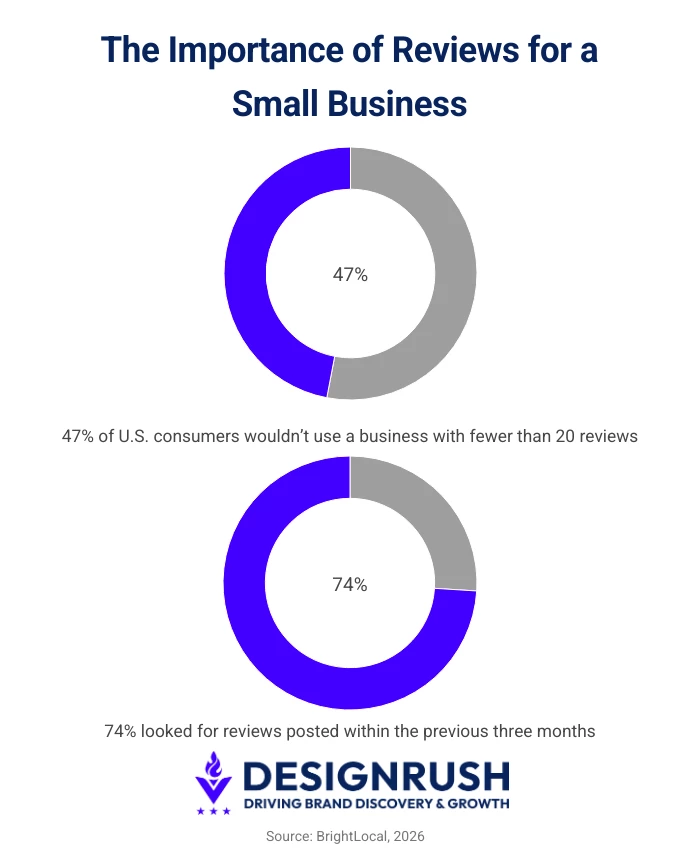
BrightLocal’s 2026 survey (n=1002) found that 47% of U.S. consumers wouldn’t use a business with fewer than 20 reviews, while 74% looked for reviews posted within the previous three months. The same study found that 42% were unlikely to choose a business that never responds to its reviews.
The advantage is that small businesses can usually respond and change course faster. The owner is often closer to the customer experience, and the distance between identifying a recurring problem and fixing it is shorter.
Where Customers Now Form an Opinion
A reputation audit should cover five layers:
- Local discovery: Google Business Profile, Google Maps, Apple Maps, Bing Places, and local directories.
- Customer validation: Google reviews, Yelp, Facebook, the Better Business Bureau, and industry-specific platforms such as Tripadvisor, Healthgrades, Angi, G2, or Trustpilot.
- Public conversation: Social media, Reddit, local community groups, forums, press coverage, and employee-review sites.
- Owned evidence: The business's website, service pages, policies, team profiles, case studies, and responses to common customer questions.
- AI synthesis: Summaries and recommendations generated from information found across those other sources.
There’s no need to monitor every platform equally, but try to identify where customers actually research and discuss businesses in your category.



10 Small Business Reputation Management Strategies for 2026
The strongest reputation management strategy for a small business is not a one-time cleanup campaign. It is a repeatable system that moves from visibility to response, operational improvement, and measurement.
Here are our 10 strategies at a glance:
| Strategy | Purpose | Suggested Cadence |
| 1. Audit what customers see | Establish a clear baseline | Quarterly and after major changes |
| 2. Respond to every review with substance | Show that the business listens and acts | As reviews arrive |
| 3. Build a compliant review generation system | Keep reviews current and representative | After eligible customer interactions |
| 4. Claim and align the profiles customers rely on | Keep public information accurate | Monthly and whenever details change |
| 5. Turn recurring feedback into operational fixes | Address repeated complaints at the source | Monthly |
| 6. Monitor beyond review platforms | Catch wider mentions and emerging issues | Weekly |
| 7. Strengthen search and AI visibility | Make accurate information easier to find | Publish as needed and review quarterly |
| 8. Build an escalation plan before a crisis | Keep high-risk responses controlled | Review quarterly |
| 9. Track reputation metrics that guide action | See what is improving | Monthly |
| 10. Automate or outsource at the right point | Match support to workload and risk | Reassess as volume or risk changes |
1. Audit What Customers See Before Trying To Change It
Start with what a customer finds about the business online. It could surprise you. Search the business name in a private browser window and record the first page of results.
Then repeat the search with terms a potential customer may use to check the company, like:
- [Business name] reviews
- [Business name] complaints
- [Business name] scam
- [Business name] + city or location
- [Business name] + owner or founder
- [Service category] near me
Check Google Maps, priority review platforms, social profiles, local community discussions, and a few relevant AI assistants as well. Look for facts and themes that appear across several sources. One stray result may mean little, but a repeated complaint or factual error deserves attention.
Use a simple spreadsheet to record the platform, rating, review count, latest review date, recurring themes, factual errors, and next action. Save screenshots of anything likely to change.
You now have a baseline for the next audit.
Pro tip: Separate visibility problems from sentiment problems. A business with almost no search presence needs a different response from one whose results are dominated by old or negative information.
What the Audit Sheet Looks Like
Here is what one row-per-platform baseline looks like for a single-location service business:
| Platform | Rating and count | Latest review | Recurring theme or error | Next action |
| Google Business Profile | 4.2, 68 reviews | 4 days ago | Booking confusion (3 reviews) | Owner: rewrite booking page |
| Yelp | 3.8, 22 reviews | 7 weeks ago | 14 reviews unanswered | Assign to a named person |
| 4.5, 9 reviews | 3 months ago | Old phone number listed | Correct this week | |
| Apple Maps | Not claimed | — | Saturday hours wrong | Claim and correct |
| AI assistants | — | — | Two of three name a discontinued service | Update service pages |
| Branded search | — | — | Old pricing page ranks third | Update service pages |
Every row should end in an action or it isn't worth recording. Repeat the audit quarterly, and after any change to your locations, services, or team.
2. Respond to Customer Reviews: Good, Bad, and Disputed
Remember that every review response has a second audience. The reviewer may never return, but future customers can still see how you behave when something goes wrong (a calm, specific reply).
BrightLocal's report found that 89% of consumers expect businesses to respond to reviews: 19% said on the same day, 81% said within a week.
So, it's best to try acknowledge a review within one business day, even when the investigation or resolution will take longer.
A Response Protocol for Positive, Negative, Mixed, and Disputed Reviews
Assign one person to monitor reviews and make sure recurring complaints reach the person who can fix them:
| Review Type | Public Response | Internal Follow-Up |
| Positive | Thank the customer and mention something specific from their review | Share the praise with the team and note any recurring strengths |
| Negative | Acknowledge the issue, apologize where appropriate, and offer a direct way to reach the owner or manager | Check what happened, contact the customer, offer a fair resolution, and correct any recurring problem |
| Mixed | Respond to both the praise and the criticism without ignoring either | Fix the weaker part of the experience while protecting what worked well |
| Disputed | Keep the reply brief and factual without revealing customer information | Save the evidence, check business records and platform policies, and report qualifying reviews |
Templates can save time, but each response should address the customer’s actual experience. BrightLocal found that generic responses make 50% of consumers less likely to choose a business.
Use refunds, replacements, and goodwill gestures to solve the customer's problem, but don’t make help conditional on changing or deleting the review.
Escalate High Volumes of Disputed Reviews
Check internal records before responding to a disputed review. Allegations involving safety, discrimination, fraud, privacy, or legal action warrant senior review, as does a sudden influx of suspected fake reviews.
Google limits removal to reviews that violate its policies. Businesses can use the Reviews Management Tool to report eligible content, check decisions, and submit an appeal where available. When reviews appear coordinated, presenting them with supporting evidence can make the pattern easier to assess.
Erase.com Removes 41 Disputed Reviews for a Medical Practice
When a medical practice was unable to resolve 41 disputed reviews through individual reports, it turned to Erase.com, an online reputation management company specializing in review and content removal.
The team documented the alleged violations, organized the supporting evidence, and escalated the reviews through the relevant platform processes. All 41 were removed.
“On its own, one suspected fake review can look real,” says Rick Da Silva, VP of sales at Erase, adding that the proof shows in the pattern of new accounts, copied phrasing, and reviews posted in a tight window.
“The standard reporting flow often gives businesses limited room to present that kind of pattern evidence. A structured escalation does.”
All 41 removals were confirmed within 28 days. Erase.com does caution that timelines vary, and clients can expect high-volume cases to often take several weeks.
3. Build a Compliant Review Generation System
A steady flow of genuine reviews gives buyers a more current picture of the business. Ask for a review while the experience is still fresh, such as after a completed job, appointment, delivery, or resolved support issue.
It’s best to make the request part of the normal customer process. A campaign refreshes the profile for a few weeks, but then your most recent review starts ageing again.
Train customer-facing employees to ask briefly and neutrally, then support the request with an email or SMS follow-up where appropriate.
Keep the process simple:
- Send the request to every eligible customer
- Ask for honest feedback in plain language
- Link directly to the review form, provide a QR code, or add the request to a post-visit survey
- Use automation to keep the process consistent
- Limit reminders so the request does not become a nuisance
- Leave the wording and rating entirely to the customer
The FTC's Consumer Reviews and Testimonials Rule prohibits several deceptive practices, including buying reviews on the condition that they express a particular sentiment. Review platforms might set stricter rules. Google, for example, bans incentivized reviews.
Don't Filter Who Gets Asked
If you use a post-visit survey, route every respondent to the public review form, not just the ones who rated you well. The moment the survey decides who gets asked, it's review gating.
Let the survey flag customers who need following up, then contact them directly and leave the decision to post entirely to them.
If you want more positive reviews, make honest participation easy and improve the experience behind the rating. Filtering out unhappy customers hides the complaint without fixing it, and the same theme keeps arriving from the customers you didn't filter.
4. Claim and Align the Profiles Customers Rely On
Outdated opening hours can hurt your reputation before anyone writes a review. So can an old phone number, an incorrect service area, or a profile that sends customers to a discontinued page.
Start with the platforms most likely to appear in local or branded searches:
- Google Business Profile
- Apple Maps
- Bing Places
- The most relevant industry directories and review platforms
Keep the business name, address, phone number, opening hours, service area, website URL, services, and core description consistent. The wording can vary, as long as the facts agree. Refresh photos, logos, and cover images whenever the location, team, offering, or brand changes.
Add the details that prevent avoidable frustration like the coverage area and how to book if you run a service business, or a current menu for a restaurant.
Besides helping customers reach you and know what to expect, accurate profiles give search engines and AI systems a consistent set of facts to work with.
Decide Who Checks, and How Often
Profile accuracy often fails through access, or a lack thereof. Usually, the manager who set up the Google Business Profile has left, and nobody can edit it.
Be sure to record who owns each listing and where the credentials live before you need them.
Then set the cadence with something like ten minutes across your main listings monthly, plus a pass whenever hours, staff, services, or contact details change. Put it on the same schedule as your review check so it doesn't rely on someone remembering.
5. Turn Recurring Feedback Into Operational Fixes
If you keep apologizing for the same complaint, there’s clearly an operational problem your responses are simply trying to hide.
Tag reviews and public feedback by theme. Common categories include:
- Waiting or delivery time
- Staff conduct
- Communication
- Pricing or unexpected charges
- Product or service quality
- Booking, returns, or cancellation processes
- Accessibility and convenience
One angry comment may describe an isolated experience, but the same theme appearing across reviews, support messages, and staff feedback warrants investigation.
Give each recurring issue an owner to investigate the cause, then agree on a correction, and set a date to see whether the pattern changes. Once you've improved the process, future responses can explain what corrective steps you've taken.
Bring Employees Into the Feedback Loop
Frontline employees often spot service problems before managers or online reviewers do. Give them a simple way to report recurring friction and show them which themes customers are raising publicly.
Employees might choose to speak positively about the company through their professional networks. Keep that advocacy voluntary and unscripted. Their more valuable contribution usually happens inside the business, where open communication can catch a service issue before it appears in reviews.
6. Monitor Beyond Review Platforms
Customers will talk about your business wherever the conversation already happens. That may be a local Facebook group, a Reddit thread, a community forum, a social post, a news comment section, or a specialist industry community.
Set up free alerts for the business name, product names, public-facing employees, and common misspellings. Check priority communities manually when automated monitoring misses them. As the volume grows, a social-listening or reputation management tool can collect several sources in one place.
There's no need to answer every mention. Before you join a conversation, consider:
- Whether the information is materially inaccurate
- The reach and credibility of the source
- Whether the discussion is gaining momentum
- Whether the issue affects safety, legality, privacy, or customer trust
- Whether a response will clarify the situation or draw more attention to an otherwise minor post
Good monitoring tells you when to respond, when to investigate privately, and when to leave a minor comment alone.
When Reputation Management Software Becomes Useful
If you run one location and receive only a few mentions each week, manual alerts may be enough. Software starts earning its cost when reviews are spread across several platforms or locations, or when the team keeps missing them.
Depending on the platform, software can provide:
- Real-time alerts for reviews and mentions
- Centralized response queues
- Automated review requests
- Role assignment and approval workflows
- Sentiment and recurring-theme analysis
- Location and competitor reporting
A useful tool should cut monitoring time and make repeated themes easier to spot. You still need people to fix the customer experience and make careful decisions in an actual crisis.
Where Those Conversations Now Happen
Sadly, ranking well on Google no longer means being findable.
SOCi's 2026 Local Visibility Index, which analyzed more than 350,000 locations across 2,751 multi-location brands, found that AI assistants surface a far narrower set of businesses than search does:
- ChatGPT recommended 1.2% of locations
- Perplexity, 7.4%
- Gemini, 11%
By comparison, those same brands appeared in Google's local 3-pack 35.9% of the time. In retail, only 45% of the brands leading traditional local search also ranked among the most AI-recommended.
Those are well-resourced brands with dedicated marketing teams. A single-location business has little reason to assume it appears in an AI answer at all, so check rather than guess.
7. Use SEO and Useful Content To Strengthen Search and AI Visibility
Customers searching your name should find enough accurate information to judge the business fairly. SEO supports online business reputation management by improving the visibility of complete listings, useful pages, and credible third-party references. Fair criticism may still rank, and a flood of thin posts will usually add clutter without earning trust.
Begin with the local-search basics. Complete your Google Business Profile, keep important listings accurate, ask for reviews consistently, and earn relevant links or citations from local organizations and industry publications.
Google confirms that review count and positive ratings can help local ranking. Reputation therefore affects searches such as "best coffee shop near me" as well as searches for the business by name.
Build a Sustainable Content Cadence
Publish when you have something useful to show or explain:
- Service, location, and product information
- Answers to recurring customer questions
- Clear booking, pricing, returns, cancellation, and guarantee policies
- Project examples and case studies
- New photos, team updates, and business milestones
- Expert guidance that demonstrates what the company knows
A modest publishing schedule is enough for many small businesses. Concentrate on pages that answer real questions, earn references, or add accurate information to branded and local searches. Thin updates written only to push down a negative result rarely earn lasting visibility.
AI tools summarize businesses using reviews, websites, listings, news coverage, forums, and other public sources. Clear source material gives those systems less room to guess.
State the basic facts plainly on your website:
- What the business does and does not offer
- Where it operates
- Who provides the service
- How pricing, bookings, returns, cancellations, or guarantees work
- Which qualifications, licenses, memberships, or certifications apply
- How customers can contact the right person
Back those facts with detailed service pages, team profiles, FAQs, policies, and case studies. Credible third-party coverage adds independent confirmation when the business has genuinely earned it. Small business online reputation management overlaps with content marketing here because both help customers understand and verify what you do.
Every quarter, review your branded Google results and ask two or three AI platforms the questions customers are likely to ask. Record factual errors, repeated descriptions, cited sources, and unanswered questions. Fix recurring gaps at the source, especially on pages and profiles you control.
BrightLocal's 2026 research found that 54% of consumers visit a business's website after reading positive reviews. Your website therefore has to confirm the picture those reviews create.
8. Build an Escalation Plan Before a Crisis
When a damaging post starts spreading, you’re not likely to have time to consider who should check the records, contact the customer, or approve a response, so assign these responsibilities in advance.
Use three response levels:
- Routine issue: A normal complaint, service mistake, or isolated negative review can usually go through your existing review or customer service process.
- Emerging pattern: Several related complaints, a sudden increase in negative sentiment, or an allegation attracting wider discussion should be referred to the owner or a senior manager for investigation.
- High-risk event: Claims involving safety, discrimination, fraud, data exposure, legal action, media attention, viral reach, or a coordinated review attack require greater care. Preserve the evidence and consult the appropriate legal, insurance, communications, or platform specialists before publishing a detailed response.
A one-page plan is often enough for a small business. Record who monitors complaints, investigates what happened, drafts and approves responses, and contacts outside advisers. Keep their current phone numbers and email addresses with the plan.
The plan should also identify actions that may make the situation worse. Avoid threatening the customer, revealing personal information, speculating before the facts are known, or promising an outcome the business cannot deliver.
A Masterclass in Making It Worse
In 2015, a Plano couple left a mildly critical Yelp review of a Dallas pet-sitting company: a fairly routine issue.
The company sued them in small claims court, alleging defamation and breach of a non-disparagement clause buried in its standard contract. A local CBS consumer reporter picked up the story and it went viral.
The company then dropped that case and sued in district court for up to $1 million, arguing the media attention had damaged its business (attention its own lawsuit had generated). By its own affidavits, new business had already fallen sharply.
In August 2016 a Dallas County district court dismissed every claim with prejudice, awarded the couple costs and legal fees, and added sanctions to deter similar suits. Congress passed the Consumer Review Fairness Act four months later, voiding non-disparagement clauses in consumer form contracts.
9. Track Reputation Metrics That Guide Action
Choose a small set of measures that shows where your attention is needed. Review them monthly, or more frequently if complaints are increasing.
Focus on these six areas:
- Average rating by platform: Track whether ratings on Google, Yelp, Facebook, or relevant industry platforms are improving or declining. Investigate sudden changes.
- Review volume and recency: Record how many new reviews arrive each month and how recently they were posted. Compare review volume with customer activity rather than chasing an arbitrary target.
- Response rate and time: Measure how many reviews receive a reply and how long responses usually take. This can reveal neglected platforms or gaps in staff availability.
- Recurring themes: Group repeated praise and complaints by subject, such as service speed, product quality, staff conduct, pricing, or booking difficulties. Pass recurring problems to the person who can fix them.
- Branded search results: Check what appears when someone searches for the business by name. Note any inaccurate listings, outdated pages, negative coverage, or useful content that should be more visible.
- Conversion signals: Monitor calls, bookings, direction requests, enquiries, and referral sources alongside your reputation data. This could show whether good reviews and search results are influencing customer action.
Treat a higher star rating as one useful indicator, but it doesn’t prove on its own that reputation work increased revenue, since advertising, seasonality, service changes, and other factors contribute. Where possible, compare reputation trends with website analytics, Google Business Profile activity, CRM outcomes, and customer surveys.
What the Research Says About Ratings and Revenue
A 2026 study in the Journal of Small Business Strategy surveyed 251 US small business owners and tested this directly:
- Reputation management practice (asking, monitoring, responding, maintaining profiles) was strongly associated with business performance, explaining 35% of the variance in it.
- The Google star rating on its own showed no significant relationship with performance.
- Practice explained under 10% of what moved those star ratings.
The practice predicted performance; the rating didn't. So track all six measures rather than watching the rating alone, and treat the rating as a by-product rather than a target.
Reputation management explained less than a tenth of what moved these ratings, most of the rest is the customer experience itself.
What One Health System Did With Its Survey Data
In 2012, a surgeon walked into her chief medical officer's office and said "Google me." He did, and an unpleasant comment came up with no way to tell how old it was or whether the person had ever been a patient.
The system was already collecting patient surveys and doing little with them. It converted the rating question to a five-star scale, turned the comments field into reviews, and released them in stages: privately to each physician, then internally for peer comparison, then publicly, 99.5% unedited.
The system reports that performance improved at each stage. By 2016, it said half its providers ranked in the top 10% nationally on patient satisfaction, and its then-CEO wrote that patient feedback had also shortened clinic wait times and improved handoffs between providers.
These are the organisation's own figures, and it's a large system, but the sequence transfers at any size. It never claimed a revenue number; the outcomes were rankings and operational changes.
10. Automate or Outsource at the Right Point
Most small businesses can begin with free alerts, native review notifications, a shared response document, and a monthly spreadsheet. You might need more support when you add locations, receive more reviews than the team can handle, face a persistent negative search result, or need specialist help with SEO, PR, or crisis communication.
Choose the level that matches the problem:
- Keep it in-house: A DIY approach suits a business with one location, manageable review volume, no active crisis, and someone who can take ownership. The work usually includes profile updates, review requests, responses, basic monitoring, and monthly reporting.
- Add reputation management software: Software becomes useful when reviews arrive across several platforms or locations and manual monitoring takes too much time. It can centralize alerts, automate review requests, organize response workflows, tag sentiment, and generate reports.
- Hire a specialist or agency: When negative search results persist, false information is spreading, allegations carry legal or reputational risk, or the business lacks the time and expertise to respond, you might need professional help. That could include SEO, content, digital PR, crisis communication, platform escalation, and coordinated reporting.
Online reputation management for business owners becomes easier to scale when software takes care of the repetitive work. The customer experience remains the business’s responsibility, however. Avoid any provider that promises to remove legitimate criticism or guarantees complete control over search results.
Before outsourcing, define the problem you need solved. Everyday review management, negative search results, false information, and crisis support require different expertise and budgets.
What Each Option Costs
Monitoring and review management stay cheap because they’re predictable, but a live crisis needs senior attention at short notice, so a modest retainer usually costs less across a year than one emergency engagement.
| Approach | Usual cost to small businesses |
| Keep it in-house | A few hours a week of owner or staff time |
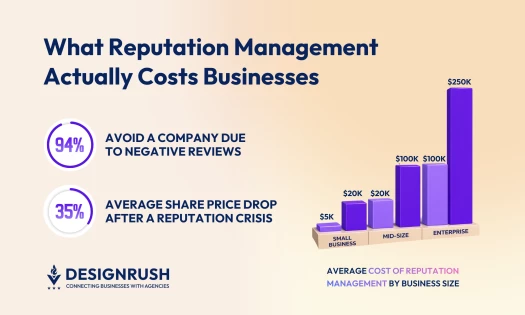
| Add software | $39–$75 a month for a single location |
| Hire a specialist or agency | $5,000–$20,000 per engagement, or $100–$135 an hour |
Most small businesses end up splitting the work: replies, policy-violation reports, and routine monitoring in-house, outside help only for search visibility, false information, or a crisis.
DesignRush's reputation management cost guide breaks pricing down by service type, business size, and hourly rate.
3 Practical Reputation Tools for Small Businesses
A small business doesn't usually need an enterprise monitoring suite. If there’s one task that’s becoming difficult to manage, like requesting reviews, maintaining local visibility, or finding conversations beyond review platforms, that’s where you should focus your search for a reputation management tool.
Businesses that need more advanced sentiment analysis, automation, or AI-search monitoring can compare the leading platforms in our guide.
Here are three geared especially toward small business:
- NiceJob: Best for automating review requests
- Localo: Best for managing Google Business Profile
- Awario: Best for monitoring wider online mentions
1. NiceJob: Best for Automating Review Requests
If your review flow rises and falls with how busy your team is, NiceJob takes the asking out of their hands.
It sends requests and reminders automatically, and also covers review monitoring, website widgets, social sharing, AI-assisted replies, and integrations. The integrations connect it to whatever you already use to book jobs or send invoices, which means the request fires off a completed job.
Price: $75 a month, with a 14-day free trial and no contract.
2. Localo: Best for Managing Google Business Profile
For a single-location business whose customers mostly arrive through Google Maps or local search, Localo concentrates on that one channel.
It combines Google review management with local rank tracking, profile audits, post publishing, and protection against unwanted profile changes.
Google allows users and third parties to suggest edits to your listing, and those can go live without your approval. So, an alert can prevent a bad review resulting from incorrect information.
Price: $49 a month, or $39 with annual billing, on the Single Business plan.
3. Awario: Best for Monitoring Wider Online Mentions
Awario earns its place once the important conversations are happening outside Google reviews and your own social profiles.
It tracks your business name, products, competitors, and other keywords across social media, Reddit, news sites, and the wider web. Plan around the three-topic limit on the entry plan –you'll have to decide what's worth watching rather than monitoring everything.
Price: $49 a month, or $29 with annual billing. The Starter plan covers one user, three topics, and 30,000 mentions a month.
Final Words on Reputation Management for Small Business
Online business reputation management follows the customer experience more closely than many businesses would like. Review responses and accurate profiles matter, but repeated service problems will keep producing fresh evidence of the same weakness.
Keep asking for honest feedback, respond with care, and pass recurring complaints to the people who can act on them. Clear website information and accurate listings then help customers verify the improvements you've made.
Our team ranks agencies worldwide to help you find a qualified partner. Visit our Agency Directory for the top reputation management agencies, as well as:
- Top Reputation Management Agencies in Boston
- Top Digital Strategy Agencies
- Top Branding Companies
- Top Digital Marketing Agencies
- Top Reputation Management Companies in Boston
Reputation Management for Small Businesses FAQs
1. What Is the difference between review management and reputation management?
Review management covers how you request, monitor, and answer customer reviews. Online reputation management for business also covers listings, branded search results, social discussions, news coverage, employee feedback, and AI-generated recommendations.
Reviews are one part of that wider picture.
2. Should I use AI to write my review responses?
AI is useful for a first draft, not for the final reply. The risk is blandness, use it to get past the blank page, then add the detail only you have, and what you've changed since.
Always read before publishing, and don't let it handle reviews involving safety, legal, privacy, or factual allegations as those need a human check against your records first.
3. Can a business remove a negative Google review?
Google removes reviews that violate its policies, not reviews that a business merely dislikes or disputes. You can report suspected fake engagement, harassment, impersonation, conflicts of interest, or prohibited personal information.
Save the review and any supporting evidence first, then respond professionally while Google considers the report when a public reply is appropriate.
4. How can a small business get more positive reviews?
Ask every eligible customer for honest feedback soon after the service, purchase, appointment, or resolved support interaction. Give them a direct link, QR code, post-visit survey, or automated follow-up so the task takes little effort.
Keep the request neutral: never buy reviews, suggest a rating, or send only satisfied customers to the public platform.
5. What are the best free reputation monitoring tools for a small business?
Google Alerts can track indexed web mentions, while Google Business Profile and major review platforms provide their own notifications. You can also run branded searches across Google Maps, social platforms, and relevant community or industry forums.
Free tools become harder to manage once you have several locations, a high review volume, or conversations spread across many platforms.
6. How long does it take to improve an online reputation?
You can correct a profile or answer a review quickly. Building a representative review history or changing branded search results usually takes much longer.
Anyone learning how to manage online reputation should expect the timing to depend on the visibility of the problem, the strength of existing negative content, customer volume, and progress on the issue that caused the complaints. Be wary of providers that guarantee a precise recovery date.