
VPS hosting protects revenue and customer experience by balancing performance and cost. It is a practical middle ground between shared hosting and dedicated servers.
VPS Hosting: Key Findings
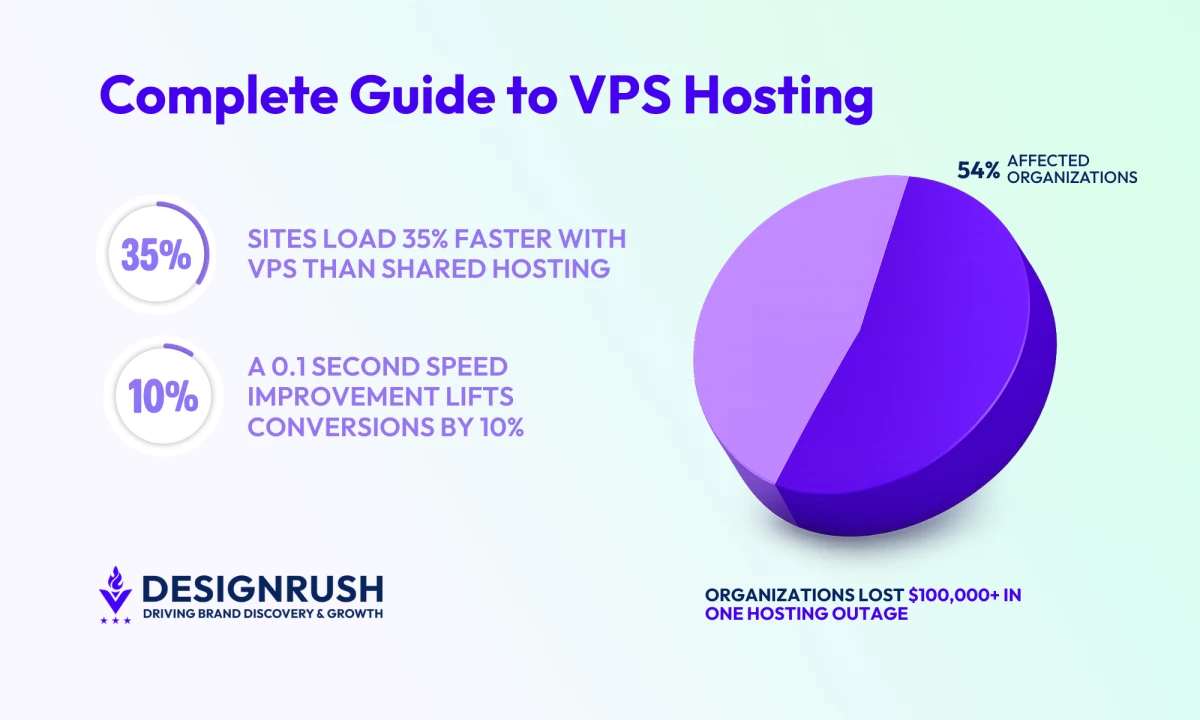
- Use VPS hosting when revenue depends on speed and uptime, as sites on VPS load 15–35% faster than shared hosting.
- Rely on VPS for campaigns, flash sales, or launches, where even a 0.1-second speed improvement can increase retail conversions by 8–10%.
- Switch to VPS when manual hosting work consumes 10–20% of your team’s time, since dedicated resources reduce firefighting caused by shared-server contention.
What Is VPS Hosting?
A Virtual Private Server (VPS) provides your business with dedicated hosting resources in a shared cloud environment.
Unlike shared hosting, performance is consistent as your workloads aren't affected by other users.
You get your own private server space, without the cost of buying and maintaining physical hardware.
In summary, a VPS gives you:
- Your CPU, RAM, storage, and bandwidth fully dedicated.
- An environment that runs in isolation without interference.
- Full root access to configure and customize freely.
- Self-managed updates, security, and maintenance.
How Does VPS Hosting Work?
VPS hosting divides one physical server into multiple private environments. Each business gets its own reserved capacity inside that system.
Here are its core functioning mechanics:
- Virtualization layer (hypervisor): A control layer sits between the hardware and customer environments. Its job is to allocate capacity and enforce separation.
- Dedicated resources: Each VPS is allocated its own CPU cores, RAM, disk space (usually on fast SSDs), and IP address. That allocation is not shared or borrowed by other tenants.
- Isolation by design: Each VPS runs independently. Traffic spikes, failures, or misconfigurations in one environment do not affect others on the same hardware.
- Full administrative control: Each VPS operates like a standalone server. Teams control software, configurations, and updates without provider-imposed constraints.
- Provider-managed infrastructure: Physical hardware, power, and redundancy remain the provider’s responsibility. Your team manages only the operating environment and applications.
Pros and Cons of VPS Hosting for Businesses
VPS hosting is often the first infrastructure upgrade that meaningfully changes performance, reliability, and control.
Benefits of VPS Hosting
Some key benefits include:
Greater Control
VPS provides administrator-level access to the server environment. You can install custom software, adjust configurations, and integrate specialized tools without platform restrictions.
Better Performance
Since your VPS isn’t sharing CPU or memory with dozens of unrelated websites, you get consistently fast load times.
Scalability & Cost-Effectiveness
You can upgrade resources without significant downtime. You pay only for what you need when you need it.
Stronger Security Isolation
Each VPS operates independently from others on the same hardware. Malware or attacks elsewhere won’t directly compromise yours. You can also implement your own security measures.
Higher Reliability
VPS hosting has top-notch uptime, often at 99.99%. This is crucial, as over half (54%) of organizations have lost more than $100,000 in a single hosting outage.
Considerations and Limitations
Key drawbacks for VPS:
Higher Cost
VPS costs more than shared plans. If your site is simple and traffic is light, a VPS might be overkill initially.
Technical Management
VPS isn’t as plug-and-play as shared hosting. With unmanaged VPS, you handle all OS updates, security, backups, performance tuning, etc. Even managed VPS often assumes some knowledge.
Fixed Resource Caps
VPS scales vertically but remains a single environment. High-traffic or data-intensive workloads can outgrow it, eventually requiring you to move to dedicated infrastructure.
Provider Quality
Performance ultimately depends on the host’s underlying hardware and resource governance. Poorly managed platforms can still experience contention.
How Does VPS Differ from Other Hosting Models?
This comparison clarifies the trade-offs so you can choose the hosting model that actively supports your growth and long-term performance.
Hosting Type | When to Choose | Cost | Customization | Performance |
VPS hosting | Growing businesses, eCommerce, apps | Moderate | High (full root access) | High (dedicated slice) |
Small sites, personal blogs, startups | Low | Limited (pre-configured) | Basic (shared resources) | |
Large enterprises, mission-critical apps | High | Maximum (own server) | Very High (entire server) | |
Businesses needing elastic scaling and flexibility | Variable | High (OS-level control) | High (scales automatically) | |
WordPress sites, blogs, and content-focused sites | Moderate | Limited (WordPress only) | High for WordPress, limited for custom apps |
VPS vs. Shared Hosting
VPS outperforms shared hosting in speed, reliability, and control.
- Shared: Low-cost but unpredictable, and scalability is limited, often requiring migration to VPS or dedicated hosting as your business grows.
- VPS: With dedicated CPU, RAM, and storage, VPS ensures consistent load times and isolates your environment from other users.
In fact, sites can load 15–35% faster with VPS than shared plans.
VPS vs. Dedicated Hosting
VPS delivers most of the benefits of dedicated servers at a lower cost with easier upgrades.
- Dedicated: You get an entire physical server dedicated to your website, ensuring maximum performance and complete control, at a much higher cost.
- VPS: Offers many of the same benefits, at a lower price point and with easier upgrades.
VPS vs. Cloud Hosting
VPS offers control and predictable costs, while cloud hosting provides automatic scaling but less stable pricing.
- Cloud: Offers automatic, elastic scaling and high OS-level control, while providers manage the underlying infrastructure. Costs fluctuate based on usage.
- VPS: Provides similar control, but scaling is manual and limited to vertical upgrades. VPS is typically more cost stable.
VPS vs. WordPress Hosting
VPS supports broader applications and faster performance than WordPress-optimized but limited hosting.
- WordPress: Optimized for WordPress sites but restricts custom applications and software installation.
- VPS: Supports broader use cases, faster performance for content-heavy sites, and self-managed updates, security, and configuration.
When Should You Switch to VPS?
Choose VPS when your current hosting is causing measurable business constraints. Key signals include:
- Performance issues affecting users: Page loads, API responses, or applications are slow or inconsistent. This indicates your current hosting is reaching its limits.
- Revenue or UX is affected: Rising cart abandonment, form drop-offs, or slow searches are causing measurable revenue loss or degraded user experience.
- Support & development bottlenecks: Support tickets spike during campaigns or content drops and engineers delay feature releases to avoid downtime.
- Marketing campaigns are risk-limited: Campaigns or flash sales are constrained because your current hosting cannot reliably handle higher traffic.
- Need for customization or compliance: Your business requires custom libraries, firewall rules, specialized software, or must meet PCI, HIPAA, or GDPR.
- Operational inefficiencies: If teams are spending 10–20% of their time on manual hosting tasks such as restarts, weekend backups, patching, or syncing errors.
Use Cases: Who Uses VPS Hosting and Why?
Let’s explore the key use cases where VPS hosting can deliver exceptional value.
- High-traffic eCommerce retailers
- Developers and technical teams
- Growing businesses and startups
- Compliance-focused businesses
- Data-intensive businesses
1. High-Traffice Commerce Retailers
Modern eCommerce sites require payment processing, shopping cart databases, SSL, and other software. VPS allows installation of custom databases, caching layers, and security certificates.
Performance directly impacts sales, even a 0.1 second speed improvement can lift conversions 8%-10% in retail sites.
VPS ensures faster loads with dedicated resources and can handle traffic spikes from campaigns, flash sales, or events without downtime.
2. Developers and Technical Teams
VPS is ideal for developers needing full server control. Root access lets you configure the OS, web server, frameworks, and libraries.
You can run multiple environments, such as development, testing, and production, and quickly spin up VMs with automation and scripting for agile dev teams.
3. Growing Businesses and Startups
Managed VPS plans give startups a cost-effective performance boost while keeping operations simple.
Resources like RAM and CPU scale with your needs, supporting rapid growth, international expansion, and professional user experiences.
Even if you’re on a budget, many providers offer entry-level VPS packages that can serve a growing site better than the slowest shared plans.
4. Compliance-Focused Businesses
Financial services, healthcare providers, or eCommerce firms requiring strict data handling and regulatory compliance use VPS to implement PCI, HIPAA, GDPR, or other security measures while maintaining performance and isolation.
5. Data-Intensive Businesses
Companies managing databases, file storage, email servers, or backend infrastructure use VPS for predictable I/O, control over backups, encryption, audit logs, and dedicated IPs.
What Are the Types of VPS Hosting?
VPS plans come in both managed and unmanaged options:
- Managed VPS: The provider handles server maintenance tasks (OS updates, security patches, monitoring, backups, etc.), much like a higher-tier shared host. This is ideal if you lack in-house sysadmin skills.
- Unmanaged VPS: You get raw server access and must handle all system administration yourself. This offers maximum control (and typically lower cost), but it requires significant technical expertise.
- Semi-managed: The host covers core updates and basic support, leaving other tasks for you.
Top VPS Hosting Providers in 2026 Comparison
In 2026, several providers have distinguished themselves through exceptional performance, customer support, and innovative features:
VPS Host | Best For | Differentiating Feature | Pricing |
Scalable, reliable VPS | Full suite of cloud services. secure storage, 100% uptime SLA | Starts at $8/month | |
Budget users | Ultra‑affordable VPS plans | KVM 1 starts at $4.99/month | |
Developers, cloud apps | Droplets with API, high flexibility | Droplets start at $4/month | |
Performance-critical businesses | Premium managed VPS with 100% uptime SLA | Starts at $5/month (1 vCPU with 1 GB memory) | |
Security-focused businesses | Built‑in SPanel control + cybersecurity | Starts at $19.95/month (billed annually) | |
Highly customizable cloud VPS | Hourly billing, 18 global data centers | Starts at $4/month (1 vCPU with 1 GB memory) |
How To Choose the Best VPS Hosting Provider
When selecting a VPS host in 2026, focus on these key factors:
- Performance and uptime guarantees
- Provider hardware quality
- Support and management
- Security and compliance
- Transparency
- Scalability options
- Reputation and reviews
1. Ensure High Performance and Uptime
Industry-standard uptime is 99.9% or higher. Some hosts promise 99.99%+ with compensation for downtime.
Atlantic.Net and Liquid Web lead in this category, offering 100% uptime SLAs, making them ideal for enterprise workloads.
DigitalOcean and Kamatera also provide strong reliability (99.9–99.99%), though self-management or maintenance windows may affect uptime.
2. Verify Hardware Quality for Your Workload
Ensure fast NVMe SSD storage, plentiful RAM/CPU, and modern server infrastructure.
DigitalOcean and Kamatera deliver high-performance, scalable infrastructure, while ScalaHosting and Hostinger target SMBs with efficient SSDs suitable for lighter workloads.
3. Choose Providers With Responsive Support and Management
24/7 support is crucial, especially if your team isn’t fully technical.
Liquid Web and Atlantic.Net provide 24/7 white-glove managed services, perfect for teams lacking technical depth. DigitalOcean and Kamatera are more self-service, suited for developer-led teams.
Meanwhile, Hostinger and ScalaHosting offer simpler, SMB-friendly support.
4. Prioritize Security and Compliance
Look for VPS hosts with support features like DDoS protection, firewalls, malware scanning, automated backups, and regulatory adherence (e.g. HIPAA for healthcare).
Atlantic.Net leads in regulated hosting with HIPAA- and PCI-compliant features, automated backups, firewalls, and DDoS protection.
ScalaHosting provides built-in security for SMBs, while DigitalOcean and Kamatera leave compliance largely to the user.
5. Look for Transparent Control Panels and Predictable Billing
The control panel should clearly show your resource usage, allowing you to easily track and manage your hosting performance.
Billing must also be predictable. Be mindful of potential pricing spikes upon renewal.
Atlantic.Net and DigitalOcean give full dashboard and API visibility, helping users track usage and manage resources. Hostinger and ScalaHosting provide simpler, straightforward panels.
6. Ensure Easy Scalability as Needs Grow
Look for providers that allow easy upgrades as your needs grow. Some scale droplet sizes with a simple reboot, while others may require you to pay for a new plan or server.
As Satish Hemachandran, VP at Newfold Digital, explains:
“Generating sustainable growth is a primary objective for any successful business. Hence, a hosting service that grows with you is an important foundation for the long-term success of your business.”
Atlantic.Net, Kamatera, and DigitalOcean lead in scaling flexibility, allowing CPU, RAM, and storage upgrades with minimal downtime and snapshot support.
7. Check Reputation and Reviews
Read recent user reviews and independent benchmarks to assess the reliability and performance of the potential VPS provider.
Atlantic.Net and Liquid Web consistently earn high marks for reliability and support. DigitalOcean and Kamatera are praised for flexibility and global infrastructure, while Hostinger is recognized for affordability.
What Is VPS Hosting: Wrap-Up
VPS hosting strikes the ideal balance between cost, performance, and scalability for growing businesses.
With the right provider and configuration, VPS hosting can power your digital transformation and fuel long-term growth.

Our team ranks agencies worldwide to help you find a qualified partner. Visit our Agency Directory for the best web development agencies, as well as:
- Web Design Companies
- eCommerce Development Agencies
- WordPress Web Design Agencies
- UI/UX Design Agencies
- Top Front End Web Development Agencies
Our design experts also recognize the most innovative design projects across the globe. Visit our Awards section for the best & latest in website design.
VPS Hosting FAQs
1. When should I switch to VPS hosting?
Switch when your website outgrows shared hosting—frequent slowdowns, custom server needs, or stronger security requirements are clear signs.
VPS hosting offers better speed, reliability, and flexibility. It’s ideal for growing traffic, e-commerce, or any project needing more control and consistent performance.
2. Can VPS hosting handle high-traffic websites?
Yes. VPS hosting allocates dedicated CPU and RAM to handle moderate to high traffic efficiently. You can scale resources as needed.
While extreme spikes may require cloud scaling, VPS is far more reliable than shared hosting for busy sites or e-commerce platforms.
3. What are the main benefits of managed VPS hosting?
Managed VPS hosting includes server updates, security patches, monitoring, backups, and expert support.
It’s perfect for teams without IT staff, offering strong performance and security without the need to manage the server yourself—ideal for focusing on your site, not system admin.



-preview-webp.webp)