
Most “free” inventory tools aren’t truly free. They’re trials, limited demos, or freemium plans that restrict you once you start relying on them.
This guide filters those out. We reviewed dozens of options and kept only tools with genuinely usable free plans, ones you can actually run a business on.
Best Inventory Management Software: Key Findings
- Use open-source tools like Odoo Community and invenTree for unlimited scale, but plan for setup and hosting overhead.
- Prioritize tools with mobile barcode scanning, like Sortly and Zoho, as they eliminate manual entry and reduce real-world inventory errors.
- Stick with free plans only if you process under ~50 monthly orders; beyond 200–300 orders/month, inefficiencies outweigh cost savings.
Free vs. Paid Inventory Software: What Free Actually Buys You
1. Best Business Management Software
2. Best eCommerce AI Tools
3. AI Solutions for Small Businesses
The real consideration is not whether a tool is free, but what its limits could cost you.
If you fit within them, free works. If you’re hitting caps, you’re already paying for it in workarounds and messy data.
In most cases, a paid plan that removes those friction points is cheaper than forcing a free tool to fit.
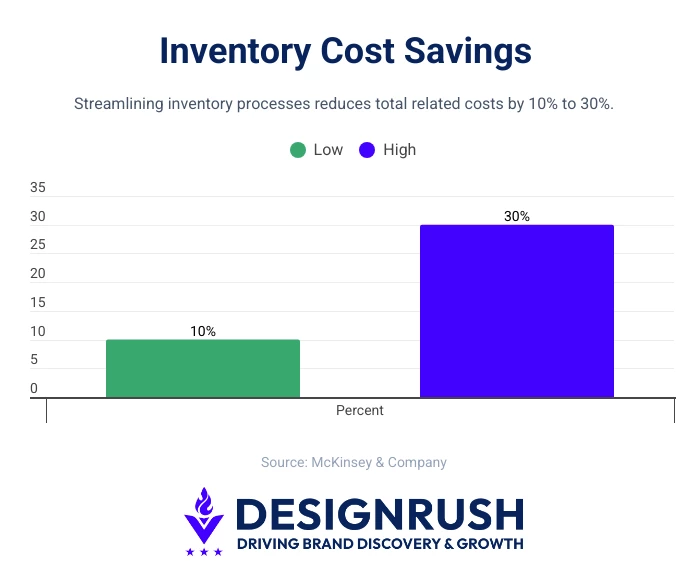
In fact, improved inventory management processes can reduce costs by 10–30%, meaning inefficient systems quietly erode margins even when the software itself is free (McKinsey & Company).
From there, it helps to understand how each model works in practice:
Freemium With Hard Usage Caps
This is the most common model. Zoho Inventory and Sortly operate this way.
You get real software, features, and a ceiling that hits at a specific number. These tools are legitimate for small operations that don't expect to scale quickly, but become limiting if your volume fluctuates or grows.
Self-Hosted Open-Source
This is the only category where "free" means truly unlimited. Odoo Community, invenTree, and Dolibarr are built on this model.
There are no SKU caps, order limits, or per-user fees. Instead, the cost comes in setup time, a server (typically $5–20/month on a VPS), and the technical skill to maintain it.
Freemium With Feature Walls or Trial-Based
Then there’s the gray area. Tools like Craftybase offer limited free access but reserve key functionality for paid tiers.
Others like Fishbowl, DEAR Inventory, and QuickBooks Commerce are often labeled “free” elsewhere, but operate as trial-only or paid products.
To keep this guide practical, we’ve focused on tools with genuinely usable free plans.
Who Should Use Free Inventory Software?
Free inventory tools are best for early-stage operations, low order volumes, or teams still building their systems and processes:
- Startups and pre-revenue founders: They get the most from free inventory tools as the limits rarely bite at low volume. If you're under ~50 orders a month, free plans are usually enough and help establish good tracking habits early.
- Small retail businesses with a single location: Ideal for Square for Retail’s free plan, with unlimited items, POS integration, and mobile support. Limits appear mainly when scaling locations.
- SMBs that have outgrown spreadsheets but aren't ready to commit to SaaS pricing are the best candidates for self-hosted, open-source solutions. Odoo Community or invenTree offer more inventory capabilities than most paid tools, if you can handle the setup.
That said, free inventory software has a clear ceiling.
Businesses that outgrow it typically handle 200-300+ monthly orders, operate across multiple locations, or need inventory tied to accounting, 3PL, or production systems.
Enterprises, in particular, shouldn’t rely on free tools for core operations, not because of cost, but capability.
Free plans typically lack audit trails, role-based permissions, and ERP integrations that finance, compliance, and ops teams depend on.
The 10 Best Inventory Management Software
Here’s how the top free inventory management software tools compare at a glance, so you can quickly see which fits your setup without hitting limits too soon.
Tool | SKU / Item Limit | Order Cap | Users | Locations | Scalability |
Unlimited items | 50 orders/month | 1 | 1 warehouse | Moderate (upgrade required early) | |
Unlimited | Unlimited | Unlimited | 1 | Moderate (multi-location locked) | |
100 entries | None | 1 | Basic | Low (strict item cap) | |
Unlimited | Unlimited | Unlimited | Unlimited | High (fully scalable, self-hosted) | |
Unlimited | Unlimited | 1 | Multi-warehouse (local setup) | Moderate (limited by architecture) | |
Unlimited | Unlimited | Unlimited | Unlimited | High (technical scalability) | |
Unlimited | Unlimited | Unlimited | Multi-location | High (ERP-level growth) | |
Unlimited | Limited invoices (10/month) | 1 | 1 | Low–Moderate | |
Unlimited | Unlimited | Unlimited | Multi-location (POS) | Moderate | |
Unlimited | Trial only | 1 (entry tier) | Limited | Moderate (paid required) |
From there, here’s a closer look at each tool and where it fits best:
1. Zoho Inventory – Best for Small eCommerce Businesses
Ideal for small eCommerce and product-based businesses
Zoho Inventory earns the top spot as one of the most well-rounded entry-level options, especially for small businesses that need structured order and stock control without upfront costs.
The free plan gives you item management with variants, purchase orders, sales orders, basic picking and packing, and multi-channel order management across Shopify and Zoho's own commerce tools.
You also get shipment tracking and basic reporting, two features that many competitors restrict to paid tiers.
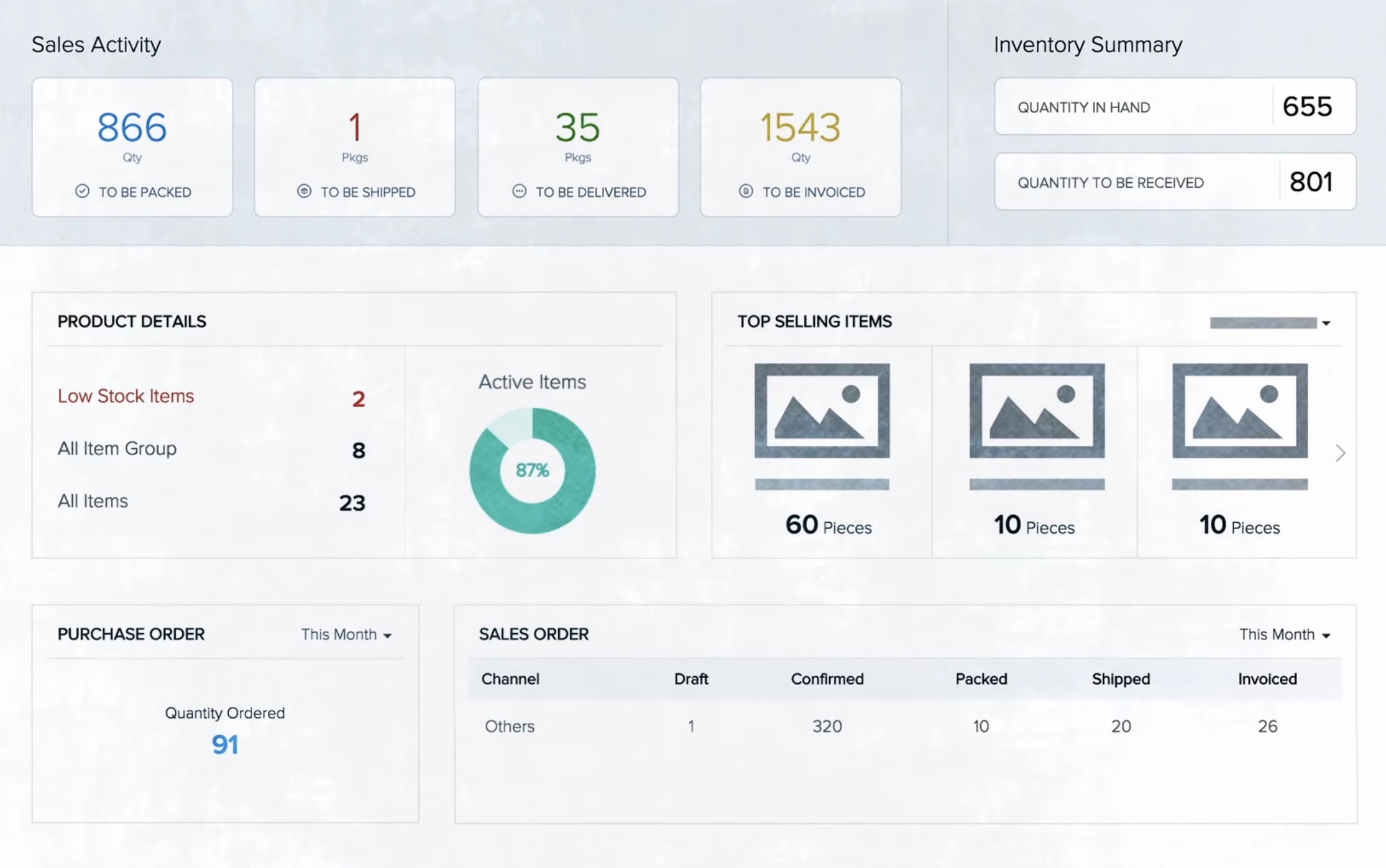
Barcode scanning via the mobile app works cleanly on the free plan. You can print labels, scan items in and out, and update quantities without touching a desktop.
For small operations with physical inventory, this alone separates Zoho from most free competitors.
The 50-order monthly cap is a real limitation, but it's transparent and predictable.
For solopreneurs and very small teams, Zoho makes it possible to organize product catalogs and fulfill orders without immediately upgrading to paid software.
Pricing
- Free plan – Available forever; 50 orders/mo, 1 warehouse, 1 user, and unlimited items
- Paid plans – Start from $29/organization/mo
Core Features (Free Plan)
- Inventory management with variants and real-time updates
- Purchase and sales orders with picking, packing, and shipment tracking
- Multi-channel order management (Shopify + Zoho Commerce)
- Mobile barcode scanning with label printing and stock updates
- Basic reporting
Usability
Zoho Inventory has a steeper learning curve due to its dense feature set and multi-step inventory workflows. But its interface is functional and logically organized. Most users are productive within a day or two without formal onboarding.
The mobile app is genuinely well-built and covers enough functionality that you don't need a desktop open to handle routine tasks.
Integration and Compatibility
The free plan integrates with Shopify, Zoho CRM, Zoho Books, and several shipping carriers, including FedEx and UPS.
If you're already in Zoho's ecosystem (CRM, Books, and Desk), inventory clicks into place without configuration overhead.
Security and Reliability
Zoho uses TLS 1.2+ for data in transit and AES-256 for data at rest. The platform is ISO 27001-certified and SOC 2 Type II compliant. Uptime historically runs above 99.9%.
Data export is available on all plans, including free.
What Users Say
Capterra: 4.5 / 5 ⭐ (414 reviews) | Google Play: 4.7 / 5 ⭐ (~4.2K reviews)
Users generally view Zoho Inventory as a reliable, budget-friendly option for small to mid-sized businesses, especially for managing stock across multiple channels.
The interface is considered clean and functional, with mobile access adding convenience.
However, some note limited customization, occasional navigation friction as inventory grows, and a setup process that takes some initial effort.
Pros and Cons
| Pros | Cons |
|
|
2. Square for Retail – Best for Brick-and-Mortar Retail
Best suited for retail stores with POS-first operations
Square for Retail is one of the few truly free inventory tools built directly into a point-of-sale system. It’s tightly integrated with checkout, so every sale automatically updates stock levels in real time.
Item management, variants, stock alerts, purchase orders, and real-time inventory updates all sync directly with Square's POS hardware.
You can add items via the mobile app, scan barcodes at checkout, and see your stock levels update instantly.
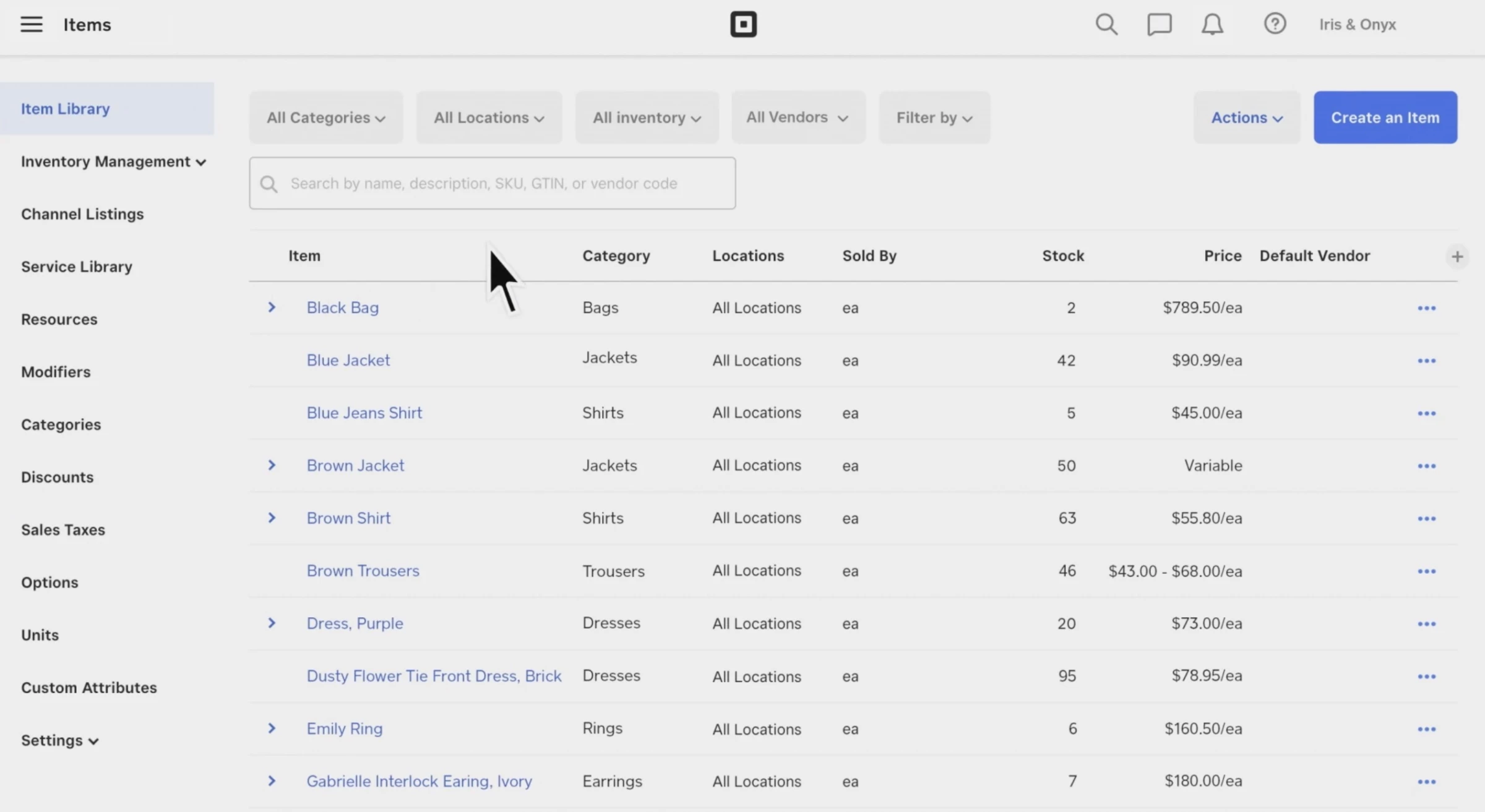
The free plan's reporting is more limited than paid tiers, but it covers the essentials: sales by item, cost of goods, and low-stock alerts.
What it lacks is advanced analytics, as category-level reporting, margin analysis, and sales trend forecasting are paid features.
Multi-location inventory is the single biggest wall on the free plan, as it doesn't support separate location tracking.
Pricing
- Free plan – includes unlimited items, unlimited transactions, unlimited users, and one location
- Paid plans – Start from $49/mo/location
Core Features (Free Plan)
- Free inventory tool integrated with Square POS hardware
- Item management with variants, purchase orders, and real-time stock sync
- Mobile item creation, barcode scanning, and instant inventory updates at checkout
- Basic reporting (sales by item, cost of goods, low-stock alerts)
Usability
Square for Retail has the most polished user experience on this list. If you've used Square for payments, the inventory interface will feel immediately familiar.
For first-time users, setup is fast. Items can be imported via CSV, and the POS integration means inventory and sales are in the same interface without any configuration.
Integration and Compatibility
Integrations include Square Payments (native), Quickbooks, WooCommerce, and a wide partner ecosystem.
Most third-party integrations require paid Square plans or third-party connectors.
Security and Reliability
Square is PCI-DSS Level 1 compliant, which is the highest payment security certification. Data is encrypted in transit and at rest.
Uptime is excellent and backed by SLA guarantees on paid plans. Data export is available on all plans.
What Users Say
Capterra: 4.7 / 5 ⭐ (492 reviews)
Across verified reviews, sentiment is highly positive for Square for Retail.
Users highlight fast setup, minimal onboarding, and an intuitive interface for everyday retail tasks, making it ideal for small teams. Mobile functionality is also a major plus.
That said, recurring drawbacks show up, such as high or unclear transaction fees at scale, limited advanced features, and occasional issues with support and internet dependency.
Pros and Cons
| Pros | Cons |
|
|
3. Sortly – Best for Asset Tracking
Ideal for tracking tools, equipment, and internal inventory
Sortly earns its place because nothing else comes close for mobile-first inventory tracking.
Its free plan includes 100 unique items and 1 user, making it ideal for individuals or small teams managing physical inventory like tools, equipment, or supplies.
Even at the free level, Sortly offers standout features such as in-app barcode and QR code scanning, item photos, low stock alerts, and customizable folders and tags.
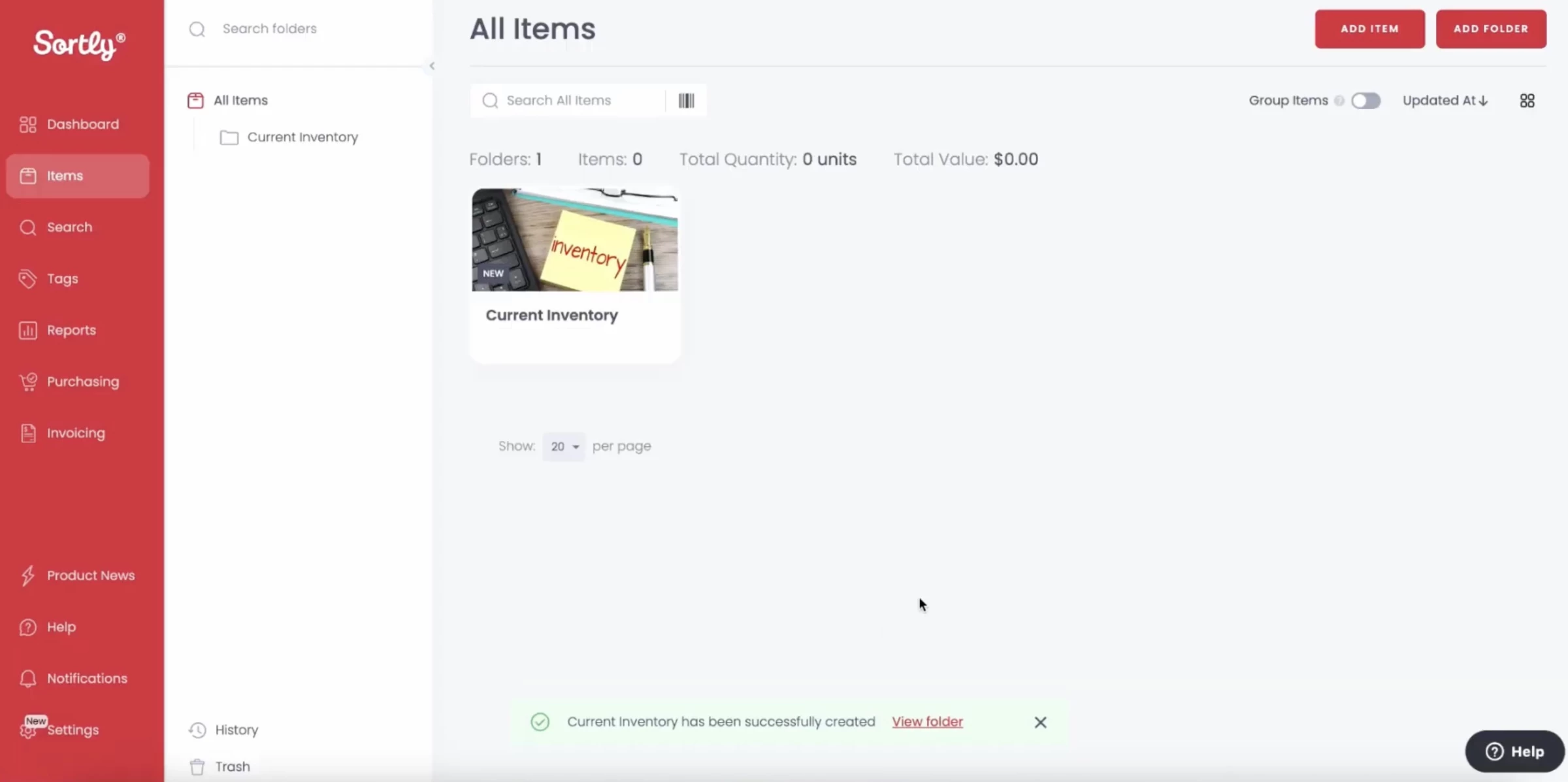
The 100-entry limit applies to total inventory entries, not SKUs in the traditional sense. This is a meaningful constraint: 100 entries might represent 100 unique products, or 100 individual items.
That makes it unsuitable as a primary inventory system for any real product business, but for asset tracking, sample management, or small physical inventories, it's the best free tool available.
Pricing
- Free plan – 100 total inventory entries, 1 user
- Paid plans – Start from $24/mo, billed annually
Core Features (Free Plan)
- Mobile barcode and QR code scanning to add, update, and locate items quickly
- Custom fields to store details such as serial numbers, locations, or condition
- Item photos for visual identification and easier tracking
- Low-stock alerts to notify when items reach predefined thresholds
Usability
Sortly has the most intuitive interface on this list, bar none. There is almost no learning curve. You can onboard a non-technical employee in fifteen minutes.
The visual layout is clean, mobile-first, and designed for non-technical users, with drag-and-drop organization, visual item tracking, and fast onboarding.
Integration and Compatibility
Sortly's free plan has limited integrations. It doesn't connect to accounting software or eCommerce platforms on the free tier. This is its most significant functional gap relative to Zoho or Square.
It works seamlessly across mobile, desktop, and tablet, with automatic cloud syncing and offline access, so teams can update inventory from anywhere.
Security and Reliability
Sortly protects user data through encryption in transit and at rest, helping keep inventory information secure from unauthorized access.
A dedicated Security & Compliance Portal provides transparent access to its latest security practices, audits, and safeguards.
What Users Say
Capterra: 4.5 / 5 ⭐ (951 reviews) | Google Play: 4.7 / 5 ⭐
Overall sentiment for Sortly is positive, especially among small to mid-sized teams looking for straightforward inventory tracking.
Users often praise its quick setup, simple interface, and strong visual tools like photos and QR codes that make organizing and tracking items easier across locations.
Common drawbacks include feature limitations, such as restricted advanced inventory structures, occasional duplication issues, and limited customization for certain fields
Pros and Cons
| Pros | Cons |
|
|
4. Odoo Community – Best for Scalable Operations With IT Support
Best suited for SMBs needing ERP-level inventory and workflows
Odoo Community is the only tool on this list where "free" genuinely means unlimited. Every other option trades something, whether orders, SKUs, users, or locations, for the zero price tag.
The cost is your own server infrastructure and the time to set it up. Odoo also offers a paid cloud-hosted version, but the self-hosted Community edition is free forever.
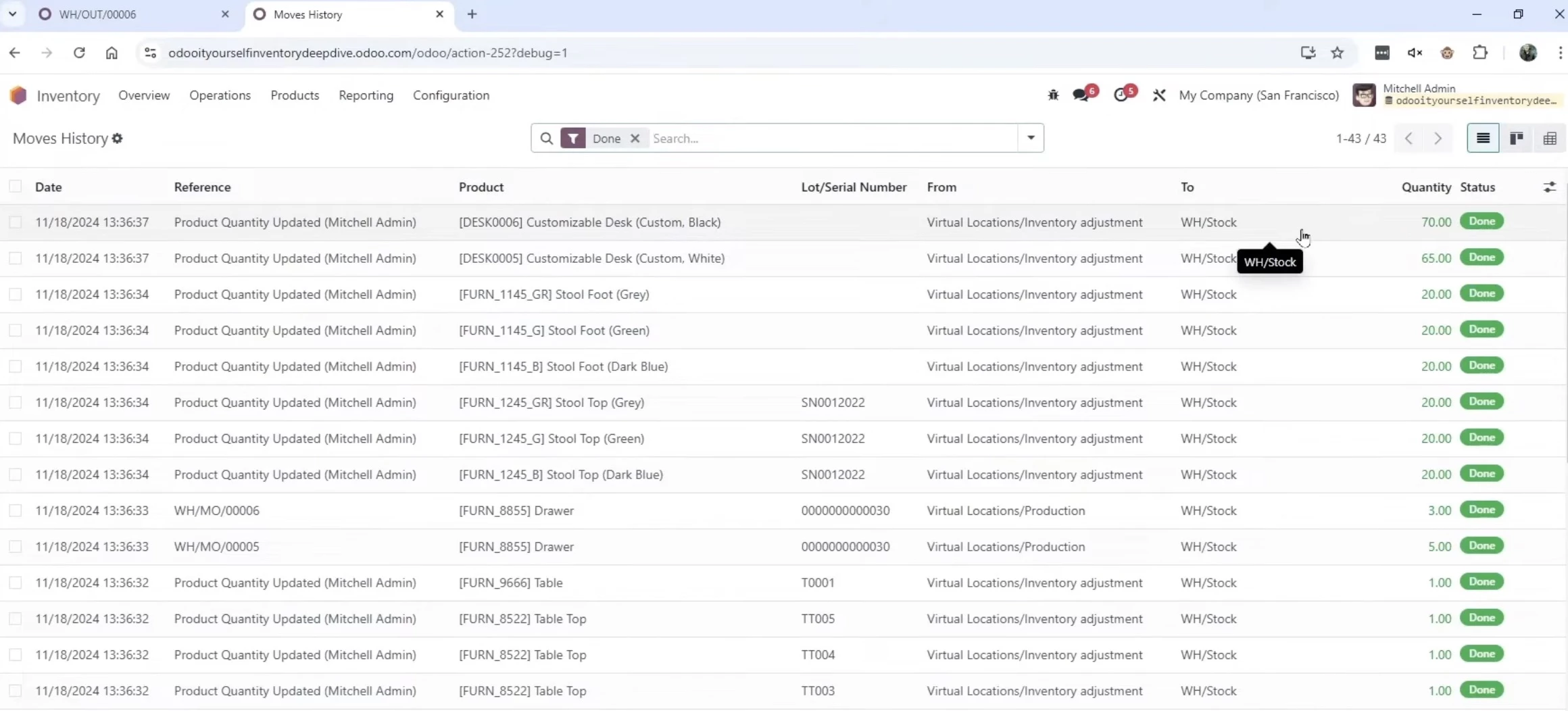
Odoo trades setup complexity for operational freedom.
Odoo Community includes a full inventory management suite: warehouse management with multiple locations and zones, barcode scanning, lot and serial number tracking, procurement rules, replenishment workflows, and detailed stock moves.
Pricing
- Free plan – Unlimited users
- Paid plans – Start from $7.25/user/month, billed annually
Core Features (Free Plan)
- Multi-warehouse and multi-location management with zones and internal routing
- Barcode scanning for receiving, picking, packing, and stock transfers
- Lot and serial number tracking for detailed product traceability
- Modular system allowing installation of only needed inventory-related apps
Usability
Odoo is powerful and complex. Initial setup requires technical knowledge. You'll need to install Odoo on a server, configure a database, and set up the modules you need.
The learning curve post-setup is real but manageable. Odoo publishes extensive documentation and has an active community forum.
Most operational workflows, like receiving, shipping, inventory adjustments, and manufacturing orders, can be learned without formal training.
Integration and Compatibility
Odoo Community integrates with virtually everything through its modular architecture and open API.
Community apps (many free) cover payment gateways, shipping carriers, eCommerce platforms, and accounting tools.
Security and Reliability
Security depends on how you configure your installation. Odoo Community supports SSL/TLS, role-based access controls, and database encryption.
For production use, proper server hardening and regular backups are your responsibility. This is the trade-off of self-hosting: you control the security posture completely, but you also own it.
What Users Say
Capterra: 4.2 / 5 ⭐ (1,295 reviews)
Odoo Community is widely praised as a flexible, low-cost open-source ERP with strong customization and modular apps that centralize inventory, sales, and accounting.
It’s especially valued by startups and technical teams for its no-license-cost model and scalability.
However, users commonly report a steep learning curve and complex setup. It can feel too heavy for simple use cases, and support quality varies depending on reliance on community or paid help.
Pros and Cons
| Pros | Cons |
|
|
5. ABC Inventory by Almyta Systems – Best for Desktop-Based Inventory Management
Ideal for businesses managing large inventory catalogs
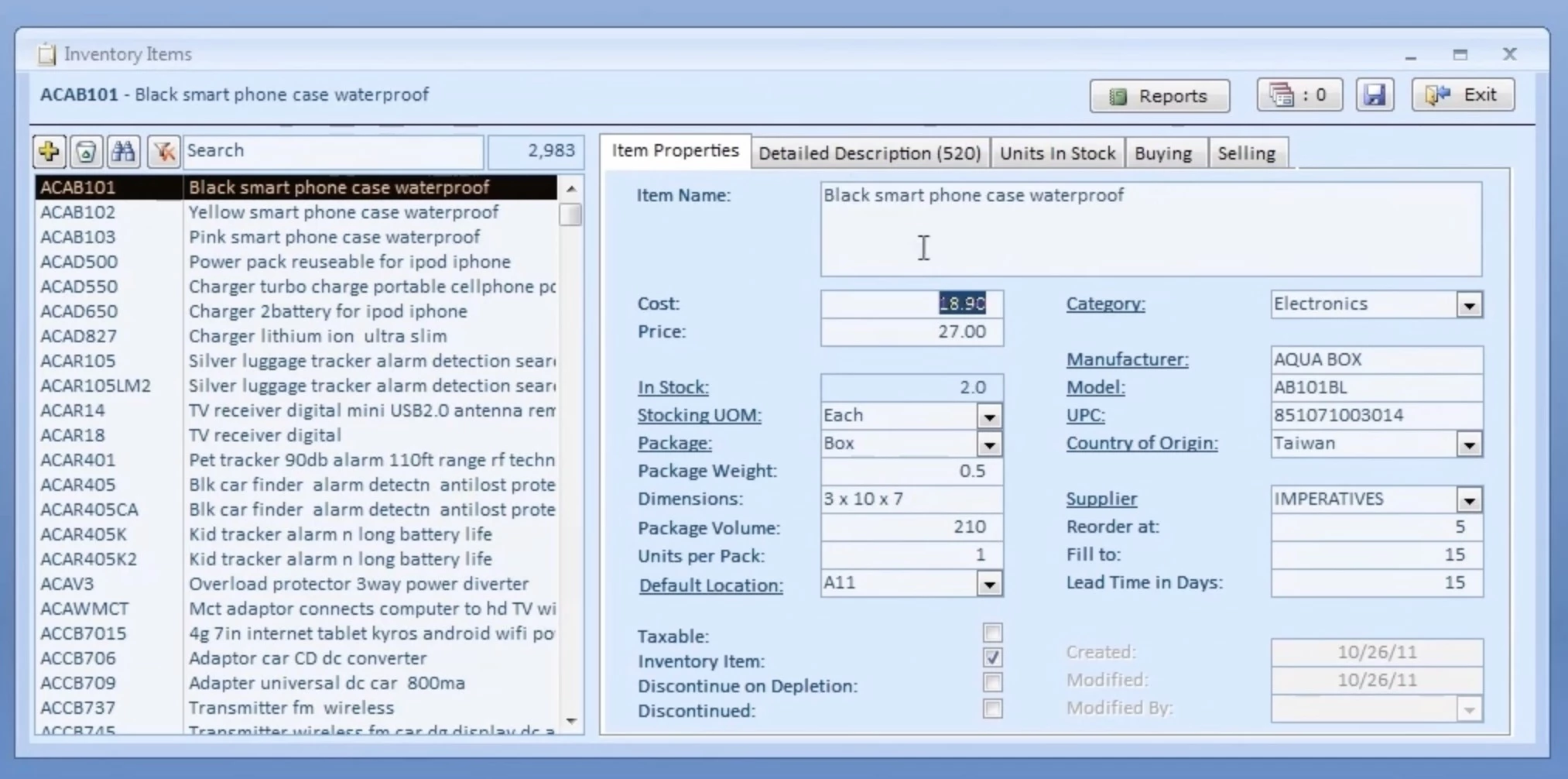
ABC Inventory by Almyta Systems is completely free and desktop-based. There is no paid version. The developer monetizes through services and consulting rather than software licensing.
It offers no limits on the number of records or inventory items, making it highly suitable for businesses managing large or growing catalogs.
ABC Inventory covers a surprising amount of ground for a completely free desktop application: purchase orders, work orders, barcode printing, multiple warehouses, FIFO and LIFO costing, and comprehensive reporting.
The limitation is the architecture. Because it's a desktop application, multi-user access requires a shared network drive setup or a local server configuration that most small businesses aren't equipped to handle.
Pricing
- Free version – single-user desktop license
- Paid commercial version (Almyta Control System) – Paid upgrade for multi-user + advanced features
Core Features (Free Plan)
- Unlimited inventory items and records with no SKU restrictions
- Purchase orders, sales orders, and work orders for end-to-end operations
- Custom reports with export options (Excel, CSV, text, HTML)
- FIFO and LIFO costing methods
- Bill of materials (BOM) and basic manufacturing workflows
Usability
ABC Inventory's interface looks exactly like what it is: Windows software from an earlier era of UX design. It's functional and logically structured, but it will feel dated to anyone accustomed to modern web applications.
The learning curve is moderate. The concepts are standard inventory management, but the navigation takes time to internalize.
There is no mobile app. All inventory operations require a desktop computer. This is the single biggest operational constraint.
Integration and Compatibility
There are no integrations in the modern sense. Data can be imported and exported via CSV and Excel.
If you need this tool to connect to your accounting software, eCommerce platform, or shipping carrier, you're doing it manually.
Security and Reliability
Data is stored locally, which means security and backup are entirely your responsibility. If your computer is lost, stolen, or fails without a current backup, your inventory data goes with it.
For any business where inventory data is operationally critical, this risk needs to be explicitly managed.
What Users Say
Users commonly view ABC Inventory by Almyta Systems as a capable free option for small businesses needing basic inventory control, including stock tracking, bin/location management, and simple order handling.
It’s often recommended as a step up from spreadsheets for users who want more structured warehouse organization without subscription costs.
However, feedback also points to a more technical setup and Windows-based installation, which can feel less modern than cloud alternatives.
Pros and Cons
| Pros | Cons |
|
|
6. invenTree – Best for Engineering and Manufacturing
Best suited for electronics, parts, and BOM-heavy operations
invenTree is free and open-source, self-hosted via Docker or a manual Python/Django installation.
It's hosted on GitHub and actively maintained. Like Odoo Community, the cost is server infrastructure and setup time.
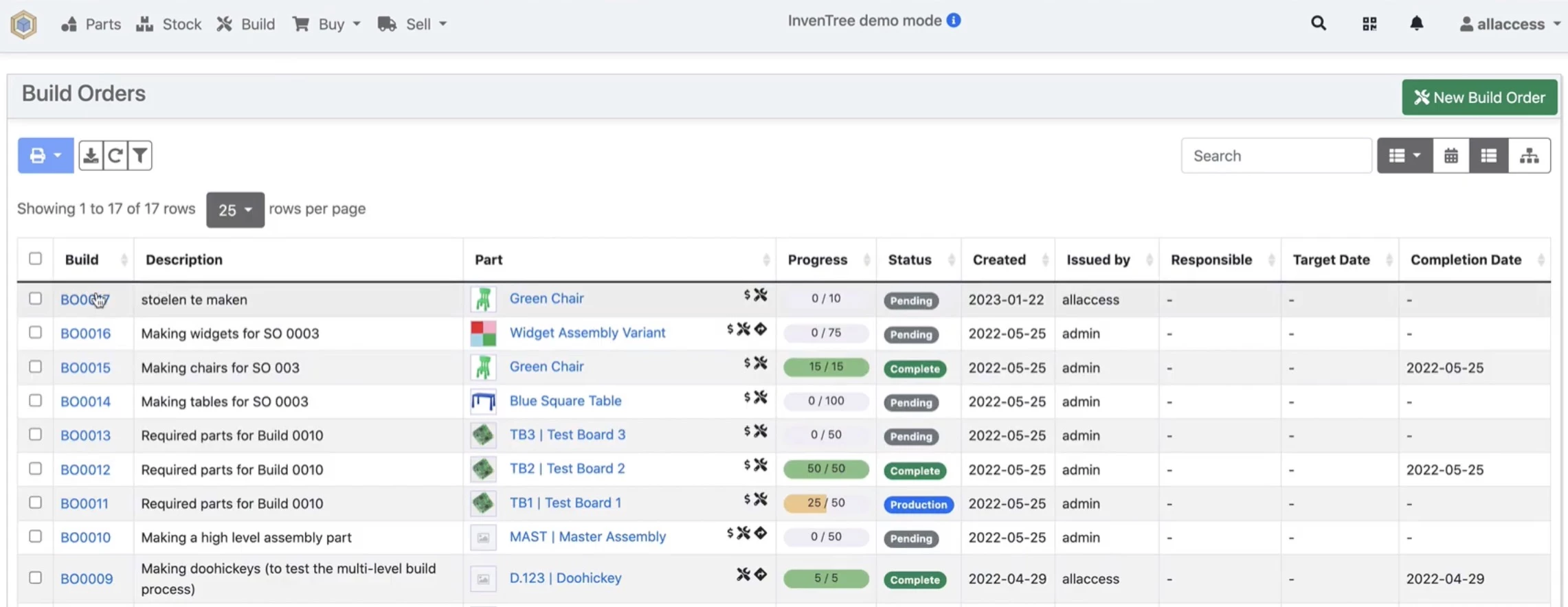
invenTree was built specifically for inventory management in technical and engineering contexts. It's particularly well-suited to electronics components, spare parts, and manufacturing BOMs.
It handles part management with supplier linkage, purchase orders, stock tracking across multiple locations, and BOM management with assembly tracking.
Pricing
- Free plan – Self-hosted
Core Features (Free Plan)
- BOM (Bill of Materials) management with assembly tracking
- Part and component tracking with supplier linkage
- Multi-location inventory management with stock control
- Purchase order management for sourcing and restocking
Usability
invenTree is technical software for technical people. The interface is clean and modern compared to ABC Inventory, but it's not designed for a non-technical warehouse manager.
Setup requires comfort with Docker or a Python/Django stack, and the configuration options reward familiarity with inventory management concepts.
Integration and Compatibility
The REST API makes invenTree the most integration-flexible self-hosted option. It offers a strong API layer and plugin system, allowing users to connect it with external tools or build custom functionality.
You can connect it to Slack for low-stock alerts, push data to your ERP via webhooks, or build a custom dashboard that pulls inventory status alongside your other operational metrics.
Security and Reliability
Security configuration is your responsibility, same as any self-hosted application.
InvenTree benefits from active open-source development, frequent updates, dependency monitoring, and strong documentation around security practices like authentication, permissions, and data protection
What Users Say
InvenTree is praised by users for its flexible management of parts, BOMs, suppliers, and detailed inventory data, making it popular with engineering teams and hardware startups replacing spreadsheets.
However, it requires technical setup (often Docker or Linux) and isn’t plug-and-play. It also lacks built-in accounting or invoicing, so it usually needs other tools for full business operations.
Pros and Cons
| Pros | Cons |
|
|
7. Dolibarr – Best for All-In-One Business Management
Ideal for small businesses needing ERP, CRM, and inventory in one system
Dolibarr is a free, open-source ERP and CRM platform for small businesses and nonprofits that need more than just inventory tracking.
The inventory management module is included at no cost in the self-hosted version.
It handles stock management, warehouse tracking, product movements, stock adjustments, purchase orders, and sales orders.
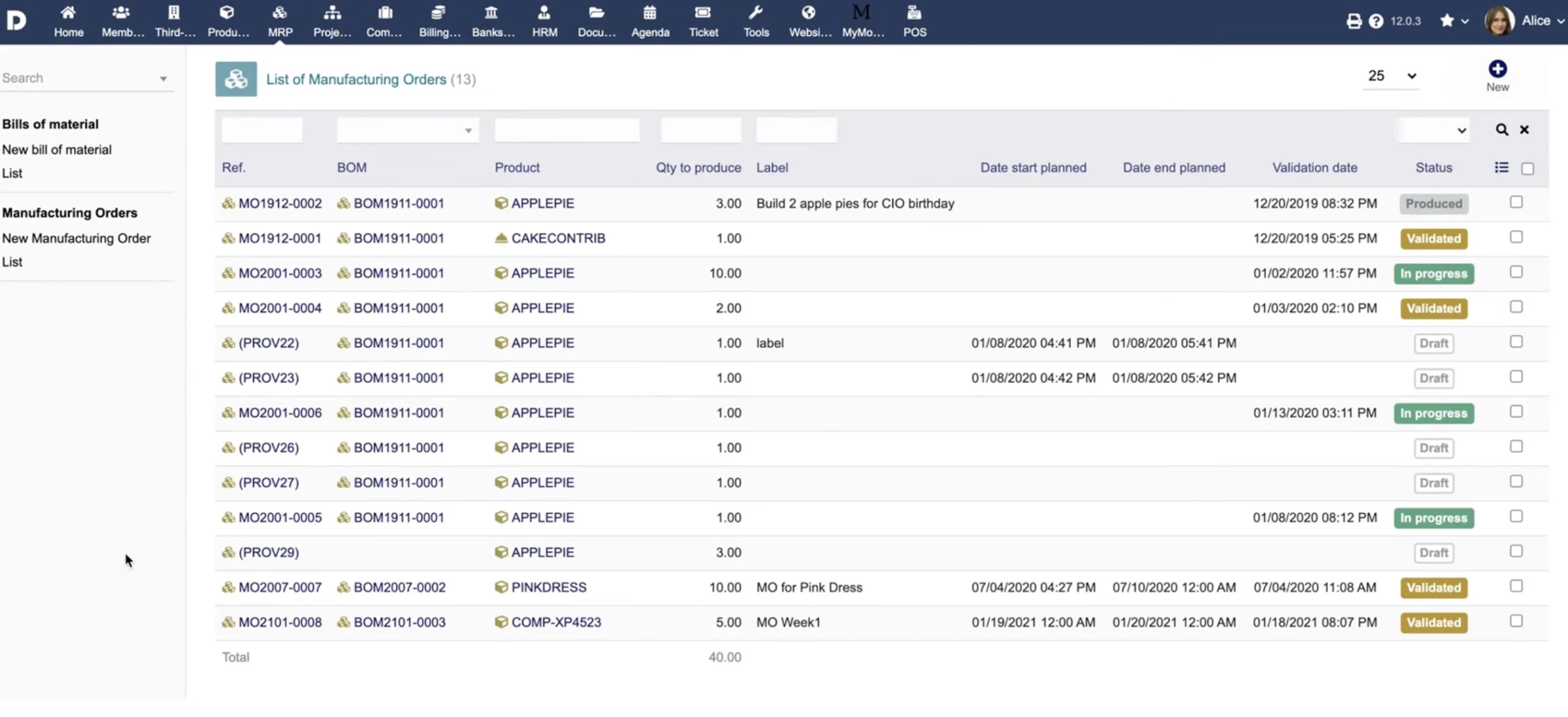
The BOM module (available as a free add-on) covers basic production tracking, which makes Dolibarr one of the few free options with any manufacturing capability.
The ERP scope means that inventory is part of a larger operational picture, including CRM, accounting, HR, project management, and invoicing.
Pricing
- Free plan – Self-hosted
Core Features (Free Plan)
- Warehouse and multi-location stock management
- Stock movement tracking (manual and automated)
- Real-time stock updates from orders, invoices, and shipments
- Virtual stock calculation (future availability view)
Usability
Dolibarr's interface has improved in recent years, but it remains less intuitive than modern web applications.
It's a PHP-based system with a traditional enterprise softwarefeel of dense menus, many configuration options, and a layout that rewards familiarity.
New users typically need more onboarding time here than with any other tool on this list except ABC Inventory.
The mobile experience is limited. There is a mobile-optimized interface but no dedicated native app. Basic operations are manageable, but complex workflows are better handled on a desktop.
Integration and Compatibility
Dolibarr has a module ecosystem (DoliStore) with hundreds of free and paid add-ons covering payment gateways, shipping carriers, eCommerce platforms, and accounting integrations.
The quality of these modules varies significantly. Core integrations work well; community-built modules can be inconsistent.
Security and Reliability
Security is your responsibility in the self-hosted version. Dolibarr supports SSL/TLS, user permissions by module, and audit logs.
For DoliCloud, security is managed by the provider. Regular backups are essential given the breadth of business data the system handles.
What Users Say
Capterra: 4.5 / 5 ⭐ (105 reviews)
Dolibarr generally earns strong ratings among small businesses and technical users. Users commonly praise its free, modular structure that combines CRM, invoicing, inventory, and other business tools.
However, it requires a learning curve and can involve technical setup, particularly for self-hosting.
While highly customizable, it is less intuitive than modern SaaS tools, and some modules feel inconsistent in usability, though functionality is often seen as outweighing these drawbacks.
Pros and Cons
| Pros | Cons |
|
|
8. ProfitBooks – Best for Inventory With Built-In Accounting
Best suited for small businesses managing stock and finances together
ProfitBooks is a free cloud-based accounting and inventory tool built for small businesses that want both functions without managing two separate systems.
Its permanent free plan supports one user with unlimited invoices, purchase orders, and inventory tracking.
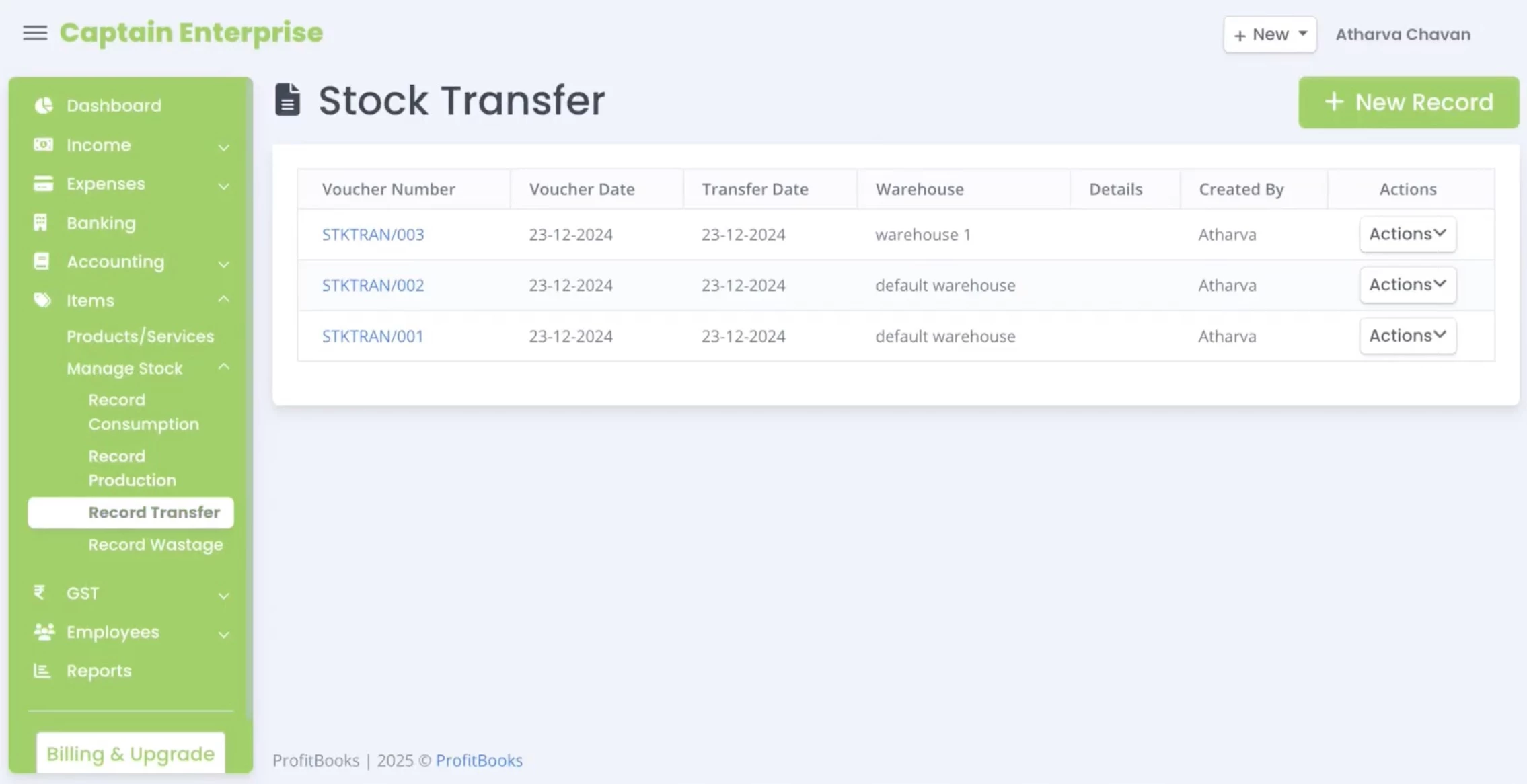
The inventory module covers product creation, stock adjustments, purchase order management, and basic warehouse tracking.
Every transaction links directly to ProfitBooks' accounting layer, so your books update automatically when stock is received or sold.
It won't scale to complex multi-warehouse operations or high-volume fulfillment, but for service businesses carrying physical stock, consultants managing equipment, or very small product businesses, it fills the gap between a spreadsheet and a full SaaS platform.
Pricing
- Free plan – 1 user, 10 invoices/month, 1 warehouse
- Paid plans – Start from $9.95/month or $99/year
Core Features (Free Plan)
- Inventory tracking with stock adjustments and product categorization
- Purchase orders and basic supplier management
- Direct integration between inventory transactions and the accounting ledger
- Invoice creation tied to stock levels
Usability
ProfitBooks has a clean, modern interface that's notably easier to navigate than most free tools with accounting features.
The dual focus on inventory and accounting means menus are organized around business workflows rather than pure inventory logic, which suits non-technical owners well.
Integration and Compatibility
ProfitBooks integrates with PayPal and Stripe for payment collection and offers CSV import/export for moving data to other systems.
Third-party eCommerce or shipping integrations are not available on the free plan. It functions primarily as a standalone tool.
Security and Reliability
ProfitBooks uses SSL encryption for data in transit and automated cloud backups. Data is hosted on AWS infrastructure.
The free plan includes full data export capability, which limits switching costs if you outgrow it.
What Users Say
Capterra: 4.4 / 5 ⭐ (97 reviews)
ProfitBooks is generally seen as a simple, affordable tool for small businesses and solo operators. Users often highlight its quick setup, ease of use, and ability to centralize everyday financial tasks without ERP complexity.
A key benefit frequently mentioned is time savings, and support is also commonly described as responsive and helpful, especially during onboarding.
On the downside, users note limited advanced features, including restricted reporting, customization, and some mobile app limitations.
Pros and Cons
| Pros | Cons |
|
|
9. Loyverse – Best for Retail and Hospitality
Ideal for restaurants, cafes, and retail with fast transactions
Loyverse is a free POS and inventory platform built specifically for retail and hospitality businesses, optimized for fast transactions, modifiers, and ingredient-level tracking.
The free plan is genuinely unlimited across most dimensions: unlimited items, unlimited receipts, unlimited users, and up to unlimited locations for basic POS use.
Real-time inventory updates at every sale, low-stock alerts, purchase orders, and a supplier management module are all included at no cost.
Pricing
- Free plan – Unlimited items, locations, and users
- Paid plans – Add-ons such as advanced inventory at $25/mo and unlimited sales history at $5/mo
Core Features (Free Plan)
- Unlimited items, users, and locations (no core usage caps)
- Real-time inventory tracking with automatic stock updates per sale
- Offline POS mode with automatic sync when reconnected
- Built-in sales tracking with item-level performance insights
Usability
Loyverse is designed for speed; cashiers and floor staff can be trained in under thirty minutes. It works both online and offline, ensuring uninterrupted operations even without internet access.
The back-office dashboard is clean and mobile-accessible, covering sales history, item performance, and inventory levels without requiring a desktop.
It's the most hospitality-intuitive free tool available.
Integration and Compatibility
Native integrations, including WooCommerce, QuickBooks, and Xero, require the paid Integrations add-on. The free plan operates largely as a self-contained system.
It also connects with hardware like receipt printers, barcode scanners, and cash drawers.
Security and Reliability
Loyverse operates on a cloud-based infrastructure with real-time syncing, secure data handling, and 24/7 support.
The offline POS mode stores data locally and syncs when connectivity returns, which protects against transaction loss during outages. All plans include full data export.
What Users Say
Capterra: 4.8 / 5 ⭐ (457 reviews)
Loyverse POS is consistently viewed as an easy-to-use system with fast setup and a short learning curve, making it especially suitable for small business owners and lean teams.
It’s praised for real-time inventory updates, sales tracking, and practical mobile features that support day-to-day retail and food service operations, all at a low cost.
However, users note limitations such as tablet reliance, basic reporting depth, and limited customization for more complex workflows.
Pros and Cons
| Pros | Cons |
|
|
10. Craftybase – Best for Handmade and Small-Batch Production
Best suited for makers, Etsy sellers, and craft-based businesses
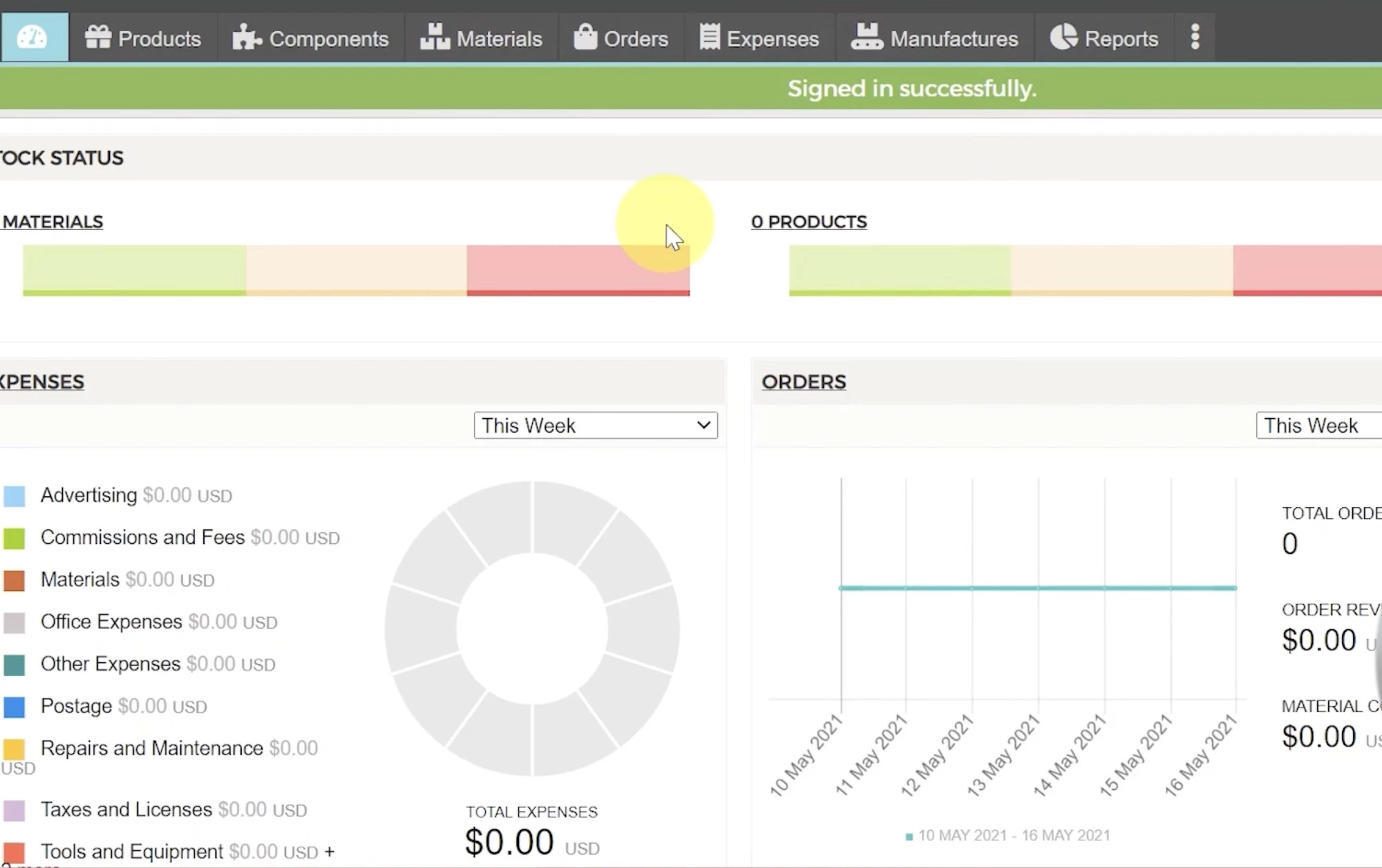
For transparency, Craftybase does not offer a permanent free plan, but we’ve included it in the list as it’s the only purpose-built tool for handmade goods and small-batch manufacturing.
This is a real gap in the free software market, and makers and handmade goods sellers have specific inventory needs that general inventory tools cannot handle.
Craftybase was built for makers: people who create physical goods from raw materials and sell them through platforms like Etsy, Shopify, or at craft fairs.
It handles bill of materials (BOM) tracking, recipe costing, raw material inventory, finished goods inventory, and production order management in a single interface.
Etsy and Shopify integrations sync sales back to Craftybase and trigger inventory adjustments, which closes the loop between selling and production planning.
Pricing
- Free plan – 14-day trial
- Paid plans – Start from $41/mo or $490/yr, billed annually
Core Features (Free Plan)
- Recipe-based costing to calculate exact product costs
- Raw material inventory management with automatic deduction during production
- Finished goods inventory synced with production output
- Sales sync with Etsy, Shopify, and Amazon Handmade to update inventory in real time
Usability
Craftybase is the most approachable manufacturing-adjacent tool available.
The language, the workflows, and the interface are designed for someone who runs a creative business, not someone with a supply chain background.
Setup typically takes a few hours for a basic product catalog.
Integration and Compatibility
Etsy, Shopify, and Amazon Handmade integrations are the core of Craftybase's eCommerce connectivity. It does not integrate with accounting software natively, but can export data for your accountant.
Security and Reliability
Craftybase is a cloud-hosted application. Standard SaaS security applies, including TLS encryption, cloud backups, and secure data storage. Data export is available for all plans.
What Users Say
Capterra: 4.6 / 5 ⭐ (242 reviews)
Feedback for Craftybase shows it’s well-suited to small manufacturers, artisans, and handmade product businesses that need more than basic inventory tracking
Users value its ability to track raw materials through to finished goods, along with consignment and tax reporting features helping improve pricing and margin visibility.
Limitations include a learning curve, especially for larger inventories, along with limited integrations, occasional syncing issues, and some reliance on manual workarounds for advanced workflows.
Pros and Cons
| Pros | Cons |
|
|
What To Look for in Free Inventory Management Software Tools
Here's what actually distinguishes useful free inventory software from the tools that will frustrate you six weeks in.
- Understand exactly what the free plan caps
- Mobile barcode scanning determines real-world usability
- Only count integrations that are actually free
- Confirm you can export your data
- Match the tool to your operational context
1. Understand Exactly What the Free Plan Caps
Not all limitations hit the same way. Order caps create operational failure at volume. If you hit Zoho Inventory's 50-order monthly ceiling mid-month, fulfillment stops.
Feature walls create strategic blindness. Loyverse's advanced inventory reporting looks free until you realize stock valuation requires a $25/month add-on. And user limits determine whether your free tool can support a team at all.
Before committing, ask: what breaks first for my business? For a solopreneur doing 20 orders a month, a 50-order cap is irrelevant.
For a small retail shop with two staff, a single-user restriction is a dealbreaker from day one.
Best for transparent limits: Zoho Inventory (explicit caps, clear upgrade path), Square for Retail (no order cap whatsoever)
2. Mobile Barcode Scanning Determines Real-World Usability
Any tool that requires you to sit at a desktop to log a receipt, a return, or a stock check is a tool that will create a two-step process for every physical inventory action.
The best inventory management software lets you scan a barcode with your phone and update stock in real time.
That single capability eliminates an entire category of transcription errors and makes your inventory data trustworthy rather than aspirational.
Best mobile scanning: Sortly (most intuitive mobile UX), Zoho Inventory (full-featured mobile app with label printing), Square for Retail (native POS barcode integration)
3. Only Count Integrations That Are Actually Free
Many tools advertise 50+ integrations and quietly restrict them to paid tiers. Zoho Inventory's free plan includes Shopify, Zoho CRM, Zoho Books, and major shipping carriers.
Square for Retail's POS integration is native to the free plan. Loyverse's integrations require a separate $9/month add-on.
Before you build your stack around a tool, verify which integrations are live on the free tier.
As Ivan Burban, Head of Marketing at Coupler.io, points out:
“Given the complexity and cost of building custom integrations internally, a platform with stable access to hundreds of data sources and transparent pricing provides more value in the long run.”
If your inventory tool needs to talk to your accounting software or eCommerce platform, that connection needs to exist on the plan you're actually using.
Best free integrations: Zoho Inventory (Shopify, Zoho Books, Zoho CRM, shipping carriers), Square for Retail (native POS + Square Payments)
4. Confirm You Can Export Your Data
All major cloud-hosted tools in this list use TLS encryption in transit and AES-256 at rest. The real security question for free plans is data export: can you get your data out if you need to leave?
Tools that make it easy to export a full CSV of your inventory, such as Zoho and Sortly, give you leverage. Tools that bury export behind paid tiers create a switching cost that works against you.
Best data portability: Odoo Community, invenTree (full self-hosted control), Zoho Inventory, Sortly (CSV export on free plan)
5. Match the Tool to Your Operational Context
Choosing a tool optimized for a different context creates friction even when the feature list looks right on paper.
The right tool is the one that matches how your business physically moves inventory. Here’s how to match the tool to your real-world use case:
- Retail and hospitality with a physical POS: Square for Retail or Loyverse
- Small product businesses and eCommerce: Zoho Inventory
- Asset tracking, tools, and equipment: Sortly
- Engineering, electronics, and technical manufacturing: invenTree
- Small businesses needing inventory + accounting: ProfitBooks or Dolibarr
- Operations with no budget and IT resources: Odoo Community
Best Inventory Management Software: Final Words
Free inventory software works, but only if you’re clear about where your business is now and where it’s going.
For small or early-stage operations, tools like Zoho Inventory, Square for Retail, Sortly, Odoo Community, and invenTree can cover real needs.
Use free software to build your processes and validate your setup. When it starts slowing you down, upgrade.

Our team ranks agencies worldwide to help you find a qualified partner to implement the latest AI solutions. Visit our Agency Directory for the Top IT Services Companies, as well as:
- Top IT Services Companies in Dallas
- Top IT Consulting Companies
- Top IT Outsourcing Companies
- Top IT Services for Startups
- Top Managed IT Service Providers
Best Inventory Management Software FAQs
1. What is the best completely free inventory management software?
It depends on what “completely free” means for you. If you want a no-setup, cloud-based tool, Zoho Inventory is the most capable within its limits.
If you want zero caps, tools like Odoo Community, invenTree, and Dolibarr are free forever but require hosting and setup. There’s no single best option, only the best fit for your setup and scale.
2. What’s the difference between free and open-source inventory software?
“Free” usually means a freemium cloud tool with usage limits. Open-source means you host it yourself with no licensing fees or caps.
Tools like Odoo Community, invenTree, and Dolibarr fall into both categories. The trade-off: more control, but also more setup and maintenance.
3. Can free inventory management software tools handle multiple warehouses or locations?
Usually not. Zoho Inventory and Square for Retail free plans are limited to one location.
If you need multi-location tracking without paying, self-hosted tools like Odoo Community or invenTree are the practical options.
4. Is free inventory software secure enough for a real business?
For cloud tools, generally yes. They use standard encryption (TLS in transit, AES-256 at rest). The bigger concern is data portability (can you export your data easily?).
With open-source tools, security is entirely on you, giving you full control, but also full responsibility.
5. When should I upgrade from free inventory management software tools?
Upgrade when the tool starts slowing you down: hitting order/SKU limits, needing multiple users, managing multiple locations, or relying on manual workarounds. I
If you’re patching gaps with spreadsheets or delayed syncing, you’ve likely outgrown the free plan.
6. Do free inventory tools work for eCommerce businesses?
Only to a point. Zoho Inventory is the strongest free option with eCommerce integrations. Square for Retail works if you also sell in person.
Beyond that, most free tools lack real-time multi-channel sync, something growing eCommerce operations will eventually need from a paid solution.