


13 UX Research Methods Explained by Use Case and Product Stage

A practical UX research guide for product teams, designers, and agencies, with sample sizes and tools per method.
8,487
13 UX Research Methods Explained by Use Case and Product Stage
Article by Nicole Causapin
|

Choosing the wrong UX research method can waste weeks validating the wrong thing. 

We break down 13 UX research methods, when they work best, where they fall short, and how to match them to the right product stage and research question. 

User Experience Research Methods: Key Findings 

  • Do generative research before usability testing. Testing the wrong problem confidently is worse than not testing at all. 
  • Always pair A/B tests with a qualitative method. Knowing which version won means nothing without knowing why. 
  • Use Articos to validate hypotheses before booking moderated sessions. At $8–$20 per study, it pays for itself before the first interview. 

Why Skipping UX Research Costs 100x More Later

UX research reveals how people actually experience and use a product, and it's most effective when it happens throughout the entire development process. 

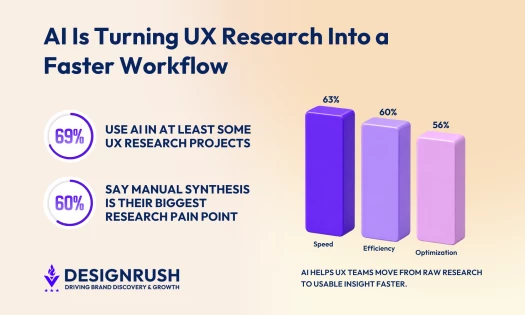
83% of designers, product managers, and researchers agree.  

value of ux research

In fact, IBM found that resolving a usability issue after launch can cost 100 times more than addressing it during the design stage. 

Research is also becoming easier to run without a large budget or dedicated team. User research platforms like Articos help teams collect structured user feedback faster and at lower cost. 

At $8-$20 per study, versus $5,000-$30,000 for a traditional firm, it's changed the cost calculation for agencies and consultants who previously had to skip interviews entirely to stay within project budgets.  

Explore The Top UI/UX Design Agencies
Agency description goes here
Sponsored i Agencies shown here include sponsored placements.

4 Core Types of UX Research: What Question Are You Trying to Answer? 

Every UX research method falls into four dimensions that determine what kind of answer you'll get before you run a single session. 

Which type you should use depends on the question you need answered.  

Here’s a quick guide on UX research types: 

1. Attitudinal vs. Behavioral Research: How Do Users Feel, and What Do They Actually Do? 

The gap between what users say and what they do is where the most valuable insights hide. Use both to get the full picture. 

Users may claim they would use a feature but ignore it in practice or describe a design as “confusing” while still completing the task successfully. 

1.1. Attitudinal: What Users Say 

This focuses on users’ preferences, opinions, and reported experiences. It helps you understand how users feel about a product and why they make certain decisions. 

Methods: User interviews, surveys, focus groups, diary studies, and desirability testing. 

Use when: Early in a project to understand needs and motivations, or after launch to gauge satisfaction and perceived usability. 

1.2. Behavioral: What Users Do 

This captures observed user actions like their clicks, navigation paths, hesitations, and errors, and reveals how they actually interact with a product. 

Methods: Usability testing, session recording, eye tracking, and clickstream analysis.  

Use when: When you need to know what users actually do with your product, not what they say they'd do. Particularly valuable for validating design decisions and identifying friction you didn't anticipate. 

Don't rely on attitudinal data alone. If users say they want a feature, find behavioral evidence before building it. 

2. Qualitative vs. Quantitative: Do You Need the Why or the How Much? 

A qualitative interview will tell you why users abandon your checkout page, while a quantitative A/B test will tell you how much a proposed fix improves conversion. 

2.1. Qualitative: Understanding the “Why” 

This research provides depth and context to understand why users behave the way they do. It works with small samples and produces observations, quotes, and patterns rather than numbers. 

Methods: User interviews, focus groups, diary studies, and ethnographic research. 

Use when: Your team is still defining the problem. If users are abandoning a checkout flow, qualitative research uncovers the frustrations driving that behavior.

2.2. Quantitative Research: Measuring the “How Much” 

Quantitative research provides data you can measure, compare, and track for statistical confidence.  

It answers: how many users are affected, how often something happens, or whether one version performs better than another. 

Methods: Surveys (when closed-ended and statistically sampled), A/B testing, tree testing, and five-second tests.  

Use when: You already understand the problem and are debating which solution works better. 

3. Generative vs. Evaluative: What Stage Are You At?

The most common mistake in UX research is running evaluative research before you've done enough generative work to know what you're actually testing.  

A rough sequence to follow: 

  1. Start with generative research to understand users and define the problem space. 
  2. Use those insights to inform early design decisions. 
  3. Shift to evaluative research once you have something worth testing. 
  4. Cycle back to generative when you hit a finding that challenges your assumptions. 

3.1. Generative: Before You’ve Built Anything 

Generative research surfaces user needs, behaviors, and mental models that should inform what you design.  

Methods: User interviews, ethnographic research, diary studies, contextual inquiry, and exploratory surveys. 

Use when: Starting a new product or feature, entering an unfamiliar problem space, or challenging existing assumptions. 

3.2. Evaluative: Once You Have Something to Test 

Evaluative research assesses how well a prototype, a flow, or a live product works and identifies what to fix. 

Methods: Usability testing, A/B testing, five-second tests, tree testing, and heuristic evaluation. 

Use when: You have a prototype or live product and need to identify problems before or after launch. 

4. Moderated vs. Unmoderated: What Are Your Constraints?

This distinction cuts across nearly every method in this guide, and it affects your cost, timeline, and the depth of insight you'll get. 

4.1. Moderated: Researcher-Guided Sessions 

A facilitator guides the session in real time. They can ask follow-up questions and redirect when participants go off track. 

Methods: User interviews, focus groups, moderated usability testing, and contextual inquiry 

Use when: Tasks are complex or exploratory, as they provide deeper insight. However, plan for smaller samples (5–10), higher cost, and days to weeks. 

4.2. Unmoderated: Independent, Self-Guided Sessions  

Participants complete tasks or answer questions independently, usually through a software platform, with no researcher present.  

Methods: Surveys, A/B tests, five-second tests, card sorting (remote), tree testing, and session recording 

Use when: Validating a decision or gathering feedback at scale or within a tight timeline or budget. Expect faster results (hours to days) across larger samples (20–100+), though the depth of insight will be more moderate. 

The 13 Best UX Research Methods by Use Case and Product Stage 

Experienced teams rarely rely on a single approach. Usually, a combination of qualitative, quantitative, behavioral, and attitudinal methods working in parallel is what a well-rounded lean research practice looks like in production. 

Tony Paris, Senior Website Creator at AppWT, describes the pragmatic toolkit his team reaches for:  

"We approach our UX research process using user interviews, usability testing, surveys, A/B testing, analytics, and persona development."  

Avinash Chandra, Founder of BrandLoom Consulting, describes how that multi-method thinking shapes his team's process:  

"Our UX research begins with understanding user personas through interviews, followed by usability tests to shape intuitive user flows. Iterating designs based on feedback ensures purposeful elements." 

That sequence of generative first, evaluative second, and iterative throughout is the thread running through every method below:

Method 

Type 

Moderated? 

Best Stage 

Typical Duration 

User Interviews 

Qual / Attitudinal 

Yes 

Discovery 

1–3 weeks 

Surveys 

Quant / Attitudinal 

No 

Any 

1–2 weeks 

Usability Testing 

Qual / Behavioral 

Both 

Validation 

1–3 weeks 

A/B Testing 

Quant / Behavioral 

No 

Post-launch 

2–4 weeks 

Card Sorting 

Qual+Quant / Attitudinal 

Both 

Discovery/IA 

1–2 weeks 

Tree Testing 

Quant / Behavioral 

No 

Validation/IA 

1–2 weeks 

Focus Groups 

Qual / Attitudinal 

Yes 

Discovery 

1–2 weeks 

5-Second Tests 

Quant / Attitudinal 

No 

Validation 

3–5 days 

Session Recording 

Qual / Behavioral 

No 

Post-launch 

Ongoing 

Diary Studies 

Qual / Attitudinal 

No (self-report) 

Discovery 

3–6 weeks 

Contextual Inquiry 

Qual / Behavioral 

Yes 

Discovery 

2–4 weeks 

Heuristic Evaluation 

Qual / Behavioral 

No (expert review) 

Validation 

1–2 weeks 

Concept Testing

Qual + Quant / Attitudinal

Both

Discovery / Early Validation

1-2 weeks

1. User Interviews for Early Discovery & Understanding Motivation

  • Best for: Exploring a new problem space, understanding motivations behind behavior, or building personas 
  • Sample size: 5-8 per user segment; 15-20 across multiple user types 
  • Timeline: 2-4 weeks from recruiting to synthesis 
  • Recommended tools: Articos, Lookback, Grain & UserZoom 

User interviews are moderated one-on-one conversations designed to uncover goals, behaviors, pain points, and mental models. 

No other method gets you as close to user thinking as quickly or deeply. This is because interviews allow follow-up questions in real time, which is where unexpected insights usually surface. 

Shaheer Gadit, Founder & CEO of Articos, frames it plainly: 

"User interviews are the highest-signal method in UX research, and they're the first thing most agencies cut from a client engagement because the cost and timeline don't fit a project budget.  

That's the gap we built Articos to close, [which is] a user research platform that runs structured interviews in under 30 minutes, with behaviorally diverse synthetic participants grounded in Big Five personality science. "  

2. Surveys for Benchmarking, Quantifying Attitudes & Screening Participants

  • Best for: Measuring how widespread an opinion or behavior is across your user base, benchmarking satisfaction, or screening participants before a qualitative study 
  • Sample size: 100-400+ respondents; 30 for directional signal  
  • Timeline: Under a week  
  • Recommended tools: Typeform, Google Forms, & Qualtrics 

UX surveys are structured questionnaires distributed to users to collect self-reported data on attitudes, satisfaction, preferences, and behaviors at scale. 

They’re often overused for discovery and underused for benchmarking.  

Asking users “what features do you want?” usually produces speculation, but tracking metrics like NPS, CSAT, or SUS over time creates a benchmark that shows whether the product experience is improving. 

3. Usability Testing for Pre-launch Friction and Design Comparisons

  • Best for: Testing a design or prototype, spotting friction before launch, or figuring out which design direction users actually respond to best. 
  • Sample size: 5-8 per user segment; more for less common but high-impact issues. 
  • Timeline: 1-3 weeks 
  • Recommended tools: Maze, Lyssna, Lookback, & UserTesting 

Usability testing is a method in which participants attempt to complete defined tasks using a product or prototype while a researcher observes and records errors, hesitations, and completion rates. 

Usability testing is the workhorse of UX research because it is reliably actionable. Watching a real user struggle with something your team built is the fastest way to end an internal debate about whether a design problem exists. 

Ray Ignatenco-Dallos, Lead UX/UI Designer at Inorbital, speaks to what makes iterative usability testing effective:  

"Transparent communication ensures alignment with clients and our team, leading to precise implementation of suggested changes. Our iterative approach, driven by ongoing improvement and user feedback, ensures consistently high-quality, user-driven designs."  

4. A/B Testing for Optimizing Flows and Validating Final Decisions 

  • Best for: When you have enough traffic for reliable results, want to optimize a measurable flow, or need to choose between validated directions. 
  • Sample size: 100+ conversions per variant for 95% statistical confidence 
  • Timeline: 2-4 weeks to reach significance 
  • Recommended tools: Articos, Optimizely, VWO, & GA4 Experiments 

A/B testing is where two or more design variants are shown to separate user groups, with outcomes like clicks, conversions, or task completions measured to determine which performs better. 

It’s one of the few UX methods that can show, with statistical confidence, whether one version outperforms another at scale. Its limitation is that it can only tell you that something works differently and not why.  

5. Card Sorting for Designing Navigation & Validating Labels 

  • Best for: Designing or redesigning navigation structure, validating category labels, and uncovering unexpected content groupings. 
  • Sample size: 20-30 for open sorting; 20 for closed sorting 
  • Timeline: 1-2 weeks from setup to analysis 
  • Recommended tools: Optimal Workshop, Maze, & UXtweak 

In card sorting, participants group labeled cards into categories that make sense to them, helping teams understand how users naturally organize information and navigation. 

It’s one of the most effective methods for information architecture because it replaces internal assumptions with actual user logic.  

The most consistent finding from card sorting studies is that users group information in ways that match their real-world context and expectations. 

6. Tree Testing for Navigation Findability & Confusing Labels 

  • Best for: Validating information architecture or identifying which navigation labels confuse users or navigation structure 
  • Sample size: 50-100 participants 
  • Timeline: 1-2 weeks from setup to analysis 
  • Recommended tools: Treejack by Optimal Workshop & Maze 

Tree testing evaluates how easily users can find information within a website or app’s navigation structure using only a text-based hierarchy, without visual design, search, or interface cues. 

It isolates whether your labels and structure make sense on their own. A polished interface can sometimes mask poor information architecture in usability tests, but tree testing exposes whether users can truly navigate the structure without visual assistance. 

7. Focus Groups for Emotional Reactions and Shared Vocabulary 

  • Best for: Understanding reactions to early-stage concepts, messaging, or branding, and generating early hypotheses 
  • Sample size: 5-8 per group; run 2-3 groups minimum 
  • Timeline: 1-2 weeks 
  • Recommended tools: Zoom & Lookback 

Focus groups are moderated group discussions used to surface attitudes, emotional reactions, and shared language around a concept, product, or topic. 

They’re useful for generating early reactions and uncovering how people talk about a problem, but they’re also easy to misuse. Group dynamics often suppress honest feedback, with participants gravitating toward dominant opinions or artificial consensus. 

8. Five-Second Tests for First Impressions and Visual Clarity 

  • Best for: Testing first impressions, value proposition clarity, and whether the visual hierarchy works at a glance 
  • Sample size: 20-50 participants 
  • Timeline: 3-5 days from setup to results 
  • Recommended tools: Lyssna & Maze 

A five-second test is where participants view a design for five seconds and then answer questions about what they remember, understand, or notice first. 

It’s commonly used to evaluate first impressions, clarity, and visual hierarchy. 

Five seconds is roughly how long a first-time visitor spends forming an initial impression of a page before deciding whether it's worth their time.  

It's one of the fastest, cheapest, and most underutilized tools for validating whether a landing page, onboarding screen, or dashboard communicates what it's supposed to communicate. 

9. Session Recording & Heatmaps for Friction and Drop-Off Analysis 

  • Best for: Identifying drop-offs, rage clicks, scroll issues, and other friction patterns in user flows 
  • Sample size: 100+ sessions; filter by user segment 
  • Timeline: Ongoing once installed 
  • Recommended tools: Hotjar, FullStory, & Microsoft Clarity (free) 

Session recording tools capture real users' mouse movements, clicks, scrolls, and navigation paths during live use of a product, so teams can observe behavior without recruiting participants. 

They’re one of the most efficient UX research tools because they require almost no setup beyond installing a tracking script. The limitation is that they show you what happened without explaining why. 

10. Diary Studies for Long-Term Behavior and Usage Context 

  • Best for: Studying habits and behaviors that happen over time or outside a controlled testing environment 
  • Sample size: 10-20 for qualitative depth; add 5-10 for quantitative triangulation 
  • Timeline: 3-6 weeks from recruiting through analysis 
  • Recommended tools: Dscout, Indeemo, & Google Forms with scheduled reminders 

Diary studies are where participants self-report their experiences, behaviors, and feelings over time through entries, apps, or voice recordings. 

It captures something no other method can: behavior as it unfolds in real life, including the moments that are too infrequent, too habitual, or too contextual to surface in interviews or lab sessions.  

The biggest challenge is participant consistency. Long or open-ended prompts usually lead to weaker responses over time, so effective diary studies use check-ins that are easy to complete. 

11. Contextual Inquiry (Field Studies) for Real-World User Behavior 

  • Best for: Understanding real-world product use and early discovery research 
  • Sample size: 5-8 participants 
  • Timeline: 3-6 weeks, including analysis 
  • Tools: Field notes, Lookback (for remote), Dovetail 

Contextual inquiry is an observational method where researchers watch users complete tasks in their natural environment, like their home, workplace, or wherever the product is used. 

Its value comes from capturing real-world behavior that lab studies systematically miss. People adapt to interruptions, physical environments, multitasking, and workflow shortcuts in ways that rarely appear in controlled usability tests. 

12. Heuristic Evaluation for Rapid Issue Identification Before User Testing 

  • Best for: Quickly identifying obvious usability issues before investing in full user testing 
  • Sample size: 3-5 evaluators 
  • Timeline: 1-2 weeks 
  • Recommended tools: Structured issue log in Notion or spreadsheet; UXCheck browser extension 

In a heuristic evaluation, UX specialists assess an interface against established usability principles, such as Jakob Nielsen's 10 heuristics. 

It’s the only method in this guide that relies entirely on expert review instead of user participation.  

Heuristic evaluations are especially effective for identifying structural usability issues like inconsistent navigation, unclear error states, or missing system feedback. 

It's faster and cheaper than user testing, but catches different problems. Experts tend to catch broad usability violations, while users identify contextual, task-specific friction. The best validation approach combines both. 

13. Concept Testing for Validating Ideas Before You Build Them

  • Best for: Testing early-stage ideas, value propositions, or feature concepts before committing design or development resources 
  • Sample size: 10-20 for qualitative concept exploration; 50+ for quantitative validation across user segments 
  • Timeline: 1-2 weeks from setup to synthesis 
  • Recommended tools: Maze, Lyssna, UserTesting, and structured Typeform surveys 

In concept testing, participants are shown a description, mock-up, or early prototype of an idea and asked to evaluate how appealing, clear, or useful it feels before it’s fully designed or built. 

It fills a gap that most other methods leave open: the space between generative discovery and evaluative usability testing, and evaluates whether an idea resonates enough with users to be worth developing further. 

It helps prevent teams from investing weeks of design and engineering work in a direction users may not respond to. 

How To Choose the Right UX Research Method for Your Study 

The right research method is the one that directly answers your current research question, given your actual constraints.  

Most teams get it backwards, reaching for a familiar method before they've clearly defined what question it needs to answer. 

Jeff Witters, Founder & Creative Director of Cartisien Interactive, describes their process:  

"We start by defining design objectives, conducting thorough research, analyzing data, and implementing findings. Our goal: designs that meet user needs and business goals, easy to use, and effective."  

Here’s a simple way to choose the right UX research method for your situation: 

1. Start With Your Problem

Before choosing anything, define what you’re actually trying to learn or validate. 


If your problem is:  

  • Knowing who your users are or what they need: Generative interviews & diary studies  
  • Users dropping off at a specific step: Usability testing & session recording  
  • Validating your navigation structure: Tree testing & card sorting  
  • Comparing two design variations: A/B testing  
  • Understanding what users want from a new product: Focus groups, surveys & interviews  
  • Internal disagreement over content or navigation priority: Card sorting & 5-second tests  
  • Understanding how users behave in their real environment: Contextual inquiry  
  • Studying behavior that unfolds over weeks, not hours: Diary studies  
  • Quickly spotting UI problems without recruiting users: Heuristic evaluation 

Sayef Ahmed, Founder and Creative Lead at SA Creative Agency, puts this goals-first approach into practice:  

"I start by defining goals, then gather user input through interviews and surveys to create personas and scenarios. Using this, I design and test prototypes, refining until the solution meets requirements."  

2. Apply the Four Constraints

Once you've identified the method that answers your question, filter it through four practical constraints: 

  1. Budget: How much can you spend per study? 
    Heuristic evaluation, surveys, and five-second tests are viable at near-zero cost. Moderated interviews, diary studies, and contextual inquiry require $5,000-$20,000 for a properly structured study. 
  2. Timeline: How quickly do you need results? 
    Five-second tests and surveys can produce results in days. Diary studies and contextual inquiry usually take weeks.  
  3. Product stage: Are you in discovery, active design, or post-launch optimization? Generative methods like interviews, diary studies, and contextual inquiry for discovery. Evaluative and post-launch methods favor usability testing, tree testing, A/B testing, and session recordings. 
  4. Team capacity: Who is running the research? 
    Moderated research requires facilitation skills, while unmoderated tools are easier for PMs and designers to run independently. 

3. Adjust Research by Context and Product Type

Your product context changes which methods are practical, affordable, and reliable for your company type, traffic level, or product environment. 

  • Startups and lean teams: Guerrilla usability testing, unmoderated tools like Maze or Lyssna, and lightweight surveys offer the highest return when time and budget are limited.  
  • B2B and enterprise products: Interviews and diary studies are more useful than A/B testing because enterprise workflows and organizational context are harder to capture through analytics alone. 
  • Mobile apps: Contextual inquiry and diary studies capture real mobile behavior better than lab testing, including interruptions, one-handed use, and on-the-go contexts.  

AI-Assisted UX Research: What's Changing in 2025-2026 

AI is becoming useful in parts of the UX research process, particularly where speed and scale matter most: 

  • Automated transcription reduces the time cost of interview analysis.  
  • AI synthesis tools like Dovetail AI can surface patterns across 20 interview transcripts faster than manual synthesis.  
  • AI-powered participant screener analysis can also process survey responses at scale to identify high-quality candidates for qualitative studies. 

Articos is the most rigorous example of this. It builds 12 synthetic personas per study using 30 personality facets, cognitive bias mapping, and stance diversity, including skeptical and late-adopter profiles designed to surface friction. 

It runs structured interviews and synthesizes insights into a report in under 30 minutes at a fraction of the cost of traditional moderated research. 

Where AI falls short is interpretation. Nielsen Norman Group found that current AI tools often miss hesitation, emotional cues, and nuanced context across mixed research methods. 

For high-stakes decisions, like product pivots, accessibility research, and regulated industries, human moderation remains the standard. 

Use AI to speed up transcription, synthesis, and screening, but keep humans involved in facilitation and interpretation. 

Our team ranks agencies worldwide to help you find a qualified partner. Visit our Agency Directory for the Top UI/UX Design Agencies as well as: 

  1. Top UX Research Firms 
  2. Top Interactive Design Agencies 
  3. Top UX Audit Agencies 
  4. Top Design Agencies 
  5. Top UX Designers in Chicago 

Our design experts also recognize the most innovative design projects across the globe. Visit our Awards section for the best & latest.  

UX Design Research Methods FAQs 

1. What is UX research?

UX research is the systematic study of how real users interact with a product, their behaviors, goals, mental models, and pain points, to inform design and product decisions with evidence rather than assumptions. 

2. What is the difference between UX research and market research?

Market research asks whether people want a product to exist. UX research asks how people actually use it once it does.  

One informs the decision to build; the other informs how to build it well. 

3. What UX research method should I use for a new product?

Start with generative methods: user interviews and diary studies to understand who your users are and what they're actually trying to accomplish. Save evaluative methods like usability testing once you have a prototype worth testing. 

4. How many participants do I need for usability testing?

In moderated usability testing, five participants are often enough to uncover most major usability issues. Add more participants when testing multiple user segments or trying to catch lower-frequency issues. 

For quantitative methods like surveys and A/B tests, 100+ is the minimum for meaningful statistical confidence. 

5. What UX research methods work for small budgets?

Heuristic evaluations, guerrilla usability testing, five-second tests, and lightweight unmoderated usability tests are all viable on small budgets. 

Even with limited time and money, these methods can still produce actionable research insights quickly. 

6. What tools do UX researchers use?

By category:  

  • Interviews and moderated research: Articos, Lookback, UserZoom, & Grain.  
  • Unmoderated usability testing: Maze, Lyssna, & UserTesting.  
  • Surveys: Typeform, Google Forms, & Qualtrics.  
  • Session recording: Hotjar, FullStory, & Microsoft Clarity.  
  • Card sorting and tree testing: Optimal Workshop, & UXtweak.  
  • Diary studies: Dscout & Indeemo.  
  • Synthesis and analysis: Dovetail, Marvin, & Notion.  
👍👎💗🤯
Latest User Experience Trends
Receive our NewsletterJoin over 70,000 B2B decision-makers growing their brands