
AI can make UX research faster, but speed can easily turn into shallow evidence if teams automate the wrong parts of the workflow.
In this guide, we show you how to use AI for UX research in a way that saves time without losing rigor. You’ll learn where AI fits across planning, recruiting, interviews, synthesis, reporting, and prompts, and where human judgment still needs to lead.
AI for User Experience Research: Key Findings
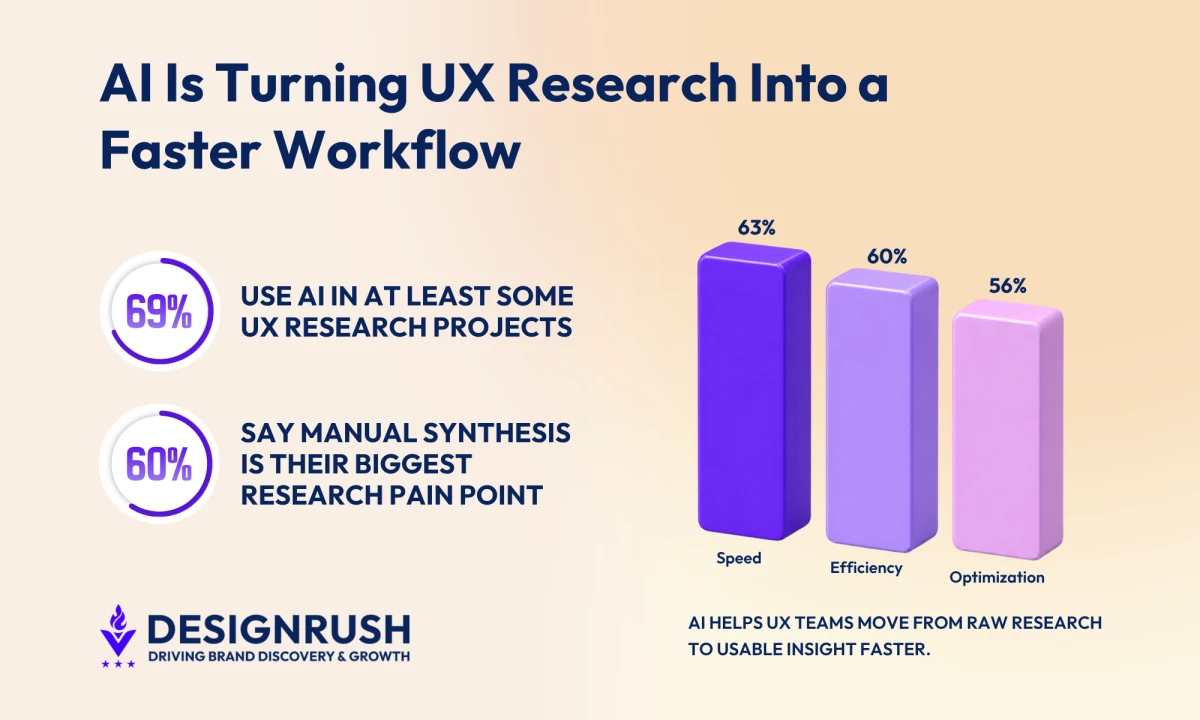
- AI is now used in at least some UX research projects by 69% of teams, with 63% reporting faster turnaround and 60% seeing better efficiency.
- Articos shows how synthetic users can support early UX research by using behavioral science and hypothesis-blind interviews to test ideas, reporting 86% human accuracy across 46 studies.
- AI synthesis solves a real bottleneck, with 60.3% of practitioners citing manual work as their biggest synthesis pain point and 54.7% already using AI for analysis and synthesis.
How AI Is Changing UX Research in 2026
AI is pushing UX research into a more uncomfortable stage of maturity.
Teams can now move faster through interviews, transcripts, tagging, synthesis, and reporting, but speed creates a new problem for research leaders in that more findings do not automatically mean better decisions.
Maze’s Future of User Research Report 2026 shows how quickly that pressure is building.
Demand for research rose from 55% in 2025 to 66% in 2026, while research work is spreading across roles that were never built around research rigor.
Product managers now conduct research in 39% of organizations, followed by market researchers at 35% and marketers at 23%.
That broader participation helps teams stay closer to users, but it also makes quality harder to control.
Maze found that 61% of organizations provide research tools and templates, while fewer than half offer dedicated researcher support, structured training, or research libraries. Another 13% have no resources in place for non-researchers at all.
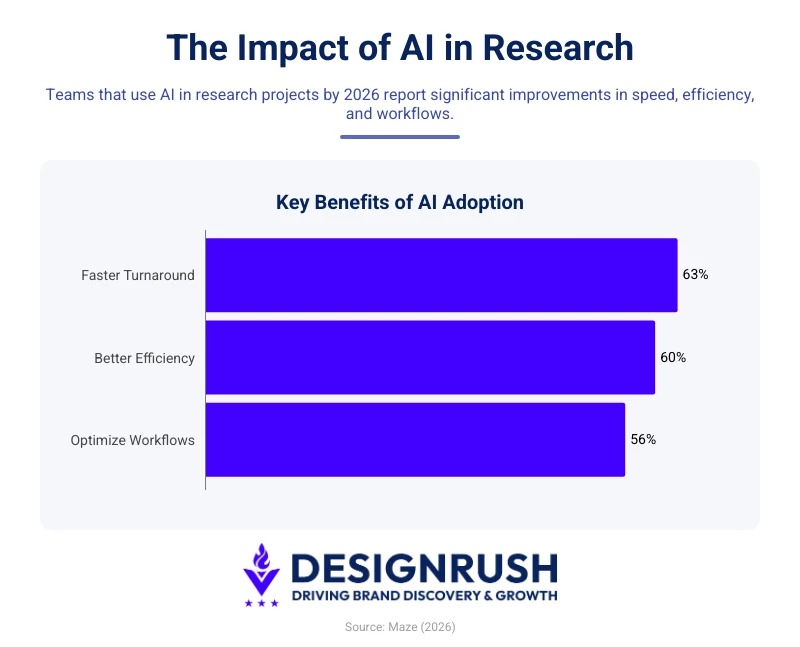
AI is filling part of that research support gap by taking over the work that slows teams down most, with Maze finding that 69% of teams use AI in at least some research projects in 2026, 63% report faster turnaround, 60% see better efficiency, and 56% use it to optimize workflows.
What AI does not replace is the part of UX research that turns evidence into product judgment.
Maze’s 2026 data shows researchers still see human involvement as essential for interpreting nuance and emotion at 82%, making ethical decisions at 80%, framing the right questions at 76%, and turning findings into strategic recommendations at 66%.
Those use cases define the purpose of this guide, which is to show how to use AI for UX research without turning speed into shallow evidence.
The next section explains where AI fits across the research process, from planning and recruitment to analysis, synthesis, and reporting.
How To Use AI Across the UX Research Workflow
A practical way to build an AI UX research workflow is to evaluate each phase of the research lifecycle by what AI can handle well, where it weakens the work, and which human checks keep the output useful.
- AI for UX research planning and study design
- AI for participant recruiting and screening
- AI-moderated user research interviews
- AI Transcription and tagging for UX research
- AI for UX research synthesis and theme extraction
- AI reporting and distributing research insights
1. AI for UX Research Planning and Study Design
AI is useful at the planning stage because it helps teams move faster from a broad product question to a workable research plan.
McKinsey’s 2025 workplace AI report found that employees are already using AI heavily in drafting, summarizing, and idea generation, while only 1% of companies consider themselves mature in AI adoption.
That gap is exactly why UX teams should treat AI planning output as a starting point rather than a finished study design.
Use AI to generate hypotheses, screener drafts, discussion-guide options, usability tasks, and follow-up question ideas.
A model can produce more angles than a researcher would typically draft manually in the same amount of time, especially for teams testing early concepts, landing pages, or product messaging before committing budget to formal experimentation.
As Brizy’s Co-Founder and CEO, Dimi Baitanciuc, notes, “By leveraging best practices per industry, the AI can anticipate what resonates most with target audiences, reducing the need for extensive manual A/B testing.”
The risk is that polished questions can still be strategically weak, meaning AI may produce prompts that sound neutral while reflecting generic assumptions about the audience, market, or product category.
You should use AI to expand the option set, then apply human judgment to decide which questions match the study goal, which ones introduce bias, and which ones should be removed before fieldwork begins.



2. AI for Participant Recruiting and Screening
 AI can reduce the operational drag around recruiting, especially in outreach, reminders, scheduling, screener routing, and panel management.
User Interviews’ 2025 State of User Research Report found that finding enough qualified participants, time to recruit, and participant quality remain the biggest recruiting struggles.
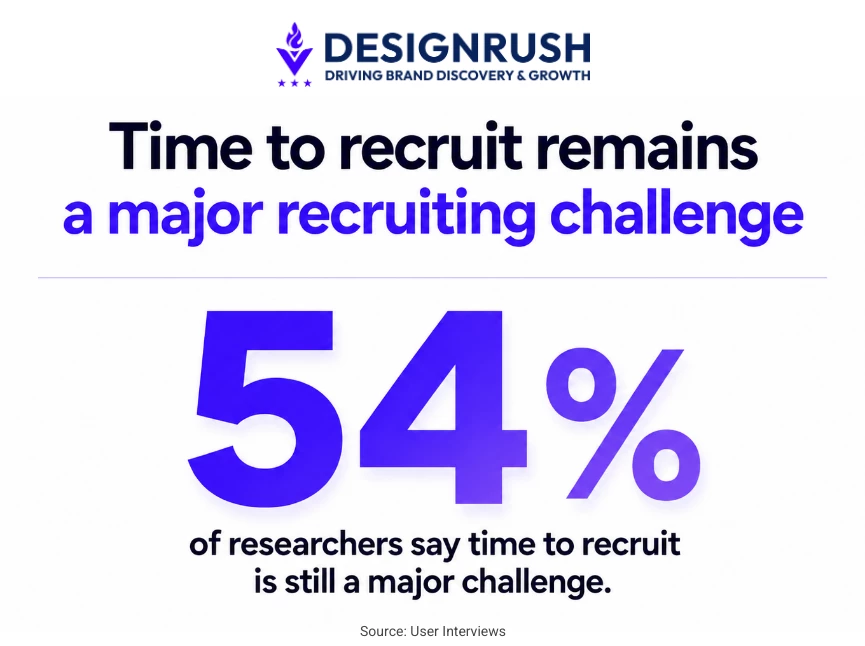
Time to recruit still affects 54% of researchers, even after dropping 7 points from the previous year.
The same report found that more than 70% of respondents use an AI tool for qualitative recruiting, while 56% use one for quantitative recruiting.
AI can make that workflow faster by helping teams route screeners, automate reminders, manage scheduling, and sort participants against predefined criteria.
Use AI to make recruiting faster and more organized, especially when studies involve multiple segments, markets, or time zones.
It can help screen participants against defined criteria, automate follow-ups, and reduce the manual work that delays fieldwork.
The possible risk that AI brings in this phase is sampling bias at higher speed.
If the participant pool is already skewed, AI can optimize within that skew and make the sample look efficient while narrowing who gets heard.
You still need to define the audience, check representation, review exclusions, and decide whether the sample reflects the users the product actually needs to understand.
3. AI-Moderated User Research Interviews
AI-moderated user research interviews use AI to conduct text or voice-based research sessions without a human moderator leading the conversation in real time.
The system follows a research guide, asks participants questions, captures responses, and can often generate follow-up questions based on what the participant says.
This makes AI moderation useful when teams need broader input than traditional moderated research can support.
It works best for early discovery, lightweight usability checks, multilingual feedback, and high-volume concept testing where the goal is to identify patterns before investing in deeper research.
- Use AI moderation for breadth, speed, and directional learning.
- Use human moderation when the research involves sensitive topics, complex buying behavior, high-value customers, executive stakeholders, or decisions that will strongly influence the roadmap.
Where Synthetic Users and Digital Twins Fit
Synthetic users and digital twins sit before real-user validation in the UX research workflow.
They simulate audience reactions through AI-generated personas or modeled user profiles, which makes them useful for early exploration when teams need to test assumptions before they recruit participants.
Teams can use them to stress-test interview guides, compare messaging angles, explore likely objections, pressure-test product concepts, and identify which hypotheses deserve real-user validation.
The quality of synthetic user research depends on how the personas are built. Most platforms generate them by prompting a language model with a persona description, an approach prone to idealization and flat priorities.
A smaller set of platforms, including Articos, argues that the architecture around the model is what determines whether synthetic research produces signal or noise.
Each synthetic persona on the Articos AI user research platform is built on Big Five personality science with NEO-PI-R 30-facet annotation, Hofstede's 6D cultural model across 93 countries, and Rogers' diffusion theory for stance diversity.
Interviews run under hypothesis-blind conditions, so personas cannot see the research question, success criteria, or each other's answers.
According to Articos' published methodology, the system achieved 86% theme recall when benchmarked against expert findings from Baymard Institute and Nielsen Norman Group across 46 studies in 9 industries.
"Same AI models everyone uses, completely different system on top," says Shaheer Gadit, founder and CEO of Articos.
"Generic AI given a research task generates 142 themes per study at around 4.5% precision, most of it noise. The fix is not more compute. It is grounding the system in the same behavioral science that has powered rigorous human research for forty years."
4. AI Transcription and Tagging for UX Research
AI transcription and tagging are useful because qualitative research produces more raw material than teams can clean, code, and compare under normal product timelines.
- Transcription is the safer layer because it turns interviews, usability sessions, and feedback calls into searchable material without deciding what the findings mean.
- Tagging is more sensitive because it starts shaping how the team sees the evidence. AI can organize transcript segments by topic, journey stage, feature, sentiment, or user segment, but those labels should stay provisional.
Use AI tags as draft labels around topics, journey stages, sentiment, features, or user segments.
Then have a researcher review the transcript, merge duplicate tags, correct vague categories, and check whether the tags reflect what participants actually said.
5. AI for UX Research Synthesis and Theme Extraction
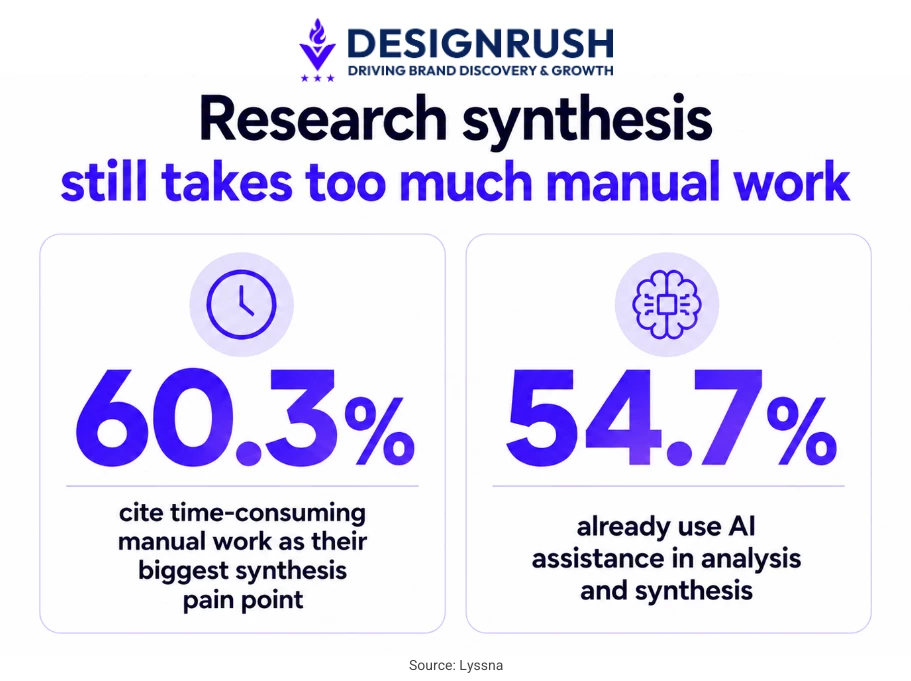
Lyssna’s 2025 Research Synthesis Report found that 60.3% of practitioners cite time-consuming manual work as their biggest synthesis pain point, while 54.7% already use AI assistance in analysis and synthesis.
The same report found that 65.3% of research synthesis is completed in one to five days, which shows how much interpretation happens under time pressure.
Use AI to extract observations, cluster similar points, pull supporting quotes, summarize recurring issues, and compare patterns across interviews or usability sessions. This can shorten the path from raw data to working themes.
A strong workflow starts by using AI to extract observations with source quotes.
Then use it to group those observations into possible themes. After that, the researcher should interpret what the themes mean for the product, roadmap, customer experience, or business decision.
Every final claim should link back to a transcript segment, recording, survey response, or usability data point.
6. AI Reporting and Distributing Research Insights
AI can help UX research travel further after the study ends, especially when product and design teams own most of the follow-through.
Userlytics’ 2025 UX report found that product teams implement UX research insights in 63% of companies, followed by UX design teams at 58%, while executive management owns implementation in only 19%.
That puts the reporting burden on clarity, relevance, and distribution across the teams responsible for turning research into product changes.
Great Question’s 2025 democratization survey shows the same access problem from the research side.
Among 301 UX Research and ResearchOps professionals, 95% support democratizing access to UX research repositories, which makes reporting and distribution one of the safest places to use AI.
AI can turn one study into role-specific summaries for product, engineering, marketing, leadership, and customer-facing teams, so each group gets the version of the findings most relevant to its decisions.
Use AI for reporting, retrieval, and audience-specific summaries, but keep source traceability visible. Every AI-generated report, repository answer, or executive summary should link back to the relevant transcript, clip, survey response, usability finding, or study note.
That gives stakeholders faster access without letting polished summaries drift away from the evidence.
The Four Categories of AI Tools for UX Research
The AI UX research tool market has stabilized into roughly four distinct categories.
Understanding which category a tool belongs to is more important than memorizing brand names, as categories define what a tool is for, while features are increasingly converging within each category.
- AI-moderated interview platforms
- Usability testing and prototype evaluation platforms
- Synthesis, tagging, and research repository tools
- General-purpose LLMs for planning, drafting, and structured research
- Specialized AI tools for specific research signals
AI-Moderated Interview Platforms
 AI-moderated interview platforms run text or voice interviews without a human moderator in the session, follow a research guide, ask follow-up questions, capture responses, and often produce an initial summary of the findings.
User Interviews AI Moderation fits teams that already rely on participant recruitment and want to reduce the scheduling and moderation burden around interviews, prototype tests, surveys, and live website tests.
- Pros:
- Supports AI moderation around customer feedback and prototypes.
- Keeps AI moderation close to real participant recruitment.
- Reduces scheduling and live moderation work for lower-risk research.
- Cons:
- Less suited for teams that want a fully AI-native research workflow.
- Still needs researcher review for follow-up quality.
- Works better for breadth than for emotionally sensitive or complex interviews.
Koji is more AI-native and end-to-end, so it fits teams looking for automated interviews and analysis in one workflow rather than a traditional research platform with AI features added on.
- Pros:
- Built around autonomous voice and text interviews at scale.
- Designed to replace static survey-style feedback with conversational follow-ups.
- Useful for getting the “why” behind answers without live interviews.
- Cons:
- Less familiar for teams used to traditional research platforms.
- Full automation can make weak study design harder to catch.
- Not best for final validation on high-stakes product decisions.
Listen Labs is useful for teams that want to run AI-moderated conversations at scale and turn open-ended responses into faster qualitative signals.
- Pros:
- Supports AI-moderated interviews with video, audio, or text responses.
- Offers automated takeaways, personas, and theme generation.
- Supports recruitment through its own participant pool.
- Cons:
- Automation can distance researchers from raw behavior.
- AI-generated personas and themes need source checks.
- Best for scaling signals, not replacing deep moderation.
Usability Testing and Prototype Evaluation Platforms
 Usability testing platforms are built around a product experience. They help teams test prototypes, websites, apps, or flows against specific tasks, then use AI to surface friction points, summarize behavior, and identify patterns across sessions.
Maze works well for prototype testing, design validation, feature prioritization, and continuous product discovery. It is especially useful when teams need fast feedback on product decisions before development.
- Pros:
- Strong for rapid prototype testing.
- Useful before engineering starts.
- Supports recruiting, moderation, and summaries.
- Cons:
- Less suited for deep live probing.
- Fast testing can create shallow evidence.
UserTesting fits teams that need a broader testing infrastructure, including moderated and unmoderated tests, video feedback, prototype validation, and customer experience research.
- Pros:
- Supports product and CX research.
- Useful for video-based feedback.
- Offers moderated and unmoderated testing.
- Cons:
- Heavier than quick prototype tools.
- Needs clear study setup.
- Better for mature research programs.
Useberry is useful for design teams that want quick prototype feedback, click tracking, heatmaps, preference tests, and first-click testing before handoff.
- Pros:
- Supports fast prototype testing.
- Useful for visual hierarchy and navigation.
- Offers heatmaps, flows, timing, and recordings.
- Cons:
- Less suited for deep qualitative research.
- Better for design signals than strategy.
- Click data still needs interpretation.
Synthesis, Tagging, and Research Repository Tools
 Synthesis and repository tools help teams make sense of research they have already collected, especially when interview notes, transcripts, clips, usability findings, and customer feedback are scattered across tools and folders.
Dovetail is strong for centralizing customer feedback, tagging qualitative data, creating highlight reels, and making research searchable across teams.
- Pros:
- Centralizes research evidence.
- Supports tagging, clips, and insights.
- Makes past research searchable.
- Cons:
- Heavy for simple transcription.
- Needs consistent tagging habits.
Looppanel is useful for teams that run a lot of interviews and need faster transcription, tagging, note organization, and first-pass synthesis.
- Pros:
- Strong for interview-heavy workflows.
- AI Notes reduce manual cleanup.
- Tags organize themes and needs.
- Cons:
- Narrower than full repositories.
- AI notes still need review.
- Tags need a consistent taxonomy.
Condens fits teams that want a dedicated research repository with tagging, synthesis, and stakeholder-ready outputs.
- Pros:
- Organizes research data and artifacts.
- Supports collaborative synthesis.
- Offers comments, mentions, and published insights.
- Cons:
- Needs metadata and tagging discipline.
- Better for maintained repositories.
- Summaries still need careful framing.
General-Purpose LLMs for Planning, Drafting, and Structured Research Support
 General-purpose LLMs are the flexible layer in the stack. They are not UX research platforms, but they are useful for the parts of research that involve planning, drafting, rewriting, summarizing, and structuring information.
ChatGPT is useful for research planning, drafting, restructuring, and turning messy notes into clearer working documents.
- Pros:
- Drafts plans, guides, screeners, and hypotheses.
- Cleans up notes into usable formats.
- Helps compare options and assumptions.
- Cons:
- Can sound too certain.
- Needs clear prompts and source data.
- Quotes, claims, and themes need review.
Claude is useful when teams need to work through long qualitative documents, interview notes, transcripts, or research drafts.
- Pros:
- Strong for long qualitative material.
- Summarizes transcripts and notes.
- Refines dense research drafts.
- Cons:
- Can miss nuance and contradictions.
- Still needs source-level checks.
- Better for review than final calls.
Perplexity is useful for desk research, source discovery, competitive context, and early market scanning before a study begins.
- Pros:
- Finds sources and market signals.
- Supports competitor and trend research.
- Helps refine research questions.
- Cons:
- Cannot replace user evidence.
- Source quality needs review.
- Best before or around the study.
As Andy Fuller, CEO of Designbull, shares, "I use an AI tool called Perplexity.ai to assist in synthesizing large amounts of user feedback in my user research projects. This has allowed me to spend more time focusing on creating improved UI designs."
Specialized AI Tools for Specific Research Signals
 Some AI tools focus on a specific type of signal, such as product behavior, visual attention, open-ended feedback, facial expression, or business KPI reporting. They usually sit beside the core research stack rather than replacing it.
Pendo helps teams connect user feedback with product behavior, adoption, feature usage, and in-app guidance.
- Pros:
- Combines analytics, feedback, and guides.
- Shows adoption and usage patterns.
- Connects feedback to product behavior.
- Cons:
- Needs enough usage data.
- Less useful before launch.
- Shows where, but not always why.
Amplitude helps teams analyze funnels, cohorts, retention, feature engagement, and behavioral patterns inside the product
- Pros:
- Strong for product analytics.
- Tracks funnels, cohorts, and retention.
- Links UX changes to behavior.
- Cons:
- Needs clean event tracking.
- Shows what, not always why.
- Can over-focus teams on metrics.
EyeQuant predicts visual attention on landing pages, designs, and creative assets before formal user testing.
- Pros:
- Predicts visual attention patterns.
- Checks CTAs and hierarchy.
- Compares layouts before testing.
- Cons:
- Prediction is not behavior.
- Cannot confirm intent or comprehension.
- Best as a pre-test signal.
RealEye supports webcam-based eye-tracking, facial coding, and attention measurement.
- Pros:
- Supports remote attention tracking.
- Measures visual and emotional response.
- Works for ads, pages, videos, and prototypes.
- Cons:
- Depends on participant setup.
- Facial coding is directional.
- Needs context from tasks and comments.
AI Prompt Templates for Faster UX Research
If there's a single skill that separates teams getting useful work out of AI from teams getting plausible-sounding noise, it's the discipline of structured prompting.
The prompts below are templates you can copy, adapt to your study, and use across general-purpose LLMs or inside research tools that accept custom prompts.
Replace anything in [brackets] with your own context.
- Drafting a discussion guide
- Writing a screener
- Generating hypotheses before a study
- Analyzing a single transcript
- Finding themes across multiple interviews
- Drafting a hypothesis persona
- Identifying usability friction in session notes
- Running sentiment analysis on open-ended feedback
- Summarizing research findings for a specific audience
- Suggesting follow-up research questions
1. Drafting a Discussion Guide
A discussion guide prompt works best when the study already has a clear target user and decision goal.
Give the model the study type, audience, and what the team needs to learn, then use the output as a first draft for sections, core questions, and probes.
You are helping me design a [30 / 45 / 60]-minute [discovery / evaluative / concept-testing] interview for [product or feature]. The target participant is: [describe persona, role, context, relationship to the product, level of familiarity]. The study goals are: 1. [goal one] 2. [goal two] 3. [goal three] Generate a discussion guide structured as: - A 5-minute intro and warm-up - 3 thematic sections of 4 to 5 open-ended questions each, mapped to the study goals above - A 5-minute wrap-up that surfaces anything the participant wants to add Constraints: - Open-ended phrasing only, no yes/no questions - No leading questions, no jargon, no double-barreled questions - For each question, briefly note which study goal it addresses Do not number the warm-up or wrap-up questions; only number the main 12-15 thematic questions. |
2. Writing a Screener
Use this prompt when you need to turn inclusion and exclusion criteria into a complete screener survey that filters out poor-fit participants before recruitment begins.
I need a screener survey to recruit [N] participants for a study with [target user type]. Inclusion criteria (must all be true): - [criterion 1] - [criterion 2] - [criterion 3] Exclusion criteria (any one disqualifies): - [criterion 1] - [criterion 2] Write a 6-8 question screener that: - Tests each criterion without telegraphing the "right" answer - Mixes multiple-choice and short-answer questions - Includes at least one behavioral question (what they did, not what they think) for each main criterion - Has a final open question asking the participant to describe a recent experience with [relevant product category] in their own words For each question, mark whether it screens IN, screens OUT, or is for quota tracking. |
3. Generating Hypotheses Before a Study
Before fieldwork starts, a hypothesis-generation prompt can sharpen the study. It turns broad research questions into testable assumptions, which helps the team separate what it wants to learn from what it already believes.
I'm about to run a [study type] study on [topic / product / feature] with [target user type]. The questions I'm trying to answer are: 1. [research question one] 2. [research question two] 3. [research question three] Before I talk to real users, generate 8 to 10 hypotheses about what I might find. For each hypothesis: - State it as a testable claim (not a question) - Note which research question it relates to - Mark whether it's likely (based on common patterns in this domain), contrarian (cuts against conventional wisdom), or a stretch (worth testing but unlikely) - Suggest one specific interview question that would help test it These are hypotheses to test, not conclusions. Don't tell me which ones are true. |
4. Analyzing a Single Transcript
A single-transcript prompt is useful after an interview when the team needs a quick read without skipping the source material.
Ask for the main topics, a concise summary, notable quotes, and follow-up questions that could guide the next session.
Below is an interview transcript from a [study type] study about [topic or product]. Read the full transcript before responding. Produce three outputs: 1. A list of distinct topics the participant raised. For each topic, include a 3–5 word label and a direct anchoring quote (10–25 words) from the transcript. 2. A short summary (under 200 words) of what this participant cares about, what frustrates them, and what's notable about their behavior or context. 3. Three to five open questions this interview raises that would be worth exploring in future research. Rules: - Quote the transcript directly for any claim about what the participant said. Do not paraphrase as if it were a direct statement. - If something is ambiguous, mark it as AMBIGUOUS rather than guessing. - Do not add observations the transcript doesn't support. Transcript: [paste transcript] |
5. Finding Themes Across Multiple Interviews
For multiple interviews, the prompt should look across participants rather than summarize them one by one.
The strongest output identifies repeated themes, outliers, contradictions, and tensions that might change the team’s interpretation.
Below are notes or transcripts from [N] interviews on [topic or product] with [target user type]. Identify the main themes that appear across these interviews. For each theme: - A short name (3-6 words) - A one-sentence definition - The number of distinct participants who raised it (more important than total mentions) - Two or three direct quotes from different participants that anchor the theme, attributed to participant IDs Also include: - Any OUTLIER observations that don't fit a theme, with a brief note on why - Any TENSION points where participants directly contradicted each other Rules: - A theme requires at least three distinct participants raising it. Below that threshold, flag as "weak signal" rather than as a theme. - Quote directly. Do not paraphrase as if it were a direct statement. Interviews: [paste interview notes or transcripts] |
6. Drafting a Hypothesis Persona
A hypothesis persona prompt can turn research notes, survey responses, or customer feedback into a working persona, but the output should describe likely needs, behaviors, motivations, and decision triggers without pretending to be validated segmentation.
Based on the research summarized below, draft a hypothesis persona for [target user type]. Structure: - One-line summary of who they are - Behavioral patterns (what they actually do) - Stated goals (what they say they want) - Observed pain points - Two to three direct quotes that anchor the most important elements of the persona Rules: - Mark anything as INFERRED if it isn't directly supported by the research below. - Don't smooth over contradictions. If two participants said opposite things, name both patterns rather than averaging them. - Avoid demographic filler (age, location) unless it's directly relevant to behavior. This is a hypothesis persona for further validation, not a final persona. Frame it as "we believe X" rather than "X is true." Research: [paste interview summaries, notes, or theme clusters] |
7. Identifying Usability Friction in Session Notes
Usability session notes need a prompt that separates inconvenience from actual friction.
Ask the model to identify where users hesitated, failed, backtracked, misunderstood instructions, or needed help, then assign severity based on task impact.
Below are observation notes from [N] usability sessions on [product or feature]. Participants were asked to [task description]. Identify the friction points in these sessions. For each friction point: - A short description of the issue (1 sentence) - Where in the user flow it occurred - How many distinct participants experienced it - Severity rating: BLOCKER (could not complete task), MAJOR (completed with significant difficulty), MINOR (annoyance or confusion that didn't derail the task) - An anchoring observation or quote from the session notes Also list: - Anything participants did unexpectedly that the design didn't anticipate - Anything participants ignored or didn't notice Rules: - Don't propose design solutions. Identify problems only. - Don't infer intent. Stick to what was observed. Session notes: [paste session notes] |
8. Running Sentiment Analysis on Open-Ended Feedback
A useful prompt for open-ended feedback groups comments by positive, negative, mixed, and neutral sentiment, then connects each group to recurring themes in the customer’s own language.
Below are [N] open-ended responses from [survey / NPS comments / support tickets / app reviews / other source] about [product or feature]. Analyze them and produce: 1. Overall sentiment distribution: positive, neutral, negative, mixed — as both counts and percentages. 2. The top 5 themes driving positive sentiment, with one anchoring quote each. 3. The top 5 themes driving negative sentiment, with one anchoring quote each. 4. Any mixed-sentiment themes — where the same feature or behavior is praised by some and criticized by others — with anchoring quotes from both sides. 5. Notable outlier responses that don't fit any theme but seem worth flagging. Rules: - Quote directly. Do not invent or paraphrase as if direct. - Distinguish complaints about the product from complaints about related but separate issues (pricing, support, third parties). - Sarcasm and mixed sentiment should be flagged, not forced into a single bucket. Responses: [paste responses] |
9. Summarizing Research Findings for a Specific Audience
Audience-specific summaries work best when the same findings need different levels of detail.
Product may need roadmap implications, engineering may need implementation risks, marketing may need messaging cues, and leadership may need the business impact.
Below are research findings from a study on [topic or product]. Rewrite them for [audience: engineers / product managers / executives / marketing / designers].
Rules across all versions: - Every claim must link back to a specific finding or participant. - Mark anything that's interpretation rather than direct observation. - Don't soften findings the audience may not want to hear. Findings: [paste research findings] |
10. Suggesting Follow-Up Research Questions
Follow-up research prompts are useful when synthesis raises new questions instead of closing the topic.
The prompt should turn the current findings into prioritized next-study ideas, with each question tied to a decision the team still needs to make.
Below is a summary of research findings from a [study type] study on [topic or product]. Suggest 5 to 8 follow-up research questions that these findings raise but do not answer. For each: - The question itself - Why these findings raise it (with evidence from the summary) - What method would best answer it (interview, survey, usability test, diary study, analytics review, etc.) - Rough effort estimate (low / medium / high) - A judgment on whether the answer is likely to change a meaningful product or strategy decision (yes / maybe / no) Prioritize questions where the answer would meaningfully change a decision. Don't suggest questions just because they're interesting. Findings: [paste findings summary] |
Final Thoughts: How To Get Started with AI in UX Research
If you're a research leader trying to figure out where to start, the practical advice is narrower than most AI guides suggest.
Pick one phase of the research lifecycle where your team currently spends disproportionate time relative to the value the phase produces.
For most teams, this is either transcription-and-tagging or synthesis. Introduce one AI tool for that phase. Set up the workflow with explicit evidence traceability and a review step. Run two or three studies with the new workflow.
Then measure time saved, stakeholder reaction, and quality of decisions made on the back of the research. Compare honestly to what the same studies would have looked like without AI.
If the gain is real, expand to the next phase. If the gain isn't real, figure out why before adding more tools.
The teams that succeed with AI in research are the ones that treat it as a workflow problem first and a tool problem second, and the ones that struggle are the ones that buy tools and hope the workflow will figure itself out.

Our team ranks agencies worldwide to help you find a qualified partner. Visit our Agency Directory for the top UI/UX design companies, as well as:
- Top Web Design Companies
- Top Product Design Companies
- Top Mobile App Development Agencies
- Top Custom Software Development Companies
Our design experts also recognize the most innovative design projects across the globe. Visit our Awards section to see the best & latest in app design.
AI for UX Research FAQs
1. What is AI for UX research?
AI for UX research is the application of machine learning, natural language processing, and generative models to research tasks like drafting study plans, transcribing and tagging interviews, extracting themes from qualitative data, detecting sentiment, predicting behavior from analytics data, and generating reports.
2. Can AI replace UX researchers?
No. AI is reliable for pattern detection and structured analytical tasks but unreliable for the work that defines research as a function, like framing problems well, judging which findings matter, contextualizing insights for business decisions, and reading the situational and emotional cues that distinguish good interviewing.
3. What's the best AI tool for UX research?
The market has split into four categories: AI-moderated interview platforms, usability testing platforms, synthesis and repository tools, and general-purpose LLMs, plus specialized tools for analytics, eye-tracking, sentiment, and dashboarding. Most mature research practices use a stack across three or four categories. Tool selection should follow workflow design, not the other way around.
4. What are synthetic users, and should I use them in UX research?
Synthetic users are AI-generated personas used to simulate user feedback. They can be useful for early-stage exploration, desk research on a new user group, generating hypotheses, and piloting interview guides. They should not replace real user research for important decisions.
5. How do I prevent AI from producing misleading research findings?
You can prevent AI from producing misleading research findings by following three disciplines:
- Evidence traceability in which every claim links to a specific transcript or data point.
- Structured prompting that breaks analysis into named steps and reviews each one.
- Human interpretation of AI produced signals.
The most common failure mode is treating AI synthesis as a finished product rather than a draft, which is also the most preventable.
6. Where should a team start with AI in UX research?
Pick one phase of the research lifecycle that currently consumes disproportionate time. For most teams that's transcription-and-tagging or synthesis. Introduce one tool, with explicit evidence traceability and a review step. Run two or three studies. Measure honestly. Expand only if the gains are real.