
It’s tempting to think automation runs itself, but without proper attention, you may just be filling your audience's inboxes without getting the desired results.
This guide breaks down how to measure ROI properly, improve underperforming sequences, fix the leaks that drag returns down, and focus on the automations most likely to earn their place.
Key Findings: How To Increase Email Automation ROI
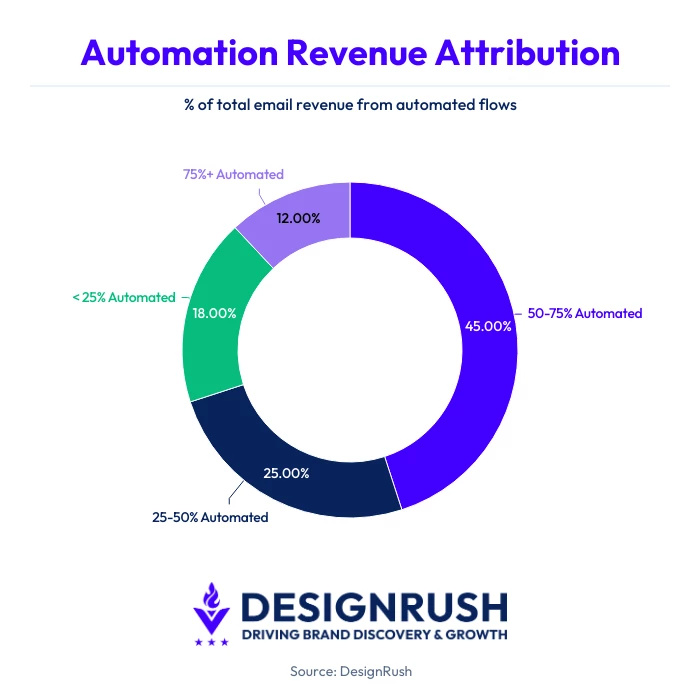
- 57% of surveyed marketers said automated flows generate 50%+ of total email revenue, while 14% said they contribute more than 75%.
- Back in Stock emails converted at 6.46% and generated $8.46 per email, while Welcome emails reached $6.30 per email.
- 83% of marketers use behavioral triggers, and 71% reported a 20%+ engagement lift from personalization.
Does Email Automation Actually Impact Revenue?
Email automation tends to perform best when messages arrive at the right moment.
Relevance and timing matter. A welcome email after sign-up or a reminder after checkout abandonment is more likely to convert than a generic campaign sent to everyone.
According to DesignRush's 2026 survey of 99 verified email marketing professionals, automation is generating considerable revenue:
- 43% said automated flows account for 50% to 75% of total email revenue
- 14% reported that automation contributes more than 75%
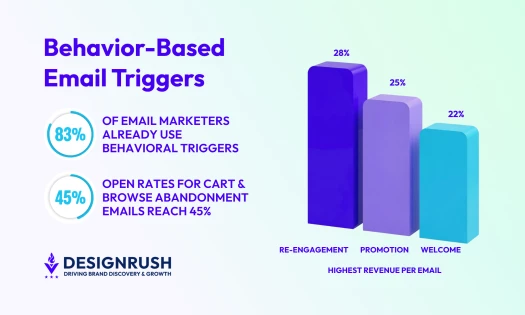
That helps explain why trigger-led automation is widely used. The same survey found 83% use behavioral triggers in some capacity, while 37% use them extensively. These commonly include welcome emails, cart recovery, browse abandonment, post-purchase follow-ups, and win-back sequences.
So yes, email automation can have a serious impact on ROI. The bigger challenge is knowing which automations deserve more investment and which ones need tweaking.
Which Email Automations Drive the Most Revenue?
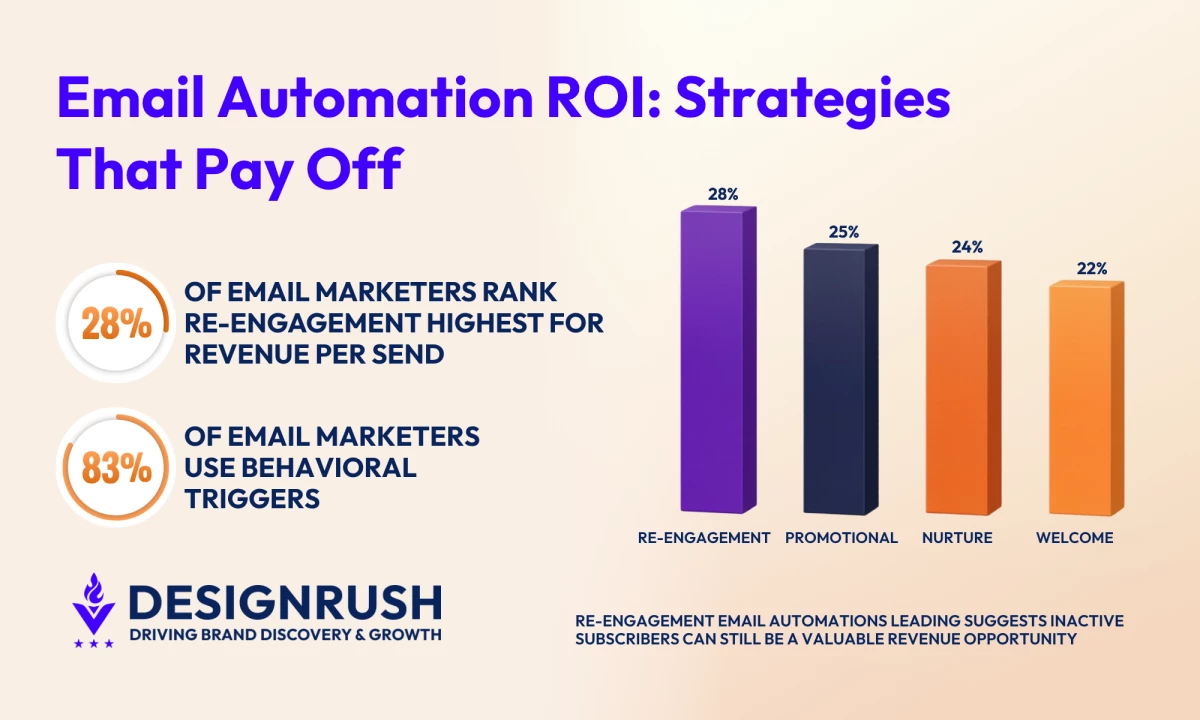
In our survey, 28% of respondents identified re-engagement emails as the highest revenue-per-send stage, ahead of promotional emails at 25%, nurture emails at 24%, and welcome emails at 22%.
Re-engagement topping promotional sends is unexpected, considering the broadcast-first, discount-heavy approach is still common across eCommerce and retail email programs.
It suggests dormant subscribers can be highly profitable when timing, targeting, and messaging are handled well.
Omnisend’s ecommerce marketing report points in a similar direction. It found that automations made up just 2% of total email sends but generated 30% of email-driven revenue, highlighting how triggered emails can outperform scheduled campaigns when they reach customers at the right moment.
If you are deciding where to focus next, these are the automations worth prioritizing:
| Automation Type | Why It Works | Benchmark Signals |
| Abandoned Cart & Checkout Recovery | Reaches shoppers close to purchase |
|
| Welcome & Onboarding | Converts new subscribers while interest is fresh |
|
| Browse Abandonment | Captures product interest before it fades |
|
| Order Confirmation | Confirms purchases and reinforces trust |
|
| Order Follow-Up | Encourages repeat engagement post-purchase |
|
| Back in Stock | Reaches shoppers with high intent |
|
| Birthday & Milestone Emails | Uses personalization for higher engagement |
|
| Cross-Sell Emails | Promotes relevant next purchases |
|
| Lapsed Purchase/Win-Back | Re-engages previous buyers after inactivity |
|
How To Track ROI From Email Automation
Before you focus on improving email automation ROI, you need to know how to measure it properly to spot which automations are generating revenue and where returns are being lost.
Here’s what you need to do:
1. Track ROI by Workflow
Review each workflow on its own:
- Welcome series (new subscriber onboarding)
- Abandoned cart (left items in cart)
- Browse abandonment (viewed products, no cart)
- Post-purchase (after an order)
- Win-back (inactive customers)
- Sunset/re-engagement (unengaged subscribers)
For the full beginner-to-intermediate playbook on building these flows, see our email automation guide.
2. Use the Right Formula
Your ROI should reflect return after all your costs. This gives you a clearer picture than simply reporting sales influenced by email.
Follow this formula just like you would to calculate your broad digital marketing ROI:
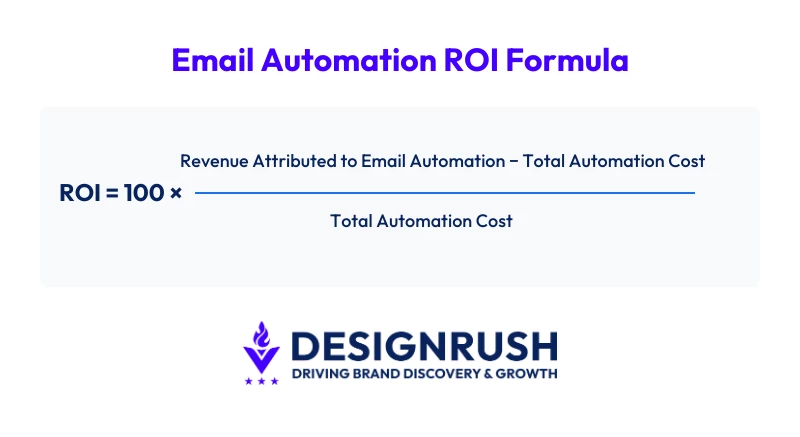
Or, follow the same formula our email marketing ROI calculation guide breaks down step by step.
3. Include All Costs
Make sure to calculate:
- Email platform fees
- Agency, in-house, or freelance labor
- Copy and design costs
- Promotional incentives (e.g., discounts, vouchers, gifts, and free shipping)
- Data and system costs (CRM, integrations, tracking tools, etc.)
4. Prioritize Revenue Metrics
Vanity metrics, like clicks and opens can still be useful directional signals, but they are weaker indicators of business value than they once were.
As Max Konev, the founder of Pushwoosh, explains:
“In addition to tracking clicks and opens, you surely want to track conversions. The ultimate goal of any push notification or email is closely tied to revenue, and with a customer engagement platform, it’s easy to track.”
According to DesignRush's survey, 40% said their teams are only somewhat aligned on which metrics matter most, while open-ended responses noted that traditional metrics often miss trust, intent, and long-term value.
Monitor metrics that assist you in judging commercial performance:
- Revenue per email shows how much each send earns on average
- Revenue per recipient helps compare value across audiences or segments
- Conversion rate shows whether clicks become purchases or sign-ups
- Average order value shows how much customers spend per purchase
- Repeat purchase rate shows whether customers return after the automation
- Assisted revenue captures sales influenced by email earlier in the journey
- Time to first purchase measures how quickly new subscribers convert
5. Measure Flows on the Right Timeline
Each automation works on a different buying timeline, so performance should be reviewed in context.
A cart reminder may convert within hours. A welcome series can influence a first purchase over several days.
Post-purchase emails often show their value later through repeat orders, referrals, and higher lifetime value. Win-back campaigns may need multiple touches before dormant customers return.
Use review windows that match the purpose of the flow:
- Abandoned cart: same day to several days
- Browse abandonment: several days
- Welcome series: first week after sign-up
- Post-purchase: weeks to months, depending on reorder cycle
- Win-back: multiple weeks or campaign cycles
- Sunset flows: subscriber engagement, list quality, and deliverability over time
When revenue impact is harder to spot, use cleaner measurement methods:
- Compare the results before and after launch
- Run holdout groups where a portion of users do not receive the flow
- Track repeat orders, unsubscribe rates, and reactivation rates
- Track both direct conversions and sales influenced earlier by email
- Monitor spam complaints, inactive subscriber share, and other list quality signals
How To Improve Email Automation ROI
Once tracking is in place, the next step is improving the workflows, journeys, and sending practices that influence return. You should focus on:
- Prioritizing Revenue-Critical Flows First
- Improving Segmentation With Better Customer Signals
- Protecting Deliverability Before Chasing New Revenue
- Fixing the Journey After the Click
- Refreshing Old Automations
- Simplifying Your Email Tech Stack
- Reducing Automation Overlap
Prioritizing Revenue-Critical Flows First
Some automations have a much bigger commercial role than others. Start with the workflows closest to purchase intent or customer retention.
Your first round of improvements should be on:
- Abandoned cart and checkout recovery
- Welcome and onboarding flows
- Post-purchase reorder or upsell emails
- Win-back campaigns for inactive buyers
- Browse abandonment for engaged visitors
Litmus’ 2026 State of Email Report found that companies reporting the highest email ROI were more likely to use subscription lifecycle emails and behavioral segmentation triggers.
This suggests emails tied to the customer journey can outperform adding another generic automation.
Improving Segmentation With Better Customer Signals
Better ROI comes from tailoring emails to customer behavior, purchase stage, and intent.
Use these signals to shape the message, timing, or offer:
- First-time or repeat buyer: welcome offer or loyalty reward
- Time since last purchase: reorder reminder or win-back timing
- Products or categories viewed: relevant recommendations
- Cart value: premium upsell or incentive
- Pages viewed or return visits: stronger buying intent
- Recent email clicks or inactivity: resend, suppress, or re-engage
- Region or local currency: pricing, shipping, or seasonal relevance
We found 83% use behavioral triggers in some form, while 71% reported a 20%+ engagement lift from personalization.
The goal is simple. Automate emails that match what the customer is likely to need next.
Protecting Deliverability Before Chasing New Revenue
Even great automations fail if emails stop reaching inboxes or perform poorly once opened.
Our survey found that 62% cited spam filtering as a top challenge, while Litmus found that only 47% of companies are designing fully responsive and mobile-friendly emails.
That points to two common weak spots - inbox placement and the experience subscribers have once they open the email.
So, make sure you monitor:
- Complaint rates
- Bounce rates
- Disengaged subscribers
- Engagement decline
- Sender reputation
- Mobile rendering issues
Also, run re-engagement campaigns for inactive subscribers, then suppress contacts who stopped engaging. Continuing to send to dead segments can drag down the rest of the program.
Fixing the Journey After the Click
Clicks don’t guarantee sales. If engagement seems great but revenue is disappointing, the problem may be after the email.
Email automation works as part of a wider digital marketing journey, so the landing page, product page, mobile experience, and checkout all need to support the promise made in the message.
Even a strong automation can underperform when those touchpoints create friction.
Check these common issues:
| Friction Point | Why It Hurts ROI |
| Slow landing page | Purchase interest fades |
| Mobile usability issues | Higher bounce risk |
| Broken promo code | Conversion drops at checkout |
| Confusing product page | Lower trust |
| Long checkout process | More abandonment |
| Message-to-page mismatch | Users leave quickly |
Refreshing Old Automations
Perhaps you build automations once and leave them untouched as your products, offers, and customer expectations keep changing.
Review older automations regularly and look for:
- Outdated copy or branding
- Broken links or expired codes
- Products no longer relevant
- Boring subject lines
- Poor mobile experience
- Send timing that no longer fits buyer behavior
- Incentives that don’t convert
- Logic paths that feel cluttered or unnecessary
- Declining revenue per email sent
- Too many emails in one automation series
For example, 56% of email marketers in our survey said value-led content performs best, well ahead of promotional copy.
So, if your older automations still rely on generic offers or tired messaging, a refresh may be overdue.
Simplifying Your Email Tech Stack
Too many disconnected tools can slow launches, complicate testing, and make results harder to trust.
Litmus found that one in three marketers needs four to six tools to send email campaigns.
When data sits in separate systems, it's harder to improve automation ROI because reporting gaps, sync delays, and manual work start to pile up.
- Review whether your current setup creates friction in areas like:
- Audience syncing between CRM and email platform
- Delayed purchase or revenue attribution
- Duplicate contacts or inconsistent segments
- Manual exports and spreadsheet workarounds
- Too many approval steps before launch
- Testing data spread across multiple tools
Reducing Automation Overlap
More emails don’t automatically create more revenue. When several automations hit the same subscriber in a short period, they can end up competing with each other.
View this post on Instagram
A subscriber should not receive all of these too close together:
- Browse reminder
- Cart recovery
- Promotional campaign
- Win-back email
- Post-purchase upsell
Too many competing messages can reduce conversions, raise unsubscribe risk, and make performance harder to measure.
For example, Gmail now allows users to manage subscriptions and unsubscribe directly from the inbox, making message fatigue easier to act on.
Review rules such as:
- Purchase suppresses cart recovery
- Cart recovery pauses promotional sends
- Recent openers skip win-back campaigns
- Highest-intent trigger gets priority
- Cooldown periods limit send frequency
Clearer priority rules and spacing controls could enhance your performance without sending more.
How Not To Improve Email Automation ROI
The following mistakes can quietly drag down performance, even when your automations seem fine:
- Measuring success with opens and clicks only
- Counting total email revenue without separating automation performance
- Building new automations before fixing core revenue drivers
- Sending every subscriber the same journey
- Letting cart, browse, promo, and win-back emails overlap
- Using discounts too early in recovery automations
- Leaving inactive subscribers in regular sends
- Allowing outdated automations to keep running
- Treating post-purchase emails as receipts instead of retention tools
- Ignoring the true cost of software, discounts, and labor
AI is a good example of why more activity does not automatically mean better returns. Our research found 87% of email marketers use AI tools, yet only 20% said it’s the reason behind conversions.
Adding more tools won’t fix a weak strategy or poor segmentation.
How To Boost Email Automation ROI: Final Thoughts
Email automation can be one of the most efficient revenue channels when each workflow has a clear purpose, accurate measurement, and regular optimization.
| DesignRush Email Marketing Benchmark Survey, conducted Apr 2026. Respondents include agency professionals (53%), small business owners (18%), enterprise marketers (11%), and in-house teams (10%). Annual email send volumes range from under 10,000 to over 1 million. |
If you need expert help building or improving your strategy, we can match you with the right companies.
Our team ranks agencies worldwide to help you find a qualified partner. Visit our Agency Directory for the top email marketing agencies, as well as:
- Top Email Marketing Companies In Houston
- Top AI Email Marketing Agencies
- Top B2B Email Marketing Agencies
- Top Cold Email Agencies
- Top Email Design Agencies
FAQs: How To Improve Email Automation ROI
1. What is a good ROI for email automation?
It depends on margins, product price, and customer lifecycle. A better benchmark is whether automated flows regularly outperform scheduled campaigns on revenue per recipient, conversion rate, or repeat purchase value.
2. Which email automations usually make the most money?
Cart recovery, welcome series, browse abandonment, post-purchase, and win-back flows often perform well because they reach users at moments close to purchase or reactivation.
3. How often should I review email automation performance?
Monthly reviews are a solid baseline, with weekly checks for high-volume flows like cart recovery or welcome emails. Seasonal businesses may need more frequent reviews during peak sales periods.
4. Why do some automated emails get clicks but low sales?
The issue is often after the click. Slow landing pages, confusing product pages, poor mobile experience, or checkout friction can reduce conversions even when email engagement looks good.
5. Should I build more automations to increase ROI?
It is usually smarter to improve your current high-value flows first, fix overlap between campaigns, and tighten segmentation before launching additional sequences.