
When digital experiences fall short — whether it’s a website, app, or platform — so do conversions, retention, and brand perception.
A strong UX strategy fixes that by aligning design decisions with what actually moves your business forward.
User Experience Strategy: Key Points
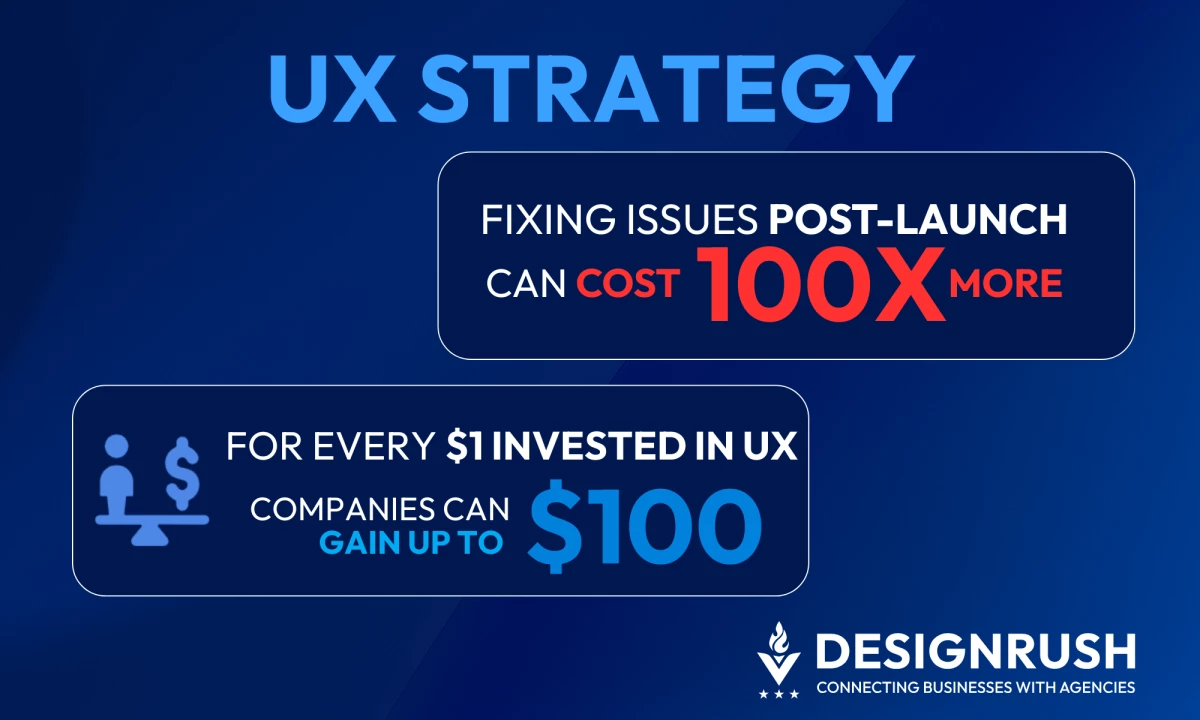
- Fixing UX issues post-launch can cost up to 100x more than addressing them during design
- For every $1 invested in UX, companies can gain up to $100
- Linking design choices to KPIs like conversions or churn turns UX from an expense into a performance asset.
The ROI Behind a Strong UX Strategy
Research shows that for every $1 invested in user experience (UX), businesses can earn up to $100 in return — an ROI of nearly 9,900%.
If you’re aiming for that kind of return, these strategies will help you get there.
1. Start With User Research, Not Assumptions
Skipping research is one of the most expensive mistakes in UX strategy. It leads to guesswork, misaligned priorities, and design decisions that solve the wrong problems.
But not only that.
Fixing UX issues after launch can cost up to 100x more to fix after development than resolving them during the design phase.
Effective UX strategies begin with understanding your users — how they behave, what they need, and where they struggle.
This goes beyond basic demographics. You need to uncover motivations, friction points, and emotional triggers that shape how users interact with your product.
Nick Dank, Co-founder and CEO of Suits & Sandals, highlights:
"The UX strategy we suggest to our clients depends on a detailed understanding of the target audiences and the brand's relationship with those audiences.
Creating audience personas and a brand persona helps to understand that relationship, and the UX strategy can be built from that foundation."
| Use research methods such as: |
|
Investing in research early prevents costly rework later. It ensures every design decision is grounded in real user insight, not personal biases or team assumptions.
2. Get Stakeholders Involved From Day One
UX strategy fails when it becomes siloed.
Engaging key stakeholders early — product, engineering, marketing, and executives — ensures alignment on user goals, technical feasibility, and business objectives.
This cross-functional involvement prevents redesigns, delays, and internal conflicts that stem from miscommunication.
When stakeholders are involved from the start, design decisions are easier to defend, roadmaps are smoother to execute, and the final product better reflects both user needs and business goals.
| To effectively involve stakeholders: |
|
3. Tie UX Decisions to Business Outcomes
UX strategy is a tool for achieving measurable business goals. Yet, many teams fail to connect design decisions to outcomes like conversions, retention, or support costs.
When that link isn’t made clear, UX gets deprioritized.
To gain real stakeholder buy-in and long-term budget, UX teams must translate design improvements into business impact.
That means framing decisions around performance indicators that matter to leadership.
| To make the UX-business connection: |
|
4. Prioritize Simplicity Over Feature Creep
The more features a product has, the more powerful it seems — until users get overwhelmed.
Feature creep is a common pitfall in UX strategy, often driven by internal pressure to add more functionality without fully considering user needs.
When simplicity is sacrificed, usability suffers.
Users abandon products they can’t easily navigate or understand. This hurts adoption, engagement, and long-term loyalty.
Instead of building everything at once, focus on delivering the most valuable core experience first: the features that solve primary user pain points and drive business results.
| To prevent feature creep: |
|
5. Design for Usability and Accessibility Early
Designing for usability means ensuring that users can complete tasks intuitively, without confusion or excessive effort.
Accessibility ensures your product works for everyone, including people with visual, motor, auditory, or cognitive impairments.
Incorporating both early in the design process saves time, avoids costly rework, and expands your potential user base.
Accessibility is both compliance and smart design. Usability is ease of use and the key to sustained engagement.
| To build usability and accessibility into your strategy: |
|
6. Track, Test, and Iterate After Launch
Launching and forgetting is a mistake.
Once your product is in users’ hands, real-world behavior reveals what’s working and what’s not. If you’re not measuring and iterating, you’re guessing.
Post-launch testing helps uncover friction points that internal teams might miss. Tracking tools can pinpoint drop-off zones, slow load times, or underperforming CTAs.
This data drives smarter updates and faster wins.
Iteration is about continuously improving the experience. That’s what separates good products from great ones.
| To build a post-launch feedback loop: |
|
7. Make UX a Strategic Investment
Many teams treat UX like a checkbox, something to complete before handoff.
But sustained business impact comes when UX is treated as an ongoing investment, not a one-time project.
UX strategy should be embedded into the company’s operating model, with dedicated resources, training, and processes.
That’s how brands scale consistent, user-centered experiences—and keep pace with changing customer needs. When UX is treated as strategy, design becomes a growth driver.
| To turn UX into a strategic asset: |
|
The 4 Strategic Pillars of UX
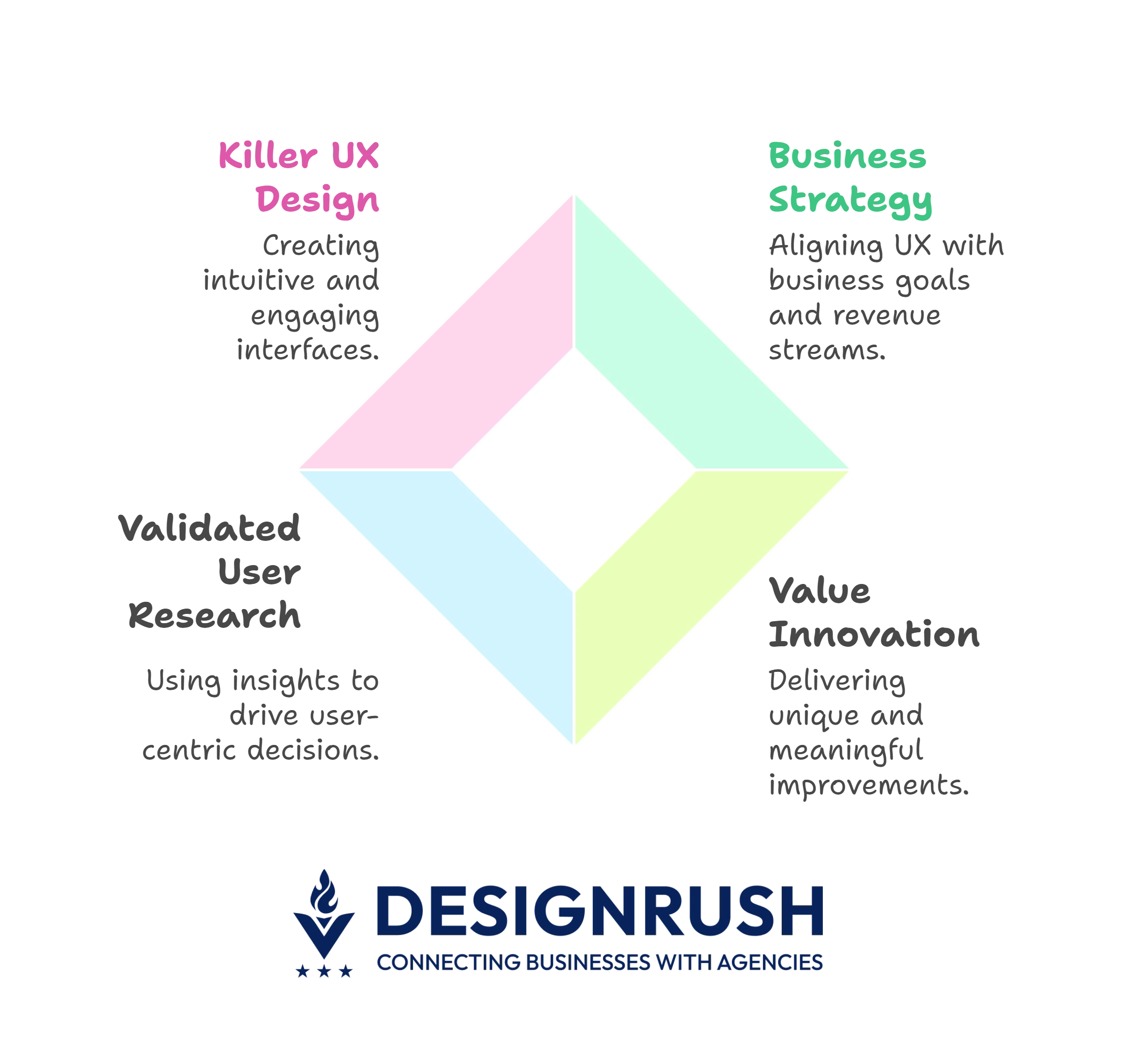
A strong UX strategy is grounded in four core pillars that shape both decision-making and execution. They ensure your UX work stays aligned with real user needs and business outcomes:
 1. Business Strategy
UX must support the business model. That means understanding your value proposition, target audience, revenue streams, and growth goals — and designing experiences that help move them forward.
2. Value Innovation
This is about delivering meaningful improvements that set you apart in the market. It’s about adding features that solve real problems in better ways.
3. Validated User Research
Insights should drive decisions. Research helps you avoid assumptions by showing how users actually think, feel, and behave. It’s your foundation for building relevant, usable experiences.
4. Killer UX Design
Execution matters. Great UX turns strategy and research into intuitive, engaging interfaces that work across every touchpoint.
It makes sure the final product delivers on both user expectations and business goals.
6 UX Metrics To Evaluate Strategy Impact
You can’t improve what you don’t measure. UX strategy needs clear metrics to prove its impact both on design and business performance.
Tracking the right KPIs helps you evaluate whether your strategy is working, where users are getting stuck, and what improvements will drive the biggest returns.
The key UX metrics to monitor include:
1. Task Success Rate
Task success rate is the percentage of users who complete a defined task successfully like signing up, making a purchase, or submitting a form.
It reflects whether your product’s core functionality is intuitive. Low success rates signal usability issues that need immediate attention.
| How to track it: |
|
2. Time on Task
Time on task is the average time it takes for users to complete a specific task, like finding a product or completing checkout.
While shorter times often indicate better usability, the goal is efficiency and clarity, not rushing users through. An unusually long or short duration could signal confusion or lack of engagement.
| How to track it: |
3. Error Rate
Error rate is the frequency at which users make mistakes while trying to complete a task, such as clicking the wrong button, entering invalid data, or abandoning a form.
High error rates often point to poor design decisions, confusing copy, or weak visual hierarchy. Errors disrupt the user experience and can lead to drop-offs or support tickets.
| How to track it: |
|
4. Net Promoter Score
Net Promoter Score (NPS) is a standardized metric that asks users how likely they are to recommend your product or service on a scale of 0–10.
NPS provides a quick pulse on overall satisfaction and brand loyalty. It helps you identify promoters, passives, and detractors — each with different retention and revenue implications.
| How to track it: |
Ruben Cespedes, Principal Product Designer at Dell Technologies, suggests monitoring the specific KPIs that matter to your clients:
“Whether it's boosting conversions, retaining users, or ensuring top-notch customer satisfaction."
5. Customer Effort Score
Customer Effort Score (CES) is a metric that measures how easy it was for users to complete an action or resolve an issue.
Typically framed as, “How easy was it to [complete task]?” on a scale from “very easy” to “very difficult.”
CES correlates strongly with user loyalty. The less effort it takes to interact with your product, the more likely users are to return and less likely to churn.
| How to track it: |
|
6. Support Ticket Volume
Support ticket volume is the number of support requests related to product usability, errors, or confusion.
A spike in tickets — especially about the same feature — often signals a UX flaw. Fewer tickets typically indicate clearer flows, better onboarding, and stronger self-service.
| How to track it: |
|
Tools like Zendesk or Help Scout can surface recurring UX-related friction.
UX Strategy: Final Word
Great digital experiences don’t happen by accident. They’re the result of deliberate choices, rooted in research, aligned with business goals, and continuously refined.
A strong UX strategy brings structure to those choices. It keeps teams aligned, users engaged, and growth on track.
If you need support building or refining that strategy, partnering with a UX design agency can bring the structure, speed, and expertise to get it right.

Our team ranks agencies worldwide to help you find a qualified partner. Visit our Agency Directory for the best UI/UX design companies, as well as:
- Web Design Companies
- eCommerce Development Companies
- Web Development Companies
- WordPress Web Design Companies
Our design experts also recognize the most innovative design projects across the globe. Visit our Awards section for the best & latest in website design.
UX Strategy: FAQs
1. Can UX strategy be applied to existing products, not just new ones?
Absolutely. In fact, many businesses revisit their UX strategy to fix underperforming features, improve retention, or respond to user feedback.
It’s just as valuable for optimizing existing platforms as it is for launching new ones.
2. What’s the difference between UX strategy and UX design?
UX strategy defines the direction: what to build, why it matters, and how it supports business goals.
UX design is the execution, creating the actual interface, workflows, and interactions based on that strategy.
3. Do small businesses need a UX strategy?
Yes. Even lean teams benefit from a clear UX strategy. It helps prioritize limited resources, avoid costly missteps, and ensure your product actually meets user needs without endless trial and error.