
Web hosting is the service that stores your website's files and makes them accessible on the internet. Without it, your site simply doesn't exist for visitors. For a business, that makes hosting a foundational decision as it shapes your site's speed, reliability, security, and ability to grow.
The right business web hosting plan keeps your site fast and consistently available. The wrong one quietly costs you traffic, conversions, and engineering time.
This guide walks through how to choose web hosting that fits your traffic, budget, and long-term goals.
How To Choose a Web Hosting Plan: Key Findings
- A 99.9% uptime guarantee still allows about 43 minutes of downtime per month, making SLA terms an important factor when comparing hosting providers.
- Different hosting types serve different business needs, balancing cost, performance, scalability, security, and control.
- Long-term value depends on more than introductory pricing, with security, backups, customer support, and renewal costs often being bigger differentiators over time.
Why Your Web Hosting Choice Directly Affects Business Outcomes
The performance of your web hosting plan has a direct impact on how users perceive and interact with your brand.
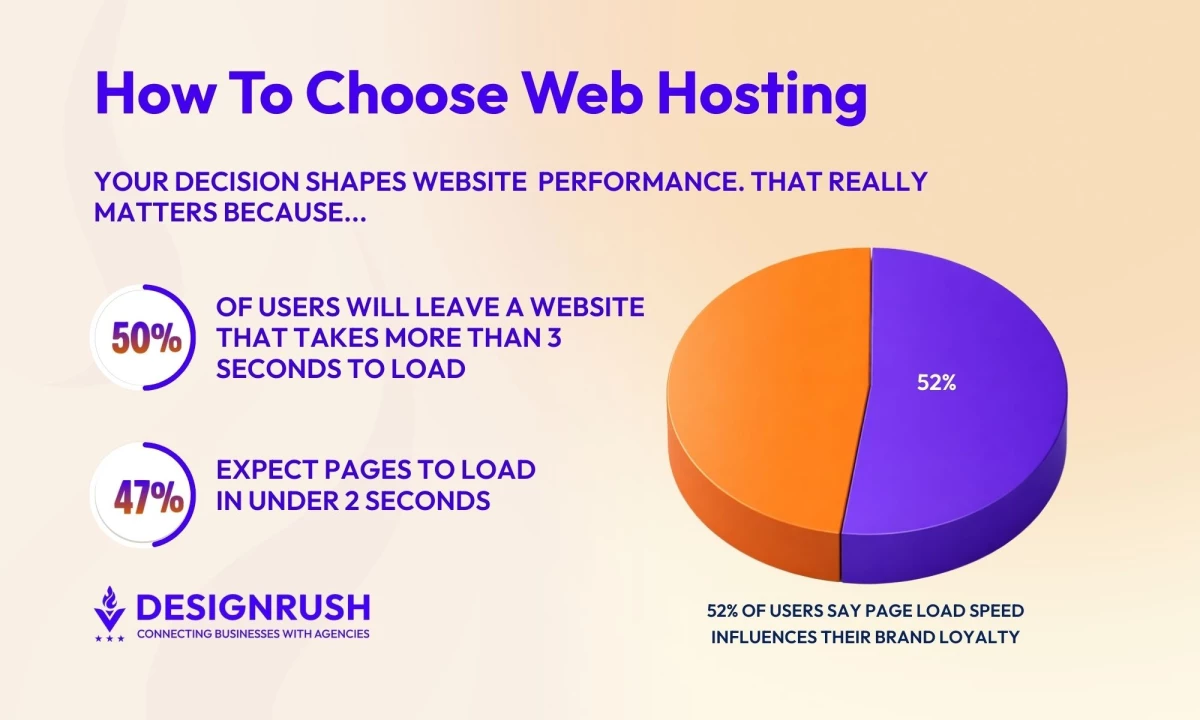
According to Google research, 50% of users will leave a website that takes more than three seconds to load, while 47% expect pages to load in under two seconds.
What’s more, 52% of users say page load speed influences their loyalty to a brand, making performance a factor not just for first impressions but for long-term retention.
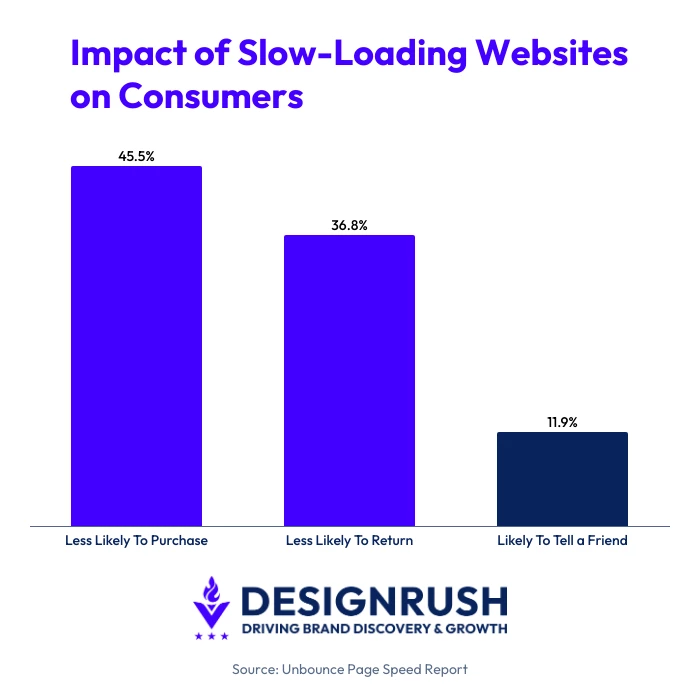
Slow-loading websites can have lasting business consequences. Research shows that nearly half of consumers say they're less likely to purchase after a poor experience, while 36.8% are less likely to return, and 11.9% are less likely to tell a friend.
What Reliable, High-Performance Hosting Actually Delivers
Reliable hosting has a direct impact on how your business operates day-to-day and how users experience your brand. The right hosting plan supports:
- Consistent performance under load: Quality hosting allocates sufficient server resources to prevent slowdowns during traffic spikes, promotions, or seasonal demand.
- Predictable uptime and availability: Strong hosting infrastructure reduces the risk of outages that can interrupt sales, lead generation, or customer access to services.
- Faster response times across devices: Optimized servers and modern infrastructure help ensure fast page delivery for both desktop and mobile users.
- Operational stability as you scale: Hosting that supports easy upgrades allows your website to grow without disruptive migrations or performance drops.
- Lower long-term technical overhead: Reliable hosting minimizes emergency fixes, performance troubleshooting, and reactive maintenance.
The right hosting plan for your business depends on your needs, given that not all websites are created equal, as Satish Hemachandran, VP at Newfold Digital, puts it. “The type of website often dictates the need for a level of performance that can be supported," he explains.



How To Determine Your Web Hosting Needs
Before comparing plans or providers, define what your website actually needs to do. Choosing a plan you'll outgrow within a year or paying for resources you'll never use are two of the most common hosting mistakes.
1. How much traffic do you expect?
The amount of traffic your website receives plays a major role in determining the type of hosting you need. A brochure website with a few hundred monthly visitors can run comfortably on shared hosting.
If you're expecting steady growth, seasonal spikes, or thousands of monthly visitors, VPS, cloud, or managed hosting offers more consistent performance and greater scalability.
2. Is it an eCommerce website?
If your website processes payments, uptime and security are business-critical. Every minute of downtime can translate directly into lost revenue, abandoned carts, and lost customer trust.
Look for hosting providers that offer PCI-compliant environments, SSL certificates, automated backups, malware protection, and strong security controls.
Performance is equally important. Shopify's analysis of real store data found that for every 100 milliseconds a store takes to load, conversion rates tend to be about 3.5% lower.
Stores with a Largest Contentful Paint (LCP) of 2.5 seconds reported roughly 30% lower conversion rates than stores loading in 1.5 seconds.
3. Do you need business emails?
Business email is often treated as an add-on rather than a core hosting feature. Before choosing a plan, decide whether you want your website and email managed by the same provider or through separate services.
For businesses that rely heavily on email communication, dedicated platforms such as Google Workspace and Microsoft 365 typically offer more advanced administration, collaboration, and security features than basic email hosting packages.
Keeping email separate from your website can also reduce operational risk. If you need to migrate your website, upgrade hosting infrastructure, or troubleshoot a hosting outage, your email service can continue operating independently.
4. Will you host videos or large files?
Media-rich websites require significantly more storage, bandwidth, and server resources than standard business websites.
Product videos, downloadable resources, image galleries, and other large assets can quickly increase hosting demands.
If your website relies heavily on media, consider higher-tier hosting plans or cloud-based infrastructure that can support increased resource consumption without sacrificing performance.
5. Do you need developer access?
Not every website requires advanced server controls, but development teams often need more flexibility than entry-level hosting plans provide.
Features such as SSH access, staging environments, Git integration, custom server configurations, and deployment tools are commonly available on VPS, cloud, and dedicated hosting plans.
If your team expects to customize or actively maintain the website, these capabilities may be essential.
6. Do you expect rapid growth?
Businesses expecting traffic growth, seasonal demand spikes, or expansion into new markets should prioritize scalable hosting solutions from the outset.
Cloud hosting and VPS hosting typically offer greater flexibility than shared hosting, allowing resources to be scaled up as requirements change. Planning for scalability early can help avoid disruptive migrations and costly system changes later.
Hemachandran reminds us that your provider needs to support your business’s efforts to achieve sustainable growth, saying “a hosting service that grows with you is an important foundation for the long-term success of your business.”
7. Are you building on a specific platform?
Some hosting providers are tailored for specific platforms such as WordPress, Magento, Shopify, or WooCommerce.
These specialized environments often include platform-specific performance optimizations, security features, automatic updates, and expert support.
If your website relies heavily on a particular platform, choosing a hosting provider with dedicated expertise can reduce maintenance requirements and boost overall performance.
- Security Checklist
- Understand Uptime Guarantees
- Evaluate Customer Support Quality
- Backup and Disaster Recovery
- Assess Transparency and Long-Term Cost Predictability
- Check Customer Reviews and Provider Reputation
- Compare Hosting Providers
Security Checklist
Security requirements vary depending on the type of website you operate, but every business should understand what protections are included with a hosting plan before signing up.
Look for providers that offer:
- SSL certificates
- Web application firewall (WAF)
- DDoS protection
- Malware scanning and removal
- Multi-factor authentication (MFA)
- Automated security updates
- Security monitoring and alerts
- Automated backups
- PCI DSS support (if applicable)
Not every feature is included by default. Review what’s covered by the base plan and what requires an additional fee, particularly if you operate an eCommerce website or handle sensitive customer data.
Understand Uptime Guarantees
Uptime is the percentage of time a hosting service remains operational and accessible to visitors. Most providers advertise uptime guarantees, but it’s important to understand what those numbers actually mean in practice.
A 99.9% uptime SLA (Service Level Agreement) still allows nearly 44 minutes of downtime per month, while a 99.99% SLA reduces that figure to roughly four minutes.
When comparing providers, look beyond the headline percentage. Check whether uptime commitments are backed by a service-level agreement (SLA), whether compensation is offered for excessive downtime, and whether scheduled maintenance is excluded from the guarantee.
You can also look for independent uptime monitoring or third-party performance data rather than relying solely on provider claims.
Evaluate Customer Support Quality
Support quality often becomes most important during traffic spikes, product launches, website migrations, or unexpected outages. In those situations, your hosting provider’s support team effectively becomes an extension of your business operations.
When evaluating support, consider:
- Availability (24/7 versus limited support hours)
- Average response and resolution times
- Available support channels
- Platform-specific expertise
- Access to migration or onboarding assistance
For businesses without dedicated IT resources, responsive support can be just as valuable as technical specifications.
Backup and Disaster Recovery
Backups protect your website if something goes wrong, whether it's a cyberattack, accidental deletion, a failed update, or server failure. But not all backup systems offer the same level of protection.
Before choosing a hosting provider, find out:
- How often backups are created
- How long backups are retained
- Whether backups are stored off-site
- How the restoration process works
- How quickly your website can be recovered after an incident
For businesses that rely on their website for sales or lead generation, recovery time can be just as important as backup frequency.
Assess Transparency and Long-Term Cost Predictability
Introductory pricing often hides the true cost of web hosting. Before committing to a provider, review how pricing changes after promotional periods end and whether essential features are included or charged separately.
Pay particular attention to:
- Renewal pricing
- Contract length and cancellation terms
- Storage or bandwidth overage fees
- Costs for backups, security, or premium support
- Website migration fees
Check Customer Reviews and Provider Reputation
Provider websites highlight features, but customer reviews can reveal how well those features hold up in actual use.
Look for recurring feedback about:
- Uptime reliability
- Support responsiveness
- Billing and renewal practices
- Migration experiences
- Security or performance issues
A few negative reviews are inevitable, but recurring complaints about the same issue are a good indicator of what to expect.
Compare Hosting Providers
Use the factors below to spot meaningful differences between hosting providers:
| What To Compare | What To Look For |
| Resource Allocation | Clear limits for storage, bandwidth, CPU, and RAM rather than vague “unlimited” claims. |
| Uptime Guarantee | A service-level agreement (SLA) of 99.9% or higher, with compensation outlined for downtime. |
| Data Center Locations | Server locations close to your target audience for better performance. |
| Backup Policy | Automatic backups, retention periods, and easy restoration options. |
| Migration Support | Free or assisted site migration to reduce risk when switching providers. |
| Contract Terms | Introductory pricing vs. renewal rates and long-term lock-in requirements. |
| Control Panel & Tools | Access to intuitive dashboards, staging environments, and developer tools. |
| Compliance Support | Explicit support for PCI DSS or other regulatory requirements if applicable. |
Types of Web Hosting Explained
Different hosting types are designed to meet different performance, security, and scalability needs.
If you understand how each option works (and what it’s best for), it’ll be easier to match your hosting plan to your business goals.
- VPS (Virtual Private Server) hosting
- Shared hosting
- Cloud hosting
- Managed web hosting
- Dedicated hosting
- PCI-compliant hosting
1. VPS (Virtual Private Server) Hosting
VPS hosting divides a physical server into isolated virtual environments, giving each website dedicated resources and greater control over server configurations.
It’s a strong option for growing businesses that have outgrown shared hosting but don’t yet need a dedicated server.
Top providers include:
- Atlantic.net: Secure, high-performance VPS hosting with dedicated resources and infrastructure designed for compliance-driven and mission-critical workloads.
- Hosting.com: Speed-optimized VPS hosting with root access for developers and technical teams.
2. Shared Hosting
Shared hosting places multiple websites on the same server, meaning they all share the same pool of resources. It’s the most affordable option and works best for low-traffic sites with simple functionality.
This type of hosting is commonly used by startups, personal sites, and early-stage business websites, often through providers that offer simple setup and low-cost entry plans.
Top providers include:
- Bluehost: Low-cost shared hosting plans with a simple setup process suited for beginners and small sites.
- HostGator: Provides flexible shared hosting plans with unmetered bandwidth and consistent uptime for entry-level websites.
3. Cloud Hosting
Cloud hosting runs websites across a network of connected servers rather than relying on a single machine. This setup improves reliability and allows businesses to scale resources quickly during traffic surges.
It’s well suited for companies with fluctuating traffic or expansion plans.
Top providers include:
- Amazon Web Services: Delivers highly customizable cloud hosting infrastructure designed for scalability and enterprise-level performance.
- Google Cloud: Provides global server coverage and strong performance for data-driven and high-traffic applications.
4. Managed Web Hosting
Managed hosting includes ongoing technical support where the provider handles server maintenance, security updates, monitoring, and backups.
This option is ideal for businesses that want reliable performance without managing server operations internally.
Top providers include:
- WP Engine: Managed WordPress hosting with built-in security, performance optimization, and expert support.
- Kinsta: Using cloud infrastructure to deliver fast, secure managed hosting for WordPress sites at scale.
5. Dedicated Hosting
Dedicated hosting gives a business full access to a whole physical server, which results in maximum performance, customization, and control.
This hosting type is best for large websites, enterprise platforms, and applications with strict security or compliance needs.
Top providers include:
- Liquid Web: Offers enterprise-grade dedicated servers with proactive monitoring and high-performance support.
- OVHcloud: Competitively priced dedicated servers with global data center availability.
6. PCI-Compliant Hosting
PCI-compliant hosting is designed for businesses that process, store, or transmit credit card information.
These hosting environments meet Payment Card Industry Data Security Standard (PCI DSS) requirements to help reduce the risk of data breaches and compliance penalties.
This type of hosting is essential for eCommerce websites, subscription platforms, and businesses handling online payments.
Top providers include:
- Rackspace: Offers PCI-compliant hosting solutions with managed security controls and compliance support for regulated businesses.
- IBM Cloud: Provides PCI-compliant cloud infrastructure designed for businesses handling sensitive payment and customer data.
Advantages and Disadvantages of Web Hosting Services by Type
Each hosting type offers a different balance of cost, performance, scalability, and control. Understanding the trade-offs can help you narrow down the options before making your choice.
| Hosting Type | Advantages | Disadvantages |
| Shared Hosting | Lowest cost, beginner-friendly, and easy to set up for small websites | Shared resources can affect performance during traffic spikes. Limited customization and scalability |
| VPS Hosting | Dedicated resources, better performance, and greater control than shared hosting | Higher cost and may require technical expertise to manage. |
| Cloud Hosting | Easily scales resources, offers high availability, and handles fluctuating traffic well | Pricing can be more complex and costs may increase as usage grows |
| Managed Web Hosting | Provider handles maintenance, updates, security, backups, and monitoring | Higher monthly costs and less flexibility over server configuration |
| Dedicated Hosting | Maximum performance, complete server control, and strong security for enterprise workloads | Most expensive option and often requires in-house technical expertise |
| PCI-Compliant Hosting | Supports PCI DSS compliance and provides additional security for websites processing online payments | Typically costs more than standard hosting and isn't necessary for websites that don't handle payment card data |
How To Choose a Web Hosting Provider: Wrapping Up
Choosing a web hosting plan is a strategic decision. By aligning your hosting choice with your traffic patterns, operational resources, and long-term goals, you can position your website to perform as a dependable asset for your business.

Our team ranks agencies worldwide to help you find a qualified partner to implement the latest AI solutions. Visit our Agency Directory for the Top Web Development Companies, as well as:
- Top Cloud Consulting Companies
- Top Managed IT Service Providers
- Top WordPress Development Companies
- Top IT Services Companies
- Top Houston Web Development Companies
Our design experts also recognize the most innovative design projects across the globe. Visit our Awards section to see the best in web design.
How To Choose Web Hosting FAQs
1. How much should a business expect to pay for web hosting?
Costs vary by hosting type. Shared hosting is typically the least expensive, while managed, cloud, and dedicated hosting cost more due to added performance, security, and support.
2. Can I switch hosting providers later if my business grows?
Yes. Many businesses upgrade or migrate hosting as their needs change. Planning for scalability and choosing a provider with migration support can simplify the process.
3. Does web hosting affect SEO rankings?
Yes. Hosting impacts SEO indirectly through factors like page speed, uptime, and site reliability. Search engines favor websites that load quickly, stay consistently available, and provide stable user experiences.
4. Does website speed affect SEO?
Yes. Google uses page experience signals, including Core Web Vitals, as part of its ranking systems.
While high-quality, relevant content remains the primary ranking factor, a fast-loading website can improve user experience, reduce bounce rates, and help search engines crawl your pages more efficiently.
5. What is a good website load time?
Google recommends that the Largest Contentful Paint (LCP) occur within 2.5 seconds of a page starting to load. In general, websites that load within two to three seconds provide a better user experience and are less likely to lose visitors due to slow performance.
6. Does website speed affect conversion rates?
Faster websites make it easier for visitors to browse products, complete forms, and finish purchases. Even small delays can lead to higher abandonment rates, particularly for eCommerce sites where slow-loading product pages or checkout processes can reduce conversions and revenue.





-preview-webp.webp)