
HubSpot is built for inbound marketing first, CRM second, so you end up paying for a broad marketing ecosystem when all you need is pipeline visibility and follow-ups.
Before anything else, audit what you actually use. Most startups find they're paying for multiple hubs but only actively using one.
HubSpot Competitors: Key Findings
- SMBs that want HubSpot’s core sales and marketing capabilities with less cost and complexity should consider Nutshell for CRM, pipeline management, email marketing, and automation in one platform.
- Outbound teams benefit from pipeline-focused CRMs like Pipedrive or Close, while inbound teams may prefer automation tools like ActiveCampaign or Brevo.
- Startups expecting rapid growth should choose customizable CRMs like Zoho or Salesforce Starter early to avoid a costly migration within 12-18 months.
Where HubSpot Starts Strong (and Gets Expensive Fast)
1. CRM for Small Businesses
2. Best AI Productivity Tools
3. Best Marketing Analytics Tools
4. Best Lead Gen Tools
HubSpot’s free tier is one of the strongest available at no cost. That’s why so many startups start there.
You already get a basic CRM, email tools, meeting scheduler, live chat, and forms builder.
But the moment you need real automation, pipeline reporting, or anything beyond basic contact management, you’re pushed to an ~$800/month Professional plan.
That jump is where most teams start questioning the all-in-one model, whether it still makes sense, or if a more focused tool would better match how they actually operate.
At that point, the right capabilities for how you sell matter more than keeping everything under one roof.
The alternatives below are matched to that reality: your stage, your go-to-market motion, and what you’ll actually use day to day. Here’s how they compare at a glance:
Tool | Best For | CRM & Pipeline | Automation | Rating (Capterra) | Starting Price |
SMB HubSpot replacement | ✅ | ✅ | 4.4 | $13/user/mo | |
Growing sales teams | ✅ | ✅ | 4.5 | $14 per user/mo | |
Customization & scale | ✅ | ✅ | 4.3 | Free / $14 per user/mo | |
AI-powered CRM | ✅ | ✅ | 4.5 | Free / $9 per user/mo | |
Advanced automation | ✅ | ✅ | 4.6 | $15 per month (contacts-based) | |
Email + SMS scale | ✅ | ✅ | 4.6 | Free / $9 per user/mo | |
Outbound + calling | ✅ | ✅ | 4.7 | $35 per user/mo | |
Support & retention | ❌ | ✅ | 4.4 | $55 per user/mo | |
Lightweight CRM | ✅ | ❌ | 4.5 | $24 per user/mo | |
Long-term scale | ✅ | ✅ | 4.4 | Free / $25 per user/mo |
1. Nutshell: Best for SMBs Replacing HubSpot Without the Cost or Complexity
For growing sales and marketing teams that want HubSpot-level capability without the price curve or the migration headache.
Nutshell is an SMB-focused CRM that includes pipeline management, sales automation, web chat, and an AI chatbot.
Email marketing, SMS, prospecting, quotes and invoices, and the advanced marketing suite are available as paid add-ons, so teams pay only for what they use rather than buying a bundled all-in-one tier.
AI features are included rather than sold separately, though usage is metered. Every plan includes the AI Chatbot, with a monthly allotment of AI outcomes that scales with each tier.
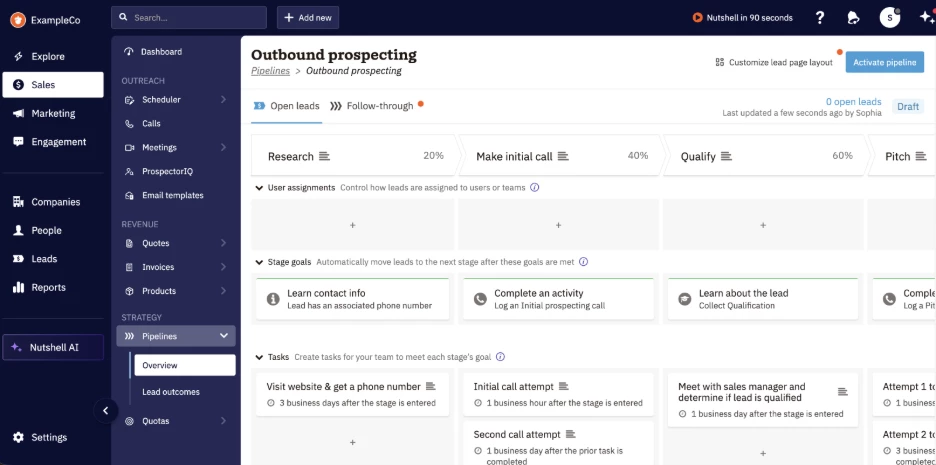
Where Nutshell competes with HubSpot for SMBs is in cost-to-capability at the tier most growing teams actually live on.
- HubSpot gates workflow automation and custom reporting behind Marketing Hub Professional, which runs $890/month plus a mandatory $3,000 onboarding fee and a required annual contract.
- Nutshell delivers comparable sales automation and reporting at its Pro tier, with unlimited CRM contacts and storage, no overage fees on either, and no annual commitment.
White-glove data import is included free on all plans, which removes the single biggest objection most teams have to switching, namely the 4-8 week migration window the section at the bottom describes.
For SMB sales and marketing teams that want pipeline visibility, automated follow-ups, and email marketing in one place, Nutshell is one of the strongest SMB-priced options on this list.
Pricing (billed annually)
- Free 14-day trial
- Foundation: $13/user/month
- Growth: $25/user/month
- Pro: $42/user/month
- Business: $59/user/month
- Enterprise: $79/user/month
Notable Features
- All-in-one CRM, marketing automation, web chat, scheduling, quoting, and prospecting.
- Native AI suite covering meeting summarization, timeline summaries, AI chatbot, AI email replies, and AI sales coach.
- 5,000+ app integrations including Google, Microsoft, and Zapier.
- Sales automation for lead routing, pipeline automation, and automated follow-ups.
Pros
- CRM and marketing tools in one platform, with add-ons for email, SMS, and more.
- Free onboarding and data migration for qualifying customers, no mandatory fees.
- Simple per-user pricing with unlimited CRM contacts and storage.
- Free live chat and email support on every plan.
Cons
- Marketing suite is leaner than HubSpot Pro for very high-volume inbound teams.
- UI is purpose-built rather than infinitely customizable like Salesforce.
- Best fit for SMBs and growing teams rather than 500+ seat enterprise rollouts.
2. Pipedrive - Best for Growing Sales Teams That Need Pipeline Visibility
For growing startups and SMBs with established sales processes, dedicated sales leadership and a sales team ready to scale
Pipedrive is a platform designed for reps, where they can open the tool, see exactly what needs to happen today, and log activity without much navigation.
Compared to HubSpot, Pipedrive wins on simplicity and speed to value:
HubSpot gives startups a broad marketing, sales and service ecosystem, but that breadth can become expensive and harder to manage as sales teams grow.
Pipedrive focuses on the sales workflow itself, giving teams pipeline visibility, automation, reporting, email sync and 500+ integrations in a CRM reps are more likely to use consistently.
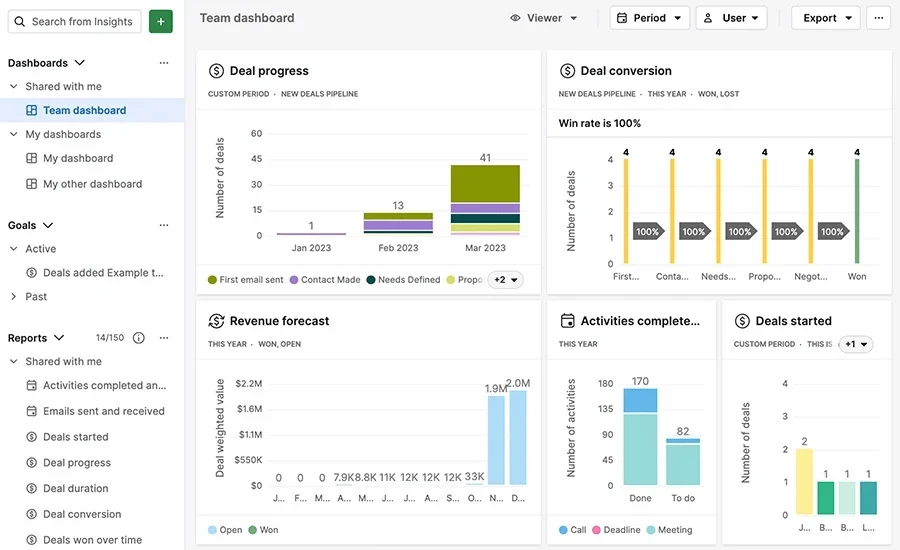
Pipedrive also fits teams that are outgrowing scattered spreadsheets, custom tools or overcomplicated CRMs. Its customizable pipelines, automations, AI-assisted follow-ups and manager-level insights help standardize sales processes, reduce manual work and give sales leaders clearer visibility into performance.
For growing sales teams, Pipedrive is strongest when the goal is to scale sales execution, improve adoption and get better control over the pipeline without moving into a heavier system like Salesforce or paying for HubSpot features the team does not need.
Pricing (billed annually)
- Free 14-day trial
- Paid plan: Starts from $14/seat/month (basic pipeline & contact management)
Notable Features:
- Visual sales pipeline with drag-and-drop deal tracking
- Activity-based selling like tasks, reminders, and follow-ups)
- AI sales assistant plus email generation
- Workflow automation for repetitive sales tasks
- Customizable pipelines, fields, permissions and visibility controls
- 500+ integrations (Google, Slack, QuickBooks, etc.)
Pros
- Fastest onboarding of any tool in this list
- Purpose-built for salespeople
- Honest per-user pricing with no contact-based escalation
- Strong mobile app for field or remote sales teams
Cons
- No native email marketing or campaign tools or admins
- Reporting is less deep than HubSpot Pro at equivalent price
- Will require third-party integrations if you run inbound
3. Zoho CRM - Best for Deep Customization and Automation
For growth-stage startups planning for complex workflows, automation, and multi-channel operations early
Zoho CRM positions itself differently from HubSpot by solving a problem most startups only feel later: scaling limitations.
While HubSpot works well early on, many of its advanced capabilities, including customization, automation depth, and analytics, are locked behind higher tiers or require add-ons.
Zoho brings much of that functionality into lower-priced plans.
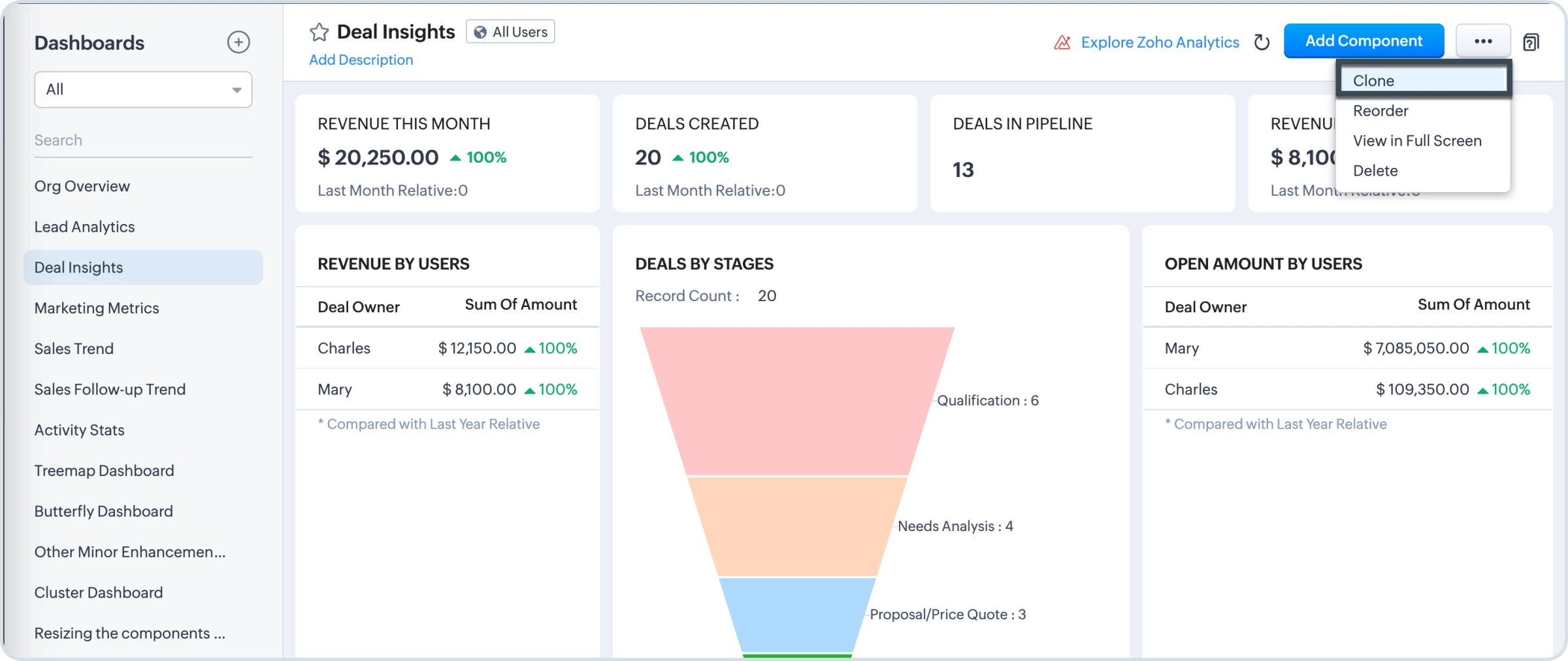
You can build custom modules, workflows, approval processes, and even entire sales journeys using tools like Blueprint and CommandCenter.
This means your CRM adapts to your business. In contrast, HubSpot’s customization is more limited unless you move into expensive enterprise tiers.
Zoho also offers automation and AI without add-on costs. Features like lead scoring, AI predictions (via Zia), and advanced reporting are included in plans where HubSpot typically charges extra or restricts access.
Pricing
- Free: Up to 3 users (basic CRM, contacts, deals, and tasks)
- Paid plan: Starts from $14/seat/month (with 15-day free trial)
Notable Features:
- Advanced workflow automation and process builder
- AI assistant (Zia) for predictions, insights, and recommendations
- Deep customization for modules, layouts, fields, and automation rules
- Omnichannel communication
- Advanced analytics and reporting dashboards
Pros
- Highly customizable compared to HubSpot at similar price points
- Advanced automation and AI included
- Large library of integrated apps (Zoho suite) without add-ons
- More predictable pricing vs HubSpot’s upgrade curve
Cons
- Steeper learning curve for new users
- UI can feel less intuitive than simpler CRMs
- Setup can take longer than plug-and-play tools


4. Freshsales - Best for AI-Powered Lead Prioritization
For startups that want an intuitive, AI-powered CRM without HubSpot’s pricing curve
Freshsales is designed for startups that want a balance between power and usability.
Compared to HubSpot, Freshsales wins by making intelligent features accessible at lower price points, including automation and built-in communication tools.
This is all without mandatory onboarding fees that can add thousands to HubSpot’s cost.
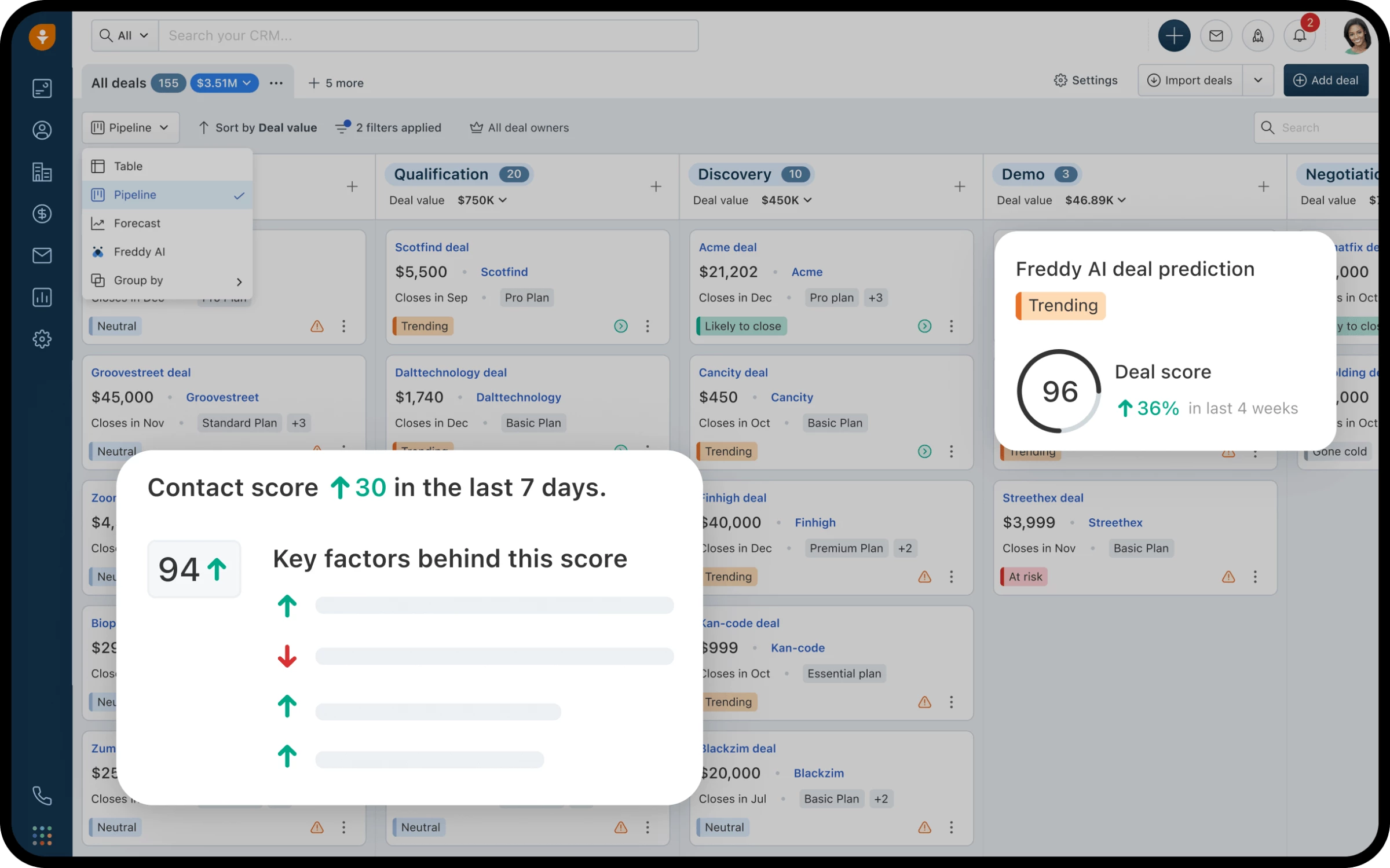
Freshsales’ AI-driven sales execution uses Freddy AI assistant to prioritize leads, suggest next actions, and provide insights, so teams can focus on deals most likely to close.
Combined with built-in email, phone, and chat capabilities, it enables startups to manage the entire sales process in one place, without needing multiple tools early on.
Pricing (billed annually)
- Free: Up to 3 users
- Paid plan: Starts from $9/seat/month (with 21-day free trial)
Notable Features:
- AI-powered lead scoring and deal insights (Freddy AI)
- Built-in communication via email, phone, chat, and SMS
- Visual sales pipeline with drag-and-drop management
- Workflow automation and auto-assignment rules
- Customizable dashboards and reports
Pros
- Much easier to use and faster to adopt than HubSpot
- Strong AI features are included without add-ons
- Affordable pricing with no onboarding fees
Cons
- Smaller range of integrations vs HubSpot
- Less robust marketing suite
- Reporting lacks depth compared to HubSpot Pro
5. ActiveCampaign - Best for Advanced Marketing Automation
For growth-focused teams prioritizing advanced marketing automation and lifecycle personalization
Tingnan ang post na ito sa Instagram
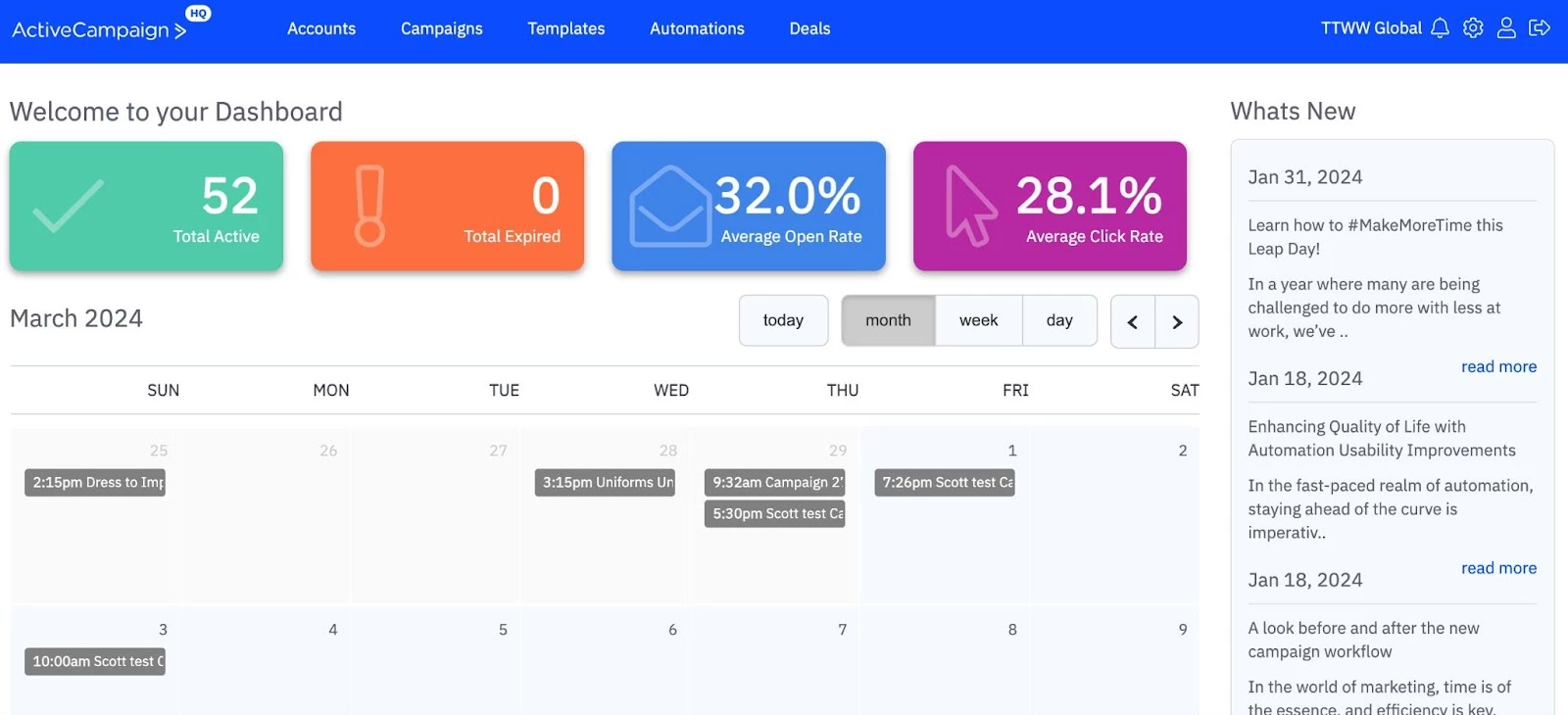
ActiveCampaign’s automation engine is, by most practitioner accounts, the deepest available outside of enterprise marketing platforms.
You can create multi-step workflows using dozens of triggers and actions to run personalized sequences across email, SMS, and other channels.
It also does segmentation a lot better than HubSpot, specifically. You can build audience segments based on behavioral data with the flexibility that HubSpot's marketing tools don't match at equivalent price points.
The honest limitation is on the sales side. If your startup has a dedicated sales team working on active deals, ActiveCampaign is not their tool.
The CRM functionality is built for marketers to understand the customer journey, not for salespeople to manage their pipeline.
Teams that use ActiveCampaign for marketing often pair it with a sales-first CRM like Pipedrive when they need stronger pipeline visibility, sales adoption and deal management.
Pricing (billed annually)
- Paid plan: Starts from $15/month for ~1,000 contacts (with 14-day free trial)
Notable Features:
- Advanced automation builder
- AI campaign and automation generation
- Cross-channel orchestration, including email, SMS, and WhatsApp
- Dynamic segmentation and conditional content
- Built-in CRM with automation-driven sales actions
Pros
- Best-in-class marketing automation depth for the price
- AI tools reduce manual campaign building and optimization
- Strong personalization and behavioral targeting
Cons
- Steeper learning curve than simpler CRMs
- Not a full “all-in-one” business suite like HubSpot
- CRM is less robust than HubSpot for complex sales orgs
6. Brevo - Best for Email and SMS Without Per-Contact Pricing
For early-stage teams and lean marketers who need scalable email + SMS without paying for unused features
Brevo’s edge is pricing: you pay for emails sent, not contacts stored. That keeps costs predictable as your list grows; unlike HubSpot, where pricing scales with contacts whether you use them or not.
It also covers marketing well, including email campaigns, SMS, automation workflows, segmentation, and even transactional emails, making it far more accessible for startups.
The modular, pay-for-what-you-need approach also lets you add sales tools, live chat, or advanced features as needed instead of committing to a full bundle upfront.
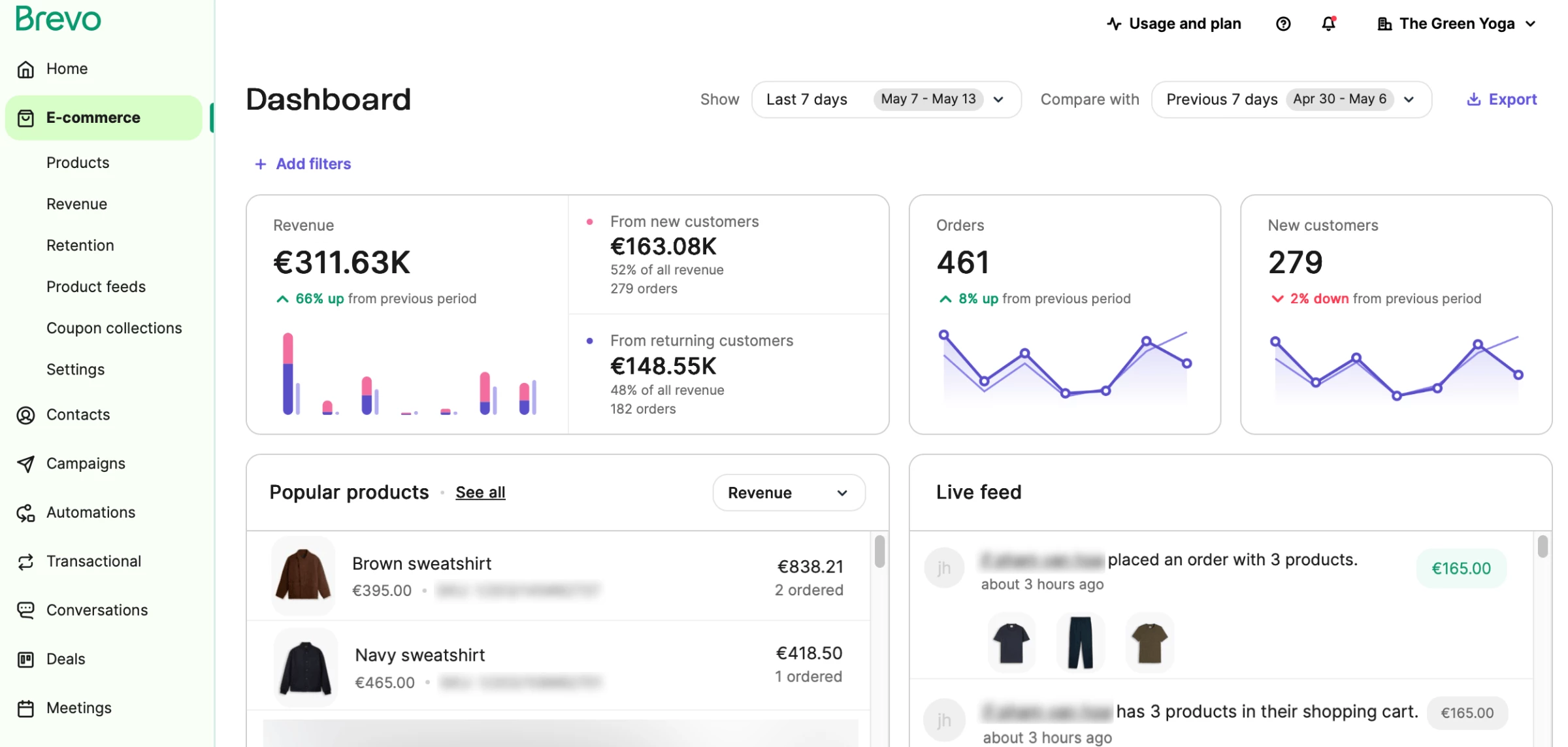
Where Brevo falls short is on the sales side. The CRM is functional for contact management and basic deal tracking, but it's not built for a sales team that needs pipeline velocity, call logging, and rep activity tracking.
If your startup has both a marketing function and an active sales team, Brevo works best as the marketing layer in a two-tool stack rather than as a standalone HubSpot replacement.
Pricing
- Free: Up to 300/day sends, CRM included
- Paid plan: Starts from $9/seat/month
Notable Features:
- Email, SMS & WhatsApp marketing in one platform
- Marketing automation workflows (even on lower tiers)
- Transactional email included
- Advanced segmentation and behavioral triggers
- Built-in CRM with sales pipeline and live chat add-ons
Pros
- Much more affordable than HubSpot as contacts grow
- Pricing based on email volume
- Automation available without high-tier upgrades
- No onboarding fees and easy setup
Cons
- CRM is too basic for an active sales team to use; not a full HubSpot replacement
- Not ideal for complex B2B sales orgs
7. Close - Best for High-Volume Outbound Sales and Calling Workflows
For startups with dedicated sales teams focused on rapid outreach, lead qualification, and closing deals fast
Close is built for one thing: maximizing sales productivity through high-volume outreach.
Unlike HubSpot, which spreads functionality across marketing, service, and CRM hubs, Close focuses entirely on helping reps contact more leads, faster, from one place.
Features like global calling, SMS, predictive dialing, and full email integration are native to the platform. In HubSpot, many of these either don’t exist or require additional tools, integrations, or higher-tier plans.
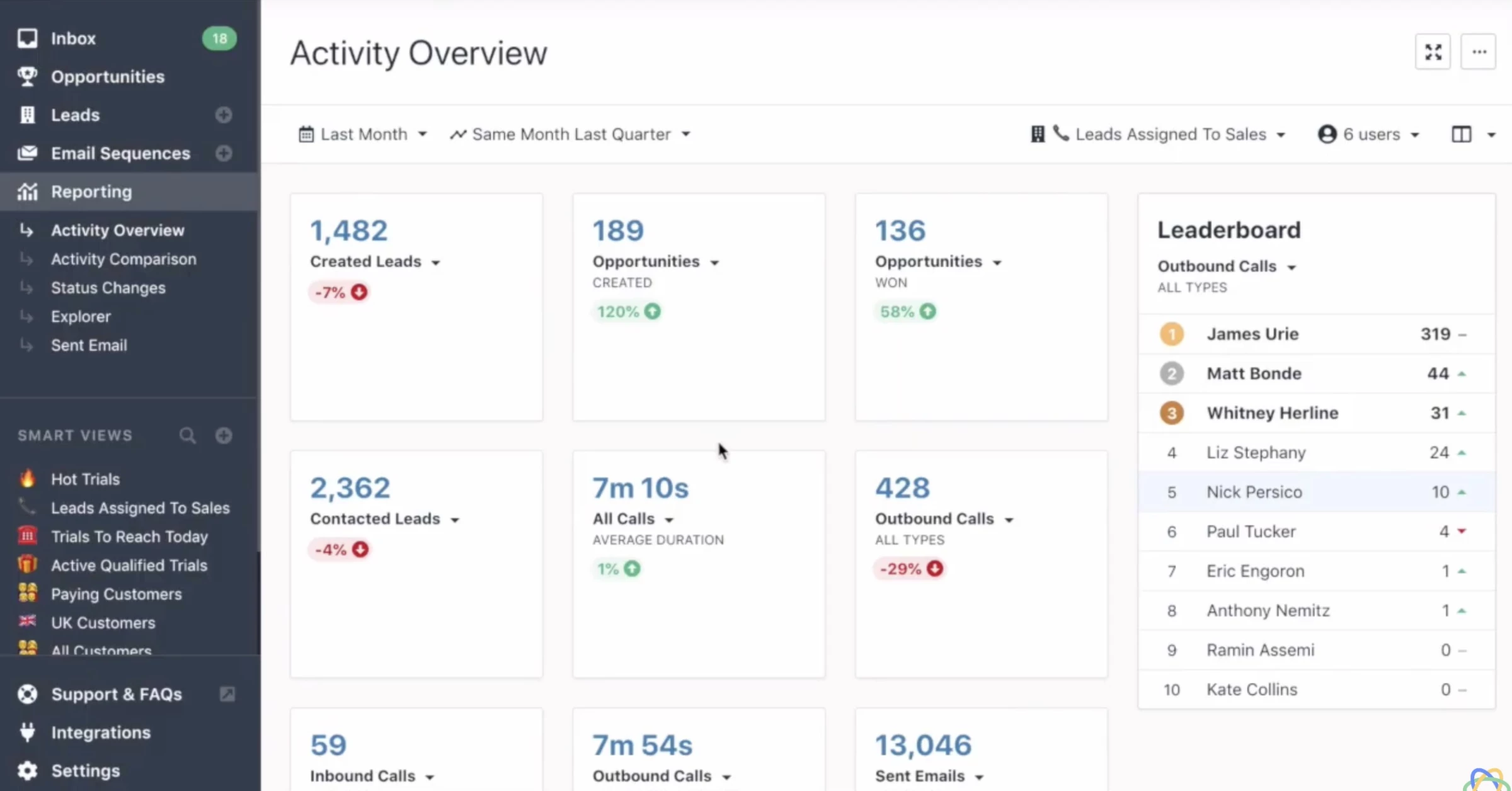
Close is designed to be easy to learn and deploy quickly, with no need for complex setup, onboarding fees, or admin-heavy configuration.
While HubSpot can become powerful over time, it often requires more setup and maintenance.
If your startup relies on outbound sales and high-touch deal closing, Close is a stronger fit than HubSpot. It prioritizes execution speed and rep productivity over building a full marketing stack.
Pricing (billed annually)
- Paid plan: Starts from $35/seat/month (with 14-day free trial)
Notable Features:
- Built-in power dialer with voicemail drop and call recording (no integrations required)
- Native email sequencing with open/click tracking and automatic follow-up scheduling
- Predictive dialer on Professional plan that auto-dials from a list
- Integrated SMS on all plans
- Smart Views - saved filtered lead lists that auto-update based on activity criteria
Pros
- Faster to set up and easier to use than HubSpot
- Native calling and sequencing eliminate tool-switching for reps
- Built specifically for outbound
- No onboarding fees or complex configuration
Cons
- No marketing automation; requires a separate tool for inbound
- Steeper per-user cost at scale
- Less suited for large, multi-department teams
8. Zendesk - Best for Support-Led Retention
For B2C SaaS and high-touch B2B startups, where reducing churn and improving support response time directly drives revenue
Zendesk is built specifically for customer experience (CX).
While HubSpot treats service as one part of a broader CRM platform, Zendesk handles customer support at scale with intelligent ticket routing, omnichannel support, and an agent workspace that lets support teams resolve issues without toggling between systems.
HubSpot’s Service Hub, by comparison, lacks native SMS, has more limited channel support, and doesn’t offer the same level of customization or centralized workflow for agents.
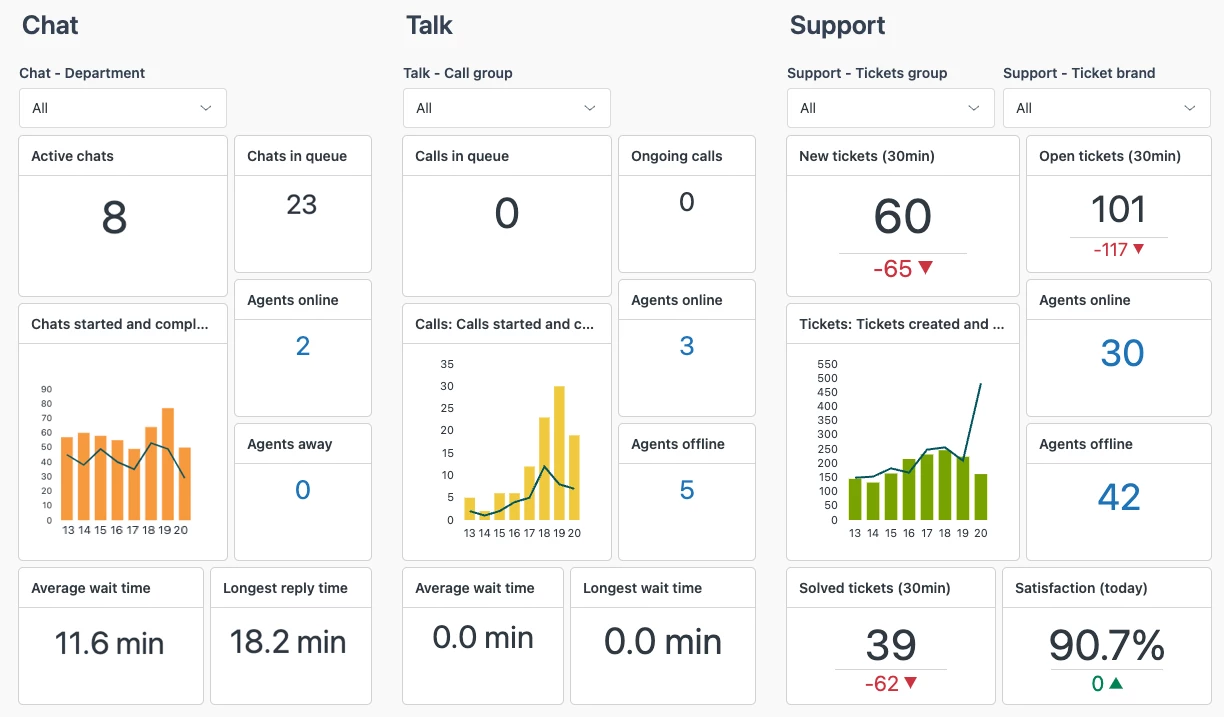
Zendesk’s AI is also trained on billions of customer interactions and is embedded across the platform. AI agents handle routine issues without human input; copilots guide reps through more complex ones in real time.
If your startup’s growth depends on customer experience, retention, and support quality, Zendesk goes deeper where HubSpot only scratches the surface.
Pricing
- Paid plan: Starts from $55/seat/month (with 14-day free trial)
Notable Features:
- Omnichannel support (email, chat, voice, SMS, and social messaging)
- AI-powered triage and intelligent ticket routing based on issue type and agent expertise
- Self-service knowledge base and community forum builder
- SLA management with escalation rules and performance tracking
- Advanced customer satisfaction (CSAT) and NPS tracking are built into reporting
Pros
- Best-in-class ticketing and CX capabilities
- Scales easily from startups to enterprise support teams
- Extensive integrations and ecosystem
Cons
- Not a CRM replacement; no sales pipeline or marketing automation
- Pricing is per-agent and escalates significantly for larger support teams
- Requires a separate CRM for meaningful sales or marketing functions
9. folk - Best for Lightweight Relationship Management Without CRM Complexity
For pre-seed and seed-stage founders, investors, and small teams who manage relationships in Gmail and need structured contact tracking without CRM overhead
folk is different from everything else on this list, and that difference is intentional. Rather than replacing HubSpot, it targets the teams that never should have been using HubSpot in the first place.
folk is built around relationship management for small, founder-led teams: a clean interface, Gmail and LinkedIn integration, contact lists that sync automatically, and light pipeline functionality that doesn't demand the same configuration overhead as a full CRM.
In HubSpot, much of this requires manual updates or integrations, which creates friction for teams.
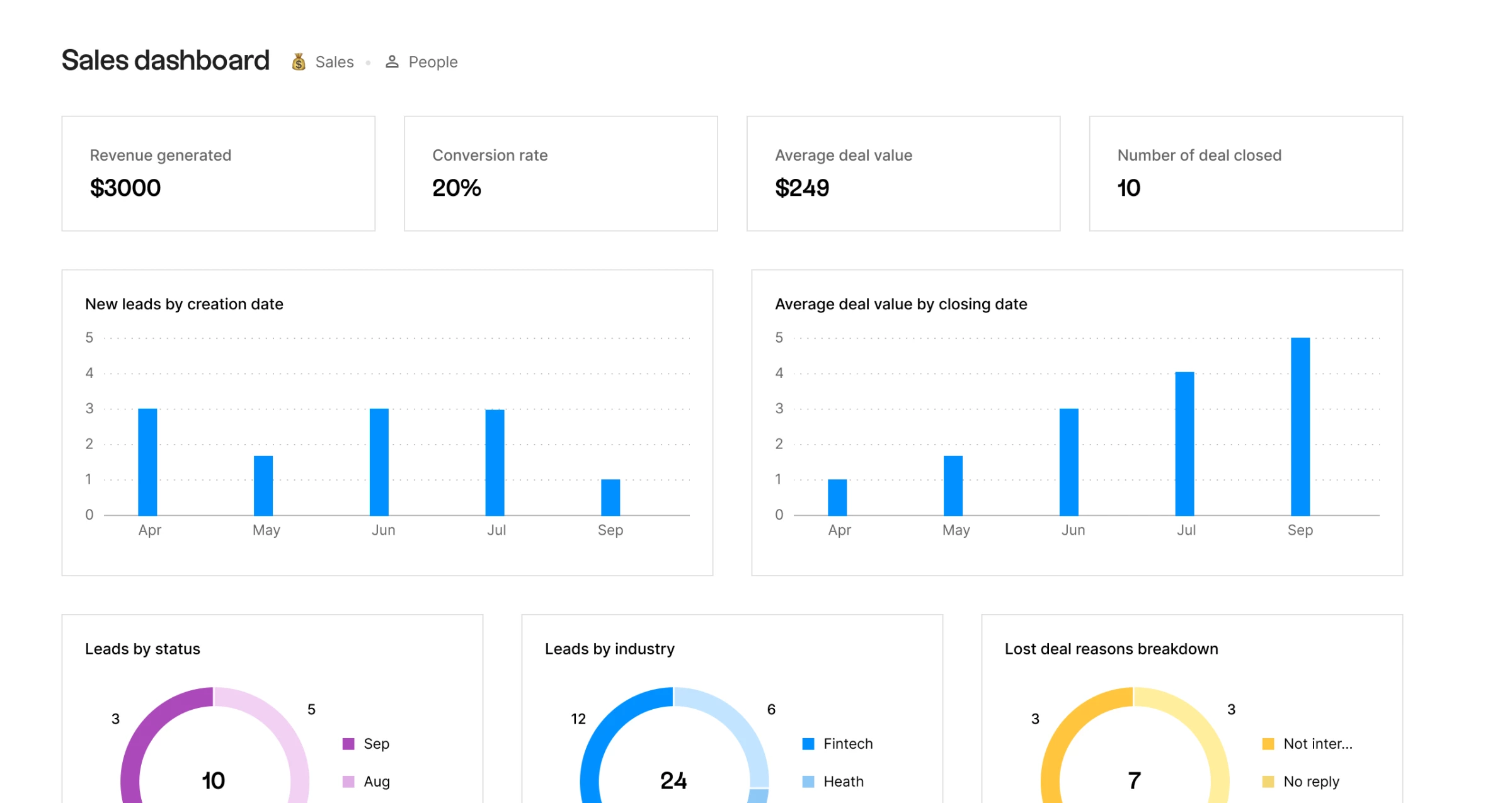
For a pre-seed founder managing an investor pipeline, a recruiting process, or early sales conversations, folk is closer to what the work actually looks like than any traditional CRM.
You can send personalized bulk emails, build simple pipelines around people, and collaborate with your team through notes, reminders, and shared context.
Pricing (billed annually)
- Paid plan: Starts from $24/user/month (with 14-day free trial)
Notable Features:
- Gmail and LinkedIn integration that automatically captures and enriches contact profiles
- Group-based contact organization
- Email templates and sequence tracking directly from the contact view
- AI-powered data enrichment that auto-populates company and contact details
- Simple pipelines for managing people and relationships
Pros
- Extremely simple and fast to use
- Great for partnerships, hiring, and investor tracking
- Designed for relationship management
Cons
- Limited traditional sales pipeline features
- Not built for complex sales teams or forecasting
- Fewer native integrations compared to HubSpot
10. Salesforce Starter - Best for Long-Term CRM Scalability and Enterprise Readiness
For startups past product-market fit with a dedicated GTM team that needs enterprise-grade CRM capability without having to switch
Salesforce Starter Suite is designed to solve one of the biggest long-term risks of choosing HubSpot: outgrowing your CRM too quickly.
While HubSpot often works well early, it becomes expensive and fragmented as you add features, Salesforce starts with a unified system that already includes sales, service, marketing, and even commerce.
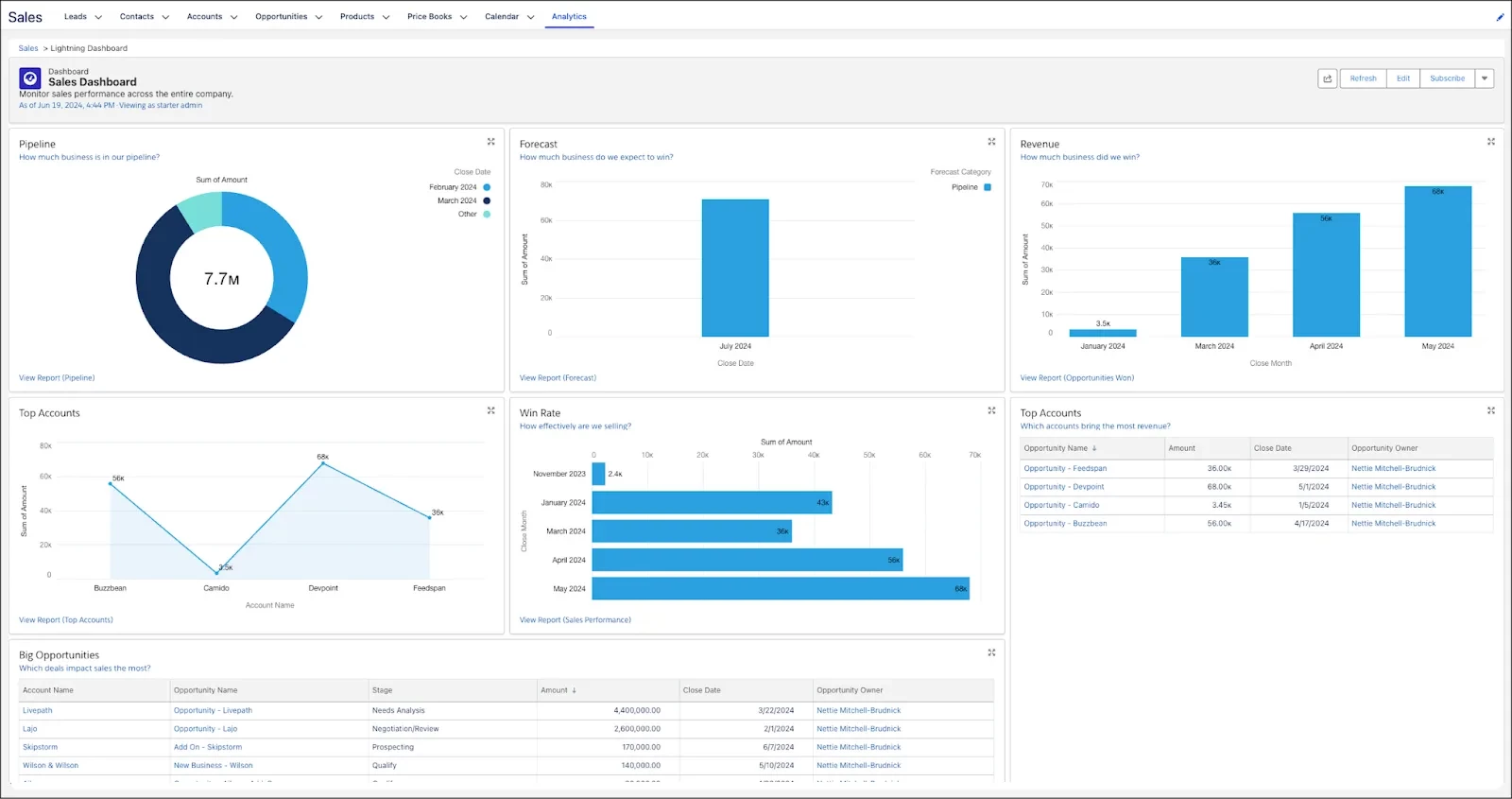
You can start with a simple setup, then expand into advanced automation, AI, and integrations as your business grows.
If you’re building long-term scale and complexity, Salesforce Starter Suite gives you a foundation that HubSpot often grows into, without forcing a costly migration later.
Pricing
- Free Suite: Up to 2 users (free CRM with sales, service, and marketing tools plus built-in AI)
- Starter Suite: $25/user/month
Notable Features:
- Unified CRM (sales, service, marketing, and commerce in one platform)
- Built-in AI (Agentforce) for automation and insights
- Lead routing and sales automation workflows
- Dynamic email marketing and forms
- Large library with 7,000+ integrations
Pros
- Extremely scalable; won’t need to switch CRMs later
- All-in-one platform reduces tool sprawl
- Flexible customization for growing teams
Cons
- Steeper learning curve than simpler tools
- Can feel complex for very early-stage teams
- Overkill if you only need basic CRM functionality
How To Choose the Right HubSpot Alternative for Your Startup
Most startup founders make the same mistake when evaluating CRM tools: they sort by company size. It's an understandable shortcut, but it leads you astray almost immediately.
The variables that actually matter are your funding stage and your GTM motion. Get clear on those two things first, and the right tool becomes obvious.
So instead of asking “what do companies my size use?”, start here:
1. Match the Tool to Your Stage
Pre-seed (0-5 people, still validating)
Focus on learning. You don’t need automation or complex workflows, just a way to store contacts, track conversations, and remember follow-ups.
HubSpot’s free tier works, but so do Notion, Airtable, or folk. Spending more than $30/month on a CRM at this stage is usually unnecessary unless sales is your core function.
Seed (5-20 people, early revenue)
Now you’re pushing growth. You’ll need basic automation, pipeline visibility, and lead tracking. HubSpot Starter works, but you’ll likely outgrow it in 6–12 months.
Tools like Nutshell or Freshsales suit earlier teams, while Pipedrive becomes a stronger fit once a startup has a dedicated sales team, an active pipeline, and a repeatable sales process.
Series A+ (20+ people, dedicated GTM team)
At this point, complexity is unavoidable. You need attribution, integrations, territory management, and board-level reporting.
The question shifts from “what’s cheapest?” to “what won’t we outgrow soon?” Zoho CRM, Salesforce Starter Suite, or a more flexible stack starts to make sense.
2. Then Factor in How You Sell
Your GTM motion is the clearest signal for which tool will work. Most fall into three camps:
If your growth is inbound-led
You're generating leads through content, SEO, paid ads, or product signups. Your CRM needs to handle high-volume contact management, email nurturing, and campaign attribution.
Best-fit tools for this motion:
- Nutshell combines pipeline management with email marketing, automation, web forms, and landing pages, making it a practical HubSpot alternative for startups that want sales and marketing tools in one platform.
- Brevo is the better pick if email and SMS are your primary channels and you don't need strong sales features.
- ActiveCampaign offers deeper customer journey automation than Nutshell, but Nutshell provides a more sales-focused CRM experience.
If your growth is outbound-led
You have a sales team working a defined list, and revenue depends on rep productivity. Pipeline visibility, call logging, and email sequencing matter most, along with a CRM your reps will actually use.
Marketing tools like campaigns or landing pages probably aren’t a priority.
The most relevant tools for this setup are:
- Pipedrive is best for growing sales teams that need an easy CRM for pipelines, follow-ups, automations and reporting, but it doesn’t replace HubSpot’s full marketing suite.
- Close is worth the premium if phone outreach is central to your process; calling, SMS, and sequencing are all native.
- Freshsales splits the difference. Solid pipeline management, useful AI lead scoring, and quicker to set up than most in its class.
If your growth is product-led
You need your CRM to talk to your product data, surfacing expansion signals, and helping a small team manage high account volume without touching every deal individually.
folk is the standout. It's Gmail-native, lightweight, and well-suited to founder-led sales teams that need some structure without a full system.
It's not a CRM replacement, but for early PLG companies, that's often exactly the point.
Switching from HubSpot? What To Know Before You Migrate
Migration failures usually come from underestimating scope. A few things prevent that:
- Export everything first: Pull contacts, companies, deals, activities, and especially custom properties. These are often missed and cause gaps later
- Clean before you import: Remove duplicates, standardize fields, and fix lifecycle stages so you’re not carrying messy data into your new system
- Prioritize key automations: Rebuild the small set of workflows that actually drive revenue; everything else can be phased in after launch
- Move active deals early: Migrate open deals with key context (stage, value, last activity) so your pipeline doesn’t stall mid-transition
- Handle front-end assets last: Forms, landing pages, and meeting links should only switch once your CRM is stable and fully tested
Most teams should plan for 4-8 weeks from decision to full cutover.
Tools that offer dedicated migration support (most mid-tier CRMs do) can compress this meaningfully, but don't trust a vendor who promises a full migration in under a week without significant hands-on support.
Best Alternatives to HubSpot for Startups: Final Words
HubSpot is priced on the assumption that as your startup grows, your needs and spend, grow with it. That works for inbound-heavy SaaS teams with strong margins, where an all-in-one system earns its cost.
But for outbound-first or product-led teams, or anyone not yet using those advanced features, HubSpot has become a very expensive default.
It's designed to capture companies as they start scaling. Whether that investment makes sense depends on how much of HubSpot you're actually using, and whether a more focused tool would serve how you sell today just as well for less.
The best alternative to HubSpot is the one that matches your motion, fits your stage, and gets out of your team's way.

Our team ranks agencies worldwide to help you find a qualified partner. Visit our Agency Directory to find top-rated digital marketing companies, as well as:
- Best Digital Marketing Agency in Los Angeles
- Top Content Marketing Agencies
- Top Conversion Rate Optimization Services
- Top Media Buying Agencies
- Top Affiliate Marketing Companies
And don’t miss our Awards section, where we celebrate the most innovative projects in design — from logo and app design to print and packaging.
Alternatives HubSpot FAQs
1. Why do businesses switch from HubSpot?
Most startups don’t leave HubSpot because it’s ineffective, they leave because it becomes misaligned with how they actually operate.
HubSpot is built as an all-in-one platform, which works well early on. But as teams grow, costs rise alongside added features, many of which aren’t fully used.
At the same time, startups with simpler sales motions often don’t need the full marketing ecosystem HubSpot is designed around.
2. What's the best free CRM for a pre-seed startup?
HubSpot's free tier remains the most feature-complete free CRM available. It covers basic contact management, deal tracking, email templates, and meeting scheduling without charging you anything.
If your team has three or fewer users and under 1,000 contacts, start there and don't overthink it. Zoho CRM's free tier (up to three users) is the second-best option if you want something that scales more affordably when you're ready to upgrade.
3. What happens when HubSpot's startup discount runs out?
You'll be moved to standard pricing, which means anywhere from $9/user/month (Starter) to $800/month (Pro) or higher, depending on your configuration.
HubSpot typically sends renewal notices 30 days before expiration. At that point, you have three options: negotiate a loyalty rate, downgrade to a lower tier if your usage allows it, or migrate.
Most startups that don't plan ahead end up absorbing a bill they weren't budgeting for. Start your evaluation at least 90 days before your discount expires.
4. Which HubSpot alternative is best for outbound sales?
Pipedrive is the strongest recommendation for growing outbound or sales-led teams because it combines a clean pipeline view with automation, activity tracking, reporting and interface reps can adopt quickly.
Close is worth the premium if phone calling is central to your process, the built-in dialer saves enough time per rep to justify the cost difference.
Freshsales is the right call if you want AI-assisted lead prioritization alongside solid pipeline management without paying enterprise prices.
5. Is it cheaper to switch or to stay on HubSpot?
If you're on Professional but only using the CRM and basic email, switching likely saves money.
If you're running automation, sequences, landing pages, and a shared inbox, the replacement costs narrow the gap quickly.
Don't forget to factor in the operational cost of the transition itself, including team time, retraining, and months of running parallel systems.