
Figma has emerged as a go-to design tool for professionals worldwide, revolutionizing how designers collaborate, prototype, and create intuitive interfaces. Known for its browser-based accessibility and real-time teamwork capabilities, Figma has set the standard for modern design workflows.
However, as the design industry evolves, new tools and platforms keep cropping up. Let's take a look at the top eight Figma competitors in 2026 that will streamline your design processes and improve collaboration while allowing you to explore innovative ways to achieve your creative goals.
Figma Pros and Cons: A Quick Overview
Here’s a quick look at Figma’s strengths and weaknesses to set the stage for our alternatives.
Pros of using Figma:
- Highly collaborative: Real-time editing and feedback for teams
- Browser-based: Accessible across devices without installations
- Integrates with other tools: Compatible with plugins, APIs, and third-party software
- User-friendly interface: Clean, intuitive design for smooth navigation
- Cross-platform: Works on Windows, macOS, and even Linux
Cons of using Figma:
- Resource-intensive: Requires significant system memory for large projects
- Limited offline capabilities: Not fully functional without an internet connection
- Dependent on a subscription model: Premium features require monthly payments
- Performance issues: Can slow down with complex files or many active collaborators
- Learning curve: Advanced features may require time for mastery
Sketch: A Vector-Based Design Tool for macOS Teams
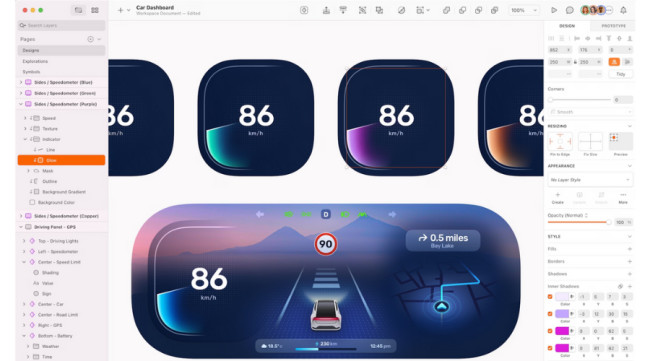
Sketch is a robust design platform tailored specifically for macOS users. It specializes in user interface and user experience design — ideal for digital product development. Its vector-based approach ensures precision, while its vast library of plugins extends prototyping and automation. Moreover, its version control, design system management, and project history features enable seamless organization, helping design teams tackle complex workflows effortlessly.
Sketch delivers a refined and distraction-free experience, allowing designers to focus on creating pixel-perfect user interfaces and prototypes. It is best suited for mid-level to senior designers who value precision and customization in their professional design projects. Additionally, Sketch is commonly used as a WordPress website design tool since its vector-based design features are ideal for creating WordPress themes or components.
Key Strengths
- Optimized for macOS with Superior Performance: As a native macOS application, Sketch delivers smooth performance and responsiveness, making it ideal for Apple users while offering features like design precision and pixel-perfect vector editing tools.
- Extensive Plugin Ecosystem for Workflow Customization: Sketch’s robust ecosystem of plugins enhances its core capabilities, allowing users to tailor workflows and extend functionality for various design needs.
- Built-in Tools for Design Systems and Version Control: Sketch provides advanced features for managing design systems, version history, and token exports, simplifying organization and collaboration on complex projects.
Limitations
- macOS Limitation: Sketch does not work on Windows, Linux, or browsers, restricting its accessibility for cross-platform teams.
- Collaboration Limitations: Real-time collaboration is not as seamless as Figma’s browser-based workflow.
- Steeper Learning Curve: Advanced features and workflows may take time for beginners to master.
Miro: A Visual Collaboration Platform for Teams
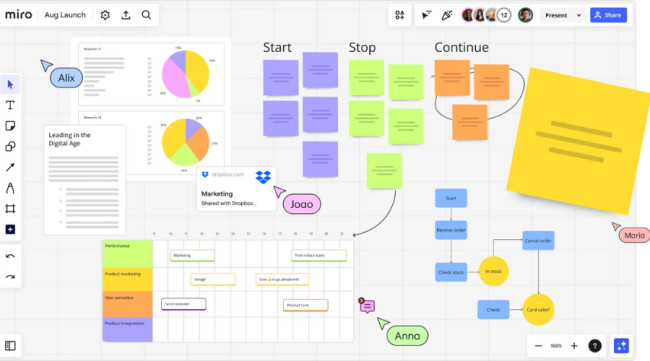
Miro is an online whiteboard platform that enables teams to brainstorm, strategize, and collaborate visually. It provides an intuitive and flexible workspace for creating mind maps, diagrams, and prototypes, making it ideal for innovation and team alignment. Widely adopted by remote and distributed teams, Miro supports real-time editing, commenting, and asynchronous communication, ensuring smooth collaboration regardless of location.
With its vast library of templates and strong integrations, Miro adapts to various workflows, supporting complex systems visualization and agile management processes for teams of all sizes. Its accessible interface and robust feature set cater to beginners and advanced users, making it a versatile tool for design teams, non-designers, and project managers.
Key Strengths
- Focus on Brainstorming and Visual Collaboration: Miro specializes in ideation and project planning with versatile tools for brainstorming, mapping, and process visualization, distinguishing it from Figma’s emphasis on UI/UX design.
- Customizable Workflows and Extensive Integrations: With over 100 third-party integrations and a customizable API, Miro adapts seamlessly to organizational needs, acting as a hub for diverse data and tools.
- Asynchronous and Real-Time Collaboration: Features like Talktrack support asynchronous communication, enhancing team collaboration across time zones while offering dynamic real-time engagement tools.
Limitations
- Not a Dedicated Design Tool: Miro lacks advanced design and prototyping features that Figma offers for UI/UX creation.
- Visual Clutter with Extensive Use: Boards can become overwhelming with too many contributions or complex visualizations.
- Higher Cost for Premium Features: While Miro’s free version is limited, premium plans can become expensive for larger teams.
Adobe XD: Seamless UI/UX Design Within the Adobe Ecosystem
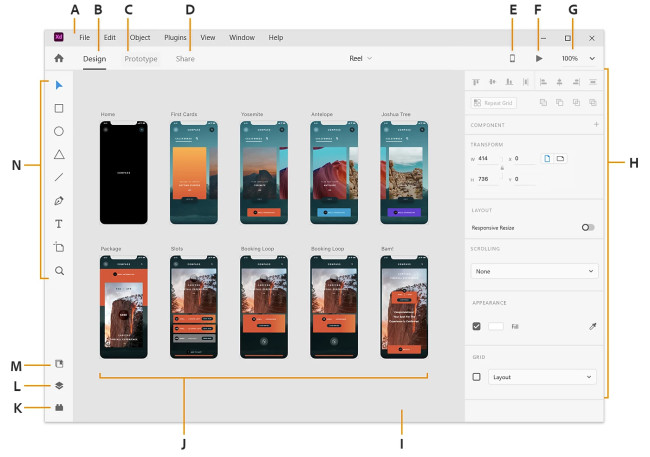
Adobe XD is a vector-based design tool that streamlines the creation of user interfaces and experiences. Known for its seamless integration with Adobe Creative Cloud applications, XD is the go-to choice for designers familiar with Adobe’s ecosystem. With shared libraries, cloud documents, and real-time editing, Adobe XD facilitates efficient teamwork while maintaining consistency across design assets.
Best suited for mid-level and senior designers, Adobe XD supports complex workflows and professional projects. While beginners may face a slight learning curve, Adobe’s extensive library of resources and tutorials ensures users can get up to speed effectively. Its prototyping features enable designers to build interactive, clickable prototypes, making it an excellent option for collaboration between design teams and web development.
Key Strengths
- Seamless Integration with Adobe Creative Cloud: Adobe XD connects effortlessly with tools like Photoshop and Illustrator, creating a unified workflow for design teams already in the Adobe ecosystem.
- Advanced Built-In Prototyping and Testing Tools: XD excels in transitioning designs into interactive prototypes, making it easy to test and iterate on user flows directly within the platform.
- Robust Asset Management: Cloud-based shared libraries ensure consistency and efficiency across teams and projects using Adobe's powerful design suite.
Limitations
- Steeper Learning Curve: Designers unfamiliar with Adobe’s tools may find XD’s interface and features more complex.
- Limited Cross-Platform Collaboration: While Figma is browser-based, Adobe XD relies on Creative Cloud, which can restrict accessibility for some users.
- Less Widely Adopted: Figma’s popularity has surpassed Adobe XD, meaning fewer third-party plugins and community resources are available.
Framer: Effortless Web Design and Publishing
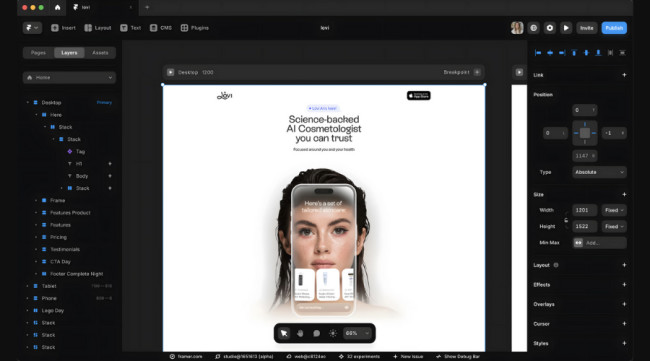
Framer is a dynamic web design tool tailored for designers who want to create and publish websites quickly without writing code. Its drag-and-drop interface simplifies layout creation, making it adaptable to various web design needs. Framer goes beyond traditional design tools by offering features like SEO optimization, localization, and performance enhancements, catering to a wide range of web management tasks.
Recently, Framer introduced an AI-powered feature that allows users to generate a ready-to-go website simply by providing a descriptive prompt. While its primary focus is website creation, Framer facilitates collaboration among designers, engineers, and product managers, ensuring a smooth workflow for web projects.
Key Strengths
- Website-Centric Focus with Advanced Publishing Tools: Framer is tailored for website creation, integrating features like SEO, localization, and performance tools that go beyond Figma's UI/UX capabilities.
- AI-Powered Website Creation for Rapid Development: Framer's AI-driven tools enable fast and efficient website generation, offering significant time-saving advantages over Figma's design-to-code approach.
- No-Code Accessibility for Non-Technical Users: Framer’s drag-and-drop interface simplifies web design, making it ideal for non-coders who want to launch websites without requiring development expertise.
Limitations
- Limited Prototyping Capabilities: Framer is not ideal for creating high-fidelity prototypes, a strength of Figma.
- Narrower Focus: While Framer specializes in web design, Figma offers broader use cases, including app design and complex prototyping.
- Smaller Community and Resources: Framer’s user base and plugin ecosystem are less extensive compared to Figma’s thriving community.

InVision: Advanced Prototyping for Design Teams
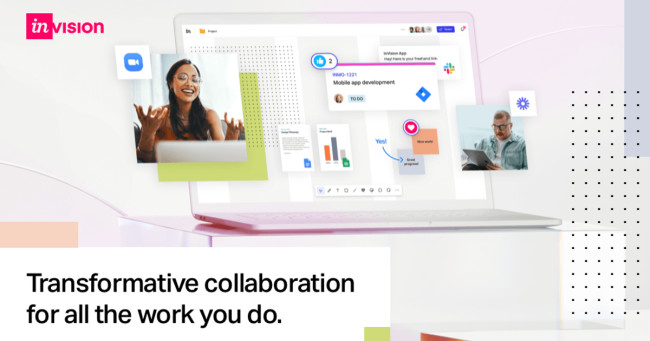
InVision is a comprehensive design platform that excels in prototyping, team collaboration, and design management. It allows designers to create detailed, interactive prototypes and manage complex design systems through InVision Studio, InVision Cloud, and InVision DSM. The platform supports teams by enabling seamless feedback, version control, and integrations with tools like Slack, Jira, and Trello, enhancing workflow efficiency.
Its LiveShare feature facilitates real-time presentations and collaborative design reviews, ensuring teams stay aligned during the design process. InVision’s robust prototyping capabilities are ideal for mid-level to senior designers who require high-fidelity designs and efficient communication with developers.
Key Strengths
- Prototype-Centric Platform for Interactive Designs: InVision offers superior tools for creating high-fidelity, interactive prototypes that simulate final product functionality more effectively than Figma.
- Comprehensive Feedback and Collaboration System: With features like detailed commenting, version control, and real-time feedback integration, InVision streamlines collaboration and iteration processes.
- Specialized Design-to-Development Handoff: InVision’s focused handoff tools bridge the gap between design and code, ensuring a seamless transition for development teams.
Limitations
- Limited Design Tools: InVision lacks the versatility of Figma’s design tools, which allow for a more expansive range of design functionalities.
- Performance Issues: InVision may experience lag with large files or complex prototypes, which is not as much of an issue with Figma’s cloud-based, real-time design system.
- Pricing Model: InVision’s pricing can become expensive as teams scale, especially when accessing advanced features and enterprise plans.
UXPin: Design Systems and Code-Ready Prototypes
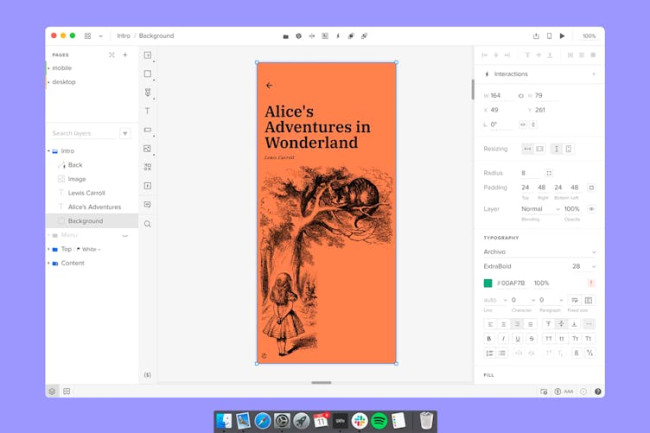
UXPin is a design and prototyping tool that emphasizes the integration of code with design, ideal for teams working on detailed, high-fidelity prototypes. UXPin is code-based, enabling designers to set up advanced interactions on a component level and export the code for development.
The platform’s Merge technology allows teams to use fully coded React or Storybook components directly in their projects, making it perfect for mature design systems and engineering-driven companies. UXPin is an excellent choice for teams focused on advanced prototyping, design systems, and code integration — suitable for senior designers and engineering-driven teams.
Key Strengths
- Code-Based Design for Realistic Prototypes: UXPin integrates code directly into the design process, enabling the creation of functional, interactive prototypes, surpassing Figma’s vector-based prototyping capabilities.
- End-to-End Workflow with Design System Support: UXPin eliminates the need for external plugins, offering a seamless design-to-development process while maintaining design consistency with robust design system tools.
- Merge Technology for Component Integration: UXPin’s Merge allows teams to incorporate React and Storybook components, ensuring precision and flexibility for teams with established design systems.
Limitations
- Complexity: UXPin’s code-based design system and advanced features may be overwhelming for beginners, whereas Figma offers a more user-friendly interface that’s easier to navigate for designers of all levels.
- Limited Design Versatility: While UXPin excels in code-based prototyping and design systems, it may not offer as many design options or flexibility in visual design as Figma’s vector-based tools
- Learning Curve: UXPin’s depth and complexity can create a steep learning curve.
Marvel: Rapid Prototyping for Agile Teams
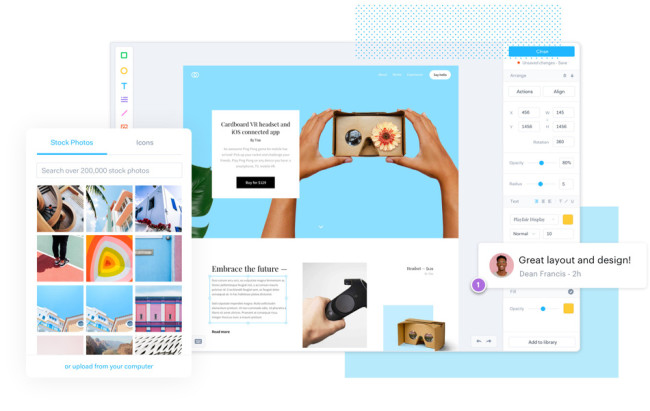
Marvel is a comprehensive design tool focusing on rapid prototyping, wireframing, and user testing for agile workflows. Its user-friendly interface and ease of use make it accessible for designers of all skill levels, including non-designers in startups or smaller teams. Marvel allows designers to quickly convert static screens into interactive prototypes and test them across devices.
The platform also integrates user testing and feedback, enabling teams to gather valuable insights for refining designs. Additionally, Marvel’s handoff tools automatically generate design specs and CSS code, streamlining the transition from design to development. Overall, Marvel is ideal for teams or individuals seeking an easy-to-use, end-to-end design platform that can quickly turn ideas into interactive prototypes.
Key Strengths
- Simplified Prototyping Process: Marvel’s intuitive interface and focus on quick prototyping make it an ideal tool for beginners and teams needing fast, interactive prototypes without complexity.
- Built-In User Testing for Streamlined Feedback: With integrated user testing tools, Marvel provides a straightforward way to gather and implement feedback directly into designs, reducing reliance on external platforms.
- Geared for Speed and Simplicity: Marvel excels in turning static designs into clickable prototypes on the fly, appealing to teams prioritizing efficiency over intricate design workflows.
Limitations
- Limited Advanced Prototyping: Marvel’s simplicity is a double-edged sword; it lacks the advanced prototyping capabilities such as complex animations, transitions, and interactive elements Figma offers
- Less Design Flexibility: Marvel’s design tools are more basic than Figma’s vector editing capabilities, which may limit designers who need to create more detailed or intricate designs.
- Pricing for Larger Teams: Marvel’s subscription pricing may become expensive for larger teams or companies that need access to advanced features or have multiple users.
Lucid Visual Collaboration Suite: Visualize Ideas and Workflows
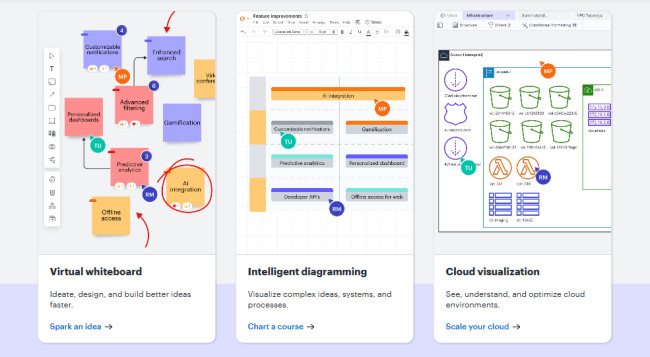
Lucid Visual Collaboration Suite is a powerful tool for teams needing to create visual content for planning, diagramming, and brainstorming, offering tools like Lucidchart and Lucidspark. Lucid also offers strong real-time collaboration features, allowing multiple users to work on projects simultaneously and track changes with version control. The tool is integrated into productivity tools like Slack, Google Drive, and Microsoft Teams, and Lucid helps teams stay aligned and organized.
Lucid is a great collaboration and visualization tool, making it the go-to platform for teams working on conceptualization and planning. The suite’s user-friendly interface and broad range of templates make it accessible to beginners and experienced designers.
Key Strengths
- Diagramming and Brainstorming Expertise: Unlike Figma, Lucid is tailored for creating flowcharts, mind maps, and diagrams, making it an ideal solution for visual planning and ideation workflows.
- Enhanced Collaboration Features: With integrations into productivity tools like Slack and Microsoft Teams, Lucid supports real-time collaboration, version control, and shared libraries for team-based visual content creation.
- Accessibility for All Skill Levels: Its intuitive interface and pre-built templates cater to beginners and non-designers, offering a smoother onboarding experience compared to Figma’s more design-focused approach.
Limitations
- Limited Design Capabilities: Lucid is not a dedicated design tool like Figma and lacks the advanced design and prototyping features Figma offers. It is more suitable for creating visual content for planning and ideation rather than detailed UI/UX design.
- Less Suitable for UI/UX Design: While Lucid excels in collaboration and diagramming, it is not as versatile or comprehensive for UI/UX design projects. Figma’s vector editing tools and prototyping capabilities make it a more robust option for detailed design workflows.
- Not Ideal for High-Fidelity Prototyping: Lucid does not support high-fidelity design and prototyping like Figma, making it less suitable for designers working on complex, interactive prototypes.
Figma Alternatives At a Glance
| Tool | Best For | Strengths | Limitations |
| Sketch |
|
|
|
| Miro |
|
|
|
| Adobe XD |
|
|
|
| Framer |
|
|
|
| InVision |
|
|
|
| UX Pin |
|
|
|
| Marvel |
|
|
|
| Lucid Visual Collaboration Suite |
|
|
|
Key Takeaways on Alternatives to Figma
The growing diversity of design tools allows teams to choose platforms tailored to their unique workflows and project requirements. Tools like Sketch shine for macOS users needing pixel-perfect precision, while Miro excels in ideation with its infinite canvas. For those deeply embedded in the Adobe ecosystem, Adobe XD offers seamless integration with Creative Cloud, enhancing end-to-end design processes, while the Lucid Visual Collaboration Suite empowers teams with robust collaborative capabilities across various industries.
Key considerations when choosing a Figma alternative include platform compatibility, collaboration features, design tool complexity, and integration with other software. These tools demonstrate innovation in the design industry, ensuring that professionals have versatile options to optimize their creativity.
Figma Competitors FAQs
1. How do I decide between Figma and its competitors?
Evaluate your specific needs, such as platform compatibility, team collaboration, prototyping requirements, and integration with other tools. Consider a trial period for the alternatives to identify the best fit for your workflow.
2. Which alternative to Figma can I use to create websites without code?
Framer is the best choice for no-code website creation. Its drag-and-drop interface and AI-powered features enable users to build and publish websites quickly.
3. Are there free Figma alternatives available?
Many alternatives, like Miro and Marvel, offer free versions with limited features. These are suitable for small teams or individual projects with basic requirements.