
Being the founder of Dviga Marketing Agency, I’ve had a front-row seat to how web design trends rise, peak, and quietly reset. There’s always a moment in that cycle when teams have the chance to step back, refine what they’ve already built, and extract more value instead of adding more layers.
However, I keep seeing the same false choice play out: either ignore 3D entirely and risk looking outdated, or layer immersive effects onto every project and watch performance metrics quietly erode.
3D in Web Design: Key Findings
- 3D improves user behavior, not just visuals, when it guides attention, content recognition, and deeper page exploration.
- Performance engineering determines success, as optimized 3D can coexist with usability, accessibility, and SEO without sacrificing speed.
- 3D delivers the strongest ROI in high-consideration funnels like real estate, B2B, and complex products where confidence drives conversion.
3D in Modern Web Design Overview
The difference between an award-winning, conversion-driving website and a sluggish, inaccessible one comes down to strategic, not decorative, use of 3D. For agencies and brand leaders, understanding when and how to deploy 3D is now a core competitive advantage.
Immediate Business Applications: When 3D Delivers Real Value
You can't justify 3D investment without identifying where it creates genuine business value. Not visual interest, actual measurable outcomes that impact your bottom line.
I approach every project by understanding the user's journey and pinpointing moments where interactive visualization solves a real problem.
Here's where I saw 3D consistently deliver:
1. Virtual Tours for Real Estate: Enabling Remote Property Exploration
When we first integrated 3D walkthroughs for property developers, the impact was immediate. Prospective buyers could explore spaces remotely, at their own pace, without the pressure of a scheduled showing.
To implement virtual tours effectively:
- Build accurate architectural models optimized for web rendering, not high-poly print models
- Strip unnecessary geometry and bake lighting where possible
- Profile constantly to ensure smooth 60fps experiences across devices
- Integrate progressive loading so the experience remains responsive
This wasn't about making the website look cutting-edge; it was about enabling qualified leads to self-educate before committing time to an in-person visit.
Prospects spend significantly more time engaging with interactive tours versus static photo galleries, and that engagement translates to qualified leads.
2. Product Visualization: Allowing Interactive Exploration
I've worked with clients selling complex technical equipment where static photos simply can't communicate the full value proposition.
The same principle applied when we developed an interactive website for a UAE-based real estate developer, featuring a 3D map of Dubai with embedded project locations, immersive navigation, and a city-wide portfolio of active developments.
In both cases, giving users control, letting them rotate a product, zoom into specific features, or explore spatial relationships within a digital environment, reduces uncertainty and increases purchase confidence.
When someone spends three minutes navigating a 3D model or interactive map, they’re not just engaged; they’re mentally investing in ownership.
3. Reducing Cognitive Load: User-Controlled Exploration
What I've observed repeatedly is that 3D works best for high-consideration purchases. When the cognitive load is high and the decision is complex, giving users control over their exploration pace transforms the experience.
They're no longer passive consumers of marketing materials, they're active investigators building their own understanding. This is particularly effective in sectors like automotive, luxury retail, and B2B manufacturing.
4. Driving Measurable Engagement Metrics
The Grink website iterations taught me this lesson viscerally. Our first version incorporated 3D animations tied to scroll behavior, and we immediately saw increased time-on-site.
But more importantly, we established feedback loops to understand why users were engaging differently.
To track 3D effectiveness:
- Monitor time-on-site and interaction rates before and after implementation
- A/B test variations to understand what resonates
- Survey visitors to gather qualitative insights
- Track conversion rates and bounce rates as key performance indicators
Here's what I tell every client: if you can't articulate the specific user problem your 3D element solves, you don't need it. Visual novelty is not a strategy.
UX, Performance, and Accessibility: Navigating the Tradeoffs
The glamorous part of 3D web design is creating stunning visuals. The unglamorous part, which actually determines success, is optimization.
I've seen many projects where ambitious 3D implementations destroyed everything else that matters: load times, mobile performance, accessibility.
1. Optimizing File Sizes and Load Times
My workflow with tools like Spline and Blender always includes aggressive asset optimization. I compress textures, reduce polygon counts without sacrificing quality, and constantly test on actual devices, not just high-end development machines.
Most users aren't browsing on the latest MacBook Pro. They're on mid-range phones with spotty connections.
Recent peer-reviewed research published in Acta Graphica (2025) reinforces this tension: while immersive elements can significantly improve engagement and comprehension, technical discipline ultimately determines whether those gains convert into sustained user trust and measurable outcomes.
In the same study’s controlled usability testing of a 3D-enhanced marketing agency website:
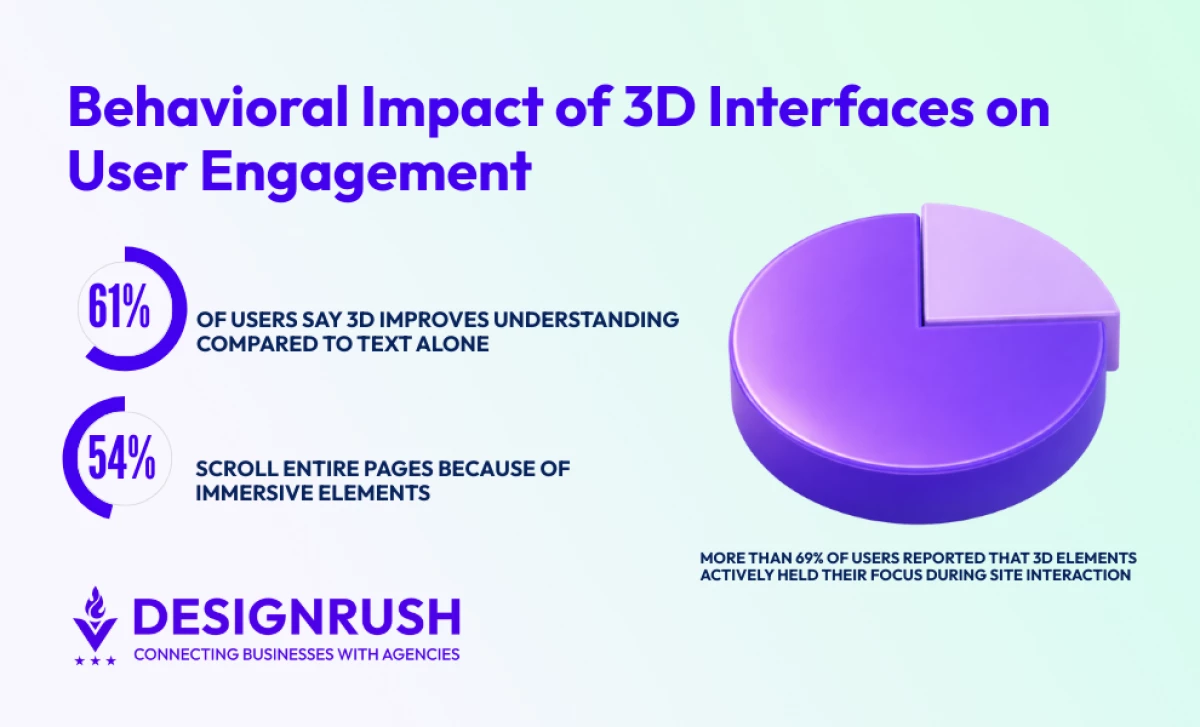
- More than 69% of users reported that 3D elements actively captured and maintained their attention
- 54% said they scrolled through entire pages specifically because of the 3D experience.
More critically for conversion paths, 61% stated that 3D had a strong impact on their ability to recognize and understand content compared to text alone, positioning immersive elements as a cognitive guide that directs users toward structure, calls to action, and key messaging rather than pulling focus away from them.
To optimize 3D assets for web:
- Compress textures and minimize poly count during the export process
- Implement lazy loading so 3D elements only load when users scroll to that section
- Use conditional rendering to serve simplified versions on mobile devices
- Create LOD (level of detail) systems so distant objects use fewer resources
The technical reality is harsh: unoptimized 3D tanks site speed, which murders SEO rankings, increases bounce rates, and destroys user trust.
Google's Core Web Vitals don't care how beautiful your 3D scene is if it blocks the main thread for three seconds.
2. Ensuring Accessibility and Inclusivity
Accessibility is where many 3D implementations fail spectacularly.
I always build fallbacks for devices lacking WebGL support — static images, simplified 2D interfaces, whatever ensures core functionality remains intact.
Not everyone can or wants to experience your 3D masterpiece, and that's fine. They still need to accomplish their goals on your site.
To maintain accessibility:
- Provide fallbacks for unsupported devices using static images or simplified versions
- Respect prefers-reduced-motion settings for users with vestibular disorders
- Include controls to pause or disable animations
- Test with screen readers to ensure alternative experiences work properly
Motion sensitivity is critical. Vestibular disorders affect more people than most designers realize. The principle I follow is simple: 3D should enhance the experience for those who can enjoy it while never blocking access for those who can't.
3. Mobile Performance Considerations
On mobile devices with limited GPU capabilities, I often serve simplified versions or gracefully degrade to optimized static imagery. This isn't compromise, it's respect for the reality of how people access your site.
Testing on actual mid-range devices reveals performance issues that high-end development machines never show.
Award-Winning Case Studies: Practical Insights
1. Grink: Iterative 3D Strategy From Prototype to Award
The Grink project represents years of iterative learning about strategic 3D integration. The site earned its final form through live traffic, hard metrics, and the parts of the experience users kept coming back to.
Our initial version was ambitious. We tied complex 3D animations to scroll behavior, creating this sense of journey as users moved through content.
The performance impact was measurable: longer load times, some stuttering on older devices.
But user feedback was mixed in interesting ways. People loved the concept but found certain interactions confusing or overwhelming.
Key lessons from iteration:
- Measure impact and user feedback from the first version
- Simplify animations without sacrificing the core experience
- Prioritize speed improvements through progressive loading techniques
- Make every interactive element more intuitive and purposeful
So we rebuilt. The second generation prioritized speed without sacrificing impact. Each 3D component now had a clear job: orient users, showcase capabilities, or create memorable brand moments.
2. Quantified Results and Industry Recognition
The numbers told the story. Time-on-site increased significantly. Bounce rates dropped.
More importantly, qualitative feedback shifted, users described the experience as "engaging" and "professional" rather than "cool but slow."
The CSSDA recognition validated our approach, but the real validation came from client results. Award-winning work isn't just about peer recognition, it's about demonstrating that thoughtful 3D integration drives business outcomes.
3. Real Estate Projects: Conversion-Oriented Virtual Tours
My process starts with accurate architectural models in Blender, optimized specifically for web rendering. I strip unnecessary geometry, bake lighting where possible, and create LOD systems.
For real estate clients, interactive 3D creates competitive differentiation in crowded markets. For agencies, it opens premium service offerings with healthy margins. Interactive 3D isn't an experimental add-on, it's a core capability that directly impacts revenue.
4. E-Commerce: Product Visualization That Converts
In e-commerce applications, 3D product visualization reduces return rates by helping customers understand exactly what they're buying. The ability to see a product from every angle, zoom into details, and understand scale eliminates much of the guesswork that leads to buyer's remorse.
In my experience, conversion rate improvements of 15-25% when 3D visualization is implemented well for products where understanding physical characteristics matters.
3D for Real Estate: Creating Immersive Web Experiences
Real estate represents one of the clearest ROI cases for interactive 3D. Property visualization has become increasingly expected by buyers who want to explore before committing time to viewings.
1. Technical Implementation: From Blender to WebGL
Integrating with WebGL (web graphics library) requires careful performance budgeting. I profile constantly, ensuring smooth 60fps experiences across devices. Virtual tours need to feel responsive and natural, any lag or stutter breaks immersion and credibility.
Technical approach for real estate 3D:
- Create optimized architectural models specifically for web delivery
- Implement progressive loading for multi-room experiences
- Add intuitive navigation controls that feel natural
- Provide floor plans alongside 3D views for context
2. Business Impact Beyond Aesthetics
The business case writes itself. Prospects who've virtually walked through the space arrive at physical viewings with specific questions and genuine interest. They've already mentally placed themselves in the space, which accelerates the decision-making process.
For real estate developers, this means higher-quality leads and shorter sales cycles. For agencies offering these services, it means premium pricing and long-term client relationships.
Strategic Guidelines: When to Use (and When to Skip) 3D
After years of 3D projects, I've developed a practical framework for deciding when investment makes sense versus when it becomes a liability.
When 3D Delivers Maximum Value
Complex products, physical spaces, or experiences benefit most from interactive visualization.
If understanding your offering requires spatial reasoning or seeing something from multiple angles, 3D probably makes sense.
Indicators for 3D investment:
- High-consideration purchases where buyers need confidence before committing
- Complex products that benefit from interactive exploration
- Physical spaces like real estate, venues, or retail environments
- Projects where differentiation and engagement are central business goals
- Target audiences with modern devices and good connectivity
Projects where differentiation and engagement are central business goals (luxury brands, innovative products, experiential services) also tend to justify the investment.
When 3D Becomes a Liability
Decorative-only use cases fail consistently. If you can't articulate the user problem being solved, stop.
Resource constraints matter too. If your audience primarily uses low-powered devices or has limited bandwidth, forcing 3D is counterproductive.
Red flags to avoid 3D:
- Purely decorative implementations with no clear user benefit
- Target audiences using primarily low-powered devices
- Limited development resources or tight timelines
- Content that works better as traditional media
- Budget constraints that prevent proper optimization
My rule: always align 3D investment with core business objectives and target user needs. Adopt a test-and-learn mindset. Prototype quickly, benchmark rigorously, refine based on data.
Implementation Best Practices
Don't commit to full implementation until you've validated the value hypothesis.
Start with a prototype, measure user response, and scale only when the data supports it.
As one what we at Dviga constantly emphasize: the key to successful 3D implementation lies in consistency between visual ambition and technical execution.
Even the most creative 3D work won't deliver results unless it performs well and remains accessible across devices.
3D in Modern Web Design: Final Words
Incorporating 3D elements into modern web design has never been about chasing trends.
The agencies and brands that succeed with 3D are those that deploy it strategically, grounded in user needs, validated by performance data, and tied to tangible business outcomes.
My experience with projects like Grink and immersive real estate tours has taught me that purposeful 3D drives engagement, conversion, and market differentiation.
But it requires discipline.
It requires saying no to flashy effects that don't serve users. It requires constant optimization and accessibility considerations.
Organizations that intentionally balance visual impact with performance and accessibility are the ones best equipped to leverage 3D for competitive advantage.
Align your 3D capabilities with strategic goals and continuously refine them as technologies and user expectations evolve.