


In this guide, we’ll show you how you can build leaner, smarter agency operations. You'll get expert-backed strategies, real-world examples, and tools designed to fix common friction points to help your team work better, faster, and more profitably.
Streamline Your Agency Operations: Key Points
- High-performing agencies are ditching static Gantt charts for flexible, real-time planning tools like ClickUp and Notion, enabling faster pivots and better team alignment.
- Weekly priority rituals and daily check-ins — simple but consistent habits — are proving more effective than complex systems in keeping agency projects on track.
- Agencies that clearly separate strategic work from production tasks are seeing fewer bottlenecks, stronger client relationships, and more scalable operations.
Project Management Platforms for Remote Teams
Project management is the backbone of agency operations. It holds together the people, processes, and tools that keep work moving.
Remote teams, in particular, need systems that create clarity because without physical proximity, they face more friction around communication, visibility, and alignment.
| Feature/Criteria | ClickUp | Asana | Trello |
| Ease of Use | Moderate (can be overwhelming due to extensive features) | High (clean, intuitive interface) | Very high (minimal onboarding; simple interface) |
| Project Views | List, Board, Calendar, Gantt | List, Board, Calendar, Timeline | Kanban-style boards |
| Customization | Very high (extensive customization options) | Moderate (custom fields and templates) | Low to moderate (Power-Ups extend functionality) |
| Built-in Features | Docs, Time Tracking, Dashboards, Whiteboards | Basic Automation, Timelines, Reporting | Butler Automation, Checklists |
| Integrations | 1,000+ integrations, including Slack, Google Drive, Zoom, Microsoft Teams | Integrates with Slack, Google Workspace, Adobe Creative Cloud, Zoom | Integrates with Slack, Google Drive, Jira via Power-Ups |
| Ideal Use Case | Cross-functional collaboration requiring an all-in-one solution | Teams seeking a balance between functionality and simplicity | Teams needing a straightforward, visual project management tool |
| Pricing (Starting) | Free plan available; Paid plans start at $7/user/month (Unlimited) | Free plan available; Paid plans start at $10.99/user/month (Starter) | Free plan available; Paid plans start at $5/user/month (Standard) |
We asked agencies running remote-first and hybrid teams to share the platforms they trust most. The tools below are the ones they use, rank highly, and rely on to keep operations running smoothly:
ClickUp
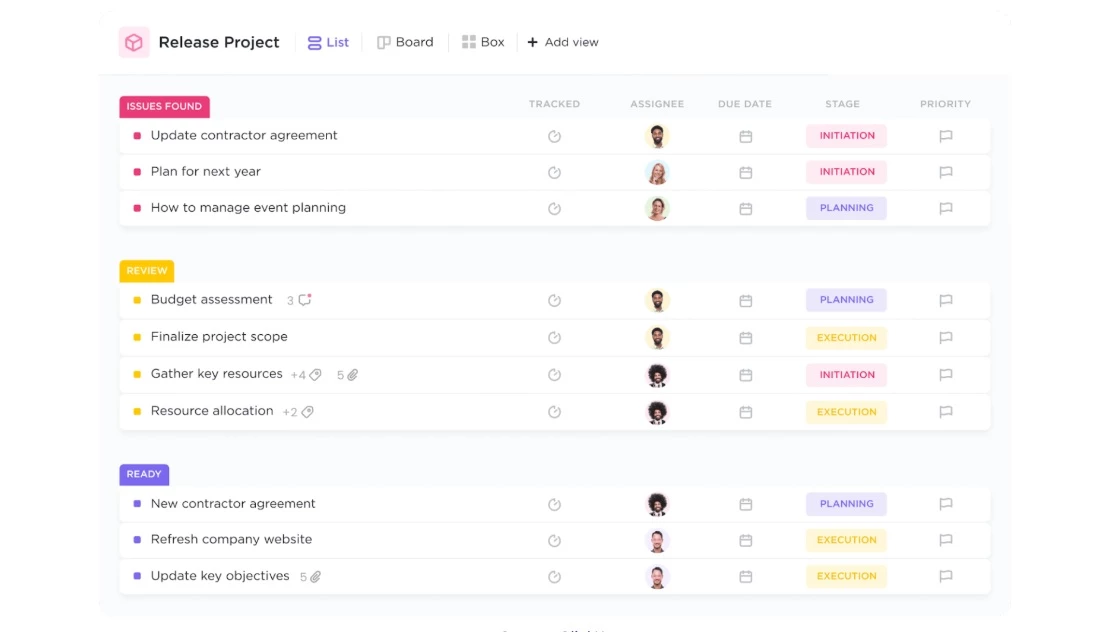
ClickUp solves a common agency problem: managing everything across too many disconnected tools. For remote teams, this challenge is even more visible as there’s no physical workspace to bridge the gaps — everything depends on the systems in place.
Agencies use ClickUp because it brings task tracking, docs, goals, timelines, and communication into one centralized platform. They can build flexible workflows that adapt to different departments or clients.
You can toggle between list, board, and calendar views, and manage projects, communication, and assets in one place.
Why agencies choose it:
- Highly customizable views and workflows
- Built-in docs, dashboards, whiteboards, and time tracking
- Integrates with 1,000+ tools, including Slack, Google Drive, Zoom, and Microsoft Teams
- Great for cross-functional collaboration and visibility across distributed teams
Things to consider:
- Can be overwhelming for new users due to the extensive feature set
- Interface may feel cluttered without deliberate setup
- Some users report performance lags in large workspaces or complex environments
Asana
Asana is another tool agencies use to centralize project work, but with a sharper focus on clarity and ease of use. It helps teams get a handle on scattered tasks and shifting priorities without adding layers of complexity.
Remote agencies use Asana to create structure quickly and scale it as needed. The platform is easy to adopt and supports multiple project views — like lists, boards, calendars, and timelines — so teams can work how they prefer without losing visibility.
Why agencies choose it:
- Clean, intuitive interface with minimal learning curve
- Multiple project views: List, Board, Calendar, and Timeline
- Smooth onboarding for teams new to project management
- Strong integration ecosystem with tools like Slack, Google Workspace, Adobe Creative Cloud, and Zoom
Things to consider:
- Timeline (Gantt) view is only available on paid plans
- Limited reporting and customization on lower-tier plans
- May lack advanced features needed for more complex workflows
Trello
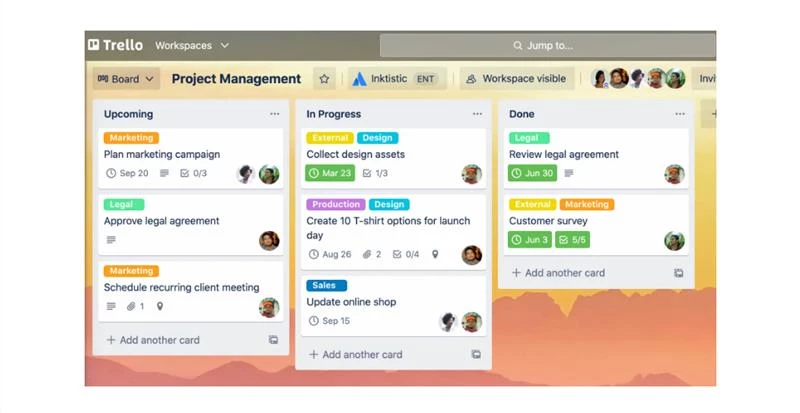
Trello’s visual, Kanban-style boards help agencies organize and track work with clarity — ideal for teams that don’t need complex systems but want accessible, flexible project views.
Its drag-and-drop interface makes it easy to see what’s in progress, what’s coming next, and where things are stuck.
For remote teams, Trello offers a lightweight way to stay aligned without feature overload. It’s especially popular for managing editorial calendars, marketing campaigns, and design pipelines.
Why agencies choose it:
- Simple, visual interface based on Kanban-style boards
- Easy to set up and use with little to no onboarding
- Customizable with lists, cards, labels, and checklists
- Integrates with tools like Slack, Google Drive, and Jira via Power-Ups
Things to consider:
- Limited built-in reporting or advanced workflow features
- May not scale well for larger teams or complex project structures
- Automation (via Butler) is useful, but requires setup and familiarity
ClickUp vs. Asana vs. Trello
There’s no one-tool-fits-all solution. According to Flux+Form’s Founder, Jeremy Swiller, smaller teams often do well with lightweight tools like Trello or Asana. Larger agencies, on the other hand, may prefer more robust platforms like Monday.com or Wrike, especially if advanced reporting, resource planning, or deeper integrations are a priority.
Before you commit, assess your agency’s requirements:
- Do you need built-in time tracking or budgeting features?
- Will the platform integrate easily with your CRM, accounting software, or file storage system?
- Can your team adopt it without heavy onboarding or steep learning curves?
No matter which platform you choose, one principle stands: centralize everything. Store briefs, timelines, assets, and feedback in one place. A single source of truth improves visibility, reduces duplicate work, and helps distributed teams stay aligned.
Muhammad Arsalan, Technology Consultant at O16 Labs, advises: “Choose tools that align with agency needs. Centralize task tracking, deadlines, and communication within the tool and integrate it with your other systems for seamless operations.”
Delegation Frameworks and Systems
Clear task ownership is one of the simplest ways to improve team performance — yet it's often overlooked. When responsibilities are vague, deadlines slip, accountability weakens, and work gets duplicated or dropped. The solution isn't micromanagement — it's structure.
Let’s break down the frameworks and systems that help agencies delegate work more effectively, reduce confusion, and keep progress on track.
- Delegation frameworks
- Delegation systems
Delegation Frameworks
When everyone’s responsible, no one is. Delegation frameworks give structure to decision-making by clearly assigning roles — who leads, who supports, who signs off, and who stays informed. They’re especially useful when multiple people or teams are involved in delivering a project:
RACI Matrix
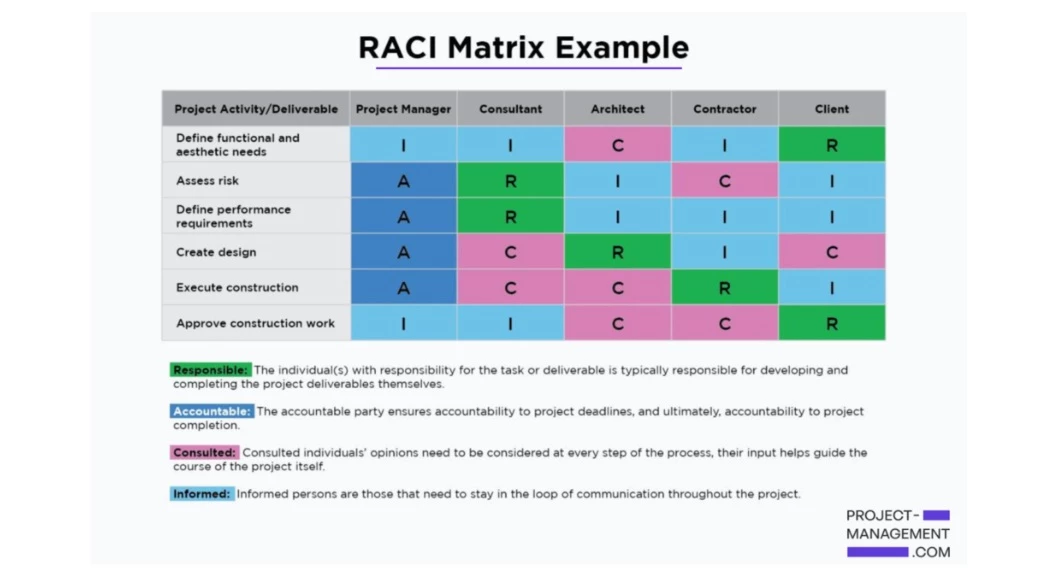
The RACI Matrix is a simple framework for clarifying roles within a project. It breaks down responsibilities into four categories so that everyone knows their role at each step:
- R = Responsible: The person doing the work
- A = Accountable: The person who owns the outcome and makes final decisions
- C = Consulted: People who provide input before work is done
- I = Informed: People who need updates, but aren’t directly involved
Use it during project planning to assign clear ownership, especially when multiple teams or departments are involved. You can integrate your RACI chart into your project management platform, so everyone has real-time visibility into who's doing what.
The Five Levels of Delegation
While the RACI Matrix helps define who owns what, the Five Levels of Delegation framework helps you determine how much control to retain. It gives you a structured way to gradually give more ownership to your team without sacrificing accountability.
The five levels are:
- Do exactly what I ask: Full control retained; ideal for urgent or high-risk tasks
- Research and report back: The team member gathers insights but doesn’t act yet
- Recommend an action plan: They suggest a solution, but you approve it
- Act and report immediately: They act on their own and inform you right after
- Act independently: Full ownership, no need for approval or updates unless requested
Start with lower levels for newer team members or high-risk tasks. As trust builds, move toward higher levels to develop leadership and free up bandwidth.
Delegation Systems
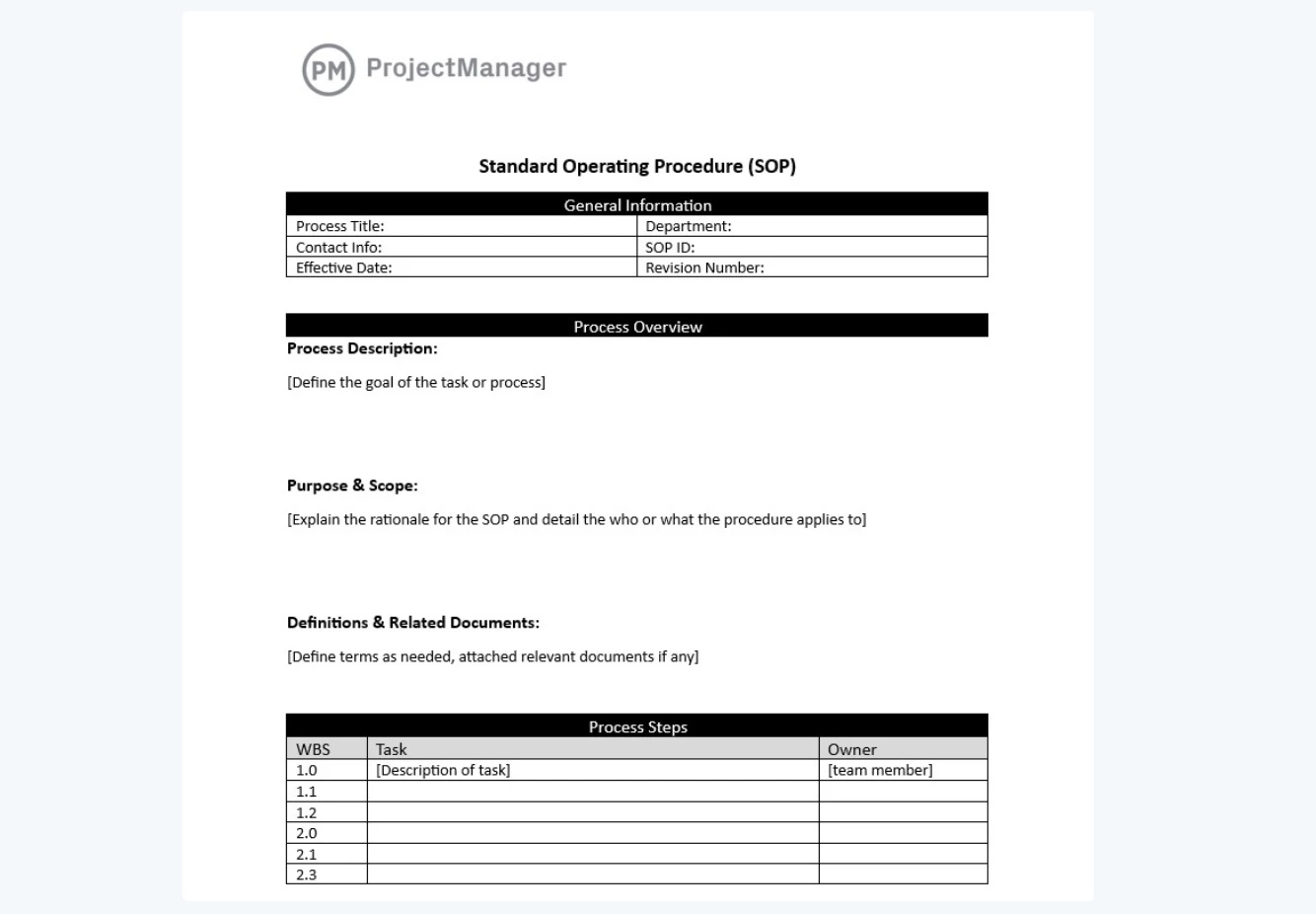
There are several ways to systemize task handoffs and repeatable work, but one of the most reliable is the standard operating procedure (SOP). It gives teams clarity, consistency, and autonomy, especially for recurring tasks.
An SOP outlines the exact steps needed to complete a task, who’s responsible for each step, and what success looks like. It removes guesswork, speeds up onboarding, and makes it easier to maintain quality as your agency grows.
What to include in an SOP:
- Task name and objective
- Step-by-step instructions
- Roles involved
- Tools or templates needed
- Review or approval checkpoints (if any)
What to standardize:
- Client reporting processes
- Campaign QA and approval workflows
- Design handoff procedures
- File naming conventions and shared folder setup
Best practices:
- Keep SOPs clear and action-oriented
- Use checklists, screenshots, or short walkthrough videos
- Store SOPs in your project management tool or knowledge base
- Schedule quarterly reviews to update and optimize
Planning and Timeline Management
When timelines aren’t clear, teams don’t know what’s urgent, what’s dependent on what, or how their work fits into the bigger picture, projects go off track.
Agencies need planning systems that give structure to make progress predictable and accountability visible without becoming rigid, and even though you have plenty of options, it's worth revisiting tried and proven techniques:
- Gantt charts may still work for you
- Track time
- Use focus techniques for deep work
- Automate repetitive tasks
1. Gantt Charts May Still Work For You
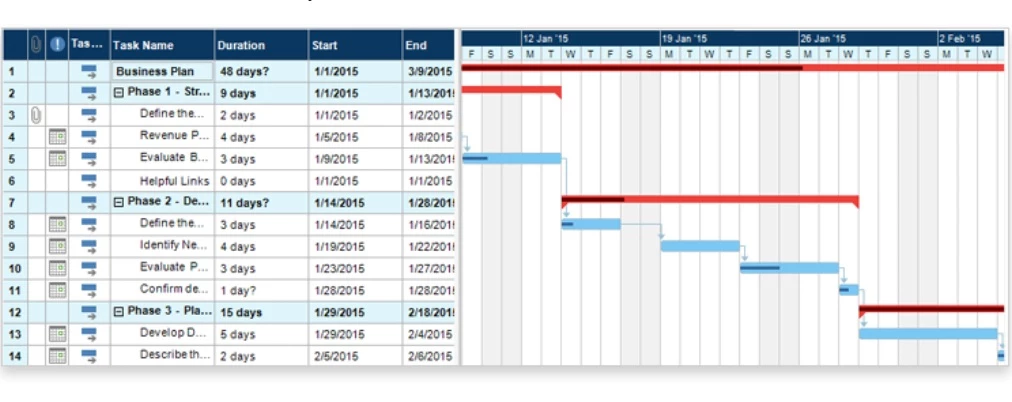
A Gantt chart is one of the most structured ways to map out project timelines. They help visualize how tasks overlap, when key milestones hit, and where dependencies could cause delays.
While most agencies are looking into more efficient alternatives, for some, Gantt is still the way to go.
When Gantt charts make sense:
- Projects with multiple phases or strict deadlines
- Cross-functional teams that need clear handoffs
- Clients who expect milestone-based reporting
When to skip them:
- Sprint-based or Agile workflows
- High-volume task tracking where priorities shift often
- Teams that prefer visual boards over timelines
2. Track Time
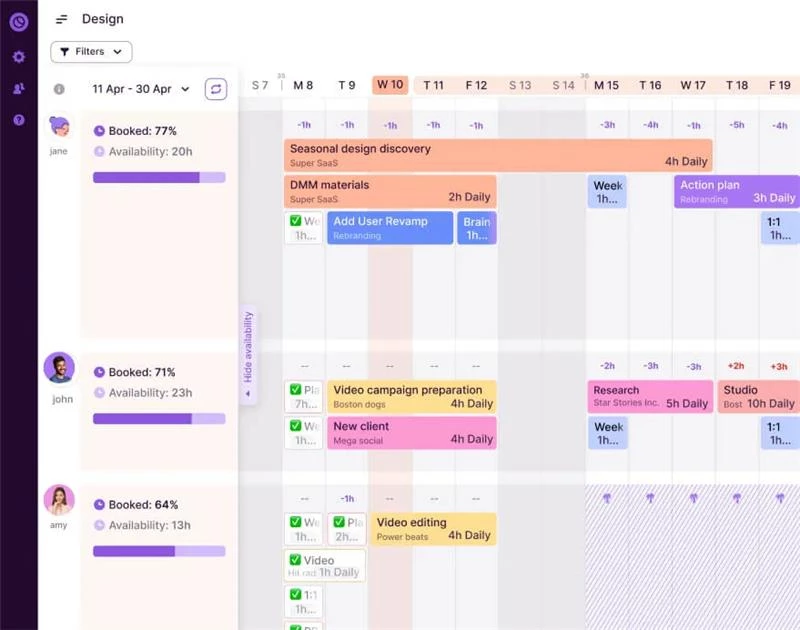
Time-tracking isn’t a fit for every agency, but for those that use it, it can reveal how work gets done — and where it stalls. It’s often used to inform pricing models, rebalance workloads, or identify services that consistently demand more time than scoped.
Rather than tracking for control, some teams use it to understand patterns and improve planning accuracy over time.
If you do decide to track time, use tools like Toggl, Harvest, or Clockify to log hours by project, task, or client — then review that data regularly to guide resource planning.
3. Use Focus Techniques for Deep Work

Distractions slow teams down, multiply errors, stall progress, and drain creative energy. Focus techniques help carve out uninterrupted time for high-value work, especially in busy, meeting-heavy environments.
Below are four methods agencies use to structure focus time without overcomplicating their day:
- Time-blocking: This method means setting aside specific times in your calendar for focused work — like a 10 a.m. block for reporting or a 2 p.m. slot for campaign reviews. It helps you stay on track and avoid distractions from meetings or last-minute tasks.
- 52/17 rule: You work for 52 minutes, then take a 17-minute break. It’s based on research that shows this rhythm keeps your brain sharp without burning out.
- 90-minute work cycle: This is based on ultradian rhythm theory, where your brain naturally works in 90-minute peaks followed by dips in focus. You work in 90-minute sessions, then take a longer break (around 20–30 minutes). It’s ideal for deep, uninterrupted work that benefits from sustained concentration.
- Getting things done (GTD): Instead of writing down big tasks like “launch campaign,” this method helps you break things into smaller, doable steps like “send draft to client” or “set internal review meeting.” It helps you stay organized and reduces stress when juggling a lot at once.
- Pomodoro technique: You work for 25 minutes, then take a 5-minute break. After four cycles, take a longer break. It’s a simple way to stay focused without committing to long work blocks — great for designers, writers, and anyone working on tight deadlines.
4. Automate Repetitive Tasks
Repetitive tasks slow teams down and eat into time that could be spent on strategy, creativity, or client work. Automation helps eliminate busywork and reduce human error — especially for agencies managing lots of moving parts across tools.
Most project management platforms like ClickUp or Asana offer built-in automations for task handoffs, status updates, or due date triggers. For more advanced setups, tools like Make connect your apps to automate entire workflows.
Start with simple workflows like:
- Auto-sending Slack updates when tasks change status
- Generating reports or invoices when projects are marked complete
- Moving files automatically from form submissions into shared folders
- Creating calendar events from form submissions
Swiller recommends starting small — with the simplest, most repetitive tasks. He lists resource allocation, billing, time tracking, status reminders, social media publishing, and email sequences as common automation wins. He also suggests mapping out your processes first to avoid automating inefficiencies and choosing scalable tools that can grow with your agency.
Workflow Implementation and Scaling Systems
Optimizing a process is only half the battle; making it stick across your team is where the real challenge starts. And as your agency grows, even small inefficiencies multiply. That’s why implementing changes intentionally and scaling systems without adding chaos is critical to long-term success.
Here’s how to do it:
- Implement workflow changes across teams
- Measure, adjust, and iterate
- Build for scalability
- Protect service quality while growing
1. Implement Workflow Changes Across Teams
Rolling out new systems or processes requires more than just an announcement. To get buy-in and adoption, you need a thoughtful rollout — one that’s communicated clearly, supported with the right tools, and adapted to how your teams actually work.
Start with the “why”: Before diving into new workflows, explain what problem the change solves — whether it’s faster turnaround, fewer errors, or better team alignment. The clearer the reason, the less resistance you’ll face.
- Involve team leads early: Bring in team leads during the planning phase. They can help shape the rollout, flag gaps you may not see, and serve as advocates when it’s time to implement.
- Pilot before scaling: Test new workflows with a small team or on a single project. This gives you time to smooth out friction before a full rollout and builds confidence through early wins.
- Make adoption easy: Support the change with short Loom videos, SOPs, and quick-reference guides. Don’t rely on long trainings — give people what they need to succeed on the job, right when they need it.
- Encourage a tool-first mindset: Make it standard to log updates, progress, and handoffs in your project management system — not scattered email threads or Slack messages. As Swiller puts it: “All tasks, updates, and progress checks happen in the PM software, not in fragmented email chains.”
2. Measure, Adjust, and Iterate
All systems need fine-tuning, no matter how well-designed. Once new workflows are in place, the next step is to measure how they’re performing, not just at a high level, but in the day-to-day reality of your team:
- Track what matters: Start with a few simple metrics: task completion rates, project turnaround time, missed deadlines, or time spent in review cycles. Pull data from your project management or time-tracking tools to keep it objective.
- Check in with your team: Numbers only tell part of the story. Run a short pulse survey or host a retro 2–4 weeks after rollout. Ask what’s working, what’s unclear, and what’s creating friction. Listen closely, especially to feedback from team leads and client-facing roles.
- Look at usage patterns: Is your team actually using the new workflow or tool? Which features are being ignored or misused? These insights can show where adoption is slipping or where additional training is needed.
- Refine and repeat: Workflow optimization isn’t a one-and-done process. As your agency evolves, your systems should too. Revisit and revise your processes quarterly or sooner if things feel stuck.
3. Build for Scalability
Workflow improvements aren’t just about the now — they’re about building systems that can grow with your agency. If your processes only work when your team is small or in constant communication, they’ll break under pressure. Scalable systems create consistency even as your workload and headcount increase.
- Systematize repeatable work: Document recurring workflows like client onboarding, campaign reporting, or QA with SOPs and templates. This reduces rework, enables faster training, and helps new hires ramp up quickly.
- Standardize the small stuff: Define naming conventions, folder structures, and label systems early. These details feel minor — until you’re working across 15 client accounts and six departments.
- Avoid premature automation: Before you automate a workflow, make sure it’s solid. Automating a broken process just helps you break things faster. Start manually, refine, then layer in tools like Zapier or native platform automations.
- Choose tools that scale: Look for project management platforms with flexible permissions, robust integrations, and reporting features that won’t max out as you expand.
4. Protect Service Quality While Growing
Growth is great, but not if it comes at the cost of client experience. As your agency scales, your workflows need to do more than move fast. They need to maintain quality, consistency, and responsiveness across every project, account, and team.
- Reinforce your delivery standards: Systematize what “great” looks like at every touchpoint, from kickoff to final handoff. Use checklists, templates, and shared review protocols to make quality consistent no matter who’s doing the work.
- Set clear internal expectations: Use delegation frameworks to clarify who owns what as teams expand. Ensure each department knows when to step in and when to escalate so nothing slips through the cracks.
- Monitor team capacity: Use project management data or capacity planning tools to watch for signs of overload. Growth often brings hidden strain; catch it early before quality suffers or burnout hits.
- Stay close to client feedback: Even as your team scales, make time for regular feedback loops, from post-project surveys to informal check-ins. Small issues caught early protect long-term trust and retention.
Team Performance Optimization Methods

Efficient systems are only as strong as the people using them. Once workflows are in place, the next step is to help your team perform at their best without burning out or slowing down.
Optimizing team performance isn’t about pushing harder. It’s about removing blockers, enabling focus, and creating space for better work.
- Identify and eliminate workflow bottlenecks: Bottlenecks often show up as repeated delays, unclear ownership, or scattered communication. The most common causes? Vague roles, inefficient approvals, and over-reliance on email or chat for project-critical updates.
Use process mapping or feedback sessions to uncover where things are stalling. Then fix it at the source:- Define task ownership with frameworks like RACI
- Set service level agreements (SLAs) for reviews and approvals
- Centralize communication inside your project management tool
- Encourage a feedback-driven culture: The best workflow improvements come from the people using them daily. Create space for ongoing feedback — through retros, monthly pulse surveys, or quick 1:1s — and listen closely to what’s slowing your team down.
Just as important: act on that feedback. When teams see their input shaping systems, they engage more, adopt faster, and surface issues early. - Track the right metrics: Data can help identify inefficiencies, but it should drive improvement, not micromanagement. Use these insights to coach, balance workloads, and spot process gaps — not to over-police time spent.
- Project velocity (how fast work moves through your pipeline)
- Average review cycles or rework rates
- Where tasks regularly get stuck
- Balance structure and flexibility: Great systems give teams clarity, not creative handcuffs. Build “flex zones” into your timelines or workflows for ideation, iteration, and collaboration. Protect creative time the same way you protect deadlines.
Also, don’t over-automate. Save automation for repeatable tasks and leave space for human input in creative judgment, strategy, and client relationships.
Arsalan advises agencies to “standardize administrative and repetitive tasks to free up time for creative work.” He also recommends reviewing processes regularly to ensure they support, rather than restrict, creative output, and to leave space for flexibility within structured frameworks so innovation doesn’t get sidelined.
Workflow Optimization Guide for Agencies: Final Thoughts
Tighter workflows mean better margins. When your team isn’t wasting time on unclear tasks, scattered tools, or back-and-forth approvals, they deliver faster and with fewer mistakes. That translates to more billable hours, smoother client relationships, and projects that stay on budget.
Use this guide as a playbook to improve delivery, reduce overhead, and scale smarter. Then explore more tools, strategies, and vetted partners in our agency directory.
Workflow Optimization Guide for Agencies: FAQs
1. How do I organize my workflow?
Start by listing the core tasks needed to complete your process from start to finish. Then group similar tasks, identify dependencies, and assign clear responsibilities. Use a structure that fits your team — whether it’s a simple checklist, a Kanban board for visual tracking, or a timeline view for deadline-driven projects.
2. How do I evaluate my workflow?
Start by looking at where delays, confusion, or rework regularly happen. Check if task ownership is clear, deadlines are consistently met, and tools are being used as intended. Review project data like turnaround times and revision cycles and get feedback from your team on what's slowing them down. If you're spending too much time following up or fixing missteps, your workflow likely needs refinement.

-preview-webp.webp)
-preview-webp.webp)