
When customers can customize a product in real time, they can make a more confident purchase decision. That’s the great thing about 3D product configurators.
3D Product Configurators: Key Findings
- Merchants who add 3D content to stores tend to almost double conversions, according to Shopify's own merchant data.
- The biggest wins come from complex or customizable products, where letting buyers specify and visualize exactly what they need removes guesswork.
- 80% of furniture shoppers said 3D models increased their purchase confidence, rising to 90% among those who used a 3D planner.
What Is a 3D Product Configurator?
Instead of selecting from a static dropdown or clicking through flat product images, a 3D product configurator is an interactive tool for eCommerce sales that lets users customize a product and see those choices update visually in real time.
The shopper becomes an active participant, able to test options, compare combinations, inspect details, and build a version of the product that is specific to their needs.
Posts from the industrialdesign
community on Reddit
More advanced configurators can include AR previews, which let shoppers place a product in their own room or environment through a phone camera. Others connect to pricing, inventory, quote, and checkout systems so that the configured product is not just visually accurate but commercially and operationally valid.
The Business Case For 3D Configuration
Closing the gap between what shoppers imagine and what they receive is a bottom-line advantage.
Ken Braun, Co-Founder and Chief Brandtender of growth marketing and web design experts, Lounge Lizard, explains how buyers benefit:
"When they’re choosing between materials, sizes, or variations that change how the product looks or functions, 3D reduces back-and-forth and uncertainty. That’s where we see it perform best, especially in categories where buyers normally need sales support just to understand options.”
When shoppers can't visualize what they're buying, doubt creeps in. They abandon carts when choices feel unclear, and when items arrive that don’t match what they had in mind, they return them.
But a decent 3D configurator can help with that.
- Conversion: Up to 94% more buyers
- Returns: Fewer costly surprises
- Engagement: Interaction that builds confidence
- Case in point: Mott's 20% inquiry lift
1. Conversion: Nearly Double the Rate of Buyers
Once every change becomes visible and shoppers can build and see the exact product they intend to buy, conversions climb. Shopify, reporting on its own merchant data, found that merchants who add 3D content to their stores see a 94% conversion lift on average, close to a doubling of the rate at which visitors become buyers.
A key mechanism is personalization, and McKinsey shows why that matters, with personalized marketing lifting revenues by 5-15%, and increasing marketing ROI by 10-30%.
A configurator is simply personalization made visual.
2. Returns: Fewer Costly Surprises
The flip side of confident buying is fewer regretful returns. The product that arrives matches the one the shopper designed on screen, no mismatched finish, wrong dimension, or surprise detail. The return rate drops sharply as a result.
In Shopify’s Gunner Kennels case study, the brand added AR so shoppers could place a 3D kennel model next to their dog and confirm sizing before buying. That feature reduced the company’s return rate by 5%.
That may sound modest, but it matters in eCommerce, where returns are already a major margin problem. NRF and Happy Returns projected that online purchases would see a 19.3% return rate in 2025, roughly $200 billion in returned online merchandise, making even small reductions commercially meaningful.
3. Engagement: Interaction That Builds Confidence
Interaction changes the quality of attention, and a 3D configurator gives shoppers something meaningful to do.
Keep in mind that shoppers are engaging because it helps them answer questions a static product page often cannot:
- What will this look like in the version I want?
- Can I compare options without losing context?
- Does this feel like the right choice before I buy?
Confidence is often the step before conversion. When shoppers can explore, compare, and validate their choices, engagement becomes decision support.
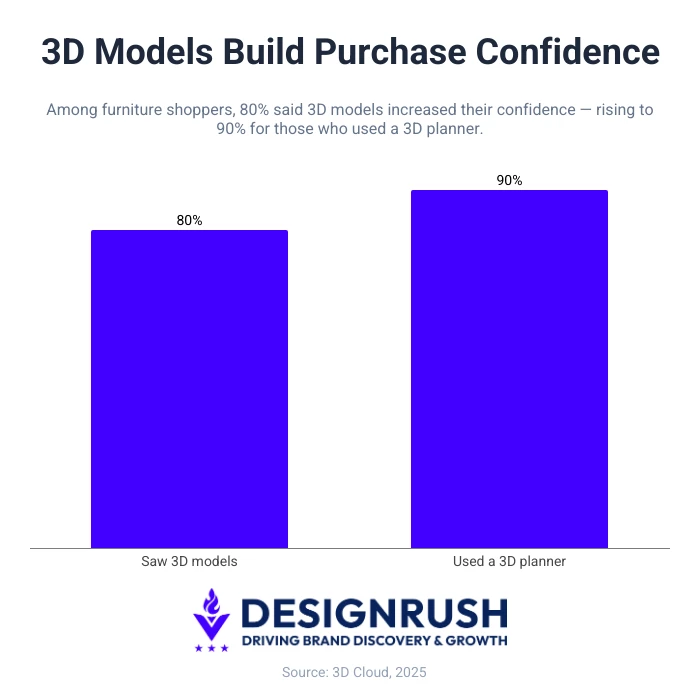
In 3D Cloud’s 2025 Furniture Shopping Trends Study (PDF), 80% of qualified furniture shoppers agreed that 3D product models increased confidence in their purchase decisions. Among those who had used a 3D planner, the figure rose to 90%.
4. Case in Point: Mott's 20% Inquiry Lift
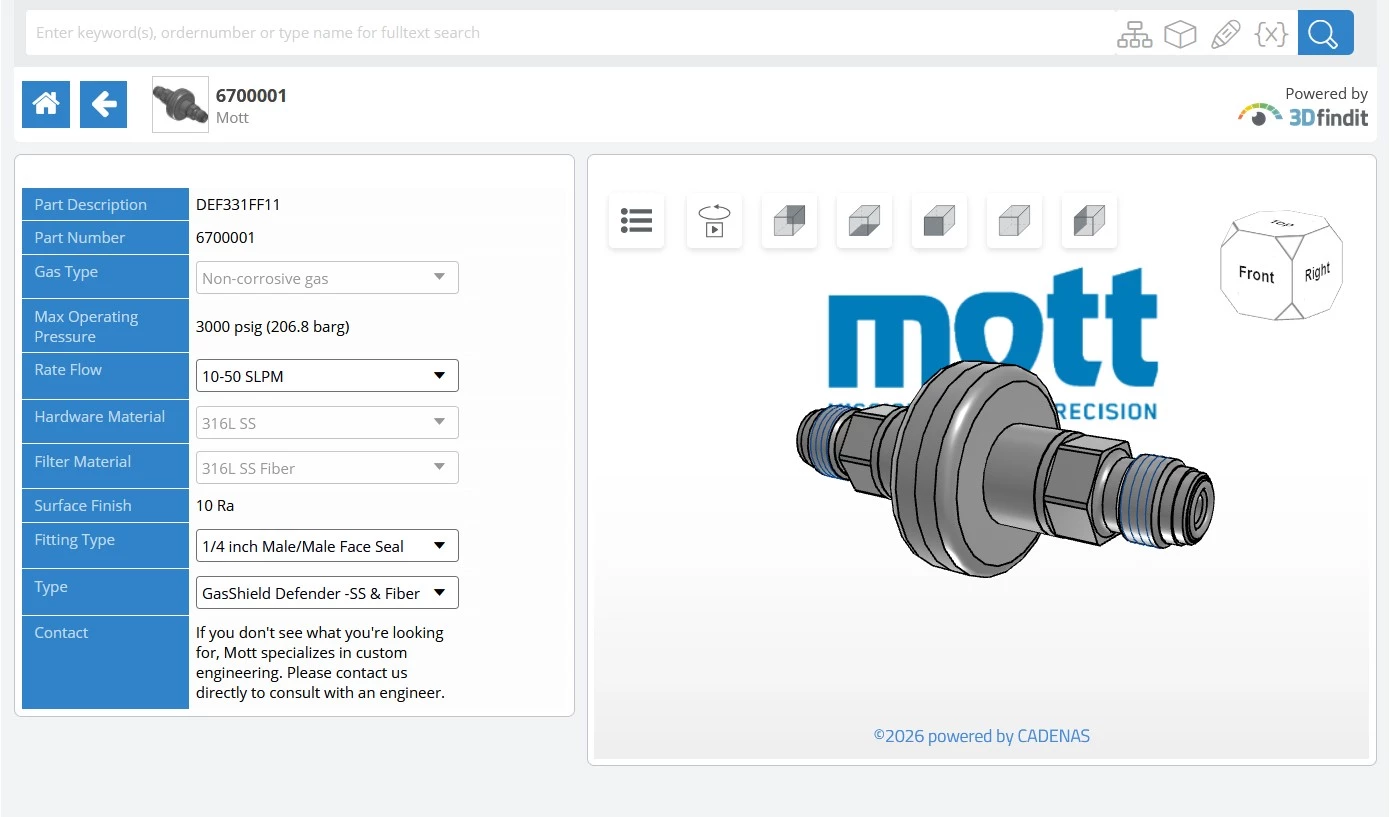
The clearest case for configurators is a product so technical that customers can't easily specify what they need. That's the problem Lounge Lizard solved for Mott Corporation.
Mott has spent more than 60 years engineering porous metal filtration and flow-control products for healthcare, aerospace, energy, and manufacturing. Its catalog is vast and highly technical, spanning process filters, ultra-high-purity gas filters, porous metal assemblies, and custom components.
For buyers, specifying the right part traditionally meant digging through dense documentation or routing every question through a sales engineer.
That’s why the centerpiece of Lounge Lizard's redesign was a custom product configurator, built alongside interactive lead-generation forms, searchable product specs, and a new resource center.
Technical buyers no longer need to decode a catalog since the configurator guides them through their options toward a valid, specifiable product.
The results follow the same arc of attention, then exploration, then intent:
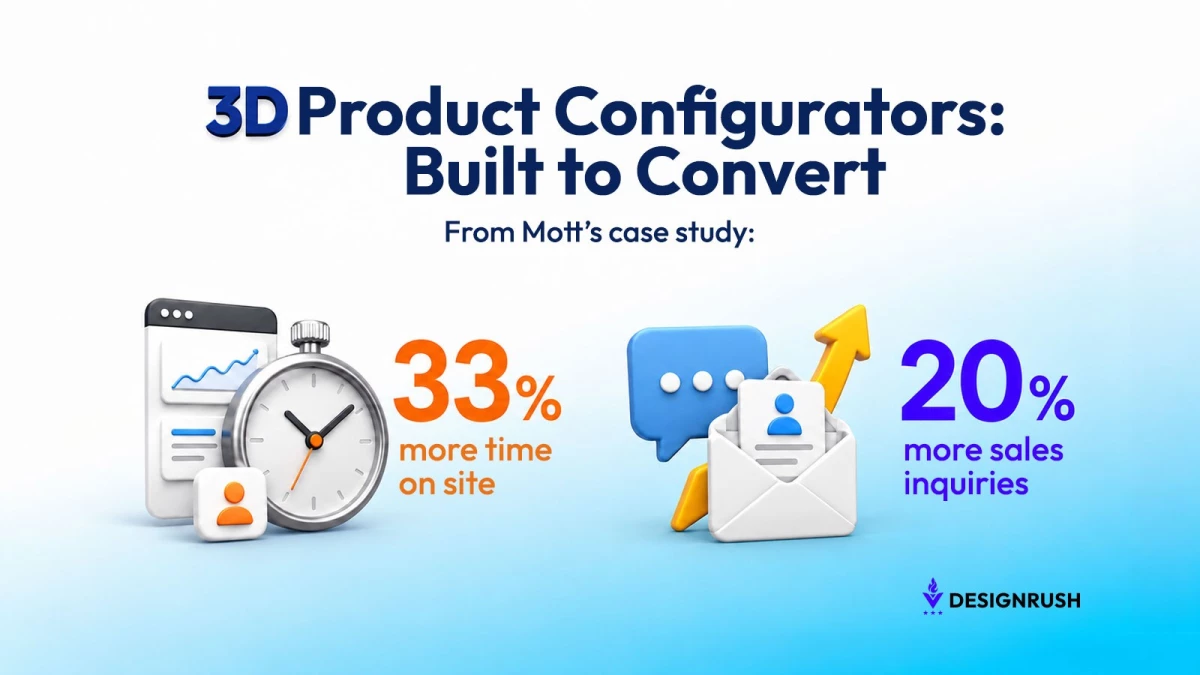
- 33% increase in time on site: Visitors stayed to work through their options rather than bouncing.
- 160% increase in pages per visit: That time turned into active exploration and configuring, the engagement pattern a working configurator produces.
- 20% increase in sales inquiries: More buyers reached the point of contacting Mott with a specified need.
A lower 36.4% bounce rate and a 23% increase in ranking keywords rounded out the picture of a stickier, more discoverable site.
How Product Configurators Work
You don't need to understand the engineering to make a smart decision, but a few concepts help you ask vendors the right questions.
Choosing Between Real-Time and Pre-Rendered Configurators
Configurators usually show product variants in one of two ways.
1.Real-Time Rendering
Real-time rendering generates each view live as the shopper makes changes. It is the better fit for complex products because it can support full rotation, zoom, AR, and thousands of possible combinations. The trade-off is performance, since a real-time 3D configurator is more technically demanding and needs careful optimization, especially on mobile.
Mott Corporation's catalog (spanning thousands of technical filter variants) is exactly the kind of case that calls for real-time rendering rather than pre-built images.
2. Pre-Rendered Configurators
Pre-rendered configurators work more like controlled image swaps. Every variant is created in advance, then displayed as the shopper selects options. This makes the experience fast and lightweight, but it limits how many combinations the product can realistically support.
Rule of thumb: Use pre-rendered visuals for a small set of fixed choices, and real-time rendering for complex, highly customizable products.
AR Preview: Helping Shoppers Judge Size, Fit, and Finish
AR extends the configurator beyond the product page by letting shoppers place the exact version they built into their own environment. After choosing the size, finish, layout, or components, they can use their phone camera to see that configured product in context.
That might mean previewing a sofa in a living room, a fixture above a real table, or equipment inside a workspace. AR helps shoppers answer practical purchase questions before checkout:
- Is this the right size?
- Does this finish work in my space?
- Will the configured product fit the room, layout, or use case?
That closes the imagination gap between building a product on screen and feeling confident enough to buy it.
What It Takes to Build a Product Configurator
A 3D configurator is only useful when the visual experience, product rules, and sales process work together.
“Businesses often treat 3D and AR as surface-level add-ons — gimmicks to check a box — without considering how they align with user needs or business goals,” says James Bugra, founder of Nockta.
He argues that the goal is to use 3D and AR where it simplifies choices, reduces uncertainty, and builds shopper confidence rather than for the sake of it.
That is why the build should start with practical questions: whether to buy or build, what product data is required, how the tool connects to sales systems, and how to keep the experience fast, guided, and commercially useful.
- Decide whether to buy or build
- Prepare the product data
- Connect the configurator to the sales flow
- Avoid the common failure points
1. Decide Whether to Buy or Build
The first question is whether an off-the-shelf configurator is enough or a custom build is needed.
Templates are faster and more affordable when the product has a limited set of fixed options. A custom agency build makes more sense when the catalog is complex, the buyer journey needs guidance, or the product has rules a standard template cannot handle.
- Worried about cost? The upfront 3D modeling is the part many underestimate, but existing CAD files cut it sharply. For complex catalogs, those costs are offset by reduced sales-engineering time and fewer returns.
- Worried about constant SKU changes? Lean toward real-time rendering and modular assets, so new variants slot in without rebuilding from scratch.
2. Prepare the Product Data
The foundation is the product itself. Existing CAD files are ideal, but high-quality photos can also be converted into 3D models. Brands also need supporting assets such as dimensions, material samples, color references, textures, and rules for which options can and cannot be combined.
This is what makes the configurator accurate as well as visually impressive.
3. Connect the Configurator to the Sales Flow
A configurator should not be a visual demo bolted onto a product page. Connected to Shopify, Magento, a CPQ system, or an ERP, each choice can update pricing, availability, and product specifications in real time.
That connection is what turns the tool into a sales asset. The shopper is not just building something that looks right; they are creating a valid product that can move into the cart, quote, or sales inquiry.
4. Avoid the Common Failure Points
Most underperforming configurators fail for three reasons:
- Too many choices without enough guidance: Don’t overwhelm shoppers with a wall of options. They need defaults, recommended paths, and clear next steps.
- Poor mobile performance: Heavy 3D assets can slow down or stutter on the phones many shoppers actually use, weakening the experience at the point of decision.
- Lack of ongoing ownership: A configurator tied to live pricing, inventory, and product rules needs someone responsible for keeping it updated. Otherwise, it can drift out of sync with the catalog.
Get the build model, product data, integrations, guided experience, mobile speed, and maintenance right, and the configurator becomes more than an interactive feature. It becomes a practical tool for helping buyers choose, validate, and purchase with confidence.
3D Product Configurators: Wrapping Up
The real value of 3D product configurators is that they shift the burden of imagination away from the shopper by allowing them to build and validate the product on screen.
That’s why they're best for complex, customizable, or high-consideration products, where uncertainty is already costing sales. For brands weighing the investment, consider where an interactive product configurator can remove the most friction so that the tool becomes a practical way to help customers.

Our team ranks agencies worldwide to help you find a qualified partner. Visit our Agency Directory for the top eCommerce companies, as well as:
- Top eCommerce Consultants
- Top Web Design Companies
- Top Shopify Development Companies
- Top Web Development Companies
- Top Shopify Plus eCommerce Agencies
Our design experts also showcase the most innovative eCommerce projects worldwide. For inspiration, visit our Awards section to explore the best and latest in eCommerce website designs.
3D Product Configurators FAQs
1. How much does a 3D product configurator cost to build?
There's no single price, because cost scales with a few key factors: whether usable CAD files already exist (the biggest factor), pre-rendered versus real-time rendering, the number of variants and rules, and how deeply the tool integrates with pricing, inventory, or CPQ and ERP systems.
A simple pre-rendered configurator can be deployed relatively affordably, while a fully integrated real-time 3D configurator for a complex catalog requires a larger investment.
2. How long does it take to build a 3D product configurator?
Timelines depend on product complexity and asset readiness. If usable CAD files already exist, a simple build can move quickly; if 3D models need to be created from photos or scratch, asset production can extend the project.
A pre-rendered setup for a few variants is usually faster than a real-time 3D configurator connected to pricing, inventory, or quoting systems.
3. Do 3D configurators work on mobile?
Yes, but mobile performance needs to be planned from the start. A heavy interactive 3D configurator can slow down or stutter on lower-end phones, which weakens the buying experience.
Compressed assets, level-of-detail controls, and testing on real mid-range devices help keep the experience smooth.
4. What's the difference between a 3D configurator and an interactive product configurator?
An interactive product configurator is any tool that lets shoppers choose options and see the product respond. A 3D configurator does that with a rotatable, three-dimensional model, helping shoppers judge depth, scale, shape, and detail in ways flat images cannot.
5. Are 3D configurators only worth it for large catalogs?
No. Catalog size matters less than product complexity, customization, and the cost of a wrong choice. A small range of high-value or highly configurable products can benefit more than a large catalog of simple SKUs, especially when visualization helps reduce hesitation or returns.
6. What industries use 3D product configurators?
Common categories include furniture and home goods, automotive, apparel and footwear, jewelry, and consumer electronics, where personalization drives the sale. On the B2B side, manufacturing, industrial suppliers, packaging, and medical equipment use them to guide technical buyers toward valid, specifiable parts.