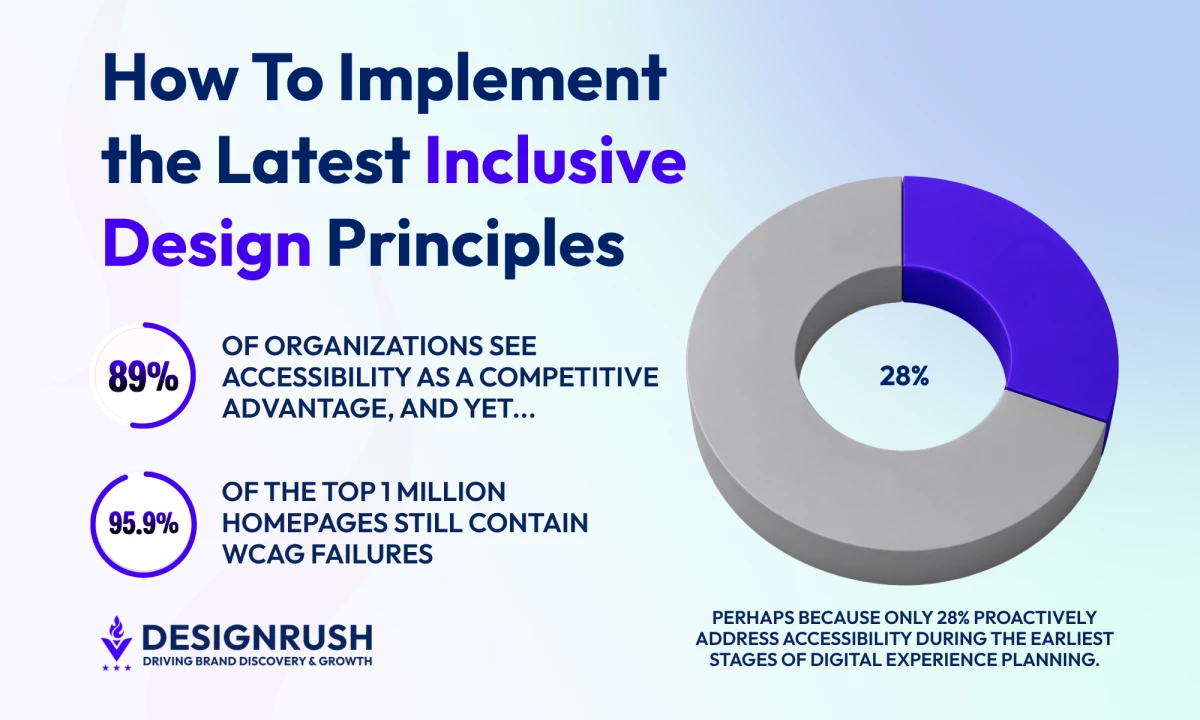

The conversation around inclusive design has changed dramatically in recent years. Learn how inclusive UX principles are helping businesses reduce friction and better support real-world user needs.
Inclusive Design: Key Findings
- Inclusive design is evolving from a compliance requirement into a broader UX and business strategy focused on reducing friction across digital experiences.
- Businesses are increasingly prioritizing cognitive accessibility, mobile usability, and flexible interactions that work across different devices, environments, and user needs.
- Growing regulatory pressure, WCAG 2.2 adoption, AI-driven UX changes, and rising user expectations are accelerating investment in inclusive digital experiences.
What Is Inclusive Design and Why Take It Seriously?
Inclusive design is the practice of creating digital experiences that work for the widest possible range of people, regardless of ability, device, environment, or context.
Rather than designing for the “average” user, inclusive UX design focuses on more flexible and accessible experiences that are better suited to different user needs and real-world conditions.
Accessibility, usability, and inclusive design are closely related, but they address different types of user experience challenges.
- Accessibility focuses on ensuring people with disabilities can use a digital experience, like ensuring a form can be completed with a keyboard or screen reader.
- Usability focuses on how easy and intuitive an experience is to use. For example, ensuring a form is clear, simple to navigate, and easy to complete.
- Inclusive design focuses on supporting a broader range of user needs, contexts, and ways of interacting. For example, it considers whether a form is overwhelming, difficult on mobile, stressful for neurodivergent users, or hard to use in low-bandwidth environments.
In practice, inclusive design principles often combine accessibility and usability principles into a broader user experience strategy.
Inclusive Design Principles Are Becoming a Business Priority
In 2026, inclusive design principles are increasingly shaping the way businesses approach customer experience, UX strategy, and long-term product resilience, and organizations are moving beyond the compliance mindset to recognize it as a driver of long-term business value.
For instance, a recent survey by Level Access found that 89% of organizations now view accessibility as a competitive advantage, while 90% say it contributes to improved customer satisfaction.
Yet, Level Access found that many organizations still tend to treat accessibility reactively instead of integrating it into product strategy from the start, with only 28% proactively addressing accessibility during the earliest stages of digital experience planning.
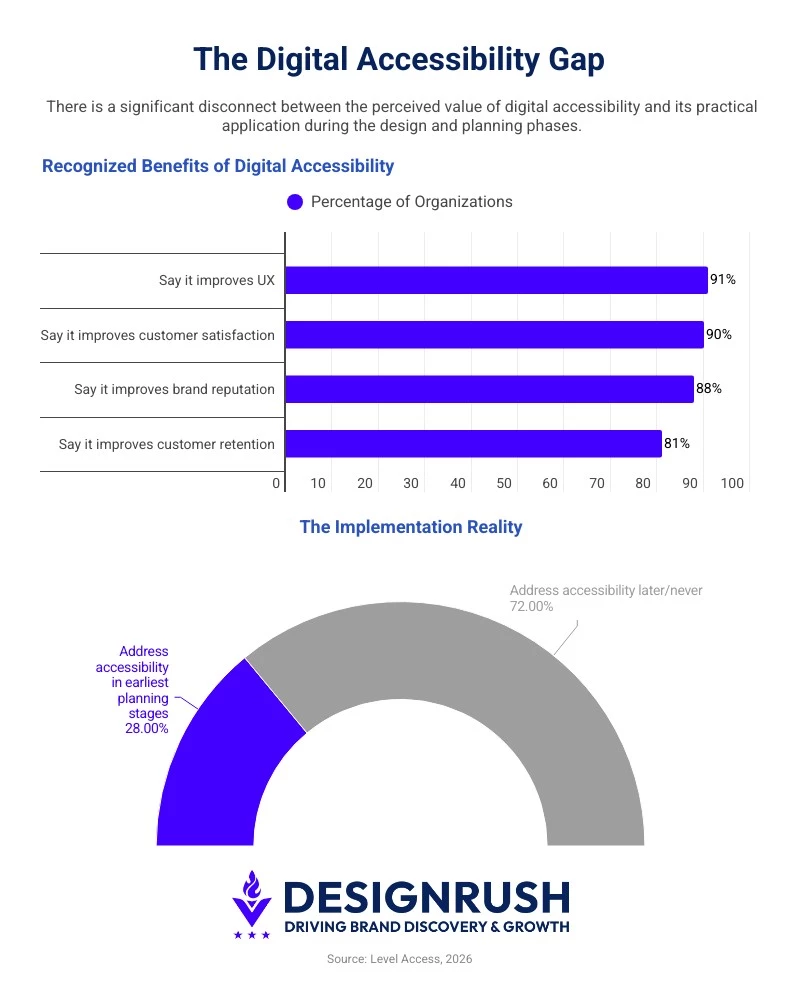 Firsthand exposure to user friction often reshapes product decisions.
Ana Šekerija, accessibility lead at Infinum, says she saw first-hand “...how easily people can be excluded even when we think a product ‘works’.”
Watching a screen-reader user struggle to navigate an app and failing to complete a task changed the way she saw her role in tech, she explains.
When it comes to usability, the business impact of reducing friction is just as significant.
Baymard Institute’s checkout usability testing found that the average large eCommerce site could increase conversion rates by 35.26% through better checkout design alone, with improvements coming down to reducing friction, simplifying form flows, and making interactions easier to complete.
What’s Driving Inclusive Design Adoption in 2026
There are numerous converging shifts in regulation, technology, and user behavior accelerating inclusive UX design adoption in 2026.
- WCAG 2.2 standards are raising the accessibility baseline
- Expanding regulation is increasing global compliance pressure
- AI-powered experiences are creating new accessibility challenges
- Mobile-first usage patterns exposing new usability gaps
1. WCAG 2.2 Standards Are Raising the Accessibility Baseline
Web Content Accessibility Guidelines (WCAG) 2.2 introduce updated standards designed to improve usability for people with cognitive disabilities, low vision, and limited mobility.
The guidelines place greater emphasis on clearer focus indicators, accessible authentication flows, consistent interactions, and larger touch targets.
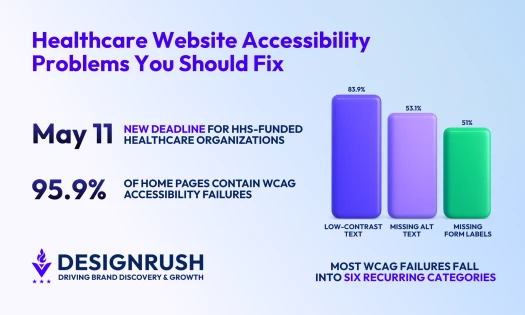
However, adoption gaps remain significant. WebAIM’s 2026 analysis found detectable WCAG failures on 95.9% of the top one million homepages.
2. Expanding Regulation Is Increasing Global Compliance Pressure
Regulatory pressure around digital accessibility is growing on both sides of the Atlantic.
The European Accessibility Act (EAA), which took effect in 2025, requires businesses serving EU customers across sectors like ecommerce, banking, transportation, and telecoms to meet accessibility standards for websites, apps, and digital services.
In the U.S., businesses face similar pressure under the Americans with Disabilities Act (ADA), where WCAG guidelines are increasingly used as the benchmark for digital accessibility compliance.
3. AI-Powered Experiences Are Creating New Accessibility Challenges
AI-driven personalization, chatbots, dynamic interfaces, and automated content generation are changing how users interact with digital experiences. At the same time, they introduce new accessibility risks if done badly.
Automated alt text, AI-generated summaries, and voice interfaces can improve usability when designed carefully, but overreliance on automation can lead to inconsistent and confusing navigation patterns, or inaccessible interactions for users relying on assistive technologies.
4. Mobile-First Usage Patterns Are Exposing New Usability Gaps
Mobile introduces exactly the kinds of real-world constraints (small screens, touch input, variable connectivity, divided attention) that inclusive design directly addresses.
With mobile now accounting for more than half (roughly 63%) of global web traffic, it has become one of the most consequential forces pushing inclusive design up the business agenda.
How To Put Current Inclusive Design Trends Into Practice in 7 Steps
The strategies below explore the current inclusive design trends shaping modern websites, and how you can apply them to create digital experiences that are easier to use, more adaptable across devices and environments, and more accessible to a wider range of users.
- Prioritize accessibility earlier in the design process
- Design for cognitive accessibility and reduced friction
- Create flexible experiences across devices and input methods
- Use AI to support accessibility (but don’t replace human oversight)
- Improve content clarity and readability
- Treat performance as part of accessibility
- Test with real users, not just automated tools
1. Prioritize Accessibility Earlier in the Design Process
Many accessibility issues become more expensive and difficult to fix after development. To reduce rework and technical debt, businesses should integrate accessibility earlier into planning, UX, and prototyping workflows instead of treating accessibility as a final QA task.
Best practices include:
- Building accessible design systems and reusable components
- Reviewing accessibility during wireframing and prototyping
- Including accessibility checks before development begins
- Testing critical user flows early and often
2. Design for Cognitive Accessibility and Reduced Friction
Inclusive UX design increasingly involves designing for users with ADHD, dyslexia, autism, memory challenges, and sensory sensitivities. Simpler interfaces often improve usability for everyone.
Businesses can reduce cognitive load by:
- Simplifying layouts and navigation
- Using plain, concise language
- Reducing visual clutter and distractions
- Creating clearer forms and error messages
- Keeping interactions predictable and consistent
Ignoring cognitive accessibility and content comprehension can make even technically compliant experiences difficult to use in practice.
3. Create Flexible Experiences Across Devices and Input Methods
Users interact with websites through keyboards, touchscreens, voice controls, screen readers, and mobile devices across different environments and connection speeds.
To support more flexible experiences:
- Ensure full keyboard navigation rather than designing primarily for mouse or visual users
- Use larger touch targets for mobile usability
- Design responsive layouts across screen sizes
- Support screen readers and voice interactions
- Respect reduced-motion user preferences and avoid excessive animation or motion-heavy effects
It's also best to avoid low-contrast “minimalist” interfaces that reduce readability across devices and lighting conditions.
4. Use AI To Support Accessibility (But Don’t Replace Human Oversight)
AI tools can help automate accessibility tasks, but they cannot fully replace human testing and UX evaluation.
Businesses can use AI for:
- Captioning and transcription
- Alt text generation
- Accessibility scans and testing
- Content summaries and translations
However, teams should still validate outputs manually and test real user journeys with assistive technologies rather than relying entirely on automated accessibility tools.
5. Improve Content Clarity and Readability
Clear content improves accessibility, usability, and SEO performance at the same time. Users should be able to scan pages quickly and understand information without unnecessary effort.
Businesses can improve readability by:
- Using descriptive headings and logical hierarchy
- Writing concise paragraphs and plain-language copy
- Choosing accessible typography and spacing
- Adding captions and transcripts to media
- Making PDFs and downloadable content accessible
6. Treat Performance as Part of Accessibility
Slow-loading pages and unstable layouts can create major usability barriers, especially for users on slower networks, older devices, or assistive technologies.
To improve accessibility through performance:
- Compress large media files
- Reduce unnecessary scripts and animations
- Minimize layout shifts and delays
- Prioritize responsive performance on mobile devices
- Optimize experiences for lower-bandwidth environments
7. Test With Real Users, Not Just Automated Tools
Automated tools can identify technical accessibility issues, but they often miss real-world usability problems and workflow friction.
To create more inclusive experiences:
- Conduct usability testing with diverse users
- Test websites with screen readers and keyboards
- Gather feedback from people with disabilities
- Evaluate task completion and navigation clarity
- Combine automated scans with human testing methods
How To Audit and Measure Inclusive Design Effectiveness
Making inclusive design part of everyday workflows requires clear testing processes, cross-functional collaboration, and measurable performance benchmarks across UX, design, development, SEO, and content teams.
Inclusive Design Checklist for Website Teams
Before launch, teams should evaluate whether they have:
- Tested keyboard navigation across critical user flows
- Validated screen reader compatibility
- Checked contrast ratios and typography readability
- Minimized unnecessary motion and animation
- Optimized forms for clarity and error recovery
- Added captions and transcripts to multimedia
- Ensured mobile responsiveness across devices
- Reviewed accessibility in PDFs and downloadable assets
- Tested experiences on slower connections and older devices
- Included diverse users in usability testing and research
- Documented accessibility standards within the design system
Metrics To Track Inclusive Design Success
Inclusive design should be evaluated through both accessibility standards and real-world user outcomes. Here’s what to track:
- Task completion rates: Measure how effectively users can complete key actions such as purchases, signups, or form submissions.
- Form abandonment rates: High abandonment rates may indicate confusing instructions, inaccessible fields, or unnecessary friction.
- Conversion rates across devices: Comparing desktop, mobile, and tablet performance can help identify accessibility or usability gaps.
- Accessibility audit scores: Automated and manual audits can help teams monitor WCAG compliance and technical accessibility improvements over time.
- Page speed and performance metrics: Slow-loading pages and unstable layouts can disproportionately affect users on older devices or slower networks.
- Customer support requests: Repeated support issues may reveal accessibility barriers or confusing user experiences that testing missed.
- Usability testing feedback: Qualitative insights from real users can uncover navigation, readability, and workflow issues that automated tools cannot detect.
- Screen reader compatibility findings: Testing with assistive technologies helps identify gaps in navigation structure, labeling, and content hierarchy.
- Bounce rates on key landing pages: High bounce rates may indicate usability issues, poor readability, or inaccessible content experiences.
- User satisfaction and retention metrics: Inclusive experiences often contribute to stronger trust, engagement, and long-term customer retention.
Businesses should also monitor feedback from users with disabilities and other underrepresented groups.
Examples of Effective Inclusive Design in Action
The following examples show how inclusive design principles can improve usability, flexibility, and accessibility across real digital experiences.
- Apple: Integrating Accessibility Features Into Everyday User Experiences
- GOV.UK: Simplifying Navigation and Content for More Accessible Public Services
- Shopify: Reducing Ecommerce Friction Through Accessible Checkout Design
Apple: Integrating Accessibility Features Into Everyday User Experiences
Apple has made accessibility a core part of its ecosystem rather than a separate feature set. Voice Control, AssistiveTouch, Live Speech, and customizable display settings allow users to tailor interactions based on their abilities and preferences.
Importantly, these features are integrated into mainstream experiences instead of being isolated accessibility add-ons.
GOV.UK: Simplifying Navigation and Content for More Accessible Public Services
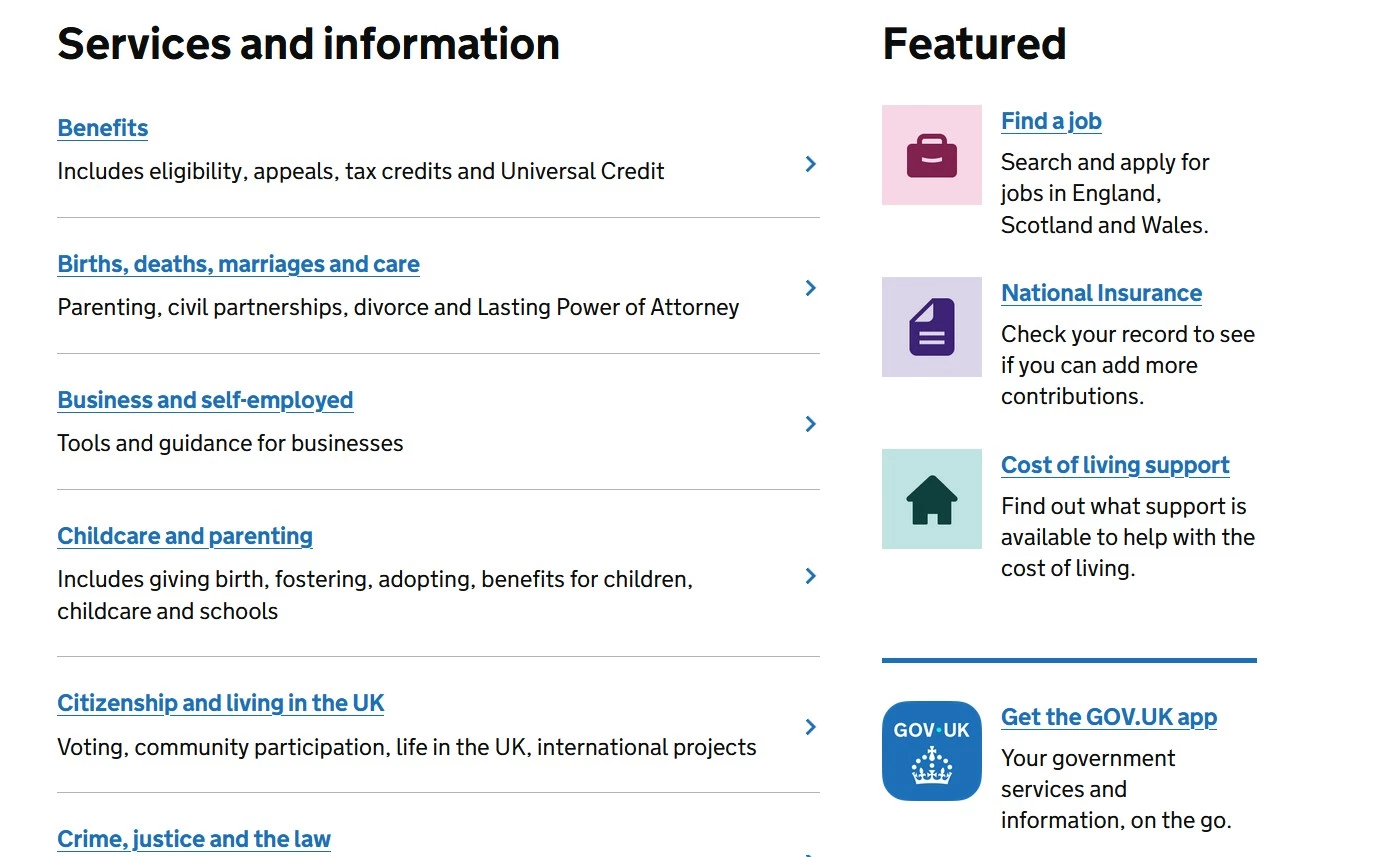
GOV.UK is widely recognized for its highly accessible content design and simplified user journeys.
The platform emphasizes:
- Plain language
- Readable layouts
- Consistent navigation
- Low cognitive load
- Device flexibility
- Strong keyboard accessibility
Its design system has become a benchmark for accessible public-sector digital services.
Shopify: Reducing Ecommerce Friction Through Accessible Checkout Design
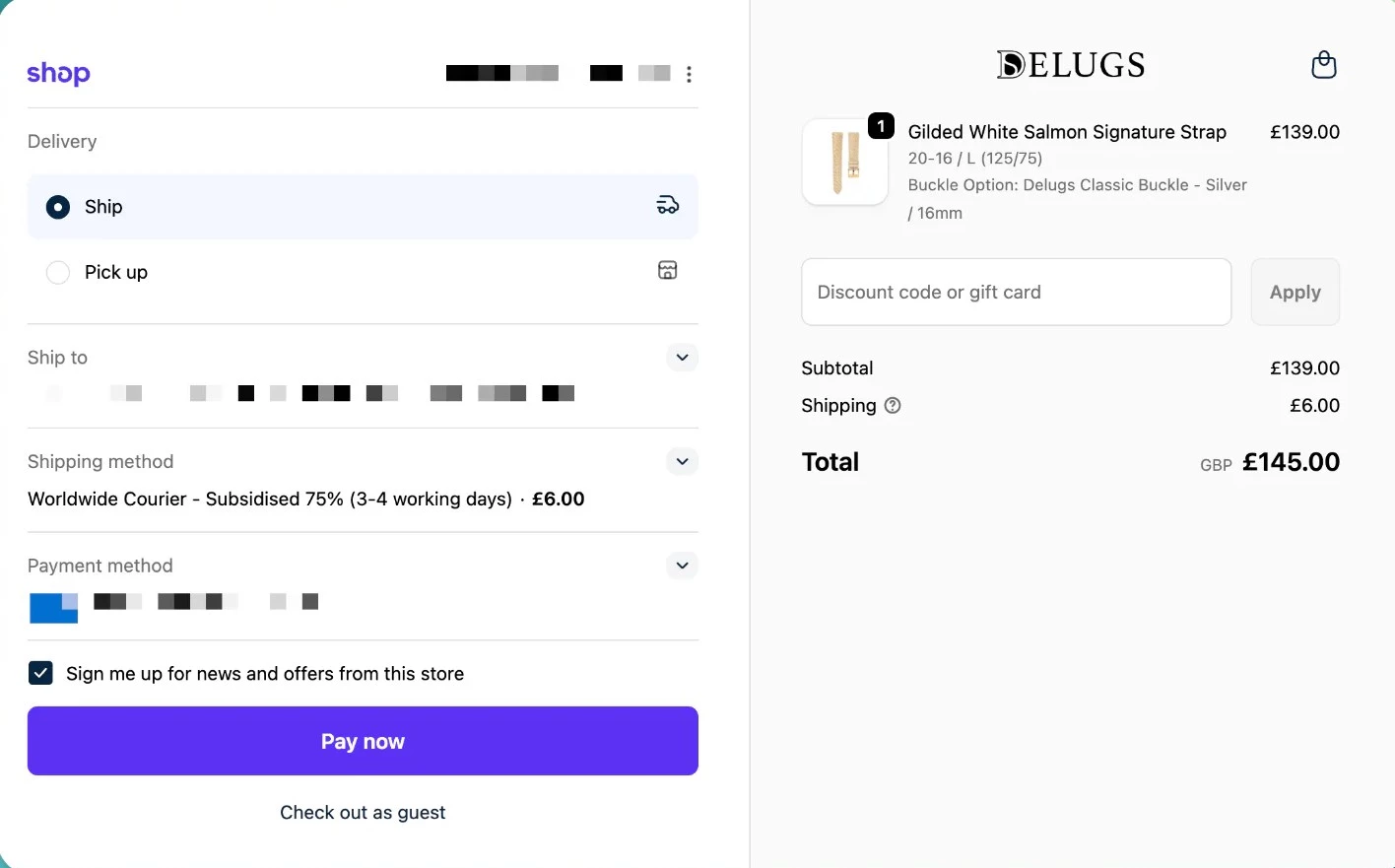
Shopify has invested heavily in simplifying eCommerce checkout experiences through clearer forms, responsive layouts, accessible touch targets, and streamlined mobile interactions.
These improvements reduce friction not only for users with disabilities but also for mobile shoppers, distracted users, and customers navigating under less-than-ideal conditions.
Final Words: Inclusive Design Starts With Strategy
As accessibility and usability expectations continue to evolve, businesses that integrate inclusive design principles earlier into UX, content, development, and testing workflows will be better positioned to reduce friction, improve engagement, and build more adaptable digital experiences for a broader audience.
Inclusive design ultimately creates more human-centered digital experiences that adapt to the way people actually use apps and web interfaces.

Our team ranks agencies worldwide to help you find a qualified partner. Visit our Agency Directory for the Top Web Development Companies, as well as:
- Top Backend Development Companies
- AI Web Design Agencies
- Top Front End Web Development Companies
- Top UI/UX Design Agencies
- Top Web Development Companies in Chicago
Our design experts also recognize the most innovative design projects across the globe. Visit our Awards section to see the best in web design.
Inclusive Design FAQs
1. Does inclusive design improve SEO?
Yes. Many inclusive design best practices also support SEO performance by improving content clarity, mobile usability, site structure, page speed, and user engagement.
Features like descriptive headings, accessible navigation, readable typography, and captioned media can make content easier for both users and search engines to understand.
2. Is inclusive design legally required?
Inclusive design itself is not usually mandated by law, but accessibility standards often are.
Regulations like the Americans with Disabilities Act (ADA), WCAG guidelines, and the European Accessibility Act increasingly require businesses to provide accessible digital experiences.
3. What industries benefit most from inclusive web design?
Industries with complex customer journeys or broad audiences (including ecommerce, healthcare, finance, education, SaaS, and government) often see the greatest benefits from inclusive UX improvements.
4. What are the biggest mistakes businesses make when applying inclusive design principles?
Common mistakes include treating accessibility as a final-stage audit, relying too heavily on automated tools, using overly complex navigation, and ignoring cognitive accessibility and readability.
5. How does inclusive design support mobile users?
Inclusive design improves mobile usability through responsive layouts, larger touch targets, simplified navigation, readable typography, and flexible interactions across devices and connection speeds.
6. What tools can help businesses test website accessibility?
Popular accessibility testing tools include WAVE, Axe, Lighthouse, NVDA, JAWS, and VoiceOver. However, automated tools should still be combined with manual testing and real-user feedback.
7. What’s the difference between inclusive design and universal design?
Inclusive design and universal design are closely related approaches to creating better user experiences, but they are not exactly the same.
Universal design aims to create one experience that works for as many people as possible, while inclusive design focuses more on flexibility and adaptability, which could extend to offering dark mode, adjustable text sizing, or reduced-motion settings.