
When website redesigns fail, it’s usually because the goals were fuzzy. The real challenge is focus, and for that, you need a plan.
Website Objectives: Key Points
- Clear, measurable goals tied to business outcomes, like increased mobile conversions or improved SEO, prevent scope creep in website redesign projects.
- Revenue leaks like form drop-offs and checkout abandonment can often be fixed through a UX-focused redesign.
- Often overlooked compliance standards, such as WCAG and GDPR, should be prioritized on healthcare or financial service websites to avoid legal risks and delays.
Defining Goals and Planning a Website Redesign: An Overview
A website redesign is lost at sea without focus, which translates into scope creep, wasted time, and drained budgets.
Here, we’ll show how to turn vague ambitions into SMART goals, build a 90/180-day ladder that balances early wins with lasting fixes, and keep your project on track.
Business Challenges To Address With a Redesign
Before committing to a redesign, I always tell businesses to separate surface-level symptoms from the real issues holding their performance back.
I also tell them to define the business goals of the website redesign up front. You need to decide what you're trying to achieve: is it higher conversions, better user engagement, improved performance, or all of the above?
To prioritize the website's focus for the next 6-12 months, choose one key goal that aligns with the business’s immediate needs:
- Acquire for growing brand awareness or new customers
- Convert for improving sales or leads
- Support for enhancing customer retention and satisfaction
Of course, every successful redesign, regardless of goal, should cover several universal outcomes:
- Faster performance on real devices: Mobile p75 benchmarks: LCP ≤ 2.5s, INP ≤ 200ms, CLS ≤ 0.1.
- Higher-quality conversions: Clear CTAs, smooth form completion, and checkout flows that don’t break trust.
- Reliable measurement: Clean analytics events and stable attribution so insights don’t get lost.
- Improved findability: Strong crawlability, index hygiene, and healthy SERP click-through on priority pages.
- Compliance and governance: WCAG 2.2 AA accessibility, privacy standards, and secure defaults.
- Lower total cost of ownership: Fewer plugins, simpler builds, faster deploys, and fewer incidents over time.
I’ve learned that these outcomes only happen when leaders are willing to face the underlying issues that quietly drag performance down.
- Signs of revenue leakage a redesign can fix
- How to know when search visibility issues are rooted in site problems
- How an outdated design or missing proof points erode trust
- Compliance gaps to watch out for
Signs of Revenue Leakage a Redesign Can Fix
Based on my experience, I’ve put together a table of tell-tale signs of revenue leakage and how a redesign can realistically plug the gaps.
| Signal | Likely Root Cause | Quick Test | Why It’s Fixable in Redesign |
| High mobile traffic + low mobile conversions | Slow LCP/INP, confusing mobile flows | Compare mobile vs desktop conversion; LCP p75 on mobile | Performance budgets and mobile-first templates |
| High add‑to‑cart / low checkout completion | Friction in forms, payment UX, trust gaps | Session replays on abandonment steps; form error rate | Template changes, validation, trust signals |
| Rising paid CAC + flat conversion rate | Message/intent mismatch, slow pages | Landing page “scent” audit; speed vs conversion rate analysis | New information architecture, faster pages, clearer offers |
| Organic impressions up, clicks/conversions flat | Weak meta/UX, SERP CTR, thin content | CTR by rank; time-on-page on top entries | Content + meta refresh, UX proof points |
How To Know When Search Visibility Issues Are Rooted in Site Problems
Search visibility problems aren’t always about keywords. Often, they’re signs of deeper site issues that a redesign can take care of.
Watch for:
- Crawl or index anomalies (orphaned pages, duplication, “crawled—currently not indexed”) pointing to information architecture or technical gaps.
- Low rank-adjusted CTR compared to peers, which usually signals weak titles, meta descriptions, or brand trust (not keyword choice).
- Poor Core Web Vitals (LCP > 2.5s, INP > 200ms, CLS > 0.1), which hurt both visibility and mobile click-through.
- Template-level thinness (lots of near-duplicate pages) reveals content model flaws that are best solved in a redesign.
How an Outdated Design or Missing Proof Points Erode Trust
Trust is fragile online, so if your site has an outdated design or is missing proof points, you’ll quietly erode visitor confidence.
- Lack of social proof: You'd be amazed how often visitors abandon pricing or demo pages when case studies, ratings, or recognizable client logos are missing in key places.
- Weak security and fulfillment signals: If TLS cues are missing or policies are hard to find, users are more likely to drop off during checkout.
- Outdated visual design: Inconsistent spacing, low contrast, or non-responsive layouts make products and services feel risky or unreliable.
- The five-second test: If a stranger can’t quickly state what you do, who it’s for, and why they should choose you, I’d say it’s time to revisit your information architecture and hero narrative.
Minimum Viable Proof Checklist
Make sure to include these essential trust elements:
- ✅ Named, quantified case on every high‑intent page
- ✅ Testimonial with name/title/company & context
- ✅ 6-12 ICP logos, grouped
- ✅ Independent rating/badge with link
- ✅ Risk‑reversal (SLA/terms/guarantee) adjacent to CTA
- ✅ Privacy/Security signposts (GPC honored, SOC 2/ISO/PCI where applicable)
Compliance Gaps To Watch Out For
For one thing, they create legal risks. But they can also stall projects late in a redesign, costing time and trust. The good news: most issues are predictable if you know what to look for.
I’ve found that the key to avoiding these setbacks is setting clear, measurable compliance targets early on.
Here’s what to focus on:
Accessibility
- Target: WCAG 2.2 Level AA for new templates; include both automated scans and manual testing for key user flows.
Pass/Fail: Pass = 0 critical AA failures on new templates; remediation plan for legacy content. With the EU's European Accessibility Act, businesses selling into the EU should treat accessibility as non-negotiable.
Privacy
- GDPR (EU/EEA): Ensure data-subject requests are handled within one month, with extensions allowed on notice.
Pass = Active process with mailbox and tracker, plus updated privacy policy. - California (CPRA): Respond within 45 days (with one extension to 90 days), including a frictionless “Do Not Sell or Share” mechanism.
Pass = Link or frictionless processing, intake/verification, and audit trail. - Colorado (CPA): Recognize Global Privacy Control (GPC) as a valid universal opt-out signal.
Pass = Site suppresses sale/sharing/targeted ads accordingly.
Security (Web Layer)
- Transport Security: Ensure TLS 1.2+ with HSTS and a modern configuration (TLS 1.3 preferred).
Pass = A-grade on Mozilla Observatory (headers) with no SSL Labs red flags. - Exploit Mitigation: Implement a baseline Content Security Policy (CSP) to mitigate XSS risk.
Pass = Working CSP in production. - App Risk Posture: No critical OWASP Top 10 (2021) findings in the launch scope, with active dependency scanning.
Pass = No critical security flaws identified.
eCommerce
- PCI DSS Compliance: Ensure payment flows meet PCI 4.x standards, including strong encryption and no use of SSL/early TLS.
Pass = Attestation of compliance with PCI DSS requirements for all payment processes.
Content & IP
- Ensure proper licensing for fonts and images, and establish content moderation policies for user-generated content to avoid legal complications down the road.



Laying the Groundwork: What To Clarify Before Redesign
At this stage, the focus shifts from abstract goals to hard data, measurable performance gaps, and updated user expectations. This is when I like to see real alignment happening, with decisions reflecting evidence, not instinct.
- Audit performance to target what’s really broken
- Establish the metrics that keep your redesign on track
- Reassess your audience to stop losing relevance
- Replace vague redesign goals with measurable KPIs
Audit Performance To Target What’s Really Broken
When auditing a site, there are three metrics I always check first.
- Mobile LCP at the 75th percentile is the strongest single proxy for how fast users perceive the site and a leading indicator of conversion risk.
- Primary conversion rate, from session to lead or order, reveals the revenue ceiling you may be leaving on the table.
- Index health, measured by the percentage of important pages earning impressions in the last 30 days, shows whether search issues stem from technical gaps, content weaknesses, or both.
Here are some common issues that can seriously hurt your conversion rates:
- Render-blocking JS/CSS, oversized images, and unoptimized fonts slow download times and frustrate users.
- Excessive client-side JavaScript inflates INP and negatively impacts form interactions.
- Slow TTFB (Time to First Byte) due to lack of caching or edge rendering, along with chat and tag bloat, delays user experience.
- Mismatch between ad promises and landing page content can confuse visitors, while weak proof points near CTAs lower trust.
- Analytics gaps, like double-counting or missing events, can obscure valuable insights into what's working and what's not.
Tools or Frameworks for Those Without In-House Auditors
If you lack in-house auditors, I suggest using these tools and frameworks to help fill the gap:
- Performance and quality: Use lab and field testing, set page-weight budgets, and monitor for errors to assess site performance.
- Crawling and IA: Site crawlers can identify duplicate or thin pages and orphaned content, helping to clean up your information architecture.
- Behavior and UX: Conduct task-based usability tests, observe user sessions, and analyze funnels to improve user experience.
- Accessibility: Automated scanners can catch basic issues, while structured manual checks (like keyboard navigation and screen reader tests) ensure compliance.
- SEO: Webmaster consoles, log analysis, and schema/metadata audits can help improve your site’s search visibility.
- Frameworks: Use established frameworks like Core Web Vitals, WCAG 2.2 AA, Jobs-To-Be-Done, task analysis, and a 10-heuristics UX review to guide your redesign.
Note: Avoid tool sprawl. Select one tool or framework per category and standardize your reports for consistency.
Establish the Metrics That Keep Your Redesign on Track
Use CI/CD and QA processes to keep track of progress and make sure those goals stay on target as the project moves forward.
| Category | Baseline (today) | Target (launch +90 days) | Guardrails (CI/CD & QA) |
| Performance | Mobile p75 LCP/INP/CLS | LCP ≤ 2.5s, INP ≤ 200ms, CLS ≤ 0.1 | Performance budgets block merges; test on mid‑tier Android |
| Reliability | Uptime, error rate | ≥ 99.9% uptime; < 1% JS error rate | Error budgets; rollback plan; canary releases |
| Conversion | Current funnel rates | +20–30% primary CVR | No launch if CVR < baseline in A/B holdout |
| SEO | % pages with impressions | +20% impressions on top templates; CTR up by rank | Noindex/redirect checks in pre‑flight; canonical tests |
| Accessibility | Issue density; manual pass rate | WCAG 2.2 AA across top 100 pages | Keyboard/screen‑reader checks in QA; no regressions |
| Privacy/Security | Consent logs; headers | Full consent audit trail; strong defaults (TLS/HSTS/CSP) | Security headers tested in CI; DPA on file |
| Analytics | Event coverage map | 100% of core journeys tracked with IDs | Schema‑validated events in CI; dashboards ready pre‑launch |
| Ops | Lead time to change; deploy freq | ≤ 1 day lead time; weekly releases | Preview environments; checklists; owner on-call |
Reassess Your Audience to Stop Losing Relevance
I know it seems a bit extreme, but what if your audience isn’t responding because you don’t know them so well anymore? As your audience’s needs evolve, I recommend using these research methods to challenge your assumptions and uncover what really matters to your audience:
- Top-task survey: Ask visitors to rank their main goals, then redesign your IA around the top 5 tasks.
- 5-task usability test (remote, unmoderated): Observe where users face real friction.
- Open card sort + tree test: Validate naming and navigation before jumping into wireframes.
- Intercept surveys at key pages: Ask visitors, “Were you able to do X?” in a single question to identify obstacles.
- Jobs-to-be-Done interviews: Uncover switching triggers, anxieties, and success criteria.
- Support/sales log analysis: Identify recurring objections and common “where do I…?” questions.
Signals You’ve Outgrown Your Original Audience Assumptions
Here’s how to spot if your site is no longer meeting the needs of your current audience:
- High bounce rates on high-intent pages or falling conversions despite increasing brand traffic.
- Content that ranks but doesn’t convert, or new segments in your CRM not reflected on the site.
- Product shifts (pricing, packaging, buyers) not mirrored in your IA or copy.
- Support queries shifting to topics your site doesn’t address.
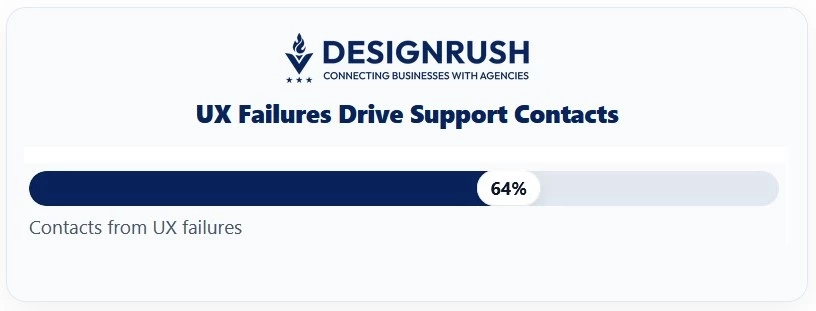
Note: Nielsen Norman Group found that in medium-complex journeys, 64% of customer-service contacts stem from UX failures, so use those questions to prioritize content and site-structure fixes.
How to Measure Whether You Truly Meet Accessibility Standards
I suggest using a combination of tools and manual checks to ensure your site meets accessibility standards. Here’s how:
- Run automated scans and conduct manual tests (keyboard-only, screen reader) for the top user journeys.
- Track issue density (issues per page), pass rate on WCAG 2.2 AA criteria, and time-to-fix as an engineering KPI.
- Publish an Accessibility Statement and maintain a VPAT (Voluntary Product Accessibility Template) where applicable. Treat accessibility defects like production incidents with clear owners and SLAs.
Replace Vague Redesign Goals With Measurable KPIs
It’s time to turn those high-level ambitions into measurable objectives. After your audit, the next step is to translate your findings into SMART goals with clear owners, timelines, and metrics for success.
Here's what these could look like:
- eCommerce: Focus on increasing revenue per visitor, boosting checkout conversion rates, raising average order value, and reducing cart abandonment.
- SaaS: Improve conversion from visitor to trial, trial to activation, shorten time-to-value, and increase the quality of PQLs/MQLs.
- Services/B2B: Increase demo requests or booked calls, improve the MQL to SQL conversion rate, and drive engagement with ICP accounts.
- Content/Community: Grow email subscribers, increase time-on-site and return visits, and boost member sign-ups.
- Support: Improve self-serve resolution rates and reduce “contact us” queries for known issues.
Leadership needs to sign off on these goals now (before the design phase begins) so that any trade-offs down the road are well-informed and defensible.
I once watched a project stall for weeks because stakeholders hadn’t aligned on what “conversion growth” actually meant. By the time design was done, every decision was up for debate again.
Balance Short-Term Wins with Longer-Term Goals (Without Derailing)
Be sure to balance immediate improvements with long-term strategic changes, and do so without disrupting the progress you’ve already made. Start by stabilizing your site with low-risk improvements (like media optimization or UX fixes) behind A/B testing guardrails.
I’ve found it’s best to start small, stabilizing your site with low-risk improvements (like media optimization or UX fixes) behind A/B testing guardrails.
At the same time, focus on updating your site’s structure, design system, or even consider switching to a new platform, but make sure to work on these changes alongside other updates and test them thoroughly to avoid breaking anything.
90/180-Day Goal Ladder
To maintain this balance, it helps to have a 90/180-Day Goal Ladder. Here’s how to break it down:
First 90 Days (quick wins):
- SEO optimization: Audit existing pages, fix on-page SEO issues, and add basic trust elements like testimonials or security badges.
- Content updates: Refresh top-performing pages with updated copy and visuals.
- Simplify navigation: Streamline main navigation and restructure the most visited landing pages for better user experience.
Next 180 Days (foundational fixes):
- Site speed optimization: Focus on technical improvements like reducing load time by 30%.
- Comprehensive design overhaul: Redesign key pages (home, product, checkout) to align with the new brand identity and modern design principles.
- Conversion optimization: Conduct A/B tests to improve conversion rates for key CTAs.
- CMS upgrade: Implement a more flexible CMS that allows content updates without developer intervention.
Website Objectives: Final Words
A successful website redesign is about making smart, data-driven decisions that align with your business goals. That means setting clear, measurable objectives and staying focused on what really matters.
Find More Agency Hiring Resources:
- Using an Agency vs. In-House for Your Website Redesign
- Questions To Ask a Design Agency Before Signing
- In-House vs. a Web Development Agency
Ultimately, you want a site that works harder for your business and your audience. Keep the goals front and center, test often, and stay flexible. I’ve found that this is the best way to ensure a redesign actually delivers results.

Our team ranks agencies worldwide to help you find a qualified partner. Visit our Agency Directory for the top web development companies, as well as:
Our design experts also recognize the most innovative design projects across the globe. Visit our Awards section for the best & latest in website design.
Website Objectives FAQs
1. How do I prioritize which issues to address first in a redesign?
Focus on high-impact issues that align with your main goals. Address critical problems like performance and conversion rates before diving into design changes. Prioritize quick wins that can deliver immediate value while planning for larger fixes.
2. How can I ensure my redesign doesn't alienate my existing audience?
Involve your audience early through surveys and usability tests. Maintain your brand’s core identity and run A/B tests to ensure your changes are well-received before launching.
3. How often should a website be redesigned?
Small updates should happen annually, while a major redesign is typically needed every 3-5 years, depending on how quickly your business evolves. Regular audits can help determine when a redesign is necessary.