Key Findings
- Interactive storytelling formats like scrollytelling have been shown to increase dwell time by up to 85%, with users spending an average of 12 minutes on standout experiences.
- Honda UK’s relaunch of its content hub using scrollytelling led to a 47% increase in click-throughs and a 600% rise in newsletter subscriptions, proving its value beyond just aesthetics.
- Brands in tech, eCommerce, healthcare, and advocacy are using scrollytelling to break down intricate topics and tell emotionally resonant stories that static formats can’t match.
Want to use scrollytelling on your site? We’ll break down how it works, where it makes the most impact, and what to consider before using it.
Scrollytelling in Action: How It Works + Examples
Scrollytelling works by tying storytelling elements to the scroll itself. As users move down the page, they trigger animations, transitions, and content reveals in a controlled sequence. It’s not just motion for the sake of it; every scroll is a cue to deliver the next part of the story.
Behind the scenes, it’s often built using JavaScript libraries like GSAP or Scrollama, or no-code platforms like Webflow and Lottie. These let designers choreograph visuals, pin content in place, or shift layers at different speeds — all without overwhelming the user.
Caleb Bradley, CEO and Founder of Bighorn Web Solutions, emphasizes that implementing scrollytelling demands tight collaboration between design and development teams. Designers must craft visually engaging narratives that reflect the brand’s identity and resonate with user expectations. Meanwhile, developers play a critical role in ensuring those experiences run smoothly.
“Interactive elements should be implemented in a way that maintains performance and cross-device compatibility,” he explains. “That’s what captivates users and drives meaningful conversions.”
Here’s how a few brands are using scrollytelling to turn information into something people actually want to interact with:
- "Snow Fall: The Avalanche at Tunnel Creek" by The New York Times
- SpaceX: Starship
- Vino Bianco: A Tasteful Storytelling Experience
1. "Snow Fall: The Avalanche at Tunnel Creek" by The New York Times

Widely recognized as a turning point in digital storytelling, Snow Fall: The Avalanche at Tunnel Creek was one of the first pieces to show what scrollytelling could really do. Published by The New York Times in 2012, it transformed a traditional long-form article into an immersive, scroll-driven experience layered with visuals, video, and interactive graphics.
As users moved through the story, they triggered flyover animations, topographic maps, and embedded media timed to the narrative’s pacing. The motion wasn't just decorative — it mirrored the rhythm of the story: calm to chaos, detail to devastation. You weren’t just reading about an avalanche. You felt the slope, the speed, the weight of the snow as it built and broke.
The strength of this execution was how seamlessly the digital elements supported the storytelling. Nothing felt tacked on. Each scroll invited you deeper — into the geography, the science, and the emotional fallout.
How much impact did it make?
The execution didn’t just impress creatively — it delivered measurable results. Within six days of launch, Snow Fall drew over 3.5 million page views and 2.9 million unique visitors, nearly a third of whom were new to The New York Times site.
By contrast, content marketers at the time considered 1,200 page views over 90 days a solid benchmark for individual articles. Snow Fall hit nearly 3,000 times that in under a week — a testament to how immersive storytelling can drive reach far beyond typical performance.
Over a decade later, Snow Fall remains a masterclass in how scrollytelling can be used to build tension, deepen empathy, and deliver a story that stays with the reader long after the screen goes dark.
2. SpaceX: Starship
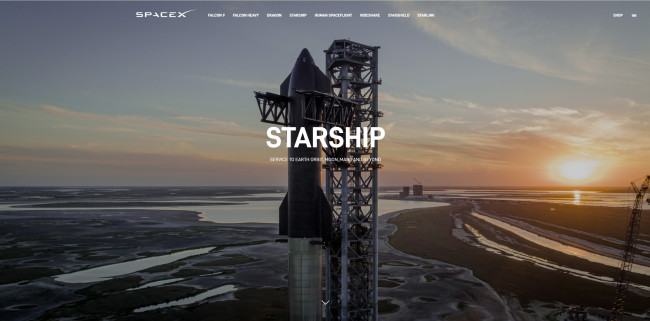
SpaceX uses scrollytelling to explain one of the most complex machines on Earth: the Starship. As users scroll, they’re guided through a clean, high-contrast layout that unpacks each stage of the spacecraft, from its engineering to its mission architecture.
Each section unfolds with subtle animations, component breakdowns, and zoomed-in visuals timed to the user’s scroll. The pacing keeps the content digestible without dumbing it down. No need for flashy transitions or noise; just smart sequencing and crisp motion that reflect the precision of the product itself.
It’s a solid example of how scrollytelling can turn technical content into something people actually want to explore, without overwhelming or oversimplifying.
What can businesses learn from it?
SpaceX’s approach is visually impressive and a smart way to explain something intricate without losing your audience. Here’s what makes it effective and how you can apply the same principles:
- Break down complexity with structure: Use scrollytelling to guide users through information step by step, especially when explaining technical or multi-layered topics.
- Use pacing to your advantage: Control the flow of information with scroll-triggered reveals — giving users time to absorb each part before moving on.
- Design with purpose: Let every interaction support clarity. Don’t animate for the sake of movement — animate to focus attention, explain, or reinforce key ideas.
3. Vino Bianco: A Tasteful Storytelling Experience
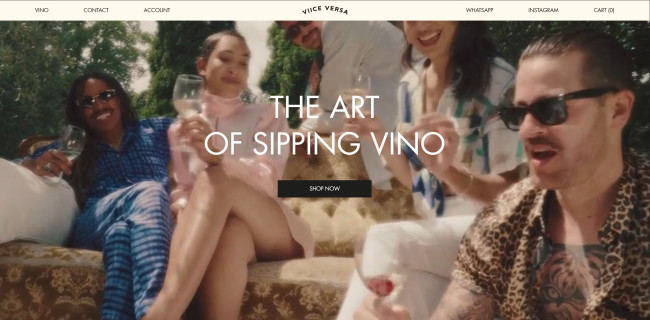
Vino Bianco blends scrollytelling with brand storytelling to create something that feels more like a journey than a product page. As you scroll, you’re taken through the wine’s origin, production methods, and tasting notes, each part unfolding with clean transitions, elegant typography, and rich imagery.
The animations are subtle but intentional. Grapes float into view, maps gently slide to highlight regions, and text fades rhythmically without stealing focus from the story itself. It’s immersive without being overwhelming.
What makes it stand out is how well the design reflects the product: refined, deliberate, and built around experience. It’s scrollytelling that informs and creates mood.
How does this approach translate to brand value?
Vino Bianco’s scrollytelling execution offers clear lessons for lifestyle, eCommerce, and direct-to-consumer (DTC) brands aiming to elevate how they present products online:
- Make your design reflect your brand: The visual rhythm and aesthetic of Vino Bianco mirrors the sophistication of the product, reinforcing identity and brand perception.
- Use storytelling to go beyond specs: By showing the wine’s origin and journey through scrollytelling, the experience becomes more than a sales pitch — it becomes a narrative.
- Create immersion with subtlety: The micro-interactions and light motion design add dimension without overpowering the message — ideal for brands where mood and tone are part of the value.
Where Scrollytelling Fits Best: Industries and Use Cases
Scrollytelling's unique blend of narrative and interactivity makes it a versatile tool across various industries. Here are some sectors where scrollytelling has been effectively utilized:
- Technology and SaaS: Tech companies often employ scrollytelling to simplify complex products or services. By guiding users through features and benefits interactively, they enhance user understanding and engagement. For instance, interactive product walkthroughs can demonstrate software functionalities in a user-friendly manner.
- eCommerce and DTC brands: In the competitive eCommerce landscape, DTC brands leverage scrollytelling to create immersive shopping experiences. By narrating their brand story or showcasing product journeys, they foster a deeper connection with consumers. This approach not only highlights product uniqueness but also enhances brand loyalty.
- Healthcare: Healthcare organizations utilize scrollytelling to map patient journeys, illustrating the stages from diagnosis to treatment. This visual storytelling aids in identifying areas for improvement in patient care and enhances communication between providers and patients.
- Travel and tourism: Destination marketers use scrollytelling to transport potential travelers to various locales digitally. Through rich visuals and narratives, they evoke emotions and inspire visits by showcasing the unique aspects of destinations.
- Nonprofits and advocacy groups: Nonprofit organizations harness scrollytelling to share compelling stories that highlight their mission and impact. By engaging supporters emotionally, they drive donations and volunteerism. Visual storytelling techniques effectively communicate complex issues and the organization's role in addressing them.
Why Businesses Are Investing in Scrollytelling

Scrollytelling is a proven way to improve engagement, deliver information more effectively, and strengthen brand perception.
According to Bradley, when brands use scrollytelling to present their stories, products, and services in an immersive way, they’re able to capture user attention and spark deeper interaction. He notes that “when executed thoughtfully, scrollytelling certainly can simplify complex information, making it more digestible and memorable for visitors.”
Here’s why businesses are investing in scrollytelling:
Drives Higher Engagement
Users typically leave websites within 10–20 seconds unless they’re hooked. But well-executed scrollytelling breaks that pattern.
- “Snow Fall” by The New York Times kept users engaged for an average of 12 minutes — far longer than the typical bounce window.
- According to a 2015 Infogram and DC Thomson study, articles with interactive data visuals saw a 62% increase in average dwell time and a 317% boost in scroll depth.
- At Imperial College London, multimedia storytelling led to 50% longer reading times than standard articles.
These stats show that interactive formats draw and hold attention, encouraging users to engage deeply with content.
Enhances Brand Storytelling
Scrollytelling presents information and creates experiences that enhances brand storytelling. One of the strongest examples comes from Honda UK, which redesigned its content hub The Engine Room using the Shorthand platform to better showcase its stories around innovation, motorsport, and culture:
The results showed how effective brand storytelling can directly drive performance:
- 85% increase in average dwell time
- 47% lift in click-through rate to the main website
- 600% growth in newsletter subscriptions
- 32% improvement in ROI, measured by traffic and business value
Boosts Conversions on Key Pages
Scrollytelling is a form of interactive content and interactive content delivers results. Reports reveal that:
- Interactive formats like scroll-based scrollytelling increase engagement rates by up to 80%.
- Time on site is extended by an average of 47% compared to static content.
- Conversion rates climb by 30–40%, especially for personalized or utility-driven experiences.
According to Bradley, successful scrollytelling starts with user-centric design. Brands should “prioritize the needs and preferences of their target audience,” ensuring that visual elements enhance rather than complicate the experience.
He also emphasizes the importance of a clear narrative structure — one that logically guides users through the story toward a specific action. “Lastly,” he adds, “strategically placed call-to-actions are key. CTAs should be clear and compelling, integrated seamlessly into the storytelling flow to encourage conversions without disrupting the experience.”
Is Scrollytelling Right for Your Business?
Not every brand needs or benefits from scrollytelling. Before investing time and resources into building an interactive narrative, ask the following:
When It Makes Sense
- You need to explain something complex: Scrollytelling helps simplify multi-layered or technical topics in an intuitive, visual way.
- You want to evoke emotion or build narrative depth: Ideal for brand campaigns, cause-driven messaging, or storytelling around product origin and purpose.
- You're launching something worth exploring: Product launches, new initiatives, and immersive experiences benefit from scroll-triggered control.
- You have the bandwidth to execute: This format takes more planning, creative development, and testing than a static landing page.
When To Think Twice
- The message is simple and transactional: If your goal is a quick click or form fill, scrollytelling might overcomplicate the user journey.
- You don’t have strong visual assets: Without high-quality visuals or motion design, scrollytelling can feel underwhelming.
- You're tight on time or budget: Good scrollytelling requires more time, tech, and creative than standard content.
Scrollytelling: Final Thoughts
Scrollytelling helps businesses explain better, show more, and hold attention longer. For teams working with complex websites, ideas or high-consideration products, it’s a practical way to create clarity and depth.

Our team ranks agencies worldwide to help you find a qualified partner. Visit our Agency Directory for the Top Web Development Companies, as well as:
- Top Backend Development Companies
- AI Web Design Agencies
- Top Front End Web Development Companies
- Top UI/UX Design Agencies
- Top Web Development Companies in Chicago
Our design experts also recognize the most innovative design projects across the globe. Visit our Awards section to see the best in web design.
Scrollytelling: FAQs
1. How long does it take to build a scrollytelling experience?
It depends on complexity. A simple, no-code scrollytelling page can be built in days. More custom, animated experiences may take several weeks from concept to launch, especially if they involve scripting, design, and testing.
2. Do I need custom code to implement scrollytelling?
Not necessarily. Tools like Webflow and Shorthand let you create scroll-based animations without writing code. But for advanced features or highly customized behavior, front-end development using JavaScript libraries like GSAP may be needed.
3. Can scrollytelling be used on mobile?
Yes. When designed responsively, scrollytelling works well on mobile. Just make sure to optimize animations and content layout for smaller screens, and test scroll behavior across devices to avoid lags or glitches.