
A parent opens twelve tabs over three weeks, a prospective student checks the tuition page at eleven at night, and a district administrator forwards a link to four colleagues who each look for something different. Your site answers all of them with nobody from your institution in the room.
The 15 education website designs below run in order of who they teach, starting at preschool and moving through K-12, community college, university, and corporate training before reaching museums, foundations, and public knowledge work. Find your segment, read the two on either side of it, and take the mechanism instead of the palette.
Educational Website Design: Key Findings
- DesignRush web design pricing data puts education website projects at $5,000 to $40,000+, a band covering learning management systems, course catalogs, student portals, and accessibility work.
- The Department of Justice's Title II rule makes WCAG 2.1 Level AA enforceable for public school districts and public universities, with compliance dates of April 26, 2027 and April 26, 2028.
- WebAIM's 2026 Million report found detectable WCAG failures on 95.9% of the top million homepages, up from 94.8%, with low-contrast text on 83.9% of them.
What Makes a Good Educational Website Design?
A good educational website design earns trust quickly and lowers the effort of learning. The strongest ones share four traits: a clear entry point for each visitor type, proof rendered visually rather than described, interaction that teaches rather than decorates, and navigation that never makes someone hunt.
The short version: great educational design makes the next step obvious and the subject matter feel worth the time.
# | Website | Built by | Segment | Standout feature |
1 | Storm Brain | Early childhood | Logo filled with real student photos | |
2 | Mighty | K-12 private | Two-color palette, video hero | |
3 | Netzbewegung GmbH | K-12 curriculum | Chat-app learning interface | |
4 | eDesign Interactive | Community college | Career-pathway navigation | |
5 | Orbit Media Studios | Professional university | Program-categorized mega menus | |
6 | ELITE DIGITAL | University faculty | Interactive campus-exploration cards | |
7 | Digital Silk | Private university | Three header CTAs for three audiences | |
8 | Negm Designs | Language learning | Arch-shaped image containers | |
9 | Electric Circus | Corporate learning | Avatar creation before first lesson | |
10 | Nahuel Gerth | Public knowledge | Two-axis timeline, color-coded by era | |
11 | Yoni Kessler & Yehuda Bruck | Science communication | Screen-splitting scroll effect | |
12 | vueloIV | Museum research | Left-to-right scroll narrative | |
13 | Output | Civic education | One assigned color per project | |
14 | Purple Bunny | Advocacy education | Sticky nav with persistent Donate | |
15 | Matteo Sacchi | Cultural institution | Horizontal one-page scroll |
How These 15 Education Website Designs Were Selected
We applied three criteria in this order:
- Audience routing. Does the site know who is reading and get them to the right depth fast? A university homepage serving an applicant, a current student, and a donor is doing three jobs at once.
- Teaching value of the interaction. Every animation, quiz, and scroll effect has to explain something. If removing it costs the visitor nothing, it was decoration.
- Proof placement. Do outcomes, accreditation, and results sit where a parent or applicant forms a judgment, or on a separate page nobody opens?
All 15 carry a DesignRush entry page, which means the design was submitted, published within seven days, and scored under a published evaluation process.
Criterion | Weight | What it measures |
Design | 30% | How well the design commands attention and elicits action |
Usability | 30% | Whether the design achieves its purpose and improves the user experience |
Creativity | 30% | Whether the design was unique and resourceful in its techniques, tools, and concepts |
Content | 10% | Whether the design was detail-oriented in execution and presentation |
Each entry is scored independently by three or more creative directors from global brands and agencies, and individual scores are published publicly.
The August 2026 jury panel runs to 81 judges across 23 countries, and anything scoring 7.5 or above is shortlisted for external review. Winners are announced on the 10th of each month.
Reviews of the DesignRush-recognized projects here were written by the DesignRush design team. That includes Branko Dimitrijević, a senior designer with 33 design awards and more than 165 web projects delivered across a 12-year career.
1. Imagine ELC by Storm Brain
Standout Features:
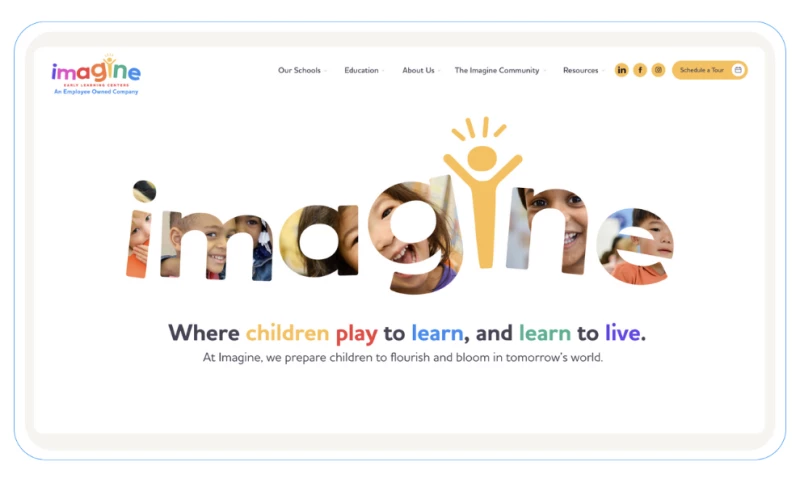
- Logo filled with real student photography
- Rounded shapes and soft shadows throughout
- Tour scheduling reachable from anywhere
Imagine Early Learning Centers runs preschool programs, which makes this the most emotional purchase on the list. Storm Brain had three jobs in one brief: attract new families, support current parents, and explain an educational philosophy without burying any of them.
The logo carries the argument. It is filled with photographs of actual students instead of set in flat type, so the emotional case lands before a parent reads a word about curriculum. Rounded shapes, soft shadows, and generous spacing keep the tone gentle, and bright accents add energy without chaos.
Navigation stays deliberately shallow. Programs, staff, values, and a tour booking each sit one step away, and a photo answers wherever a wall of text would slow things down.
In fact, effort is the constraint most education sites underestimate. Pew Research Center's April 2024 report, based on a survey of 2,531 U.S. public K-12 teachers, found that 84% say they lack enough time during regular work hours for grading, lesson planning, paperwork, and email. Any interface aimed at that audience is competing with a schedule already over capacity.
Why it works: A parent has already decided they need childcare by the time they reach you. What they are deciding now is whether to trust you with a four-year-old, and photographs of real children answer that faster than any paragraph about curriculum.
Read more in our full Imagine ELC design analysis.
2. UMS-Wright Preparatory School by Mighty
Standout Features:
- Two colors only, royal red and white
- Introductory video in the hero
- Chronological history section on the About page
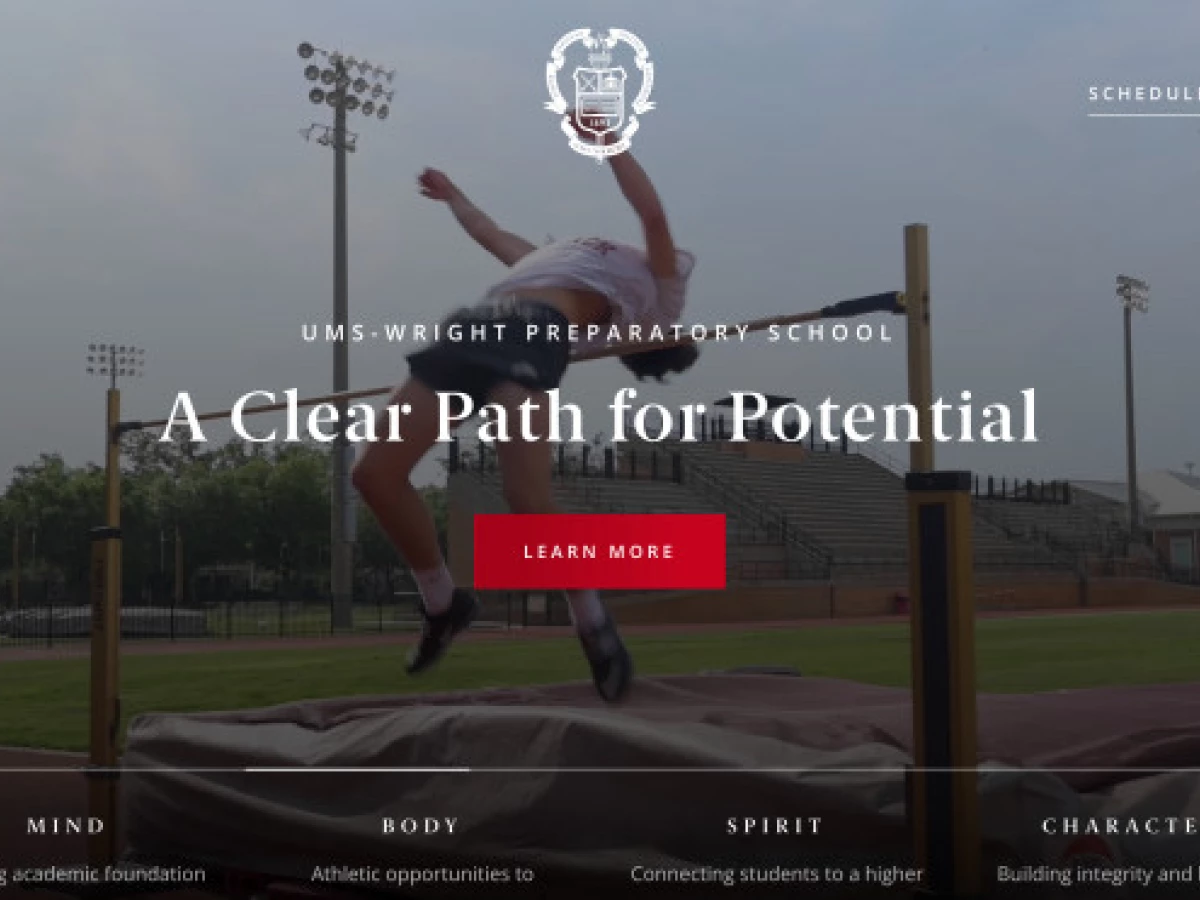
UMS-Wright Preparatory School sells on legacy and outcomes, the opposite of what a new academy has to argue. Its buyers are parents comparing three or four schools on reputation, and reputation is hard to render without looking pompous.
Mighty restricted the palette to royal red and white. The two colors swap between text and background section by section, producing variation without a third element, and the restraint itself reads as institutional confidence.
An introductory video opens the hero and does the work a paragraph about community would do badly. The About page then walks the school's history in order, marking each turn with a visual device, so a parent absorbs longevity as a sequence and not as a claim.
Why it works: A parent comparing four schools is reading to be convinced. The photos of the school and the chronological About page let a hundred-year record do the arguing instead. A newer competitor can buy better photography, but it cannot fake the timeline.
3. Planet Schule Klima Challenge by Netzbewegung GmbH
Standout Features:
- Chat-app learning interface
- Rotatable globe as topic navigation
- Points and badges tied to short video lessons
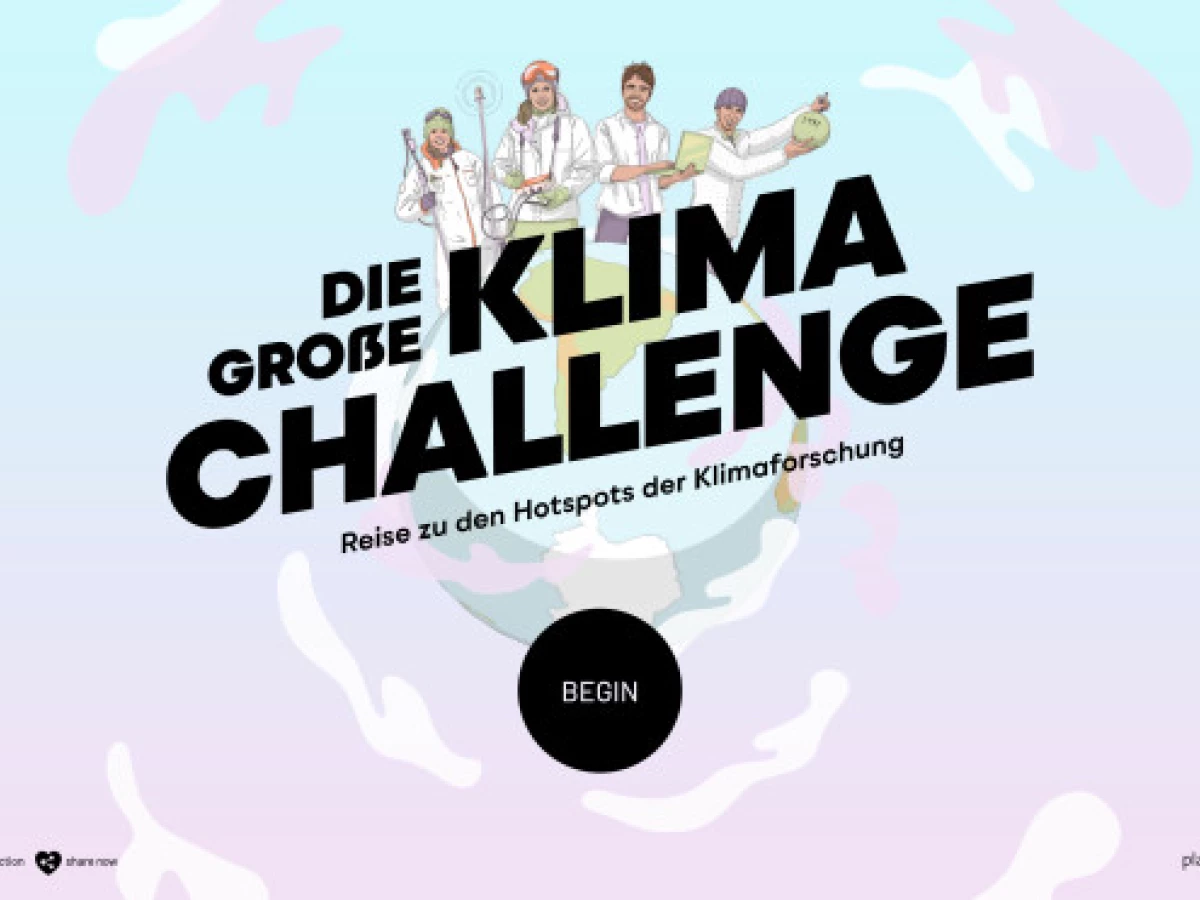
Planet Schule Klima Challenge teaches climate research to school-age students, and its real customer is a teacher deciding whether to give up a lesson period. That decision gets made in about thirty seconds of clicking.
Netzbewegung dropped the curriculum layout and built the interface as a chat app. Content arrives as messages, not pages of continuous text, matching a format the audience already reads fluently.
Navigation runs through a rotatable globe with four regions. A student picks an area, watches short video lessons, then answers a quiz that awards points and badges, so assessment sits inside the flow instead of at the end.
Why it works: With 84% of U.S. public K-12 teachers reporting insufficient time in Pew's 2024 survey of 2,531 teachers, a platform that grades itself removes work instead of adding it. That is the difference between a tool a teacher adopts and one they open once.
4. County College of Morris by eDesign Interactive
Standout Features:
- Programs organized by career pathway
- Lime-yellow numerals on deep navy for institutional data
- Rounded modular blocks on alternating backgrounds
County College of Morris is a community college in Randolph, New Jersey, and many of its applicants are first in their family to enroll. They are not comparing prestige. They want to know whether a specific job is reachable from here.
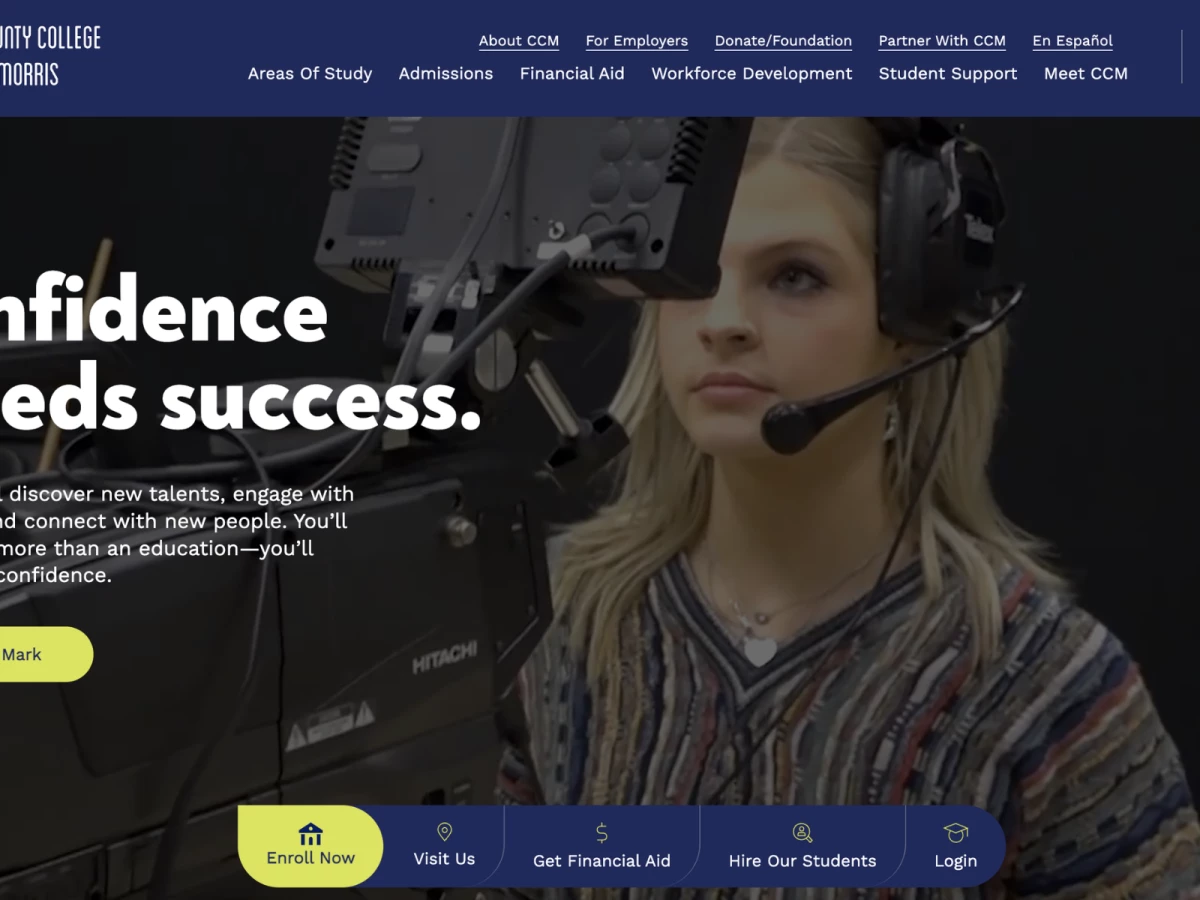
eDesign Interactive organized programs around career pathways instead of academic departments. The left-hand list presents fields of study in a scannable column, so a prospective student browses by the outcome they want and never has to learn the org chart the college happens to run.
A full-width hero video of students across different fields opens the homepage, with a darkened overlay keeping white sans-serif headlines legible over the motion.
Lime-yellow anchors the call to action and returns as oversized numerals on deep navy for graduate counts and program totals. Content then sits in rounded modules alternating navy and light backgrounds, a system the college's own team can extend without the layout drifting.
Why it works: A first-generation applicant does not know that Communication Studies sits in one school and Media Production in another. Career-pathway navigation deletes that step.
Read more in our full County College of Morris design breakdown.
5. Chamberlain University by Orbit Media Studios
Standout Features:
- Mega menus that carry program context
- Programs categorized by career goal
- Flat iconography breaking up dense text
Chamberlain University trains nurses and healthcare professionals, an audience that arrives with a credential in mind and a licensing requirement attached to it. The site has to move someone from a vague intention to a named program without a phone call.
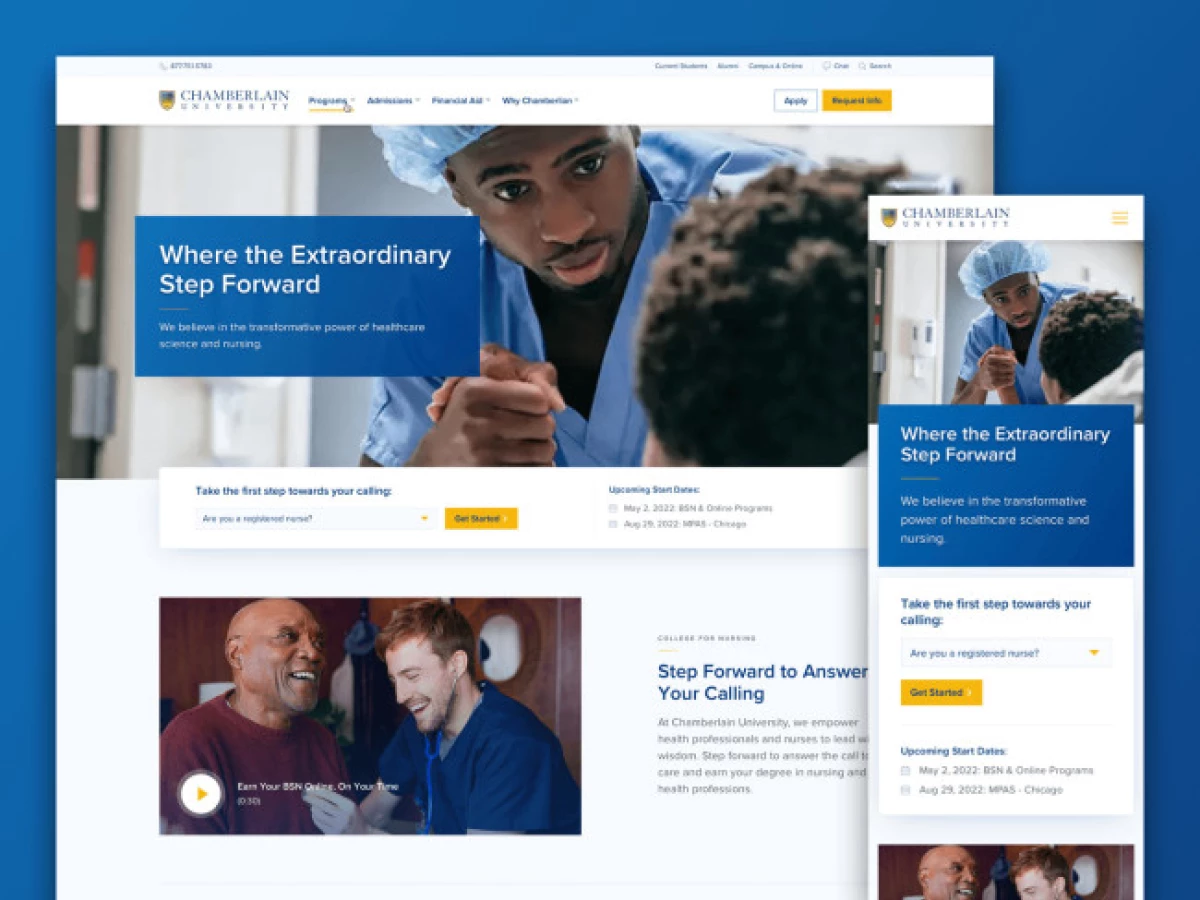
Orbit Media Studios built the program architecture around what a prospective nurse is trying to become, not around how the university files its offerings. Categorization is the design here, and it is why a visitor reaches the right degree page in one or two clicks.
The drop-downs do more than list destinations. Each carries short notes on the value of studying there, so the menu argues while the visitor is deciding where to go, and flat icons break up the text density that program-heavy sites accumulate.
Why it works: Nursing applicants arrive with a licensing requirement attached, so landing on the wrong program page is a wasted visit and not a browsing detour. Categorizing by credential gets them to the right one in two clicks.
6. McMaster University, Faculty of Humanities by ELITE DIGITAL
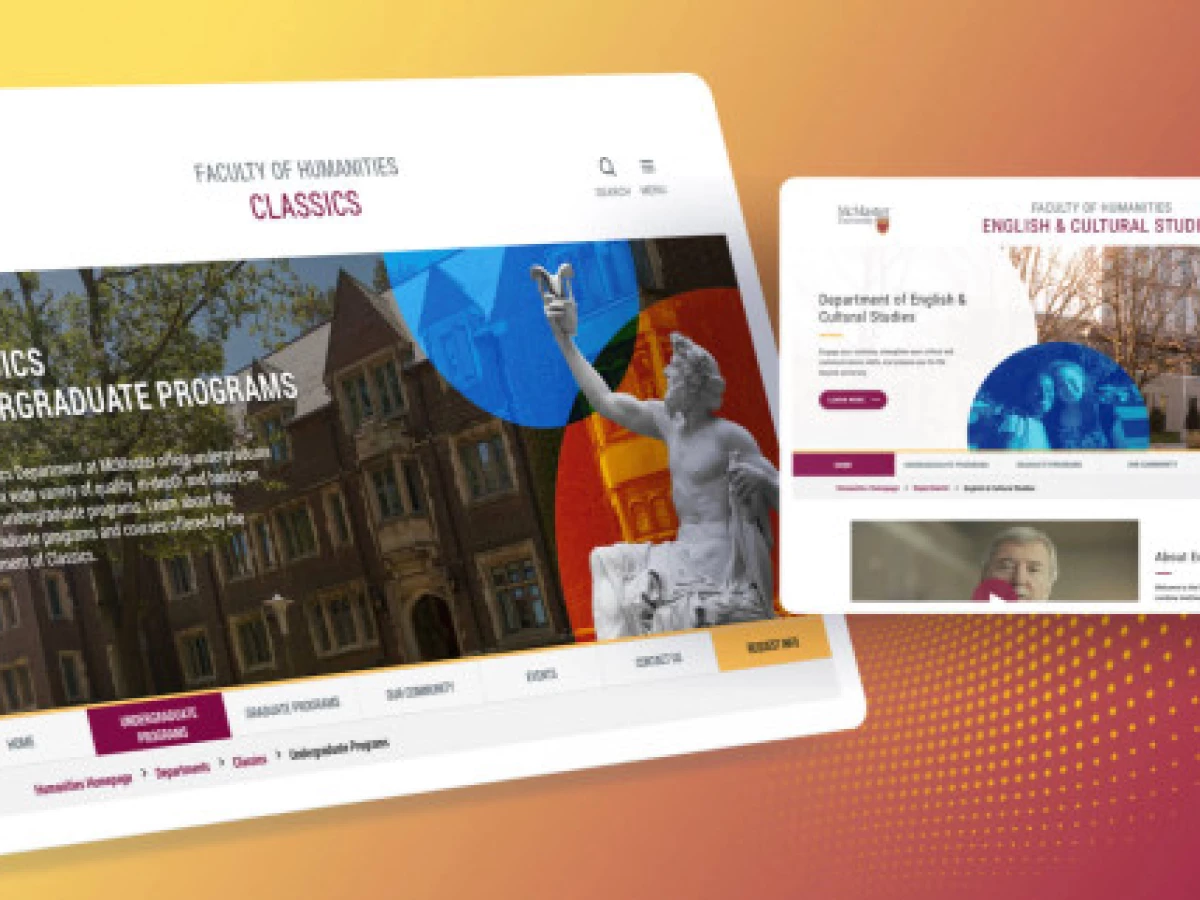
Standout Features:
- Bright spectrum tempered by muted purple and mustard
- Interactive cards for campus exploration
- Navbar sitting directly beneath the hero
A humanities faculty has a positioning problem a business school does not. It has to read as intellectually serious to faculty and funders and as alive to an eighteen-year-old choosing between programs. Most university subsites pick one and lose the other.
ELITE DIGITAL resolved it in the palette. A spectrum of bright colors is held in check by muted purple and mustard yellow, so the site registers as energetic at a glance and as considered on a second look.
Campus exploration runs through interactive cards, each carrying a large minimalist icon that stands for a category of information. The navbar sits directly beneath the hero banner instead of floating at the top, putting the browsing options where the eye already is. Video appears as a section and not as a background, so faculty life gets airtime without hijacking the load.
Why it works: Holding a bright spectrum against muted purple and mustard lets the page read as serious to a funder and as alive to a seventeen-year-old, without either group seeing a compromise.
7. Unity Environmental University by Digital Silk
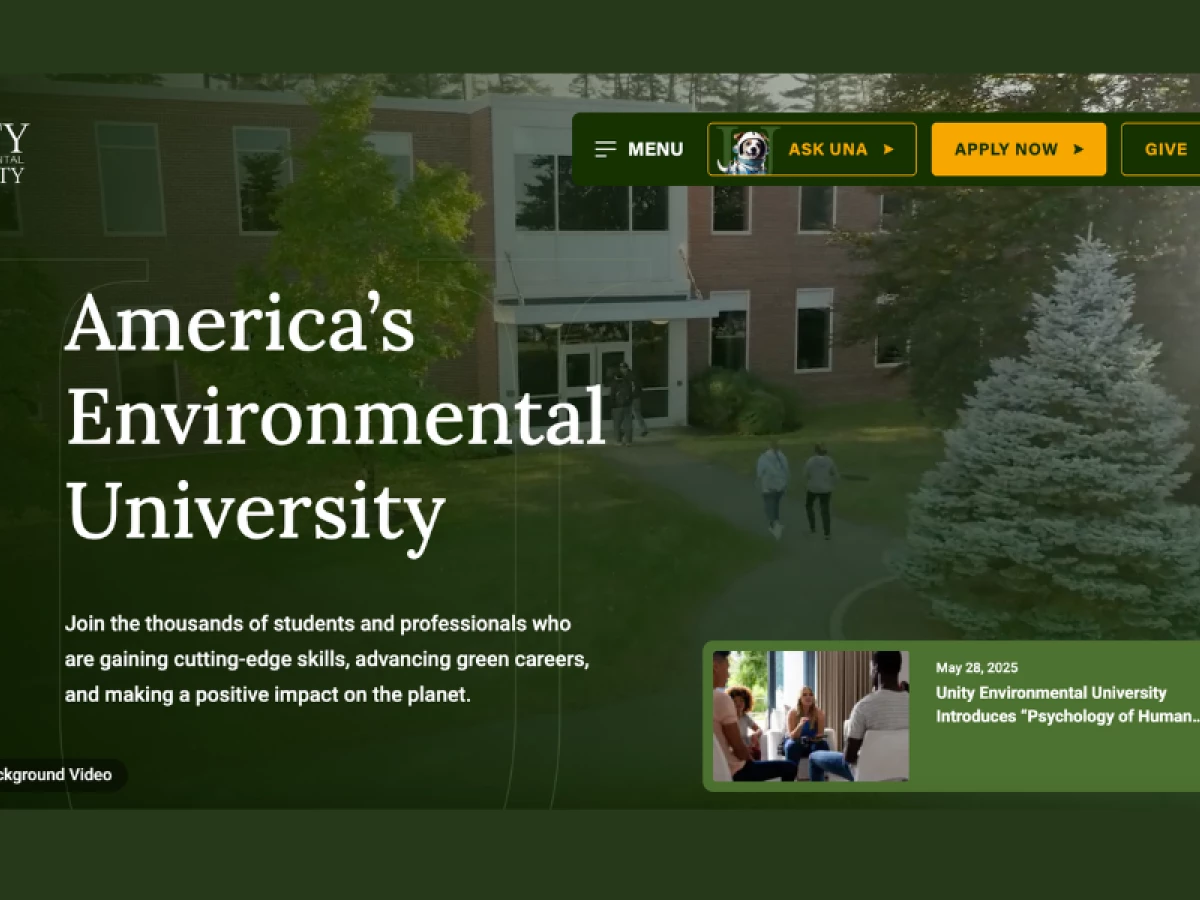
Standout Features:
- Three header CTAs for three audiences
- User-controlled background video
- Outcome cards with plain-language captions
Unity Environmental University is a private institution built around environmental science, and its homepage holds applicants, current students, and donors at once. Most universities bury each audience behind a mega menu and hope the right person digs.
Digital Silk put the routing in the header. Apply Now, Ask Una, and Give sit side by side above the fold, so three visitor types self-select in the first second instead of the first minute. Forest green, leaf silhouettes, and organic shapes state what the school stands for before a word of copy is read.
The hero video is user-controlled, not autoplaying, which is both a courtesy and a baseline accessibility behavior. Outcome cards then carry employment rates, enrollment figures, and graduate results, each with a one-line explanation of what the number means. Ask Una gives a prospective student a way to ask something without picking up a phone.
Why it works: An applicant, a current student, and a donor each want a different page, and a mega menu makes all three dig for theirs. Three header actions resolve that in the first second, which is the only second you reliably get.
Read more in our full Unity Environmental University design review.
8. Enkidu Linguist Solutions by Negm Designs
Standout Features:
- Full-width video hero with darkened overlay
- Animated credibility counters
- Arch-shaped image containers
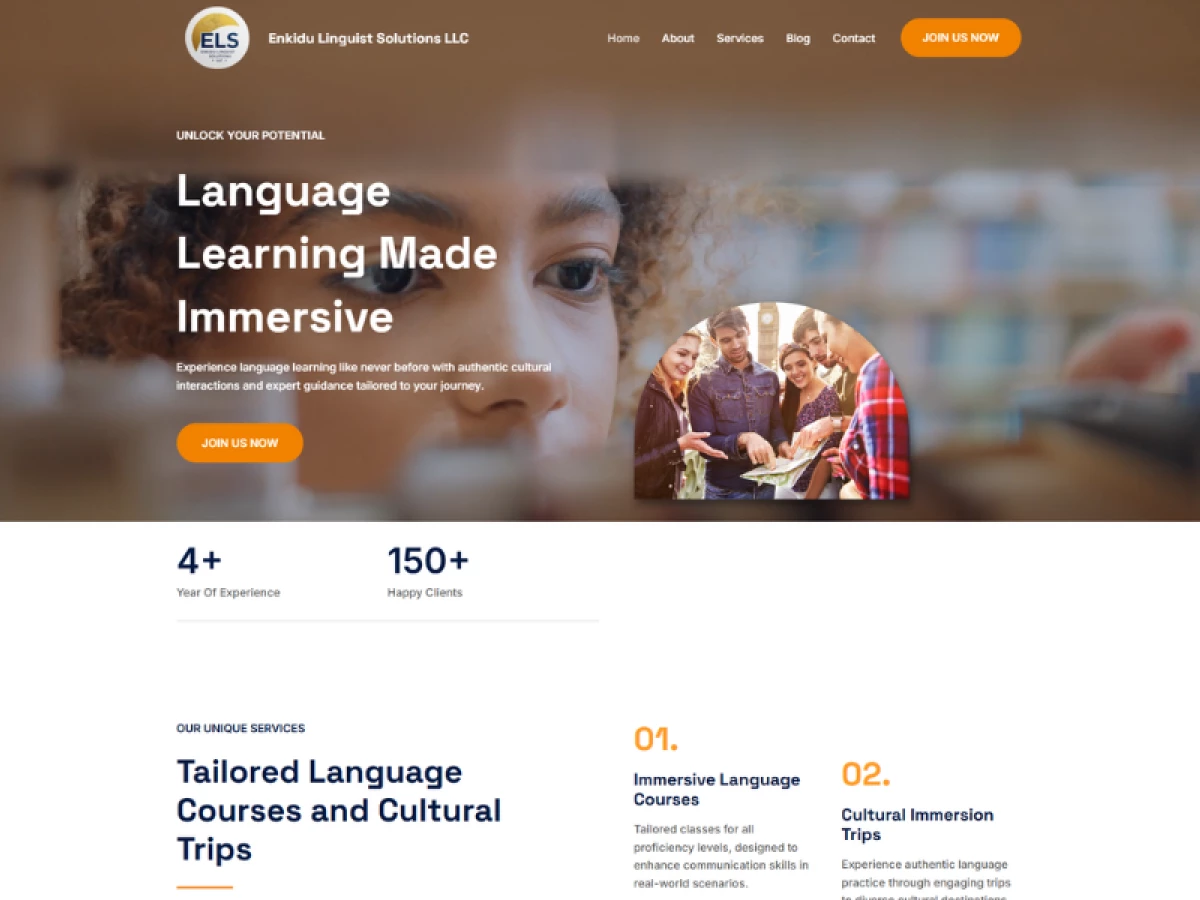
Enkidu Linguist Solutions teaches languages, where the product is an experience nobody can evaluate from a feature list. A prospective learner wants to know what a session feels like before they consider what it costs.
Negm Designs opened each primary page with a full-width hero carrying video or photography: learners, cultural landmarks, white sans-serif taglines over darkened overlays. The overlay does real work, keeping headline copy legible over footage that never stops moving.
Animated counters sit below the hero, counting up years of experience and client totals as the visitor scrolls. Those numbers are claims the business displays about itself, not verified figures, which is worth knowing before you copy the pattern. Arch-shaped containers frame every image, and that one repeated shape is what keeps a photography-led build from reading as stock.
Why it works: Language tuition is bought on how a lesson feels, which a feature list cannot convey and a testimonial only half-conveys. Opening on footage of actual learners answers the question the visitor arrived with.
Read more in our full Enkidu Linguist Solutions design analysis.
9. DHL Global Learning Game Hub by Electric Circus
Standout Features:
- Avatar creation before the first lesson
- Scenarios modeled on real DHL operations
- Regional leaderboards alongside individual progress
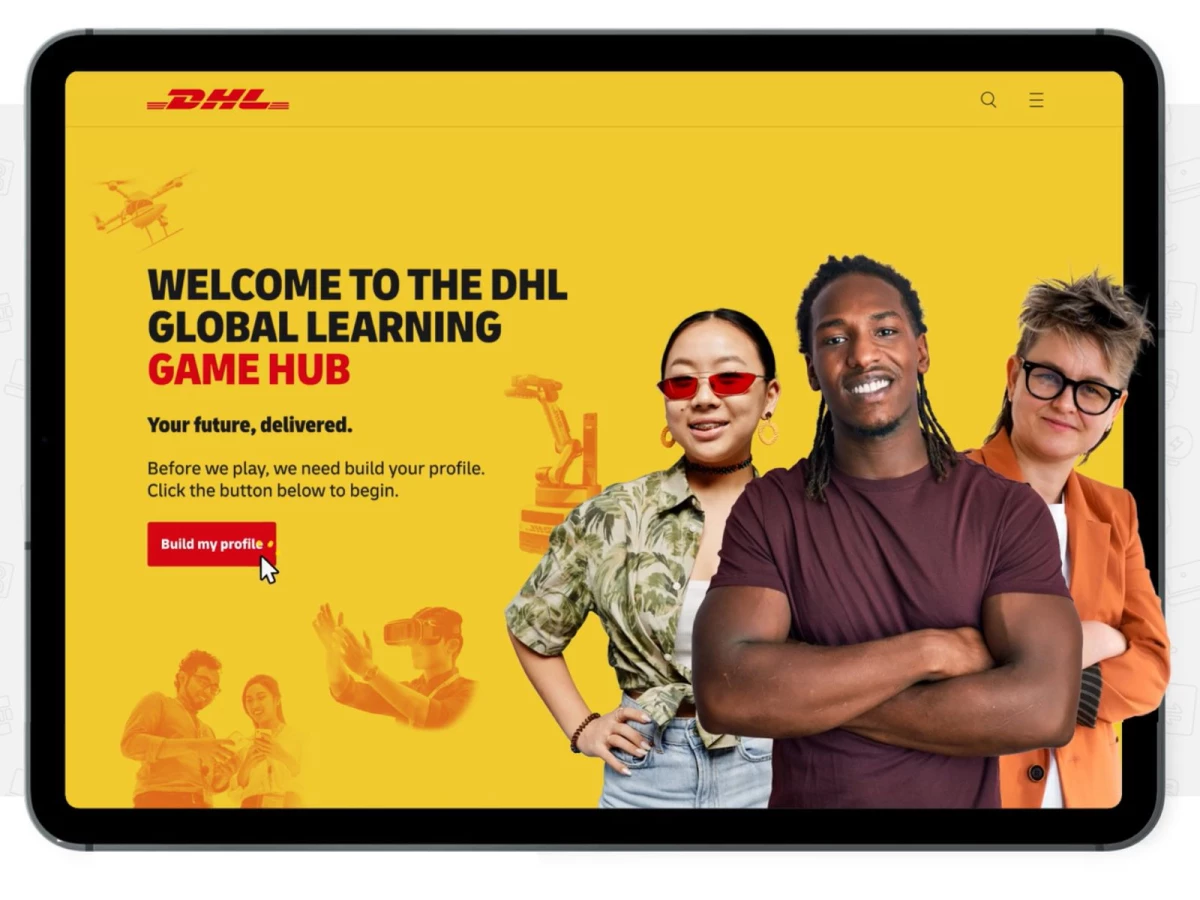
DHL needed a better way to deliver mandatory training to a global workforce, and mandatory is the hardest word in that sentence. Compliance training is content people are required to finish and motivated to skip.
Electric Circus opened with avatar creation. Employees customize appearance and background before entering the platform, so the first interaction is a choice and ownership is established before any learning is asked for.
Training then arrives as short games, quizzes, and scenarios built on real DHL operations, with points and streaks inside the gameplay instead of layered on a slide deck. DHL's yellow and red anchor the interface while friendly illustration softens the corporate register. The platform connects to DHL's existing Cornerstone LMS, which is what kept it from becoming a second system nobody logs into.
Reported outcome (agency-reported, engagement metrics):
- More than 10,000 training completions in under a year
- Average engagement time above five minutes
- 21% of users returning to replay games
Read more in our full DHL Global Learning Game Hub breakdown.
10. Human Things by Nahuel Gerth
 Standout Features:
- Timeline running on two axes
- Era-specific color and visual vocabulary
- Click-to-trace event animations
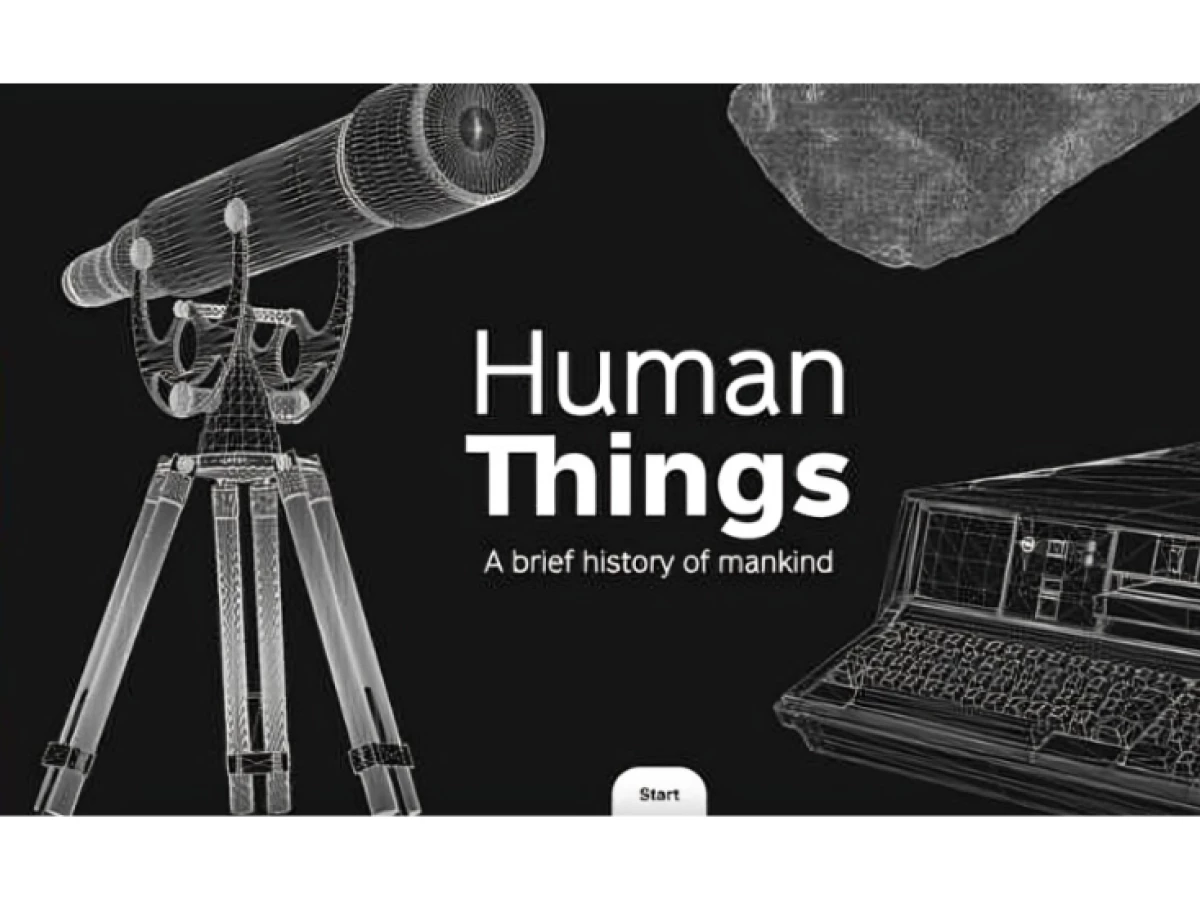
Human Things catalogs human achievement from prehistory to now, which is 300,000 years of material and no natural stopping point. The problem is holding attention across a subject with no product, no price, and no call to action.
Nahuel Gerth built a timeline that moves horizontally and vertically at once. Each era carries its own color and a visual vocabulary borrowed from the period, so a visitor knows which century they are in without reading a date label.
Individual events sit behind horizontal buttons within each era. Clicking one plays an animation tracing the line back to the previous breakthrough, turning a list of facts into a chain of consequences.
Gerth has designed for scientific institutions and museums since 2013, and the restraint shows: the motion explains a relationship and never announces itself.
Why it works: A site with no product and no call to action can only be judged on whether people keep going. Color-coding each era means a visitor always knows where they are, and the click-to-trace animation gives them a reason to reach the next one.
More work in this vein sits in our interactive website designs collection.
11. The Quake by Yoni Kessler & Yehuda Bruck
Standout Features:
- Screen-splitting scroll effect
- Rotating globe divided into nine tectonic plates
- Safety-tip carousel as the closing section
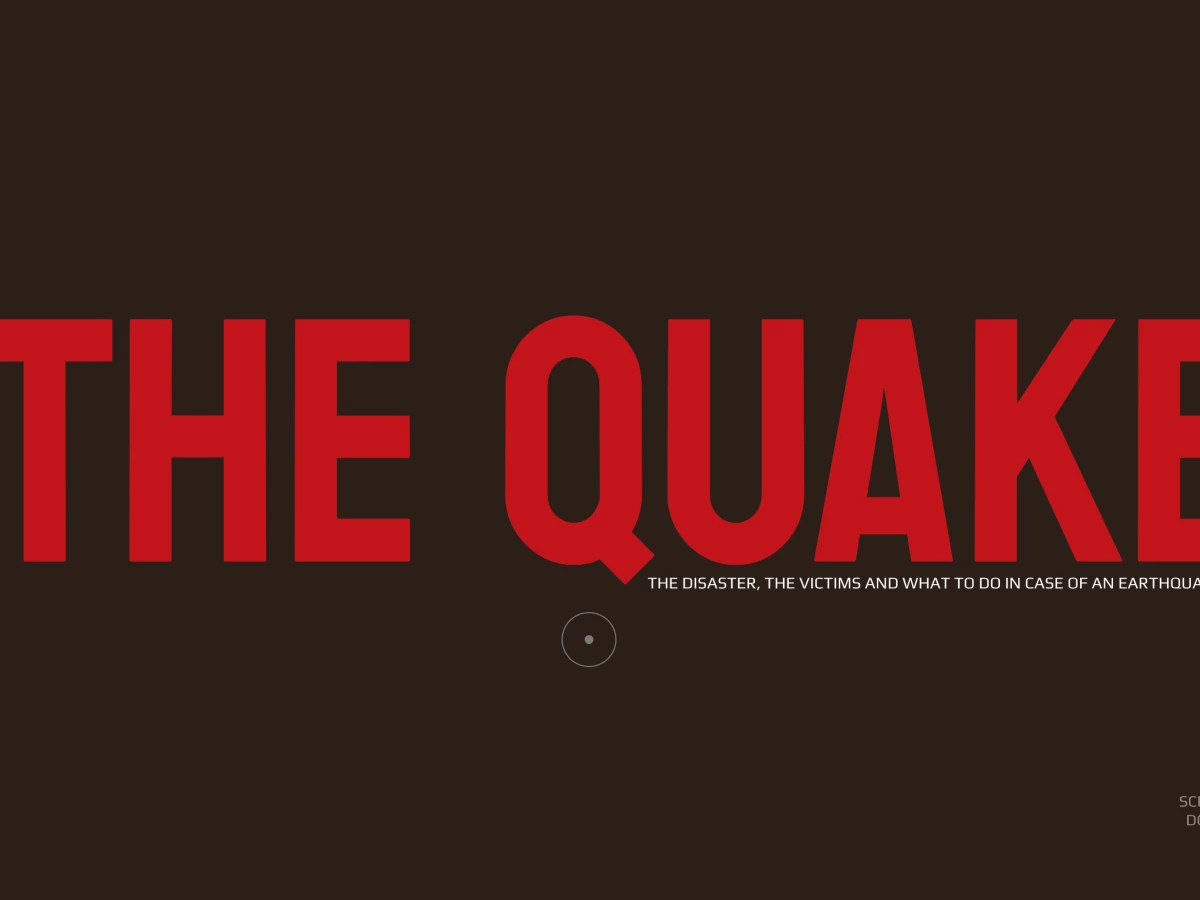
The Quake is a single-page explainer about earthquakes, built to make a distant geological process feel immediate. It opens with two bold words centered on a plain brown field and nothing else, a deliberate refusal to explain itself.
Scrolling makes the title shake and split the screen in two, mimicking the fault line the site is about. Yoni Kessler made the effect the argument itself, and it lands before any copy has to work.
The science follows in visuals: a rotating globe divided into nine tectonic plates, a world map with red alarm markers, and a working Richter scale simulation. Full-screen photography then shows consequences the data cannot. Yehuda Bruck and Kessler close on five safety tips in a carousel, each with one line to remember under stress.
Why it works: Public science writing usually loses people at the paragraph where the mechanism gets explained, long-form. Showing the mechanism in an interactive, visual way is novel and engaging.
Read more in our full The Quake website design analysis.
12. Stories of Clay by vueloIV
Standout Features:
- Background shifting from black to light as you scroll
- Left-to-right scroll direction
- Interactive origin map with clickable sites
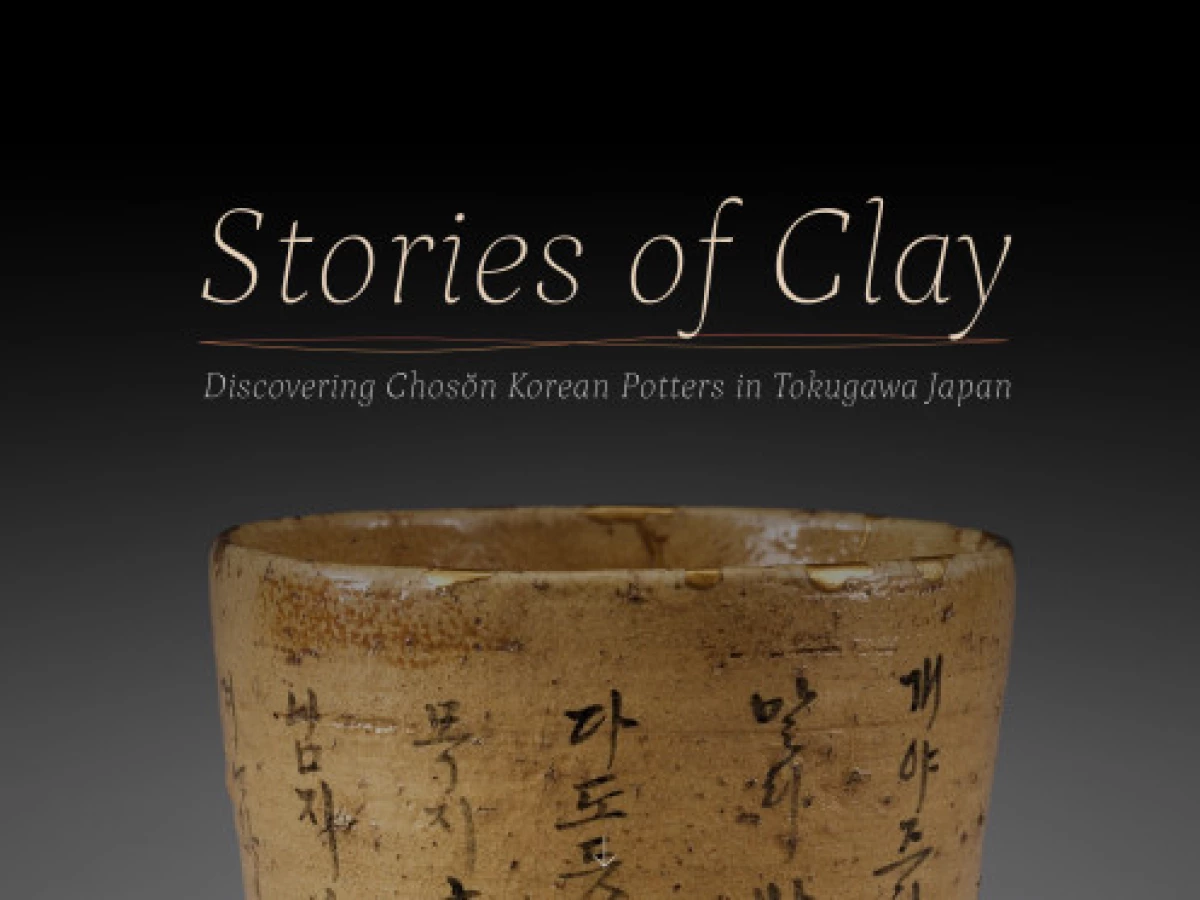
Stories of Clay presents archaeological research on ancient pottery, a subject with genuine depth and almost no natural visual drama. The landing page opens on a single lit clay pot against gray, and the restraint is what makes the object read as valuable.
vueloIV runs the narrative on background color instead of section headers. The field moves from pitch black to light hues as the story progresses, so the visitor feels the chronology before tracking it consciously.
Scrolling moves left to right, which forces a slower read on material that rewards one. An interactive map with clickable locations lets a visitor jump to a specific site and read where that pottery came from, turning a linear essay into a reference someone can return to.
Why it works: Academic research is normally published as a PDF nobody outside the field opens. Moving the background from black to light gives a chronology a reader can feel, and the clickable origin map turns a linear essay into something a student can cite one section of.
More work in this vein sits in our museum website designs collection.
13. Alfred Landecker Foundation by Output
Standout Features:
- One color assigned per project
- Full-screen video message on entry
- Hover states that invert panel color
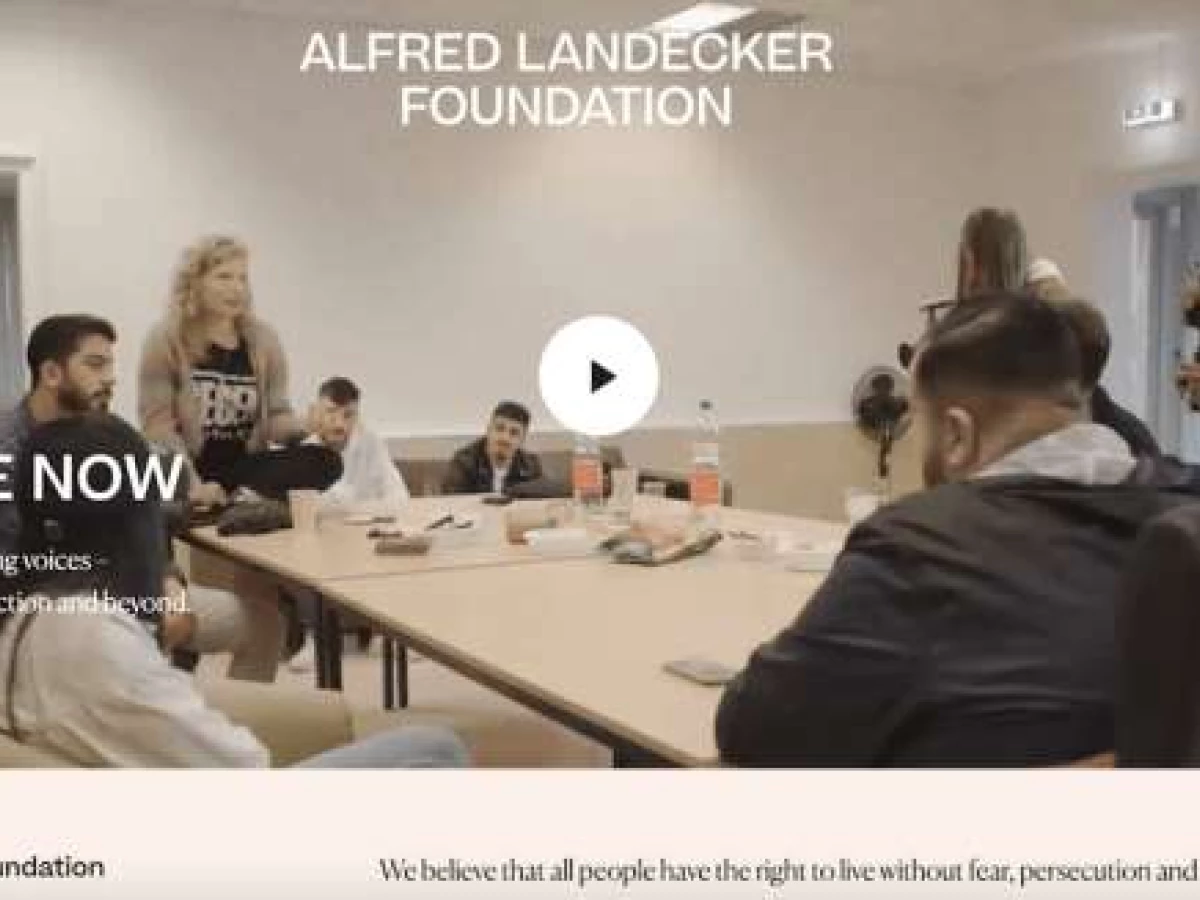
The Alfred Landecker Foundation works against antisemitism and discrimination and describes its purpose as promoting the development of democratic societies. Its site carries heavy subject matter to grant applicants, researchers, journalists, and the public at the same time.
Output built it around a low-key base palette interrupted by colorful mission blocks. Each project, whether protecting minorities or strengthening democracy, gets an assigned color, so a returning visitor navigates by hue and never re-reads the menu.
A full-screen video message opens on current initiatives, and a hamburger icon opens a categorized panel explaining the organization's purpose and background. Hovering a "What We Do" box inverts its color, confirming the interaction without animation, while a highly legible sans-serif handles retention over personality.
Why it works: Contentsquare's 2026 benchmark found 13% of visitors return within 30 days, and those repeat visitors now account for the majority of traffic, engagement, and conversions on many sites. A color system that lets a returning visitor skip the menu is built for the audience that actually carries the numbers.
More work in this vein sits in our nonprofit website designs collection.
14. Youth Justice Network by Purple Bunny
Standout Features:
- Purple, yellow, and white palette held site-wide
- Bite-sized messaging blocks with paired CTAs
- Sticky nav ordered by the path a visitor takes
Youth Justice Network supports young people moving through the justice system, and two audiences arrive with opposite needs. Someone seeking help wants the shortest path to a service, while a donor wants the case for giving.
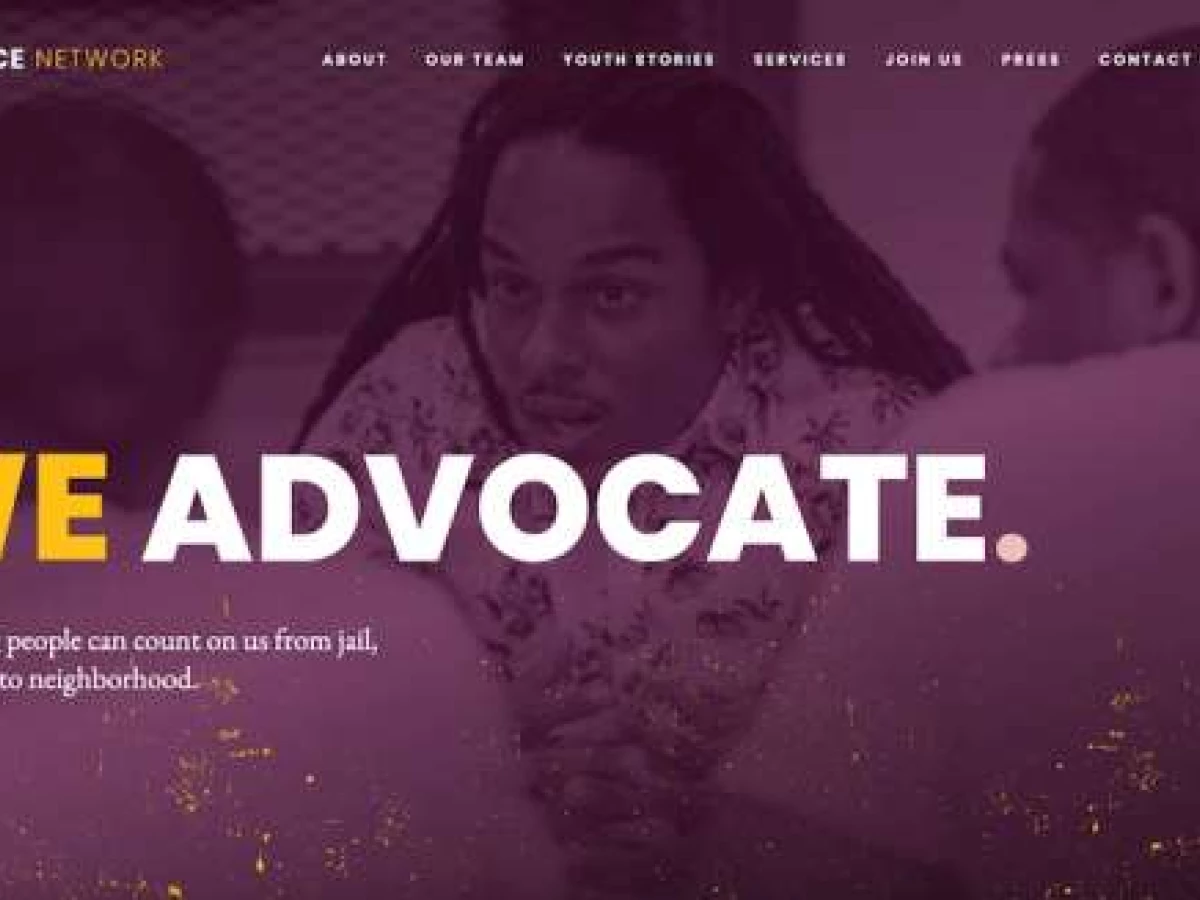
Purple Bunny holds a purple, yellow, and white palette across every page, giving an organization with several programs one recognizable surface. Purple-tinted photography of young protestors opens the homepage beside illustrated statistics on racial justice in the US.
Messaging arrives in short blocks, each with a call to action pointing somewhere specific: donate, get involved, find support. Buttons animate with a yellow sliding fill on hover, the persistent Donate button stays in the sticky navigation, and the nav links follow the path a visitor takes through the organization.
Why it works: A young person looking for help and a donor looking for a cause need opposite things from the same page, and a site that hedges serves neither. Short blocks with one action each mean nobody has to read past what applies to them.
15. Palazzo Monti by Matteo Sacchi
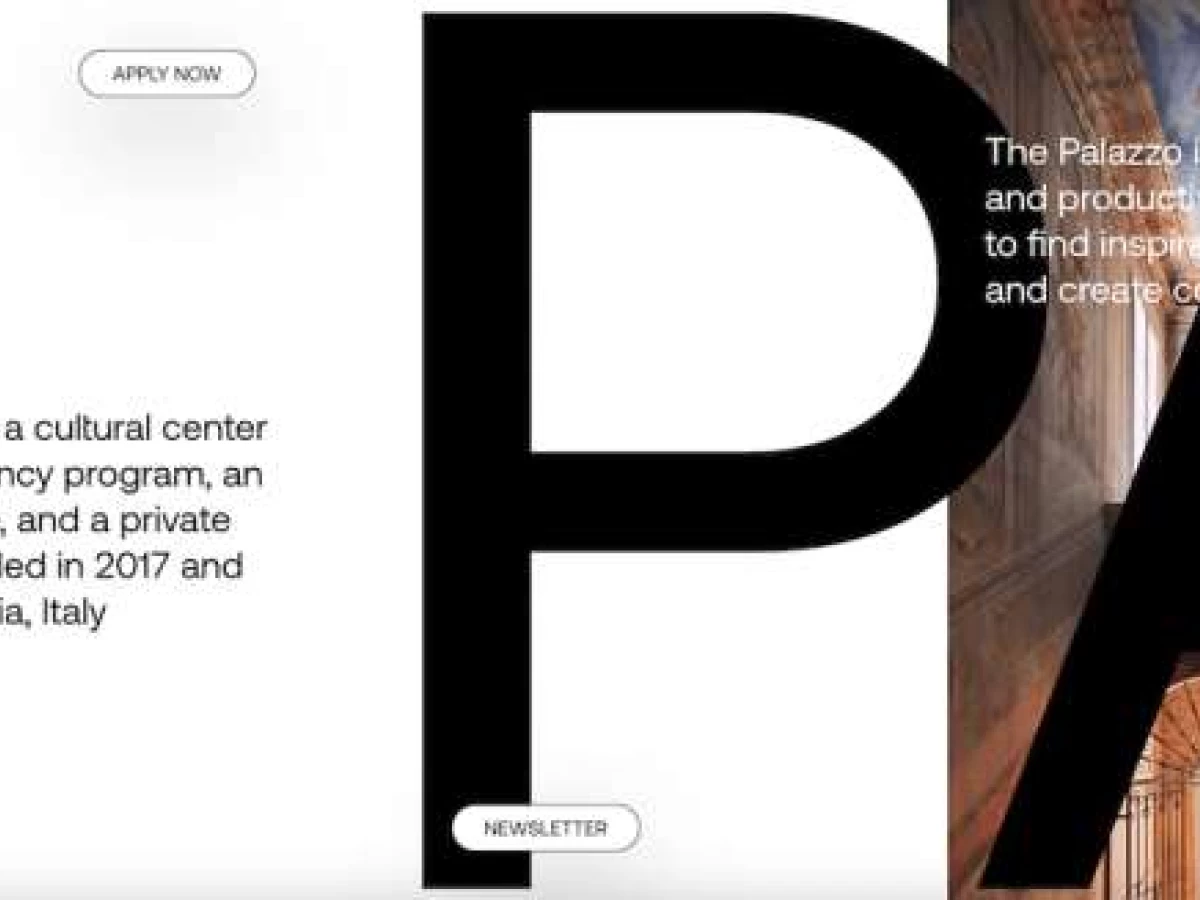
Standout Features:
- Horizontal scroll with no main menu
- Screen-height wordmark visible through content gaps
- Two sticky CTAs as the only navigation
Palazzo Monti is a cultural center and artist residency in Brescia, Italy, holding an exhibition space, a private collection, and a library. Its audience is artists deciding whether to apply, a single decision the whole site exists to support.
Matteo Sacchi built it as one horizontally scrolling page with no main menu. The "Palazzo Monti" wordmark runs at screen height across the full length of the site, appearing through the gaps between content blocks, so the brand is the substrate the content sits on.
White background and black type give colorful exhibition photography room to surprise as the visitor moves sideways, while section names appear at the bottom of the screen as About, Who, Press, and Artists pass by. Two sticky buttons, Apply Now and Newsletter, are the only persistent navigation.
Why it works: The HTTP Archive's 2025 Web Almanac found 56% of secondary pages passed Core Web Vitals on mobile against 45% of home pages. A one-page site has no secondary pages to fall back on, so everything has to pass on the page type that historically passes least often.
More work in this vein sits in our one-page website designs collection.
4 Learning Platforms Worth Studying
The 15 above are commissioned work for institutions. The four platforms below are what most people picture when they think about learning online, and each makes one structural decision worth taking.
1. Khan Academy
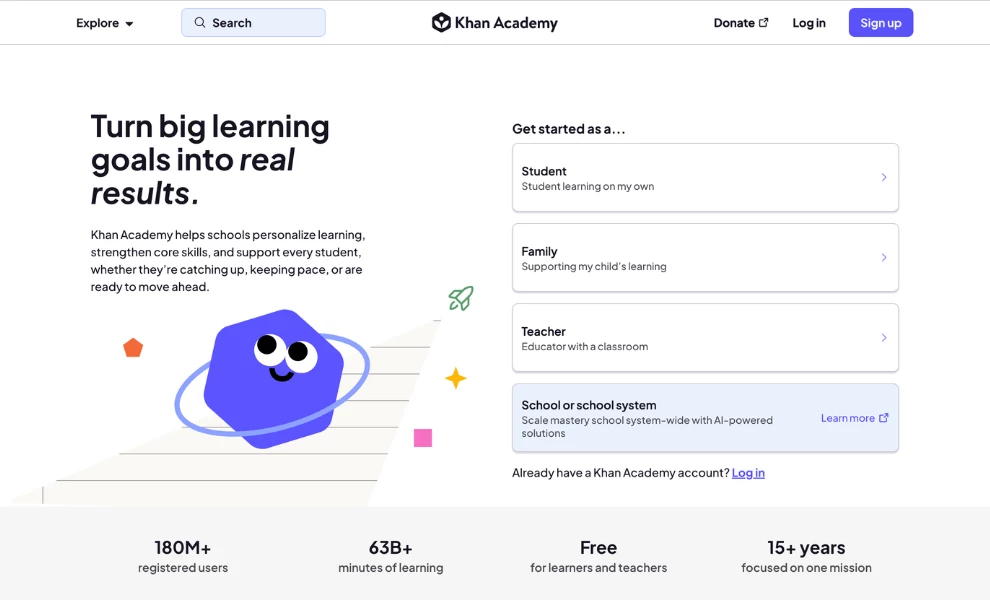
Khan Academy puts role selection in the hero at equal visual weight to the headline. Four cards read Student ("Student learning on my own"), Family ("Supporting my child's learning"), Teacher ("Educator with a classroom"), and School or school system, each with a one-line disambiguator so nobody has to guess which one they are.
The institutional card is the only one given a filled background, nudging the highest-value visitor while keeping the other three in view. A stats band beneath carries figures from the organization's own SY24-25 annual report: 189.6 million registered users, 66.8 billion learning minutes, and 104.9 million yearly active learners across 190+ countries.
2. Duolingo
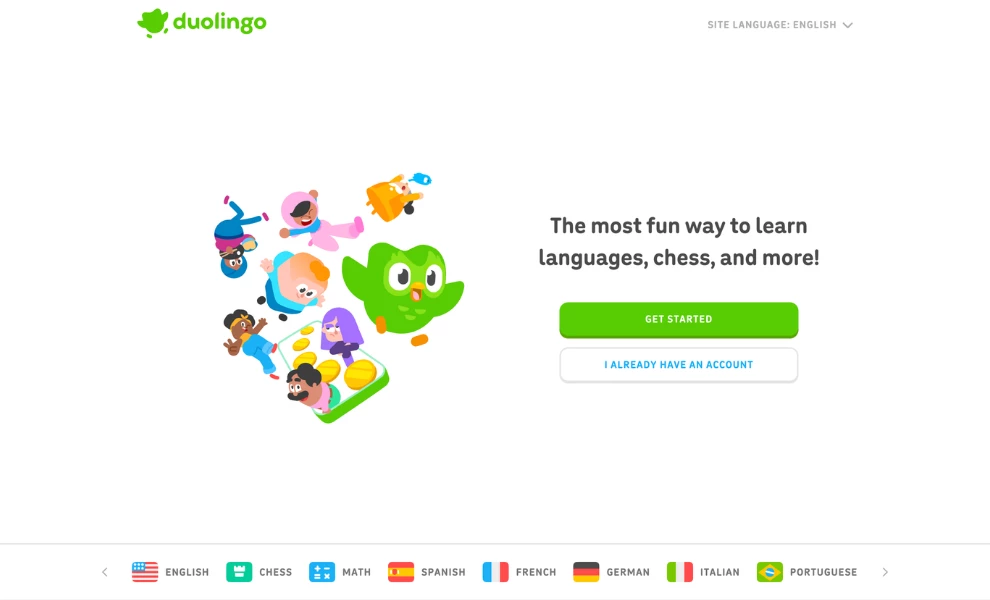
Duolingo runs a homepage with no navigation menu at all. There is a logo, a site-language selector, one headline, and exactly two buttons: GET STARTED and I ALREADY HAVE AN ACCOUNT.
Subject choice is deferred to a horizontally scrolling strip along the bottom edge listing English, Chess, Math, Spanish, French, German, Italian, and Portuguese. The catalog stays visible without competing with the single action the page wants.
3. Coursera
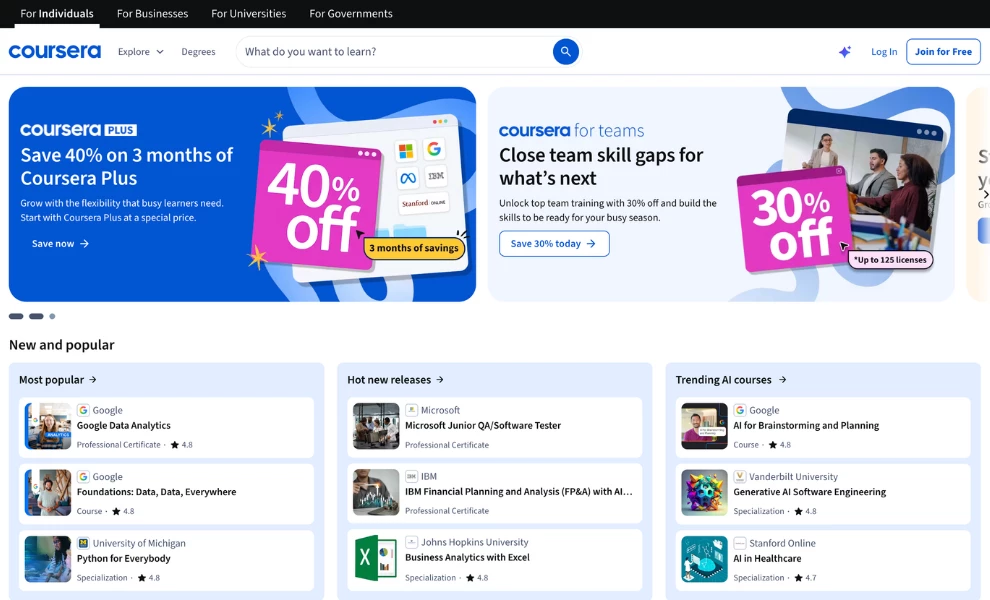
Coursera routes by buyer before it routes by subject. Top-level navigation reads For Individuals, For Businesses, For Universities, and For Governments, so an enterprise learning lead never filters through a consumer course catalog to reach procurement information.
University and company logos sit immediately below the hero. That places institutional credibility in front of the catalog, where a corporate buyer is deciding whether the platform is serious, and not on an About page they will never open.
4. Canvas
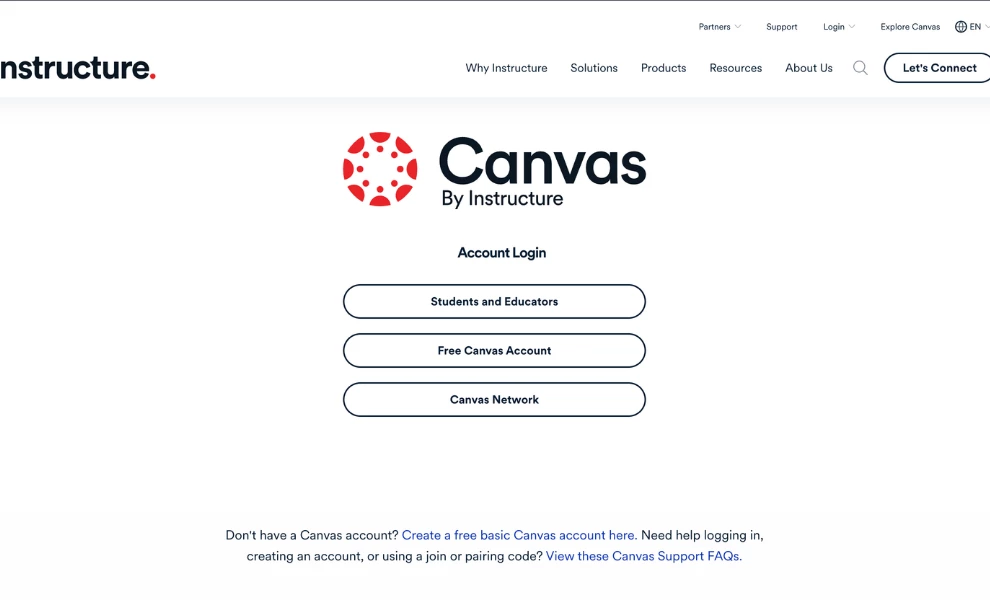
Canvas by Instructure presents pricing as institution tiers, not feature tiers, inviting visitors to pick the tier that fits their institution. The product family (Canvas Student, Mastery Connect, Elevate Data Sync, LearnPlatform, Parchment) is exposed in the navigation alongside a partner and integrations layer.
A district evaluating one product can see the ecosystem it would be buying into. Across all four platforms it is the same decision made four ways: resolve who the visitor is before showing them anything, and give the institutional buyer a separate door.
5 Design Patterns Behind the Best Education Website Design
Strip away the surface and these sites converge on five decisions. Each is paired with the number that justifies it.
1. Every visitor type gets a named entry point
Unity Environmental University puts Apply Now, Ask Una, and Give in the header. County College of Morris routes by career pathway instead of department, and Khan Academy turns role selection into its entire hero.
The number: conversion rates fell 5.1% year over year in Contentsquare's 2026 benchmark. Fewer visits now carry more weight, so every audience you fail to route is a person doing your sorting for you.
2. Interaction teaches or it goes
The Quake's screen split demonstrates a fault line, Planet Schule's quizzes check comprehension, and DHL's scenarios rehearse real operations. Remove any of the three and the visitor loses information, which is the test.
The number:697 KB of JavaScript on the median desktop home page, with only 48% of mobile sites passing Core Web Vitals. Every unjustified effect draws from the same budget.
3. Color carries information, not mood
Human Things assigns a palette per era, the Alfred Landecker Foundation assigns one per project, and County College of Morris reserves lime-yellow for numbers and actions only. The visitor starts sorting before consciously reading anything.
The number:low-contrast text on 83.9% of the top million homepages, up from 79.1%. A color system carrying meaning has to survive a contrast check and a colorblind visitor, or the meaning goes with it.
4. Proof is shown, not claimed
Unity's outcome cards carry plain-language captions, County College of Morris sets graduate counts in oversized numerals, and Imagine ELC builds its logo from photographs of real students. The best education websites design their proof into the page a parent is already reading and leave the credentials page for auditors.
The number:66.6 images on the average homepage, up 13.6% in a year. Image weight is only worth paying when the images are the evidence.
5. The subject sets the reading pace
Stories of Clay slows the visitor with horizontal scroll and a shifting background, while Duolingo strips its homepage to two buttons. One audience came to linger and the other came to start, and both sites were built for the one they have.
The number: a 5.4% conversion lift for sites raising session depth 10% or more. Pace is a design decision with a measurable outcome attached.
What Educational Website Accessibility Requires Before April 2027
Public school districts and public colleges and universities are covered by Title II of the Americans with Disabilities Act, and the Department of Justice's 2024 final rule made WCAG 2.1 Level AA the enforceable technical standard for their web content and mobile apps. Private institutions fall under Title III, where WCAG 2.1 AA has become the practical default without being named in regulation.
The deadlines moved in 2026. A DOJ interim final rule published April 20, 2026 extended compliance from April 24, 2026 to April 26, 2027 for public entities serving 50,000 or more people, and from April 26, 2027 to April 26, 2028 for smaller entities and special district governments. The requirements did not change, only the dates.
One detail catches institutions repeatedly. The 2023 proposal floated exceptions for certain course content at public educational institutions, and the 2024 final rule brought posted course materials into scope instead.
Your compliance sequence, in order
- Confirm which title applies. Public district, public college, or public university means Title II and a hard date. Private means Title III and no named standard, though funders and courts expect WCAG 2.1 AA anyway.
- Find your deadline. Serving 50,000 or more people means April 26, 2027. Under 50,000, or a special district government, means April 26, 2028.
- Inventory everything you publish. Main site, department subsites, the LMS, PDFs, forms, the events calendar, and posted course materials. Subsites and PDFs are where audits find the most failures.
- Run an automated scan first. It catches contrast, missing alt text, form labels, and heading order in an afternoon. Those four categories account for the bulk of what WebAIM detects across a million home pages.
- Fix contrast and alt text before anything else. They are the cheapest to change and the most frequently flagged, with WebAIM finding 53.1% of home pages missing alt text somewhere. Both get expensive once a rebuild is underway.
- Test manually with a keyboard and a screen reader. Automated tools miss focus order, skip links, video captions, and anything that only appears on scroll or hover.
- Add a reduced-motion path. Any scroll-triggered or animated explainer needs a route to the same information without the motion.
- Publish an accessibility statement with a contact route. Name the standard you conform to, list known exceptions, and give people a way to report a barrier.
- Write WCAG into every future scope of work. DesignRush pricing data shows accessibility to WCAG 2.2 AA is standard inclusion at the $25,000 project tier and above, so specify it at scoping rather than paying for it twice.
WebAIM's February 2026 sample of the top million homepages found 95.9% with detectable WCAG failures and low-contrast text on 83.9%, both higher than the year before after six years of improvement. DesignRush has covered why the failure rate keeps climbing in more detail.
What an Education Website Costs and How Long It Takes
DesignRush's web design pricing data puts education website projects at $5,000 to $40,000+. That band covers learning management systems, course catalogs, student portals, multimedia content, online classes, and accessibility features, a wider scope than most industries carry.
Institution type | Typical range | What drives the number |
Education | $5,000 to $40,000+ | LMS integration, course catalogs, student portals, accessibility |
Nonprofits and foundations | $3,000 to $20,000+ | Donation platform, contact forms, event management |
SaaS and edtech platforms | $10,000 to $100,000+ | Custom applications, user dashboards, security protocols |
Source: DesignRush prices for web design.
Budget tier decides scope more than sector does. Roughly $5,000 buys a 3 to 5-page Framer build with limited revisions in 2 to 3 weeks, $10,000 buys an 8 to 15-page custom WordPress site with two revision rounds and editor training in 5 to 7 weeks, and $25,000 buys full discovery, a bespoke design system, content modeling, WCAG 2.2 AA accessibility, and two months of post-launch support in 10 to 14 weeks. Anything above $50,000 is enterprise execution with multi-stakeholder discovery.
A redesign competes against paid acquisition for the same budget, and that case keeps getting easier to make. Contentsquare's 2026 benchmark measured the cost of a visit rising 9% year over year, up 30% across three years, while 59% of sites saw traffic decline in 2025. Frustration signals fell 4.3% across the same dataset, so the baseline you are judged against improved while your site stayed still.
Overruns are where a website design education project diverges from the average. Approval runs through committees and academic calendars, and neither moves at agency speed.
Overrun cause | Typical increase |
New features added mid | 15% to 30% |
Integration complexity | 10% to 25% |
Client-side content delays | 10% to 15% |
Excess revision rounds | 5% to 15% |
| Rush premium | 25% to 50% |
Source: DesignRush web design pricing data.
Content delay is the line to watch. A school that cannot get program copy signed off before the semester starts pays that 10% to 15% whether or not anyone budgeted for it. Development priced separately is broken down in our cost of web development guide.
Nicole Sauk, Founder of Ventus Design Studio, told DesignRush that "Websites do have a life cycle." Her working figure is a redesign every three to five years depending on how well the site was built and maintained, and she recommends installing analytics so the decision rests on traffic behavior rather than on how dated the design feels.
Weighing an in-house hire against an agency? Our freelance versus agency cost comparison breaks down where each stops making sense.
Educational Website Design Mistakes These 15 Sites Avoid
Each mistake below carries the problem it causes, a check you can run today, and a fix with an effort estimate. A bare list of mistakes is assertion, while a list with diagnostics is something you can act on this quarter. They run cheapest first, so work down until the budget stops.
Burying outcomes on a results page
Check: Pull analytics for your outcomes, accreditation, or awards page and compare the traffic to your programs page. A credentials page nobody opens is not proof.
Fix: An afternoon, no budget. Move graduate counts, employment rates, and accreditation onto programs, tuition, and your highest-traffic page, each with a caption explaining what the number means, the way Unity Environmental University captions its outcome cards. Watch scroll depth and program-page exits for a month afterward.
Treating accessibility as a launch-week ticket
Check: Run your homepage through a contrast checker, then tab through it without a mouse. Low-contrast text appears on 83.9% of the top million homepages, so assume you have it until a tool says otherwise.
Fix: A day for contrast and alt text, two to four weeks for the manual pass. Fix contrast first, write real alt text for every image carrying meaning, then work the nine-step sequence above. Doing this later inside a live project bills at $145 an hour under DesignRush's tracked change-order rates, and public institutions have a dated obligation rather than a preference.
Writing one homepage for parents, students, and donors at once
Check: Read your hero and name the single reader it addresses. If you cannot, it addresses nobody.
Fix: A week, mostly argument. Put three routes in the header, as Unity Environmental University does, and let each audience self-select in the first second. Give the page one primary action matched to intent, since a parent still comparing four schools is not ready for "Apply Now" and homepage bounce rate is the signal to watch.
Hiding tuition or pricing by default
Check: Time how long it takes a stranger to find what a year costs. A parent who cannot price you removes you from the shortlist without contacting anyone.
Fix: A week. Publish a figure or publish a stated reason for withholding it, and scope any package by who it is for instead of by what it unlocks. Inquiry quality moves before volume does, so judge the change on the conversations you get rather than the count.
Shipping animation with nothing behind it
Check: For each motion effect, name in one sentence what a visitor learns from it. The median mobile home page already weighs 2,362 KB, up 202.8% since 2015, and only 48% of mobile sites pass Core Web Vitals.
Fix: A week. Cut what fails the test, add a reduced-motion path to whatever survives, and measure load time before and after. The Quake and Planet Schule both pass because removing the effect would remove information.
Organizing programs by department instead of by outcome
Check: Open your programs page and count the clicks from landing to a named job title. Your org chart is not a taxonomy your applicants recognize.
Fix: Two to three weeks, no new content required. Map every program to the job or next step it leads to and rebuild the navigation on that map, the way County College of Morris routes by career pathway. Do the mapping before the build, since pages added mid-project bill at $400 to $500 each.
Letting subsites drift from the main site
Check: Open three department subsites and compare navigation, contrast, and footer against the homepage. Subsites and PDFs are where accessibility audits find the most failures.
Fix: Three to six weeks. One design system, one owner, and a contrast standard written into the scope. McMaster's faculty site holds a distinct palette inside a consistent structure, which is the version of independence that survives an audit.
Briefing a CMS nobody in the institution can operate
Check: Ask a marketing coordinator how long a new program page takes without a developer. If the answer is measured in days, the architecture is the problem.
Fix: Two to four months, inside the $25,000 tier where content modeling and integrations are standard. Put modular publishing in the brief so your own team can add pages, as County College of Morris's rounded-module system allows. Do it during a redesign, since a platform change mid-project bills at $145 an hour on top.
Commissioning a full redesign before the cheap fixes are exhausted
Check: Name the condition that makes your reference site work, then name whether you have it. Then say what the eight fixes above did not solve.
Fix: 4 to 6+ months and $30,000 to $80,000, plus $500 to $2,000 a year in maintenance afterward. Copy the mechanism instead of the layout, since Palazzo Monti's no-menu one-page build works only because it supports exactly one decision. A redesign without a named problem reproduces the old one with better typography.
Educational Website Designs: Final Thoughts
These 15 share almost no visual vocabulary. UMS-Wright runs two colors, McMaster runs a spectrum, Planet Schule runs a chat window, and Palazzo Monti runs no menu at all. Each is defensible because each answers a different question about a different learner.
What they share is sequence. The audience gets routed before the layout gets drawn, the interaction has to justify itself before it gets built, and accessibility enters at scoping instead of at launch. The best educational websites design that order first and let the visual answer follow.
Take the order, not the palette. Route your audiences, make every effect teach, put your proof where the decision forms, and set the pace to the subject. The look that fits your institution will come out of constraints your competitors do not have.
Our design experts recognize the most innovative and creative designs from across the globe. Visit Design Awards to see the:
- Best Logo Designs
- Best Website Designs
- Best Video Designs
- Best Print Designs
- Best Packaging Designs
- Best App Designs
Our team also ranks agencies worldwide to help you find a qualified agency partner. Visit our Agency Directory for the top Logo Design Companies, as well as:
- Top Web Design Agencies
- Top Video Production Companies
- Top Print Design Companies
- Top Packaging Design Companies
- Top Mobile App Development Companies