
Cloud costs are easy to rack up and hard to track. Providers bill you for the servers you use, but don't show which team or app used them. That makes waste hard to spot, especially in Kubernetes, where many apps share servers.
Cloud cost management tools show where your money goes and cut waste by shrinking oversized resources, removing unused ones, and buying discounted capacity.
Cloud Cost Optimization Tools: Key Findings
- Automation cuts bills fastest. With nearly a third of cloud spend wasted, tools like IBM Turbonomic, Cast AI, Zesty, and ScaleOps fix waste instead of just reporting it.
- Visibility decides who owns the fix. Among cloud FinOps tools, CloudHealth and Flexera One lead on chargeback, Vantage on transparent pricing, and CloudZero on cost per customer.
- AI spend is the new blind spot. CloudZero, Datadog CCM, and Vantage trace it to users and models, and PointFive covers AI coding agents.
Nearly a Third of Cloud Spend Is Wasted: What Cloud Cost Optimization Fixes
Cloud cost management means tracking, allocating, and reducing cloud spend so every dollar has an owner. It covers visibility, allocation, governance, and optimization.
That last job is getting harder. Flexera's 2026 State of the Cloud report estimates wasted cloud spend on IaaS and PaaS at 29%, up from 27% in 2025, and links the rise to increased cost complexity from AI and new PaaS/SaaS offerings.
Optimization is also where the savings come from, and most teams tackle it in three layers:
- Waste elimination removes unused resources like idle instances, unattached volumes, and old snapshots. It's the fastest, lowest-risk win.
- Rightsizing matches resources to what workloads actually use. It saves more on large estates but touches live systems, so it needs usage data and a rollback plan.
- Commitment optimization replaces on-demand pricing with Reserved Instances and Savings Plans. Do this after rightsizing, or you'll lock in discounts on capacity you were about to remove.
Mature teams add a fourth layer, architectural optimization, which designs services so costs scale with usage.
Timing matters here, says Benjamin Džaferović, CEO of software development company Outecho: "[...] Investing in scalability should start early because infrastructure and architecture are cheaper to implement at the start."
The 10 Best Cloud Cost Management Tools Compared
The tools below cover one or more of these layers. Here are the 10 best cloud cost management software options for engineers, FinOps, and finance teams responsible for cloud spending.
Tool | Best For | Coverage | Starting Price | Free Trial |
Performance-safe automation across hybrid cloud | AWS, Azure, Google Cloud, on-premises | Custom quote | Yes, plus a hands-on sandbox | |
Transparent pricing and multi-provider cost allocation | AWS, Azure, Google Cloud, plus 30+ SaaS, data, and AI providers | Free up to $2,500/month tracked spend; Pro from $30/month | 14 days on paid plans | |
Enterprise governance and chargeback | AWS, Azure, Google Cloud, Oracle Cloud, on-premises | Custom quote | Yes | |
Hybrid IT governance and automation | AWS, Azure, Google Cloud, plus SaaS and licensing | Custom, annual contracts | On request | |
Automated Kubernetes cost optimization | EKS, AKS, GKE, OpenShift, on-premises | Custom quote | Yes, starting in read-only mode | |
Savings-based Kubernetes and commitment automation | AWS, Azure | Based on usage and realized savings | No; free savings estimate instead | |
Real-time, self-hosted Kubernetes automation | Any Kubernetes environment | Custom quote | No; free live cluster analysis instead | |
Unit economics and AI cost attribution | AWS, Azure, Google Cloud, plus SaaS and AI providers | Custom quote | No; product tour and demo instead | |
Connecting cloud costs to performance data | AWS, Azure, Google Cloud, Oracle Cloud, plus SaaS and AI providers | Free for Datadog costs; Pro from $5 per $1,000 of spend | 14 days, full Datadog suite | |
Deep waste detection and AI agent cost governance | AWS, Azure, Google Cloud, Oracle Cloud, Snowflake, Databricks, AI providers | Quote after demo | No; demo instead |
How We Chose These Tools
We started with 38 cloud cost management tools from Gartner Peer Insights, Reddit practitioner threads, and vendor comparison guides. We cut any that didn't focus on cloud costs or shared too little to assess, leaving 10.
We then scored each tool on five factors:
- Action, not just visibility: Tools that resize, scale, or clean up resources ranked above those that only report.
- User ratings: We gave more weight to ratings backed by many reviews.
- Independent mentions: We favored tools practitioners recommend and discounted vendor-published rankings.
- Coverage: We looked at support for multiple clouds, Kubernetes, and SaaS.
- Pricing transparency: Tools that let you estimate costs before talking to sales earned extra credit.
Pricing, features, and ownership were checked against vendor materials in September 2026.
The ranking reflects overall strength for a typical buyer, but the "Best for" line matters more. A Kubernetes-heavy team, for example, should start with Cast AI, Zesty, and ScaleOps wherever they rank.
1. IBM Turbonomic – Best for Performance-Safe Automation Across Hybrid Cloud
For enterprises that want safe, automated resizing across cloud and on-premises
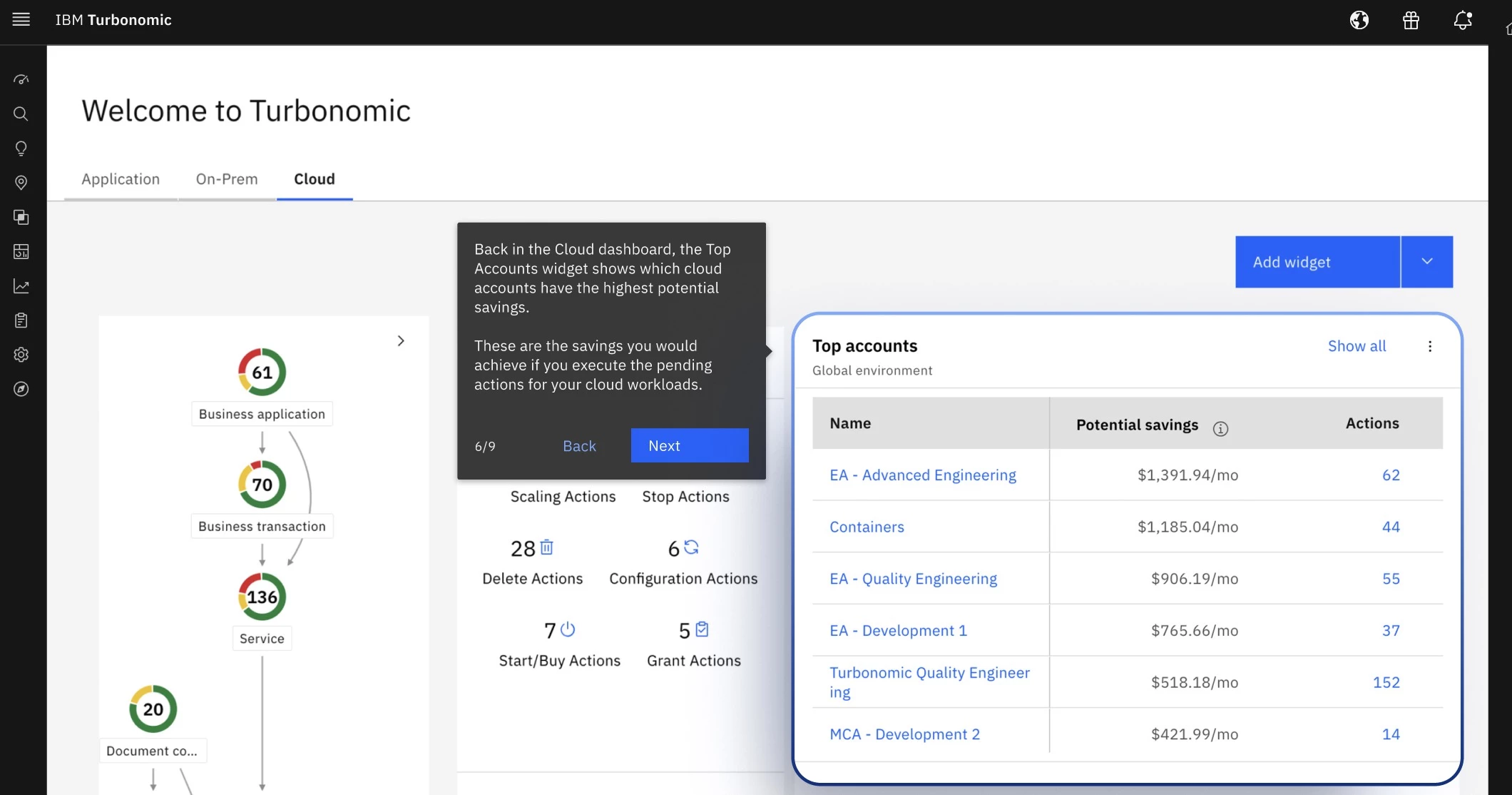
IBM Turbonomic is an application resource management platform that optimizes compute, storage, network, and GPU resources across cloud, data centers, and Kubernetes.
Instead of starting from the bill, it maps application dependencies and works out what each workload needs. It then resizes VMs, scales pods, and allocates GPUs automatically within your policies, logging every action for audit.
Its performance-first approach suits hybrid enterprises, especially those running VMware alongside AWS, Azure, or Google Cloud.
Pricing:
- IBM doesn't publish pricing, so quotes come through sales.
- A free trial and hands-on sandbox are available.
- Sold through AWS and Azure Marketplace, which may count toward existing cloud commitments.
Key Features:
- Automated, auditable actions resize VMs, scale pods, and adjust storage and networking
- Full-stack dependency mapping keeps workloads within their SLOs
- Kubernetes and OpenShift pods are rightsized in real time
- GPU optimization scales AI workloads while limiting idle capacity
- Parking Edition schedules shutdowns for idle workloads across all three major clouds
- Integrations cover cloud platforms, hypervisors, APM, ITSM, Kubecost, and OpenCost
Pros:
- Performance-based actions earn engineers' trust
- Auditable automation suits regulated environments
- Rated 4.7/5 on Gartner Peer Insights from 96 ratings
Cons:
- Limited financial reporting, so most teams pair it with FinOps tools
- More than most single-cloud teams need
2. Vantage – Best for Transparent Pricing and Multi-Provider Cost Allocation
For engineering teams focused on visibility and ownership, especially those with growing AI and SaaS bills
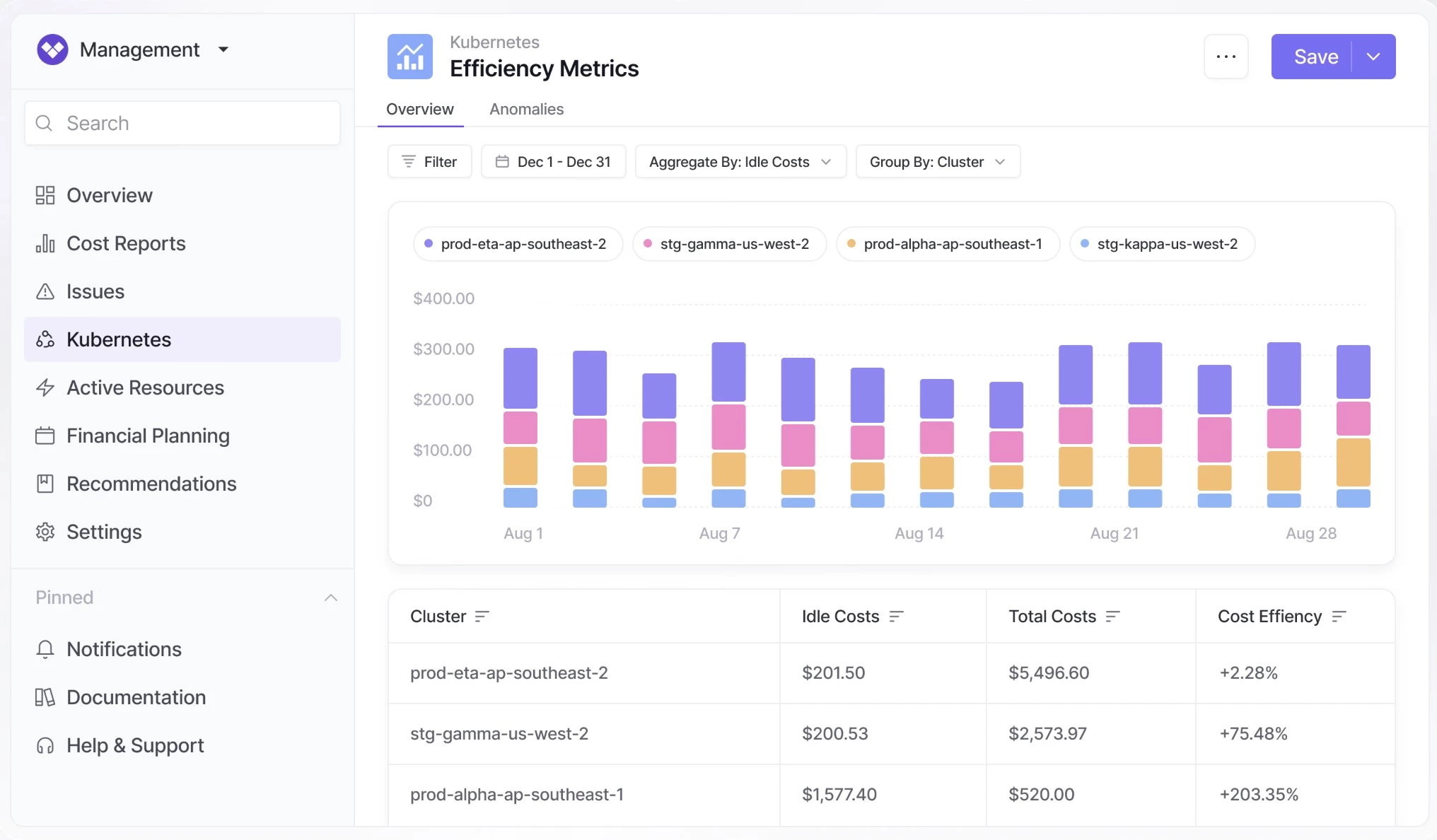
Vantage combines spend from more than 30 providers, including major clouds, Kubernetes, Snowflake, Datadog, and AI providers like OpenAI and Anthropic.
Its biggest strength is allocation. Virtual tags fix missing or messy tags without infrastructure changes, and shared costs can be split by usage or custom weights.
A Terraform provider keeps reports and budgets in code, and an MCP server lets you query costs from AI assistants. Autopilot buys AWS Savings Plans automatically, but most other recommendations still need an engineer to apply them.
Pricing:
- Starter: Free for up to $2,500/month in tracked spend
- Pro: $30/month
- Business: $200/month
- Enterprise: Custom pricing with unlimited spend and a FinOps agent
- Paid plans include a 14-day free trial
Key Features:
- Shared costs are allocated by usage, resource count, or custom weights
- More than 30 integrations cover cloud, SaaS, data, and AI providers
- Kubernetes reporting and rightsizing work by namespace and label
- Autopilot automates AWS Savings Plan purchases
- Terraform, API, and MCP support bring cost data into engineering workflows
Pros:
- The most transparent pricing in this guide, with a useful free tier
- Broad provider coverage, including AI spend
- Rated 5/5 on Gartner Peer Insights from 28 ratings
Cons:
- Automated savings only cover AWS Savings Plans
- Costs rise as your tracked spend grows
- The FinOps agent and dedicated support are Enterprise-only
3. VMware Tanzu CloudHealth – Best for Enterprise Governance and Chargeback
For enterprise FinOps teams and MSPs that need accurate chargeback and policy-based governance
VMware Tanzu CloudHealth, now part of Broadcom, is one of the longest-running cloud FinOps tools, used by more than 20,000 organizations.
It combines spend from AWS, Azure, Google Cloud, Oracle Cloud, and on-premises environments into one view. Its standout feature, Perspectives, groups spend by cost center, business unit, or environment, while reallocation rules split shared costs for accurate chargeback.
Its policy engine can stop, resize, or terminate resources on a schedule, though deeper rightsizing still needs engineers. A 2025 redesign added AI summaries of cost data.
Pricing:
- Broadcom doesn't publish pricing, so quotes are custom.
- New purchases go through Arrow Electronics or AWS Marketplace.
- A free trial is available.
Key Features:
- Reallocation rules and custom line items support accurate chargeback
- Machine-learning anomaly detection learns seasonal patterns
- Reserved Instance and Savings Plan management covers purchasing and amortization
- A policy engine automates stop, start, resize, and terminate actions
- MSP tools handle multi-tenant management, invoicing, and custom pricing
Pros:
- Covers four major clouds plus on-premises
- Policy automation handles routine cleanup
- Rated 4.3/5 on Gartner Peer Insights from 25 ratings
Cons:
- Heavy setup and enterprise-level pricing
- Some users report slow data and alert refreshes
- Deeper optimization still requires manual work



4. Flexera One – Best for Hybrid IT Governance and Automation
For large enterprises that want cloud, SaaS, and licensing costs governed together
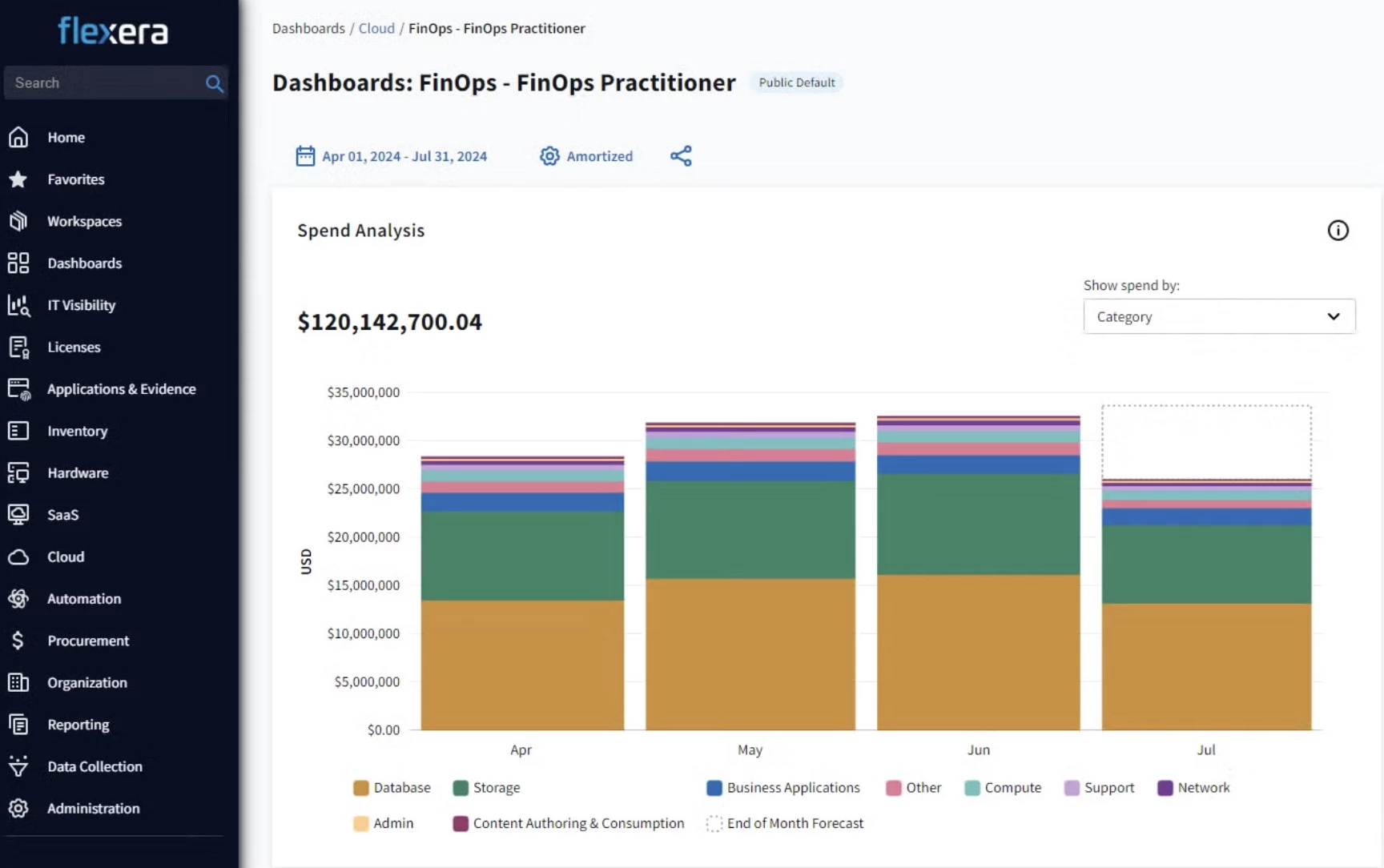
Flexera One is a FinOps and IT asset management platform that cuts cloud waste by lowering rates and reducing usage. It manages commitments across AWS, Azure, and Google Cloud, and flags idle resources, orphaned storage, and always-on dev environments.
More than 90 prebuilt policies can act on these findings automatically, from rightsizing to shutting down resources after hours.
Its biggest advantage is scope. After acquiring Snow Software, it shows cloud costs alongside on-premises software, SaaS, and licensing, which suits regulated industries and large IT estates. Recent acquisitions, including Spot, ProsperOps, and Chaos Genius, add more automation. The trade-off is effort, since practitioners describe it as manpower-heavy.
Pricing:
- Flexera doesn't publish pricing, and contracts are negotiated annually.
Key Features:
- More than 90 prebuilt policies automate cost optimization
- Rate optimization covers AWS, Azure, and Google Cloud commitments
- Rightsizing and idle resource cleanup are based on performance data
- Scheduling turns off non-production resources after hours
Pros:
- Scales well for regulated environments
- Handles both rate and usage optimization
- Unique visibility across cloud, SaaS, licensing, and on-premises costs
Cons:
- Setup and data normalization take time
- Needs significant staff to run well
- Enterprise pricing rules out most startups and mid-size teams
5. Cast AI – Best for Automated Kubernetes Cost Optimization
For platform and FinOps teams that want Kubernetes rightsizing, scaling, and Spot handled automatically
Cast AI is a Kubernetes automation platform that rightsizes CPU, memory, and replicas for each workload based on real behavior. It then picks the cheapest instances that fit, packs workloads onto fewer nodes, and removes empty ones.
Trained on thousands of clusters, it predicts Spot interruptions up to 30 minutes ahead, making Spot practical for more production traffic. Built-in cost visibility breaks down usage by cluster, namespace, workload, and team.
It suits teams whose clusters have outgrown manual tuning, replacing dashboards and tickets with continuous automation.
It works on EKS, AKS, GKE, OpenShift, and on-premises, and can start in read-only mode so your team can review its recommendations first.
Pricing:
- Cast AI doesn't publish pricing, so quotes are custom.
- A free trial is available, starting in read-only mode.
Key Features:
- Automated rightsizing adjusts CPU, memory, requests, limits, and replicas
- Node autoscaling and bin packing choose the cheapest compute for each pod
- GPU optimization and sharing support AI and inference workloads
- Works across major Kubernetes platforms and integrates with Terraform, Pulumi, and Helm
Pros:
- Makes aggressive Spot usage safe for production
- Read-only mode lets teams validate savings first
- Fits infrastructure-as-code workflows
- Rated 4.5/5 on Gartner Peer Insights from 15 ratings
Cons:
- Offers limited value for VM-heavy or legacy environments
- Limited financial reporting and chargeback
6. Zesty – Best for Savings-Based Kubernetes and Commitment Automation
For DevOps and FinOps teams on AWS or Azure that want automated optimization priced on real savings
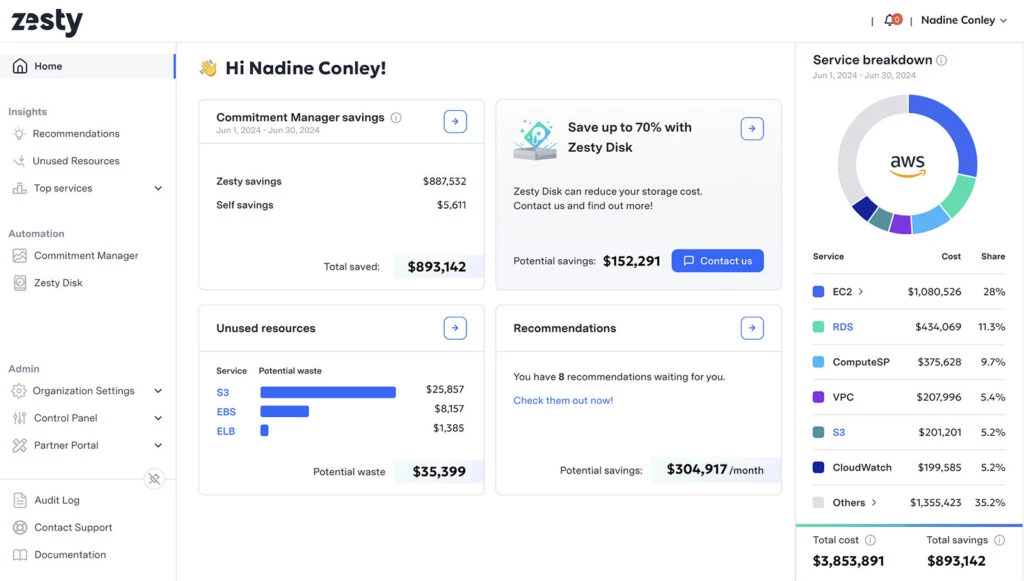
Zesty is a cloud cost optimization platform that rightsizes cluster resources to match real-time demand, and packs pods onto fewer nodes to cut compute costs.
It also covers two areas most Kubernetes tools skip. PV autoscaling shrinks persistent volumes that Kubernetes won't downsize on its own, and FastScaler absorbs sudden traffic spikes. Beyond the cluster, it manages commitments to AWS and Azure.
FastScaler targets the main reason teams overprovision, which is not trusting autoscaling to react fast enough.
Pricing:
- Pricing is based on usage and realized savings, with no published rates.
- A free calculator estimates potential savings upfront.
Key Features:
- Multi-dimensional autoscaling rightsizes Kubernetes resources in real time
- PV autoscaling adjusts persistent storage automatically
- Commitment optimization covers both AWS and Azure
- Policy guardrails control what automation can change
Pros:
- Covers storage and spike protection, not just compute
- Hands-off automation reduces engineering effort
- Rated 4.8/5 on G2 across 80 ratings
Cons:
- Offers less value for VM-heavy environments
- No Google Cloud support listed
- Limited allocation and financial reporting
7. ScaleOps – Best for Real-Time, Self-Hosted Kubernetes Automation
For platform teams that want real-time Kubernetes resizing without sending data outside their clusters
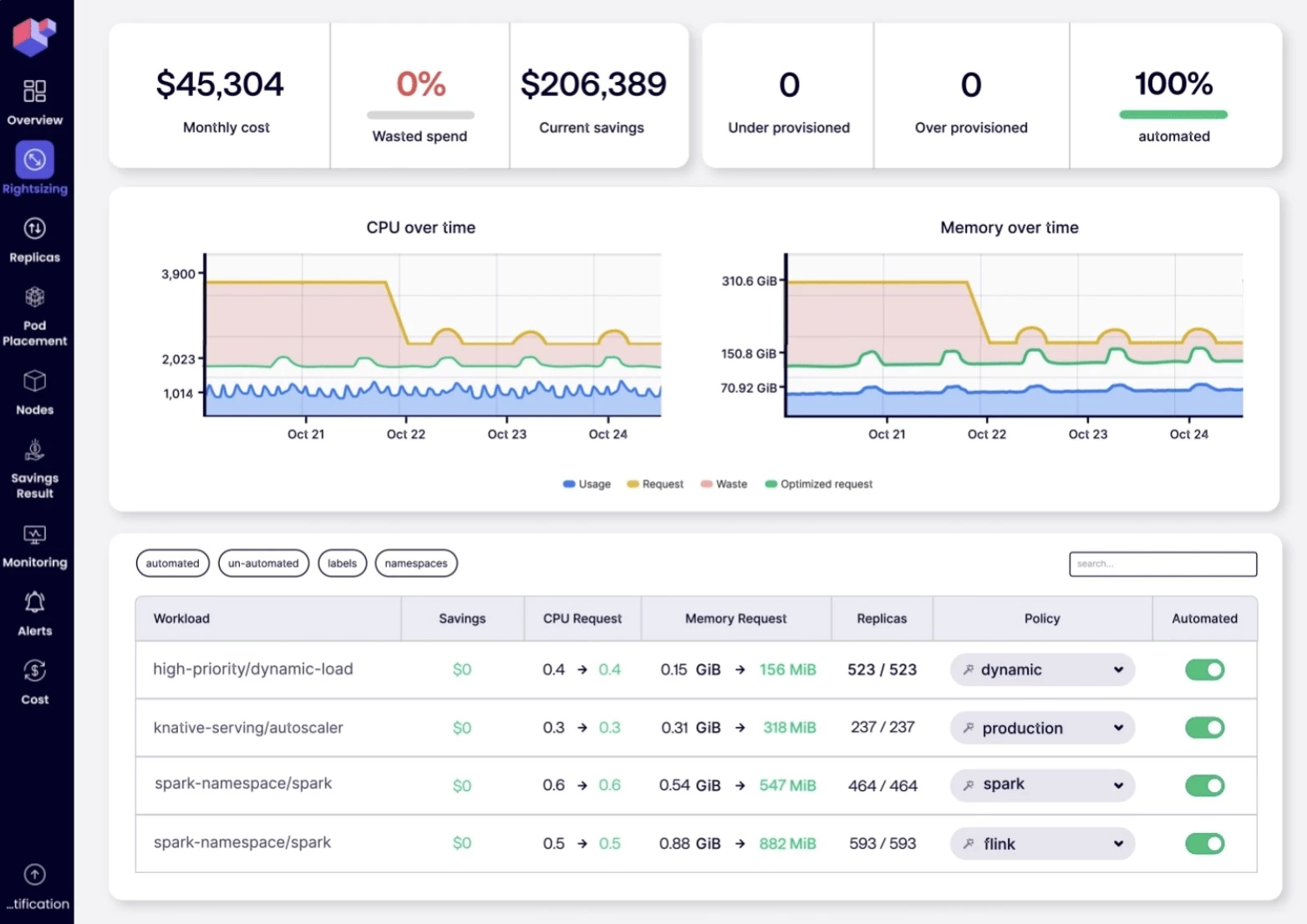
ScaleOps scales CPU, memory, and GPU for Kubernetes workloads, including AI inference. Instead of rightsizing on a schedule, it adjusts requests in real time as workloads change.
Replica, node, and Spot optimization carry those pod-level savings through to fewer, cheaper nodes. It also works on top of existing Karpenter setups and requires no code changes from application teams.
It's also self-hosted and installs with one Helm command, which makes security approval easier.
Pricing:
- Quotes are custom.
Key Features:
- Real-time pod rightsizing adjusts CPU and memory to live demand
- Smart pod placement packs workloads onto fewer nodes
- Spot and Karpenter optimization add workload-aware decisions
- A GPU platform scales resources for AI inference
Pros:
- Supports GPU and AI workloads
- Available on AWS, Azure, and Google Cloud Marketplace
- Shows a 4.6/5 on G2 across 90 ratings
Cons:
- Kubernetes only
- Some users report slowdowns on very large clusters
- Limited allocation and financial reporting
8. CloudZero – Best for Unit Economics and AI Cost Attribution
For engineering-led companies that need to know what each customer, feature, and AI model costs
CloudZero is a cost intelligence platform that assigns cloud, SaaS, and AI spend to the customers, products, and models behind it.
It manages more than $14 billion in spend and pulls data from the major clouds, Kubernetes, Snowflake, Datadog, and AI providers like OpenAI and Anthropic. Its allocation engine assigns 100% of spend to an owner without virtual tags, even for untagged shared services.
It's the strongest tool in this guide for unit economics, like cost per customer or feature, which drives pricing and margin decisions. It traces AI spend down to the user, model, and prompt.
Pricing:
- One all-inclusive subscription, with custom quotes based on your environment.
- A self-guided tour and demos are available.
Key Features:
- CostFormation allocates 100% of spend without virtual tags
- AI cost attribution maps spend to customers, products, and models
- Unit cost metrics track cost per customer and feature
- Streaming telemetry enables near-real-time anomaly detection
- Budgets, forecasts, and optimization recommendations are built in
Pros:
- Integrations cover major clouds, data platforms, and AI providers, plus an MCP integration.
- The deepest unit economics in this guide.
- Rated 4.6/5 on Gartner Peer Insights from 32 ratings
Cons:
- Recommendations only, with no automated fixes
- No built-in CMDB or IT asset management
9. Datadog Cloud Cost Management – Best for Connecting Cloud Costs to Performance Data
For engineering teams that want to trace cost changes to the deployments and traffic behind them
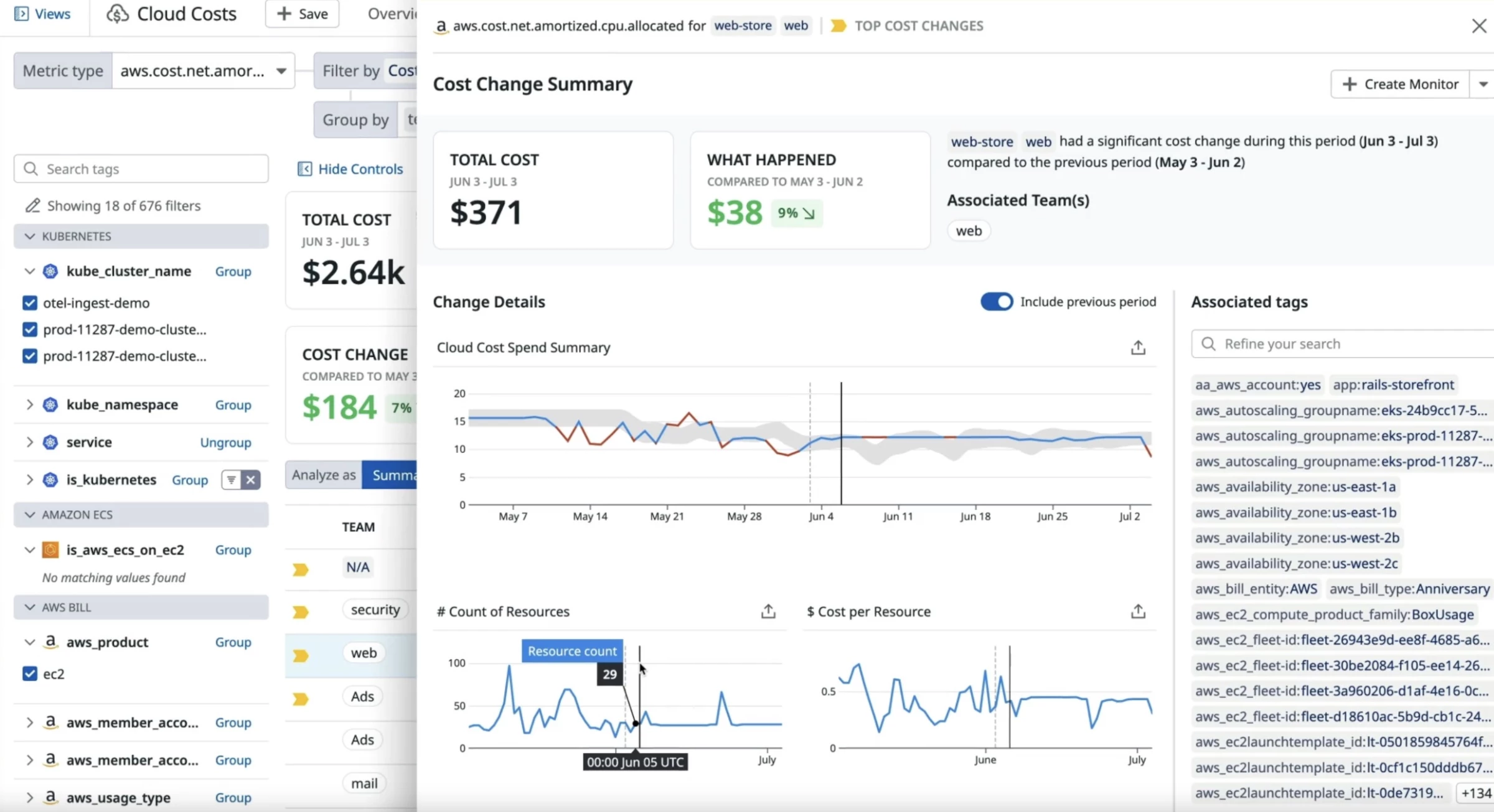
Datadog Cloud Cost Management brings cloud, SaaS, and AI spend into the platform engineers already use for monitoring. It covers AWS, Azure, Google Cloud, Oracle Cloud, SaaS tools, and AI providers like OpenAI and Anthropic.
Tag Pipelines and custom rules allocate shared costs, and container allocation extends to GPU and network costs. AI spend can be traced to users, projects, or models.
Its main advantage is context. When costs spike, the same screen shows the deployment or traffic change behind it. Bits Code generates the code for each fix, and new automations apply optimizations continuously.
Pricing (billed annually):
- Datadog Cost Visibility: Free, limited to your Datadog costs, with dashboards, alerts, anomaly detection, forecasts, budgets, and MCP access
- Pro: $5 per $1,000 of monthly cloud and SaaS spend billed annually, or $7.20 on demand
- Enterprise: $10 per $1,000 billed annually, or $15 on demand
- A 14-day free trial covers the full Datadog product suite
Key Features:
- Cost visibility spans major clouds, SaaS, and AI providers
- Bits Code generates fixes for cost recommendations
- Tag Pipelines and custom rules allocate shared infrastructure
- Anomaly detection and Bits Chat speed up root-cause analysis
Pros:
- Cost and observability data in one place
- Easy adoption for existing Datadog users
- Rated 4.6/5 on Gartner Peer Insights from 70 ratings
Cons:
- Fees scale with spend, not savings
- Key features depend on other paid Datadog products
- Automation is newer and less proven
10. PointFive – Best for Deep Waste Detection and AI Agent Cost Governance
For enterprises that have cleared obvious waste and need to find what's left, including AI coding agent costs
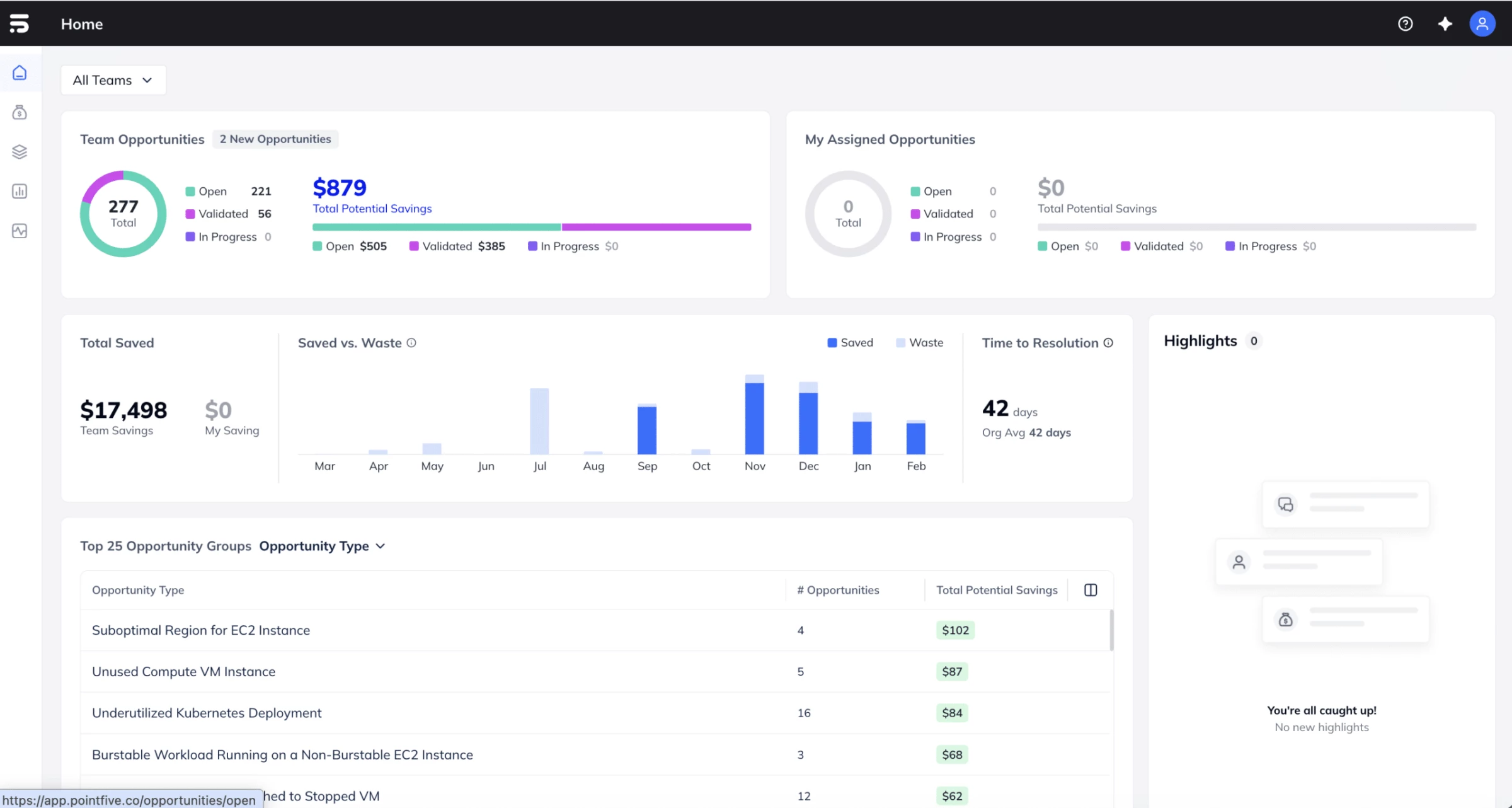
PointFive is an infrastructure efficiency platform for cloud, data platforms, and AI, founded in 2023 by the team behind IntSights. It detects more than 500 types of inefficiency across AWS, Azure, Google Cloud, Kubernetes, Snowflake, Databricks, and AI providers.
TokenShift, its newer product, tracks and governs AI coding agents like Claude Code, Copilot, and Cursor, a fast-growing cost that barely shows up in cloud billing. It analyzes activity locally and never sends prompt content.
Pricing:
- Quotes follow a demo.
- Available on AWS Marketplace.
Key Features:
- Detects more than 500 types of inefficiency beyond idle resources
- Brain maps resources, relationships, and activity across your infrastructure
- PointFive OS supports chat-based investigation and controlled automation
- Integrations include Jira, ServiceNow, Slack, GitHub, and custom MCP servers
Pros:
- The only tool in this guide that governs AI coding agent costs
- Broad coverage across clouds, data, and AI
- Strong security certifications
Cons:
- A young company with a shorter track record
- AI automation is less proven than its detection
- A fast-changing product lineup can make buying confusing
How To Choose the Right Cloud Cost Management Tool
The best cloud cost optimization tools for you are the ones that solve your current cost problem.
It depends on your cloud setup, your team, and how much automation you're comfortable with.
- Start with your biggest bottleneck
- Check whether native tools are enough
- Match the tool to your team
- Decide how much automation you'll allow
Start With Your Biggest Bottleneck
If this is your problem:
- Engineers create waste nobody fixes:
- IBM Turbonomic, Cast AI, Zesty, or ScaleOps apply fixes automatically.
- Finance can't attribute costs to teams or services:
- CloudHealth or Flexera One for enterprise chargeback, or Vantage and CloudZero if your tagging isn't clean yet.
- Commitments are leaving money on the table:
- Zesty automates AWS and Azure commitments, Flexera One and CloudHealth manage them across clouds, and Vantage automates AWS Savings Plans.
- You can't see which apps drive Kubernetes costs:
- Cast AI, ScaleOps, or Zesty for automated optimization, or Datadog CCM and Vantage for visibility.
- Cost spikes are found too late:
- CloudZero and Datadog CCM catch anomalies in near real time, and CloudHealth learns seasonal patterns.
- AI spend has no owner:
- CloudZero, Vantage, and Datadog CCM track AI costs by user or model, and PointFive covers AI coding agents.
Check Whether Native Tools Are Enough
For many single-cloud teams, native tools cover more than vendors admit.
AWS Cost Explorer, Compute Optimizer, and Cost Optimization Hub cover visibility, rightsizing, and commitments on AWS.
Microsoft Cost Management and its free FinOps toolkit do the same for Azure, and Google Cloud Billing's BigQuery export gives GCP teams raw data to work with.
You'll likely need third-party cloud cost management tools if you:
- Run more than one cloud and need a single view
- Need chargeback across shared infrastructure
- Run Kubernetes at scale
- Want changes applied automatically
If none of these apply yet, spend the budget on engineering time to act on native recommendations.
Match the Tool to Your Team
The best FinOps tools are the ones your team will actually use, so match them to the people who manage cloud costs day to day:
- FinOps and finance teams: CloudHealth and Flexera One.
- Engineering and DevOps teams: CloudZero, Vantage, Datadog CCM, and Zesty.
- Platform and SRE teams: Turbonomic, Cast AI, and ScaleOps.
- Startups with little FinOps support: Vantage and CloudZero.
- Teams that have cleared obvious waste: PointFive.
Decide How Much Automation You'll Allow
Agree internally on how much change a cloud cost optimization platform can make, then compare only tools at that level.
Automation level | What it does | Tools |
Recommendations only | Flags opportunities for people to act on | CloudZero, Datadog CCM |
Single-area automation | Automates one lever, like AWS Savings Plans | Vantage |
Approval-based automation | Applies fixes after your team signs off | PointFive |
Policy-based automation | Acts when predefined rules match | CloudHealth, Flexera One |
Fully automated | Adjusts resources continuously without approval | IBM Turbonomic, Cast AI, Zesty, ScaleOps |
Cloud Cost Management Best Practices
Even the best cloud cost management software only amplifies the process you already have. These practices help you keep saving after the first cleanup and get value from any platform faster:
- Set a tagging standard before you buy a tool
- Measure your biggest waste categories first
- Review on a fixed schedule
- Set budget alerts by workload
- Measure savings after every change
1. Set a Tagging Standard Before You Buy a Tool
Define one tagging standard across your organization, covering at least the environment, team, application, product, and cost center. Without clear ownership, waste doesn't get fixed.
Virtual tags help, but they're inferred, so enforce real tags on new resources and use virtual tags to cover older ones. Decide upfront how to split shared costs like Kubernetes clusters or logging stacks.
Usage-based splits are the fairest but hardest to maintain, so save them for large, shared costs.
2. Measure Your Biggest Waste Categories First
Waste usually falls into four categories:
- Idle resources: Unused instances, unattached volumes, and old snapshots.
- Overprovisioned resources: Instances or pods sized for peaks that rarely happen.
- Commitment gaps: Steady workloads still billed at on-demand rates.
- Kubernetes waste: The gap between the CPU and memory pods request and what they use.
3. Review on a Fixed Schedule
A one-time cleanup decays within a quarter, because new resources arrive faster than old ones get removed.
Cadence | Review | Why this frequency |
Weekly | Idle resources, unattached volumes, overprovisioned instances | Waste accumulates daily, so a monthly review lets a month of it bill |
Monthly | Reserved Instance and Savings Plan coverage and utilization | Matches the billing cycle and catches expiring commitments before workloads fall back to on-demand rates |
Quarterly | Architecture, using cost data | Rightsizing has a floor, and only architectural change moves you below it |
Quarterly reviews are also the time to ask whether a workload belongs in the cloud at all, especially steady, long-lived data.
"For long-term archives, many organizations have realised that cloud costs can become open-ended, while owning infrastructure creates a flatter and more controllable cost model," says Murat Korkmaz, CEO of digital asset management company Daminion.
4. Set Budget Alerts by Workload
Account-level alerts show that there's a problem, while workload-level alerts show who owns it.
Set budgets for accounts, teams, and workloads, and send each alert to the right owner.
5. Measure Savings After Every Change
Compare spend before and after each change, and track verified savings against what your cloud cost management tools cost.
That ratio is what justifies the program at renewal time.
Cloud Cost Optimization Tools: Final Words
The best cloud cost management tools are the ones your team will actually act on, so start with the problem costing you the most today.
Just remember that the tool is only half the job. Tagging standards, clear automation limits, and regular reviews decide whether savings last, so track verified savings against tool costs from day one.
If your team doesn't have the capacity to build this in-house, a cloud consulting partner can set up the foundations and hand over a process your team can run.

Our team ranks agencies worldwide to help you find a qualified partner. Visit our Agency Directory for the Top IT Services Companies, as well as:
- Top IT Services Companies in Dallas
- Top IT Consulting Companies
- Top IT Outsourcing Companies
- Top IT Services for Startups
- Top Managed IT Service Providers
And don’t miss our Awards section, where we celebrate the most innovative projects in design — from logo and app design to print and packaging.