
iOS game development now serves a wide range of use cases, from entertainment to brand engagement and product innovation. It's worth knowing the tools, workflows, and development models essential for building and scaling high-quality iOS game experiences.
iOS Game Development: Key Findings
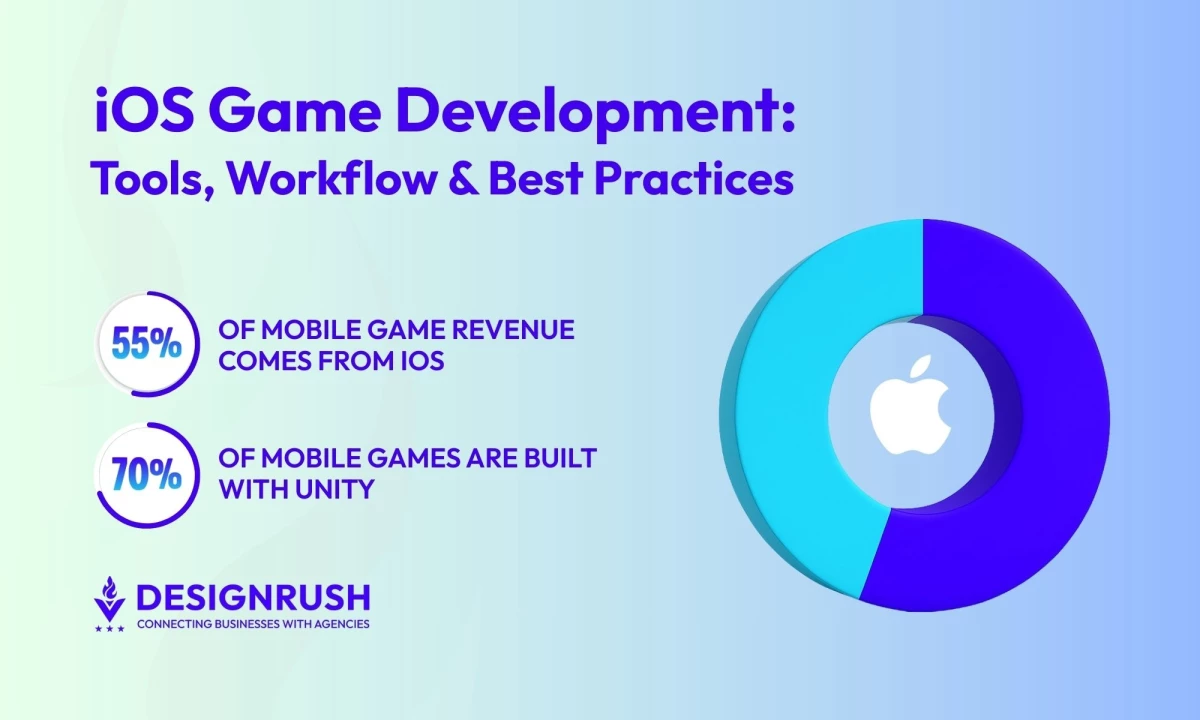
- iOS games generate 30–50% more revenue per download than Android and account for over 55% of global mobile game revenue.
- Unity powers over 70% of mobile games, making it the go-to engine for scalable, cross-platform iOS development with built-in monetization tools.
- Seamless continuity across iPhone, iPad, and Mac gives developers unique multi-device engagement routes not easily replicated on other platforms.
iOS Game Development Overview
iOS apps yield roughly 30–50% more revenue per download compared to Android apps on average.
This creates a path to scalable, high-margin opportunities across a wide range of use cases.
Core Tools, Languages & Frameworks for iOS Game Creation
Before jumping into development, it’s important to evaluate how each tool choice impacts time-to-market, scalability, and long-term support. Below are the core options:
Native iOS Development Stack
- Swift: Apple’s powerful, modern language for iOS development
- Xcode: Apple’s official IDE, with a built-in Simulator and robust debugging tools
- SpriteKit/SceneKit: Apple’s 2D and 3D game frameworks, ideal for casual games with tight integration with iOS APIs
- ARKit: Used for immersive augmented reality games (e.g. location-based or device-camera AR experiences)
Building natively often means earlier access to the latest Apple features and APIs, smoother performance on Apple devices, and fewer App Store compatibility issues.
Cross-Platform Game Engines: Unity vs Unreal Engine
Choosing the engine that aligns with the project’s scope (and the team’s expertise) can significantly impact development speed and the game’s quality.
Here’s a comparison of the leading game engines for iOS: Unity and Unreal Engine.
Feature/Aspect | Unity | Unreal Engine |
Programming Language | C# | C++ |
2D/3D Support | Supports both 2D and 3D | Primarily 3D; best for high-fidelity 3D |
Strengths | Fast prototyping, large asset store, built-in monetization, wide mobile support | Cinematic visuals, advanced rendering, AR/VR integration |
Mobile Game Usage | Less common for mobile-only projects | |
Cross-Platform Deployment | One-click deployment to iOS, Android, console, and PC | Supports deployment across PC, console, mobile, and XR |
Best For | Targeting mobile with potential console/PC ports; faster development cycles | Developing high-end games or immersive AR/VR experiences |
Community & Ecosystem | Robust community; strong plugin and third-party support | Large support from Epic; excellent for AAA-quality development |
Supporting Tools & DevOps
Behind every great game is a smart toolkit. From design to deployment, these tools help teams work faster, test better, and launch with confidence:
- Design & art: Tools like Figma (UI design) and Blender or Maya (3D modeling) assist in creating game art and interfaces — key for App Store appeal.
- Collaboration & version control: Git (via GitHub/Bitbucket) tracks code changes; For large art assets, cloud storage or asset servers might be used.
- Testing: Use Apple’s TestFlight to distribute beta builds. Organize tester groups (e.g., by user persona or device type) to gather diverse feedback before launching.
- Analytics & crash reporting: Tools like Firebase Analytics, GameAnalytics, or Crashlytics provide real-time data on user behavior, retention, and technical issues.
- CI/CD pipelines: Automate builds and deployments with GitHub Actions or Jenkins to speed up releases and reduce manual errors.



iOS Game Development Workflow — From Idea to App Store
Game development is inherently iterative, with most teams adopting an Agile workflow adapted for the unique demands of building games:
Pre-Production: Strategy First
Pre-production helps clarify who the game is for, how it will play, and how it will make money, setting the stage for a smoother development process.
- Define the audience and core loop
- Start with an MVP
- Choose monetization early
- Create mockups and wireframes
1. Define the Audience and Core Loop
Identify your target players and design the core gameplay loop that will keep them engaged. Is it a hyper-casual game for teens or a training quiz for corporate staff? Your audience guides all design decisions.
2. Start With an MVP
For new game ideas or client pitches, build a lightweight Minimum Viable Product — a lightweight version that captures the core fun factor without all the content. This could be a single level or a basic prototype focusing on unique mechanics.
MVPs can be done relatively quickly (in a matter of weeks for simple concepts) and help validate the idea. If the MVP shows promise (good feedback or metrics like retention), it’s easier to justify further investment.
3. Choose Monetization Early
Decide how the game will make money at the concept stage. Monetization impacts everything, from game mechanics to feature design.
A game intended for ad revenue might design shorter play sessions, whereas one with subscriptions might focus on long-term content value.
Monetization models:
- In-app purchases (IAPs): Ideal for games with multiple levels, cosmetic upgrades, or time-savers (common in free-to-play mobile titles).
- Subscriptions: Great for fitness, storytelling, or educational games with recurring content (e.g. monthly new levels or lessons).
- Ad-based monetization: High-engagement games can earn via banners, interstitials, or rewarded ads (e.g., Unity Ads, AdMob).
- Hybrid: Many successful games combine IAPs and ads to balance lifetime value (LTV) and player experience.
4. Create Mockups and Wireframes
Before writing code, map out key screens (menus, HUDs, etc.) with wireframes or storyboards. For level-based games, sketch a few sample levels. Some teams also build a simple paper prototype or an animatic to simulate gameplay flow.
Development: Agile, Modular, Focused
With a clear plan in place, development kicks off. Teams typically work in sprints, building the game in modular pieces — starting with the core loop and layering in features, art, and polish.
5. Work in Sprint Cycles
Work in short sprints (1–2 weeks), developing playable game increments. After each sprint, you should have a playable build (even if very rough) to test internally.
The cycle is Build → Test → Iterate.
6. Focus on Touch UX
For iOS, design controls and interfaces specifically for touch screens, across various device sizes. If the game uses tilt, swipes, or multi-touch gestures, those should be refined early on through testing.
7. Build Modular Architecture
Develop the game in modular components (e.g., a module for physics, a module for IAP logic, etc.). This makes it easier to delegate parts of the project (sound design, AI behaviors, etc.) to specialists or outsource without breaking the whole project. It also allows code reuse in future projects.
8. Integrate and Optimize Assets
Continuously integrate art and sound assets as they are ready, rather than at the last minute. Optimize assets (textures, models) for performance on target iOS devices early, to avoid surprises later with app size or frame rate.
Testing, QA, and Optimization
Before launch, the game should go through rigorous testing. This stage helps catch bugs, optimize performance, and polish the experience.
- Conduct beta testing via TestFlight
- Monitor performance closely
- Fix crashes and bugs
- Iterate based on feedback
9. Conduct Beta Testing via TestFlight
Use TestFlight to distribute builds to QA testers and external beta users. Segment testers (e.g., casual vs. hardcore gamers, iPhone vs. iPad users) to get focused feedback.
Gather both qualitative feedback (surveys, in-app feedback prompts) and quantitative data (analytics events).
10. Monitor Performance Closely
On iOS devices, closely monitor FPS (frames per second) during gameplay, as well as battery usage and thermal impact. Games that cause device overheating or rapid battery drain quickly get poor reviews.
Optimize code and assets where needed, especially on older devices. For instance, tune down poly counts or effect complexity if the frame rate drops on an iPhone 8.
11. Fix Crashes and Bugs
Use crash logs (from Xcode Organizer or services like Crashlytics) to fix crashes promptly. Aim for zero crash defects before submission.
Don’t forget edge cases — test network loss (for online games), airplane mode, large text settings, and other real-world scenarios.
12. Iterate Based on Feedback
Watch for pain points in user behavior. If 80% of beta users quit on level 3, it may be too hard or confusing — adjust the difficulty or add a tutorial hint. Real user testing is invaluable to fine-tuning game balance and UX.
App Store Deployment
After testing, it’s time to package the game for launch. This means polishing your App Store listing, meeting Apple’s requirements, and planning updates after release.
- Prepare polished metadata
- Ensure App Store compliance
- Submit and respond to review
- Plan for post-launch iterations
13. Prepare Polished Metadata
Your App Store listing is the game's storefront. Create an eye-catching icon and use all screenshot slots to showcase the game.
Include an App Preview video to demonstrate gameplay. Lastly, write an optimized description with relevant keywords (without keyword stuffing) to improve search visibility.
14. Ensure App Store Compliance
Ensure the game meets Apple’s strict guidelines on privacy, content, and performance. For example, if your game tracks data, implement the App Tracking Transparency prompt.
Many first-time rejections happen due to missing privacy permission prompts or not providing sufficient explanation for a feature. Having an internal review checklist (covering guidelines on privacy, content ratings, use of Apple trademarks, etc.) can save time.
15. Submit and Respond to Review
Submit the app via App Store Connect. If it’s rejected, carefully review the feedback, fix the issues, and resubmit.
It’s common to go through a couple of iterations. Small issues like a missing disclaimer or privacy toggle can cause initial rejections, but quick fixes often lead to approval (and even feature placement if your app stands out).
16. Plan for Post-Launch Iterations
Even after launch, plan updates. Apple favors apps that show continued improvement or seasonal updates. Be ready to patch quickly if users find bugs post-launch and keep improving to boost visibility and retention.
Luca Mastrorocco, Co-Founder at REPLUG, reinforces this mindset:
"Apps that sustain growth understand that the real value comes after the install. They prioritize onboarding, personalized messaging, and re-engagement campaigns to keep users active and engaged over time."
Best Practices for Game Development
Game dev has a lot of moving parts. That’s why how you work behind the scenes matters just as much as what shows up on screen.
Here are a few best practices to help you stay efficient, creative, and ready for launch.
- Outsource modular components: Identify which areas can be outsourced or handled by specialists to speed up production. Commonly outsourced components include audio design, 2D/3D asset creation, and specialized programming tasks.
- Build pre-launch hype: As development wraps up, start building an audience through Reddit, Discord, teasers, and email sign-ups. Share dev diaries and sneak peeks to create a following that’s ready to download on day one.
- Document for smooth handoffs: Keep code, assets, and processes well-documented. This makes future updates easier and helps new devs or clients jump in without confusion.
- Pitch to get featured by Apple: Getting featured by Apple can skyrocket a game’s success. Apple looks for polished visuals strong usability, originality, and regional localization.
Emerging Trends & The Future of iOS Game Development
iOS game development is becoming more immersive, intelligent, and interconnected. Despite having fewer downloads than Android, iOS accounts for over 55% of global mobile game revenue, offering a uniquely lucrative ecosystem to innovate in.
Beyond entertainment, iOS game development is increasingly being used to create value, differentiate products, and reach new audiences across industries. Teams are experimenting with a wide range of applications, including:
- Branded mini-games: Build small games for marketing campaigns to drive user interaction. Chipotle’s “The Scarecrow” game promoted the brand’s sustainable farming message and hit the App Store top 100.
- White-label games: Re-skinned game frameworks licensed to multiple clients. An agency can develop a core game and customize graphics/stories for different brands.
- Gamification-as-a-Service: Turn onboarding, loyalty programs, or training into engaging game mechanics to boost user participation. Gartner predicts that over 70% of Global 2000 companies will adopt gamified solutions in their operations by 2025.
- eCommerce gamification: Turning shopping or loyalty programs into game-like experiences like spin-to-win discount games or progress-based rewards.
- Interactive publishing: Transforming content like books, comics, or courses into interactive games or gamified storytelling apps. This adds value to traditional content and can reach new audiences.
- Advergames: These are designed specifically to promote a brand or product and engage customers in fun, interactive ways.
According to Manish Gulati, Co-Founder & CEO of ChicMic:
"Advergames are worth it, as they lead to brand awareness, enjoyable experiences, publicity, and are more interactive than other forms of advertisements."
As mixed reality, cross-platform ecosystems, adaptive AI, and efficiency-first design continue to evolve, the potential for standout iOS experiences is expanding rapidly. These trends are shaping what the next generation of mobile games will look like:
- Mixed reality becomes mainstream: Advancements in ARKit and spatial computing are making mixed reality a core pillar of future gameplay. Developers are blending physical and digital spaces, turning empty rooms into battlefields, arenas, or collaborative play zones.
- Cross-platform play as the default: Players expect to move seamlessly between iPhone, iPad, Mac, and even consoles or PCs. Cross-platform interoperability is becoming standard with Game Center’s multiplayer support and the rise of cloud gaming.
- AI-powered personalization: AI and machine learning now enable games to dynamically adjust difficulty, pacing, and narrative based on player behavior. This creates tailored gameplay experiences that boost engagement and retention.
- Minimalistic & eco-efficient design: Streamlined, battery-efficient design is growing in popularity. Lightweight, visually minimal games improve performance, extend device life, and align with Apple’s sustainability goals—without sacrificing polish or appeal.
iOS Game Development: Final Words
iOS game development is a strong growth driver that offers access to Apple’s high-spending user base and a platform optimized for monetization. It provides a compelling foundation for launching game-driven experiences across industries.
By pairing the right development stack with a well-planned monetization model and launch strategy, teams can broaden their reach, strengthen engagement, and unlock new revenue opportunities.

Our team ranks agencies worldwide to help you find a qualified partner. Visit our Agency Directory for the top iPhone App Development companies, as well as:
- Top Mobile App Development Companies
- Top Android App Development Companies
- Top Cross-Platform App Development Companies
- Top Enterprise Mobile App Development Companies
- Top App Development Companies for Startups
Our design experts also recognize the most innovative design projects across the globe. Visit our Awards section to see the best & latest in app design.
iPhone Game Development FAQs
1. How much does it cost to develop an iOS game?
Cost varies widely by scope. A simple 2D game or MVP can cost up to $80,000. In contrast, complex 3D or multiplayer games can cost six figures (often exceeding $200,000 and up) due to the extensive art, coding, and testing required.
2. What’s the best engine for scalable iOS game development?
Unity is the top choice for scalability, offering cross-platform support, strong 2D/3D tools, and a large developer community. For iOS-only projects, Apple’s native SpriteKit is efficient and tightly integrated — ideal for simple 2D games.
For high-fidelity graphics or AR/VR, Unreal Engine is another choice, though it’s used more in console/PC and high-end mobile development.
3. What are the key benefits of developing games for iOS?
iOS offers access to a high-spending user base, strong monetization tools, and a consistent hardware ecosystem that simplifies optimization.
Developers also benefit from Apple’s robust APIs, early access to emerging technologies, and a marketplace where high-quality games can gain strong visibility
4. How can games get featured on the App Store?
Apple features games that deliver exceptional quality and uniqueness. To increase your chances, focus on user experience and polish. The game should feel well-crafted, with intuitive controls and an attractive design.
From a technical side, ensure the game runs smoothly on all recent devices and follows Apple’s guidelines (no crashes, no rule violations). You can also submit a “featuring nomination” via App Store Connect with your app’s story or updates.