
Photo editing apps are no longer just for photographers. They’ve become essential tools for every brand, creator, and entrepreneur with a visual story to tell.
Best Photo Editing Apps: Key Findings
- Cross-platform and cloud-enabled tools like Adobe Lightroom Mobile allow teams to edit, review, and publish in real time.
- Tools like Snapseed and VSCO democratize pro-level editing for creators and small businesses.
- 64% of photographers using AI-powered workflows say clients can’t distinguish AI-edited from manual edits.
Best Photo Editing Apps Overview
Whether you’re enhancing a portrait, stylizing a reel, or building cohesive brand aesthetics, the right photo editing app can save hours of time, simplify complex workflows, and unlock creative possibilities that once required full desktop suites.
Why These Photo Editing Apps Lead the Pack
The best photo editing apps blend power, speed, and accessibility to help creators produce studio-quality visuals from any device. They deliver professional-grade results without the steep learning curve.
As artificial intelligence becomes central to modern editing workflows, it’s reshaping how professionals work and what clients expect. One survey found that 81% of photographers using AI-powered workflows report a better work-life balance, reclaiming hours once spent on repetitive post-production.
But as AI reshapes the editing landscape, balancing creativity, automation, and affordability remains key. Here’s what sets the leading apps apart, and what to watch for.
- Ease of use meets pro-level tools
- AI as a creative partner
- Authentic visual aesthetics
- Collaboration and cloud agility
- Pricing and platform freedom
1. Ease of Use Meets Pro-Level Tools
Modern mobile editors combine intuitive design with features once reserved for full suites. Think RAW support, layers, masking, and detailed color control. They make advanced editing feel natural and fast.
Take note: With so many options, even “simple” apps can overwhelm beginners. Pro-level tools often hide behind premium paywalls or require extra tutorials to unlock their full potential.
2. AI as a Creative Partner
AI now plays a central role in mobile editing by automating retouching, lighting correction, and background cleanup. It accelerates workflows and frees creators to focus on composition and storytelling.
Take note: Over-reliance on automation can lead to formulaic results or mismatched tones across projects. And while AI speeds up production, consistent quality still demands a human eye.
3. Authentic Visual Aesthetics
Authenticity is in. Film-inspired tones, cinematic palettes, and organic grain have replaced overly filtered looks. Today’s apps use AI texture mapping and style-transfer tech to recreate analog warmth digitally.
Take note: Many filters are overused, creating sameness across platforms. Standing out still requires thoughtful curation and a personal editing style.
4. Collaboration and Cloud Agility
Collaboration-first editing apps now give teams behind fast-moving brands real-time access and cloud sync tools to move from edit to publish quicker than ever.
Take note: Cloud workflows introduce new concerns (storage limits, sync errors, and privacy risks) especially when handling client assets or brand-sensitive material.
5. Pricing and Platform Freedom
Leading apps balance free access for casual creators with premium plans for professionals. Many offer cross-platform compatibility, letting users edit seamlessly across mobile, desktop, and web.
Take note: Subscription fatigue is real. Constantly expanding feature sets can push costs higher, and fragmented pricing models make it harder to compare true value between tools.



Top 6 Photo Editing Apps for 2026
From AI-driven retouching to cinematic filters and cloud-based workflows, these are the photo editing apps leading the way in 2026 (and why they stand out).
- Snapseed: Best free professional-grade photo editing app
- Adobe Lightroom Mobile: Best for professional editing and cross-platform workflows
- VSCO: Best for creative filters and consistent aesthetics
- Lensa: Best for AI-powered portrait and background enhancement
- YouCam Perfect: Best for beauty and selfie optimization
- Prisma: Best for artistic filters and creative expression
- Top photo editing apps compared
1. Snapseed: Best Free Professional-Grade Photo Editing App
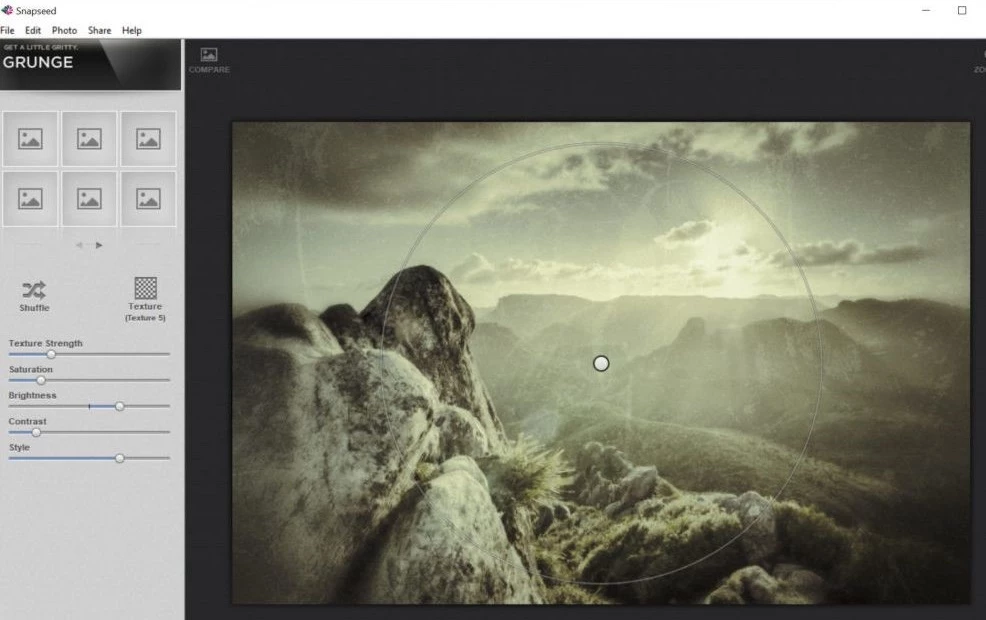
Snapseed remains one of the most powerful free photo editing apps available, offering professional-level tools without the premium price tag. Developed by Google, it gives users access to precision controls typically found in desktop editing software, all wrapped in a clean, intuitive interface.
For small business owners and professionals, Snapseed offers an ideal balance of control and simplicity. You can easily fine-tune exposure, color, and sharpness or explore advanced tools like curves, selective adjustments, and healing for precise retouching.
Its RAW file support gives photographers full control over image data without needing a computer, while the non-destructive workflow lets you experiment freely and refine every edit.
From polishing product shots to creating social-ready visuals, Snapseed’s mix of power and accessibility makes it a reliable favorite across creative industries.
Editing tip: Use the “Selective” tool to brighten faces or products without overexposing the background.
Key features:
- RAW file editing
- Selective adjustments and masking
- Healing brush for blemish and object removal
- Perspective correction
- Double exposure mode
- Dozens of professional filters and film-style presets
- Non-destructive editing history
Pros:
- Entirely free with no hidden paywalls or ads
- Offers desktop-level editing power on mobile
- Great for both beginners and professionals
- Supports precise color and tonal adjustments
- Fast and stable performance even on older devices
Cons:
- Interface can feel complex for complete beginners
- Lacks cloud sync and collaboration features
- No built-in community or export templates for social media
Pricing:
- 100% free for Android and iOS users
2. Adobe Lightroom Mobile: Best for Professional Editing and Cross-Platform Workflows
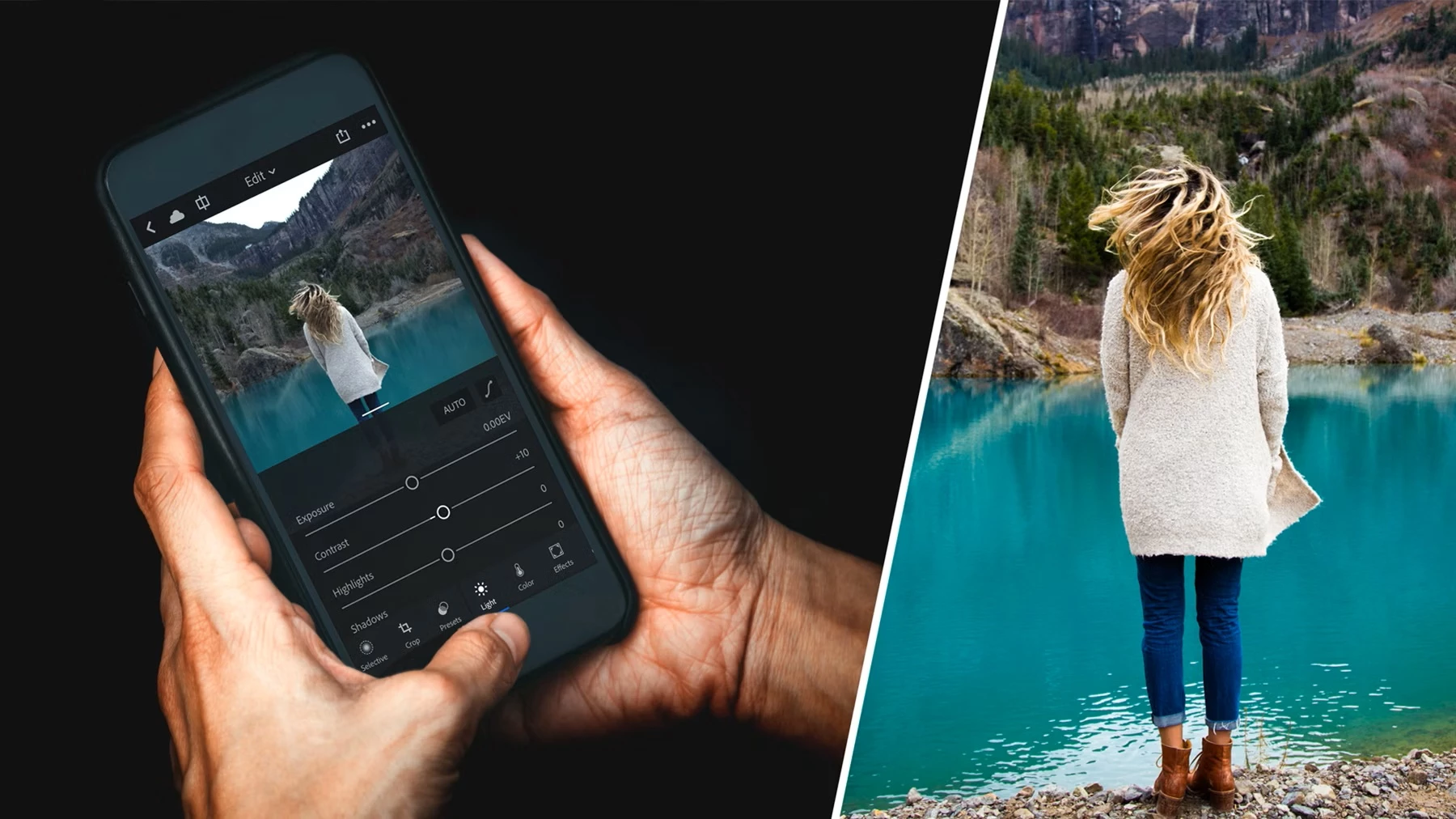
Adobe Lightroom Mobile brings Adobe’s industry-leading editing power to mobile, making it the go-to choice for professionals, agencies, and creators who need advanced control and seamless cross-device syncing.
It offers everything from precise exposure and color adjustments to selective masking, curves, lens correction, and full RAW editing, all within a non-destructive workflow that preserves your original files.
The app’s AI-driven Adaptive Presets and Quick Actions automate complex edits like sky replacement, background blur, and object removal, which saves hours in post-production.
Its cloud-based ecosystem is another standout: start editing on your phone, refine on your desktop, and finish on your tablet without missing a beat.
Pro tip: Copy-paste settings across photos for consistent edits, perfect for batch processing campaigns.
Key features:
- Full RAW editing and non-destructive workflow
- AI-powered masking and Adaptive Presets
- Healing and cloning tools
- Selective color grading and tone curves
- Cloud sync across devices via Adobe Creative Cloud
- Built-in camera with manual exposure control
- Batch editing and copy-paste settings
Pros:
- Professional-grade tools in a mobile-friendly interface
- Excellent RAW and color management for serious photographers
- Seamless syncing between mobile, desktop, and web
- Advanced AI tools for faster, smarter edits
- Large preset ecosystem for consistent brand aesthetics
Cons:
- Premium features require a subscription
- Can feel overwhelming for beginners
- Large RAW files and cloud syncing may require significant storage
Pricing:
- Free basic plan with limited features
- Lightroom Premium starts at $4.99/month (includes cloud storage and full access to all tools)
3. VSCO: Best for Creative Filters and Consistent Aesthetics
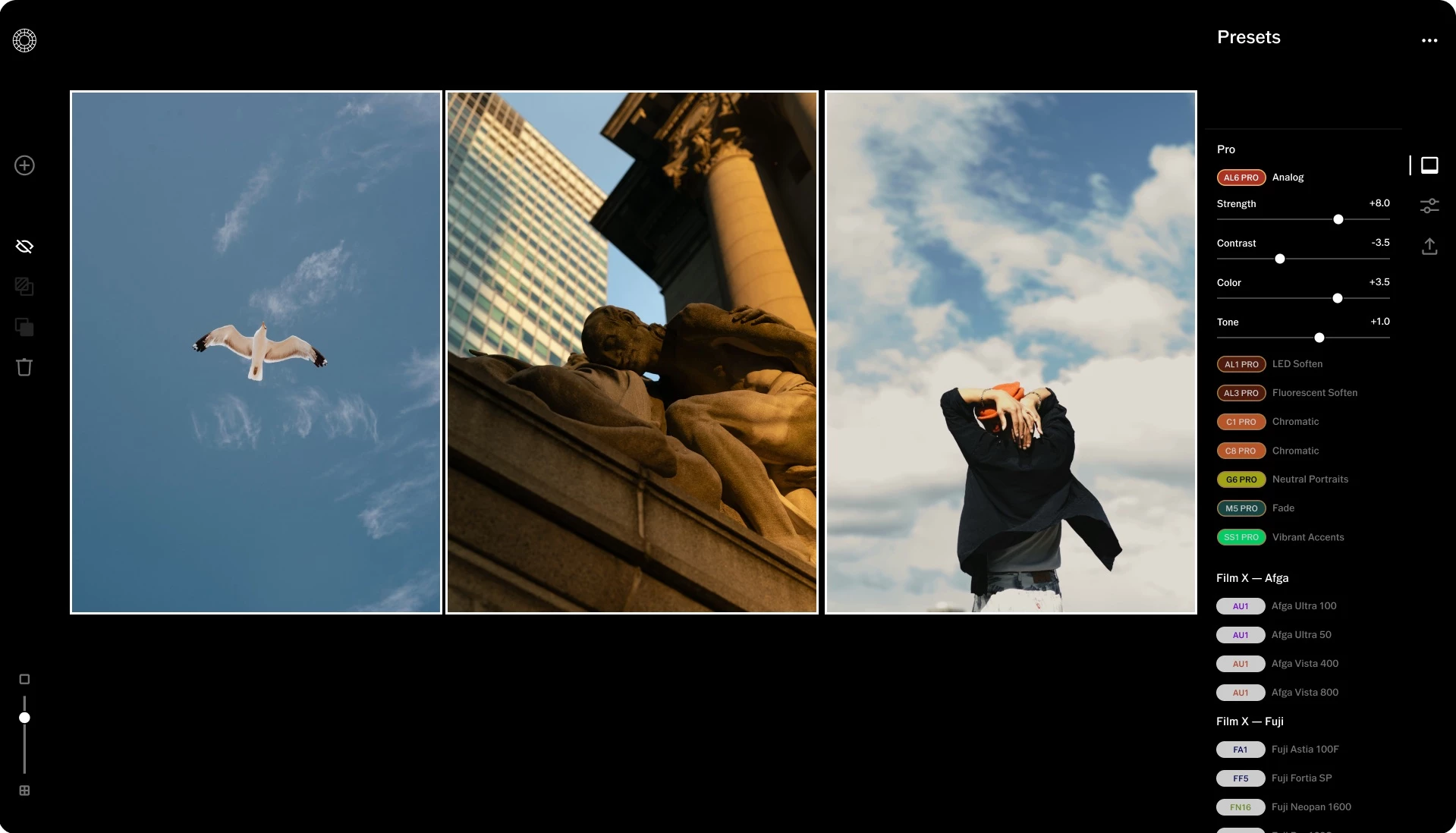
VSCO has long been a favorite among creators, influencers, and lifestyle brands seeking a distinctive visual identity. Known for its signature film-inspired filters, it prioritizes mood and storytelling over technical precision, making it ideal for consistent, aesthetic-driven content.
At its core, VSCO delivers simplicity with style. It offers curated presets that emulate vintage film stocks, warm tones, and cinematic color.
Alongside its filters, it includes reliable tools for exposure, contrast, grain, HSL adjustments, and even video editing, helping creators maintain a cohesive look across formats.
Style hack: Use the “HSL” sliders to fine-tune tones; even minor hue tweaks create a unique aesthetic.
Key features:
- 200+ film-style presets and creative filters
- Advanced photo and video editing tools
- HSL, grain, and split-tone controls
- AI-powered recommendation tools (2025 update)
- Integrated community platform for sharing and discovery
- Collage and montage tools for short-form content
Pros:
- Industry-leading filters for distinctive, brand-worthy aesthetics
- Ideal for lifestyle and social media content
- Offers both photo and video editing tools
- Clean, distraction-free interface
- Built-in creative community for inspiration and visibility
Cons:
- Limited advanced tools compared to Lightroom or Snapseed
- Many filters and features are locked behind a subscription
- No true RAW editing or cloud sync functionality
Pricing:
- Free basic version available
- VSCO Membership Plus Plan starts at US $2.50/month, $29.99/year.
4. Lensa: Best for AI-Powered Portrait and Background Enhancement
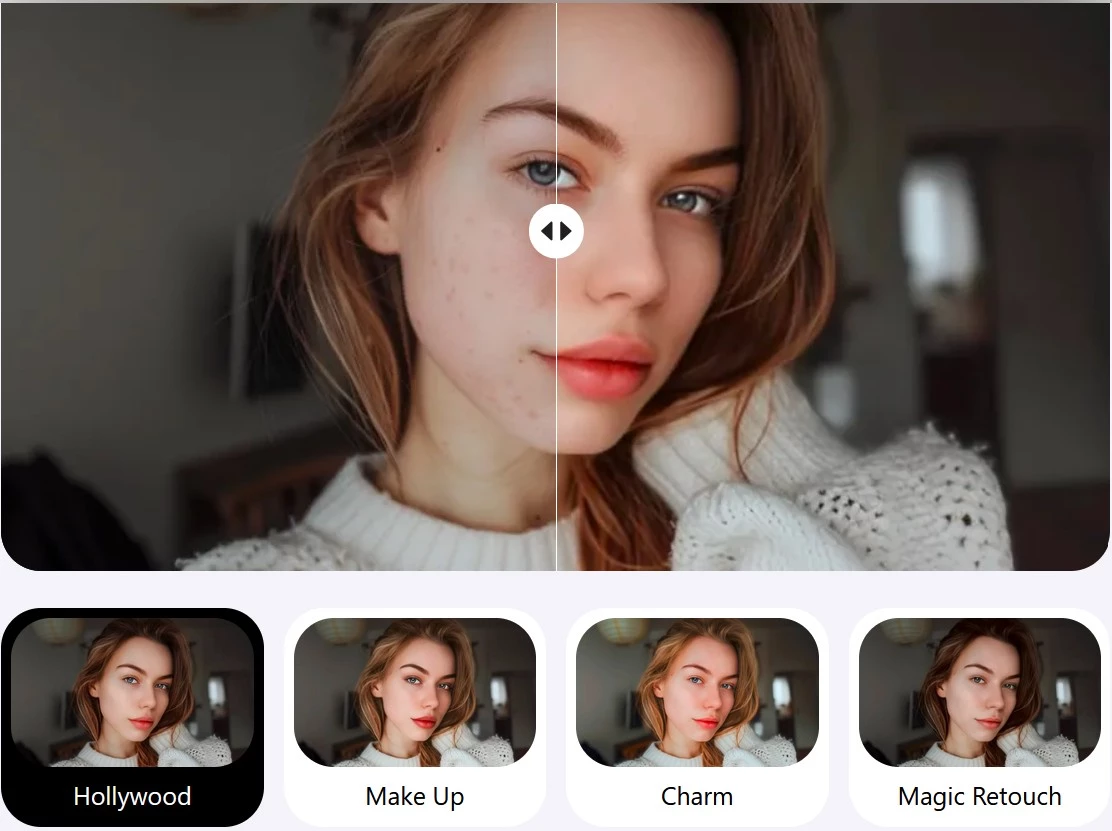
Lensa AI has quickly become one of the most talked-about photo editing apps, thanks to its AI tools that make professional-looking portraits possible in seconds.
Built for creators, influencers, and small businesses producing fast, high-impact visuals, it excels at AI-powered retouching and background editing that once demanded manual skill.
Its strength lies in smart automation. Lensa enhances facial features, adjusts lighting, and removes blemishes without over-smoothing (a common flaw in older beauty filters).
Features like Magic Correction and Auto Adjust fine-tune tone and contrast, while background blur and replacement tools make it easy to isolate subjects or swap scenes for clean, professional results.
Key features:
- AI portrait enhancement and beauty retouching
- Automatic lighting and tone adjustment
- Background removal and replacement
- Blur and bokeh effects
- One-tap Magic Correction
- Video retouching tools
- Generative AI “Magic Avatars” for stylized portraits
Pros:
- Exceptional AI tools for fast, natural-looking results
- Great for portraits, selfies, and branded visuals
- Intuitive interface with minimal learning curve
- Saves significant time on manual retouching
- Consistent, polished output suited for social and marketing use
Cons:
- Limited creative control for users seeking manual precision
- Heavy reliance on AI may produce inconsistent results across lighting conditions
- Subscription costs can add up for frequent users
Pricing:
- Free basic version available
- Premium plans start at $7.99/month or $35.99/year
5. YouCam Perfect: Best for Beauty and Selfie Optimization
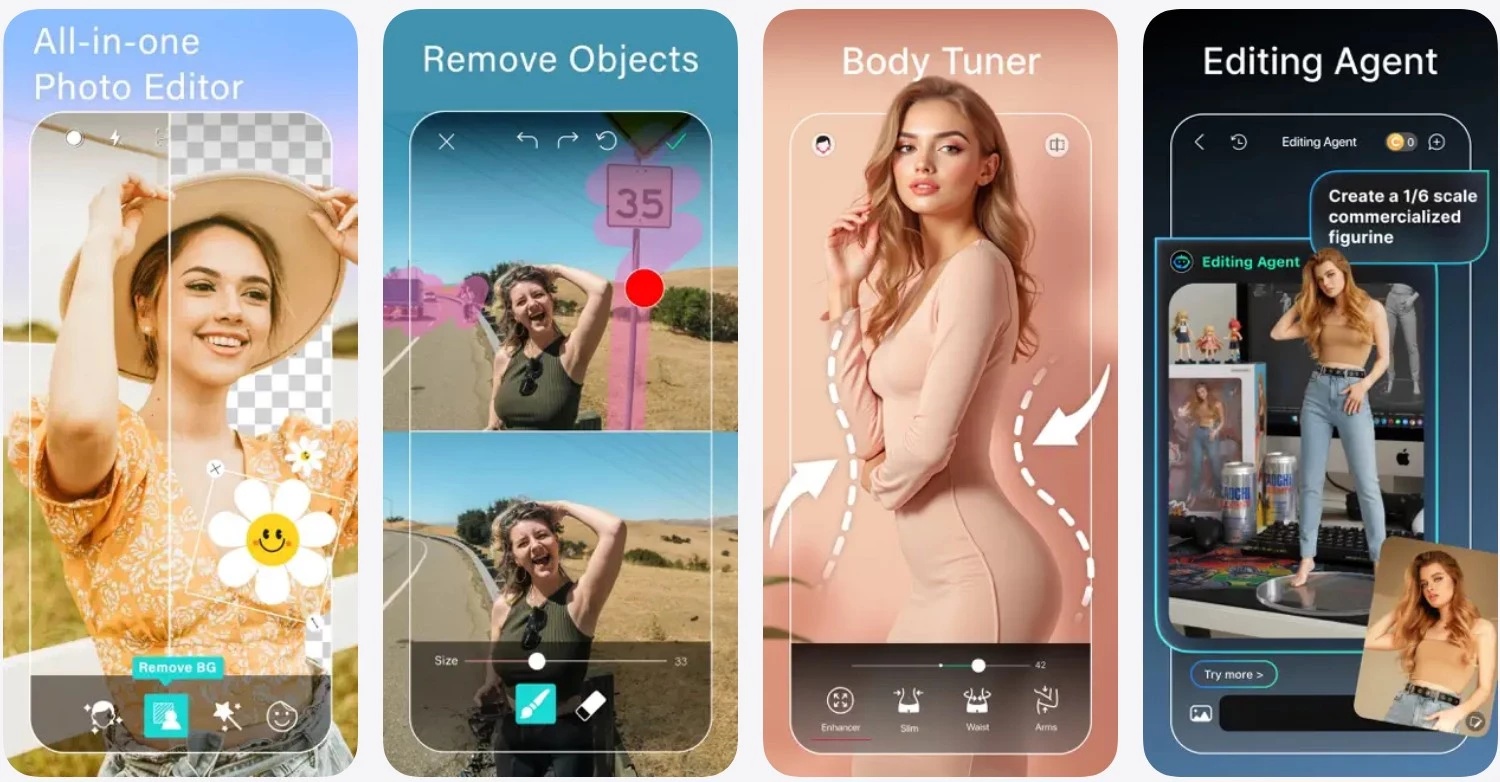
YouCam Perfect is a favorite among creators and small businesses in beauty, lifestyle, and e-commerce looking to elevate portraits and product shots quickly. Its AI-powered tools make it easy to add professional polish, no advanced skills needed.
The app excels at portrait enhancement, offering skin smoothing, blemish removal, face and body reshaping, and lighting correction that look natural, not over-filtered.
Object removal and background editing tools help create clean, distraction-free visuals for social posts and product images.
YouCam Perfect also includes collage, frame, and filter options for quick, social-ready edits, making it an efficient solution for small teams maintaining consistent, polished visuals without external design support.
Pro tip: Keep skin smoothing under 50% to preserve texture and realism.
Key features:
- AI-powered retouching and beauty tools
- Skin, face, and body adjustments
- Object removal and background replacement
- Filters, frames, and stickers for social posts
- Collage and multi-photo layouts
- Cloud backup for easy file access across devices
Pros:
- Fast, intuitive AI tools for portraits and selfies
- Ideal for social creators, influencers, and small brands
- Offers creative flexibility with collages and filters
- Produces natural-looking results compared to older beauty apps
- Regularly updated with seasonal effects and features
Cons:
- Focused mainly on portrait and selfie editing; limited pro-level tools
- Free version includes ads and watermarks
- Overuse of retouching can reduce authenticity in branded content
Pricing:
- Free basic version available
- Premium subscription starts at $5.99/month or $31.99/year
6. Prisma: Best for Artistic Filters and Creative Expression
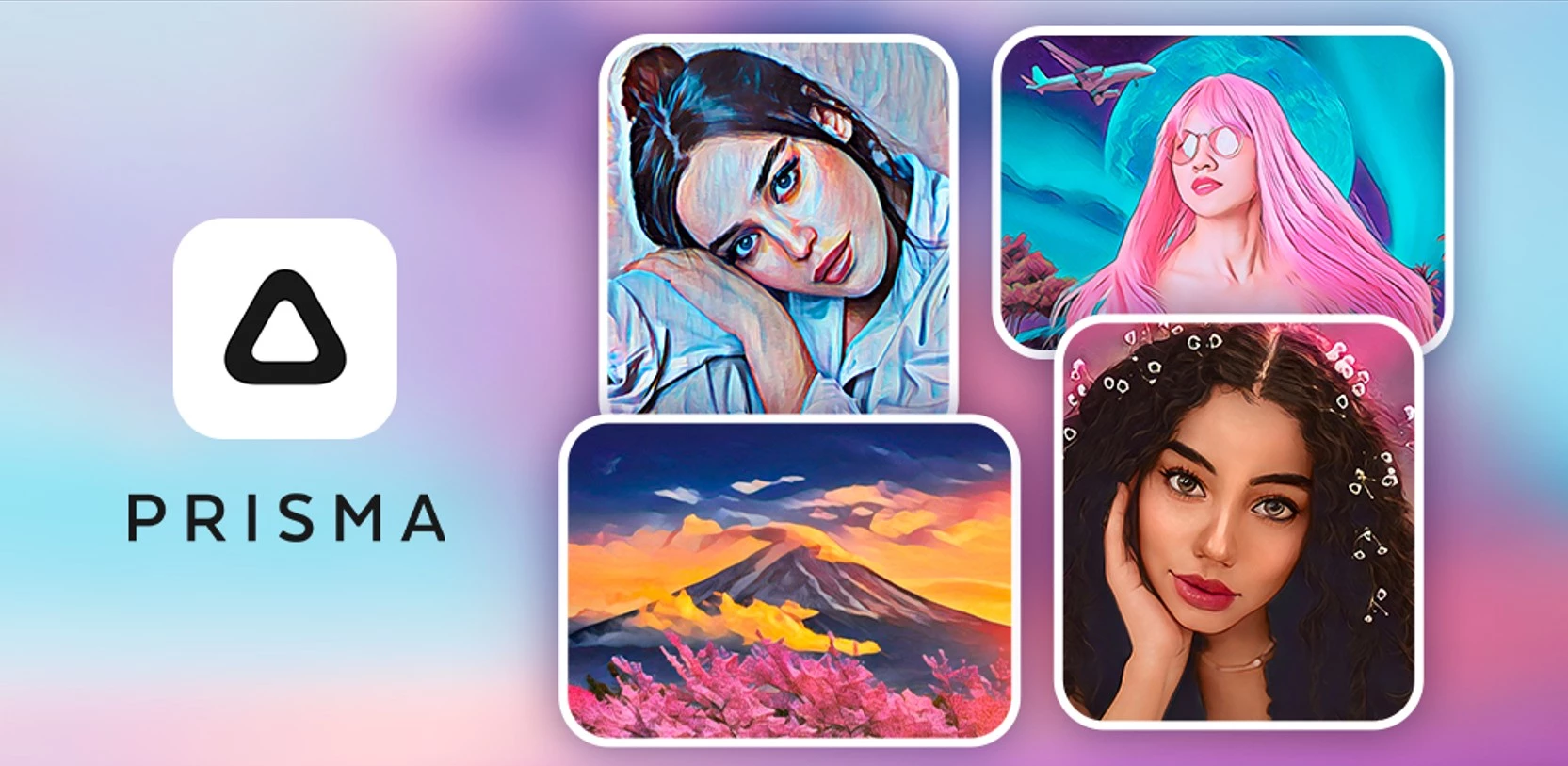
Prisma stands apart from traditional photo editors by transforming ordinary photos into striking works of digital art. It uses neural network technology to apply painterly effects that mimic the styles of famous artists (think Van Gogh and Picasso).
Unlike most editors focused on correction and polish, Prisma is built for creative expression. Its AI-driven artistic filters are designed to let users experiment with texture, brushstrokes, and color in bold, original ways.
New style-blending tools allow multiple effects to merge into one distinctive look, which is great for brands and creators who want visuals that stand out. Prisma still includes core tools for exposure, contrast, and saturation, making it easy to refine your final image.
Key features:
- Neural-style transfer filters inspired by famous art movements
- AI style blending for custom filter combinations
- Basic editing tools (exposure, contrast, saturation)
- High-resolution exports for professional use
- Option to process videos with artistic filters
- Fast rendering and easy social sharing
Pros:
- Unique AI filters that turn photos into digital artwork
- Excellent for creatives and brands seeking distinctive visual styles
- Simple, fast, and beginner-friendly
- Regularly updated with new artistic filters
- Great for social media visuals and campaign storytelling
Cons:
- Not suited for technical editing or detailed retouching
- Limited manual control compared to pro apps
Pricing:
- Free basic version available
- Prisma Premium starts at $7.99/month or $29.99/year
7. Top Photo Editing Apps Compared
Here’s a quick side-by-side look at how the top apps stack up in key features:
| App | AI Tools | RAW Support | Collaboration / Cloud Sync | Starting Price |
| Snapseed | Basic | ✅ | ❌ | Free |
| Adobe Lightroom Mobile | Advanced | ✅ | ✅ (Cloud Sync) | $4.99/month |
| VSCO | Filters / AI Curation | ❌ | Limited (Community) | $2.50/month |
| Lensa | Portrait & Retouch AI | ❌ | ❌ | $7.99/month |
| YouCam Perfect | Beauty / Object Removal | ❌ | ✅ (Cloud Backup) | $5.99/month |
| Prisma | Neural Style AI | ❌ | ❌ | $7.99/month |
How to Choose the Right Photo Editing App for You
Each of these tools shines in different scenarios. The best approach is to match your creative intent with the app’s strengths while considering how it fits your budget, platform, and workflow.
- For social creators: Prioritize apps like VSCO that emphasize filters, presets, and quick sharing to maintain a consistent, on-brand look.
- For professionals: Choose Adobe Lightroom Mobile or Snapseed for RAW support, precision controls, and non-destructive editing, ideal for detailed retouching and client work.
- For influencers: Lensa and YouCam Perfect are excellent for AI retouching, lighting correction, and fast exports, helping you stay content-ready on tight schedules.
- For artists and creatives: Prisma offers neural filters and painterly effects that turn standard images into expressive, stylized artwork.
- For small teams: Opt for tools with cloud sync or collaboration features, like Lightroom Mobile, to streamline file sharing and maintain consistency across projects.
When choosing, also consider:
- Cost: Free tiers are great for casual use, but professionals will benefit from premium plans that unlock full control.
- Device compatibility: Cross-platform apps ensure a smoother workflow across mobile and desktop.
- Workflow needs: Look for tools that fit naturally into your content pipeline, from capture to publish.
Emerging Trends and Innovations in Photo Editing Apps
The photo editing world in 2025 is defined by smarter AI, nostalgic aesthetics, and seamless collaboration. Here are the key shifts shaping how creators and businesses edit today:
- Generative AI becomes standard
- Vintage and film-inspired styles return
- Collaboration and cloud workflows
- Platform flexibility and creative integration
1. Generative AI Becomes Standard
AI has evolved from a novelty to a must-have. Features like automatic retouching, smart object removal, and lighting correction now deliver pro-level results in seconds. These tools save hours of post-production time while keeping creative control firmly in the user’s hands.
As Min Lew, creative director at Base Design, says that by embracing AI, her team challenges the notion that it threatens creativity, as they turn it into an advantage to produce something avant-garde.
“This approach turns client projects into experiments, attracting audiences by staying current and experimenting in real-time," she says.
2. Vintage and Film-Inspired Styles Return
Amid hyper-digital visuals, creators are embracing the film look: grain, muted tones, and cinematic palettes. AI-powered texture simulations recreate the warmth of analog photography while preserving modern image quality, giving brands a more human, storytelling edge.
3. Collaboration and Cloud Workflows
Photo editing is now a team sport. Apps with real-time syncing, shared libraries, and cloud storage let designers, marketers, and editors collaborate fluidly across devices.
The result: faster approvals and more consistent brand output.
4. Platform Flexibility and Creative Integration
Editing no longer lives on one device. The best apps now offer cross-platform continuity, bridging mobile, desktop, and cloud for uninterrupted workflows. Many also expand into video and mixed-media editing, which means creators can manage entire content pipelines from a single tool.
Best Photo Editing Apps: Final Words
Forget struggling to master complex tools. Thanks to AI, the best picture editing apps today empower creators to move faster, collaborate smarter, and express more authentically, no matter their skill level or platform.
What sets leading tools apart now is how seamlessly they fit into the creator’s workflow. Success is defined by agility, storytelling, and the ability to turn any image into a moment that feels both crafted and real.
Our team ranks agencies worldwide to help you find a qualified partner. Visit our Agency Directory for the top mobile app development companies along with:
- Top Brand Strategy Agencies
- Top Influencer Marketing Agencies
- Top Instagram Marketing Agencies
- Top Digital Marketing Agencies for Small Businesses
Best Photo Editing Apps FAQs
1. What’s the difference between a photo editing app and a photo filter app?
Photo editing apps provide advanced tools like masking, curves, and RAW editing for precision control, while filter apps apply preset looks for quick aesthetic tweaks. Think of filter apps as one-tap stylizers, and editing apps as your full creative toolkit.
2. How can businesses maintain a consistent visual style across different photo editors?
Establish a shared preset or color grading reference for your team. Store tone, contrast, and filter settings in the cloud, and apply them across devices or editors. Consistency should be about maintaining the same visual language rather than using the same app.