

eCommerce Website Best Practices: Key Points
- Mobile-first design is critical, with mobile commerce projected to drive 59% of all eCommerce revenue, a 0.1-second speed improvement can boost conversions by 8%.
- Streamlined UX directly impacts sales; 18% of US shoppers abandon carts due to complicated checkouts, highlighting the importance of frictionless user journeys.
- User-generated content drives conversions — Statista found that UGC can increase conversion rates by 3.8% once customers view it, making it a powerful trust-builder.
In this guide we’ll deliver proven best practices that turn browsers into buyers. Whether you're building a new eCommerce site or optimizing an existing one, these insights will help you design for conversion, scale with confidence, and grow with data.
UX and UI Design Principles That Boost Conversions
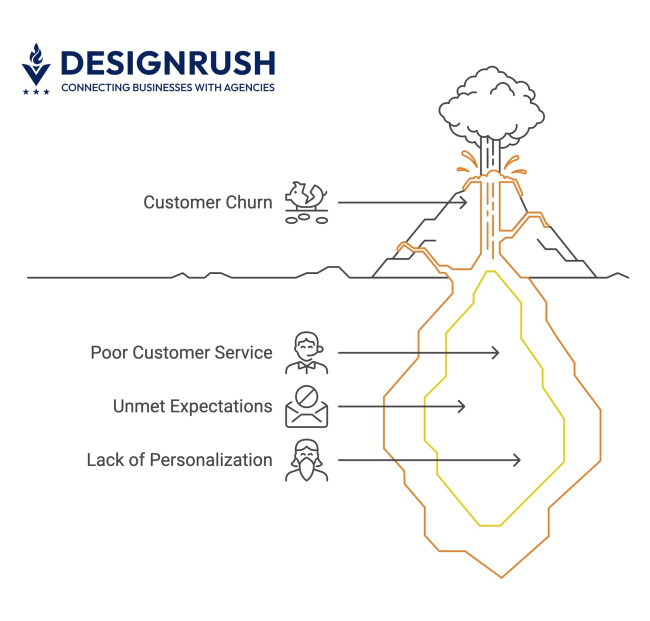
In eCommerce, design is about function, not just form. Every element should actively push users closer to purchase. Companies that treat UX as a conversion asset, not an afterthought, consistently outperform competitors in both sales and retention.
In fact, according to research done by PWC, 32% of customers would leave a brand they loved after just one bad experience.
So, if you don’t want to be one of those brands, let’s see what you should focus on to improve your eCommerce UX.
Customer-Centric UX That Reduces Friction
Design starts with empathy. Sites that guide shoppers intuitively through the purchase journey outperform those that rely on guesswork or gimmicks. Key tactics include:
- Streamlined navigation: Use clear category menus, breadcrumb trails, and faceted filters so users can quickly find products.
- Simplified purchase funnel: Reduce the clicks and pages between product discovery and checkout. Every extra step is an opportunity for drop-off.
- Accessibility: Incorporate ADA/WCAG accessibility standards to make the site usable for all customers (expanding your reach and meeting compliance).
Research by the Baymard Institute found that about 1 in 5 US online shoppers (18%) have abandoned an order in the past quarter solely because the checkout process was too long or complicated. This highlights how crucial it is to minimize friction — lengthy forms or unclear steps literally cost sales.
Conversion-Optimized Layouts
Think of your page layout as a guided sales funnel, with calls-to-action (CTAs) and high-impact content in the spotlight:
- Visual hierarchy: Use size, color, and placement to draw attention to key actions (like “Add to Cart”) and to highlight product benefits or offers.
- Trust and urgency cues: Incorporate elements like sticky cart summaries, security badges, and low-stock or limited-time offer alerts. These build trust and create a sense of urgency.
- Streamlined checkout flow: Aim to minimize steps and form fields. Provide a clear progress indicator for multi-step checkouts and use real-time form validation to catch errors early.
Mobile-Responsive Design
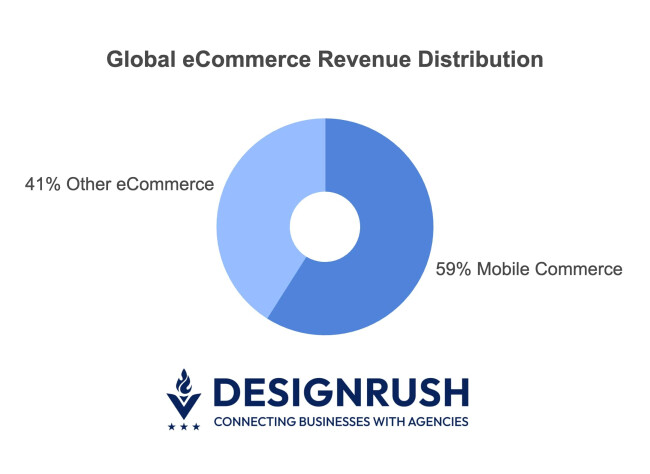
With mobile commerce setting to represent 59% of all eCommerce revenue worldwide, designing for desktop first is officially obsolete. Mobile-responsive (or mobile-first) design is paramount:
- Touch-friendly UI: Ensure buttons and interactive elements are thumb-friendly in size and spacing. Use simple, collapsible menus and gestures (like swipeable image galleries) optimized for one-handed use.
- Speed on mobile: Mobile users are even more impatient — optimize your mobile page load times by compressing images, deferring non-critical scripts, and avoiding intrusive interstitials or pop-ups.
- Full functionality on small screens: Provide all the essential features (search, filters, account access, etc.) in a way that works on smaller displays. Test your product filtering, zoom on images, and especially the checkout on actual devices to ensure nothing is cumbersome.
According to Dmytro Umen, CEO and Co-Founder of Brights, the modern shopping experience is far from ideal conditions. "People often make purchases impulsively," he explains. "They place orders from their phones, on the go, in a rush and a crowded space, having low Wi-Fi connection."
Umen emphasizes that these imperfect conditions must be central to UX design decisions. He argues that designers need to "take these imperfect hypothetical conditions into account when working on the UX aspect of eCommerce websites." The stakes are high: "No matter the circumstances, users need a quick, easy, and stress-free way to make a purchase."
The consequences of failing to meet these standards are immediate and costly. As Umen warns: "Otherwise, they will choose a different platform."
Mobile-First Design is a Revenue Multiplier

Retailers that invest in mobile-first design often see substantial gains. For example, after Merchology launched a mobile-optimized site, they saw a 40% lift in mobile conversion rate. Google’s data further shows that even a 0.1-second improvement in mobile site speed can boost retail conversion rates by about 8%.
Technical Best Practices for eCommerce Site Performance and Security
Great design may create desire, but solid tech infrastructure builds trust and scalability. A robust eCommerce tech stack is about the ability to grow without hiccups and to rank competitively in search engines.
Here are the key technical pillars:
- Scalable site infrastructure
- Performance optimization
- Technical SEO foundations
- Secure payment processing and compliance
Scalable Site Infrastructure
Growth-stage brands need an infrastructure that can handle sudden traffic spikes (e.g. viral social posts or Black Friday surges) as well as long-term expansion:
- Cloud hosting with auto-scaling: Use AWS, Google Cloud, or Azure for elastic scalability that automatically adds resources during traffic spikes, preventing crashes when demand doubles overnight.
- Headless commerce/Modular architecture: Decouple front-end from back-end to deliver content across devices without rebuilding core logic, allowing independent scaling and updates of system components.
Performance Optimization
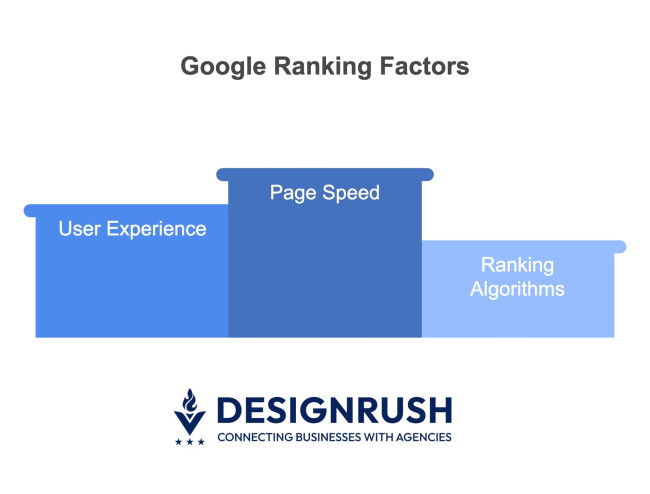
Page speed directly affects user satisfaction, conversion rates, and even SEO. Every second (and millisecond) counts:
- Optimize assets: Compress images and videos, minify CSS/JS, and implement lazy loading for off-screen images. Reducing page weight and network requests lowers bandwidth use and latency.
- Use CDNs and caching: Employ a Content Delivery Network (CDN) to serve static assets from servers closest to the user, drastically cutting load times for global visitors. Additionally, use caching layers (browser caching, server-side caches like Redis or Varnish) to deliver frequently-used content lightning-fast without hitting the database for every request.
- Preloading and prefetching: Take advantage of modern browser techniques, for example, preloading key resources or prefetching the next page, to speed up perceived load time.
- Continuous auditing: Run regular performance audits using tools like Google Lighthouse or PageSpeed Insights. These tools will flag issues (large files, slow scripts, rendering delays) and even suggest fixes.
Remember, speed isn’t just a “nice-to-have” — it’s directly tied to your bottom line. Faster sites tend to rank higher on Google, which uses page speed and experience in its ranking algorithms.
Technical SEO Foundations
SEO success begins under the hood with solid technical optimization. Key technical SEO best practices include:
- Structured data markup: Add Schema.org structured data for products, reviews, business information, etc. This can make your listings eligible for rich snippets in search results, which improve visibility and click-through rates.
- Clean URLs and canonicals: Use readable, keyword-friendly URL structures (e.g. yourstore.com/ category/product-name). Ensure you implement canonical tags for duplicate content to avoid SEO confusion.
- Core web vitals and mobile-friendliness:Google’s ranking systems explicitly consider core web vitals — loading speed, interactivity, and visual stability — as signals. Optimize your code and servers to hit “good” scores on these metrics. Likewise, ensure your site passes Google’s mobile-friendly test; mobile usability issues can hurt your SEO.
- Secure, HTTPS everywhere: Serve your entire site over HTTPS (not just the checkout). Modern browsers flag “Not secure” for non-HTTPS pages, which can scare visitors away. Plus, Google uses HTTPS as a lightweight ranking signal.
According to Marko Škuletić, Founder of Digital Creators Network, the secret to successful eCommerce lies in understanding that SEO and user experience aren't competing priorities. "Balancing SEO and user experience in the eCommerce checkout process involves creating a clean, distraction-free page that focuses on conversion while optimizing keywords and meta tags in the background," explains Škuletić.
This approach challenges the common misconception that SEO optimization must come at the expense of user experience. Instead, Škuletić advocates for a strategic method where technical optimization works invisibly to support both search engines and customers.
Secure Payment Processing and Compliance
Security is a silent conversion driver — customers won’t buy if they don’t feel safe. Thus, prioritizing secure payment and data practices is a must:
- PCI-compliant payments: Use trusted, PCI-DSS compliant payment gateways (e.g. Stripe, PayPal, Authorize.net, or buy-now-pay-later options like Klarna/Affirm). These providers adhere to strict security standards and can handle credit card data securely on your behalf, reducing your compliance burden.
- SSL sitewide: Implement TLS/SSL across your entire site, not just on checkout pages. Showing the padlock icon and “https://” in the browser builds user confidence.
- Fraud prevention and monitoring: Deploy tools like a Web Application Firewall (WAF) and bot detection to protect against malicious traffic, carding attacks, or DDoS attacks.
- Data protection: Follow best practices for storing or transmitting customer data — use encryption for sensitive info, tokenize payment details, and never store credit card numbers in plaintext. Show clear privacy and security policies to users.
Content and Marketing Tactics to Increase Traffic and Sales
Even the best-designed eCommerce site needs fuel for growth — and that fuel is marketing and content. Strategic content and coordinated marketing campaigns turn one-time buyers into loyal customers.
Below are tactics for creating content that converts and marketing strategies that drive sustainable traffic and sales.
- Product content that converts
- Data-driven marketing strategy
- Omnichannel traffic strategies
- A/B testing for growth
Product Content That Converts
Beyond aesthetics, your product content should educate and reassure shoppers, effectively acting as your in-store sales associate. High-converting product pages typically:
- Focus on benefits and SEO keywords: Write product descriptions that highlight the benefits and use cases of the product, not just features. Anticipate common customer questions and include those answers. Weave in relevant long-tail keywords naturally — this helps your pages rank for specific queries (e.g., “waterproof winter coat with hood”) that high-intent buyers search for.
- Rich media: Online, customers can’t touch the product, so do the next best thing. Provide multiple high-resolution images (show different angles, colors, and context like a model wearing the item or the item in use). Include product demo videos or 360-degree rotatable images if possible.
- User-generated content and social proof: Showcase reviews, ratings, customer photos, and Q&A on product pages. Social proof is incredibly powerful at overcoming hesitation — seeing real customers vouch for a product builds trust. Encourage buyers to leave reviews and upload images of the product in use.
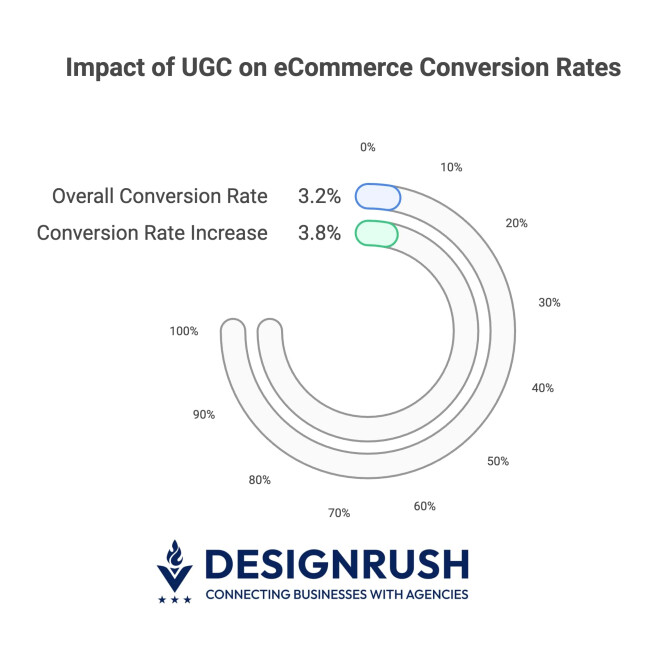
Brands that incorporate customer reviews, photos, and testimonials on their product pages have dramatically higher conversion rates. Statista observed a 3.2% conversion rate in 1,200 eCommerce websites analyzed running UGC technology. Additionally, once visitors scrolled to a point where they encountered UGC, their likelihood of conversion increased by an average of 3.8%.
It not only builds trust but also provides fresh content that can improve SEO.
Data-Driven Marketing Strategy
Analytics is your competitive edge in eCommerce. By collecting and analyzing user behavior data, you can make informed decisions rather than guessing. Here’s how data-driven eCommerce marketers increase ROI:
- Customer journey analysis: Use tools like Google Analytics (GA4), Mixpanel, or Adobe Analytics to map out where users drop off in your funnel. Identify pages with high exit or bounce rates — is it a product page lacking info? Is it a shipping cost disclosure? These are opportunities for improvement or testing.
- A/B testing and iteration: Treat your site and campaigns as always-improvable. Form hypotheses and run A/B tests to get real user data. Test everything from hero images and CTA text to pricing displays and checkout form layouts. Critically, trust the data — let winning variations inform your design and marketing updates.
- Personalization and segmentation: Use behavioral and demographic data to segment your audience and personalize offers. For example, if data shows a group of customers consistently buying children’s clothing, send them tailored promotions for kids’ apparel instead of general offers.
- Double down on winners: Identify your top-converting products and invest more in them. If 20% of your products drive 80% of your revenue (the classic Pareto principle, which does hold true in retail), make sure those products are prominently featured in your ads, homepage, and email campaigns.
- Lifecycle marketing: Use data to fuel retention marketing — set up triggers for things like cart abandonment, post-purchase follow-ups, and win-back campaigns.
How Sephora Drives Customer Loyalty

Sephora’s iconic Beauty Insider program is a masterclass in data-driven lifecycle marketing. From the moment a customer joins, they’re guided through a journey of increasing value and engagement.
The program doesn’t just reward purchases — it recognizes reviews, social interactions, and more, deepening customer relationships at every stage. With tailored product recommendations and exclusive early access to sales, Beauty Insider keeps customers engaged long after their first purchase, turning casual shoppers into loyal brand advocates.
Omnichannel Traffic Strategies
Diversifying your traffic sources protects your business and amplifies reach. A true omnichannel approach — where you integrate SEO, paid ads, social media, email, etc. — will create a flywheel of sustainable growth:
- SEO: Optimize product pages for purchase-intent keywords and create valuable content (guides, tips) to attract early-stage researchers and funnel them to products.
- PPC and shopping ads: Run targeted Google, Bing, and social campaigns segmented by audience intent. Monitor ROAS closely and adjust bids to maintain profitable returns.
- Email marketing: Build automated flows for welcome series, cart abandonment, post-purchase follow-ups, and re-engagement. Personalize based on customer data for higher ROI.
- Social media and influencers: Maintain active presence on relevant platforms with tailored content. Build community engagement and leverage social proof through influencer partnerships and user-generated content.
- Marketplaces: Consider Amazon, eBay, or Etsy to access larger audiences, then convert marketplace customers to direct customers through follow-up communications.
A/B Testing for Growth
Sustainable growth comes from continuous iteration. What worked last quarter may not work next quarter as consumer behavior and competitors evolve.
That’s why ongoing A/B testing is crucial:
- Test various elements: Experiment with different versions of key website elements — homepage banners, navigation layouts, product page copy, pricing formats, checkout flow, etc. In marketing emails, test subject lines, send times, or call-to-action buttons. On landing pages, try different headlines or images. Over time, these incremental wins add up.
- Data-backed decisions: Use A/B tests to challenge internal assumptions. Instead of Highest Paid Person’s Opinion (HIPPO) decisions, let real user behavior inform you. If variant A outperforms variant B with statistical significance, you know the change is worth implementing. This process guards you against costly design or UI missteps.
- Tools for experimentation: Platforms like Optimizely, VWO, Google Optimize, or even built-in testing features in some eCommerce platforms can help non-developers run tests. Make sure you run tests long enough to gather sufficient sample size for confidence. Document your test results and insights for future reference.
eCommerce Websites Best Practices: Final Thoughts
The payoff for following these best practices is tangible: expect lower bounce rates, higher customer satisfaction and retention, better organic search visibility, and ultimately higher customer lifetime value. Every improvement you make — no matter how small — can multiply across thousands of visitors.
Looking for experts to help scale your eCommerce brand? You don’t have to do it alone. Consider partnering with professionals who specialize in these areas.
eCommerce Websites Best Practices FAQs
1. How often should I update my eCommerce site?
Regularly — update product pages, optimize SEO, run performance checks monthly, and redesign the website every 2–3 years to stay current with UX trends and tech.
2. Why is UX design important for eCommerce?
Good UX makes it easier for users to find, understand, and buy products — directly impacting conversion rates and customer satisfaction.
3. How fast should an eCommerce site load?
Ideally, under 3 seconds. Faster sites reduce bounce rates and boost conversions.