
LinkedIn reach feels less predictable in 2026, and there is a reason. In March, the platform detailed a more advanced feed-ranking system built around relevance, expertise, and audience fit, rather than the familiar playbook of network size and early engagement.
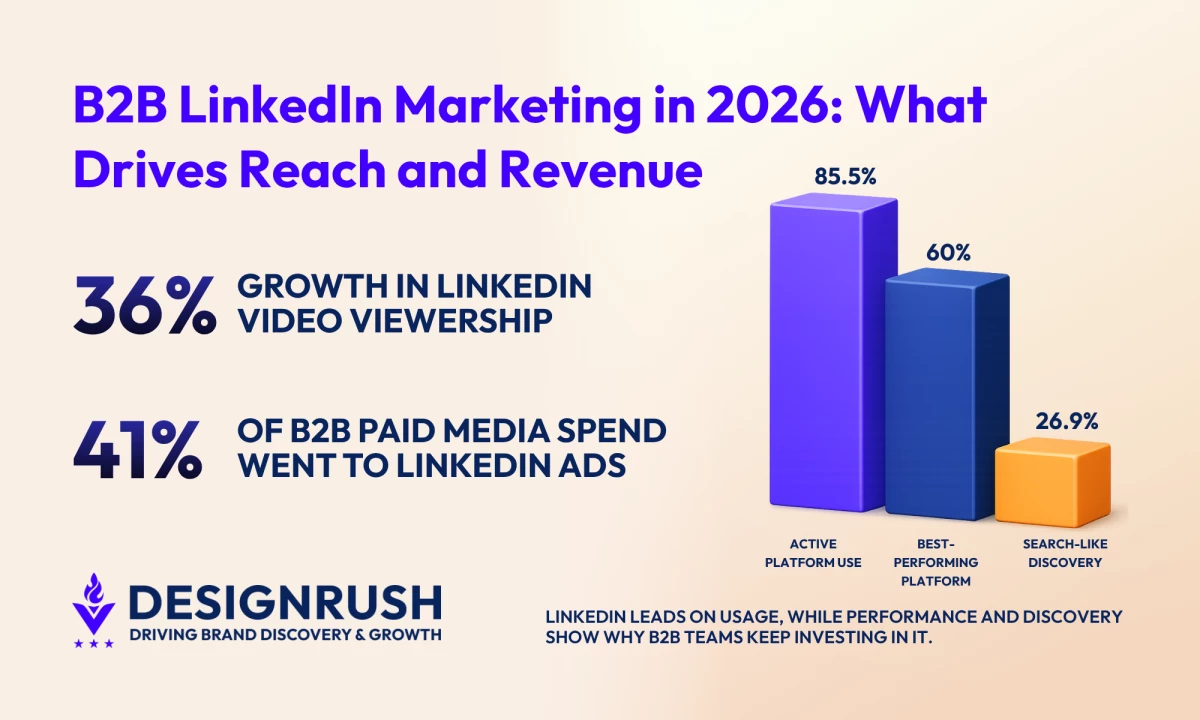
DesignRush’s 2026 Social Media Marketing Survey found that 26.9% of respondents got the most search-like discovery from LinkedIn, ahead of YouTube, Instagram, and TikTok.
Reaching those buyers now comes down to whether your content matches the questions, problems, and topics they care about.
This guide looks at what changed, which content and growth strategies still work, how organic and paid support each other, and how to measure whether any of it is driving pipeline.
How To Use LinkedIn for Marketing: Key Findings
- In 2026, LinkedIn puts greater weight on topic relevance, professional expertise, and audience fit, giving useful posts a better chance of reaching people beyond the creator’s immediate network.
- LinkedIn is still a major B2B discovery channel: 26.9% of DesignRush survey respondents ranked it highest for search-like discovery, while 85.5% actively use it and 60% consider it one of their best-performing platforms.
- The best results come from combining organic authority with paid reach and targeted sales activity. Thought Leader Ads, Sales Navigator, newsletters, and ABM each support a different stage of the buyer journey.
What Is LinkedIn Marketing?
LinkedIn marketing is the use of organic content, professional relationships, paid distribution, and sales prospecting to reach B2B buyers and support business growth.
A complete strategy usually brings together those four areas.
- Organic content: Posts, videos, newsletters, and company-page updates that demonstrate expertise and build visibility
- Relationship building: Comments, employee advocacy, direct conversations, and ongoing engagement with prospects and industry peers
- Paid distribution: Sponsored campaigns that extend proven content to selected roles, industries, or target accounts
- Sales prospecting: LinkedIn search and Sales Navigator workflows used to identify, research, and approach potential buyers
DesignRush’s 2026 survey found that LinkedIn was actively used by 85.5% of respondents and named among the platforms delivering the best results by 60%.
Those results reflect the platform’s role across the buyer journey, where content can introduce a business, professional interactions build familiarity, and paid or sales activity helps turn that attention into pipeline.
How the LinkedIn Algorithm Works in 2026
LinkedIn’s feed now does more to understand what a post is about and who is likely to care.
In March 2026, LinkedIn outlined a ranking system supported by Generative Recommenders and large language models.
It looks at professional context, including industry, skills, experience, location, and the content people engage with or skip. That gives relevant posts a better chance of reaching users outside the creator’s immediate network.
The platform is also reducing engagement pods (private groups where members agree to like, comment on, or share each other’s LinkedIn posts shortly after publishing to inflate early engagement), automated comments, repetitive thought leadership, irrelevant video attachments, and posts built mainly to collect responses.
Why Did My LinkedIn Reach Drop?
A drop in reach doesn’t automatically mean your account was penalized. Each post is ranked on its own, and performance can shift when the topic, audience fit, or content quality changes.
Possible reasons could be:
- Topic falls outside what your usual audience engages with
- Post repeats ideas or formats people have already seen
- Hook and supporting content don’t match
- Engagement looks coordinated or automated
- Followers are not the best match for that particular topic
- You’re drawing conclusions from one or two weak posts
Look beyond impressions before changing course. Check profile visits, saves, qualified comments, clicks, and conversations, then compare posts covering similar subjects.
Competition is growing, too. LinkedIn has more than 1.3 billion members, while video watch time rose 36% year over year and video uploads increased 20% in Q4 2025.
LinkedIn Then vs. Now: How Feed Distribution Is Changing
LinkedIn’s feed still uses connections, profile details, and past activity. Its newer ranking system can also understand a post's subject, track how interests change, and recommend content from professionals a user has never connected with.
| Factor | Earlier Feed Experience | 2026 Feed Direction |
| Main personalization signals | Profile information, network relationships, and past engagement | Profile details, engagement history, content reviewed or skipped, and changing interests |
| Where content comes from | Heavily shaped by the user’s existing network | Existing connections and professionals outside the immediate network |
| How posts are interpreted | Relied more on established behavioral and network signals | LLMs help the system understand what a post is actually about |
| How interests are handled | Built gradually through profile and activity data | Updated as users explore new topics and join different conversations |
| Experience for new users | Limited until LinkedIn gathered enough profile and engagement data | LinkedIn is testing an Interest Picker to personalize the feed earlier |
What the New Update Means for Your Content
Each post now needs a clear subject, audience, and reason to exist. A broad mix of unrelated topics makes it harder for LinkedIn to place the content and harder for readers to understand what your company is known for.
For B2B teams, that means:
- Build posts around a specific buyer question, decision, or industry issue
- Use first-hand experience, original data, case studies, or expert commentary
- Keep the copy and accompanying media focused on the same topic
- Develop a consistent set of themes tied to your positioning
- Use the language buyers use when describing their challenges
- Pick the format that explains the idea best, rather than chasing a supposedly favored post type
This still leaves room for variety. Founder insights, employee perspectives, newsletters, client stories, practical guides, and industry commentary can all work, provided the link to your expertise is clear.
View this post on Instagram
The next step is turning those principles into a repeatable content and growth system.
How To Build and Grow Your LinkedIn Presence
A successful LinkedIn presence gives people a clear picture of what your business knows, who it helps, and why they should keep paying attention.
Here are six strategies that cover the full process - positioning, content, networking, employee participation, and sales follow-up.
- Clarify Your Positioning, Audience, and Goals
- Build Content Around Buyer Questions
- Use LinkedIn Newsletters for Recurring Topics
- Join Relevant Conversations and Build a Targeted Network
- Extend Reach Through Employee Advocacy
- Turn Attention Into Sales Conversations
1. Clarify Your Positioning, Audience, and Goals
Start by deciding what LinkedIn needs to accomplish for the business. Brand awareness, thought leadership, lead generation, recruitment, and account-based marketing require different content and metrics.
Your profile and company page should make three things obvious:
- Who you serve
- What problems you solve
- Which topics you have credible expertise in
Use LinkedIn analytics to check whether the audience finding you matches that positioning. Personal audience analytics show follower demographics such as job title, industry, seniority, company size, and location.
Page admins can review similar data for visitors and followers, as well as Page views, search appearances, and content performance.
Set one primary goal for each campaign or content stream, then choose the metric that reflects it. Qualified reach may suit awareness, while referral traffic, form completions, booked meetings, and pipeline are more useful once the objective moves closer to revenue.
Larger businesses can also use Showcase Pages for distinct brands, product lines, or long-term initiatives with their own audiences. They should support a genuinely separate content strategy rather than serve as temporary campaign pages.
2. Build Content Around Buyer Questions
Content planning should begin with what buyers need to understand before they choose a solution, vendor, or next step.
Useful B2B topics include:
- Common problems and how to approach them
- Changes affecting the industry
- Practical frameworks and guidesOriginal research or company data
- Client outcomes and project lessons
- Founder, specialist, and employee perspectives
The content does not need to sell directly every time. It should still connect to the problems your company is equipped to solve.
Choose the format around the idea. A document post may suit a process; a video may help with a demonstration or an expert explanation; and a concise text post may be enough for a clear opinion.
LinkedIn reports that video viewership has grown 36% year over year, but growth alone does not make video the right format for every topic.
Review content analytics by topic and format. LinkedIn provides impressions, reach, clicks, reactions, comments, reposts, and engagement rate, which can help identify the subjects that consistently attract the right audience.
3. Use LinkedIn Newsletters for Recurring Topics
A LinkedIn newsletter works best when your business has a focused subject it can explore regularly.
Newsletters differ from ordinary articles because readers can subscribe. LinkedIn may notify subscribers through the feed, in-app alerts, push notifications, or email whenever a new edition is published.
Each newsletter also has its own page where readers can find previous editions.
Choose a topic that is:
- Narrow enough to attract a recognizable audience
- Broad enough to sustain multiple editions
- Closely tied to the company’s expertise
- Useful without requiring a sales pitch in every issue
A cybersecurity firm might publish a monthly briefing on emerging compliance risks, while a software consultancy could break down recurring product-development decisions.
Use regular posts to introduce questions, findings, or examples that feed into the next edition. Track subscriber growth, article views, reader demographics, referral traffic, and any inquiries influenced by the newsletter.
LinkedIn Page analytics includes dedicated newsletter reporting for article totals, trends, and subscriber demographics.
4. Join Relevant Conversations and Build a Targeted Network
Publishing is only one part of LinkedIn marketing. Comments, connections, and direct conversations help people become familiar with the company and the experts behind it.
Follow discussions involving:
- Target buyers and accounts
- Existing clients and partners
- Specialists in your field
- Industry associations and events
- Topics tied to your positioning
Comments should add information, experience, or a useful question. Generic praise may increase activity but gives readers little reason to visit the profile or remember the person who left it.
Use the standard LinkedIn search for occasional networking and prospect research. Sales Navigator is more useful when prospecting is ongoing, and the team needs detailed lead and account filters, saved searches, lists, and alerts.
Sales Navigator also provides account updates and, on eligible plans, buyer-intent signals linked to activity such as company-page engagement, content interaction, and Lead Gen Form submissions.
The tool can help organize prospecting, but it cannot fix a vague ICP or make generic outreach relevant. Connection requests and messages still need a clear reason for contacting that person.
5. Extend Reach Through Employee Advocacy
Employees give a business access to expertise, stories, and professional networks that a company page cannot reproduce on its own.
Invite founders, executives, salespeople, and subject-matter experts to share:
- Lessons from current projects
- Answers to recurring client questions
- Reactions to industry developments
- Behind-the-scenes processes
- Original research or company findings
- Personal views shaped by their role
Provide prompts, facts, and source material, but leave room for the employee’s own language and perspective. A group of people publishing identical captions looks coordinated and removes the credibility employee advocacy is meant to create.
Company-page posts can still support the program by supplying reports, announcements, and visuals that employees can interpret for their own audiences.
Posts that earn meaningful organic engagement may later be promoted through Thought Leader Ads. LinkedIn allows businesses to sponsor eligible posts from individuals, including employees and creators, while retaining the original author’s name and voice.
6. Turn Attention Into Sales Conversations
LinkedIn activity is commercially useful when the team knows how to respond to the interest it generates.
Look for signals such as:
- A relevant prospect commenting more than once
- A target account viewing the company page
- Someone downloading an asset or completing a Lead Gen Form
- A buyer asking a detailed question
- A newsletter subscriber visiting a service page
- Several people from the same company engaging with content
Answer the question, share a useful resource, or ask about the issue behind the comment. A call or demo should follow when the conversation reveals a genuine fit.
Keep sales and marketing aligned on which interactions merit follow-up, who owns the response, and how activity will be recorded in the CRM.
Sales Navigator can support this process with saved leads, account lists, alerts, and buyer-intent information, while campaign and website tracking provide additional context.
The aim is to recognize when attention has become interest and make the next step easy.
How Organic LinkedIn, Paid Ads, and ABM Work Together
Organic content, paid distribution, and account-based marketing solve different parts of the same B2B problem. Organic activity builds credibility, paid campaigns widen reach, and ABM concentrates both around the accounts most likely to buy.
Most teams will use a mix rather than choose one route.
| Business Situation | Best-Fit Mix | Why |
| Broad ICP and lower deal value | Organic first, with limited paid testing | A wide market makes precise account targeting less valuable, while paid acquisition can be difficult to justify on smaller deals |
| Defined ICP and moderate deal value | Organic content, retargeting, and lead-generation campaigns | Organic builds familiarity, while paid campaigns bring interested prospects back into the funnel |
| Narrow ICP and high deal value | Organic authority, targeted ads, and sales outreach | Higher contract value can support the cost of reaching specific roles and companies |
| Enterprise sales with several decision-makers | Organic content, ABM, and coordinated sales follow-up | Different members of the buying group need repeated exposure to relevant proof and expertise |
| New brand with little market recognition | Build organic proof before scaling paid spend | Ads can buy impressions, but they cannot replace a credible profile, useful content, or clear positioning |
Paid LinkedIn becomes easier to justify when the contract value is high, the ICP is narrow, and sales can follow up properly. ABM makes the most sense when the team already knows which companies matter and can tailor content, ads, and outreach around them.
LinkedIn Ad Costs and Budget Benchmarks
LinkedIn doesn’t publish a universal CPC, CPM, or CPL because campaigns run through an auction. Costs change according to the audience, campaign objective, bidding strategy, ad format, competition, and relevance.
LinkedIn’s official budget rules also vary by campaign setup. A campaign using a total budget must have at least $100 in unspent budget before a new ad set can launch, while Dynamic Group Budget campaigns require a minimum daily budget of $30.
Actual daily spend may run up to 50% above the entered daily amount, although weekly or lifetime limits still apply.
For market context, Dreamdata’s 2026 benchmark report found that LinkedIn accounted for 41% of paid media spend among its B2B customers, up from 39% the year before.
The report is based on aggregated data covering more than 66 million sessions and 3.5 million customer journeys, so it is useful as a directional B2B benchmark rather than a universal spending rule.
The wide cost range usually comes down to:
- Audience size: Narrow targeting creates more competition for fewer impressions
- Seniority: Executives and specialist roles tend to be harder to reach
- Industry: Software, finance, cybersecurity, and other crowded B2B categories attract heavier bidding
- Location: Costs differ sharply between markets
- Objective: Awareness, video views, lead generation, and website conversions are priced differently
- Creative quality: Better relevance and response rates can reduce the effective cost of each result
- Offer quality: A campaign with an expensive click can still work if the offer converts and the deal value supports it
Judge the budget against cost per qualified lead, opportunity, influenced account, and closed revenue, not CPC alone.
Thought Leader Ads
Thought Leader Ads let a company sponsor eligible posts from employees, executives, creators, and other LinkedIn members with the author’s permission. The original post, name, and point of view remain visible, while Campaign Manager adds targeting, budget control, and reporting.
They fit especially well when an employee or executive post has already earned meaningful organic attention. Instead of recreating it as a company ad, the business can extend the original voice to a defined audience.
LinkedIn reports that campaigns using Thought Leader Ads have delivered:
- 252% higher click-through rates
- 62% lower CPC
- 48% higher Lead Gen Form completion rates
- 23% lower CPL
These are LinkedIn-reported results, not guaranteed campaign outcomes.
Thought Leader Ads currently support objectives such as brand awareness, engagement, and video views, with eligible formats including single-image, video, event, article, and newsletter posts.
Some formats and creator-discovery features are limited by region and content type.
Where ABM Fits
LinkedIn ABM combines named-account targeting with content, paid media, and sales follow-up.
Matched Audiences can be built using:
- Company lists
- Contact lists
- Website visitors
- Page followers
- People who engaged with ads
- Lead Gen Form audiences
LinkedIn requires at least 300 matched member accounts before an audience can be used in an ad set. Company lists can also be narrowed by attributes such as job function or seniority, which helps teams reach specific members of the buying committee.
ABM works best when marketing and sales agree on the account list, message, proof points, and follow-up plan before the campaign starts. A company upload alone is not an ABM strategy; it’s only the targeting layer.
Top 5 LinkedIn Tools B2B Teams Rely on in 2026
1. GetSales.io - Best for LinkedIn Outreach Across Multiple Senders
GetSales.io is designed for GTM teams that want to ramp up LinkedIn outreach safely.
Its standout feature, Single Session Protection™, keeps all automated actions in one secure session, so you can avoid bans and stay worry-free.
Combined with rotating sender profiles and a unified inbox, teams can manage multiple LinkedIn accounts and emails from a single dashboard safely.
Best For
Teams doing high-volume LinkedIn outreach, especially agencies, GTM engineers, or B2B companies juggling multiple profiles.
Pros
- Full historical communication sync across all senders
- Chrome extension to save leads, view message history, and personalize outreach with AI prompts
- Cloud LinkedIn automation with premium residential proxies
- Omnichannel support: email automation + SMS/WhatsApp messaging
- Flexible integrations via API and webhooks.
Cons
- API access starts at the Growth tier and above.
- Solo plan is limited to one sender profile.
- Identity rental and multi-profile workflows may be overkill for small teams with light outbound needs.
Pricing
- Send: $31/seat/mo
- Enrich: $39/seat/mo
- Scale: $55/seat/mo
2. Taplio - Best for LinkedIn Content Creation and Growth
Taplio is your go-to platform if you want to grow your LinkedIn presence minus having to juggle multiple tools. It combines AI-powered content creation, scheduling, and performance tracking.
With Taplio, you can generate posts based on trending content in your niche, craft them using AI templates, and schedule them to post automatically.
Its analytics dashboard shows which posts are performing best, so you can focus on content that actually works.
The Chrome extension also makes it easy to save inspiration, view top posts from profiles you follow, and engage without leaving LinkedIn.
Get started with Taplio for free.
Best For
Creators, solopreneurs, and marketing teams looking to build a consistent content rhythm, grow followers, and generate leads efficiently.
Pros
- AI-powered post creation with hooks and formatting suggestions
- Schedule posts and plan content from a single dashboard
- Chrome extension for quick inspiration, engagement, and analytics
- Track growth with detailed post performance insights
- Engagement tools to connect with key voices in your network
Cons
- AI suggestions can feel generic without prompt fine-tuning
- Easy to focus on quantity over depth if not careful
- Full suite of features requires a paid plan after the 7-day trial
Pricing
- Starter: $32/month
- Standard: $49/month
- Pro: $149/month
3. Supergrow - Best for Scaling LinkedIn Content and Engagement
Supergrow keeps your content and engagement running by helping you write posts, schedule content, and manage multiple accounts.
Its AI-powered Post Generator and Carousel Maker help you craft content that fits your style and grabs attention. You can repurpose content from PDFs, articles, or YouTube videos, saving hours of manual work.
Get started with Supergrow for free.
Best For
Agencies, marketing teams, or individual creators looking to scale content, manage multiple accounts, and drive LinkedIn growth.
Pros
- AI-driven content creation and post formatting for LinkedIn-ready posts
- Carousel maker with pre-built templates for professional designs
- Customizable engagement feeds with AI-assisted comment suggestions
- Analytics to track post performance, follower growth, and engagement trends
Cons
- AI suggestions may need fine-tuning to match your voice perfectly
- Can be tempting to prioritize quantity over quality
- Full functionality requires a paid plan after the 7-day trial
Pricing
- Starter: $16
- Pro: $31
4. Hootsuite - Best for All-in-One Social Media Management
With Hootsuite, you can schedule posts, reply to messages, track trends, and see how your content is performing all in one place.
The AI assistant, OwlyGPT, can even help with captions, hashtags, and content ideas based on what’s actually happening online.
Its analytics, social listening, and employee advocacy tools let you see what works, engage smarter, and grow your audience faster.
Start your 30-day free trial with Hootsuite.
Best For
Businesses, social media managers, and agencies that need a centralized platform for scheduling, engagement, analytics, and team collaboration.
Pros
- Manage multiple social accounts from a single dashboard
- Schedule posts in advance and get recommendations for the best posting times
- Generate captions, hashtags, and images with AI (OwlyGPT)
- Track brand sentiment, mentions, and competitors
- Centralized inbox for messages and comments across platforms
Cons
- Can feel overwhelming for solo users or beginners
- Higher-tier plans are pricey for small teams
- Some AI features may require fine-tuning for brand voice
Pricing
- Standard: $99 per user/mo
- Professional: $199 per user/mo
- Advanced: $399 per user/mo
- Enterprise: Custom pricing
5. AuthoredUp - Best for LinkedIn Content Creation & Analytics
AuthoredUp gives you everything you need to plan, create, and analyze content. The platform has a built-in editor with text styling, bullet points, emojis, and readability checks.
You can schedule posts, organize drafts, reuse top-performing content, and even track growth across profiles and company pages. Plus, it’s fully GDPR-compliant and hosted in Europe, so your account stays secure.
Best For
Individual creators, LinkedIn marketers, and small teams looking to streamline content creation, improve engagement, and track results.
Pros
- Access over 150 hooks and 100+ CTA templates
- Analyze post performance and track follower growth
- Reuse top-performing posts with AI suggestions
- Team analytics and draft collaboration
Cons
- Limited integrations outside LinkedIn
- Advanced analytics and team features require higher-tier plans
- Learning curve for newcomers to LinkedIn content strategy
Pricing
- Individual Plan: $16.63/month
- Business Plan: $12.46/profile/month
How To Use LinkedIn for Business Marketing: Final Words
Build a solid foundation first: optimize your profile, clarify your messaging, and define your goals. Then, execute a cycle of creating value-driven content and engaging authentically.
Even if your posts never “go viral,” steady, strategic effort will pay dividends in pipeline and partnerships over time.
Our team ranks agencies worldwide to help you find a qualified partner to implement the latest AI solutions. Visit our Agency Directory for the Top Social Media Marketing Companies as well as:
- Top LinkedIn Marketing Agencies
- Best Instagram Marketing Companies
- Best TikTok Marketing Agencies
- Top Facebook Marketing Companies
- Top Influencer Marketing Agencies
LinkedIn Marketing: FAQs
1. How often should I post on LinkedIn?
There is no universal posting schedule that works for every company. Start with two to four useful posts per week, then adjust based on content quality, audience response, and available resources.
LinkedIn recommends publishing at a regular cadence to maintain visibility, but it doesn’t prescribe a fixed weekly number.
Review analytics to see which topics and posting times attract the most relevant viewers rather than increasing volume for its own sake.
2. When should a business use LinkedIn Ads?
LinkedIn Ads make sense when a business needs to reach a defined professional audience beyond its existing followers.
They are particularly useful for high-value B2B offers, niche industries, recruitment, retargeting, and campaigns aimed at specific roles or companies.
Paid campaigns work best when the business already has clear positioning, useful content, or a convincing offer, and a sales process ready to follow up. Ads can expand distribution, but they cannot compensate for an unclear message or weak audience fit.
3. How long does it take to see results on LinkedIn?
Initial indicators such as impressions, profile visits, clicks, and engagement may appear within days or weeks. Qualified leads, sales opportunities, and revenue usually take longer, especially for B2B companies with complex buying committees.
LinkedIn should be measured over a period that reflects the actual sales cycle. Content and ads may influence buyers well before they complete a form or speak with sales, so monthly lead totals rarely show the full impact.
4. Why did my LinkedIn reach drop in 2026?
Reach may fall when a post does not match the interests of the people LinkedIn shows it to, repeats familiar ideas, uses unrelated media, or attracts coordinated or automated engagement.
LinkedIn’s updated feed uses profile context, engagement history, content reviewed or skipped, and changing interests to recommend posts.
It's also limiting repetitive content, engagement bait, automated comments, and other activity designed to inflate interaction.
Compare posts on similar subjects and review profile visits, clicks, saves, and qualified conversations before assuming the account has been penalized.
5. How much do LinkedIn ads cost for B2B?
LinkedIn Ads use an auction, so CPC, CPM, and CPL vary by audience, objective, bid strategy, competition, format, and ad relevance.
LinkedIn lists a minimum daily budget of $10, although the minimum shown in Campaign Manager may change according to campaign length and setup.
A narrow audience of executives in a competitive industry will usually cost more than a broader campaign. B2B teams should judge performance by qualified leads, influenced accounts, opportunities, and revenue rather than CPC alone.
6. Do I need Sales Navigator for LinkedIn marketing?
Standard LinkedIn search is usually enough for occasional networking, audience research, and light prospecting.
Sales Navigator becomes worthwhile when a team regularly targets specific leads or accounts and needs advanced filters, saved lists, account alerts, AI-assisted insights, CRM integrations, or InMail.
It helps organize and deepen prospect research, but the team still needs a clear ICP and personalized outreach.