
I’ve tested ChatGPT to find the best ways to incorporate it into my social media strategy. Let's see how ChatGPT can help you create content, perform trend analysis, and much more. You will also find some very useful prompts to kickstart each task.
ChatGPT for Social Media: Key Points
7 Best Ways to Use ChatGPT in Your Social Media Marketing
I've compiled some practical tips on the best ways to use this AI tool for your social media marketing, along with use cases and sample prompts you can use as a starting point until you master the art of AI-driven engagement. Let’s explore seven actionable strategies.
1. Create Content with ChatGPT
Creating scroll-stopping content is a daily challenge for brands and creators, and it's where ChatGPT shines because it can produce copy that matches your brand voice. It analyzes your input and delivers content that aligns with your tone, messaging, and platform requirements.
From playful one-liners for Instagram to polished updates for LinkedIn, ChatGPT can generate post ideas, captions, and even complete content calendars that save time and maintain consistency.
I find it particularly useful for refining post clarity, adding emotional appeal, or adjusting the length to fit character limits, all with a simple prompt.
Sample prompts for Facebook posts:
Remember to always include the tone and style of your intended post, as seen in my example prompt below:
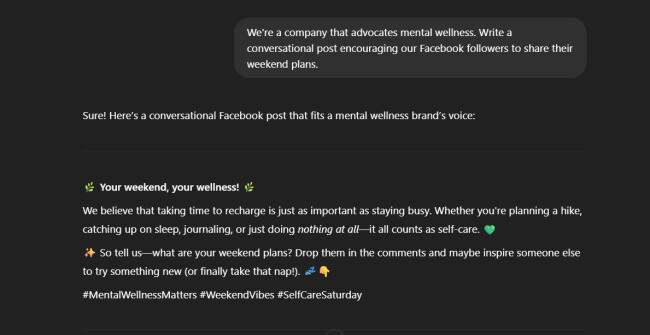
Here are other sample prompts that I created as an example for you to edit or customize for your brand:
- For a health & wellness brand
Prompt: “Write a Facebook post for a health and wellness brand promoting a new line of organic herbal teas. Make the tone calming and informative, and include a question to encourage engagement.” - For a tech startup
Prompt: "Create a Facebook post announcing a new feature in our productivity app. Use a friendly and innovative tone, highlight how it saves users time, and include a call-to-action for beta testers.” - For a local restaurant
Prompt: “Generate a Facebook post for a family-owned Italian restaurant promoting a weekend pasta special. Make it warm and mouthwatering and invite followers to tag someone they’d share it with.” - For a fashion brand
Prompt: “Write a trendy and upbeat Facebook post for a sustainable fashion brand showcasing our new eco-friendly summer collection. Mention limited availability and encourage followers to shop now.”
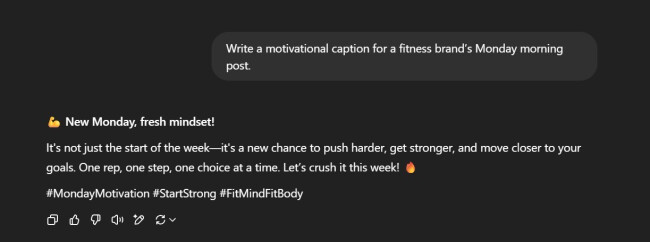
Sample prompts for Instagram posts:
Sample 1: Keep it short and simple
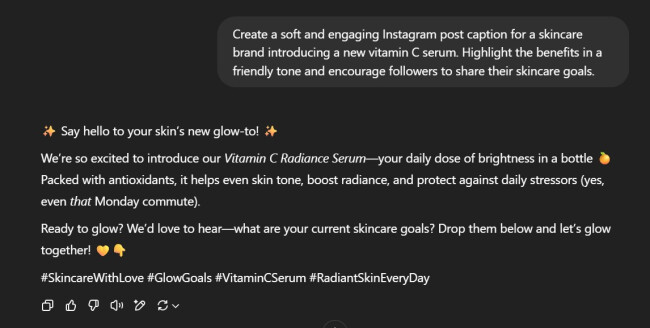
Sample 2: Add more details to effectively promote your product:
Sample prompt for LinkedIn posts:
Since LinkedIn content often leans toward longer-form updates, thought leadership pieces, or mini-articles, I suggest you provide all the key details, such as your:
- Main message
- Target audience
- Tone
Other than that, add any specific points you’d like to include, as the more context you give, the more polished and professional your post will be.
Here’s an example:
“Create a professional yet engaging LinkedIn post (between 200-300 words) for entrepreneurs and small business owners about overcoming failure in business. The main message should emphasize resilience, learning from mistakes, and the importance of persistence. Use a tone that is motivational, honest, and relatable — avoid sounding overly polished or salesy. Start with a personal anecdote or a compelling hook, then highlight a specific lesson learned from a past failure. Conclude with an encouraging message and a question that invites followers to share their own experiences.”
2. Use ChatGPT for Audience Interaction
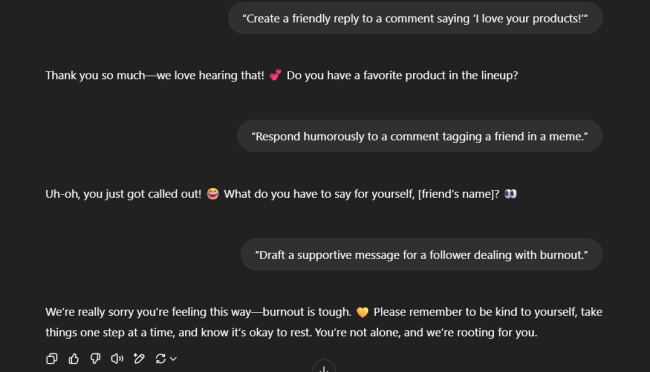
I discovered that timely and authentic replies are crucial for building meaningful connections with your audience, and ChatGPT can make this much easier. Use the AI tool to generate thoughtful responses to comments, questions, or direct messages to show genuine interest and keep discussions alive. Providing this level of responsiveness improves engagement and cultivates lasting loyalty and trust.
What’s more, personalized replies make followers feel valued. Whether you’re expressing gratitude, addressing feedback, or simply continuing a friendly exchange, AI-powered responses, when properly prompted, can reflect your brand’s character.
Example prompts
Here’s a series of examples:
3. Perform Trend Analysis with AI
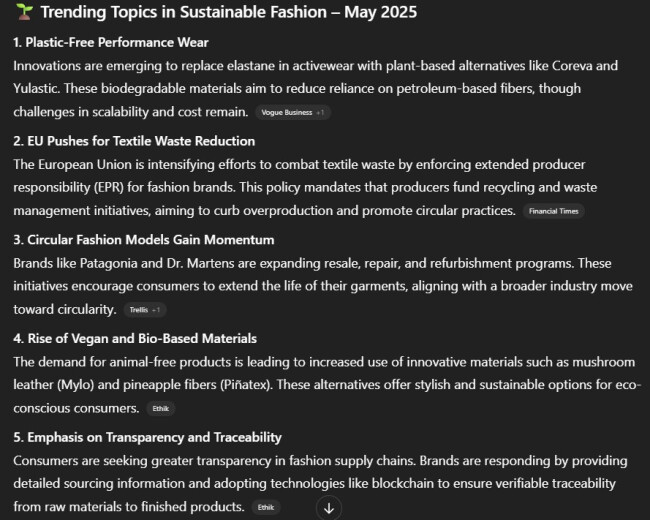
ChatGPT can help you stay ahead of competitors by analyzing industry news, online conversations, and emerging social signals to suggest relevant trending topics and hashtags.
When I gave it the right prompt, it managed to surface what’s gaining traction in my niche.
Incorporating trending topics into your content strategy increases your visibility and shows that your brand is current and culturally aware.
Be it a viral challenge, an awareness campaign, or breaking news, ChatGPT can help you create timely posts that resonate with your audience and tap into existing momentum.
Just remember to fact-check and verify trending topics for accuracy and relevance before posting.
Example prompts
Sample prompt 1 with a result below: “What are some trending topics in sustainable fashion this week?”
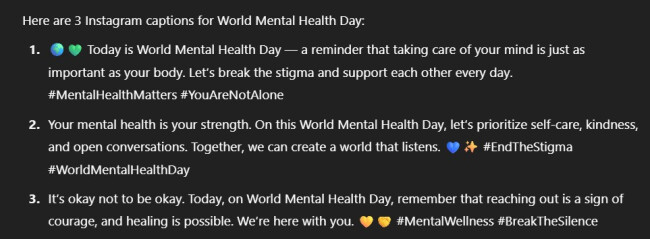
Sample prompt 2 with a result below: “Generate 3 Instagram captions about World Mental Health Day.”
4. Rely on ChatGPT for Campaign Planning
Are you managing social media campaigns across different channels? I tested that practice, too, and discovered that ChatGPT is a great AI assistant in developing effective social media campaigns, from brainstorming creative concepts to organizing post schedules.
All I needed to do was provide clear objectives and audience details, and I could prompt ChatGPT to generate campaign themes, content ideas, taglines, and posting timelines that aligned with my goals. It helps ensure consistent messaging across platforms and alignment with your target audience.
You could be launching a product, running a seasonal promotion, or creating an awareness campaign. Using ChatGPT for social media streamlines the planning process, saves time, and sparks fresh ideas to keep your content cohesive and engaging from start to finish.
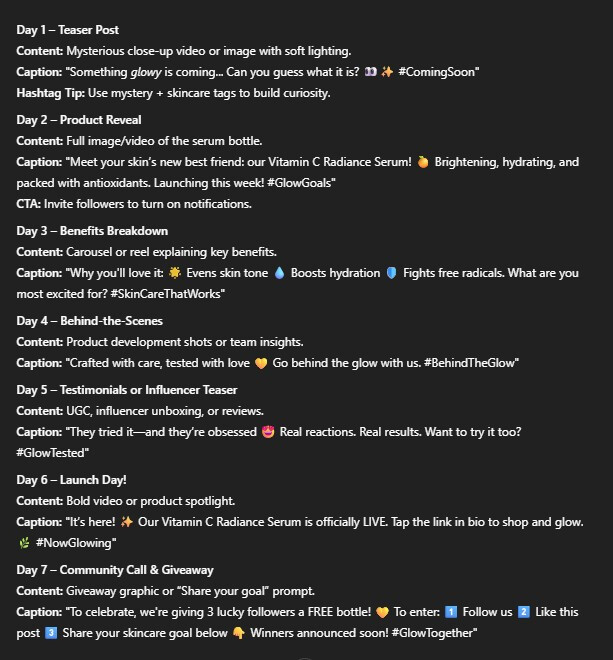
Check out the sample result below, using the prompt: “Create a 7-day content plan for a product launch of a new skincare serum.”
5. Use ChatGPT for Performance Analysis
Did you know that ChatGPT can assist in turning likes, shares, comments, reach, click-through rates, and other raw engagement metrics into actionable insights?
By simply inputting your data, you can prompt ChatGPT to identify what’s working, identify underperforming content, and suggest improvements for your audience and platform.
It can help uncover patterns in post timing, content types, or hashtag use, guiding data-driven decisions for your future campaigns.
I’m not saying it can replace in-depth analytics tools, but it does offer a fast, accessible way to interpret results and optimize your social media strategy without getting lost in the numbers.
Example prompts
- For general performance review: “Using the following engagement data, [insert likes, comments, shares, reach for each post], analyze which post formats (e.g., videos, carousels, quotes) and topics performed best. Then, recommend three specific strategies to increase engagement in future posts, considering content type, posting time, and audience interaction.”
- For specific insight: “Analyze the following Facebook performance metrics from last month. Highlight patterns in user engagement and recommend changes to post frequency or content type: [insert data].”
- For performance diagnosis: “Analyze potential reasons why our recent Instagram Stories are underperforming based on common performance factors (e.g., timing, content relevance, CTA effectiveness, visual quality). List 3 likely causes and suggest ways to improve future Stories. [insert data] “
6. Develop Visual Content Ideas
Now, while ChatGPT doesn’t create content visuals directly, it’s an excellent tool for brainstorming ideas and generating creative briefs for images, videos, reels, or infographics.
You can use it to develop storyboard concepts, describe visual themes, suggest shot lists, or outline content that aligns with your message and brand aesthetic.
I think it’s especially helpful for guiding graphic designers or using it with AI image-generation tools. ChatGPT can turn abstract goals into clear, actionable, creative direction if you’re planning a product shoot or an educational infographic.
Example prompts
Prompt for video storyboarding:“Suggest storyboard steps for a YouTube Short about product unboxing.”
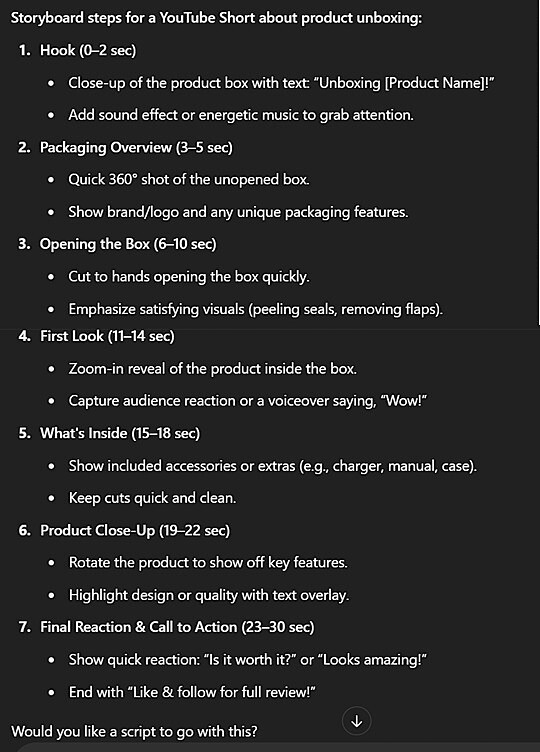
As you can see at the end of the result, ChatGPT can also generate the video script to help you save even more time.
Here are a few more sample prompts:
- For a carousel post: “Suggest five Instagram carousel ideas for a wellness brand focusing on stress relief and mindfulness. Include a short description for each slide.”
- For an infographic: “Create an infographic idea about email marketing best practices.”
- For a mood board: “Suggest visual themes for a spring fashion photoshoot.”
7. Use ChatGPT for Community Building
Building a loyal, engaged online community requires more than just posting regularly — you need to encourage conversations and shared experiences.
Relying on ChatGPT for your social media can help by generating content ideas, conversation starters, and engagement strategies designed to build connection and trust over time.
From interactive posts to themed series and user-generated content campaigns, AI can support long-term community growth across platforms. It can ensure your followers feel heard, valued, and part of something bigger.
For example, you want to build connections with your new followers as soon as possible.
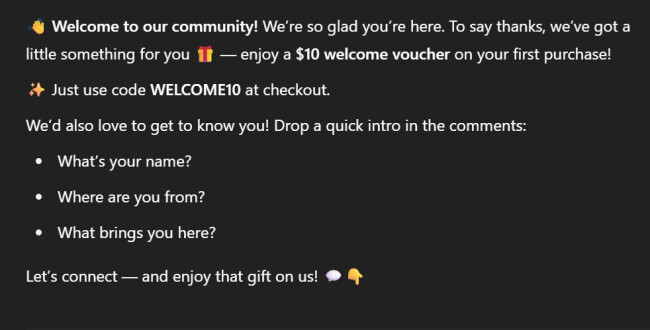
See the result I got using the prompt: “Write a welcome post for new followers, offering them a $10 welcome voucher and encouraging them to introduce themselves.”
Example prompts
Try these other sample ChatGPT prompts for your community-building social content:
- For a thank you message: “Write a heartfelt and authentic social media post thanking our community for helping us reach 1 million followers. Use a warm and appreciative tone, reflect briefly on the journey, and include a call-to-action that invites followers to share their favorite moments with our brand. Keep it concise and suitable for Instagram or Facebook.”
- For encouraging conversations: “Suggest 5 engaging questions to ask our community for #MondayMotivation.”
- For generating scripts:“Create a friendly and engaging script for an Instagram Live session where we introduce our team members and answer live questions from followers. The tone should be casual, welcoming, and brand-appropriate. Include a brief opening to greet viewers, short introductions for 3–4 team members, a transition into the Q&A portion, and a closing statement that thanks viewers and encourages them to follow, share, and stay connected.”
Best Practices for Using ChatGPT for Social Media
Now, I’m not suggesting that you should rely solely on AI. To truly unlock ChatGPT’s potential for your social media marketing, it’s important to follow a few key best practices.
Here’s how you can do it right:
Create effective prompts
- Be specific: Always define the tone, platform, and target audience
- Set word limits: People have short attention spans, so keep it short and interesting
- Include examples: Guide ChatGPT with sample inputs to shape the output
Balance AI with a human touch
- Incorporate real stories: Add personal experiences or genuine reactions to keep it real
- Check for authenticity: Review the tone to ensure it feels human, not robotic
- Use AI for efficiency: Let ChatGPT handle the structure but keep the emotion real
Use AI ethically
- Be transparent: Disclose AI involvement in sensitive or editorial content
- Avoid misuse: Don’t use AI to spread misinformation or manipulate readers
- Respect privacy: Never input personal or user-sensitive data without consent
Begin with a few test prompts and evaluate how AI-driven engagement changes your brand’s social presence. You should know that there’s no such thing as the best ChatGPT prompts for social media marketing.
The most effective ones are those that follow your brand voice, goals, and audience, seamlessly built into your prompt instructions.
AI is also not here to replace humans but to enhance our creativity, productivity, and connections. The future of social media belongs to those who adapt, experiment, and engage authentically — with a little help from ChatGPT.
ChatGPT for Social Media FAQs
1. Can ChatGPT replace a social media manager?
ChatGPT can help with some parts of a social media manager’s job, like writing posts, coming up with ideas, or answering common questions. But it can’t fully replace a human. A social media manager understands the brand’s voice, connects with people in real time, and makes smart decisions during trends or crises. ChatGPT is a helpful tool, but the human side, like creativity, emotion, and judgment, is still very important.
2. Is it safe to let ChatGPT respond to DMs?
Letting ChatGPT respond to DMs can be helpful for quick, simple replies like FAQs or store hours. But it’s not entirely safe to trust it with all messages. It may misunderstand tone, give wrong info, or miss sensitive issues. It’s best to have a person check messages often, especially if the topic is emotional or complex. Use ChatGPT to save time but always keep a human in the loop to handle important conversations.
3. Can ChatGPT help with influencer collaborations?
Yes, ChatGPT can help with influencer collaborations in a few useful ways. It can write outreach messages to introduce your brand, check influencer engagement by reviewing comments or stats, and come up with creative ideas for content you can make together.
However, while it can speed things up and give solid starting points, a person should still handle final decisions and keep the relationship personal. ChatGPT is great for support, but not for managing everything independently.